生产者流程
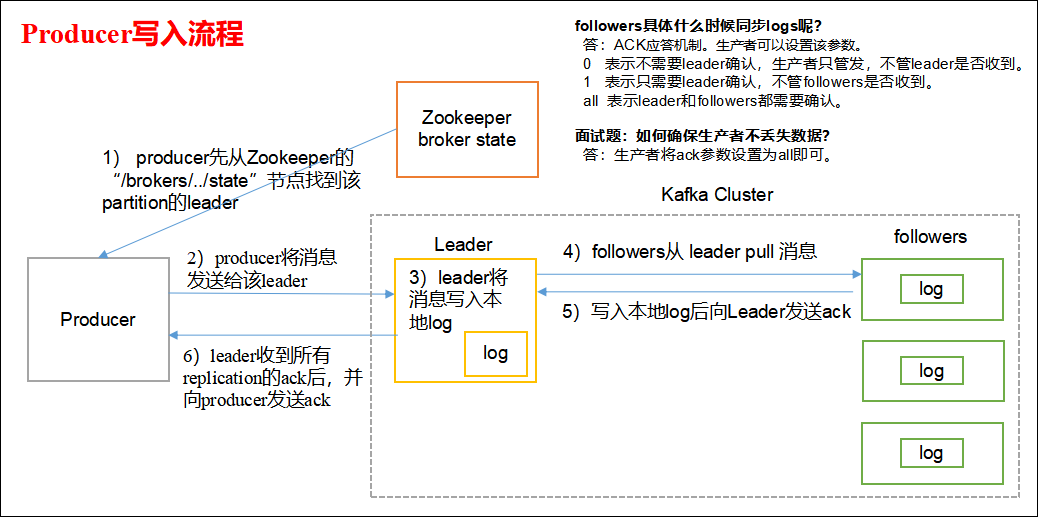
Kafka 的 Producer 发送消息采用的是异步发送的方式。在消息发送的过程中,涉及到了两个线程——main 线程和 Sender 线程,以及一个线程共享变量——RecordAccumulator。 main线程会依次经过拦截器,序列化器,分区器将数据发送到RecourdAccumlator, Sender 线程不断从 RecordAccumulator 中拉取消息发送到 Kafka broker。
<dependency><groupId>org.apache.kafka</groupId><artifactId>kafka-clients</artifactId><version>0.11.0.0</version></dependency>
异步发送
public class CustomProducer {

    public static void main(String[] args) {
        Properties props = new Properties();
        props.put("bootstrap.servers", "127.0.0.1:9092");
        props.put(ProducerConfig.ACKS_CONFIG, "all");
        // 重试次数
        props.put("retries", 1);
        // 批次大小 只有数据积累到 batch.size 之后, sender 才会发送数据
        props.put("batch.size", 16384);
        // 等待时间 果数据迟迟未达到 batch.size, sender 等待 linger.time 之后就会发送数据。
        props.put("linger.ms", 1);
        // RecordAccumulator 缓冲区大小
        props.put("buffer.memory", 33554432);
        props.put("key.serializer", "org.apache.kafka.common.serialization.StringSerializer");
        props.put("value.serializer", "org.apache.kafka.common.serialization.StringSerializer");

        Producer<String, String> producer = new KafkaProducer<>(props);
        for (int i = 0; i < 100; i++) {
            producer.send(new ProducerRecord<String, String>("test", "test-" + Integer.toString(i),
                    "test-" + Integer.toString(i)));
        }
        producer.close();
    }

}
public class CallBackProducer {
    public static void main(String[] args) {
        Properties props = new Properties();
        props.put("bootstrap.servers", "127.0.0.1:9092");//kafka 集群, broker-list
        props.put("acks", "all");
        props.put("retries", 1);//重试次数
        props.put("batch.size", 16384);//批次大小
        props.put("linger.ms", 1);//等待时间
        props.put("buffer.memory", 33554432);//RecordAccumulator 缓冲区大小
        props.put("key.serializer","org.apache.kafka.common.serialization.StringSerializer");
        props.put("value.serializer","org.apache.kafka.common.serialization.StringSerializer");

        Producer<String, String> producer = new KafkaProducer<>(props);
        for (int i = 0; i < 100; i++) {
            producer.send(new ProducerRecord<String, String>("test",
                "test" + Integer.toString(i)), new Callback() {

                //回调函数, 该方法会在 Producer 收到 ack 时调用,为异步调用
                @Override
                public void onCompletion(RecordMetadata metadata, Exception exception) {
                    if (exception == null) {
                        System.out.println(metadata.partition() + " - " + metadata.offset());
                    } else {
                        exception.printStackTrace();
                    }
                }
            });
        }

        producer.close();
    }
}
自定义分区器的生成者
public class MyPartitioner implements Partitioner {

    @Override
    public void configure(Map<String, ?> configs) {
        // TODO Auto-generated method stub
    }

    @Override
    public int partition(String topic, Object key, byte[] keyBytes, Object value, byte[] valueBytes, Cluster cluster) {
        // 具体内容填写可参考默认分区器org.apache.kafka.clients.producer.internals.DefaultPartitioner
        return 0;
    }

    @Override
    public void close() {
        // TODO Auto-generated method stub
    }

}
Properties props = new Properties();
props.put(ProducerConfig.PARTITIONER_CLASS_CONFIG, MyPartitioner.class);
Producer<String, String> producer = new KafkaProducer<>(props);
同步发送
由于 send 方法返回的是一个 Future 对象,根据 Futrue 对象的特点,我们也可以实现同步发送的效果,只需在调用 Future 对象的 get 方发即可。
Producer<String, String> producer = new KafkaProducer<>(props);
for (int i = 0; i < 100; i++) {
    producer.send(new ProducerRecord<String, String>("test",  "test - 1"), new Callback() {
        @Override
        public void onCompletion(RecordMetadata metadata, Exception exception) {
            ...
        }
    }).get();//<----------------------
}
消费者流程
自动提交offset
public class CustomConsumer {
    public static void main(String[] args) {

        Properties props = new Properties();
        props.put("bootstrap.servers", "127.0.0.1:9092");
        props.put("group.id", "abc");
        props.put("enable.auto.commit", "true");
        props.put("auto.commit.interval.ms", "1000");
        props.put("key.deserializer","org.apache.kafka.common.serialization.StringDeserializer");
        props.put("value.deserializer","org.apache.kafka.common.serialization.StringDeserializer");

        KafkaConsumer<String, String> consumer = new KafkaConsumer<>(props);
        consumer.subscribe(Arrays.asList("test"));
        while (true) {
            ConsumerRecords<String, String> records = consumer.poll(100);
            for (ConsumerRecord<String, String> record : records) {
                System.out.printf("offset = %d, key = %s, value = %s%n", record.offset(), record.key(), record.value());
            }
        }
    }
}
手动提交offset
同步
同步提交 offset 有失败重试机制,故更加可靠。
public class SyncCommitOffset {
    public static void main(String[] args) {
        Properties props = new Properties();
        ...
        //关闭自动提交 offset
        props.put("enable.auto.commit", "false");
        ...
        KafkaConsumer<String, String> consumer = new KafkaConsumer<>(props);
        consumer.subscribe(Arrays.asList("first"));//消费者订阅主题
        while (true) {
            //消费者拉取数据
            ConsumerRecords<String, String> records =consumer.poll(100);
            for (ConsumerRecord<String, String> record : records) {
                System.out.printf("offset = %d, key = %s, value= %s%n", record.offset(), record.key(), record.value());
            }
            //同步提交,当前线程会阻塞直到 offset 提交成功
            consumer.commitSync();
        }
    }
}
异步
虽然同步提交 offset 更可靠一些,但是由于其会阻塞当前线程,直到提交成功。因此吞吐量会收到很大的影响。因此更多的情况下,会选用异步提交 offset 的方式。
public class AsyncCommitOffset {
    public static void main(String[] args) {
        Properties props = new Properties();
        ...
        //关闭自动提交
        props.put("enable.auto.commit", "false");
        ...
        KafkaConsumer<String, String> consumer = new KafkaConsumer<>(props);
        consumer.subscribe(Arrays.asList("first"));// 消费者订阅主题
        while (true) {
            ConsumerRecords<String, String> records = consumer.poll(100);// 消费者拉取数据
            for (ConsumerRecord<String, String> record : records) {
                System.out.printf("offset = %d, key = %s, value = %s%n", record.offset(), record.key(), record.value());
            }
            // 异步提交
            consumer.commitAsync(new OffsetCommitCallback() {
                @Override
                public void onComplete(Map<TopicPartition, OffsetAndMetadata> offsets, Exception exception)                 {
                    if (exception != null) {
                        System.err.println("Commit failed for" + offsets);
                    }
                }
            });
        }
    }
}
先提交 offset 后消费,有可能造成数据的漏消费;而先消费后提交 offset,有可能会造成数据的重复消费。
生产者发送数据offset是从0开始,消费者消费的数据offset是从offset+1开始的.
自定义拦截器
Producer 拦截器(interceptor)是在 Kafka 0.10 版本被引入的,主要用于实现 clients 端的定制化控制逻辑。
public class TimeInterceptor implements ProducerInterceptor<String, String> {
    @Override
    public void configure(Map<String, ?> configs) {
    }

    @Override
    public ProducerRecord<String, String> onSend(ProducerRecord<String, String> record) {
        // 创建一个新的 record,把时间戳写入消息体的最前部
        return new ProducerRecord(record.topic(), record.partition(), record.timestamp(), record.key(),
                "TimeInterceptor: " + System.currentTimeMillis() + "," + record.value().toString());
    }

    @Override
    public void close() {
    }

    @Override
    public void onAcknowledgement(RecordMetadata metadata, Exception exception) {
    }
}
public class CounterInterceptor implements ProducerInterceptor<String, String>{

    private int errorCounter = 0;
    private int successCounter = 0;

    @Override
    public void configure(Map<String, ?> configs) {
    }

    @Override
    public ProducerRecord<String, String> onSend(ProducerRecord<String, String> record) {
        return record;
    }

    @Override
    public void onAcknowledgement(RecordMetadata metadata, Exception exception) {
        // 统计成功和失败的次数
        if (exception == null) {
            successCounter++;
        } else {
            errorCounter++;
        }
    }

    @Override
    public void close() {
        // 保存结果
        System.out.println("Successful sent: " + successCounter);
        System.out.println("Failed sent: " + errorCounter);
    }

}
public class InterceptorProducer {
    public static void main(String[] args) {
        // 1 设置配置信息
        Properties props = new Properties();
        props.put("bootstrap.servers", "127.0.0.1:9092");
        props.put("acks", "all");
        props.put("retries", 3);
        props.put("batch.size", 16384);
        props.put("linger.ms", 1);
        props.put("buffer.memory", 33554432);
        props.put("key.serializer","org.apache.kafka.common.serialization.StringSerializer");
        props.put("value.serializer","org.apache.kafka.common.serialization.StringSerializer");
        // 2 构建拦截链
        List<String> interceptors = new ArrayList<>();
        interceptors.add("com.lun.kafka.interceptor.TimeInterceptor");
        interceptors.add("com.lun.kafka.interceptor.CounterInterceptor");

        props.put(ProducerConfig.INTERCEPTOR_CLASSES_CONFIG, interceptors);

        String topic = "test";
        Producer<String, String> producer = new KafkaProducer<>(props);
        // 3 发送消息
        for (int i = 0; i < 10; i++) {
            ProducerRecord<String, String> record = new ProducerRecord<>(topic, "message" + i);
            producer.send(record);
        }
        // 4 一定要关闭 producer,这样才会调用 interceptor 的 close 方法
        producer.close();
    }
}
Streams
Apache Kafka开源项目的一个组成部分.
Flume
数据一致性
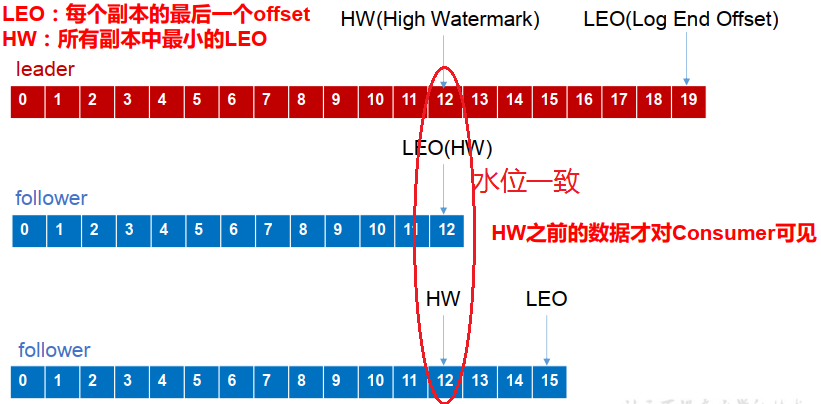
- LEO:(Log End Offset)每个副本的最后一个offset
- HW:(High Watermark)高水位,指的是消费者能见到的最大的 offset, ISR 队列中最小的 LEO
- follower 故障:follower 发生故障后会被临时踢出 ISR,待该 follower 恢复后, follower 会读取本地磁盘记录的上次的 HW,并将 log 文件高于 HW 的部分截取掉,从 HW 开始向 leader 进行同步。等该 follower 的 LEO 大于等于该 Partition 的 HW,即 follower 追上 leader 之后,就可以重新加入 ISR 了。
- leader 故障:leader 发生故障之后,会从 ISR 中选出一个新的 leader,之后为保证多个副本之间的数据一致性, 其余的 follower 会先将各自的 log 文件高于 HW 的部分截掉,然后从新的 leader同步数据。
kafka启动不起来的原因?
在关闭kafka时,先关了zookeeper,就会导致kafka下一次启动时,会报节点已存在的错误
只要把zookeeper中的zkdata/version-2的文件夹删除即可

若有收获,就点个赞吧
0 人点赞


