- 1、环境设置
- 2、数据处理 & 建立输入管道
- 3、Transformer 相关的处理
- 建立一個 2 維矩陣,維度為 (size, size),
- 其遮罩為一個右上角的三角形
- 4、Transformer 的结构
- 5、Transformer 的搭建 & 训练
- 定義我們要看幾遍數據集
- 用來寫資訊到 TensorBoard,非必要但十分推薦
- 比對設定的
EPOCHS以及已訓練的last_epoch來決定還要訓練多少 epochs - 給定一個英文句子,輸出預測的中文索引數字序列以及注意權重 dict
- 準備英文句子前後會加上的
, - inp_sentence 是字串,我們用 Subword Tokenizer 將其變成子詞的索引序列
- 並在前後加上 BOS / EOS
- 跟我們在影片裡看到的一樣,Decoder 在第一個時間點吃進去的輸入
- 是一個只包含一個中文
token 的序列 - auto-regressive,一次生成一個中文字並將預測加到輸入再度餵進 Transformer
参考:淺談神經機器翻譯 & 用 Transformer 與 TensorFlow 2 英翻中 运行环境:Google Colab (也可以选择本地或服务器的 jupyter notebook,只是在线的 Colab 免费提供GPU) TensorFlow API:Modelu: tf | TensorFlow Core v2.5.0
1、环境设置
import osimport timeimport numpy as npimport matplotlib as mplimport matplotlib.pyplot as pltfrom pprint import pprintfrom IPython.display import clear_output
import tensorflow as tfimport tensorflow_datasets as tfdsprint(tf.__version__)
输出 tensorflow 版本号:2.5.0
由于使用的是 Colab,将数据存储在 Google Drive,因此需要先挂载 Google Drive:
from google.colab import drivedrive.mount('./mount')
定义一些之后存储各种数据时会用到的路径:
output_dir = "mount/My Drive/Colab Notebooks/DLHLP20"en_vocab_file = os.path.join(output_dir, "en_vocab")zh_vocab_file = os.path.join(output_dir, "zh_vocab")checkpoint_path = os.path.join(output_dir, "checkpoints")log_dir = os.path.join(output_dir, 'logs')download_dir = "mount/My Drive/Colab Notebooks/DLHLP20/datasets"if not os.path.exists(output_dir):os.makedirs(output_dir)if not os.path.exists(download_dir):os.makedirs(download_dir)
2、数据处理 & 建立输入管道
通过 tf.data API 以及前面导入的 TensorFlow Datasets (import tensorflow_datasets as tfds) 来建立高效的输入管道,以在当前训练步骤完成之前就准备好下一个时间点 GPU 需要使用的数据,使得 GPU 并行计算能发挥最佳性能
2.1 下载并准备数据集
本实验最终让 Transformer 实现英翻中,使用的数据集是 机器翻译竞赛 WMT 2019 的中英数据集
先查看 tfds (tfds API)中 WMT 2019 的中英翻译有哪些数据来源:
tmp_builder = tfds.builder("wmt19_translate/zh-en")pprint(tmp_builder.subsets)
输出如下,包含多个来源的数据集
{Split('train'): ['newscommentary_v14', // 新闻评论数据集'wikititles_v1', // 维基百科标题数据集'uncorpus_v1', // 联合国数据集'casia2015','casict2011','casict2015','datum2015','datum2017','neu2017'],Split('validation'): ['newstest2018']}
为了节省 Transformer 的训练时间,只选择其中的新闻评论数据集当作训练数据集,即 newscommentary_v14
config = tfds.translate.wmt.WmtConfig(version="0.0.3", # 注意这一行与参考博文不一样,否则会报错language_pair=("zh", "en"),subsets={tfds.Split.TRAIN: ["newscommentary_v14"]})builder = tfds.builder("wmt_translate", config=config)builder.download_and_prepare(download_dir=download_dir)clear_output()
2.2 切割数据集
然只下载了一个新闻评论的数据集,但里面还是有超过30万对中英语句,为了减少训练时间,将此数据集切割成多个部分的 split ,20% 当作训练集,1% 当作验证集,剩下的 79% 数据不使用
参考博文使用
tfds.Split.TRAIN.subsplit切割,但这个函数已经被官方移除,是过时的写法,会报错 修改方法参考:How to split a tensorflow dataset into train, test and validation in a Python script?
train_perc = 20 # 训练集val_prec = 1 # 验证集drop_prec = 100 - train_perc - val_prec # 不用的数据split = ["train[:20%]","train[20%:21%]","train[21%:]"]split
examples = builder.as_dataset(split=split, as_supervised=True)train_examples, val_examples, _ = examplesprint(train_examples) # 训练集print(val_examples) # 验证集
上面的 train_examples 跟 val_examples 都已經是 tf.data.Dataset
先拿几笔数据出来看看:
for en, zh in train_examples.take(3):print(en)print(zh)print('-' * 10)
输出如下,每一对 example (即每一次 take)都包含相同语义的中、英文两个句子,并且是以 unicode 呈现的 tf.Tensor :
tf.Tensor(b'The fear is real and visceral, and politicians ignore it at their peril.', shape=(), dtype=string)tf.Tensor(b'\xe8\xbf\x99\xe7\xa7\x8d\xe6\x81\x90\xe6\x83\xa7\xe6\x98\xaf\xe7\x9c\x9f\xe5\xae\x9e\xe8\x80\x8c\xe5\x86\x85\xe5\x9c\xa8\xe7\x9a\x84\xe3\x80\x82 \xe5\xbf\xbd\xe8\xa7\x86\xe5\xae\x83\xe7\x9a\x84\xe6\x94\xbf\xe6\xb2\xbb\xe5\xae\xb6\xe4\xbb\xac\xe5\x89\x8d\xe9\x80\x94\xe5\xa0\xaa\xe5\xbf\xa7\xe3\x80\x82', shape=(), dtype=string)----------tf.Tensor(b'In fact, the German political landscape needs nothing more than a truly liberal party, in the US sense of the word \xe2\x80\x9cliberal\xe2\x80\x9d \xe2\x80\x93 a champion of the cause of individual freedom.', shape=(), dtype=string)tf.Tensor(b'\xe4\xba\x8b\xe5\xae\x9e\xe4\xb8\x8a\xef\xbc\x8c\xe5\xbe\xb7\xe5\x9b\xbd\xe6\x94\xbf\xe6\xb2\xbb\xe5\xb1\x80\xe5\x8a\xbf\xe9\x9c\x80\xe8\xa6\x81\xe7\x9a\x84\xe4\xb8\x8d\xe8\xbf\x87\xe6\x98\xaf\xe4\xb8\x80\xe4\xb8\xaa\xe7\xac\xa6\xe5\x90\x88\xe7\xbe\x8e\xe5\x9b\xbd\xe6\x89\x80\xe8\xb0\x93\xe2\x80\x9c\xe8\x87\xaa\xe7\x94\xb1\xe2\x80\x9d\xe5\xae\x9a\xe4\xb9\x89\xe7\x9a\x84\xe7\x9c\x9f\xe6\xad\xa3\xe7\x9a\x84\xe8\x87\xaa\xe7\x94\xb1\xe5\x85\x9a\xe6\xb4\xbe\xef\xbc\x8c\xe4\xb9\x9f\xe5\xb0\xb1\xe6\x98\xaf\xe4\xb8\xaa\xe4\xba\xba\xe8\x87\xaa\xe7\x94\xb1\xe4\xba\x8b\xe4\xb8\x9a\xe7\x9a\x84\xe5\x80\xa1\xe5\xaf\xbc\xe8\x80\x85\xe3\x80\x82', shape=(), dtype=string)----------tf.Tensor(b'Shifting to renewable-energy sources will require enormous effort and major infrastructure investment.', shape=(), dtype=string)tf.Tensor(b'\xe5\xbf\x85\xe9\xa1\xbb\xe4\xbb\x98\xe5\x87\xba\xe5\xb7\xa8\xe5\xa4\xa7\xe7\x9a\x84\xe5\x8a\xaa\xe5\x8a\x9b\xe5\x92\x8c\xe5\x9f\xba\xe7\xa1\x80\xe8\xae\xbe\xe6\x96\xbd\xe6\x8a\x95\xe8\xb5\x84\xe6\x89\x8d\xe8\x83\xbd\xe5\xae\x8c\xe6\x88\x90\xe5\x90\x91\xe5\x8f\xaf\xe5\x86\x8d\xe7\x94\x9f\xe8\x83\xbd\xe6\xba\x90\xe7\x9a\x84\xe8\xbf\x87\xe6\xb8\xa1\xe3\x80\x82', shape=(), dtype=string)----------
取 10 笔数据,将这些 Tensors 实际存储的字符串利用 numpy() 取出并解码查看:
sample_examples = []num_samples = 10for en_t, zh_t in train_examples.take(num_samples):en = en_t.numpy().decode("utf-8")zh = zh_t.numpy().decode("utf-8")print(en)print(zh)print('-' * 10)# 之後用來簡單評估模型的訓練情況sample_examples.append((en, zh))
输出如下:
The fear is real and visceral, and politicians ignore it at their peril.这种恐惧是真实而内在的。 忽视它的政治家们前途堪忧。----------In fact, the German political landscape needs nothing more than a truly liberal party, in the US sense of the word “liberal” – a champion of the cause of individual freedom.事实上,德国政治局势需要的不过是一个符合美国所谓“自由”定义的真正的自由党派,也就是个人自由事业的倡导者。----------Shifting to renewable-energy sources will require enormous effort and major infrastructure investment.必须付出巨大的努力和基础设施投资才能完成向可再生能源的过渡。----------In this sense, it is critical to recognize the fundamental difference between “urban villages” and their rural counterparts.在这方面,关键在于认识到“城市村落”和农村村落之间的根本区别。----------A strong European voice, such as Nicolas Sarkozy’s during the French presidency of the EU, may make a difference, but only for six months, and at the cost of reinforcing other European countries’ nationalist feelings in reaction to the expression of “Gallic pride.”法国担任轮值主席国期间尼古拉·萨科奇统一的欧洲声音可能让人耳目一新,但这种声音却只持续了短短六个月,而且付出了让其他欧洲国家在面对“高卢人的骄傲”时民族主义情感进一步被激发的代价。----------Most of Japan’s bondholders are nationals (if not the central bank) and have an interest in political stability.日本债券持有人大多为本国国民(甚至中央银行 ) , 政治稳定符合他们的利益。----------Paul Romer, one of the originators of new growth theory, has accused some leading names, including the Nobel laureate Robert Lucas, of what he calls “mathiness” – using math to obfuscate rather than clarify.新增长理论创始人之一的保罗·罗默(Paul Romer)也批评一些著名经济学家,包括诺贝尔奖获得者罗伯特·卢卡斯(Robert Lucas)在内,说他们“数学性 ” ( 罗默的用语)太重,结果是让问题变得更加模糊而不是更加清晰。----------It is, in fact, a capsule depiction of the United States Federal Reserve and the European Central Bank.事实上,这就是对美联储和欧洲央行的简略描述。----------Given these variables, the degree to which migration is affected by asylum-seekers will not be easy to predict or control.考虑到这些变量,移民受寻求庇护者的影响程度很难预测或控制。----------WASHINGTON, DC – In the 2016 American presidential election, Hillary Clinton and Donald Trump agreed that the US economy is suffering from dilapidated infrastructure, and both called for greater investment in renovating and upgrading the country’s public capital stock.华盛顿—在2016年美国总统选举中,希拉里·克林顿和唐纳德·特朗普都认为美国经济饱受基础设施陈旧的拖累,两人都要求加大投资用于修缮和升级美国公共资本存量。----------
2.3 建立中文 & 英文字典
和大多数 NLP 案例相同,有了原始的中英文语句后,分别为其建立字典,来将每个词会转换成索引(index)。tfds.features.text 底下的 SubwordTextEncoder 提供了非常方便的 API 让我们扫过整个训练集并建立字典
2.3.1 建立英文字典
首先为英文语料建立字典(为节省时间,如果之前已经建好字典并保存,直接读取即可):
注意:参考博文使用的是
tfds.features.text底下的SubwordTextEncoder提供的 API,来扫过整个训练集并建立字典,但tfds.features.text已经被移除了,是过时的写法,会报错 修改方法:通过tfds.deprecated.text强制使用 参考:module ‘tensorflow_datasets.core.features’ has no attribute ‘text’
%%timetry:subword_encoder_en = tfds.deprecated.text.SubwordTextEncoder.load_from_file(en_vocab_file)print(f"載入已建立的字典: {en_vocab_file}")except:print("沒有已建立的字典,從頭建立。")subword_encoder_en = tfds.deprecated.text.SubwordTextEncoder.build_from_corpus((en.numpy() for en, _ in train_examples),target_vocab_size=2**13) # 有需要可以调整字典大小# 存储字典以方便下次 warmstartsubword_encoder_en.save_to_file(en_vocab_file)print(f"字典大小:{subword_encoder_en.vocab_size}")print(f"前 10 個 subwords:{subword_encoder_en.subwords[:10]}")print()
输出:
載入已建立的字典: mount/My Drive/Colab Notebooks/DLHLP20/en_vocab字典大小:8113前 10 個 subwords:[', ', 'the_', 'of_', 'to_', 'and_', 's_', 'in_', 'a_', 'is_', 'that_']CPU times: user 40.7 ms, sys: 948 µs, total: 41.6 msWall time: 387 ms
可以用上面建立的字典将一个英文句子转换成对应的索引序列:
sample_string = 'Taiwan is beautiful.'indices = subword_encoder_en.encode(sample_string)indices
输出句子 'Taiwan is beautiful.' 对应的索引序列如下:
[3461, 7889, 9, 3502, 4379, 1134, 7903]
再将上面输出的索引分别还原成对应的 tokens:
print("{0:10}{1:6}".format("Index", "Subword"))print("-" * 15)for idx in indices:subword = subword_encoder_en.decode([idx])print('{0:5}{1:6}'.format(idx, ' ' * 5 + subword))
输出如下,可以看到 beautiful 被拆分成了 bea uti ful,即,当 subword tokenizer 遇到字典里没有的词汇,就将该词拆成多个子词(subwords),因此这种断词方法(wordpieces)不用担心有字典里没出现过的词汇
Index Subword---------------3461 Taiwan78899 is3502 bea4379 uti1134 ful7903 .
编码(词汇→索引)、解码(索引→词汇)是可逆的:
sample_string = 'Taiwan is beautiful.'indices = subword_encoder_en.encode(sample_string)decoded_string = subword_encoder_en.decode(indices)assert decoded_string == sample_stringpprint((sample_string, decoded_string))
输出:
('Taiwan is beautiful.', 'Taiwan is beautiful.')
2.3.2 建立中文字典
然后为中文也建立一个字典,注意下面的代码中令 max_subword_length=1 ,这样每个汉字会被视为一个单位(对应一个索引)。BERT 等模型处理中文时实际上以字作为 token 更为合适。
%%timetry:subword_encoder_zh = tfds.deprecated.text.SubwordTextEncoder.load_from_file(zh_vocab_file)print(f"載入已建立的字典: {zh_vocab_file}")except:print("沒有已建立的字典,從頭建立。")subword_encoder_zh = tfds.deprecated.text.SubwordTextEncoder.build_from_corpus((zh.numpy() for _, zh in train_examples),target_vocab_size=2**13, # 有需要可以調整字典大小max_subword_length=1) # 每一個中文字就是字典裡的一個單位# 將字典檔案存下以方便下次 warmstartsubword_encoder_zh.save_to_file(zh_vocab_file)print(f"字典大小:{subword_encoder_zh.vocab_size}")print(f"前 10 個 subwords:{subword_encoder_zh.subwords[:10]}")print()
输出:
載入已建立的字典: mount/My Drive/Colab Notebooks/DLHLP20/zh_vocab字典大小:4205前 10 個 subwords:['的', ',', '。', '国', '在', '是', '一', '和', '不', '这']CPU times: user 30.4 ms, sys: 5.13 ms, total: 35.5 msWall time: 350 ms
取一个中文句子测试一下:
sample_string = sample_examples[0][1]indices = subword_encoder_zh.encode(sample_string)print(sample_string)print(indices)
输出如下:
这种恐惧是真实而内在的。 忽视它的政治家们前途堪忧。[10, 151, 574, 1298, 6, 374, 55, 29, 193, 5, 1, 3, 3981, 931, 431, 125, 1, 17, 124, 33, 20, 97, 1089, 1247, 861, 3]
用一个例子(example,指一组同语义的中英文语句)测试一下,分别将其转换成对应的索引序列
en = "The eurozone’s collapse forces a major realignment of European politics."zh = "欧元区的瓦解强迫欧洲政治进行一次重大改组。"# 將文字轉成為 subword indicesen_indices = subword_encoder_en.encode(en)zh_indices = subword_encoder_zh.encode(zh)print("[英中原文](轉換前)")print(en)print(zh)print()print('-' * 20)print()print("[英中序列](轉換後)")print(en_indices)print(zh_indices)
输出如下:
[英中原文](轉換前)The eurozone’s collapse forces a major realignment of European politics.欧元区的瓦解强迫欧洲政治进行一次重大改组。--------------------[英中序列](轉換後)[16, 900, 11, 6, 1527, 874, 8, 230, 2259, 2728, 239, 3, 89, 1236, 7903][44, 202, 168, 1, 852, 201, 231, 592, 44, 87, 17, 124, 106, 38, 7, 279, 86, 18, 212, 265, 3]
2.4 前处理数据
2.4.1 BOS & EOS
为序列前后分别加上特殊的 token:BOS、EOS,分别代表序列的开始和结束。
定义一个 encode(en_t, zh_t) 函数,输入是一笔同语义的中英文语句,输出是加上了 BOS、EOS 后的字典序列
def encode(en_t, zh_t):""":param en_t: 英文语句:param zh_t: 同语义的中文语句:return en_indices: 英文语句加上 BOS、EOS 后转换成的字典序列:return zh_indices: 中文语句加上 BOS、EOS 后转换成的字典序列"""# 因為字典的索引從 0 開始,# 我們可以使用 subword_encoder_en.vocab_size 這個值作為 BOS 的索引值# 用 subword_encoder_en.vocab_size + 1 作為 EOS 的索引值en_indices = [subword_encoder_en.vocab_size] + subword_encoder_en.encode(en_t.numpy()) + [subword_encoder_en.vocab_size + 1]# 同理,不過是使用中文字典的最後一個索引 + 1zh_indices = [subword_encoder_zh.vocab_size] + subword_encoder_zh.encode(zh_t.numpy()) + [subword_encoder_zh.vocab_size + 1]return en_indices, zh_indices
从训练集中取一笔中英文 Tensors 查看上面这个函数的实际输出
en_t, zh_t = next(iter(train_examples))en_indices, zh_indices = encode(en_t, zh_t)print('英文 BOS 的 index:', subword_encoder_en.vocab_size)print('英文 EOS 的 index:', subword_encoder_en.vocab_size + 1)print('中文 BOS 的 index:', subword_encoder_zh.vocab_size)print('中文 EOS 的 index:', subword_encoder_zh.vocab_size + 1)print('\n輸入為 2 個 Tensors:')pprint((en_t, zh_t))print('-' * 15)print('輸出為 2 個索引序列:')pprint((en_indices, zh_indices))
输出如下:
英文 BOS 的 index: 8113英文 EOS 的 index: 8114中文 BOS 的 index: 4205中文 EOS 的 index: 4206輸入為 2 個 Tensors:(<tf.Tensor: shape=(), dtype=string, numpy=b'The fear is real and visceral, and politicians ignore it at their peril.'>,<tf.Tensor: shape=(), dtype=string, numpy=b'\xe8\xbf\x99\xe7\xa7\x8d\xe6\x81\x90\xe6\x83\xa7\xe6\x98\xaf\xe7\x9c\x9f\xe5\xae\x9e\xe8\x80\x8c\xe5\x86\x85\xe5\x9c\xa8\xe7\x9a\x84\xe3\x80\x82 \xe5\xbf\xbd\xe8\xa7\x86\xe5\xae\x83\xe7\x9a\x84\xe6\x94\xbf\xe6\xb2\xbb\xe5\xae\xb6\xe4\xbb\xac\xe5\x89\x8d\xe9\x80\x94\xe5\xa0\xaa\xe5\xbf\xa7\xe3\x80\x82'>)---------------輸出為 2 個索引序列:([8113, 16, 1284, 9, 243, 5, 1275, 1756, 156, 1, 5, 1016, 5566, 21, 38, 33, 2982, 7965, 7903, 8114],[4205, 10, 151, 574, 1298, 6, 374, 55, 29, 193, 5, 1, 3, 3981, 931, 431, 125, 1, 17, 124, 33, 20, 97, 1089, 1247, 861, 3, 4206])
但还不能直接使用 train_dataset = train_examples.map(encode) 将 encode 函数直接套用到整个训练集,因为 tf.data.Dataset.map 里的计算是在计算图模式下执行的,因此里面的 Tensors 没有 Eager Execution 下才有的 numpy 属性,需要先用 tf.py_function 将上面定义的 encode 函数包成一个以 eager 模式执行的 TensorFlow 操作,然后再套用到整个训练集中
def tf_encode(en_t, zh_t):# 在 `tf_encode` 函式裡頭的 `en_t` 與 `zh_t` 都不是 Eager Tensors# 要到 `tf.py_funtion` 裡頭才是# 另外因為索引都是整數,所以使用 `tf.int64`return tf.py_function(encode, [en_t, zh_t], [tf.int64, tf.int64])# `tmp_dataset` 為說明用資料集,說明完所有重要的 func,# 我們會從頭建立一個正式的 `train_dataset`tmp_dataset = train_examples.map(tf_encode)en_indices, zh_indices = next(iter(tmp_dataset))print(en_indices)print(zh_indices)
输出:
tf.Tensor([8113 16 1284 9 243 5 1275 1756 156 1 5 1016 5566 2138 33 2982 7965 7903 8114], shape=(20,), dtype=int64)tf.Tensor([4205 10 151 574 1298 6 374 55 29 193 5 1 3 3981931 431 125 1 17 124 33 20 97 1089 1247 861 3 4206], shape=(28,), dtype=int64)
2.4.2 过滤长序列
为了加快 Transformer 的训练,在实验中将长度超过 40 个 tokens 的序列都去掉:
MAX_LENGTH = 40def filter_max_length(en, zh, max_length=MAX_LENGTH):# en, zh 分別代表英文與中文的索引序列return tf.logical_and(tf.size(en) <= max_length,tf.size(zh) <= max_length)# tf.data.Dataset.filter(func) 只會回傳 func 為真的例子tmp_dataset = tmp_dataset.filter(filter_max_length)
检查是否有序列超过设定的长度(40),顺便计算过滤掉长序列后剩余的训练集笔数:
# 因為我們數據量小可以這樣 countnum_examples = 0for en_indices, zh_indices in tmp_dataset:cond1 = len(en_indices) <= MAX_LENGTHcond2 = len(zh_indices) <= MAX_LENGTHassert cond1 and cond2num_examples += 1print(f"所有英文與中文序列長度都不超過 {MAX_LENGTH} 個 tokens")print(f"訓練資料集裡總共有 {num_examples} 筆數據")
输出如下,过滤掉长句子后仍有近 3 万笔数据,数据量还是足够的
所有英文與中文序列長度都不超過 40 個 tokens訓練資料集裡總共有 29784 筆數據
2.4.3 填充至等长
经过上述操作后,每个例子中的索引序列长度还是不同的,这在建立 batch 时可能会有问题,因此使用 padded_batch 函数将每个 batch 中所有序列填充至等长
# 使用 padded_batch 函式將 batch 裡的所有序列都 pad 到同樣長度BATCH_SIZE = 64tmp_dataset = tmp_dataset.padded_batch(BATCH_SIZE, padded_shapes=([-1], [-1]))en_batch, zh_batch = next(iter(tmp_dataset))print("英文索引序列的 batch")print(en_batch)print('-' * 20)print("中文索引序列的 batch")print(zh_batch)
输出如下,英文 batch 中最长序列长度为 39,就都填充到 39(未达到 39 的就补 0 填充到 39);中文 batch 中最长序列长度为 40,就都填充到 40
英文索引序列的 batchtf.Tensor([[8113 16 1284 ... 0 0 0][8113 1894 1302 ... 0 0 0][8113 44 40 ... 0 0 0]...[8113 122 506 ... 0 0 0][8113 16 215 ... 0 0 0][8113 7443 7889 ... 0 0 0]], shape=(64, 39), dtype=int64)--------------------中文索引序列的 batchtf.Tensor([[4205 10 151 ... 0 0 0][4205 206 275 ... 0 0 0][4205 5 10 ... 0 0 0]...[4205 34 6 ... 0 0 0][4205 317 256 ... 0 0 0][4205 167 326 ... 0 0 0]], shape=(64, 40), dtype=int64)
2.4.4 建立训练集 & 验证集
上面介绍了一些建立训练集 & 验证集时要用到的前处理,现在开始从头建立训练集和验证集:
MAX_LENGTH = 40BATCH_SIZE = 128BUFFER_SIZE = 15000# 訓練集train_dataset = (train_examples # 輸出:(英文句子, 中文句子).map(tf_encode) # 輸出:(英文索引序列, 中文索引序列).filter(filter_max_length) # 同上,且序列長度都不超過 40.cache() # 加快讀取數據.shuffle(BUFFER_SIZE) # 將例子洗牌確保隨機性.padded_batch(BATCH_SIZE, # 將 batch 裡的序列都 pad 到一樣長度padded_shapes=([-1], [-1])).prefetch(tf.data.experimental.AUTOTUNE)) # 加速# 驗證集val_dataset = (val_examples.map(tf_encode).filter(filter_max_length).padded_batch(BATCH_SIZE,padded_shapes=([-1], [-1])))
取一笔数据看看最终建立的数据集的样子:
en_batch, zh_batch = next(iter(train_dataset))print("英文索引序列的 batch")print(en_batch)print('-' * 20)print("中文索引序列的 batch")print(zh_batch)
输出如下:
英文索引序列的 batchtf.Tensor([[8113 41 233 ... 0 0 0][8113 16 190 ... 0 0 0][8113 3872 42 ... 0 0 0]...[8113 435 7341 ... 0 0 0][8113 3413 2088 ... 0 0 0][8113 1560 1 ... 0 0 0]], shape=(128, 36), dtype=int64)--------------------中文索引序列的 batchtf.Tensor([[4205 34 17 ... 0 0 0][4205 16 4 ... 0 0 0][4205 200 77 ... 0 0 0]...[4205 10 66 ... 0 0 0][4205 104 25 ... 0 0 0][4205 9 803 ... 0 0 0]], shape=(128, 40), dtype=int64)
至此,我们已建立了一个可供训练的输入管道。
训练集/验证集中:
- 一次回传大小为 128 的 2 个 batch,分别包含 128 个英文索引序列和 128 个中文索引序列
- 序列开头皆为
BOS对应的索引,英文为 8113,中文为 4205 - 中英文 batch 里的序列都被 padding 到等长,且不超过前面定义的最长序列长度 40
因此,之后每步训练拿出的数据 Tensors 的 shape 应为 (batch_size, seq_len),且其中的每个索引数字都代表一个中/英文 token(包含 BOS/EOS)
3、Transformer 相关的处理
3.1 输入数据 & 词嵌入
为了直观理解 Transformer,我们建立两对同语义的中英文句子,用来在后面的步骤中将其丢入 Transformer,观察 Transformer 对它们做了些什么转换。
3.1.1 输入数据
建立两对同语义的中英文句子:
demo_examples = [("It is important.", "这很重要。"),("The numbers speak for themselves.", "数字证明了一切。"),]pprint(demo_examples)
然后,对这两对中英句子做前处理,并以 Tensor 的方式读出:
batch_size = 2demo_examples = tf.data.Dataset.from_tensor_slices(([en for en, _ in demo_examples], [zh for _, zh in demo_examples]))# 將兩個句子透過之前定義的字典轉換成子詞的序列(sequence of subwords)# 並添加 padding token: <pad> 來確保 batch 裡的句子有一樣長度demo_dataset = demo_examples.map(tf_encode)\.padded_batch(batch_size, padded_shapes=([-1], [-1]))# 取出這個 demo dataset 裡唯一一個 batchinp, tar = next(iter(demo_dataset))print('inp:', inp) # shape=(2,8),代表英文句子数目为2,句子长度为8print('' * 10)print('tar:', tar) # shape=(2,10),代表英文句子数目为2,句子长度为10
输出如下,inp 的 shape = (2, 8),代表英文 batch 有 2 个句子,句子长度(tokens 数)为 8;tar 的 shape = (2, 10),代表中文 batch 有 2 个句子,句子长度(tokens 数)为 10
inp: tf.Tensor([[8113 103 9 1066 7903 8114 0 0][8113 16 4111 6735 12 2750 7903 8114]], shape=(2, 8), dtype=int64)tar: tf.Tensor([[4205 10 241 86 27 3 4206 0 0 0][4205 165 489 398 191 14 7 560 3 4206]], shape=(2, 10), dtype=int64)
3.1.2 词嵌入
上面得到的输入(句子的索引序列)是二维的,在将索引序列丢入神经网络之前,一般会先做词嵌入(word embedding),将词汇从维度为字典大小的高维离散空间嵌入到低维的连续空间中。
为英文与中文分别建立一个词嵌入层,并对 inp 和 tar 做转换,将输入从二维向量转换为三维向量:
# + 2 是因為我們額外加了 <start> 以及 <end> tokensvocab_size_en = subword_encoder_en.vocab_size + 2vocab_size_zh = subword_encoder_zh.vocab_size + 2# 為了方便 demo, 將詞彙轉換到一個 4 維的詞嵌入空間d_model = 4embedding_layer_en = tf.keras.layers.Embedding(vocab_size_en, d_model)embedding_layer_zh = tf.keras.layers.Embedding(vocab_size_zh, d_model)emb_inp = embedding_layer_en(inp) # shape=(2, 8, 4),代表英文句子数即batch_size=2,每个句子8个词,每个词向量维度为4emb_tar = embedding_layer_zh(tar) # shape=(2, 10, 4),代表中文句子数即batch_size=2,每个句子10个词,每个词向量维度为4emb_inp, emb_tar
输出如下,做词嵌入转换后,emb_inp 的 shape = (2, 8, 4),代表英文 batch 有 2 个句子,句子长度(tokens 数)为 8,每个 token (词嵌入向量)的维度为 4;emb_tar 的 shape = (2, 10, 4),代表中文 batch 有 2 个句子,句子长度(tokens 数)为 10,每个 token (词嵌入向量)的维度为 4
(<tf.Tensor: shape=(2, 8, 4), dtype=float32, numpy=array([[[ 0.0290383 , -0.04547672, -0.02772095, -0.03357754],[-0.00695816, -0.04078375, 0.02525837, -0.02481749],[-0.04623505, 0.04233763, -0.01499236, 0.0204999 ],[ 0.01926272, -0.00047588, -0.04174998, -0.03272629],[-0.02661264, -0.01885304, -0.04105211, 0.04283339],[-0.03520732, -0.04360742, 0.02240748, 0.043366 ],[-0.00359789, 0.03168226, -0.04263718, 0.02017691],[-0.00359789, 0.03168226, -0.04263718, 0.02017691]],[[ 0.0290383 , -0.04547672, -0.02772095, -0.03357754],[ 0.0057646 , 0.01873441, 0.04519582, 0.01169586],[-0.04670626, -0.0461443 , -0.03423715, 0.04910291],[-0.0080081 , -0.0066364 , -0.01258793, -0.0427192 ],[ 0.03887614, -0.03308231, 0.00964315, 0.04348907],[-0.04985246, -0.04806296, 0.03991742, -0.00247025],[-0.02661264, -0.01885304, -0.04105211, 0.04283339],[-0.03520732, -0.04360742, 0.02240748, 0.043366 ]]],dtype=float32)>, <tf.Tensor: shape=(2, 10, 4), dtype=float32, numpy=array([[[-9.4237924e-03, -1.8982053e-02, -3.8755499e-02, 1.6131904e-02],[ 1.3820972e-02, -3.2755092e-02, 1.0215558e-02, 2.3236815e-02],[ 5.3795800e-03, 2.7922321e-02, 4.9203541e-02, 5.4208413e-03],[ 3.0345544e-03, -3.4656405e-02, -2.3234559e-02, 3.9151311e-03],[ 4.8759926e-02, 4.2193059e-02, -2.9141665e-02, 4.5896284e-03],[-4.5878422e-02, 4.3194380e-02, -4.8125375e-02, -2.7835155e-02],[-1.0285042e-02, 5.3374879e-03, 4.0048312e-02, 1.6815785e-02],[-5.7560802e-03, -4.3076027e-02, 3.9412268e-03, -3.4347549e-03],[-5.7560802e-03, -4.3076027e-02, 3.9412268e-03, -3.4347549e-03],[-5.7560802e-03, -4.3076027e-02, 3.9412268e-03, -3.4347549e-03]],[[-9.4237924e-03, -1.8982053e-02, -3.8755499e-02, 1.6131904e-02],[ 4.1677501e-02, 6.7135915e-03, 3.7391197e-02, -3.8386367e-02],[-2.9780090e-02, -3.5157301e-02, 2.0691562e-02, 3.0919526e-02],[ 2.7362112e-02, -1.5102543e-02, 1.0358501e-02, 4.9035549e-03],[ 3.9686177e-02, 4.7571074e-02, -4.3680418e-02, -9.9581480e-04],[ 7.1074963e-03, -1.7719496e-02, -7.9342239e-03, -3.0051971e-02],[-1.1939298e-02, -3.7533417e-03, 2.2292137e-05, 4.3857586e-02],[-2.3507465e-02, -3.2441415e-02, 1.8460218e-02, -4.7260523e-02],[-4.5878422e-02, 4.3194380e-02, -4.8125375e-02, -2.7835155e-02],[-1.0285042e-02, 5.3374879e-03, 4.0048312e-02, 1.6815785e-02]]],dtype=float32)>)
理解了上面的 3 维张量后,就能明白 emb_tar 的第一个中文句子的倒数 3 行为什么长得是一样的,因为它们对应的 token 都是填充的 0
print("tar[0]:", tar[0][-3:])print("-" * 20)print("emb_tar[0]:", emb_tar[0][-3:])
输出如下:
tar[0]: tf.Tensor([0 0 0], shape=(3,), dtype=int64)--------------------emb_tar[0]: tf.Tensor([[-0.00575608 -0.04307603 0.00394123 -0.00343475][-0.00575608 -0.04307603 0.00394123 -0.00343475][-0.00575608 -0.04307603 0.00394123 -0.00343475]], shape=(3, 4), dtype=float32)
3.2 MASK 遮罩
Transformer 使用遮罩机制,使得在进行自注意力机制时不至于看到不该看的
Transformer 中有两种遮罩(mask):
- padding mask:将序列中填充 0 (padding)的部分遮盖住,使得 Transformer 不会关注到这部分位置,而只关注实际的序列内容
- look ahead mask:确保 Decoder 在进行自注意力机制时,只关注当前 token 之前就已经产生的 tokens,而避免关注到 Decoder 未来才会生成的 tokens
对于两种遮罩,mask 矩阵都是将需要遮蔽的位置的值设为 1。
3.2.1 padding mask
创建 padding mask 矩阵:
# padding maskdef create_padding_mask(seq):# padding mask 的工作就是把索引序列中為 0 的位置設為 1mask = tf.cast(tf.equal(seq, 0), tf.float32)return mask[:, tf.newaxis, tf.newaxis, :] # broadcastinginp_mask = create_padding_mask(inp) # 得到四维张量inp_mask
输出如下,得到的是四维张量,因为在中间加了两个维度以便之后做 broadcasting。
具体可以看后面多头注意力的部分,在 padding mask 加入两个新维度分别是:
- 一个是用来遮住同个句子但不同头的注意力权重
- 一个是用来 broadcast 到 2 维注意力权重的
<tf.Tensor: shape=(2, 1, 1, 8), dtype=float32, numpy=array([[[[0., 0., 0., 0., 0., 0., 1., 1.]]],[[[0., 0., 0., 0., 0., 0., 0., 0.]]]], dtype=float32)>
先将 inp_mask 遮罩的额外维度去掉,以方便和 inp 比较:
print("inp:", inp)print("-" * 20)print("tf.squeeze(inp_mask):", tf.squeeze(inp_mask))
输出如下,可以看到 inp_mask 就是将 inp 中为 0 的对应位置设为 1 凸显出来,这样后续的程序就知道应该把那些地方遮盖住
inp: tf.Tensor([[8113 103 9 1066 7903 8114 0 0][8113 16 4111 6735 12 2750 7903 8114]], shape=(2, 8), dtype=int64)--------------------tf.squeeze(inp_mask): tf.Tensor([[0. 0. 0. 0. 0. 0. 1. 1.][0. 0. 0. 0. 0. 0. 0. 0.]], shape=(2, 8), dtype=float32)
3.2.2 look ahead mask
创建 look ahead mask 矩阵,以遮住 Decoder 未来生成的 tokens 不让之前的 token 关注:
# 建立一個 2 維矩陣,維度為 (size, size),# 其遮罩為一個右上角的三角形def create_look_ahead_mask(size):mask = 1 - tf.linalg.band_part(tf.ones((size, size)), -1, 0)return mask # (seq_len, seq_len)seq_len = emb_tar.shape[1] # 注意這次我們用中文的詞嵌入張量 `emb_tar`look_ahead_mask = create_look_ahead_mask(seq_len)print("emb_tar:", emb_tar)print("-" * 20)print("look_ahead_mask", look_ahead_mask)
输出如下,look ahead 遮罩就是产生一个 2 维矩阵,其两个维度都和中文的词嵌入张量 emb_tar 的倒数第 2 个维度(序列长度)一样,且矩阵中元素 1 呈右上三角
emb_tar: tf.Tensor([[[-9.4237924e-03 -1.8982053e-02 -3.8755499e-02 1.6131904e-02][ 1.3820972e-02 -3.2755092e-02 1.0215558e-02 2.3236815e-02][ 5.3795800e-03 2.7922321e-02 4.9203541e-02 5.4208413e-03][ 3.0345544e-03 -3.4656405e-02 -2.3234559e-02 3.9151311e-03][ 4.8759926e-02 4.2193059e-02 -2.9141665e-02 4.5896284e-03][-4.5878422e-02 4.3194380e-02 -4.8125375e-02 -2.7835155e-02][-1.0285042e-02 5.3374879e-03 4.0048312e-02 1.6815785e-02][-5.7560802e-03 -4.3076027e-02 3.9412268e-03 -3.4347549e-03][-5.7560802e-03 -4.3076027e-02 3.9412268e-03 -3.4347549e-03][-5.7560802e-03 -4.3076027e-02 3.9412268e-03 -3.4347549e-03]][[-9.4237924e-03 -1.8982053e-02 -3.8755499e-02 1.6131904e-02][ 4.1677501e-02 6.7135915e-03 3.7391197e-02 -3.8386367e-02][-2.9780090e-02 -3.5157301e-02 2.0691562e-02 3.0919526e-02][ 2.7362112e-02 -1.5102543e-02 1.0358501e-02 4.9035549e-03][ 3.9686177e-02 4.7571074e-02 -4.3680418e-02 -9.9581480e-04][ 7.1074963e-03 -1.7719496e-02 -7.9342239e-03 -3.0051971e-02][-1.1939298e-02 -3.7533417e-03 2.2292137e-05 4.3857586e-02][-2.3507465e-02 -3.2441415e-02 1.8460218e-02 -4.7260523e-02][-4.5878422e-02 4.3194380e-02 -4.8125375e-02 -2.7835155e-02][-1.0285042e-02 5.3374879e-03 4.0048312e-02 1.6815785e-02]]], shape=(2, 10, 4), dtype=float32)--------------------look_ahead_mask tf.Tensor([[0. 1. 1. 1. 1. 1. 1. 1. 1. 1.][0. 0. 1. 1. 1. 1. 1. 1. 1. 1.][0. 0. 0. 1. 1. 1. 1. 1. 1. 1.][0. 0. 0. 0. 1. 1. 1. 1. 1. 1.][0. 0. 0. 0. 0. 1. 1. 1. 1. 1.][0. 0. 0. 0. 0. 0. 1. 1. 1. 1.][0. 0. 0. 0. 0. 0. 0. 1. 1. 1.][0. 0. 0. 0. 0. 0. 0. 0. 1. 1.][0. 0. 0. 0. 0. 0. 0. 0. 0. 1.][0. 0. 0. 0. 0. 0. 0. 0. 0. 0.]], shape=(10, 10), dtype=float32)
3.3 Scaled dot product attention
在之前的文章中讲过,Transformer 中使用的自注意力机制和注意力机制实际上是一回事,因此在编码中也是用同一个注意力函数实现。
此外,Transformer 中,注意力机制计算注意力打分函数时,用的是缩放点积模型(Scaled dot product)。
上图是缩放点积注意力机制的计算图和示意图,公式为  .
.
- MatMul:先将维度相同的 Q 和 K 做点积
- Scale:然后除以一个缩放因子
 。这是为了避免 Q、K 点积的值由于 Q、K 的维度
  太大而跟着太大,而太大的点积值丢入 softmax 后可能是其梯度变得很小,导致训练结果不理想
- 生成的
scaled_attention_logits的shape=(batch_size, seq_len_q, seq_len_k),每一行代表序列 q 的某个 token 对序列 k 中每个 token 的注意力权重
- 生成的
- Mask 遮罩(可选):避免将注意力放在没有实际语义(填充 0)的地方
- Softmax:再丢入 softmax 函数中得到相加和为 1 的注意力权重
- MatMul:最后将注意力权重对 V 做加权平均
缩放点积注意力的实现:
def scaled_dot_product_attention(q, k, v, mask):"""Calculate the attention weights.q, k, v must have matching leading dimensions.k, v must have matching penultimate dimension, i.e.: seq_len_k = seq_len_v.The mask has different shapes depending on its type(padding or look ahead)but it must be broadcastable for addition.Args:q: query shape == (..., seq_len_q, depth)k: key shape == (..., seq_len_k, depth)v: value shape == (..., seq_len_v, depth_v)mask: Float tensor with shape broadcastableto (..., seq_len_q, seq_len_k). Defaults to None.Returns:output: 注意力机制的结果,是每个 token 的新的 representationattention_weights: 注意力权重矩阵"""# 將 `q`、 `k` 做點積再 scalematmul_qk = tf.matmul(q, k, transpose_b=True) # (..., seq_len_q, seq_len_k)dk = tf.cast(tf.shape(k)[-1], tf.float32) # 取得 seq_k 的序列長度scaled_attention_logits = matmul_qk / tf.math.sqrt(dk) # scale by sqrt(dk)# scaled_attention_logits 的 shape=(batch_size, seq_len_q, seq_len_k)# 最后一个维度代表序列 q 里的某个 token 与序列 k 中每个 token 的匹配程度,但加和还不为1(后面做 softmax 后和为 1)# 將遮罩「加」到被丟入 softmax 前的 logits# 將遮罩乘上一個接近負無窮大的 -1e9, 這樣可以讓這些被加上極大負值的位置變得無關緊要,在經過 softmax 以後的值趨近於 0if mask is not None:scaled_attention_logits += (mask * -1e9)# 对最后一个维度做 softmax 是為了得到總和為 1 的比例之後對 `v` 做加權平均attention_weights = tf.nn.softmax(scaled_attention_logits, axis=-1) # (..., seq_len_q, seq_len_k)# 以注意權重對 v 做加權平均(weighted average)output = tf.matmul(attention_weights, v) # (..., seq_len_q, depth_v)return output, attention_weights
示例 1:这里拿已经被转换成词嵌入空间得英文张量 emb_inp 同时充当 Q 和 K,自己与自己做匹配(self-attention);随机生成一个二元张量作为 V
# 設定一個 seed 確保我們每次都拿到一樣的隨機結果tf.random.set_seed(9527)# 自注意力機制:查詢 `q` 跟鍵值 `k` 都是 `emb_inp`q = emb_inpk = emb_inp# 随机產生一個跟 `emb_inp` 同樣 shape 的 binary vectorv = tf.cast(tf.math.greater(tf.random.uniform(shape=emb_inp.shape), 0.5), tf.float32)v
输出如下:
<tf.Tensor: shape=(2, 8, 4), dtype=float32, numpy=array([[[1., 0., 0., 0.],[0., 1., 0., 1.],[0., 0., 0., 1.],[1., 0., 1., 0.],[1., 0., 1., 0.],[0., 1., 0., 1.],[0., 0., 1., 0.],[0., 1., 0., 1.]],[[1., 0., 1., 1.],[1., 0., 1., 0.],[1., 0., 0., 0.],[1., 0., 1., 0.],[0., 1., 0., 1.],[1., 1., 1., 1.],[0., 0., 0., 0.],[0., 0., 1., 0.]]], dtype=float32)>
假设没有遮罩,将上面的 Q,K,V 输入到注意力函数,查看输出结果
mask = Noneoutput, attention_weights = scaled_dot_product_attention(q, k, v, mask)print("output:", output) # 注意力机制的结果print("-" * 20)print("attention_weights:", attention_weights) # 句子 q 里每个 token 对句子 k 里每个 token 的注意权重
输出如下
output: tf.Tensor([[[0.3754064 0.37491858 0.37504062 0.49967808][0.375093 0.3751777 0.37480363 0.5000596 ][0.37471822 0.37491643 0.37509933 0.5001621 ][0.37528062 0.37477034 0.37516797 0.49968264][0.3749827 0.3749506 0.3751282 0.4999781 ][0.37483385 0.3752799 0.3748202 0.5002752 ][0.3749682 0.37477815 0.37523592 0.4998837 ][0.3749682 0.37477815 0.37523592 0.4998837 ]][[0.62511265 0.24998146 0.62504023 0.37525356][0.62497264 0.2501231 0.6251355 0.37500358][0.62471056 0.24997216 0.6245305 0.37481806][0.6252279 0.24993078 0.6251918 0.3750667 ][0.6247138 0.2501474 0.6247551 0.37513638][0.62503874 0.25015905 0.62513757 0.37502298][0.62474614 0.24991831 0.6245631 0.37481573][0.6247693 0.2501465 0.6248009 0.37493715]]], shape=(2, 8, 4), dtype=float32)--------------------attention_weights: tf.Tensor([[[0.12528133 0.12509221 0.1247595 0.12515798 0.12496709 0.124910820.12491555 0.12491555][0.12513678 0.12521061 0.12488186 0.12500277 0.12495347 0.125119720.12484738 0.12484738][0.12473849 0.12481638 0.1252457 0.12489983 0.1250799 0.124980430.12511961 0.12511961][0.12514941 0.12494969 0.12491229 0.1251712 0.12496004 0.124783930.12503672 0.12503672][0.12489372 0.12483564 0.12502751 0.12489522 0.12519377 0.125075710.12503922 0.12503922][0.1249046 0.12506895 0.12499527 0.12478628 0.12514298 0.125320.12489095 0.12489095][0.12488046 0.12476789 0.12510554 0.12501018 0.12507756 0.124862090.12514816 0.12514816][0.12488046 0.12476789 0.12510554 0.12501018 0.12507756 0.124862090.12514816 0.12514816]][[0.1252721 0.12482584 0.12497401 0.12508717 0.12502795 0.124953510.12495787 0.12490161][0.12488046 0.1251864 0.1248944 0.1249486 0.12506035 0.125062760.12490975 0.1250573 ][0.12484588 0.12471178 0.12533696 0.12478167 0.1249379 0.125034270.12519464 0.12515691][0.12513591 0.12494262 0.1249584 0.12515086 0.12489066 0.125040130.12495913 0.12492236][0.12498897 0.12496667 0.12502712 0.12480308 0.12521943 0.124927980.12499836 0.12506838][0.12486393 0.12491844 0.12507285 0.12490181 0.12487736 0.125281690.12491225 0.1251717 ][0.12489744 0.12479473 0.12526251 0.12485005 0.12497689 0.124941420.12519751 0.12507945][0.12479065 0.12489156 0.12517406 0.12476277 0.12499625 0.125150250.1250288 0.12520567]]], shape=(2, 8, 8), dtype=float32)
示例 2:再为英文语句产生对应的 padding mask:
def create_padding_mask(seq):# padding mask 的工作就是把索引序列中為 0 的位置設為 1mask = tf.cast(tf.equal(seq, 0), tf.float32)return mask[:, tf.newaxis, tf.newaxis, :] # broadcastingprint("inp:", inp)inp_mask = create_padding_mask(inp)print("-" * 20)print("inp_mask:", inp_mask)
输出如下:
inp: tf.Tensor([[8113 103 9 1066 7903 8114 0 0][8113 16 4111 6735 12 2750 7903 8114]], shape=(2, 8), dtype=int64)--------------------inp_mask: tf.Tensor([[[[0. 0. 0. 0. 0. 0. 1. 1.]]][[[0. 0. 0. 0. 0. 0. 0. 0.]]]], shape=(2, 1, 1, 8), dtype=float32)
将 inp_mask 降到 3 维,并和示例 1 的 q、k、v 一起丢入注意力函数中,查看注意力权重变化:
mask = tf.squeeze(inp_mask, axis=1) # (batch_size, 1, seq_len_q), 這次把 inp_mask 降到 3 維_, attention_weights = scaled_dot_product_attention(q, k, v, mask)print("attention_weights:", attention_weights)
输出如下,可以看到由于第一个英文句子的倒数两个位置为 0(填充),因此每个 token 针对倒数两个 token 的注意力权重的值都为 0
attention_weights: tf.Tensor([[[0.16700415 0.16675204 0.16630854 0.16683973 0.16658527 0.166510240. 0. ][0.16678117 0.16687958 0.16644143 0.16660257 0.16653687 0.166758430. 0. ][0.16637106 0.16647494 0.16704756 0.16658624 0.16682641 0.166693760. 0. ][0.16688222 0.1666159 0.16656603 0.16691127 0.1666297 0.166394860. 0. ][0.16654237 0.16646492 0.16672078 0.16654438 0.16694249 0.166785060. 0. ][0.16649106 0.16671014 0.16661192 0.16633335 0.16680881 0.167044770. 0. ][0.16657309 0.16642293 0.16687332 0.16674611 0.16683598 0.166548580. 0. ][0.16657309 0.16642293 0.16687332 0.16674611 0.16683598 0.166548580. 0. ]][[0.1252721 0.12482584 0.12497401 0.12508717 0.12502795 0.124953510.12495787 0.12490161][0.12488046 0.1251864 0.1248944 0.1249486 0.12506035 0.125062760.12490975 0.1250573 ][0.12484588 0.12471178 0.12533696 0.12478167 0.1249379 0.125034270.12519464 0.12515691][0.12513591 0.12494262 0.1249584 0.12515086 0.12489066 0.125040130.12495913 0.12492236][0.12498897 0.12496667 0.12502712 0.12480308 0.12521943 0.124927980.12499836 0.12506838][0.12486393 0.12491844 0.12507285 0.12490181 0.12487736 0.125281690.12491225 0.1251717 ][0.12489744 0.12479473 0.12526251 0.12485005 0.12497689 0.124941420.12519751 0.12507945][0.12479065 0.12489156 0.12517406 0.12476277 0.12499625 0.125150250.1250288 0.12520567]]], shape=(2, 8, 8), dtype=float32)
可以把针对最后两个位置的注意力权重拿出来,方便比较:
attention_weights[:, :, -2:]
输出如下:
<tf.Tensor: shape=(2, 8, 2), dtype=float32, numpy=array([[[0. , 0. ],[0. , 0. ],[0. , 0. ],[0. , 0. ],[0. , 0. ],[0. , 0. ],[0. , 0. ],[0. , 0. ]],[[0.12495787, 0.12490161],[0.12490975, 0.1250573 ],[0.12519464, 0.12515691],[0.12495913, 0.12492236],[0.12499836, 0.12506838],[0.12491225, 0.1251717 ],[0.12519751, 0.12507945],[0.1250288 , 0.12520567]]], dtype=float32)>
示例 3:用中文张量 emb_tar 同时充当 Q 和 K,来模拟 Decoder 自注意力机制的的处理情况,再随机生成 V,和 look ahead mask 一起输入注意力函数:
- 建立 look ahead mask:
```python
建立一個 2 維矩陣,維度為 (size, size),
其遮罩為一個右上角的三角形
def create_look_ahead_mask(size): mask = 1 - tf.linalg.band_part(tf.ones((size, size)), -1, 0) return mask # (seq_len, seq_len)
seq_len = emb_tar.shape[1] # 注意這次我們用中文的詞嵌入張量 emb_tar
look_ahead_mask = create_look_ahead_mask(seq_len)
print(“emb_tar:”, emb_tar)
print(“-“ * 20)
print(“look_ahead_mask”, look_ahead_mask)
- 将 Q、K、V 和 mask 一起输入到注意力函数:```python# 讓我們用目標語言(中文)的 batch# 來模擬 Decoder 處理的情況temp_q = temp_k = emb_tartemp_v = tf.cast(tf.math.greater(tf.random.uniform(shape=emb_tar.shape), 0.5), tf.float32)# 將 look_ahead_mask 放入注意函式_, attention_weights = scaled_dot_product_attention(temp_q, temp_k, temp_v, look_ahead_mask)print("attention_weights:", attention_weights)
输出如下,可以看到 look ahead mask 就是让每个 token 只关注序列中包含在自己左侧的 tokens,而不去看自己右侧(后面位置)的tokens
attention_weights: tf.Tensor([[[1. 0. 0. 0. 0. 0.0. 0. 0. 0. ][0.49982026 0.5001797 0. 0. 0. 0.0. 0. 0. 0. ][0.33289742 0.33326188 0.3338407 0. 0. 0.0. 0. 0. 0. ][0.25012672 0.25005642 0.24966863 0.2501483 0. 0.0. 0. 0. 0. ][0.19992453 0.19984037 0.19993336 0.19986834 0.2004335 0.0. 0. 0. 0. ][0.16670248 0.16635145 0.1664869 0.16656455 0.16668846 0.16720610. 0. 0. 0. ][0.14277314 0.14289941 0.14301896 0.14278772 0.14276735 0.142744020.14300935 0. 0. 0. ][0.12503995 0.12507923 0.12493233 0.12508415 0.12485924 0.124892840.12499405 0.12511827 0. 0. ][0.11113493 0.11116984 0.11103928 0.11117421 0.11097432 0.111004180.11109413 0.11120454 0.11120454 0. ][0.10001303 0.10004445 0.09992696 0.10004838 0.0998685 0.099895370.09997632 0.10007568 0.10007568 0.10007568]][[1. 0. 0. 0. 0. 0.0. 0. 0. 0. ][0.49909472 0.5009053 0. 0. 0. 0.0. 0. 0. 0. ][0.33331496 0.3328927 0.3337923 0. 0. 0.0. 0. 0. 0. ][0.24989659 0.25008804 0.24994354 0.2500718 0. 0.0. 0. 0. 0. ][0.19998682 0.19998467 0.1995684 0.19993785 0.20052221 0.0. 0. 0. 0. ][0.16664901 0.16672754 0.16658452 0.16666073 0.16662599 0.166752250. 0. 0. 0. ][0.1429154 0.14269434 0.14298356 0.14284788 0.14280201 0.142756360.14300044 0. 0. 0. ][0.12494281 0.12506452 0.12503041 0.12497071 0.1247808 0.125087960.12487852 0.12524427 0. 0. ][0.11114997 0.1109622 0.11098131 0.11095168 0.11122421 0.111099880.1110464 0.11109862 0.11148576 0. ][0.09994049 0.1000277 0.10007813 0.1000115 0.09990876 0.099955210.10004681 0.1000054 0.09992012 0.10010584]]], shape=(2, 10, 10), dtype=float32)
可以看到两个中文句子的第一个 token 都只关注自己:
attention_weights[:, 0, :]
输出:
<tf.Tensor: shape=(2, 10), dtype=float32, numpy=array([[1., 0., 0., 0., 0., 0., 0., 0., 0., 0.],[1., 0., 0., 0., 0., 0., 0., 0., 0., 0.]], dtype=float32)>
而两个句子的第二个 token 都只关注第一个 token 及其自己(第二个 token),因此前两个位置的注意力权重和为 1,而后面的权重皆为 0:
attention_weights[:, 1, :]
输出:
<tf.Tensor: shape=(2, 10), dtype=float32, numpy=array([[0.49982026, 0.5001797 , 0. , 0. , 0. ,0. , 0. , 0. , 0. , 0. ],[0.49909472, 0.5009053 , 0. , 0. , 0. ,0. , 0. , 0. , 0. , 0. ]],dtype=float32)>
3.4 多头注意力
多头注意力就是将 Q、K、V 这三个张量先分别转换到 d_model 维空间,再分别将其拆成 N 个较低维度的 depth 维的 q、k、v,再将 q、k、v 分别丢入注意力函数得到 N 个头对应的结果,再将这 N 个头的结果穿起来,通过一次线性转换,就能得到多头注意力的输出(不同的头关注各 tokens 在不同子空间下的 representation)。
3.4.1 拆分多头
为了实现多头注意力,将一个头变成 **num_heads** 个头,实际上就是将 **d_model** 维度的向量拆成 **num_heads** 个 **depth** 维向量,使得 **num_heads * depth = d_model** :
def split_heads(x, d_model, num_heads):# x.shape: (batch_size, seq_len, d_model)batch_size = tf.shape(x)[0]# 我們要確保維度 `d_model` 可以被平分成 `num_heads` 個 `depth` 維度assert d_model % num_heads == 0depth = d_model // num_heads # 這是分成多頭以後每個向量的維度# 將最後一個 d_model 維度分成 num_heads 個 depth 維度。# 最後一個維度變成兩個維度,張量 x 從 3 維到 4 維# (batch_size, seq_len, num_heads, depth)reshaped_x = tf.reshape(x, shape=(batch_size, -1, num_heads, depth))# 將 head 的維度拉前使得最後兩個維度為子詞以及其對應的 depth 向量# (batch_size, num_heads, seq_len, depth)output = tf.transpose(reshaped_x, perm=[0, 2, 1, 3])return output# 我們的 `emb_inp` 裡頭的子詞本來就是 4 維的詞嵌入向量d_model = 4# 將 4 維詞嵌入向量分為 2 個 head 的 2 維矩陣num_heads = 2x = emb_inpoutput = split_heads(x, d_model, num_heads)print("x:", x)print("output:", output)
输出如下。观察 output 和 emb_inp(即 x)之间的关系,可以看到 3 维的 emb_inp 的最后一个维度 shape[-1] = 4 被拆成了两半,从而被转换成一个四维张量了。也就是序列中每个 token 原本为 **d_model** 维的 representation 被平均拆成 num_heads 个 **depth** 维度的 representation。而每个 head 的二维矩阵仍代表原来的序列,只是序列中 token 的 representation 维度降低了。
x: tf.Tensor([[[ 0.0290383 -0.04547672 -0.02772095 -0.03357754][-0.00695816 -0.04078375 0.02525837 -0.02481749][-0.04623505 0.04233763 -0.01499236 0.0204999 ][ 0.01926272 -0.00047588 -0.04174998 -0.03272629][-0.02661264 -0.01885304 -0.04105211 0.04283339][-0.03520732 -0.04360742 0.02240748 0.043366 ][-0.00359789 0.03168226 -0.04263718 0.02017691][-0.00359789 0.03168226 -0.04263718 0.02017691]][[ 0.0290383 -0.04547672 -0.02772095 -0.03357754][ 0.0057646 0.01873441 0.04519582 0.01169586][-0.04670626 -0.0461443 -0.03423715 0.04910291][-0.0080081 -0.0066364 -0.01258793 -0.0427192 ][ 0.03887614 -0.03308231 0.00964315 0.04348907][-0.04985246 -0.04806296 0.03991742 -0.00247025][-0.02661264 -0.01885304 -0.04105211 0.04283339][-0.03520732 -0.04360742 0.02240748 0.043366 ]]], shape=(2, 8, 4), dtype=float32)output: tf.Tensor([[[[ 0.0290383 -0.04547672][-0.00695816 -0.04078375][-0.04623505 0.04233763][ 0.01926272 -0.00047588][-0.02661264 -0.01885304][-0.03520732 -0.04360742][-0.00359789 0.03168226][-0.00359789 0.03168226]][[-0.02772095 -0.03357754][ 0.02525837 -0.02481749][-0.01499236 0.0204999 ][-0.04174998 -0.03272629][-0.04105211 0.04283339][ 0.02240748 0.043366 ][-0.04263718 0.02017691][-0.04263718 0.02017691]]][[[ 0.0290383 -0.04547672][ 0.0057646 0.01873441][-0.04670626 -0.0461443 ][-0.0080081 -0.0066364 ][ 0.03887614 -0.03308231][-0.04985246 -0.04806296][-0.02661264 -0.01885304][-0.03520732 -0.04360742]][[-0.02772095 -0.03357754][ 0.04519582 0.01169586][-0.03423715 0.04910291][-0.01258793 -0.0427192 ][ 0.00964315 0.04348907][ 0.03991742 -0.00247025][-0.04105211 0.04283339][ 0.02240748 0.043366 ]]]], shape=(2, 2, 8, 2), dtype=float32)
3.4.2 多头注意力层的实现
- 总之,在 q、k、v 的最后一位已经是 d_model 的情况下,多头注意力和缩放点积一样,就是输出一个完全一样维度的输出张量
- 多头注意力的输出张量 output 中每个句子的每个 token 的 representation 的维度虽然和输入张量相同,都是 d_model,但实际上已经变得包含了整个序列的语义资讯(如果是自注意力,那么就是从同个序列中不同位置且不同空间中的 representation 获得语义资讯的结果)
# 實作一個執行多頭注意力機制的 keras layer# 在初始的時候指定輸出維度 `d_model` & `num_heads,# 在呼叫的時候輸入 `v`, `k`, `q` 以及 `mask`# 輸出跟 scaled_dot_product_attention 函式一樣有兩個:# output.shape == (batch_size, seq_len_q, d_model)# attention_weights.shape == (batch_size, num_heads, seq_len_q, seq_len_k)class MultiHeadAttention(tf.keras.layers.Layer):# 在初始的時候建立一些必要參數def __init__(self, d_model, num_heads):super(MultiHeadAttention, self).__init__()self.num_heads = num_heads # 指定要將 `d_model` 拆成幾個 headsself.d_model = d_model # 在 split_heads 之前的基底維度assert d_model % self.num_heads == 0 # 前面看過,要確保可以平分self.depth = d_model // self.num_heads # 每個 head 裡子詞的新的 repr. 維度self.wq = tf.keras.layers.Dense(d_model) # 分別給 q, k, v 的 3 個線性轉換self.wk = tf.keras.layers.Dense(d_model) # 注意我們並沒有指定 activation funcself.wv = tf.keras.layers.Dense(d_model)self.dense = tf.keras.layers.Dense(d_model) # 多 heads 串接後通過的線性轉換# 這跟我們前面看過的函式有 87% 相似def split_heads(self, x, batch_size):"""Split the last dimension into (num_heads, depth).Transpose the result such that the shape is (batch_size, num_heads, seq_len, depth)"""x = tf.reshape(x, (batch_size, -1, self.num_heads, self.depth))return tf.transpose(x, perm=[0, 2, 1, 3])# multi-head attention 的實際執行流程,注意參數順序(這邊跟論文以及 TensorFlow 官方教學一致)def call(self, v, k, q, mask):"""return:output: 序列中每个 token 的新的 representation,都包含序列其他位置的资讯attention_weights: 包含每个头的每个序列 q 中的 token 对 序列 k 各个 tokens 的注意力权重"""batch_size = tf.shape(q)[0]# 將輸入的 q, k, v 都各自做一次線性轉換到 `d_model` 維空間q = self.wq(q) # (batch_size, seq_len, d_model)k = self.wk(k) # (batch_size, seq_len, d_model)v = self.wv(v) # (batch_size, seq_len, d_model)# 前面看過的,將最後一個 `d_model` 維度分成 `num_heads` 個 `depth` 維度q = self.split_heads(q, batch_size) # (batch_size, num_heads, seq_len_q, depth)k = self.split_heads(k, batch_size) # (batch_size, num_heads, seq_len_k, depth)v = self.split_heads(v, batch_size) # (batch_size, num_heads, seq_len_v, depth)# 利用 broadcasting 讓每個句子的每個 head 的 qi, ki, vi 都各自進行注意力機制# 輸出會多一個 head 維度scaled_attention, attention_weights = scaled_dot_product_attention(q, k, v, mask)# scaled_attention.shape == (batch_size, num_heads, seq_len_q, depth)# attention_weights.shape == (batch_size, num_heads, seq_len_q, seq_len_k)# 跟我們在 `split_heads` 函式做的事情剛好相反,先做 transpose 再做 reshape# 將 `num_heads` 個 `depth` 維度串接回原來的 `d_model` 維度scaled_attention = tf.transpose(scaled_attention, perm=[0, 2, 1, 3])# (batch_size, seq_len_q, num_heads, depth)concat_attention = tf.reshape(scaled_attention,(batch_size, -1, self.d_model))# (batch_size, seq_len_q, d_model)# 最后通過一個線性轉換得到多头注意力的输出output = self.dense(concat_attention) # (batch_size, seq_len_q, d_model)return output, attention_weights
接下来初始化一个多头注意力层,并将英文词嵌入向量 emb_inp 输入进去看看:
# emb_inp.shape == (batch_size, seq_len, d_model)# == (2, 8, 4)assert d_model == emb_inp.shape[-1] == 4num_heads = 2print(f"d_model: {d_model}")print(f"num_heads: {num_heads}\n")# 初始化一個 multi-head attention layermha = MultiHeadAttention(d_model, num_heads)# 簡單將 v, k, q 都設置為 `emb_inp`# 順便看看 padding mask 的作用。# 別忘記,第一個英文序列的最後兩個 tokens 是 <pad>v = k = q = emb_inppadding_mask = create_padding_mask(inp)print("q.shape:", q.shape)print("k.shape:", k.shape)print("v.shape:", v.shape)print("padding_mask.shape:", padding_mask.shape)output, attention_weights = mha(v, k, q, mask)print("output.shape:", output.shape)print("attention_weights.shape:", attention_weights.shape)print("\noutput:", output)
输出如下
d_model: 4num_heads: 2q.shape: (2, 8, 4)k.shape: (2, 8, 4)v.shape: (2, 8, 4)padding_mask.shape: (2, 1, 1, 8)output.shape: (2, 8, 4)attention_weights.shape: (2, 2, 8, 8)output: tf.Tensor([[[ 0.00729086 -0.01088331 -0.02139376 -0.01110373][ 0.00729388 -0.01088877 -0.02138113 -0.01107032][ 0.00728141 -0.01087296 -0.02137667 -0.01108264][ 0.00727768 -0.01086754 -0.02138589 -0.01110905][ 0.00730402 -0.01089834 -0.02140144 -0.01109898][ 0.00731609 -0.01091389 -0.02139529 -0.01106422][ 0.00728705 -0.01087741 -0.02138997 -0.01110259][ 0.00728705 -0.01087741 -0.02138997 -0.01110259]][[-0.01179662 0.01222272 -0.00268441 -0.01616674][-0.01177946 0.01221635 -0.00266444 -0.01613695][-0.01177551 0.01221563 -0.00265255 -0.01613718][-0.01181528 0.01224418 -0.00265591 -0.01615041][-0.01175137 0.01218743 -0.00269742 -0.01615706][-0.01179021 0.01222605 -0.00263447 -0.01611209][-0.01177933 0.01221838 -0.00266229 -0.01614963][-0.01176683 0.01220703 -0.00265213 -0.01612293]]], shape=(2, 8, 4), dtype=float32)
4、Transformer 的结构
- Encoder
- 输入 Embedding
- 位置 Encoding
- N 个 Encoder layers
- sub layer 1:Encoder 多头自注意力
- sub layer 2:Feed Forward
- Decoder
- 输出 Embedding
- 位置 Encoding
- N 个 Decoder layers
- sub layer 1:Decoder 多头自注意力
- sub layer 2:Decoder-Encoder 注意力
- sub layer 3:Feed Forward
- Final Dense Layer

4.1 Position-wise Feed-Forward Networks(FFN)
Encoder layer 和 Decoder layer 里都有 Feed Forward 子层,其中包含一组全连接层:
- 输入张量最后一个维度为
d_model - 中间层维度为
dff,论文中为 2048 - 输出张量的最后一个维度为
d_model,论文中为 512# 建立 Transformer 裡 Encoder / Decoder layer 都有使用到的 Feed Forward 元件def point_wise_feed_forward_network(d_model, dff):# 此 FFN 對輸入做兩個線性轉換,中間加了一個 ReLU activation funcreturn tf.keras.Sequential([tf.keras.layers.Dense(dff, activation='relu'), # (batch_size, seq_len, dff)tf.keras.layers.Dense(d_model) # (batch_size, seq_len, d_model)])
尝试建立一个 FNN:
batch_size = 64seq_len = 10d_model = 512dff = 2048x = tf.random.uniform((batch_size, seq_len, d_model))ffn = point_wise_feed_forward_network(d_model, dff)out = ffn(x)print("x.shape:", x.shape)print("out.shape:", out.shape)
输出如下,可以看到 FNN 的输出张量的维度和输入一模一样
x.shape: (64, 10, 512) // 输入:(batch_size, seq_len, d_model)out.shape: (64, 10, 512) // 输出:(batch_size, seq_len, d_model)
这个 FNN 实际上对序列中所有位置做的线性转换都是一样的
d_model = 4 # FFN 的輸入輸出張量的最後一維皆為 `d_model`dff = 6# 建立一個小 FFNsmall_ffn = point_wise_feed_forward_network(d_model, dff)# 懂子詞梗的站出來# 假想一个 2 维的 dummy_sentence,里面有 5 个以 4 维向量表示的 tokensdummy_sentence = tf.constant([[5, 5, 6, 6],[5, 5, 6, 6],[9, 5, 2, 7],[9, 5, 2, 7],[9, 5, 2, 7]], dtype=tf.float32)small_ffn(dummy_sentence)
输出如下,可以看到同一个 token 不会因为位置的改变而造成 FNN 的输出结构产生差异。
<tf.Tensor: shape=(5, 4), dtype=float32, numpy=array([[ 2.8674245 , -2.174698 , -1.3073453 , -6.4233937 ],[ 2.8674245 , -2.174698 , -1.3073453 , -6.4233937 ],[ 3.6502066 , -0.97325826, -2.4126563 , -6.509499 ],[ 3.6502066 , -0.97325826, -2.4126563 , -6.509499 ],[ 3.6502066 , -0.97325826, -2.4126563 , -6.509499 ]],dtype=float32)>
但尽管 FNN 对所有位置的 tokens 都做一样的转换,但这个转换是独立进行的,因此称为 Position-wise Feed-Forward Networks
4.2 Multi-Head Attention(MHA)
4.3 Encoder Layer
每个 Encoder Layer 包含两个 sub layers:
- Multi-Head Attention(MHA):输出维度是
d_model,论文里设为 512 - Feed-Forward Networks(FFN):输出维度是
d_model,论文里设为 512
每个 sub layer 之后做 dropout
每个 sub layer 还包括 Add & Norm:
- Add 残差连接:帮助减缓梯度消失问题
- Norm:层归一化
因此,Encoder Layer 内部的每个 sub layer 的处理逻辑如下:
sub_layer_out = Sublayer(x) # Sublayer 可以是 MHA or FFNsub_layer_out = Dropout(sub_layer_out)out = LayerNorm(x + sub_layer_out)
Encoder Layer 的具体实现如下:
# Encoder 裡頭會有 N 個 EncoderLayers,而每個 EncoderLayer 裡又有兩個 sub-layers: MHA & FFNclass EncoderLayer(tf.keras.layers.Layer):# Transformer 論文內預設 dropout rate 為 0.1def __init__(self, d_model, num_heads, dff, rate=0.1):super(EncoderLayer, self).__init__()self.mha = MultiHeadAttention(d_model, num_heads)self.ffn = point_wise_feed_forward_network(d_model, dff)# layer norm 很常在 RNN-based 的模型被使用。一個 sub-layer 一個 layer normself.layernorm1 = tf.keras.layers.LayerNormalization(epsilon=1e-6)self.layernorm2 = tf.keras.layers.LayerNormalization(epsilon=1e-6)# 一樣,一個 sub-layer 一個 dropout layerself.dropout1 = tf.keras.layers.Dropout(rate)self.dropout2 = tf.keras.layers.Dropout(rate)# 需要丟入 `training` 參數是因為 dropout 在訓練以及測試的行為有所不同def call(self, x, training, mask):# 除了 `attn`,其他張量的 shape 皆為 (batch_size, input_seq_len, d_model)# attn.shape == (batch_size, num_heads, input_seq_len, input_seq_len)# sub-layer 1: MHA# Encoder 利用注意機制關注自己當前的序列,因此 v, k, q 全部都是自己# 另外別忘了我們還需要 padding mask 來遮住輸入序列中的 <pad> tokenattn_output, attn = self.mha(x, x, x, mask)attn_output = self.dropout1(attn_output, training=training)out1 = self.layernorm1(x + attn_output)# sub-layer 2: FFNffn_output = self.ffn(out1)ffn_output = self.dropout2(ffn_output, training=training) # 記得 trainingout2 = self.layernorm2(out1 + ffn_output)return out2
这里实验示例,为了减少计算量,将 d_model 设为 4,num_heads 设为 2,FNN 的中间层神经元数 dff 设为 8
# 之後可以調的超參數。這邊為了 demo 設小一點d_model = 4num_heads = 2dff = 8# 新建一個使用上述參數的 Encoder Layerenc_layer = EncoderLayer(d_model, num_heads, dff)padding_mask = create_padding_mask(inp) # 建立一個當前輸入 batch 使用的 padding maskenc_out = enc_layer(emb_inp, training=False, mask=padding_mask) # (batch_size, seq_len, d_model)print("inp:", inp)print("-" * 20)print("padding_mask:", padding_mask)print("-" * 20)print("emb_inp:", emb_inp)print("-" * 20)print("enc_out:", enc_out)assert emb_inp.shape == enc_out.shape
输出如下,可以看到 Encoder Layer 的输出张量的维度和输入张量的维度相同: (batch_size, seq_len, d_model)。当然,通过内部的 MHA 和 FNN sub layer 的转换,每个 token 的 representation 肯定都大幅改变了
inp: tf.Tensor([[8113 103 9 1066 7903 8114 0 0][8113 16 4111 6735 12 2750 7903 8114]], shape=(2, 8), dtype=int64)--------------------padding_mask: tf.Tensor([[[[0. 0. 0. 0. 0. 0. 1. 1.]]][[[0. 0. 0. 0. 0. 0. 0. 0.]]]], shape=(2, 1, 1, 8), dtype=float32)--------------------emb_inp: tf.Tensor([[[ 0.0290383 -0.04547672 -0.02772095 -0.03357754][-0.00695816 -0.04078375 0.02525837 -0.02481749][-0.04623505 0.04233763 -0.01499236 0.0204999 ][ 0.01926272 -0.00047588 -0.04174998 -0.03272629][-0.02661264 -0.01885304 -0.04105211 0.04283339][-0.03520732 -0.04360742 0.02240748 0.043366 ][-0.00359789 0.03168226 -0.04263718 0.02017691][-0.00359789 0.03168226 -0.04263718 0.02017691]][[ 0.0290383 -0.04547672 -0.02772095 -0.03357754][ 0.0057646 0.01873441 0.04519582 0.01169586][-0.04670626 -0.0461443 -0.03423715 0.04910291][-0.0080081 -0.0066364 -0.01258793 -0.0427192 ][ 0.03887614 -0.03308231 0.00964315 0.04348907][-0.04985246 -0.04806296 0.03991742 -0.00247025][-0.02661264 -0.01885304 -0.04105211 0.04283339][-0.03520732 -0.04360742 0.02240748 0.043366 ]]], shape=(2, 8, 4), dtype=float32)--------------------enc_out: tf.Tensor([[[ 1.623388 -0.39707196 -1.090135 -0.13618113][-0.32270592 -0.59458977 1.7079673 -0.7906716 ][-1.3702308 1.3467281 -0.38100302 0.40450567][ 0.2299977 1.241566 -1.5490661 0.0775026 ][-1.0866984 0.88808054 -0.9033548 1.1019727 ][-1.1917038 -0.5005804 0.17631385 1.5159702 ][-0.90351737 1.4291942 -0.97096586 0.44528902][-0.90351737 1.4291942 -0.97096586 0.44528902]][[ 1.458591 -0.4763808 -1.2537323 0.27152228][-1.6820657 0.9371168 0.45904127 0.28590757][-1.1009151 0.28546828 -0.68177414 1.497221 ][-0.3456568 1.5769095 -1.1794896 -0.05176307][ 0.6062109 -1.1472129 -0.7711475 1.3121496 ][-1.5314417 -0.24402368 0.9851706 0.7902947 ][-0.99772143 0.8376673 -0.9900316 1.1500859 ][-1.133343 -0.44576913 -0.00731844 1.5864305 ]]], shape=(2, 8, 4), dtype=float32)
4.4 Decoder Layer
每个 Decoder Layer 包含三个 sub layers:
- Decoder 自身的多头自注意力 Masked MHA1:关注输出序列本身,查询 Q、键值 K 和值 V 都是自己。
- masked 是下面两种 mask 的结合
combined_mask:- padding mask:遮蔽填充的 0
- look ahead mask:避免关注 Decoder 未来生成的 token
- masked 是下面两种 mask 的结合
- Decoder 关注 Encoder 输出序列的多头注意力 MHA2:
- MHA1 的输出序列会成为 MHA2 的 Q
- K 和 V 则是 Encoder 的输出序列
- Feed Forward(FFN):
因此,Decoder Layer 内部的每个 sub layer 的处理逻辑如下:
sub_layer_out = Sublayer(x) # Sublayer 可以是 MHA1、MHA1 or FNNsub_layer_out = Dropout(sub_layer_out)out = LayerNorm(x + sub_layer_out)
Decoder Layer 的具体实现如下:
# Decoder 裡頭會有 N 個 DecoderLayer,# 而 DecoderLayer 又有三個 sub-layers: 自注意的 MHA, 關注 Encoder 輸出的 MHA & FFNclass DecoderLayer(tf.keras.layers.Layer):def __init__(self, d_model, num_heads, dff, rate=0.1):super(DecoderLayer, self).__init__()# 3 個 sub-layers 的主角們self.mha1 = MultiHeadAttention(d_model, num_heads)self.mha2 = MultiHeadAttention(d_model, num_heads)self.ffn = point_wise_feed_forward_network(d_model, dff)# 定義每個 sub-layer 用的 LayerNormself.layernorm1 = tf.keras.layers.LayerNormalization(epsilon=1e-6)self.layernorm2 = tf.keras.layers.LayerNormalization(epsilon=1e-6)self.layernorm3 = tf.keras.layers.LayerNormalization(epsilon=1e-6)# 定義每個 sub-layer 用的 Dropoutself.dropout1 = tf.keras.layers.Dropout(rate)self.dropout2 = tf.keras.layers.Dropout(rate)self.dropout3 = tf.keras.layers.Dropout(rate)def call(self, x, enc_output, training,combined_mask, inp_padding_mask):# 所有 sub-layers 的主要輸出皆為 (batch_size, target_seq_len, d_model)# enc_output 為 Encoder 輸出序列,shape 為 (batch_size, input_seq_len, d_model)# attn_weights_block_1 則為 (batch_size, num_heads, target_seq_len, target_seq_len)# attn_weights_block_2 則為 (batch_size, num_heads, target_seq_len, input_seq_len)# sub-layer 1: Decoder layer 自己對輸出序列做注意力。# 我們同時需要 look ahead mask 以及輸出序列的 padding mask# 來避免前面已生成的子詞關注到未來的子詞以及 <pad>attn1, attn_weights_block1 = self.mha1(x, x, x, combined_mask)attn1 = self.dropout1(attn1, training=training)out1 = self.layernorm1(attn1 + x)# sub-layer 2: Decoder layer 關注 Encoder 的最後輸出# 記得我們一樣需要對 Encoder 的輸出套用 padding mask 避免關注到 <pad>attn2, attn_weights_block2 = self.mha2(enc_output, enc_output, out1, inp_padding_mask) # (batch_size, target_seq_len, d_model)attn2 = self.dropout2(attn2, training=training)out2 = self.layernorm2(attn2 + out1) # (batch_size, target_seq_len, d_model)# sub-layer 3: FFN 部分跟 Encoder layer 完全一樣ffn_output = self.ffn(out2) # (batch_size, target_seq_len, d_model)ffn_output = self.dropout3(ffn_output, training=training)out3 = self.layernorm3(ffn_output + out2) # (batch_size, target_seq_len, d_model)# 除了主要輸出 `out3` 以外,輸出 multi-head 注意權重方便之後理解模型內部狀況return out3, attn_weights_block1, attn_weights_block2
MHA1 产生 combined_mask ,只要将 padding mask 和 look ahead mask两个遮罩取大的即可:
tar_padding_mask = create_padding_mask(tar)look_ahead_mask = create_look_ahead_mask(tar.shape[-1])combined_mask = tf.maximum(tar_padding_mask, look_ahead_mask)print("tar:", tar)print("-" * 20)print("tar_padding_mask:", tar_padding_mask)print("-" * 20)print("look_ahead_mask:", look_ahead_mask)print("-" * 20)print("combined_mask:", combined_mask)
输出如下,利用 broadcasting 将 combined_mask 的 shape 也扩充为 4 维:(batch_size, num_heads, seq_len_tar, seq_len_tar)= (2, 1, 10, 10) ,以方便之后多头注意力的计算
tar: tf.Tensor([[4205 10 241 86 27 3 4206 0 0 0][4205 165 489 398 191 14 7 560 3 4206]], shape=(2, 10), dtype=int64)--------------------tar_padding_mask: tf.Tensor([[[[0. 0. 0. 0. 0. 0. 0. 1. 1. 1.]]][[[0. 0. 0. 0. 0. 0. 0. 0. 0. 0.]]]], shape=(2, 1, 1, 10), dtype=float32)--------------------look_ahead_mask: tf.Tensor([[0. 1. 1. 1. 1. 1. 1. 1. 1. 1.][0. 0. 1. 1. 1. 1. 1. 1. 1. 1.][0. 0. 0. 1. 1. 1. 1. 1. 1. 1.][0. 0. 0. 0. 1. 1. 1. 1. 1. 1.][0. 0. 0. 0. 0. 1. 1. 1. 1. 1.][0. 0. 0. 0. 0. 0. 1. 1. 1. 1.][0. 0. 0. 0. 0. 0. 0. 1. 1. 1.][0. 0. 0. 0. 0. 0. 0. 0. 1. 1.][0. 0. 0. 0. 0. 0. 0. 0. 0. 1.][0. 0. 0. 0. 0. 0. 0. 0. 0. 0.]], shape=(10, 10), dtype=float32)--------------------combined_mask: tf.Tensor([[[[0. 1. 1. 1. 1. 1. 1. 1. 1. 1.][0. 0. 1. 1. 1. 1. 1. 1. 1. 1.][0. 0. 0. 1. 1. 1. 1. 1. 1. 1.][0. 0. 0. 0. 1. 1. 1. 1. 1. 1.][0. 0. 0. 0. 0. 1. 1. 1. 1. 1.][0. 0. 0. 0. 0. 0. 1. 1. 1. 1.][0. 0. 0. 0. 0. 0. 0. 1. 1. 1.][0. 0. 0. 0. 0. 0. 0. 1. 1. 1.][0. 0. 0. 0. 0. 0. 0. 1. 1. 1.][0. 0. 0. 0. 0. 0. 0. 1. 1. 1.]]][[[0. 1. 1. 1. 1. 1. 1. 1. 1. 1.][0. 0. 1. 1. 1. 1. 1. 1. 1. 1.][0. 0. 0. 1. 1. 1. 1. 1. 1. 1.][0. 0. 0. 0. 1. 1. 1. 1. 1. 1.][0. 0. 0. 0. 0. 1. 1. 1. 1. 1.][0. 0. 0. 0. 0. 0. 1. 1. 1. 1.][0. 0. 0. 0. 0. 0. 0. 1. 1. 1.][0. 0. 0. 0. 0. 0. 0. 0. 1. 1.][0. 0. 0. 0. 0. 0. 0. 0. 0. 1.][0. 0. 0. 0. 0. 0. 0. 0. 0. 0.]]]], shape=(2, 1, 10, 10), dtype=float32)
示例:将目标语言(中文)的词嵌入张量以及相关的这招丢进 Decoder Layer 看看
# 超參數d_model = 4num_heads = 2dff = 8dec_layer = DecoderLayer(d_model, num_heads, dff)# 來源、目標語言的序列都需要 padding maskinp_padding_mask = create_padding_mask(inp)tar_padding_mask = create_padding_mask(tar)# masked MHA 用的遮罩,把 padding 跟未來子詞都蓋住look_ahead_mask = create_look_ahead_mask(tar.shape[-1])combined_mask = tf.maximum(tar_padding_mask, look_ahead_mask)# 實際初始一個 decoder layer 並做 3 個 sub-layers 的計算dec_out, dec_self_attn_weights, dec_enc_attn_weights = dec_layer(emb_tar, enc_out, False, combined_mask, inp_padding_mask)print("emb_tar:", emb_tar)print("-" * 20)print("enc_out:", enc_out)print("-" * 20)print("dec_out:", dec_out)assert emb_tar.shape == dec_out.shapeprint("-" * 20)print("dec_self_attn_weights.shape:", dec_self_attn_weights.shape)print("dec_enc_attn_weights:", dec_enc_attn_weights.shape)
输出如下,可以看到 Decoder Layer 的输出张量的维度也和输入张量的维度相同: (batch_size, seq_len, d_model)。dec_self_attn_weights 代表 Decoder Layer 的自注意力权重,因此最后两个维度都为中文序列的长度 10;dec_enc_attn_weights 是 Encoder-Decoder 自注意力权重,因此最后一维是 Encoder 输出序列的长度 8。
emb_tar: tf.Tensor([[[-9.4237924e-03 -1.8982053e-02 -3.8755499e-02 1.6131904e-02][ 1.3820972e-02 -3.2755092e-02 1.0215558e-02 2.3236815e-02][ 5.3795800e-03 2.7922321e-02 4.9203541e-02 5.4208413e-03][ 3.0345544e-03 -3.4656405e-02 -2.3234559e-02 3.9151311e-03][ 4.8759926e-02 4.2193059e-02 -2.9141665e-02 4.5896284e-03][-4.5878422e-02 4.3194380e-02 -4.8125375e-02 -2.7835155e-02][-1.0285042e-02 5.3374879e-03 4.0048312e-02 1.6815785e-02][-5.7560802e-03 -4.3076027e-02 3.9412268e-03 -3.4347549e-03][-5.7560802e-03 -4.3076027e-02 3.9412268e-03 -3.4347549e-03][-5.7560802e-03 -4.3076027e-02 3.9412268e-03 -3.4347549e-03]][[-9.4237924e-03 -1.8982053e-02 -3.8755499e-02 1.6131904e-02][ 4.1677501e-02 6.7135915e-03 3.7391197e-02 -3.8386367e-02][-2.9780090e-02 -3.5157301e-02 2.0691562e-02 3.0919526e-02][ 2.7362112e-02 -1.5102543e-02 1.0358501e-02 4.9035549e-03][ 3.9686177e-02 4.7571074e-02 -4.3680418e-02 -9.9581480e-04][ 7.1074963e-03 -1.7719496e-02 -7.9342239e-03 -3.0051971e-02][-1.1939298e-02 -3.7533417e-03 2.2292137e-05 4.3857586e-02][-2.3507465e-02 -3.2441415e-02 1.8460218e-02 -4.7260523e-02][-4.5878422e-02 4.3194380e-02 -4.8125375e-02 -2.7835155e-02][-1.0285042e-02 5.3374879e-03 4.0048312e-02 1.6815785e-02]]], shape=(2, 10, 4), dtype=float32)--------------------enc_out: tf.Tensor([[[ 1.623388 -0.39707196 -1.090135 -0.13618113][-0.32270592 -0.59458977 1.7079673 -0.7906716 ][-1.3702308 1.3467281 -0.38100302 0.40450567][ 0.2299977 1.241566 -1.5490661 0.0775026 ][-1.0866984 0.88808054 -0.9033548 1.1019727 ][-1.1917038 -0.5005804 0.17631385 1.5159702 ][-0.90351737 1.4291942 -0.97096586 0.44528902][-0.90351737 1.4291942 -0.97096586 0.44528902]][[ 1.458591 -0.4763808 -1.2537323 0.27152228][-1.6820657 0.9371168 0.45904127 0.28590757][-1.1009151 0.28546828 -0.68177414 1.497221 ][-0.3456568 1.5769095 -1.1794896 -0.05176307][ 0.6062109 -1.1472129 -0.7711475 1.3121496 ][-1.5314417 -0.24402368 0.9851706 0.7902947 ][-0.99772143 0.8376673 -0.9900316 1.1500859 ][-1.133343 -0.44576913 -0.00731844 1.5864305 ]]], shape=(2, 8, 4), dtype=float32)--------------------dec_out: tf.Tensor([[[ 0.36737707 0.37314212 -1.683959 0.9434399 ][ 0.6378808 -1.5644754 -0.135131 1.0617255 ][-0.50577945 0.10977709 1.5496157 -1.1536133 ][ 0.76230735 -1.1451159 -0.81714 1.1999484 ][ 0.61280537 0.9096174 -1.6662468 0.14382386][-0.5249774 1.649297 -0.13078591 -0.9935337 ][-0.9026026 -0.74446946 1.6218615 0.02521054][ 0.57874995 -1.6322535 0.0545973 0.9989062 ][ 0.57874995 -1.6322535 0.05459725 0.9989063 ][ 0.57874995 -1.6322535 0.05459725 0.9989063 ]][[ 0.61770844 0.29575855 -1.7044817 0.7910147 ][ 1.5072398 -1.0740138 0.27373248 -0.7069585 ][-0.04998673 -1.5770535 0.5079297 1.1191106 ][ 1.0227284 -1.5438646 -0.205648 0.7267842 ][ 0.8735957 0.69074917 -1.658559 0.09421426][ 1.6364292 -1.0398554 -0.1210186 -0.47555515][-0.3596239 -1.2438971 0.08143152 1.5220895 ][ 0.49965852 -1.5166018 1.191542 -0.17459887][-0.13645804 1.671995 -0.70915186 -0.826385 ][-0.45344985 -1.3591743 1.2963259 0.51629823]]], shape=(2, 10, 4), dtype=float32)--------------------dec_self_attn_weights.shape: (2, 2, 10, 10)dec_enc_attn_weights: (2, 2, 10, 8)
4.5 Position Encoding
位置编码:想办法让被加入位置编码的 word embedding 在 d_model 维度的空间里不只会因为语义相近而靠近,也会因为在序列中的位置靠近而在该空间里靠近
位置编码的公式:
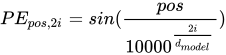
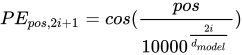
这样设计的好处:给定任一位置 pos 的位置编码 PE(pos),跟它距离 k 个单位的位置编码 PE(pos+k) 可以表示为 PE(pos) 的一个线性函数
因此,通过在 word embedding 中加入位置编码的资讯,可以帮助 Transformer 学会序列中 tokens 的相对位置关系
位置编码的实现:
# 以下直接參考 TensorFlow 官方 tutorialdef get_angles(pos, i, d_model):angle_rates = 1 / np.power(10000, (2 * (i//2)) / np.float32(d_model))return pos * angle_ratesdef positional_encoding(position, d_model):angle_rads = get_angles(np.arange(position)[:, np.newaxis],np.arange(d_model)[np.newaxis, :],d_model)# apply sin to even indices in the array; 2isines = np.sin(angle_rads[:, 0::2])# apply cos to odd indices in the array; 2i+1cosines = np.cos(angle_rads[:, 1::2])pos_encoding = np.concatenate([sines, cosines], axis=-1)pos_encoding = pos_encoding[np.newaxis, ...]return tf.cast(pos_encoding, dtype=tf.float32)seq_len = 50d_model = 512pos_encoding = positional_encoding(seq_len, d_model)pos_encoding
输出如下,位置编码的shape = (batch_size, seq_len, d_model),d_model 也是词嵌入向量的维度,seq_len 代表为序列中每个 token 都加入位置编码
<tf.Tensor: shape=(1, 50, 512), dtype=float32, numpy=array([[[ 0. , 0. , 0. , ..., 1. ,1. , 1. ],[ 0.84147096, 0.8218562 , 0.8019618 , ..., 1. ,1. , 1. ],[ 0.9092974 , 0.9364147 , 0.95814437, ..., 1. ,1. , 1. ],...,[ 0.12357312, 0.97718984, -0.24295525, ..., 0.9999863 ,0.99998724, 0.99998814],[-0.76825464, 0.7312359 , 0.63279754, ..., 0.9999857 ,0.9999867 , 0.9999876 ],[-0.95375264, -0.14402692, 0.99899054, ..., 0.9999851 ,0.9999861 , 0.9999871 ]]], dtype=float32)>
将位置编码绘图:
plt.pcolormesh(pos_encoding[0], cmap='RdBu')plt.xlabel('d_model')plt.xlim((0, 512))plt.ylabel('Position')plt.colorbar()plt.show()
输出图像如下,x 轴代表跟词嵌入向量相同的维度 d_model,y 轴则代表序列中的每个位置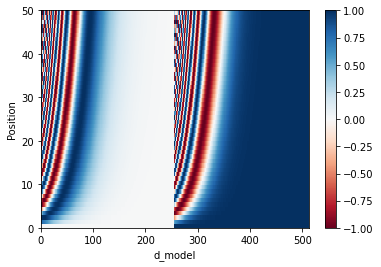
4.6 Encoder
Encoder 包含 3个元件:
- 输入的词嵌入层
- 位置编码
- N 个 Encoder Layers
Encoder 的实现:
class Encoder(tf.keras.layers.Layer):# Encoder 的初始參數除了本來就要給 EncoderLayer 的參數還多了:# - num_layers: 決定要有幾個 EncoderLayers, 前面影片中的 `N`# - input_vocab_size: 用來把索引轉成詞嵌入向量def __init__(self, num_layers, d_model, num_heads, dff, input_vocab_size,rate=0.1):super(Encoder, self).__init__()self.d_model = d_modelself.embedding = tf.keras.layers.Embedding(input_vocab_size, d_model)self.pos_encoding = positional_encoding(input_vocab_size, self.d_model)# 建立 `num_layers` 個 EncoderLayersself.enc_layers = [EncoderLayer(d_model, num_heads, dff, rate)for _ in range(num_layers)]self.dropout = tf.keras.layers.Dropout(rate)def call(self, x, training, mask):# 輸入的 x.shape == (batch_size, input_seq_len)# 以下各 layer 的輸出皆為 (batch_size, input_seq_len, d_model)input_seq_len = tf.shape(x)[1]# 將 2 維的索引序列轉成 3 維的詞嵌入張量,並依照論文乘上 sqrt(d_model)# 再加上對應長度的位置編碼x = self.embedding(x)x *= tf.math.sqrt(tf.cast(self.d_model, tf.float32))x += self.pos_encoding[:, :input_seq_len, :]# 對 embedding 跟位置編碼的總合做 regularization# 這在 Decoder 也會做x = self.dropout(x, training=training)# 通過 N 個 EncoderLayer 做編碼for i, enc_layer in enumerate(self.enc_layers):x = enc_layer(x, training, mask)# 以下只是用來 demo EncoderLayer outputs#print('-' * 20)#print(f"EncoderLayer {i + 1}'s output:", x)return x
示例:直接将索引序列 inp 丢入 Encoder:
# 超參數num_layers = 2 # 2 層的 Encoderd_model = 4num_heads = 2dff = 8input_vocab_size = subword_encoder_en.vocab_size + 2 # 記得加上 <start>, <end># 初始化一個 Encoderencoder = Encoder(num_layers, d_model, num_heads, dff, input_vocab_size)# 將 2 維的索引序列丟入 Encoder 做編碼enc_out = encoder(inp, training=False, mask=None)print("inp:", inp)print("-" * 20)print("enc_out:", enc_out)
输出如下,可以看到:
- 输入:
(batch_size, seq_len),直接将 2 维的索引序列inp作为输入 - 输出:
(batch_size, seq_len, d_model)``` inp: tf.Tensor( [[8113 103 9 1066 7903 8114 0 0] [8113 16 4111 6735 12 2750 7903 8114]], shape=(2, 8), dtype=int64)
enc_out: tf.Tensor( [[[-0.7849331 -0.5919682 -0.33270508 1.7096064 ] [-0.5070654 -0.5110137 -0.7082318 1.726311 ] [-0.39270175 -0.03102623 -1.1583622 1.58209 ] [-0.5561628 0.38050288 -1.2407898 1.4164498 ] [-0.90432 0.19381054 -0.84728897 1.5577984 ] [-0.9732155 -0.22992782 -0.46524602 1.6683893 ] [-0.84681976 -0.54344714 -0.31013623 1.7004032 ] [-0.62432766 -0.56790507 -0.5390008 1.7312336 ]]
[[-0.77423745 -0.6076474 -0.32800597 1.709891 ] [-0.47978234 -0.5615608 -0.68602896 1.727372 ] [-0.3006829 -0.07366985 -1.197396 1.5717487 ] [-0.5147843 0.27872464 -1.229085 1.4651445 ] [-0.8963447 0.26754597 -0.8954111 1.5242099 ] [-0.9755361 -0.22618699 -0.46569642 1.6674196 ] [-0.87600434 -0.54483986 -0.27099535 1.6918396 ] [-0.60130465 -0.5993665 -0.53067714 1.7313485 ]]], shape=(2, 8, 4), dtype=float32)
<a name="g54sz"></a>## 4.7 DecoderDecoder 也包含 3 个元件:- 输入的词嵌入层- 位置编码- N 个 Decoder LayersDecoder 的实现:```pythonclass Decoder(tf.keras.layers.Layer):# 初始參數跟 Encoder 只差在用 `target_vocab_size` 而非 `inp_vocab_size`def __init__(self, num_layers, d_model, num_heads, dff, target_vocab_size,rate=0.1):super(Decoder, self).__init__()self.d_model = d_model# 為中文(目標語言)建立詞嵌入層self.embedding = tf.keras.layers.Embedding(target_vocab_size, d_model)self.pos_encoding = positional_encoding(target_vocab_size, self.d_model)self.dec_layers = [DecoderLayer(d_model, num_heads, dff, rate)for _ in range(num_layers)]self.dropout = tf.keras.layers.Dropout(rate)# 呼叫時的參數跟 DecoderLayer 一模一樣def call(self, x, enc_output, training,combined_mask, inp_padding_mask):tar_seq_len = tf.shape(x)[1]attention_weights = {} # 用來存放每個 Decoder layer 的注意權重# 這邊跟 Encoder 做的事情完全一樣x = self.embedding(x) # (batch_size, tar_seq_len, d_model)x *= tf.math.sqrt(tf.cast(self.d_model, tf.float32))x += self.pos_encoding[:, :tar_seq_len, :]x = self.dropout(x, training=training)for i, dec_layer in enumerate(self.dec_layers):x, block1, block2 = dec_layer(x, enc_output, training,combined_mask, inp_padding_mask)# 將從每個 Decoder layer 取得的注意權重全部存下來回傳,方便我們觀察attention_weights['decoder_layer{}_block1'.format(i + 1)] = block1attention_weights['decoder_layer{}_block2'.format(i + 1)] = block2# x.shape == (batch_size, tar_seq_len, d_model)return x, attention_weights
示例:
# 超參數num_layers = 2 # 2 層的 Decoderd_model = 4num_heads = 2dff = 8target_vocab_size = subword_encoder_zh.vocab_size + 2 # 記得加上 <start>, <end># 遮罩inp_padding_mask = create_padding_mask(inp)tar_padding_mask = create_padding_mask(tar)look_ahead_mask = create_look_ahead_mask(tar.shape[1])combined_mask = tf.math.maximum(tar_padding_mask, look_ahead_mask)# 初始化一個 Decoderdecoder = Decoder(num_layers, d_model, num_heads, dff, target_vocab_size)# 將 2 維的索引序列以及遮罩丟入 Decoderprint("tar:", tar)print("-" * 20)print("combined_mask:", combined_mask)print("-" * 20)print("enc_out:", enc_out)print("-" * 20)print("inp_padding_mask:", inp_padding_mask)print("-" * 20)dec_out, attn = decoder(tar, enc_out, training=False,combined_mask=combined_mask,inp_padding_mask=inp_padding_mask)print("dec_out:", dec_out)print("-" * 20)for block_name, attn_weights in attn.items():print(f"{block_name}.shape: {attn_weights.shape}")
输出如下:
tar: tf.Tensor([[4205 10 241 86 27 3 4206 0 0 0][4205 165 489 398 191 14 7 560 3 4206]], shape=(2, 10), dtype=int64)--------------------combined_mask: tf.Tensor([[[[0. 1. 1. 1. 1. 1. 1. 1. 1. 1.][0. 0. 1. 1. 1. 1. 1. 1. 1. 1.][0. 0. 0. 1. 1. 1. 1. 1. 1. 1.][0. 0. 0. 0. 1. 1. 1. 1. 1. 1.][0. 0. 0. 0. 0. 1. 1. 1. 1. 1.][0. 0. 0. 0. 0. 0. 1. 1. 1. 1.][0. 0. 0. 0. 0. 0. 0. 1. 1. 1.][0. 0. 0. 0. 0. 0. 0. 1. 1. 1.][0. 0. 0. 0. 0. 0. 0. 1. 1. 1.][0. 0. 0. 0. 0. 0. 0. 1. 1. 1.]]][[[0. 1. 1. 1. 1. 1. 1. 1. 1. 1.][0. 0. 1. 1. 1. 1. 1. 1. 1. 1.][0. 0. 0. 1. 1. 1. 1. 1. 1. 1.][0. 0. 0. 0. 1. 1. 1. 1. 1. 1.][0. 0. 0. 0. 0. 1. 1. 1. 1. 1.][0. 0. 0. 0. 0. 0. 1. 1. 1. 1.][0. 0. 0. 0. 0. 0. 0. 1. 1. 1.][0. 0. 0. 0. 0. 0. 0. 0. 1. 1.][0. 0. 0. 0. 0. 0. 0. 0. 0. 1.][0. 0. 0. 0. 0. 0. 0. 0. 0. 0.]]]], shape=(2, 1, 10, 10), dtype=float32)--------------------enc_out: tf.Tensor([[[-0.7849331 -0.5919682 -0.33270508 1.7096064 ][-0.5070654 -0.5110137 -0.7082318 1.726311 ][-0.39270175 -0.03102623 -1.1583622 1.58209 ][-0.5561628 0.38050288 -1.2407898 1.4164498 ][-0.90432 0.19381054 -0.84728897 1.5577984 ][-0.9732155 -0.22992782 -0.46524602 1.6683893 ][-0.84681976 -0.54344714 -0.31013623 1.7004032 ][-0.62432766 -0.56790507 -0.5390008 1.7312336 ]][[-0.77423745 -0.6076474 -0.32800597 1.709891 ][-0.47978234 -0.5615608 -0.68602896 1.727372 ][-0.3006829 -0.07366985 -1.197396 1.5717487 ][-0.5147843 0.27872464 -1.229085 1.4651445 ][-0.8963447 0.26754597 -0.8954111 1.5242099 ][-0.9755361 -0.22618699 -0.46569642 1.6674196 ][-0.87600434 -0.54483986 -0.27099535 1.6918396 ][-0.60130465 -0.5993665 -0.53067714 1.7313485 ]]], shape=(2, 8, 4), dtype=float32)--------------------inp_padding_mask: tf.Tensor([[[[0. 0. 0. 0. 0. 0. 1. 1.]]][[[0. 0. 0. 0. 0. 0. 0. 0.]]]], shape=(2, 1, 1, 8), dtype=float32)--------------------dec_out: tf.Tensor([[[-0.5652141 -1.0581812 1.6000751 0.02332012][-0.34019786 -1.2377603 1.5330344 0.04492375][ 0.36752528 -1.4228352 1.3287866 -0.2734766 ][ 0.09472056 -1.353683 1.4559422 -0.19697976][-0.38392052 -1.094072 1.6231282 -0.1451356 ][-0.41729778 -1.0276326 1.6514215 -0.20649128][-0.33023426 -1.045482 1.6500467 -0.27433017][-0.19232102 -1.1254803 1.6149355 -0.29713416][ 0.4082284 -1.3586452 1.3515029 -0.4010862 ][ 0.19979596 -1.4183375 1.3857942 -0.16725269]][[-0.56504554 -1.0544491 1.6026781 0.01681653][-0.36043388 -1.2348609 1.5300142 0.06528072][ 0.24521813 -1.4295446 1.3651296 -0.18080314][-0.06483467 -1.3449187 1.4773033 -0.06755002][-0.41885298 -1.0775514 1.6267893 -0.13038498][-0.40018192 -1.0338532 1.650498 -0.21646306][-0.3531929 -1.0375834 1.6523482 -0.26157215][-0.24463183 -1.1371143 1.6107953 -0.22904909][ 0.19615412 -1.362728 1.4271017 -0.2605277 ][ 0.08419968 -1.3687491 1.4467623 -0.16221273]]], shape=(2, 10, 4), dtype=float32)--------------------decoder_layer1_block1.shape: (2, 2, 10, 10)decoder_layer1_block2.shape: (2, 2, 10, 8)decoder_layer2_block1.shape: (2, 2, 10, 10)decoder_layer2_block2.shape: (2, 2, 10, 8)
5、Transformer 的搭建 & 训练
5.1 Transformer 的搭建
Transformer 的实现:
# Transformer 之上已經沒有其他 layers 了,我們使用 tf.keras.Model 建立一個模型class Transformer(tf.keras.Model):# 初始參數包含 Encoder & Decoder 都需要超參數以及中英字典數目def __init__(self, num_layers, d_model, num_heads, dff, input_vocab_size,target_vocab_size, rate=0.1):super(Transformer, self).__init__()self.encoder = Encoder(num_layers, d_model, num_heads, dff,input_vocab_size, rate)self.decoder = Decoder(num_layers, d_model, num_heads, dff,target_vocab_size, rate)# 這個 FFN 輸出跟中文字典一樣大的 logits 數,等通過 softmax 就代表每個中文字的出現機率self.final_layer = tf.keras.layers.Dense(target_vocab_size)# enc_padding_mask 跟 dec_padding_mask 都是英文序列的 padding mask,# 只是一個給 Encoder layer 的 MHA 用,一個是給 Decoder layer 的 MHA 2 使用def call(self, inp, tar, training, enc_padding_mask,combined_mask, dec_padding_mask):enc_output = self.encoder(inp, training, enc_padding_mask) # (batch_size, inp_seq_len, d_model)# dec_output.shape == (batch_size, tar_seq_len, d_model)dec_output, attention_weights = self.decoder(tar, enc_output, training, combined_mask, dec_padding_mask)# 將 Decoder 輸出通過最後一個 linear layerfinal_output = self.final_layer(dec_output) # (batch_size, tar_seq_len, target_vocab_size)return final_output, attention_weights
输入:
- 英文序列:
(batch_size, inp_seq_len) - 中文序列:
(batch_size, tar_seq_len)
输出:
- 生成序列:
(batch_size, tar_seq_len, target_vocab_size) - 注意力权重的 dict
示例:搭建一个 Transformer,并用已经准备好的 demo 数据来训练它做英翻中:
注意下面的第 12-13 行的处理:
tar_inp是将中文序列去掉最末尾一个 token 后的序列,是训练时 Decoder 的输入tar_real是将中文序列去掉最开头一个 token 后的序列,是训练时的 ground truth再看第 26 行 Transformer 的输入:
inp:待翻译的英文序列tar_inp:对应的中文序列去掉最末尾一个 token 后的序列相当于在每一个 time step,是给定一个 token(
tar_inp中的一个 token)去预测下一个 token(tar_real中对应位置的 token) 并且在训练时,不是将 Transfomer 的输出丢回给 Decoder 当作输入,而是直接拿 ground truth 即tar_real当作的输入,即 teacher forcing
# 超參數num_layers = 1d_model = 4num_heads = 2dff = 8# + 2 是為了 <start> & <end> tokeninput_vocab_size = subword_encoder_en.vocab_size + 2output_vocab_size = subword_encoder_zh.vocab_size + 2# 重點中的重點。訓練時用前一個字來預測下一個中文字tar_inp = tar[:, :-1]tar_real = tar[:, 1:]# 來源 / 目標語言用的遮罩。注意 `comined_mask` 已經將目標語言的兩種遮罩合而為一inp_padding_mask = create_padding_mask(inp)tar_padding_mask = create_padding_mask(tar_inp)look_ahead_mask = create_look_ahead_mask(tar_inp.shape[1])combined_mask = tf.math.maximum(tar_padding_mask, look_ahead_mask)# 初始化我們的第一個 transformertransformer = Transformer(num_layers, d_model, num_heads, dff,input_vocab_size, output_vocab_size)# 將英文、中文序列丟入取得 Transformer 預測下個中文字的結果predictions, attn_weights = transformer(inp, tar_inp, False, inp_padding_mask,combined_mask, inp_padding_mask)print("tar:", tar)print("-" * 20)print("tar_inp:", tar_inp)print("-" * 20)print("tar_real:", tar_real)print("-" * 20)print("predictions:", predictions)
输出如下:
tar: tf.Tensor([[4205 10 241 86 27 3 4206 0 0 0][4205 165 489 398 191 14 7 560 3 4206]], shape=(2, 10), dtype=int64)--------------------tar_inp: tf.Tensor([[4205 10 241 86 27 3 4206 0 0][4205 165 489 398 191 14 7 560 3]], shape=(2, 9), dtype=int64)--------------------tar_real: tf.Tensor([[ 10 241 86 27 3 4206 0 0 0][ 165 489 398 191 14 7 560 3 4206]], shape=(2, 9), dtype=int64)--------------------predictions: tf.Tensor([[[ 0.01349578 -0.00199539 -0.00217387 ... -0.03862738 -0.03212879-0.07692745][ 0.03748299 0.01585471 -0.02548707 ... -0.04276202 -0.02495992-0.05491883][ 0.05718527 0.0288353 -0.04577482 ... -0.0450176 -0.01315334-0.03639907]...[ 0.01202047 -0.00400385 -0.00099438 ... -0.03859971 -0.03085512-0.0797975 ][ 0.0235797 0.00501019 -0.0119309 ... -0.04091505 -0.02892826-0.06939012][ 0.04867783 0.02382021 -0.03683802 ... -0.04392422 -0.01941059-0.04347047]][[ 0.01676657 -0.00080313 -0.00556348 ... -0.03981712 -0.02937311-0.07665333][ 0.03873826 0.01607162 -0.02685272 ... -0.04328423 -0.0234593-0.0552263 ][ 0.0564083 0.02865588 -0.04492006 ... -0.04475704 -0.014088-0.03639094]...[ 0.01514174 -0.00298803 -0.00426159 ... -0.0397689 -0.02800198-0.07974622][ 0.02867933 0.00800282 -0.01704068 ... -0.04215823 -0.02618419-0.06638922][ 0.05056309 0.02489874 -0.03880978 ... -0.04421616 -0.01803543-0.04204437]]], shape=(2, 9, 4207), dtype=float32)
5.2 定义损失函数与指标
序列生成任务实际上可以被视为分类任务,每次输出的都是中文字典中每个 token 的概率分布。因此可以使用交叉熵损失来计算生成任务中模型预测的分布和 ground truth 的差距
定义原始的损失函数:
loss_object = tf.keras.losses.SparseCategoricalCrossentropy(from_logits=True, reduction='none')# from_logits=True,是因为从 Transformer 得到的预测结果还没有经过 softmax,因此和不为 1# 可以通过 print(tf.reduce_sum(predictions, axis=-1)) 查看预测结果的和不为 1# reduction='none',让损失函数 loss_object 不要把每个位置的 error 加总,因为之后我们要自己把 <pad> token 出现的位置的损失舍弃不计# 假設我們要解的是一個 binary classifcation, 0 跟 1 個代表一個 labelreal = tf.constant([1, 1, 0], shape=(1, 3), dtype=tf.float32)pred = tf.constant([[0, 1], [0, 1], [0, 1]], dtype=tf.float32)loss_object(real, pred)
输出如下,由于 pred 中第三个预测结果错误,使得交叉熵损失之上升
<tf.Tensor: shape=(3,), dtype=float32, numpy=array([0.31326166, 0.31326166, 1.3132616 ], dtype=float32)>
有了上面的 loss_object 计算交叉熵损失后,还需要封装一个损失函数来建立遮罩并加总序列中不包含
def loss_function(real, pred):# 這次的 mask 將序列中不等於 0 的位置視為 1,其餘為 0mask = tf.math.logical_not(tf.math.equal(real, 0))# 照樣計算所有位置的 cross entropy 但不加總loss_ = loss_object(real, pred)mask = tf.cast(mask, dtype=loss_.dtype)loss_ *= mask # 只計算非 <pad> 位置的損失return tf.reduce_mean(loss_)
另外,再使用 tf.keras.metrics 定义两个指标,方便之后用 TensorBoard 来追踪模型的 performance
train_loss = tf.keras.metrics.Mean(name='train_loss')train_accuracy = tf.keras.metrics.SparseCategoricalAccuracy(name='train_accuracy')
5.3 设置超参数
num_layers = 4 # Transformer 中 Encoder/Decoder Layers 重复层数,论文中设为 6d_model = 128 # token 的 representation 维度,论文中为 512dff = 512 # FFN 中间层维度,论文中为 2048num_heads = 8 # 多头注意力的头数,论文中为 8input_vocab_size = subword_encoder_en.vocab_size + 2 # 输入语言(英文)的字典大小target_vocab_size = subword_encoder_zh.vocab_size + 2 # 输出语言(中文)的字典大小dropout_rate = 0.1 # 預設值print("input_vocab_size:", input_vocab_size)print("target_vocab_size:", target_vocab_size)
输出如下:
input_vocab_size: 8115target_vocab_size: 4207
5.4 设置优化器 Optimizer
使用 Adam optimizer 以及自定义的 learning rate scheduler:
让训练过程的前 warmup_steps 的学习率线性增加,之后则随步骤数的反平方根下降
class CustomSchedule(tf.keras.optimizers.schedules.LearningRateSchedule):# 論文預設 `warmup_steps` = 4000def __init__(self, d_model, warmup_steps=4000):super(CustomSchedule, self).__init__()self.d_model = d_modelself.d_model = tf.cast(self.d_model, tf.float32)self.warmup_steps = warmup_stepsdef __call__(self, step):arg1 = tf.math.rsqrt(step)arg2 = step * (self.warmup_steps ** -1.5)return tf.math.rsqrt(self.d_model) * tf.math.minimum(arg1, arg2)# 將客製化 learning rate schdeule 丟入 Adam opt.# Adam opt. 的參數都跟論文相同learning_rate = CustomSchedule(d_model)optimizer = tf.keras.optimizers.Adam(learning_rate, beta_1=0.9, beta_2=0.98,epsilon=1e-9)
观察这个 shedule 是怎么随训练步骤而改变学习率的:
d_models = [128, 256, 512]warmup_steps = [1000 * i for i in range(1, 4)]schedules = []labels = []colors = ["blue", "red", "black"]for d in d_models:schedules += [CustomSchedule(d, s) for s in warmup_steps]labels += [f"d_model: {d}, warm: {s}" for s in warmup_steps]for i, (schedule, label) in enumerate(zip(schedules, labels)):plt.plot(schedule(tf.range(10000, dtype=tf.float32)),label=label, color=colors[i // 3])plt.legend()plt.ylabel("Learning Rate")plt.xlabel("Train Step")

5.5 实际训练 & 定时存档
用前面已经定义好的超参数来初始化一个全新的 Transformer
transformer = Transformer(num_layers, d_model, num_heads, dff,input_vocab_size, target_vocab_size, dropout_rate)print(f"""這個 Transformer 有 {num_layers} 層 Encoder / Decoder layersd_model: {d_model}num_heads: {num_heads}dff: {dff}input_vocab_size: {input_vocab_size}target_vocab_size: {target_vocab_size}dropout_rate: {dropout_rate}""")
输出如下:
這個 Transformer 有 4 層 Encoder / Decoder layersd_model: 128num_heads: 8dff: 512input_vocab_size: 8115target_vocab_size: 4207dropout_rate: 0.1
设置 checkpoint 来定期存储/读取模型及 optimizer
train_perc = 20val_prec = 1drop_prec = 100 - train_perc - val_prec# 方便比較不同實驗/ 不同超參數設定的結果run_id = f"{num_layers}layers_{d_model}d_{num_heads}heads_{dff}dff_{train_perc}train_perc"checkpoint_path = os.path.join(checkpoint_path, run_id)log_dir = os.path.join(log_dir, run_id)# tf.train.Checkpoint 可以幫我們把想要存下來的東西整合起來,方便儲存與讀取# 一般來說你會想存下模型以及 optimizer 的狀態ckpt = tf.train.Checkpoint(transformer=transformer,optimizer=optimizer)# ckpt_manager 會去 checkpoint_path 看有沒有符合 ckpt 裡頭定義的東西# 存檔的時候只保留最近 5 次 checkpoints,其他自動刪除ckpt_manager = tf.train.CheckpointManager(ckpt, checkpoint_path, max_to_keep=5)# 如果在 checkpoint 路徑上有發現檔案就讀進來if ckpt_manager.latest_checkpoint:ckpt.restore(ckpt_manager.latest_checkpoint)# 用來確認之前訓練多少 epochs 了last_epoch = int(ckpt_manager.latest_checkpoint.split("-")[-1])print(f'已讀取最新的 checkpoint,模型已訓練 {last_epoch} epochs。')else:last_epoch = 0print("沒找到 checkpoint,從頭訓練。")
输出如下:
已讀取最新的 checkpoint,模型已訓練 30 epochs。
定义一个函数来产生所有的遮罩 mask:
# 為 Transformer 的 Encoder / Decoder 準備遮罩def create_masks(inp, tar):# 英文句子的 padding mask,要交給 Encoder layer 自注意力機制用的enc_padding_mask = create_padding_mask(inp)# 同樣也是英文句子的 padding mask,但是是要交給 Decoder layer 的 MHA 2# 關注 Encoder 輸出序列用的dec_padding_mask = create_padding_mask(inp)# Decoder layer 的 MHA1 在做自注意力機制用的# `combined_mask` 是中文句子的 padding mask 跟 look ahead mask 的疊加look_ahead_mask = create_look_ahead_mask(tf.shape(tar)[1])dec_target_padding_mask = create_padding_mask(tar)combined_mask = tf.maximum(dec_target_padding_mask, look_ahead_mask)return enc_padding_mask, combined_mask, dec_padding_mask
train_step:一个数据集包含多个 batch,而每次拿一个 batch 来训练的步骤就称为 train_step。一个训练步骤包含如下过程:
- 对训练数据做必要的前处理
- 将数据丢入模型,取得预测结果
- 用预测结果跟 ground truth 计算 loss
取出梯度并利用 optimizer 做梯度下降
@tf.function # 讓 TensorFlow 幫我們將 eager code 優化並加快運算def train_step(inp, tar):# 前面說過的,用去尾的原始序列去預測下一個字的序列tar_inp = tar[:, :-1]tar_real = tar[:, 1:]# 建立 3 個遮罩enc_padding_mask, combined_mask, dec_padding_mask = create_masks(inp, tar_inp)# 紀錄 Transformer 的所有運算過程以方便之後做梯度下降with tf.GradientTape() as tape:# 注意是丟入 `tar_inp` 而非 `tar`。記得將 `training` 參數設定為 Truepredictions, _ = transformer(inp, tar_inp,True,enc_padding_mask,combined_mask,dec_padding_mask)# 跟影片中顯示的相同,計算左移一個字的序列跟模型預測分佈之間的差異,當作 lossloss = loss_function(tar_real, predictions)# 取出梯度並呼叫前面定義的 Adam optimizer 幫我們更新 Transformer 裡頭可訓練的參數gradients = tape.gradient(loss, transformer.trainable_variables)optimizer.apply_gradients(zip(gradients, transformer.trainable_variables))# 將 loss 以及訓練 acc 記錄到 TensorBoard 上,非必要train_loss(loss)train_accuracy(tar_real, predictions)
让 Transformer 训练 30 个 Epochs,每个 Epoch 包含如下步骤:
- (非必要)重置写到 TensorBoard 的 metrics 的值
- 将整个数据集的 batch 取出,交给 train_step 函数处理
- (非必要)存 checkpoints
- (非必要)将当前 epoch 结果写道 TensorBoard
- (非必要)在标准输出显示当前 epoch 的结果
```python
定義我們要看幾遍數據集
EPOCHS = 30 print(f”此超參數組合的 Transformer 已經訓練 {last_epoch} epochs。”) print(f”剩餘 epochs:{min(0, last_epoch - EPOCHS)}”)
用來寫資訊到 TensorBoard,非必要但十分推薦
summary_writer = tf.summary.create_file_writer(log_dir)
比對設定的 EPOCHS 以及已訓練的 last_epoch 來決定還要訓練多少 epochs
for epoch in range(last_epoch, EPOCHS): start = time.time()
# 重置紀錄 TensorBoard 的 metricstrain_loss.reset_states()train_accuracy.reset_states()# 一個 epoch 就是把我們定義的訓練資料集一個一個 batch 拿出來處理,直到看完整個數據集for (step_idx, (inp, tar)) in enumerate(train_dataset):# 每次 step 就是將數據丟入 Transformer,讓它生預測結果並計算梯度最小化 losstrain_step(inp, tar)# 每個 epoch 完成就存一次檔if (epoch + 1) % 1 == 0:ckpt_save_path = ckpt_manager.save()print ('Saving checkpoint for epoch {} at {}'.format(epoch+1,ckpt_save_path))# 將 loss 以及 accuracy 寫到 TensorBoard 上with summary_writer.as_default():tf.summary.scalar("train_loss", train_loss.result(), step=epoch + 1)tf.summary.scalar("train_acc", train_accuracy.result(), step=epoch + 1)print('Epoch {} Loss {:.4f} Accuracy {:.4f}'.format(epoch + 1,train_loss.result(),train_accuracy.result()))print('Time taken for 1 epoch: {} secs\n'.format(time.time() - start))
输出如下,可以看到会从 checkpoint 加载进度,而不是从头开始训练。
此超參數組合的 Transformer 已經訓練 30 epochs。 剩餘 epochs:0
<a name="Lr1u7"></a>## 5.6 使用 TensorBoard在 Colab 中开启 TensorBoard```pythontry:# %tensorflow_version only exists in Colab.%tensorflow_version 2.xexcept Exception:pass# Load the TensorBoard notebook extension%load_ext tensorboard
%tensorboard --logdir "{log_dir}" # 记得加上"",因为路径中有空格,不加""会报错# 参考:https://stackoverflow.com/questions/63364452/tensorboard-error-invalid-choice-code-choose-from-serve-dev-while

5.7 预测:实际进行英翻中
预测过程:
- 将输入的英文句子利用 Subword Tokenizer 转换成 tokens 索引(inp)
- 在该英文索引序列前后加上代表 BOS/EOS 的 tokens
- 在 Transformer 输出序列长度达到 MAX_LENGTH 前重复以下步骤:
- 为目前已经生成的中文索引序列产生新的遮罩
- 将刚刚的英文序列、当前的中文序列以及各种遮罩放入 Transformer
- 将 Transformer 输出序列的最后一个位置的向量取出,并取 argmax 取得新的预测中文索引
- 将此索引加到目前的中文索引序列中作为 Transformer 到此为止的输出结果
- 如果新产生的中文索引为 则代表中文翻译已经全部完毕,直接回传
将最后得到的中文索引序列回传作为翻译结果 ```python
給定一個英文句子,輸出預測的中文索引數字序列以及注意權重 dict
def evaluate(inp_sentence):
準備英文句子前後會加上的
, start_token = [subword_encoder_en.vocab_size] end_token = [subword_encoder_en.vocab_size + 1]
inp_sentence 是字串,我們用 Subword Tokenizer 將其變成子詞的索引序列
並在前後加上 BOS / EOS
inp_sentence = start_token + subword_encoder_en.encode(inp_sentence) + end_token encoder_input = tf.expand_dims(inp_sentence, 0)
跟我們在影片裡看到的一樣,Decoder 在第一個時間點吃進去的輸入
是一個只包含一個中文
token 的序列 decoder_input = [subword_encoder_zh.vocab_size] output = tf.expand_dims(decoder_input, 0) # 增加 batch 維度
auto-regressive,一次生成一個中文字並將預測加到輸入再度餵進 Transformer
for i in range(MAX_LENGTH):
# 每多一個生成的字就得產生新的遮罩enc_padding_mask, combined_mask, dec_padding_mask = create_masks(encoder_input, output)# predictions.shape == (batch_size, seq_len, vocab_size)predictions, attention_weights = transformer(encoder_input,output,False,enc_padding_mask,combined_mask,dec_padding_mask)
# 將序列中最後一個 distribution 取出,並將裡頭值最大的當作模型最新的預測字predictions = predictions[: , -1:, :] # (batch_size, 1, vocab_size)predicted_id = tf.cast(tf.argmax(predictions, axis=-1), tf.int32)# 遇到 <end> token 就停止回傳,代表模型已經產生完結果if tf.equal(predicted_id, subword_encoder_zh.vocab_size + 1):return tf.squeeze(output, axis=0), attention_weights#將 Transformer 新預測的中文索引加到輸出序列中,讓 Decoder 可以在產生# 下個中文字的時候關注到最新的 `predicted_id`output = tf.concat([output, predicted_id], axis=-1)# 將 batch 的維度去掉後回傳預測的中文索引序列return tf.squeeze(output, axis=0), attention_weights
示例:通过 Transformer 做翻译```python# 要被翻譯的英文句子sentence = "China, India, and others have enjoyed continuing economic growth."# 取得預測的中文索引序列predicted_seq, _ = evaluate(sentence)# 過濾掉 <start> & <end> tokens 並用中文的 subword tokenizer 幫我們將索引序列還原回中文句子target_vocab_size = subword_encoder_zh.vocab_sizepredicted_seq_without_bos_eos = [idx for idx in predicted_seq if idx < target_vocab_size]predicted_sentence = subword_encoder_zh.decode(predicted_seq_without_bos_eos)print("sentence:", sentence)print("-" * 20)print("predicted_seq:", predicted_seq)print("-" * 20)print("predicted_sentence:", predicted_sentence)
输出如下(enjoy 一词翻译错了):
sentence: China, India, and others have enjoyed continuing economic growth.--------------------predicted_seq: tf.Tensor([4205 16 4 36 378 100 8 35 32 4 33 111 11 52405 238 103 294 22 49 105 83 3], shape=(23,), dtype=int32)--------------------predicted_sentence: 中国、印度和其他国家都有所担心持续经济增长。
输出这个 transformer 的参数量
transformer.summary()
输出如下,约 400 万个参数,这个 Transformer 不算巨大
Model: "transformer_1"_________________________________________________________________Layer (type) Output Shape Param #=================================================================encoder_2 (Encoder) multiple 1831808_________________________________________________________________decoder_2 (Decoder) multiple 1596800_________________________________________________________________dense_137 (Dense) multiple 542703=================================================================Total params: 3,971,311Trainable params: 3,971,311Non-trainable params: 0_________________________________________________________________
5.8 可视化注意力权重
Transformer 可以通过可视化注意力权重,来了解模型实际在生成序列的时候将注意力放在哪些地方。
先查看各个 Decoder Layer 的 MHA1、MHA2 的注意力权重的维度
之后将选择最后一个 Decoder layer 用来关注 Encoder 输出的的 MHA2(即 block2)来看一下 Transformer 在生成中文序列的各个 token 时分别关注在对应英文句子的哪些位置,该注意力的权重维度为 (batch_size, num_heads, zh_seq_len, en_seq_len) = (1, 8, 23, 15)
predicted_seq, attention_weights = evaluate(sentence)# 在這邊我們自動選擇最後一個 Decoder layer 的 MHA 2,也就是 Decoder 關注 Encoder 的 MHAlayer_name = f"decoder_layer{num_layers}_block2"print("sentence:", sentence)print("-" * 20)print("predicted_seq:", predicted_seq)print("-" * 20)print("attention_weights.keys():")for layer_name, attn in attention_weights.items():print(f"{layer_name}.shape: {attn.shape}")print("-" * 20)print("layer_name:", layer_name)
输出如下:
sentence: China, India, and others have enjoyed continuing economic growth.--------------------predicted_seq: tf.Tensor([4205 16 4 36 378 100 8 35 32 4 33 111 11 52405 238 103 294 22 49 105 83 3], shape=(23,), dtype=int32)--------------------attention_weights.keys():decoder_layer1_block1.shape: (1, 8, 23, 23)decoder_layer1_block2.shape: (1, 8, 23, 15)decoder_layer2_block1.shape: (1, 8, 23, 23)decoder_layer2_block2.shape: (1, 8, 23, 15)decoder_layer3_block1.shape: (1, 8, 23, 23)decoder_layer3_block2.shape: (1, 8, 23, 15)decoder_layer4_block1.shape: (1, 8, 23, 23)decoder_layer4_block2.shape: (1, 8, 23, 15)--------------------layer_name: decoder_layer4_block2
还要先实现绘图函数。
为了输出中文,还要先从网上下载一个中文字体到系统字体目录。
# 从网上下载一个支持中文的字体到系统字体目录!wget -O /usr/share/fonts/truetype/liberation/simhei.ttf "https://www.wfonts.com/download/data/2014/06/01/simhei/chinese.simhei.ttf"
输出如下,下载完成
--2021-05-28 08:30:40-- https://www.wfonts.com/download/data/2014/06/01/simhei/chinese.simhei.ttfResolving www.wfonts.com (www.wfonts.com)... 104.225.219.210Connecting to www.wfonts.com (www.wfonts.com)|104.225.219.210|:443... connected.HTTP request sent, awaiting response... 200 OKLength: 10050870 (9.6M) [application/octetstream]Saving to: ‘/usr/share/fonts/truetype/liberation/simhei.ttf’/usr/share/fonts/tr 100%[===================>] 9.58M 5.79MB/s in 1.7s2021-05-28 08:30:42 (5.79 MB/s) - ‘/usr/share/fonts/truetype/liberation/simhei.ttf’ saved [10050870/10050870]
实现绘图函数:
import matplotlib as mpl# 你可能會需要自行下載一個中文字體檔案以讓 matplotlib 正確顯示中文zhfont = mpl.font_manager.FontProperties(fname="/usr/share/fonts/truetype/liberation/simhei.ttf")plt.style.use("seaborn-whitegrid")# 這個函式將英 -> 中翻譯的注意權重視覺化(注意:我們將注意權重 transpose 以最佳化渲染結果def plot_attention_weights(attention_weights, sentence, predicted_seq, layer_name, max_len_tar=None):fig = plt.figure(figsize=(17, 7))sentence = subword_encoder_en.encode(sentence)# 只顯示中文序列前 `max_len_tar` 個字以避免畫面太過壅擠if max_len_tar:predicted_seq = predicted_seq[:max_len_tar]else:max_len_tar = len(predicted_seq)# 將某一個特定 Decoder layer 裡頭的 MHA 1 或 MHA2 的注意權重拿出來並去掉 batch 維度attention_weights = tf.squeeze(attention_weights[layer_name], axis=0)# (num_heads, tar_seq_len, inp_seq_len)# 將每個 head 的注意權重畫出for head in range(attention_weights.shape[0]):ax = fig.add_subplot(2, 4, head + 1)# [注意]我為了將長度不短的英文子詞顯示在 y 軸,將注意權重做了 transposeattn_map = np.transpose(attention_weights[head][:max_len_tar, :])ax.matshow(attn_map, cmap='viridis') # (inp_seq_len, tar_seq_len)fontdict = {"fontproperties": zhfont}ax.set_xticks(range(max(max_len_tar, len(predicted_seq))))ax.set_xlim(-0.5, max_len_tar -1.5)ax.set_yticks(range(len(sentence) + 2))ax.set_xticklabels([subword_encoder_zh.decode([i]) for i in predicted_seqif i < subword_encoder_zh.vocab_size],fontdict=fontdict, fontsize=18)ax.set_yticklabels(['<start>'] + [subword_encoder_en.decode([i]) for i in sentence] + ['<end>'],fontdict=fontdict)ax.set_xlabel('Head {}'.format(head + 1))ax.tick_params(axis="x", labelsize=12)ax.tick_params(axis="y", labelsize=12)plt.tight_layout()plt.show()plt.close(fig)
绘制注意力权重:
plot_attention_weights(attention_weights, sentence,predicted_seq, layer_name, max_len_tar=18)


若有收获,就点个赞吧
0 人点赞


