一、基本处理
1 ⽂件上传
原⽣servlet处理上传的⽂件数据的,springmvc⼜是对serlvet的封装所需jar包
1.1 所需依赖
<!--⽂件上传所需jar坐标--><dependency><groupId>commons-fileupload</groupId><artifactId>commons-fileupload</artifactId><version>1.3.1</version></dependency>
1.2 配置文件解析器
配置⽂件上传解析器
<!--配置⽂件上传解析器,id是固定的multipartResolver-->
<bean id="multipartResolver"
      class="org.springframework.web.multipart.commons.CommonsMultipartResolver">
  <!--设置上传⼤⼩,单位字节-->
  <property name="maxUploadSize" value="1000000000"/>
</bean>
-
1.3 前端Form
<%--
1. method="post"
2. enctype="multipart/form-data"
3. type="file"
--%>
<form method="post" enctype="multipart/form-data" action="/demo/upload">
<input type="file" name="uploadFile"/>
<input type="submit" value="上传"/>
</form>
1.4 后台接收Handler
```java /**
- 文件上传
@return */ @RequestMapping(value = “/upload”) public ModelAndView upload(MultipartFile uploadFile,
HttpSession session) throws IOException {// 处理上传文件 // 重命名,原名123.jpg ,获取后缀 String originalFilename = uploadFile.getOriginalFilename();// 原始名称 // 扩展名 jpg String ext = originalFilename.substring(originalFilename.lastIndexOf(“.”) + 1,
originalFilename.length());String newName = UUID.randomUUID().toString() + “.” + ext;
// 存储,要存储到指定的文件夹,/uploads/yyyy-MM-dd,考虑文件过多的情况按照日期, // 生成一个子文件夹 String realPath = session.getServletContext().getRealPath(“/uploads”); String datePath = new SimpleDateFormat(“yyyy-MM-dd”).format(new Date()); File folder = new File(realPath + “/“ + datePath);
if(!folder.exists()) { folder.mkdirs(); }
// 存储文件到目录
uploadFile.transferTo(new File(folder,newName));


// TODO 文件磁盘路径要更新到数据库字段

Date date = new Date();
ModelAndView modelAndView = new ModelAndView();
modelAndView.addObject("date",date);
modelAndView.setViewName("success");
return modelAndView;
}
<a name="S6YpO"></a>
### 1.5 测试
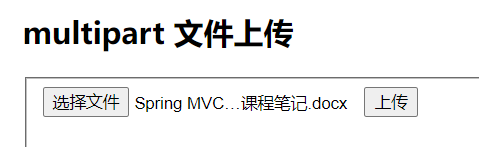<br />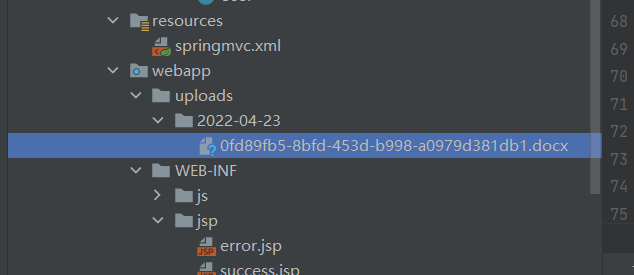
<a name="Habth"></a>
## 2 文件下载
<a name="IDUjC"></a>
### 2.1 依赖准备
```xml
<dependency>
<groupId>commons-io</groupId>
<artifactId>commons-io</artifactId>
<version>2.2</version>
</dependency>
2.2 示例代码
@RequestMapping("download")
public void download(HttpServletResponse response) throws Exception {
    response.setHeader("content-disposition",
            "attachment;filename=" + URLEncoder.encode("呵呵.jpg", "UTF-8"));
    FileUtils.copyFile(new File("E:\\upload", "290828.jpg"),
            response.getOutputStream());  //参数1:源文件   参数2:复制后的位置
}
默认响应头的value值是inline(在线),即响应到页面
2.3 前端代码
<a href="${pageContext.request.contextPath}/file/download.do">下载</a>
2.4 文件准备
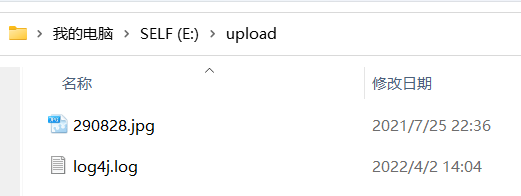
2.5 测试


若有收获,就点个赞吧
0 人点赞


