一、基本搭建流程
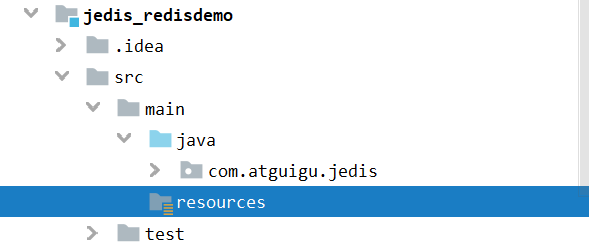
1 准备maven工程
2 导入jedis依赖
<dependency><groupId>redis.clients</groupId><artifactId>jedis</artifactId><version>3.2.0</version></dependency>
3 代码测试
 public static void main(String[] args) {
    //创建Jedis对象
    Jedis jedis = new Jedis("192.168.81.129",6379);
    jedis.auth("muZI5945@");
    //测试
    String value = jedis.ping();
    System.out.println(value);
    jedis.close();
}
二、常见API
1 String类型
@Test
public void demo1() {
    //创建Jedis对象
    Jedis jedis = new Jedis("192.168.81.129",6379);
    jedis.auth("muZI5945@");

    //添加
    jedis.set("name","lucy");

    //获取
    String name = jedis.get("name");
    System.out.println(name);

    //设置多个key-value
    jedis.mset("k1","v1","k2","v2");
    List<String> mget = jedis.mget("k1", "k2");
    System.out.println(mget);

    Set<String> keys = jedis.keys("*");
    for(String key : keys) {
        System.out.println(key);
    }
    jedis.close();
}
2 List类型
    @Test
    public void demo2() {
        //创建Jedis对象
        Jedis jedis = new Jedis("192.168.44.168",6379);

        jedis.lpush("key1","lucy","mary","jack");
        List<String> values = jedis.lrange("key1", 0, -1);
        System.out.println(values);
        jedis.close();
    }
3 set类型
@Test
public void demo3() {
    //创建Jedis对象
    Jedis jedis = new Jedis("192.168.44.168",6379);

    jedis.sadd("names","lucy");
    jedis.sadd("names","mary");

    Set<String> names = jedis.smembers("names");
    System.out.println(names);
    jedis.close();
}
4 zset类型
@Test
public void demo5() {
    //创建Jedis对象
    Jedis jedis = new Jedis("192.168.44.168",6379);

    jedis.zadd("china",100d,"shanghai");

    Set<String> china = jedis.zrange("china", 0, -1);
    System.out.println(china);

    jedis.close();
}
5 hash类型
@Test
public void demo4() {
    //创建Jedis对象
    Jedis jedis = new Jedis("192.168.44.168",6379);

    jedis.hset("users","age","20");
    String hget = jedis.hget("users", "age");
    System.out.println(hget);
    jedis.close();
}
三、简单应用
1 手机验证码
1.1 要求
- 输入手机号,点击发送后随机生成6位数字码,2分钟有效
- 输入验证码,点击验证,返回成功或失败
- 每个手机号每天只能输入3次
1.2 java代码
public class PhoneCode {

    public static void main(String[] args) {
        //模拟验证码发送
        verifyCode("13678765435");

        //模拟验证码校验
        //getRedisCode("13678765435","4444");
    }

    //3 验证码校验
    public static void getRedisCode(String phone,String code) {
        //从redis获取验证码
        Jedis jedis = new Jedis("192.168.44.168",6379);
        //验证码key
        String codeKey = "VerifyCode"+phone+":code";
        String redisCode = jedis.get(codeKey);
        //判断
        if(redisCode.equals(code)) {
            System.out.println("成功");
        }else {
            System.out.println("失败");
        }
        jedis.close();
    }

    //2 每个手机每天只能发送三次,验证码放到redis中,设置过期时间120
    public static void verifyCode(String phone) {
        //连接redis
        Jedis jedis = new Jedis("192.168.44.168",6379);

        //拼接key
        //手机发送次数key
        String countKey = "VerifyCode"+phone+":count";
        //验证码key
        String codeKey = "VerifyCode"+phone+":code";

        //每个手机每天只能发送三次
        String count = jedis.get(countKey);
        if(count == null) {
            //没有发送次数,第一次发送
            //设置发送次数是1
            jedis.setex(countKey,24*60*60,"1");
        } else if(Integer.parseInt(count)<=2) {
            //发送次数+1
            jedis.incr(countKey);
        } else if(Integer.parseInt(count)>2) {
            //发送三次,不能再发送
            System.out.println("今天发送次数已经超过三次");
            jedis.close();
        }

        //发送验证码放到redis里面
        String vcode = getCode();
        jedis.setex(codeKey,120,vcode);
        jedis.close();
    }

    //1 生成6位数字验证码
    public static String getCode() {
        Random random = new Random();
        String code = "";
        for(int i=0;i<6;i++) {
            int rand = random.nextInt(10);
            code += rand;
        }
        return code;
    }
}

若有收获,就点个赞吧
0 人点赞


