一:查询当前系统版本
[root@localhost ~]# cat /etc/redhat-release #查询linux Centos版本CentOS Linux release 8.2.2004 (Core)[root@localhost ~]# uname -r #查询版本内核4.18.0-193.el8.x86_64
二:关闭防火墙和selinux
[root@localhost zabbix-server-mysql]# setenforce 0[root@localhost zabbix-server-mysql]# systemctl stop firewalld.service
三:部署底层环境LAMP
注意: zabbix 6.0 需要 安装10.6.5以上的Mariadb,而系统自带的为10.5,所以需要安装额外源
cat <<EOF > /etc/yum.repos.d/mariadb.repo# MariaDB 10.6 CentOS repository list - created 2022-01-16 15:10 UTC# https://mariadb.org/download/[mariadb]name = MariaDBbaseurl = https://mirrors.cloud.tencent.com/mariadb/yum/10.6/centos8-amd64module_hotfixes=1gpgkey=https://mirrors.cloud.tencent.com/mariadb/yum/RPM-GPG-KEY-MariaDBgpgcheck=1EOF
1.开始安装 底层环境
[root@localhost itlaoxin]# dnf install mariadb mariadb-server httpd httpd-tools php php-cli php-json php-gd php-mbstring php-pdo php-xml php-mysqlnd php-pecl-zip wget -y
2.配置zabbix源
[root@localhost ]# rpm -Uvh https://repo.zabbix.com/zabbix/6.0/rhel/8/x86_64/zabbix-release-6.0-1.el8.noarch.rpm获取https://repo.zabbix.com/zabbix/6.0/rhel/8/x86_64/zabbix-release-6.0-1.el8.noarch.rpm警告:/var/tmp/rpm-tmp.k7Xsgd: 头V4 RSA/SHA512 Signature, 密钥 ID a14fe591: NOKEYVerifying... ################################# [100%]准备中... ################################# [100%]正在升级/安装...1:zabbix-release-6.0-1.el8 ################################# [100%]
3.安装zabbix
[root@localhost ]# dnf install zabbix-server-mysql zabbix-web-mysql zabbix-apache-conf zabbix-sql-scripts zabbix-selinux-policy zabbix-agent2 -y
4.配置MySQL
root@localhost ]# systemctl start mariadb && systemctl enable mariadbCreated symlink /etc/systemd/system/multi-user.target.wants/mariadb.service → /usr/lib/systemd/system/mariadb.service.[root@localhost ]# mysqlWelcome to the MariaDB monitor. Commands end with ; or \g.Your MariaDB connection id is 3Server version: 10.6.7-MariaDB MariaDB ServerCopyright (c) 2000, 2018, Oracle, MariaDB Corporation Ab and others.Type 'help;' or '\h' for help. Type '\c' to clear the current input statement.MariaDB [(none)]>设置 数据库名: zabbix用户名:zabbix密码: 123456让用户zabbix,能够通过本地访问数据库zabbix,使用123456作为密码MariaDB [(none)]> create database zabbix character set utf8 collate utf8_bin;Query OK, 1 row affected (0.001 sec)MariaDB [(none)]> grant all on zabbix.* to zabbix@'localhost' identified by '123456';Query OK, 0 rows affected (0.001 sec)MariaDB [(none)]> flush privileges;Query OK, 0 rows affected (0.001 sec)MariaDB [(none)]> quitBye#导入初始架构和数据[root@localhost zabbix-server-mysql]# zcat /usr/share/doc/zabbix-sql-scripts/mysql/server.sql.gz | mysql -uzabbix -p zabbix#为zabbix server配置数据库[root@localhost ]# vim /etc/zabbix/zabbix_server.conf124 DBPassword=123456[root@localhost zabbix-server-mysql]# grep DBPassword /etc/zabbix/zabbix_server.conf |grep -v ^#DBPassword=123456
5.启动Zabbix server和agent进程
[root@localhost ]# systemctl restart zabbix-server zabbix-agent2 httpd php-fpm[root@localhost ]# systemctl enable zabbix-server zabbix-agent2 httpd php-fpm
1.打开浏览器输入本机地址:http://192.168.31.129/zabbix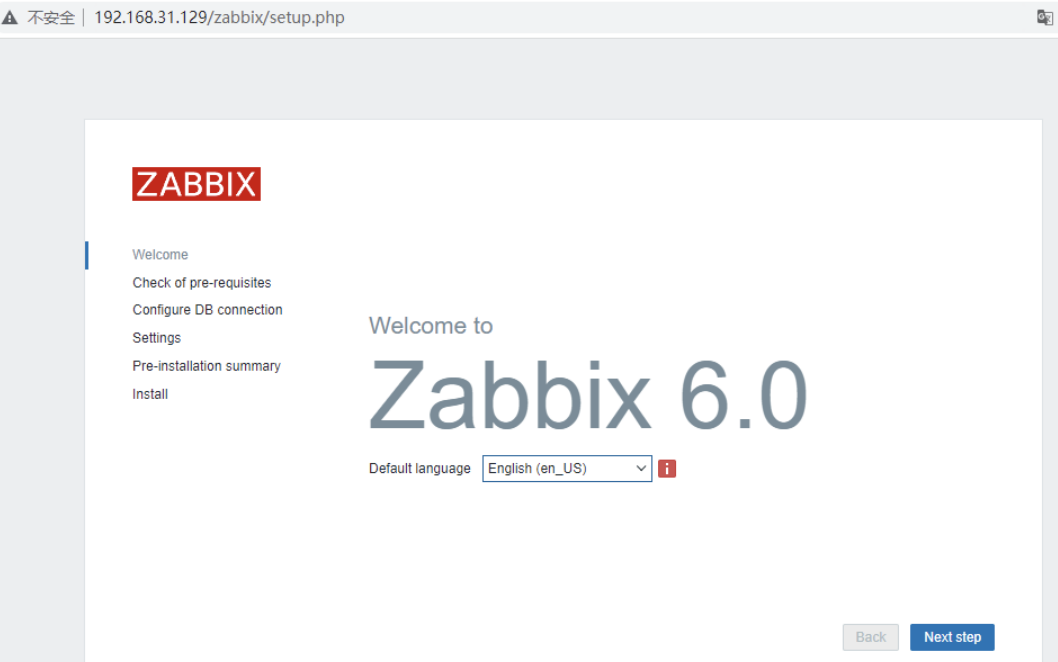
2.如果没有问题就选择中文,下一步。
3.在选择下一步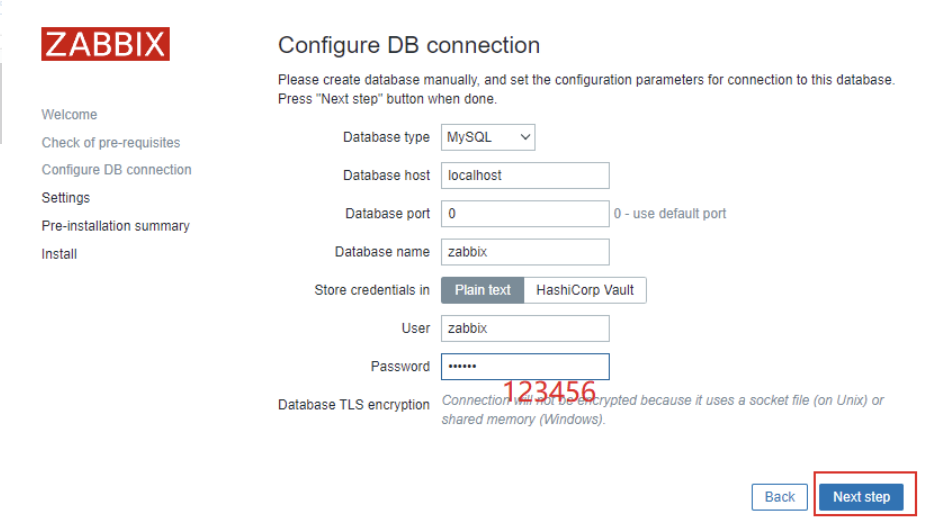
4.输入用户名Admin,密码:zabbix,点击登录; 注意大小写。
四:配置被监控主机
[root@localhost ~]# rpm -Uvh https://repo.zabbix.com/zabbix/6.0/rhel/8/x86_64/zabbix-release-6.0-1.el8.noarch.rpm #下载YUM源[root@localhost ~]# dnf clean all #清理缓存[root@localhost ~]# dnf -y install zabbix-agent #安装agent[root@localhost ~]# vim /etc/zabbix/zabbix_agentd.conf #修改配置文件[root@localhost ~]# grep "^[a-Z]" /etc/zabbix/zabbix_agentd.confPidFile=/run/zabbix/zabbix_agentd.pidLogFile=/var/log/zabbix/zabbix_agentd.logLogFileSize=0Server=127.0.0.1,192.168.10.30ListenPort=10050ListenIP=0.0.0.0StartAgents=3ServerActive=192.168.10.30Hostname=web1Include=/etc/zabbix/zabbix_agentd.d/*.conf[root@localhost ~]# systemctl restart zabbix-agent[root@localhost ~]# systemctl status zabbix-agent.service● zabbix-agent.service - Zabbix AgentLoaded: loaded (/usr/lib/systemd/system/zabbix-agent.service; disabled; vendor preset: disabled)Active: active (running) since Mon 2022-06-27 06:01:40 EDT; 57min agoProcess: 34735 ExecStart=/usr/sbin/zabbix_agentd -c $CONFFILE (code=exited, status=0/SUCCESS)Main PID: 34738 (zabbix_agentd)Tasks: 6 (limit: 4839)Memory: 4.1MCGroup: /system.slice/zabbix-agent.service├─34738 /usr/sbin/zabbix_agentd -c /etc/zabbix/zabbix_agentd.conf├─34739 /usr/sbin/zabbix_agentd: collector [idle 1 sec]├─34740 /usr/sbin/zabbix_agentd: listener #1 [waiting for connection]├─34741 /usr/sbin/zabbix_agentd: listener #2 [waiting for connection]├─34742 /usr/sbin/zabbix_agentd: listener #3 [waiting for connection]└─34743 /usr/sbin/zabbix_agentd: active checks #1 [idle 1 sec]
五:解决主机详情出现口口,中文乱码的情况
首先在windows上找个中文字体库文件,或者网上下载。拷贝zabbix安装目录解决乱码的情况。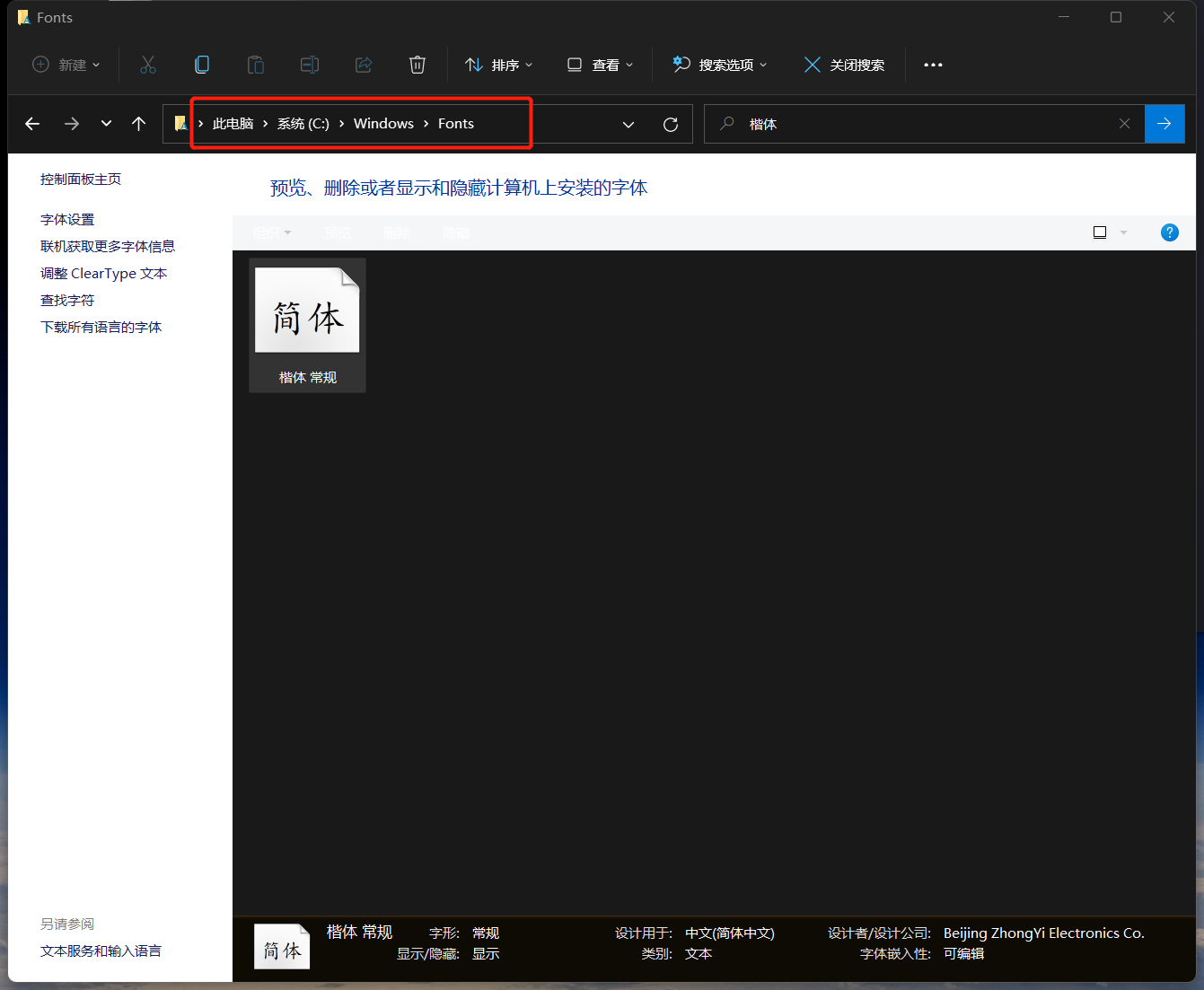
[root@localhost ~]# find / -name graphfont.ttf #查找字体所在位置/usr/share/zabbix/assets/fonts/graphfont.ttf[root@localhost ~]# find / -name "graphfont.ttf"/usr/share/zabbix/assets/fonts/graphfont.ttf[root@localhost ~]# cd /usr/share/zabbix/assets/fonts/[root@localhost fonts]# lsgraphfont.ttf graphfont.ttf.bak[root@localhost fonts]# ll总用量 11512lrwxrwxrwx 1 root root 33 6月 27 04:02 graphfont.ttf -> /etc/alternatives/zabbix-web-font-rw-r--r-- 1 root root 11787328 6月 27 08:40 graphfont.ttf.bak[root@localhost fonts]# mv graphfont.ttf.bak /usr/share/zabbix/assets/[root@localhost fonts]# cd ..[root@localhost assets]# lsfonts graphfont.ttf.bak img styles[root@localhost assets]# ll /usr/share/zabbix/assets/fonts/graphfont.ttflrwxrwxrwx 1 root root 33 6月 27 04:02 /usr/share/zabbix/assets/fonts/graphfont.ttf -> /etc/alternatives/zabbix-web-font[root@localhost assets]# ll /etc/alternatives/zabbix-web-fontlrwxrwxrwx 1 root root 38 6月 27 04:02 /etc/alternatives/zabbix-web-font -> /usr/share/fonts/dejavu/DejaVuSans.ttf[root@localhost assets]# mv /usr/share/fonts/dejavu/DejaVuSans.ttf /usr/share/fonts/dejavu/DejaVuSans.ttfback[root@localhost assets]# lsfonts graphfont.ttf.bak img styles[root@localhost assets]# mv graphfont.ttf.bak /usr/share/fonts/dejavu/DejaVuSans.ttf

centos 7.9请参考以下文档
https://os.51cto.com/article/677056.html https://blog.csdn.net/ht9999i/article/details/125169447

若有收获,就点个赞吧
0 人点赞


