<dependencies><dependency><groupId>org.example</groupId><artifactId>zdy-boot-starter</artifactId><version>1.0-SNAPSHOT</version></dependency><!--spring-boot-starter-web引入该jar包,会同时引入spring-boot-starter-web所依赖的jar包,该jar包默认引入的web容器是tomcat--><!--如果想将默认容器换为Jetty,就排使用exclusions标签排除掉tomcat的jar包,然后引入jetty的jar包--><dependency><groupId>org.springframework.boot</groupId><artifactId>spring-boot-starter-web</artifactId><exclusions><exclusion><groupId>org.springframework.boot</groupId><artifactId>spring-boot-starter-tomcat</artifactId></exclusion></exclusions></dependency><!--jetty--><dependency><groupId>org.springframework.boot</groupId><artifactId>spring-boot-starter-jetty</artifactId></dependency></dependencies>
刷新maven,重启项目,查看日志,发现web容器已经切换为了Jetty,如果起不来,重启IDEA试试(我当时就是起不来,重启后,方能起来了),如下: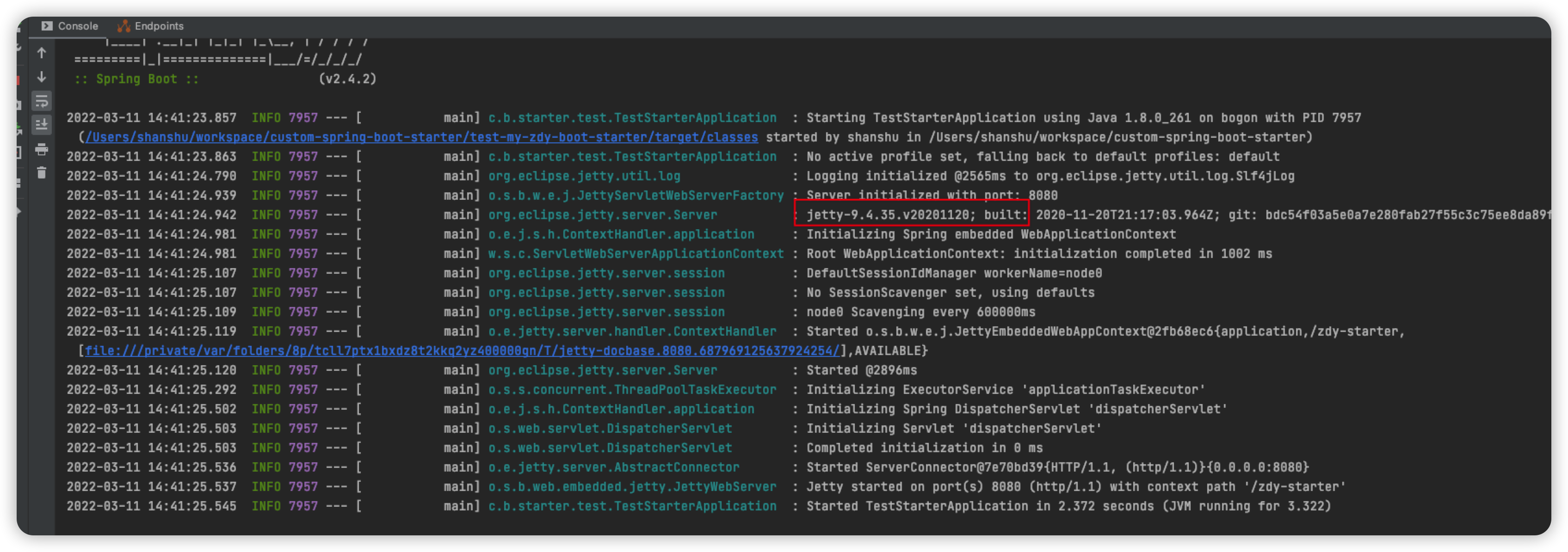
测试接口:

我们可以看到如上类中的配置,里面有关于web容器的内部配置,使用了@ConditionalOnClass注解,
�当我们引入spring-boot-starter-web依赖,没有排除tomcat时,默认满足条件,所以tomcat的配置信息生效,将使用tomcat作为Web容器,当我们排序tomcat依赖,并引入Jetty依赖时,Jetty配置类,满足条件,这是Jetty配置类生效,服务将采用Jetty作为Web容器。

若有收获,就点个赞吧
0 人点赞


