1 为什么需要微服务网关
不同的微服务一般有不同的网络地址,而外部的客户端可能需要调用多个服务的接口才能完成一个业务需求。比如一个电影购票的收集APP,可能回调用电影分类微服务,用户微服务,支付微服务等。如果客户端直接和微服务进行通信,会存在一下问题:
- 客户端会多次请求不同微服务,增加客户端的复杂性
- 存在跨域请求,在一定场景下处理相对复杂
- 认证复杂,每一个服务都需要独立认证
- 难以重构,随着项目的迭代,可能需要重新划分微服务,如果客户端直接和微服务通信,那么重构会难以实施
- 某些微服务可能使用了其他协议,直接访问有一定困难
上述问题,都可以借助微服务网关解决。微服务网关是介于客户端和服务器端之间的中间层,所有的外部请求都会先经过微服务网关。
2 springCloud-Netflix-Zuul网关
2.1. 什么是Zuul
Zuul是Netflix开源的微服务网关,他可以和Eureka,Ribbon,Hystrix等组件配合使用。Zuul组件的核心是一系列的过滤器,这些过滤器可以完成以下功能:
- 身份认证和安全: 识别每一个资源的验证要求,并拒绝那些不符的请求
- 审查与监控:
- 动态路由:动态将请求路由到不同后端集群
- 压力测试:逐渐增加指向集群的流量,以了解性能
- 负载分配:为每一种负载类型分配对应容量,并弃用超出限定值的请求
- 静态响应处理:边缘位置进行响应,避免转发到内部集群
- 多区域弹性:跨域AWS Region进行请求路由,旨在实现ELB(ElasticLoad Balancing)使用多样化
Spring Cloud对Zuul进行了整合和增强。使用Zuul后,架构图演变为以下形式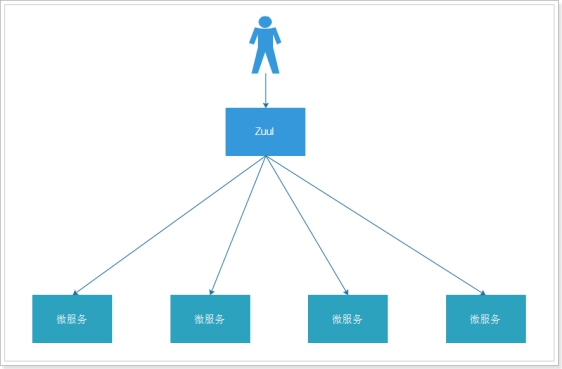
微服务的Zuul网关可以类比,ngnix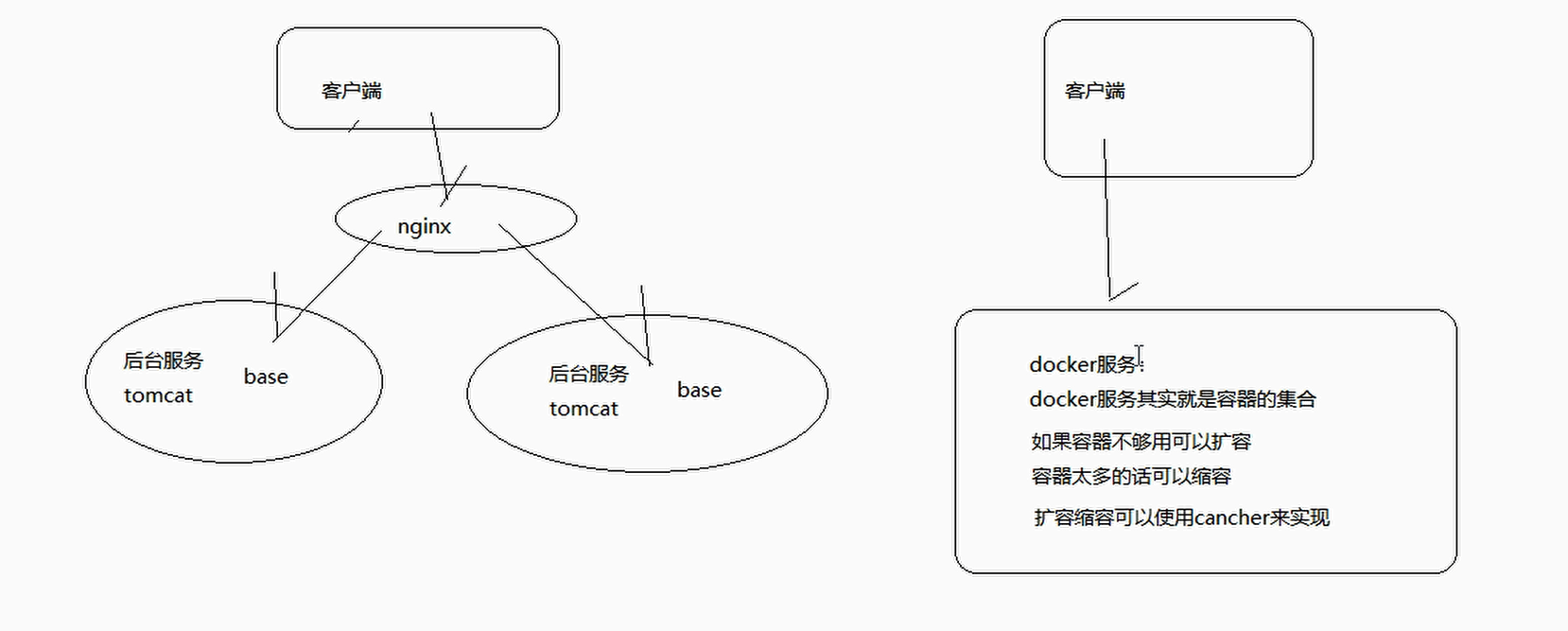

Spring Cloud Zuul通过与Spring Cloud Eureka进行整合,将自身注册为Eureka服务治理下的应用,同时从Eureka中获得了所有其他微服务的实例信息
对于路由规则的维护,Zuul默认会将通过以服务名作为ContextPath的方式来创建路由映射
Zuul提供了一套过滤器机制,可以支持在API网关无附上进行统一调用来对微服务接口做前置过滤,已实现对微服务接口的拦截和校验
2.1Zuul路由转发
2.1.1 管理后台微服务网关
(1)创建子模块tensquare_manager,pom.xml引入eureka-client 和zuul的依赖
<dependencies><dependency><groupId>org.springframework.cloud</groupId><artifactId>spring‐cloud‐starter‐netflix‐eureka‐client</artifactId></dependency><dependency><groupId>org.springframework.cloud</groupId><artifactId>spring‐cloud‐starter‐netflix‐zuul</artifactId></dependency></dependencies>
(2)创建application.yml
server:port: 9011spring:application:name: tensquare‐manager #指定服务名eureka:client:serviceUrl: #Eureka客户端与Eureka服务端进行交互的地址defaultZone: http://127.0.0.1:6868/eureka/instance:prefer‐ip‐address: truezuul:routes:tensquare‐gathering: #活动path: /gathering/** #配置请求URL的请求规则serviceId: tensquare‐gathering #指定Eureka注册中心中的服务idtensquare‐article: #文章path: /article/** #配置请求URL的请求规则serviceId: tensquare‐article #指定Eureka注册中心中的服务idtensquare‐base: #基础path: /base/** #配置请求URL的请求规则serviceId: tensquare‐base #指定Eureka注册中心中的服务idtensquare‐friend: #交友path: /friend/** #配置请求URL的请求规则serviceId: tensquare‐friend #指定Eureka注册中心中的服务idtensquare‐qa: #问答path: /qa/** #配置请求URL的请求规则serviceId: tensquare‐qa #指定Eureka注册中心中的服务idtensquare‐recruit: #招聘path: /recruit/** #配置请求URL的请求规则serviceId: tensquare‐recruit #指定Eureka注册中心中的服务idtensquare‐spit: #吐槽path: /spit/** #配置请求URL的请求规则serviceId: tensquare‐spit #指定Eureka注册中心中的服务idtensquare‐user: #用户path: /user/** #配置请求URL的请求规则serviceId: tensquare‐user #指定Eureka注册中心中的服务id
(3)编写启动类
package com.tensquare.manager;

import org.springframework.boot.SpringApplication;
import org.springframework.boot.autoconfigure.SpringBootApplication;
import org.springframework.cloud.netflix.zuul.EnableZuulProxy;
import org.springframework.context.annotation.Bean;
import util.JwtUtil;

/**
 * @author: Luck-zb
 * description:后台管理系统,网关服务 -- 启动主程序
 * Date:2021/2/2 - 16:02
 */
@SpringBootApplication
@EnableZuulProxy
public class ManagerApplication {

    public static void main(String[] args) {
        SpringApplication.run(ManagerApplication.class,args);
    }

    @Bean
    public JwtUtil jwtUtil() {
        return new JwtUtil();
    }

}
2.1.2网站前台的微服务网关
(1)创建子模块tensquare_web,pom.xml引入依赖zuul
        <dependencies>
        <dependency>
            <groupId>org.springframework.cloud</groupId>
            <artifactId>spring‐cloud‐starter‐netflix‐eureka‐client</artifactId>
        </dependency>
        <dependency>
            <groupId>org.springframework.cloud</groupId>
            <artifactId>spring‐cloud‐starter‐netflix‐zuul</artifactId>
        </dependency>
    </dependencies>
(2)创建application.yml
server:
  port: 9012
spring:
  application:
    name: tensquare‐web #指定服务名
eureka:
  client:
    serviceUrl: #Eureka客户端与Eureka服务端进行交互的地址
      defaultZone: http://127.0.0.1:6868/eureka/
  instance:
    prefer‐ip‐address: true
zuul:
  routes:
    tensquare‐gathering: #活动
      path: /gathering/** #配置请求URL的请求规则
      serviceId: tensquare‐gathering #指定Eureka注册中心中的服务id
    tensquare‐article: #文章
      path: /article/** #配置请求URL的请求规则
      serviceId: tensquare‐article #指定Eureka注册中心中的服务id
    tensquare‐base: #基础
      path: /base/** #配置请求URL的请求规则
      serviceId: tensquare‐base #指定Eureka注册中心中的服务id
    tensquare‐friend: #交友
      path: /friend/** #配置请求URL的请求规则
      serviceId: tensquare‐friend #指定Eureka注册中心中的服务id
    tensquare‐qa: #问答
      path: /qa/** #配置请求URL的请求规则
      serviceId: tensquare‐qa #指定Eureka注册中心中的服务id
    tensquare‐recruit: #招聘
      path: /recruit/** #配置请求URL的请求规则
      serviceId: tensquare‐recruit #指定Eureka注册中心中的服务id
    tensquare‐spit: #吐槽
      path: /spit/** #配置请求URL的请求规则
      serviceId: tensquare‐spit #指定Eureka注册中心中的服务id
    tensquare‐user: #用户
      path: /user/** #配置请求URL的请求规则
      serviceId: tensquare‐user #指定Eureka注册中心中的服务id
    tensquare‐search: #用户
      path: /search/** #配置请求URL的请求规则
      serviceId: tensquare‐search #指定Eureka注册中心中的服务id
(3)编写启动类
package com.tensquare.web;

import org.springframework.boot.SpringApplication;
import org.springframework.boot.autoconfigure.SpringBootApplication;
import org.springframework.cloud.netflix.zuul.EnableZuulProxy;

/**
 * @author: Luck-zb
 * description:前台网站网关服务 -- 启动主程序
 * Date:2021/2/2 - 16:54
 */
@SpringBootApplication
@EnableZuulProxy
public class WebApplication {

    public static void main(String[] args) {
        SpringApplication.run(WebApplication.class,args);
    }
}
2.2Zuul过滤器
2.2.1Zuul过滤器快速体验
我们现在在tensquare_web 创建一个简单的zuul过滤器
@Component
public class WebFilter extends ZuulFilter {
    @Override
    public String filterType() {
         return "pre";// 前置过滤器
    }
    @Override
    public int filterOrder() {
        return 0;// 优先级为0,数字越大,优先级越低
    }
    @Override
    public boolean shouldFilter() {
        return true;// 是否执行该过滤器,此处为true,说明需要过滤
    }
    @Override
    public Object run() throws ZuulException {
        System.out.println("zuul过滤器...");
        return null;
    }
}
启动tensquare_web会发现过滤器已经执行
filterType():返回一个字符串代表过滤器的类型,在zuul中定义了四种不同生命周期的过滤器类型,具体如下:
pre :可以在请求被路由之前调用
route :在路由请求时候被调用
post :在route和error过滤器之后被调用
error :处理请求时发生错误时被调用
filterOrder() :通过int值来定义过滤器的执行顺序
shouldFilter():返回一个boolean类型来判断该过滤器是否要执行,所以通过此函数可实现过滤器的开关。在上例中,我们直接返回true,所以该过滤器总是生效
run():过滤器的具体逻辑。
2.2.2网站前台的token转发
我们现在在过滤器中接收header,转发给微服务修改tensquare_web的过滤器。如果有token,直接转发。
注意:由于当使用zuul网关的时候,会丢失请求的头信息,在一些需要头信息认证的场景,就不能达到预期的效果,这里需要使用一个网关过滤器,在过滤器中获取到请求的头信息,然后再对请求进行转发
为什么会丢失请求信息呢?
因为请求头信息在request域中,而request域在一次请求范围内有效,当第一次请求到达网关的时候,是带着请求头信息的,到达网关后,这一次请求就算结束了;然后网关在分发请求就相当于第二个请求了,这时就是另外的一个request域了,新的request域中就没有了第一次请求网关的头信息了,这时候就需要在网关的过滤器中第一次请求到达时获取到请求头相关的信息,在网关对请求分发前,将头信息保存到新的request域对象中
package com.tensquare.web.filter;

import com.netflix.zuul.ZuulFilter;
import com.netflix.zuul.context.RequestContext;
import com.netflix.zuul.exception.ZuulException;
import org.apache.commons.lang3.StringUtils;
import org.slf4j.Logger;
import org.slf4j.LoggerFactory;
import org.springframework.stereotype.Component;

import javax.servlet.http.HttpServletRequest;

/**
 * @author: Luck-zb
 * description:Zuul网关过滤器
 *
 * 由于当使用zuul网关的时候,会丢失请求的头信息,在一些需要头信息认证的场景,就不能达到预期的效果,这里
 * 需要使用一个网关过滤器,在过滤器中获取到请求的头信息,然后再对请求进行转发
 *
 * Date:2021/2/2 - 17:14
 */
@Component
public class WebFilter extends ZuulFilter{

    private static Logger logger = LoggerFactory.getLogger(WebFilter.class);
    /**
     * 指定当前过滤器WebFilter在请求Controller之前还是之后执行
     * @return
     */
    @Override
    public String filterType() {
        return "pre"; // pre之前执行,post之后执行
    }

    /**
     * 在有多个过滤器的情况下,指定当前过滤器WebFilter的执行顺序,数字越小越优先
     * @return
     */
    @Override
    public int filterOrder() {
        return 0;
    }

    /**
     * 指定当前过滤器是否生效
     * @return
     */
    @Override
    public boolean shouldFilter() {
        return true;
    }

    /**
     * 过滤器的内容,返回任意Object,永久放行,如果想中断执行,需要调用停止执行的方法
     * @return
     * @throws ZuulException
     */
    @Override
    public Object run() throws ZuulException {

        // 获取Request上下文对象
        RequestContext currentContext = RequestContext.getCurrentContext();
        // 得到Request域对象
        HttpServletRequest request = currentContext.getRequest();
        // 获取头信息
        String header = request.getHeader("Authorization");

        if (logger.isInfoEnabled()) {
            logger.info("WebFilter execute -- receive Header: {}",header);
        }

        // 如果有头信息就转发
        if (StringUtils.isNotBlank(header)) {
            currentContext.addZuulRequestHeader("Authorization", header);
        }
        return null;
    }
}
2.2.3 管理后台过滤器实现token校验
修改tensquare_manager的过滤器, 因为是管理后台使用,所以需要在过滤器中对token进行验证。
(1)tensquare_manager引入tensquare_common依赖 ,因为需要用到其中的JWT工
具类
                <dependency>
            <groupId>com.tensquare</groupId>
            <artifactId>tensquare_common</artifactId>
            <version>1.0‐SNAPSHOT</version>
        </dependency>
(2)修改tensquare_manager配置文件application.yml
添加关于JWT的配置
jwt: # jwt token验证工具类使用,相关配置
  config:
    key: fantastic
    ttl: 3600000
(3)修改tensquare_manager的启动类,添加bean
package com.tensquare.manager;

import org.springframework.boot.SpringApplication;
import org.springframework.boot.autoconfigure.SpringBootApplication;
import org.springframework.cloud.netflix.zuul.EnableZuulProxy;
import org.springframework.context.annotation.Bean;
import util.JwtUtil;

/**
 * @author: Luck-zb
 * description:后台管理系统,网关服务 -- 启动主程序
 * Date:2021/2/2 - 16:02
 */
@SpringBootApplication
@EnableZuulProxy
public class ManagerApplication {

    public static void main(String[] args) {
        SpringApplication.run(ManagerApplication.class,args);
    }

    @Bean
    public JwtUtil jwtUtil() {
        return new JwtUtil();
    }

}
(4)tensquare_manager编写过滤器类
package com.tensquare.manager.filter;

import com.netflix.zuul.ZuulFilter;
import com.netflix.zuul.context.RequestContext;
import com.netflix.zuul.exception.ZuulException;
import io.jsonwebtoken.Claims;
import org.apache.commons.lang3.StringUtils;
import org.slf4j.Logger;
import org.slf4j.LoggerFactory;
import org.springframework.beans.factory.annotation.Autowired;
import org.springframework.stereotype.Component;
import util.JwtUtil;

import javax.servlet.http.HttpServletRequest;

/**
 * @author: Luck-zb
 * description:后台管理系统,网关过滤器
 * Date:2021/2/3 - 8:29
 */
@Component
public class ManagerFilter extends ZuulFilter {

    private static Logger logger = LoggerFactory.getLogger(ManagerFilter.class);

    @Autowired
    private JwtUtil jwtUtil;

    @Override
    public String filterType() {
        return "pre";
    }

    @Override
    public int filterOrder() {
        return 0;
    }

    @Override
    public boolean shouldFilter() {
        return true;
    }

    @Override
    public Object run() throws ZuulException {

        // 获取RequestContext上下文对象
        RequestContext currentContext = RequestContext.getCurrentContext();
        // 获取request域对象
        HttpServletRequest request = currentContext.getRequest();

        /**
         * Zuul网关,通过读取解析配置文件中的配置的服务,通过配置的服务名来找到相应的服务,然后再对请求
         * 进行分发,而这个操作是靠一个叫OPTIONS的方法来完成的,所以这个请求OPTIONS方法的请求也需要放行
         */
        if (request.getMethod().equals("OPTIONS")) {
            return null;
        }

        // 如果本来就是登录验证操作,也不能拦截验证
        String requestURL = request.getRequestURL().toString();
        String requestURI = request.getRequestURI();
        logger.info("requestURL:[{}],requestURI:[{}]", requestURL, requestURI);
        if (requestURL.indexOf("login") > 0) {
            return null;
        }

        // 获取请求头信息
        String header = request.getHeader("Authorization");

        if (logger.isInfoEnabled()) {
            logger.info("managerFilter receive header : {}", header);
        }

        if (StringUtils.isNotBlank(header)) {
            if (header.startsWith("Bearer ")) {
                String token = header.substring(7);
                try {
                    Claims claims = jwtUtil.parseJWT(token);
                    Object roles = claims.get("roles");
                    if (roles != null && roles.equals("admin")) {
                        // 转发头信息
                        currentContext.addZuulRequestHeader("Authorization", header);
                        // 放行
                        return null;
                    }
                } catch (Exception e) {
                    e.printStackTrace();
                }
            }
        }

        //  不放行
        currentContext.setSendZuulResponse(false);
        currentContext.setResponseStatusCode(403);
        currentContext.setResponseBody("权限不够!");
        currentContext.getResponse().setContentType("text/html;charset=utf-8");
        return null; // 这个返回值已经不生效了,这里只是为了保证语法能通过
    }
}
需要注意,Zuul网关,通过读取解析配置文件中的配置的服务,通过配置的服务名来找到相应的服务,然后再对请求进行分发,而这个操作是靠一个叫OPTIONS的方法来完成的,所以这个请求OPTIONS方法的请求也需要放行;这里我们通过 ctx.setSendZuulResponse(false) 令zuul过滤该请求,不对其进行路由,然后通过 ctx.setResponseStatusCode(401) 设置了其返回的错误码
3 springCloud-Gateway网关
3.1zuul和Spring Cloud Gateway的比较
1.开源组织不同。
Spring Cloud Gateway 是 Spring Cloud 微服务平台的一个子项目,属于 Spring 开源社区,依赖名叫:spring-cloud-starter-gateway。https://spring.io/projects/spring-cloud-gateway
Zuul 是 Netflix 公司的开源项目,Spring Cloud 在 Netflix 项目中也已经集成了 Zuul,依赖名叫:spring-cloud-starter-netflix-zuul。https://github.com/Netflix/zuul
2.性能比较
Spring Cloud Gateway基于Spring 5、Project Reactor、Spring Boot 2,使用非阻塞式的API,内置限流过滤器,支持长连接(比如 websockets),在高并发和后端服务响应慢的场景下比Zuul1的表现要好。
Zuul基于Servlet2.x构建,使用阻塞的API,没有内置限流过滤器,不支持长连接。
两者都能与Sentinel(是阿里开源的一款高性能的限流框架)集成。
综上所述,这也就是为什么现在越来越多的公司选择用gateway来替代zuul的重要原因。

若有收获,就点个赞吧
0 人点赞


