一、码前必备知识
1.1 、springBoot starter机制
SpringBoot中的starter是一种非常重要的机制,能够抛弃以前繁杂的配置,将其统一集成进starter,应用者只需要在maven中引入starter依赖,SpringBoot就能自动扫描到要加载的信息并启动相应的默认配置。starter让我们摆脱了各种依赖库的处理,需要配置各种信息的困扰。SpringBoot会自动通过classpath路径下的类发现需要的Bean,并注册进IOC容器。SpringBoot提供了针对日常企业应用研发各种场景的spring-boot-starter依赖模块。所有这些依赖模块都遵循着约定成俗的默认配置,并允许我们调整这些配置,即遵循“约定大于配置”的理念。
2.2、为什么要自定义starter
在我们的日常开发工作中,经常会有一些独立于业务之外的配置模块,我们经常将其放到一个特定的包下,然后如果另一个工程需要复用这块功能的时候,需要将代码硬拷贝到另一个工程,重新集成一遍,麻烦至极。如果我们将这些可独立于业务代码之外的功配置模块封装成一个个starter,复用的时候只需要将其在pom中引用依赖即可,SpringBoot为我们完成自动装配,简直不要太爽。
1.3、自定义starter的案例
以下案例由笔者工作中遇到的部分场景
▲ 动态数据源。
▲ 登录模块。
▲ 基于AOP技术实现日志切面。
。。。。。。
1.4、自定义starter的命名规则
SpringBoot提供的starter以spring-boot-starter-xxx的方式命名的。官方建议自定义的starter使用xxx-spring-boot-starter命名规则。以区分SpringBoot生态提供的starter。
二、自定义SpringBoot starter
2.1、新建一个工程
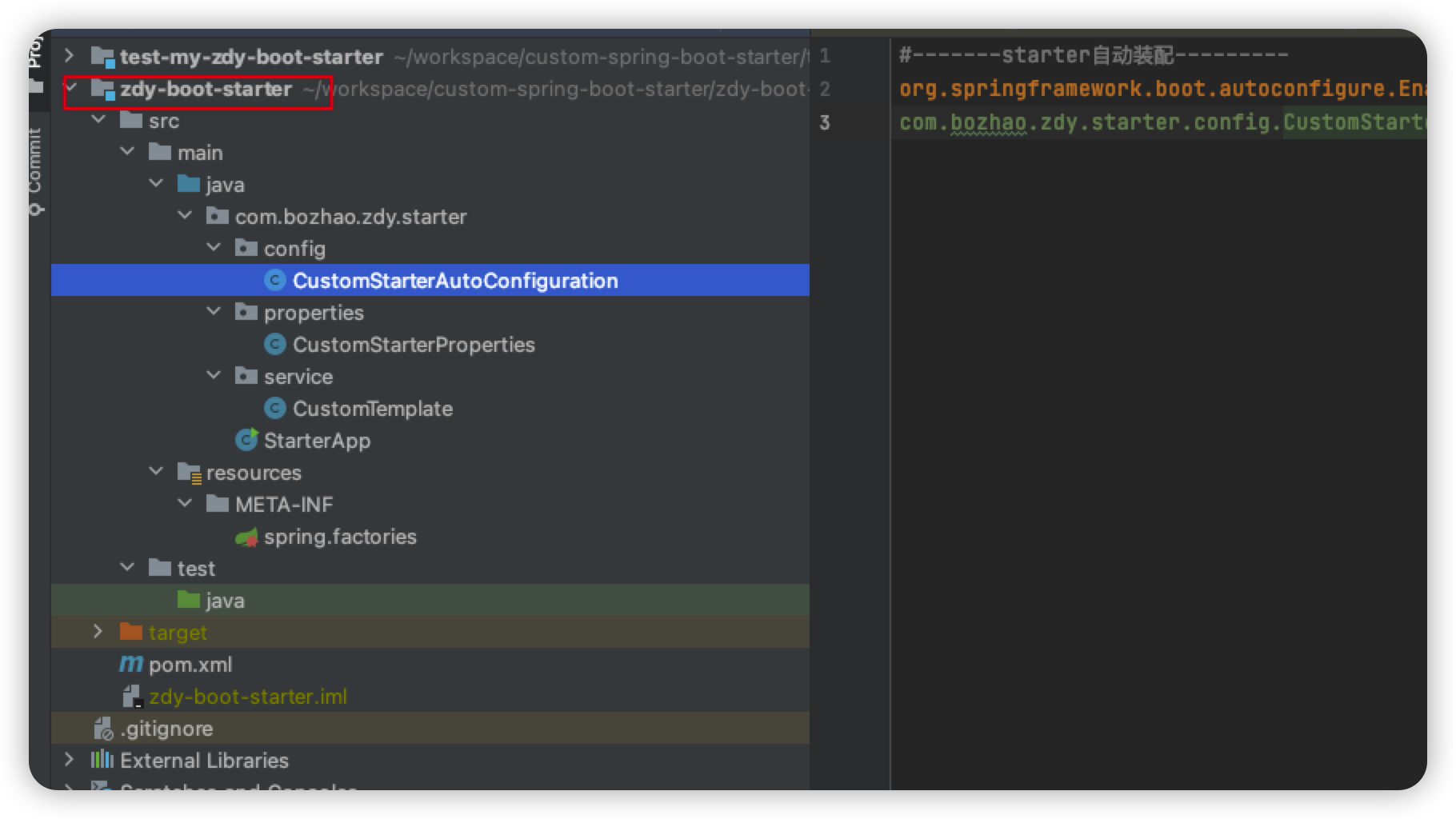
2.2、pom依赖
<?xml version="1.0" encoding="UTF-8"?><project xmlns="http://maven.apache.org/POM/4.0.0"xmlns:xsi="http://www.w3.org/2001/XMLSchema-instance"xsi:schemaLocation="http://maven.apache.org/POM/4.0.0 http://maven.apache.org/xsd/maven-4.0.0.xsd"><modelVersion>4.0.0</modelVersion><groupId>org.example</groupId><artifactId>zdy-boot-starter</artifactId><version>1.0-SNAPSHOT</version><properties><maven.compiler.source>8</maven.compiler.source><maven.compiler.target>8</maven.compiler.target></properties><dependencyManagement><dependencies><dependency><groupId>org.springframework.boot</groupId><artifactId>spring-boot-dependencies</artifactId><version>2.3.0.RELEASE</version><type>pom</type><scope>import</scope></dependency></dependencies></dependencyManagement><dependencies><dependency><groupId>org.springframework.boot</groupId><artifactId>spring-boot-configuration-processor</artifactId><scope>compile</scope><optional>true</optional></dependency><dependency><groupId>org.springframework.boot</groupId><artifactId>spring-boot-autoconfigure-processor</artifactId><scope>compile</scope><optional>true</optional></dependency><dependency><groupId>org.springframework.boot</groupId><artifactId>spring-boot-autoconfigure</artifactId><scope>compile</scope></dependency><dependency><groupId>org.springframework.boot</groupId><artifactId>spring-boot-starter</artifactId></dependency></dependencies></project>
2.3、定义一个实体类映射配置信息
@ConfigurationProperties(prefix = “custom”) 它可以把相同前缀的配置信息通过配置项名称映射成实体类,比如我们这里指定 prefix = “custom” 这样,我们就能将以custom为前缀的配置项拿到了。
ps:其实这个注解很强大,它不但能映射成String或基本类型的变量。还可以映射为List,Map等数据结构。
package com.bozhao.zdy.starter.properties;

import org.springframework.boot.context.properties.ConfigurationProperties;

/**
 * @author ZhaoBo (zhaobo@shanshu.ai)
 * @date 2022/3/10
 */
@ConfigurationProperties(prefix = "custom")
public class CustomStarterProperties {

    private String code;

    private String name;

    public String getCode() {
        return code;
    }

    public void setCode(String code) {
        this.code = code;
    }

    public String getName() {
        return name;
    }

    public void setName(String name) {
        this.name = name;
    }

    @Override
    public String toString() {
        return "CustomStarterProperties{" + "code='" + code + '\'' + ", name='" + name + '\'' + '}';
    }
}
2.4、定义一个要暴露的类
这里我们定义一个类,暴露给使用starter的人,使用其中的方法功能,完成一些事情,如我们比较熟悉的RestTemplate、RedisTemplate等等,这里我们自定义一个CustomTemplate,实现一些简单的操作呢
package com.bozhao.zdy.starter.service;

/**
 * @author ZhaoBo (zhaobo@shanshu.ai)
 * @date 2022/3/10
 */
public class CustomTemplate {

    private String code;

    private String name;

    public String getCode() {
        return code;
    }

    public void setCode(String code) {
        this.code = code;
    }

    public String getName() {
        return name;
    }

    public void setName(String name) {
        this.name = name;
    }


    public String sayHello() {
        return "CustomTemplate{" + "code='" + code + '\'' + ", name='" + name + '\'' + '}';
    }

}
�2.5 、定义一个配置类
这里,我们将DemoService类定义为一个Bean,交给Ioc容器。
▲ @Configuration 注解就不多说了。
▲ @EnableConfigurationProperties 注解。该注解是用来开启对3步骤中 @ConfigurationProperties 注解配置Bean的支持。也就是@EnableConfigurationProperties注解告诉Spring Boot 能支持@ConfigurationProperties。
当然了,也可以在 @ConfigurationProperties 注解的类上添加 @Configuration 或者 @Component 注解
▲ @ConditionalOnProperty 注解控制 @Configuration 是否生效。简单来说也就是我们可以通过在yml配置文件中控制 @Configuration 注解的配置类是否生效。
package com.bozhao.zdy.starter.config;

import com.bozhao.zdy.starter.properties.CustomStarterProperties;
import com.bozhao.zdy.starter.service.CustomTemplate;
import org.springframework.beans.factory.annotation.Autowired;
import org.springframework.boot.autoconfigure.condition.ConditionalOnClass;
import org.springframework.boot.autoconfigure.condition.ConditionalOnMissingBean;
import org.springframework.boot.context.properties.EnableConfigurationProperties;
import org.springframework.context.annotation.Bean;
import org.springframework.context.annotation.Configuration;

/**
 * @author ZhaoBo (zhaobo@shanshu.ai)
 * @date 2022/3/10
 */
@Configuration
@ConditionalOnClass({ CustomTemplate.class})
@EnableConfigurationProperties(CustomStarterProperties.class)
public class CustomStarterAutoConfiguration {

    @Autowired
    private CustomStarterProperties customStarterProperties;

    @Bean
    @ConditionalOnMissingBean(CustomTemplate.class)
    public CustomTemplate getCustomStarterService() {
        CustomTemplate customTemplate = new CustomTemplate();
        customTemplate.setCode(customStarterProperties.getCode());
        customTemplate.setName(customStarterProperties.getName());
        return customTemplate;
    }
}
2.6、最重要的步骤来了
如图,新建META-INF文件夹,然后创建spring.factories文件,
在该文件中加入如下配置,该配置指定上步骤中定义的配置类为自动装配的配置。(笔者努力最近把自动装配的博客写出来)
#-------starter自动装配---------
org.springframework.boot.autoconfigure.EnableAutoConfiguration=\
com.bozhao.zdy.starter.config.CustomStarterAutoConfiguration
三、自定义starter的使用
将如上自定义的zdy-boot-starter工程使用maven的install命令,将工程打成jar包到本地maven仓库,这样一个简单的自定义boot-starter就算是做好了
3.1、新建一个测试Spring-boot工程用来测试自定义starter
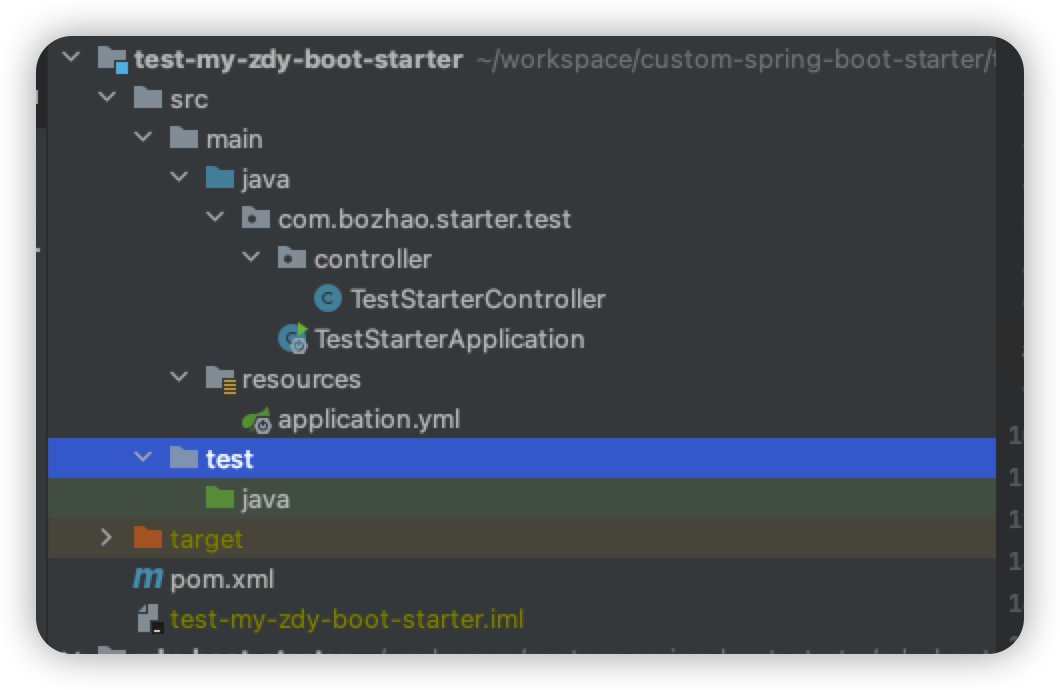
3.2、引入自定义的starter依赖
<?xml version="1.0" encoding="UTF-8"?>
<project xmlns="http://maven.apache.org/POM/4.0.0"
         xmlns:xsi="http://www.w3.org/2001/XMLSchema-instance"
         xsi:schemaLocation="http://maven.apache.org/POM/4.0.0 http://maven.apache.org/xsd/maven-4.0.0.xsd">
    <modelVersion>4.0.0</modelVersion>

    <groupId>org.example</groupId>
    <artifactId>test-my-zdy-boot-starter</artifactId>
    <version>1.0-SNAPSHOT</version>

    <properties>
        <maven.compiler.source>8</maven.compiler.source>
        <maven.compiler.target>8</maven.compiler.target>
    </properties>

    <parent>
        <groupId>org.springframework.boot</groupId>
        <artifactId>spring-boot-starter-parent</artifactId>
        <version>2.4.2</version>
    </parent>

    <dependencies>
        <dependency>
            <groupId>org.example</groupId>
            <artifactId>zdy-boot-starter</artifactId>
            <version>1.0-SNAPSHOT</version>
        </dependency>

        <dependency>
            <groupId>org.springframework.boot</groupId>
            <artifactId>spring-boot-starter-web</artifactId>
        </dependency>
    </dependencies>

</project>
3.3、配置文件
server:
  port: 8080
  servlet:
    context-path: /zdy-starter

#custom.name=国产品零零柒
#custom.code=S007
custom:
  code: S007
  name: 国产零零柒
3.4、然后写个测试类。
package com.bozhao.starter.test.controller;

import com.bozhao.zdy.starter.service.CustomTemplate;
import org.springframework.beans.factory.annotation.Autowired;
import org.springframework.web.bind.annotation.GetMapping;
import org.springframework.web.bind.annotation.RestController;

/**
* @author ZhaoBo (zhaobo@shanshu.ai)
* @date 2022/3/10
*/
@RestController
public class TestStarterController {

    @Autowired
    private CustomTemplate customTemplate;

    @GetMapping("/say-hello")
    public String sayHello() {
        return customTemplate.sayHello();
    }

}
3.5、浏览器访问接口

四、Demo地址:
https://gitee.com/Zb19920107446/custom-spring-boot-starter
完毕!!!

若有收获,就点个赞吧
0 人点赞


