为了缓解尺度变化和小目标的问题,现在已经提出了很多方法。
- 浅层特征与深层特征融合用来检测小目标。
- dilated/deformable convolution用来增加感受野来提升大目标的检测。
- 在不同分辨率的层做独立的预测来获取不同的尺度。
- 上下文用来对模棱两可的情况作分辨。
- 在一定范围尺度里面训练
- 在图像金字塔多尺度上推断
- 预测与NMS融合
目标检测重点
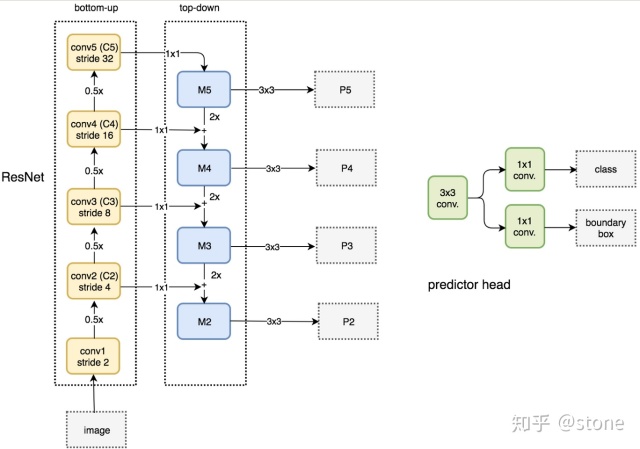
ResNet-FPN
Bottleneck是BasicBlock的升级版,其功能也是构造子网络,resnet18和resnet34中使用了BasicBlock,而resnet50、resnet101、resnet152使用了Bottlenect构造网络。
Bottleneck和BasicBlock网络结构对比如下图所示: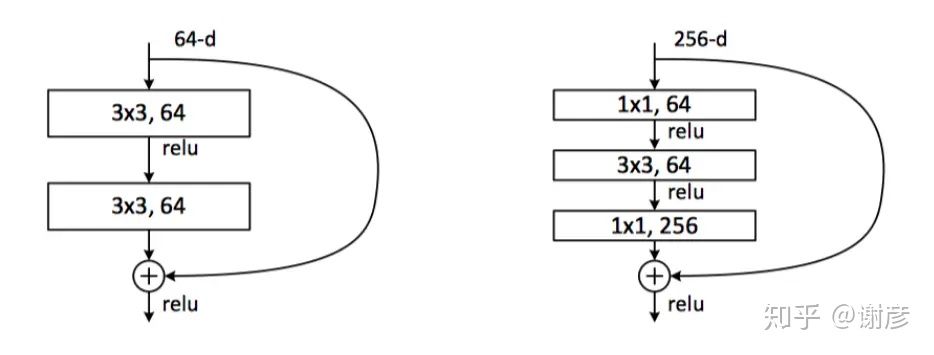
左图中的BasicBlock包含两个3x3的卷积层,右图的Bottleneck包括了三个卷积层,第一个1x1的卷积层用于降维,第二个3x3层用于处理,第三个1x1层用于升维,这样减少了计算量。
https://github.com/pytorch/vision/blob/148bac23afa21ae4df67aeb07a6f0c3bd3b15276/torchvision/models/resnet.py#L30
如果Stride不唯一,shortcut connection分支会有conv_1x1 stride 2的下采样步骤。
stem部分:conv_7x7 stride 2 padding 3 + maxpool 3x3 stride 2 padding 1
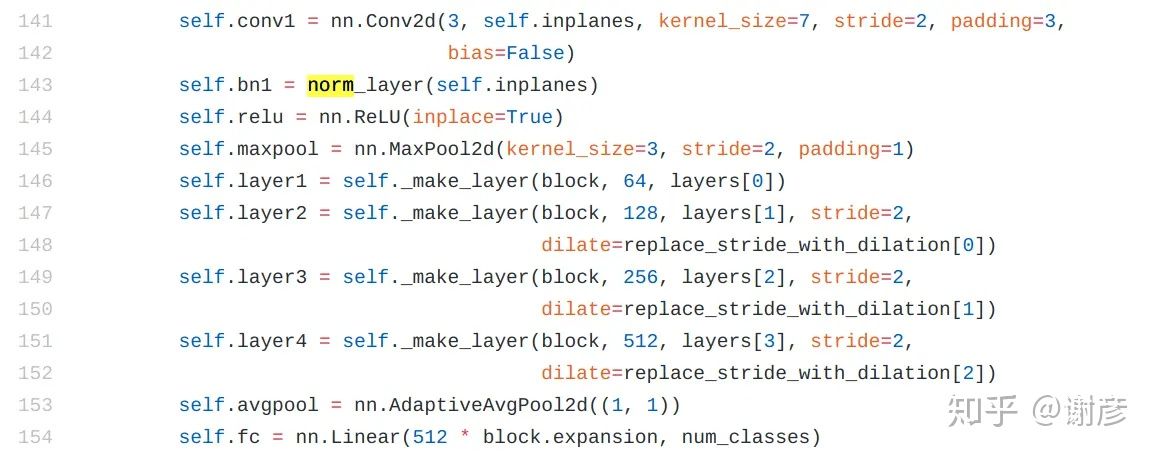
可以看到程序用函数_make_layer创建了四个层,以resnet50为例,各个层中block的个数依次是3,4,6,3个,而每个block(Bottleneck)中又包含三个卷积层,(3+4+6+3)*3共48个卷积层,外加第141行创建的另一卷积层和第154行创建的一个全连接层,总共50个主要层,这也是resnet50中50的含义。
YOLOv3
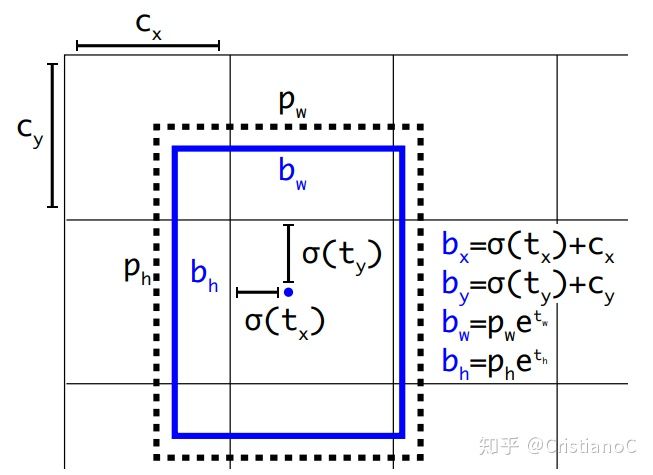
 和
和  分别表示预测框的长宽,
  和
和  分别表示先验框的长和宽。
  和
和  表示的是物体中心距离网格左上角位置的偏移量,
  和
和  则代表网格左上角的坐标。想了解具体详情的读者可以看我解读YOLO v2的那篇文章,也可以看下这面这篇对Yolov3边框预测分析讲解的很好的文章。我们结合代码来看一下(先按照255由来的方式拆解出各个坐标以及位移,再按照公式还原出预测框坐标):
def decode(self, conv_output, anchors, stride):"""return tensor of shape [batch_size, output_size, output_size, anchor_per_scale, 5 + num_classes]contains (x, y, w, h, score, probability)stride对应三种feature map的尺寸13,26,52anchor_per_scale即为每个cell预测3个bounding box"""conv_shape = tf.shape(conv_output)batch_size = conv_shape[0]output_size = conv_shape[1]anchor_per_scale = len(anchors)conv_output = tf.reshape(conv_output, (batch_size, output_size, output_size, anchor_per_scale, 5 + self.num_class))conv_raw_dxdy = conv_output[:, :, :, :, 0:2]conv_raw_dwdh = conv_output[:, :, :, :, 2:4]conv_raw_conf = conv_output[:, :, :, :, 4:5]conv_raw_prob = conv_output[:, :, :, :, 5: ]#画出(output_size,output_size)的网格y = tf.tile(tf.range(output_size, dtype=tf.int32)[:, tf.newaxis], [1, output_size])x = tf.tile(tf.range(output_size, dtype=tf.int32)[tf.newaxis, :], [output_size, 1])xy_grid = tf.concat([x[:, :, tf.newaxis], y[:, :, tf.newaxis]], axis=-1)xy_grid = tf.tile(xy_grid[tf.newaxis, :, :, tf.newaxis, :], [batch_size, 1, 1, anchor_per_scale, 1])#要计算位移先把int32转换为float32xy_grid = tf.cast(xy_grid, tf.float32)#根据公式计算预测框的中心x,y位置pred_xy = (tf.sigmoid(conv_raw_dxdy) + xy_grid) * stride#根据公式计算预测框的宽高w,hpred_wh = (tf.exp(conv_raw_dwdh) * anchors) * stridepred_xywh = tf.concat([pred_xy, pred_wh], axis=-1)# 根据公式计算含有object的置信度pred_conf = tf.sigmoid(conv_raw_conf)# 根据公式计算含有类别概率pred_prob = tf.sigmoid(conv_raw_prob)return tf.concat([pred_xywh, pred_conf, pred_prob], axis=-1)
FCOS
For each location in the feature map, we can map it back onto the input image: 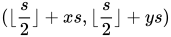
def _get_points_single(self, featmap_size, stride, dtype, device):h, w = featmap_sizex_range = torch.arange(0, w * stride, stride, dtype=dtype, device=device)y_range = torch.arange(0, h * stride, stride, dtype=dtype, device=device)y, x = torch.meshgrid(y_range, x_range)points = torch.stack((x.reshape(-1), y.reshape(-1)), dim=-1) + stride // 2return points
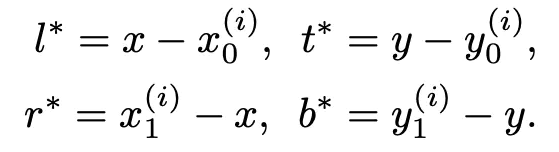
regress_ranges (tuple[tuple[int, int]]): Regress range of multiplelevel points.regress_ranges=((-1, 64), (64, 128), (128, 256), (256, 512),(512, INF)),
Faster-RCNN
def bbox2delta(proposals, gt, means=(0., 0., 0., 0.), stds=(1., 1., 1., 1.)):"""Compute deltas of proposals w.r.t. gt.We usually compute the deltas of x, y, w, h of proposals w.r.t groundtruth bboxes to get regression target.This is the inverse function of `delta2bbox()`Args:proposals (Tensor): Boxes to be transformed, shape (N, ..., 4)gt (Tensor): Gt bboxes to be used as base, shape (N, ..., 4)means (Sequence[float]): Denormalizing means for delta coordinatesstds (Sequence[float]): Denormalizing standard deviation for deltacoordinatesReturns:Tensor: deltas with shape (N, 4), where columns represent dx, dy,dw, dh."""assert proposals.size() == gt.size()proposals = proposals.float()gt = gt.float()px = (proposals[..., 0] + proposals[..., 2]) * 0.5py = (proposals[..., 1] + proposals[..., 3]) * 0.5pw = proposals[..., 2] - proposals[..., 0]ph = proposals[..., 3] - proposals[..., 1]gx = (gt[..., 0] + gt[..., 2]) * 0.5gy = (gt[..., 1] + gt[..., 3]) * 0.5gw = gt[..., 2] - gt[..., 0]gh = gt[..., 3] - gt[..., 1]dx = (gx - px) / pwdy = (gy - py) / phdw = torch.log(gw / pw)dh = torch.log(gh / ph)deltas = torch.stack([dx, dy, dw, dh], dim=-1)means = deltas.new_tensor(means).unsqueeze(0)stds = deltas.new_tensor(stds).unsqueeze(0)deltas = deltas.sub_(means).div_(stds)return deltas
不同尺度的ROI,使用不同特征层作为ROI pooling层的输入,大尺度ROI就用后面一些的金字塔层,比如P5;小尺度ROI就用前面一点的特征层,比如P4。那怎么判断ROI改用那个层的输出呢?论文的 K 使用如下公式,代码做了一点更改,替换为roi_level:
# 代码里面的计算替换为以下计算方式:roi_level = min(5, max(2, 4 + log2(sqrt(w * h) / ( 224 / sqrt(image_area)) ) ) )
224是ImageNet的标准输入,k0是基准值,设置为5,代表P5层的输出(原图大小就用P5层),w和h是ROI区域的长和宽,image_area是输入图片的长乘以宽,即输入图片的面积,假设ROI是112 * 112的大小,那么k = k0-1 = 5-1 = 4,意味着该ROI应该使用P4的特征层。k值会做取整处理,防止结果不是整数。

若有收获,就点个赞吧
0 人点赞


