https://www.kubernetes.org.cn/6226.html
一、概述
1.1 etcd 简介
etcd是一个分布式的键值对数据库,提供共享配置、服务的注册和发现。etcd与zookeeper相比算是轻量级系统,两者的一致性协议也一样,etcd的raft比zookeeper的paxos简单。
1.2 etcd 的特点
- 简单:安装配置简单,而且提供了HTTP API进行交互,使用也很简单
- 安全:支持SSL证书验证
- 快速:根据官方提供的benchmark数据,单实例支持每秒2k+读操作
-
1.3 概念术语
Raft:etcd所采用的保证分布式系统强一致性的算法。
- Node:一个Raft状态机实例。
- Member:一个etcd实例。它管理着一个Node,并且可以为客户端请求提供服务。
- Cluster:由多个Member构成可以协同工作的etcd集群。
- Peer:对同一个etcd集群中另外一个Member的称呼。
- Client:向etcd集群发送HTTP请求的客户端。
- WAL:预写式日志,etcd用于持久化存储的日志格式。
- snapshot:etcd防止WAL文件过多而设置的快照,存储etcd数据状态。
- Proxy:etcd的一种模式,为etcd集群提供反向代理服务。
- Leader:Raft算法中通过竞选而产生的处理所有数据提交的节点。
- Follower:竞选失败的节点作为Raft中的从属节点,为算法提供强一致性保证。
- Candidate:当Follower超过一定时间接收不到Leader的心跳时转变为Candidate开始竞选。
- Term:某个节点成为Leader到下一次竞选时间,称为一个Term。
Index:数据项编号。Raft中通过Term和Index来定位数据。
1.4 数据读写顺序
为了保证数据的强一致性,etcd 集群中所有的数据流向都是一个方向,从 Leader(主节点)流向 Follower,也就是所有 Follower 的数据必须与 Leader 保持一致,如果不一致会被覆盖。
用户对于 etcd 集群所有节点进行读写读取:由于集群所有节点数据是强一致性的,读取可以从集群中随便哪个节点进行读取数据
- 写入:etcd 集群有 leader,如果写入往 leader 写入,可以直接写入,然后Leader节点会把写入分发给所有 Follower,如果往 Follower 写入,然后Leader节点会把写入分发给所有 Follower
1.5 leader 选举
假设三个节点的集群,三个节点上均运行 Timer(每个 Timer 持续时间是随机的),Raft算法使用随机 Timer 来初始化 Leader 选举流程,第一个节点率先完成了 Timer,随后它就会向其他两个节点发送成为 Leader 的请求,其他节点接收到请求后会以投票回应然后第一个节点被选举为 Leader。
成为 Leader 后,该节点会以固定时间间隔向其他节点发送通知,确保自己仍是Leader。有些情况下当 Follower 们收不到 Leader 的通知后,比如说 Leader 节点宕机或者失去了连接,其他节点会重复之前选举过程选举出新的 Leader。1.6 判断数据是否写入(奇数原则)
etcd 认为写入请求被 Leader 节点处理并分发给了多数节点后,就是一个成功的写入。那么多少节点如何判定呢,假设总结点数是 N,那么多数节点Quorum=N/2+1。关于如何确定 etcd 集群应该有多少个节点的问题,上图的左侧的图表给出了集群中节点总数(Instances)对应的 Quorum 数量,用 Instances 减去 Quorom 就是集群中容错节点(允许出故障的节点)的数量。所以在集群中推荐的最少节点数量是3个,因为1和2个节点的容错节点数都是0,一旦有一个节点宕掉整个集群就不能正常工作了。
二、etcd 架构及解析
2.1 架构图
2.2 架构解析
etcd 主要分为四个部分。
- HTTP Server:用于处理用户发送的 API 请求以及其它 etcd 节点的同步与心跳信息请求。
- Store:用于处理 etcd 支持的各类功能的事务,包括数据索引、节点状态变更、监控与反馈、事件处理与执行等等,是 etcd 对用户提供的大多数 API 功能的具体实现。
- Raft:Raft 强一致性算法的具体实现,是 etcd 的核心。
- WAL:Write Ahead Log(预写式日志),是 etcd 的数据存储方式。除了在内存中存有所有数据的状态以及节点的索引以外,etcd 就通过 WAL 进行持久化存储。WAL 中,所有的数据提交前都会事先记录日志。
- Snapshot 是为了防止数据过多而进行的状态快照;
- Entry 表示存储的具体日志内容。
通常,一个用户的请求发送过来,会经由 HTTP Server 转发给 Store 进行具体的事务处理,如果涉及到节点的修改,则交给 Raft 模块进行状态的变更、日志的记录,然后再同步给别的 etcd 节点以确认数据提交,最后进行数据的提交,再次同步。
三、应用场景
3.1 服务注册与发现
etcd 可以用于服务的注册与发现
- 前后端业务注册发现
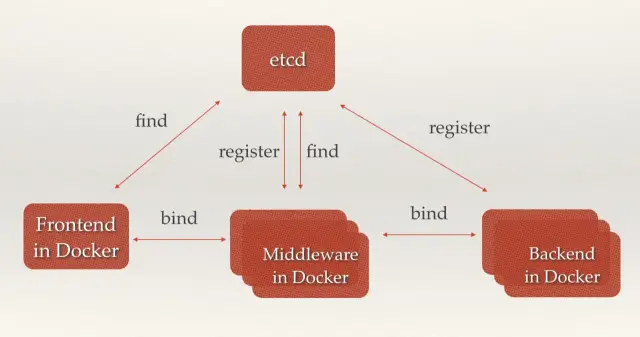
中间价已经后端服务在 etcd 中注册,前端和中间价可以很轻松的从 etcd 中发现相关服务器然后服务器之间根据调用关系相关绑定调用
- 多组后端服务器注册发现
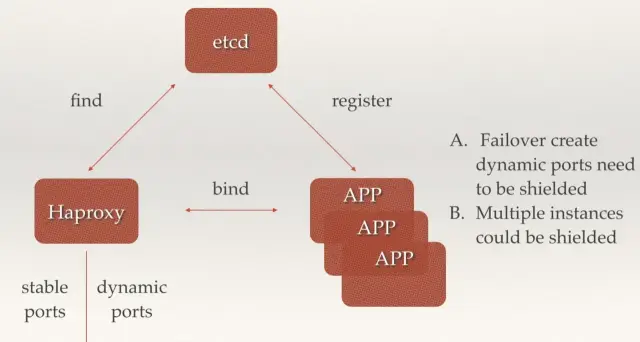
后端多个无状态相同副本的 app 可以同事注册到 etcd 中,前端可以通过 haproxy 从etcd 中获取到后端的 ip 和端口组,然后进行请求转发,可以用来故障转移屏蔽后端端口已经后端多组app实例。
3.2 消息发布与订阅
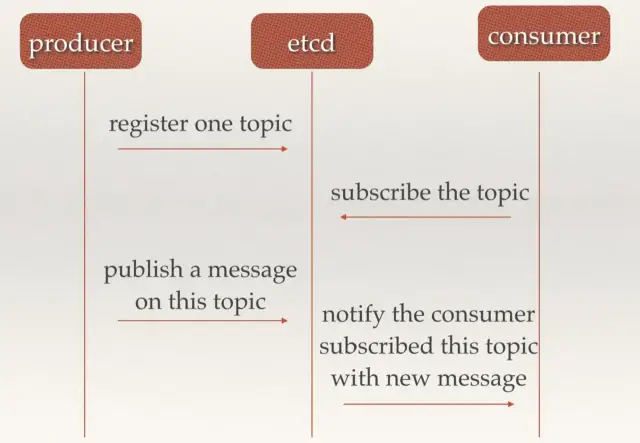
etcd 可以充当消息中间件,生产者可以往 etcd 中注册 topic 并发送消息,消费者从etcd 中订阅 topic,来获取生产者发送至 etcd 中的消息。
3.3 负载均衡
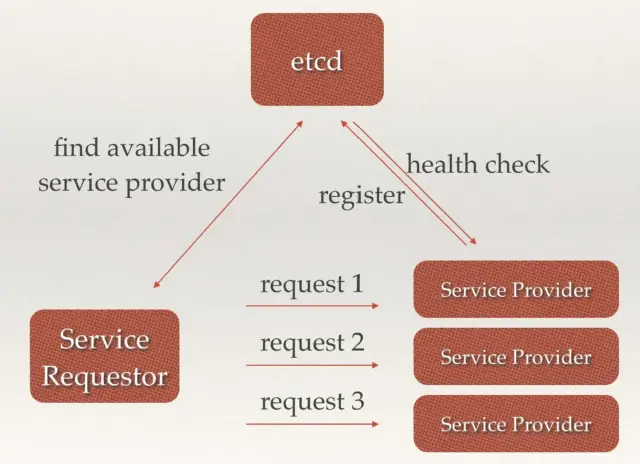
后端多组相同的服务提供者可以经自己服务注册到 etcd 中,etcd 并且会与注册的服务进行监控检查,服务请求这首先从 etcd 中获取到可用的服务提供者真正的 ip:port,然后对此多组服务发送请求,etcd 在其中充当了负载均衡的功能
3.4 分部署通知与协调
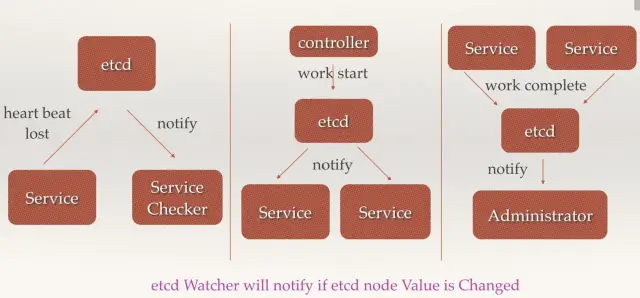
- 当 etcd watch 服务发现丢失,会通知服务检查
- 控制器向 etcd 发送启动服务,etcd通知服务进行相应操作
- 当服务完成 work 会讲状态更新至 etcd,etcd 对应会通知用户
3.5 分布式锁
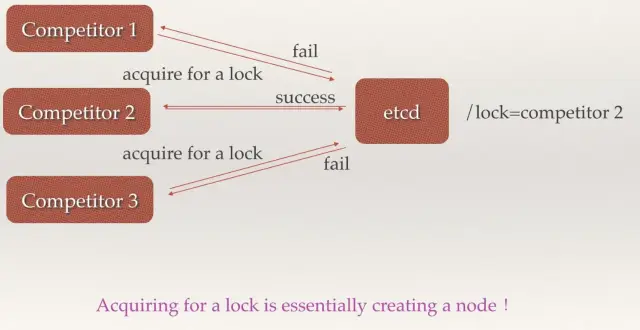
当有多个竞争者 node 节点,etcd 作为总控,在分布式集群中与一个节点成功分配 lock3.6 分布式队列

有对个 node,etcd 根据每个 node 来创建对应 node 的队列,根据不同的队列可以在etcd 中找到对应的 competitor3.7 集群与监控与 Leader 选举

etcd 可以根据 raft 算法在多个 node 节点来选举出 leader。
四、简单使用
5.1 增加
- set
指定某个键的值。例如:
etcdctl set /testdir/testkey "Hello world"Hello world
支持的选项包括:
--ttl '0' 该键值的超时时间(单位为秒),不配置(默认为0)则永不超时--swap-with-value value 若该键现在的值是value,则进行设置操作--swap-with-index '0' 若该键现在的索引值是指定索引,则进行设置操作
- mk
如果给定的键不存在,则创建一个新的键值。例如:
etcdctl mk /testdir/testkey "Hello world"
Hello world
当键存在的时候,执行该命令会报错,例如:
etcdctl mk /testdir/testkey "Hello world"
Error:  105: Key already exists (/testdir/testkey) [8]
支持的选项为:
--ttl '0' 超时时间(单位为秒),不配置(默认为 0)。则永不超时
- mkdir
如果给定的键目录不存在,则创建一个新的键目录。例如:
etcdctl mkdir testdir2
支持的选项为:
--ttl '0' 超时时间(单位为秒),不配置(默认为0)则永不超时。
- setdir
创建一个键目录。如果目录不存在就创建,如果目录存在更新目录TTL。
etcdctl setdir testdir3
支持的选项为:
--ttl '0' 超时时间(单位为秒),不配置(默认为0)则永不超时。
5.2 删除
- rm
删除某个键值。例如:
etcdctl rm /testdir/testkey
PrevNode.Value: Hello
当键不存在时,则会报错。例如:
etcdctl rm /testdir/testkey
Error:  100: Key not found (/testdir/testkey) [7]
支持的选项为:
--dir 如果键是个空目录或者键值对则删除
--recursive 删除目录和所有子键
--with-value  检查现有的值是否匹配
--with-index '0'检查现有的index是否匹配
- rmdir
删除一个空目录,或者键值对。
etcdctl setdir dir1
etcdctl rmdir dir1
若目录不空,会报错:
etcdctl set /dir/testkey hi
hi

etcdctl rmdir /dir
Error:  108: Directory not empty (/dir) [17]
5.3 更新
- update
当键存在时,更新值内容。例如:
$ etcdctl update /testdir/testkey "Hello"
Hello
当键不存在时,则会报错。例如:
etcdctl update /testdir/testkey2 "Hello"
Error:  100: Key not found (/testdir/testkey2) [6]
支持的选项为:
--ttl '0' 超时时间(单位为秒),不配置(默认为 0)则永不超时。
- updatedir
更新一个已经存在的目录。
etcdctl updatedir testdir2
支持的选项为:
--ttl '0' 超时时间(单位为秒),不配置(默认为0)则永不超时。
5.4 查询
- get
获取指定键的值。例如:
etcdctl get /testdir/testkey
Hello world
当键不存在时,则会报错。例如:
etcdctl get /testdir/testkey2
Error:  100: Key not found (/testdir/testkey2) [5]
支持的选项为:
--sort 对结果进行排序
--consistent 将请求发给主节点,保证获取内容的一致性。
- ls
列出目录(默认为根目录)下的键或者子目录,默认不显示子目录中内容。
例如:
etcdctl ls
/testdir
/testdir2
/dir

etcdctl ls dir
/dir/testkey
支持的选项包括:
--sort 将输出结果排序
--recursive 如果目录下有子目录,则递归输出其中的内容
-p 对于输出为目录,在最后添加/进行区分
5.5 watch
- watch
监测一个键值的变化,一旦键值发生更新,就会输出最新的值并退出。
例如:用户更新testkey键值为Hello watch。
etcdctl get /testdir/testkey
Hello world

etcdctl set /testdir/testkey "Hello watch"
Hello watch

etcdctl watch testdir/testkey
Hello watch
复制代码支持的选项包括:
--forever  一直监测直到用户按CTRL+C退出
--after-index '0' 在指定index之前一直监测
--recursive 返回所有的键值和子键值
- exec-watch
监测一个键值的变化,一旦键值发生更新,就执行给定命令。
例如:用户更新testkey键值。
etcdctl exec-watch testdir/testkey -- sh -c 'ls'
config    Documentation  etcd  etcdctl  README-etcdctl.md  README.md  READMEv2-etcdctl.md
支持的选项包括:
--after-index '0' 在指定 index 之前一直监测
--recursive 返回所有的键值和子键值
5.6 备份
备份etcd的数据。
etcdctl backup --data-dir /var/lib/etcd --backup-dir /home/etcd_backup
支持的选项包括:
--data-dir  etcd的数据目录
--backup-dir 备份到指定路径
5.7 member
通过list、add、remove命令列出、添加、删除 etcd 实例到 etcd 集群中。
查看集群中存在的节点
etcdctl member list
8e9e05c52164694d: name=dev-master-01 peerURLs=http://localhost:2380 clientURLs=http://localhost:2379 isLeader=true
删除集群中存在的节点
etcdctl member remove 8e9e05c52164694d
Removed member 8e9e05c52164694d from cluster
向集群中新加节点
etcdctl member add etcd3 http://192.168.1.100:2380
Added member named etcd3 with ID 8e9e05c52164694d to cluster
示例
# 设置一个key值
[root@etcd-0-8 ~]# etcdctl set /msg "hello k8s"
hello k8s
# 获取key的值
[root@etcd-0-8 ~]# etcdctl get /msg
hello k8s
# 获取key值的详细信息
[root@etcd-0-8 ~]# etcdctl -o extended get /msg
Key: /msg
Created-Index: 12
Modified-Index: 12
TTL: 0
Index: 12
hello k8s
# 获取不存在的key回报错
[root@etcd-0-8 ~]# etcdctl get /xxzx
Error:  100: Key not found (/xxzx) [12]
# 设置key的ttl,过期后会被自动删除
[root@etcd-0-8 ~]# etcdctl set /testkey "tmp key test" --ttl 5
tmp key test
[root@etcd-0-8 ~]# etcdctl get /testkey
Error:  100: Key not found (/testkey) [14]
# key 替换操作
[root@etcd-0-8 ~]# etcdctl get /msg
hello k8s
[root@etcd-0-8 ~]# etcdctl set --swap-with-value "hello k8s" /msg "goodbye"
goodbye
[root@etcd-0-8 ~]# etcdctl get /msg
goodbye
# mk 仅当key不存在时创建(set对同一个key会覆盖)
[root@etcd-0-8 ~]# etcdctl get /msg
goodbye
[root@etcd-0-8 ~]# etcdctl mk /msg "mktest"
Error:  105: Key already exists (/msg) [18]
[root@etcd-0-8 ~]# etcdctl mk /msg1 "mktest"
mktest
# 创建自排序的key
[root@etcd-0-8 ~]# etcdctl mk --in-order /queue s1
s1
[root@etcd-0-8 ~]# etcdctl mk --in-order /queue s2
s2
[root@etcd-0-8 ~]# etcdctl ls --sort /queue
/queue/00000000000000000021
/queue/00000000000000000022
[root@etcd-0-8 ~]# etcdctl get /queue/00000000000000000021
s1
# 更新key值
[root@etcd-0-8 ~]# etcdctl update /msg1 "update test"
update test
[root@etcd-0-8 ~]# etcdctl get /msg1
update test
# 更新key的ttl及值
[root@etcd-0-8 ~]# etcdctl update --ttl 5 /msg "aaa"
aaa
# 创建目录
[root@etcd-0-8 ~]# etcdctl mkdir /testdir
# 删除空目录
[root@etcd-0-8 ~]# etcdctl mkdir /test1
[root@etcd-0-8 ~]# etcdctl rmdir /test1
# 删除非空目录
[root@etcd-0-8 ~]# etcdctl get /testdir
/testdir: is a directory
[root@etcd-0-8 ~]#
[root@etcd-0-8 ~]# etcdctl rm --recursive /testdir
# 列出目录内容
[root@etcd-0-8 ~]# etcdctl ls /
/tmp
/msg1
/queue
[root@etcd-0-8 ~]# etcdctl ls /tmp
/tmp/a
/tmp/b
# 递归列出目录的内容
[root@etcd-0-8 ~]# etcdctl ls --recursive /
/msg1
/queue
/queue/00000000000000000021
/queue/00000000000000000022
/tmp
/tmp/b
/tmp/a
# 监听key,当key发生改变的时候打印出变化
[root@etcd-0-8 ~]# etcdctl watch /msg1
xxx
[root@VM_0_17_centos ~]# etcdctl update /msg1 "xxx"
xxx
# 监听某个目录,当目录中任何 node 改变的时候,都会打印出来
[root@etcd-0-8 ~]# etcdctl watch --recursive /
[update] /msg1
xxx
[root@VM_0_17_centos ~]# etcdctl update /msg1 "xxx"
xxx
# 一直监听,除非 `CTL + C` 导致退出监听
[root@etcd-0-8 ~]# etcdctl watch --forever /
# 监听目录,当发生变化时执行一条命令
[root@etcd-0-8 ~]# etcdctl exec-watch --recursive / -- sh -c "echo change"
change
# backup
[root@etcd-0-14 ~]# etcdctl backup --data-dir /data/app/etcd --backup-dir /root/etcd_backup
2019-12-04 10:25:16.113237 I | ignoring EntryConfChange raft entry
2019-12-04 10:25:16.113268 I | ignoring EntryConfChange raft entry
2019-12-04 10:25:16.113272 I | ignoring EntryConfChange raft entry
2019-12-04 10:25:16.113293 I | ignoring member attribute update on /0/members/2d2e457c6a1a76cb/attributes
2019-12-04 10:25:16.113299 I | ignoring member attribute update on /0/members/d2d2e9fc758e6790/attributes
2019-12-04 10:25:16.113305 I | ignoring member attribute update on /0/members/56e0b6dad4c53d42/attributes
2019-12-04 10:25:16.113310 I | ignoring member attribute update on /0/members/56e0b6dad4c53d42/attributes
2019-12-04 10:25:16.113314 I | ignoring member attribute update on /0/members/2d2e457c6a1a76cb/attributes
2019-12-04 10:25:16.113319 I | ignoring member attribute update on /0/members/d2d2e9fc758e6790/attributes
2019-12-04 10:25:16.113384 I | ignoring member attribute update on /0/members/56e0b6dad4c53d42/attributes
# 使用v3版本
[root@etcd-0-14 ~]# export ETCDCTL_API=3
[root@etcd-0-14 ~]# etcdctl --endpoints="http://172.16.0.8:2379,http://172.16.0.14:2379,http://172.16.0.17:2379" snapshot save mysnapshot.db
Snapshot saved at mysnapshot.db
[root@etcd-0-14 ~]# etcdctl snapshot status mysnapshot.db -w json
{"hash":928285884,"revision":0,"totalKey":5,"totalSize":20480}
5.8 API实例
存储:
   curl http://127.0.0.1:4001/v2/keys/testkey -XPUT -d value='testvalue'
   curl -s http://127.0.0.1:4001/v2/keys/message2 -XPUT -d value='hello etcd' -d ttl=5
获取:
   curl http://127.0.0.1:4001/v2/keys/testkey
查看版本:
   curl  http://127.0.0.1:4001/version
删除:
   curl -s http://127.0.0.1:4001/v2/keys/testkey -XDELETE
监视:
   窗口1:curl -s http://127.0.0.1:4001/v2/keys/message2 -XPUT -d value='hello etcd 1'
         curl -s http://127.0.0.1:4001/v2/keys/message2?wait=true
   窗口2:
         curl -s http://127.0.0.1:4001/v2/keys/message2 -XPUT -d value='hello etcd 2'
自动创建key:
   curl -s http://127.0.0.1:4001/v2/keys/message3 -XPOST -d value='hello etcd 1'
   curl -s 'http://127.0.0.1:4001/v2/keys/message3?recursive=true&sorted=true'
创建目录:
   curl -s http://127.0.0.1:4001/v2/keys/message8 -XPUT -d dir=true
删除目录:
   curl -s 'http://127.0.0.1:4001/v2/keys/message7?dir=true' -XDELETE
   curl -s 'http://127.0.0.1:4001/v2/keys/message7?recursive=true' -XDELETE
查看所有key:
   curl -s http://127.0.0.1:4001/v2/keys/?recursive=true
存储数据:
   curl -s http://127.0.0.1:4001/v2/keys/file -XPUT --data-urlencode value@upfile
使用etcdctl客户端:
存储:
   etcdctl set /liuyiling/testkey "610" --ttl '100' --swap-with-value value
获取:
   etcdctl get /liuyiling/testkey
更新:
   etcdctl update /liuyiling/testkey "world" --ttl '100'
删除:
   etcdctl rm /liuyiling/testkey
使用ca获取:
etcdctl --cert-file=/etc/etcd/ssl/etcd.pem --key-file=/etc/etcd/ssl/etcd-key.pem  --ca-file=/etc/etcd/ssl/ca.pem get /message
目录管理:
   etcdctl mk /liuyiling/testkey "hello"    类似set,但是如果key已经存在,报错
   etcdctl mkdir /liuyiling
   etcdctl setdir /liuyiling
   etcdctl updatedir /liuyiling
   etcdctl rmdir /liuyiling
查看:
   etcdctl ls --recursive
监视:
   etcdctl watch mykey  --forever + etcdctl update mykey "hehe"
   #监视目录下所有节点的改变
   etcdctl exec-watch --recursive /foo -- sh -c "echo hi"
   etcdctl exec-watch mykey -- sh -c 'ls -al' + etcdctl update mykey "hehe"
   etcdctl member list
集群启动步骤
1.启动一个etcd,任意机器,如192.168.1.1:2379
2.curl -X PUT http://192.168.1.1:2379/v2/keys/discovery/6c007a14875d53d9bf0ef5a6fc0257c817f0f222/_config/size -d value=3
3.etcd -name machine1 -initial-advertise-peer-urls http://127.0.0.1:2380 -listen-peer-urls http://127.0.0.1:2380 -discovery http://192.168.1.1:2379/v2/keys/discovery/6c007a14875d53d9bf0ef5a6fc0257c817f0f222
4.如果是在三台不同的服务器上,则重复上面的命令3次,否则重复上面的命令1次+下面的命令2次
etcd -name machine2 -discovery http://192.168.1.1:2379/v2/keys/discovery/6c007a14875d53d9bf0ef5a6fc0257c817f0f222 -addr 127.0.0.1:2389 -bind-addr 127.0.0.1:2389 -peer-addr 127.0.0.1:2390 -peer-bind-addr 127.0.0.1:2390
etcd -name machine3 -discovery http://192.168.1.1:2379/v2/keys/discovery/6c007a14875d53d9bf0ef5a6fc0257c817f0f222 -addr 127.0.0.1:2409 -bind-addr 127.0.0.1:2409 -peer-addr 127.0.0.1:2490 -peer-bind-addr 127.0.0.1:2490
5.curl -L http://localhost:2379/v2/members | python -m json.tool
五、总结
- etcd 默认只保存 1000 个历史事件,所以不适合有大量更新操作的场景,这样会导致数据的丢失。etcd 典型的应用场景是配置管理和服务发现,这些场景都是读多写少的。
- 相比于 zookeeper,etcd 使用起来要简单很多。不过要实现真正的服务发现功能,etcd 还需要和其他工具(比如 registrator、confd 等)一起使用来实现服务的自动注册和更新。
- 目前 etcd 还没有图形化的工具。

若有收获,就点个赞吧
0 人点赞


