第一次配置网络设备,需要使用console线,电脑端使用“超级终端”或其他软件。
工作模式:
用户模式:
Switch>
可以查看交换机的基本简单信息,不能做任何修改配置!
特权模式:
Switch>enableSwitch#
可以查看所有配置,不能修改配置,但是可以做测试、保存、初始化等操作!
全局配置模式
Switch#configure terminalSwitch(config)#
默认不能查看配置,可以修改配置且全局生效!
接口配置模式
Switch(config)#interface f0/1Switch(config-if)#
默认不能查看配置,可以修改配置且该接口生效!
console口/线配置模式:
Switch(config)#line console 0Switch(config-line)#
基本命令:
```clojure exit #退回到上一级模式 end #一次性退回到特权模式 Switch(config)#hostname sw1 #修改交换机名 Switch(config-line)#password 12345678 Switch(config-line)#login #设置密码并在登录console接口配置模式时要求验证密码
支持命令缩写 tab补全
快捷键:```clojurectrl+u #快速删除光标前所有字符ctrl+a #快速定位光标到行首ctrl+e #快速定位光标到行尾
交换机配置:
在内存中存在一个文件:running-config
第一次开机或被初始化之后,系统会在内存中自动创建一个干净的running-config文件。
如何保存修改的配置:
Switch#copy running-config startup-configSwitch#writeSwitch#write memory
running-config在内存中,startup-config在硬盘中,再次开机会将startup-config复制为running-config
交换机开机动作:
先去硬盘中查找startup-config文件是否存在,如果不存在,则在内存中创建新的running-config,如果存在,则复制到内存中并改名为running-config。
Switch#show running-configSwitch#sh run
Switch#show startup-config
Switch#reload
Switch(config)#enable password 密码 #在running-config中是明文Switch(config)#enable secret 密码 #在running-config中是密文当两个密码同时配置时,明文的就失效了
Switch#erase startup-config
Switch#show mac-address-table
Switch#show ip interface briefSwitch#sh ip int b
交换机的端口为二层端口,默认出厂为开启状态,插上网线就能写上速率。
接口状态有两个状态,
- 第一个状态是物理状态:
- down是人为开启,但是没有连接网线
- administratively是管理员手动down,插上网线也不会开启
第二个状态是协商状态:
- down是网线两端协商(速率或单双共)不成功
Switch(config-if)#shutdown
Switch(config-if)#no shutdownno +命令是删除命令
删除配置:Switch(config-if)#do show 查看的内容
- down是网线两端协商(速率或单双共)不成功
在哪配置的,就在哪删
- 命令前加no空格
- 原命令中参数,并且参数具有唯一性,则删除时不需要加参数
Switch(config-if)#hostname sw1Switch(config-if)#no hostname
路由器基本命令
Router(config-if)#ip 10.1.1.254 255.255.255.0Router(config-if)#no shutdown
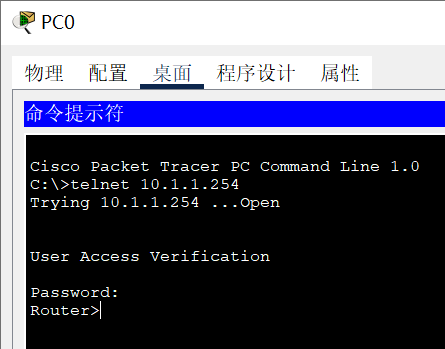
在PC上登录路由器远程控制:Router(config-if)#line vty 0 4Router(config-line)#password 123456Router(config-line)#login
 ```clojure
Router(config)#line vty 0
Router(config-line)#transport input ?
all All protocols
none No protocols
ssh TCP/IP SSH protocol
telnet TCP/IP Telnet protocol
Router(config-line)#transport input ssh
Router(config-line)#exit
Router(config)#hostname r1
Router(config)#ip domain-name aa.fx.com
r1(config)#crypto key generate rsa
The name for the keys will be: r1.aa.fx.com
Choose the size of the key modulus in the range of 360 to 2048 for your
General Purpose Keys. Choosing a key modulus greater than 512 may take
a few minutes.
```clojure
Router(config)#line vty 0
Router(config-line)#transport input ?
all All protocols
none No protocols
ssh TCP/IP SSH protocol
telnet TCP/IP Telnet protocol
Router(config-line)#transport input ssh
Router(config-line)#exit
Router(config)#hostname r1
Router(config)#ip domain-name aa.fx.com
r1(config)#crypto key generate rsa
The name for the keys will be: r1.aa.fx.com
Choose the size of the key modulus in the range of 360 to 2048 for your
General Purpose Keys. Choosing a key modulus greater than 512 may take
a few minutes.
How many bits in the modulus [512]: 1024 % Generating 1024 bit RSA keys, keys will be non-exportable…[OK]
SSH密码与Telnet密码相同,开启SSH必须设置域名和主机名,不能使用默认。<br />在PC上SSH远程登录:<br />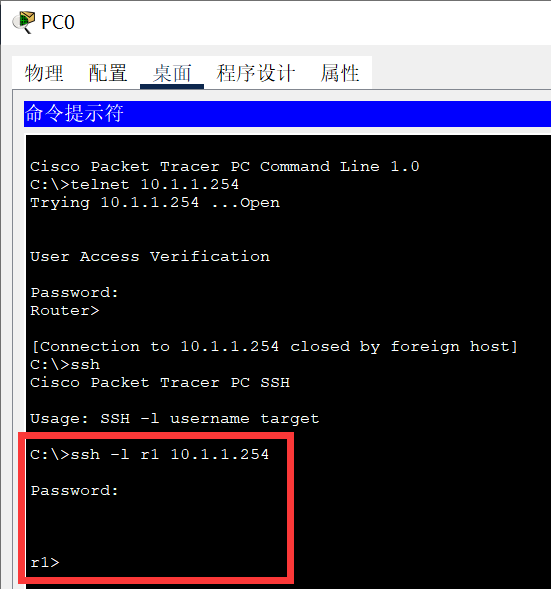<br />设置不同用户账号登录路由器:```clojurer1(config)#line vty 0 4r1(config-line)#no passwordr1(config-line)#no loginr1(config-line)#login local #使用本地数据库的用户名密码来登录r1(config-line)#exitr1(config)#username fx password fx.123r1(config)#username ll password ll.com
在PC中验证SSH登录:
Switch(config)#interface vlan 1Switch(config-if)#ip address 10.1.1.253 255.255.255.0Switch(config-if)#no shutdownSwitch(config)#line vty 0 4Switch(config-line)#login local
Switch(config)#ip default-gateway 20.1.1.254目的是为了能够让交换机被跨网段管理
Router(config)#no ip domain-lookup目的是输入错误的命令后无需等待


若有收获,就点个赞吧
0 人点赞


