https://cwiki.apache.org/confluence/display/Hive/LanguageManual+Select
查询语句语法:
SELECT [ALL | DISTINCT] select_expr, select_expr, ...FROM table_reference[WHERE where_condition][GROUP BY col_list][ORDER BY col_list][CLUSTER BY col_list| [DISTRIBUTE BY col_list] [SORT BY col_list]][LIMIT number]
基本查询(Select…From)
全表和特定列查询
数据准备
dept:
10    ACCOUNTING    1700
20    RESEARCH    1800
30    SALES    1900
40    OPERATIONS    1700
emp:
7369    SMITH    CLERK    7902    1980-12-17    800.00        20
7499    ALLEN    SALESMAN    7698    1981-2-20    1600.00    300.00    30
7521    WARD    SALESMAN    7698    1981-2-22    1250.00    500.00    30
7566    JONES    MANAGER    7839    1981-4-2    2975.00        20
7654    MARTIN    SALESMAN    7698    1981-9-28    1250.00    1400.00    30
7698    BLAKE    MANAGER    7839    1981-5-1    2850.00        30
7782    CLARK    MANAGER    7839    1981-6-9    2450.00        10
7788    SCOTT    ANALYST    7566    1987-4-19    3000.00        20
7839    KING    PRESIDENT        1981-11-17    5000.00        10
7844    TURNER    SALESMAN    7698    1981-9-8    1500.00    0.00    30
7876    ADAMS    CLERK    7788    1987-5-23    1100.00        20
7900    JAMES    CLERK    7698    1981-12-3    950.00        30
7902    FORD    ANALYST    7566    1981-12-3    3000.00        20
7934    MILLER    CLERK    7782    1982-1-23    1300.00        10
创建部门表
create table if not exists dept(
deptno int,
dname string,
loc int
)
row format delimited fields terminated by '\t';
创建员工表
create table if not exists emp(
empno int,
ename string,
job string,
mgr int,
hiredate string,
sal double,
comm double,
deptno int
)
row format delimited fields terminated by '\t';
导入数据
load data local inpath '/opt/module/datas/dept.txt' into table dept;
load data local inpath '/opt/module/datas/emp.txt' into table emp;
全表查询
select * from emp;
select
    empno, ename, job, mgr,
    hiredate, sal, comm, deptno
from
    emp;
选择特定列查询
select empno, ename from emp;
- SQL 语言大小写不敏感
- SQL 可以写在一行或多行
- 关键字不能缩写也不能分行
- 各子句一般要分行写
- 使用缩进提高语句的可读性
列别名
- 重命名一个列
- 便于计算
- 紧跟列名,列名
AS别名
查询名称和部门
select ename AS name, deptno dn from emp;
算术运算符
| 运算符 | 描述 |
|---|---|
| A + B | A 和 B 相加 |
| A - B | A 减去 B |
| A * B | A 和 B 相乘 |
| A / B | A 除以 B |
| A % B | A 对 B 取余 |
| A & B | A 和 B 按位取与 |
| A | B | A 和 B 按位取或 |
| A ^ B | A 和 B 按位取异或 |
| ~A | A 按位取反 |
查询出所有员工的薪水后加 1 显示
select sal + 1 from emp;
常用函数
求总行数(count)
select count(*) cnt from emp;
求工资的最大值(max)
select max(sal) max_sal from emp;
求工资的最小值(min)
select min(sal) min_sal from emp;
求工资的总和(sum)
select sum(sal) sum_sal from emp;
求工资的平均值(avg)
select avg(sal) avg_sal from emp;
Limit语句
限制返回的行数
select * from emp limit 5;
select * from emp limit 2, 3;
Where语句
- WHERE 将不满足条件的行过滤掉
- WHERE 紧随 FROM
查询出薪水大于1000的所有员工
select * from emp where sal > 1000;
where 子句中不能使用字段别名
比较运算符(Between / In / Is Null)
| 操作符 | 支持的数据类型 | 描述 |
|---|---|---|
| A=B | 基本数据类型 | A等于B 则返回TRUE,反之返回FALSE |
| A<=>B | 基本数据类型 | A和B都为NULL,则返回TRUE,如果一边为NULL,返回False |
| A<>B, A!=B | 基本数据类型 | A或B为NULL则返回NULL;A不等于B,则返回TRUE,反之返回FALSE |
| A<B | 基本数据类型 | A或者B为NULL,则返回NULL;A小于B,则返回TRUE,反之返回FALSE |
| A<=B | 基本数据类型 | A或者B为NULL,则返回NULL;A小于等于B,则返回TRUE,反之返回FALSE |
| A>B | 基本数据类型 | A或者B为NULL,则返回NULL;A大于B,则返回TRUE,反之返回FALSE |
| A>=B | 基本数据类型 | A或者B为NULL,则返回NULL;A大于等于B,则返回TRUE,反之返回FALSE |
| A [NOT] BETWEEN B AND C | 基本数据类型 | A,B或C任一为NULL,则结果为NULL。A的值大于等于B而且小于或等于C,则结果为TRUE,反之为FALSE。使用 NOT实现相反的效果 |
| A IS NULL | 所有数据类型 | A 等于 NULL,则返回TRUE,反之返回FALSE |
| A IS NOT NULL | 所有数据类型 | A 不等于 NULL,则返回TRUE,反之返回FALSE |
| IN(数值1, 数值2) | 所有数据类型 | IN 运算显示列表中的值 |
| A [NOT] LIKE B | STRING 类型 | B是一个SQL下的简单正则表达式 ( 通配符模式 ) ,A匹配上,则返回TRUE;反之返回FALSE。B的表达式说明如下:x%: A必须以字母 x开头, %x: A 必须以字母 x结尾,而 %x%: A包含有字母 x,可以位于开头,结尾或者字符串中间。使用 NOT实现相反的效果 |
| A RLIKE B, A REGEXP B | STRING 类型 | B 是基于 java 的正则表达式,A与其匹配,则返回TRUE;反之返回FALSE。匹配使用的是JDK中的正则表达式接口实现的,因为正则也依据其中的规则。如 : 正则表达式必须和整个字符串A相匹配,而不是只需与其字符串匹配 |
查询出薪水等于5000的所有员工
select * from emp where sal = 5000;
查询工资在500到1000的员工信息
select
    *
from
    emp
where
    sal between 500 and 1000;
查询comm为空的所有员工信息
select * from emp where comm is null;
查询工资是 1500 或 5000 的员工信息
select * from emp where sal in (1500, 5000);
Like 和 RLike
- 使用 LIKE 运算选择类似的值
- 选择条件可以包含字符或数字
% : 零个或多个字符(任意个字符)
_ : 一个字符
- RLIKE 子句
RLIKE 是 Hive 功能扩展,可以通过正则表达式指定匹配条件
查找名字以A开头的员工信息
select * from emp where ename like 'A%';
查找名字中第二个字母为A的员工信息
select * from emp where ename like '_A%';
查找名字中带有A的员工信息
select
    *
from
    emp
where
    ename rlike '[A]';
逻辑运算符(And/Or/Not)
| 操作符 | 含义 |
|---|---|
| AND | 逻辑并 |
| OR | 逻辑或 |
| NOT | 逻辑否 |
查询薪水大于1000,部门是30
select
    *
from
    emp
where
    sal > 1000 and deptno = 30;
查询薪水大于1000,或者部门是30
select
    *
from
    emp
where
    sal > 1000 or deptno = 30;
查询除了20部门和30部门以外的员工信息
select
    *
from
    emp
where
    deptno not in(30, 20);
分组
Group By 语句
GROUP BY 与聚合函数一起使用,按照一个或 多个列队结果进行分组,然后对每个组执行聚合
计算 emp 表每个部门的平均工资
select
    t.deptno,
    avg(t.sal) avg_sal
from
    emp t
group by
    t.deptno;
计算 emp 每个部门中每个岗位的最高薪水
select
    t.deptno,
    t.job,
    max(t.sal) max_sal
from
    emp t
group by
    t.deptno,
    t.job;
Having语句
- having 后面可以使用分组函数
- having 只用于
group by分组统计语句
求每个部门的平均工资
select
    deptno,
    avg(sal)
from
    emp
group by
    deptno;
求每个部门的平均薪水大于2000的部门
select
    deptno,
    avg(sal) avg_sal
from
    emp
group by
    deptno
having
    avg_sal > 2000;
Join语句
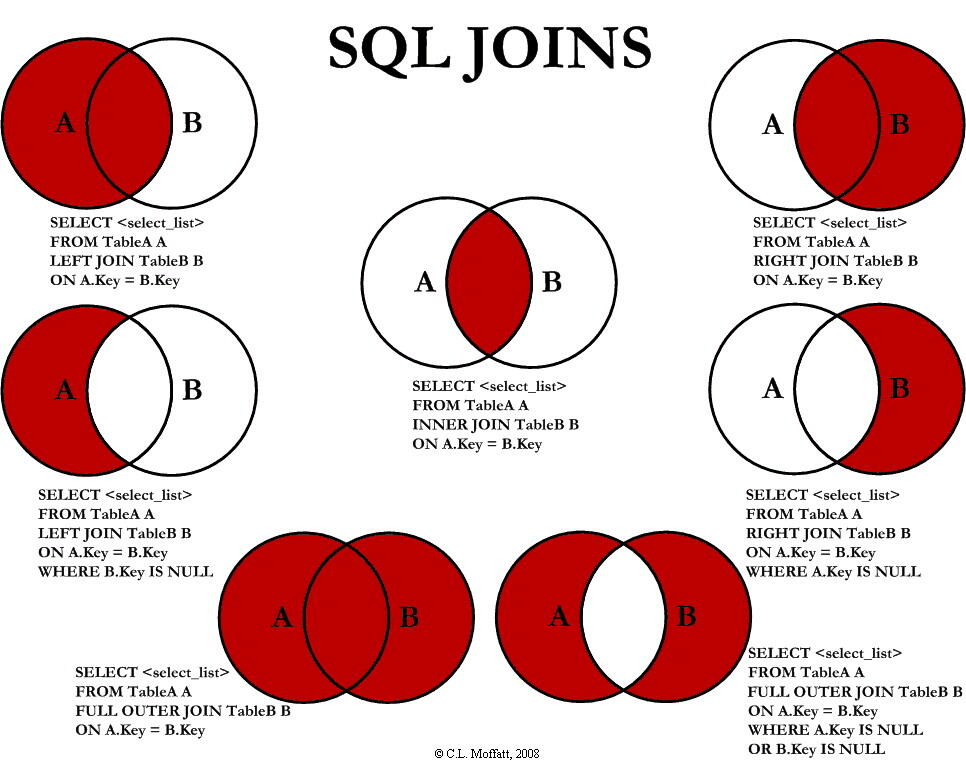
等值 Join
Hive 支持通常的 SQL JOIN
根据员工表和部门表中的部门编号相等,查询员工编号、员工名称和部门名称
select
    e.empno,
    e.ename,
    d.deptno,
    d.dname
from
    emp e join dept d
    on
        e.deptno = d.deptno;
表的别名
- 使用别名可以简化查询
- 使用表名前缀可以提高执行效率
合并员工表和部门表
select
    e.empno,
    e.ename,
    d.deptno,
from
    emp e join dept d
    on
        e.deptno = d.deptno;
内连接
匹配两个表都存在连接条件的数据
select
    e.empno, e.ename, d.deptno
from
    emp e join dept d
    on
        e.deptno = d.deptno;
左外连接
匹配左边表中的数据
select
    e.empno, e.ename, d.deptno
from
    emp e left join dept d
    on
        e.deptno = d.deptno;
右外连接
匹配右边表中数据
select
    e.empno, e.ename, d.deptno
from
    emp e right join dept d
    on
        e.deptno = d.deptno;
满外连接
匹配所有表数据
select
    e.empno, e.ename, d.deptno
from
    emp e full join dept d
    on
        e.deptno = d.deptno;
多表连接
连接 n个表,至少需要 n-1 个连接条件。如:连接三个表,至少需要两个连接条件
数据准备
1700    Beijing
1800    London
1900    Tokyo
创建位置表
create table if not exists location(
loc int,
loc_name string
)
row format delimited fields terminated by '\t';
导入数据
load data local inpath '/opt/module/hive-3.1.2/datas/location.txt' into table location;
多表连接查询
select
    e.ename, d.dname, l.loc_name
from
    emp e join dept d
    on
        d.deptno = e.deptno
    join location l
    on
        d.loc = l.loc;
Hive 对每对 JOIN 连接对象启动一个 MapReduce
先启动一个 MapReduce job 对表 e 和表 d 进行连接操作,再启动一个 MapReduce job 与 MapReduce job 的输出和表 l 进行连接
Hive 是按照从左到右的顺序执行
优化:当对 3 个或者更多表进行 join 连接时,如 : 每个 on 子句都使用相同的连接键,就只会产生一个 MapReduce job
笛卡尔积
笛卡尔积产生条件 :
- 省略连接条件
- 连接条件无效
- 所有表中的所有行互相连接
select
    empno, dname
from
    emp, dept;
排序
全局排序(Order By)
- 全局排序,只有一个 Reducer
- 使用 ORDER BY 子句排序
- ORDER BY 子句在 SELECT 后
ASC(ascend): 升序(默认)
DESC(descend): 降序
查询员工信息按工资升序排列
select
    *
from
    emp
order by
    sal;
查询员工信息按工资降序排列
select
    *
from
    emp
order by
    sal desc;
按照别名排序
按照员工薪水的 2 倍排序
select
    ename, sal * 2 twosal
from
    emp
order by
    twosal;
多个列排序
按照部门和工资升序排序
select
    ename, deptno, sal
from
    emp
order by
    deptno, sal;
每个Reduce内部排序(Sort By)
order by : 对于大数据集的效率低
不需要全局排序,使用 sort by
Sort by : 为每个 reducer 产生一个排序文件。每个 Reducer 内部进行排序,对全局结果集不排序
设置 reduce 个数
set mapreduce.job.reduces = 3;
查看设置 reduce 个数
set mapreduce.job.reduces;
根据部门编号降序查看员工信息
select *
from
    emp
sort by
    deptno desc;
将查询结果导入到文件中(按照部门编号降序排序)
insert overwrite local directory
'/opt/module/hive/datas/sortby-result'
select * from emp sort by deptno desc;
分区(Distribute By)
Distribute By:需要控制某个特定行在哪个 reducer ,为了后续的聚集
distribute by : 类似 MR 中 partition(自定义分区),进行分区,结合 sort by
先按照部门编号分区,再按照员工编号降序排序
set mapreduce.jobreduces = 3;
insert overwrite local directory '/opt/module/hive/datas/distribute-result'
select * from emp
distribute by deptno
sort by empno desc;
distribute by的分区规则 : 分区字段的 hash 码与 reduce 的个数进行模除后,余数相同的分到一个区DISTRIBUTE BY在SORT BY之前
Cluster By
当 distribute by 和 sort by 字段相同时,可以使用 cluster by
cluster by 既有 distribute by 又有 sort by 的功能。但排序只能升序排序
select *
from emp
cluster by deptno;
select *
from emp
distribute by deptno sort by deptno;
按照部门编号分区,不一定是固定死的数值,可能20和30部门分到一个分区里面去

若有收获,就点个赞吧
0 人点赞


