电商平台汇聚了海量的商品、店铺的信息,天然适合进行商品的推广
对于电商和广告主来说,广告投放的目的 : 吸引更多的用户,最终实现营销转化。因此非常关注不同位置广告的曝光量、点击量、购买量、点击率、购买率
需求分析
事件日志数据例子 :
{"lagou_event": [{"name": "goods_detail_loading", -- 商品详情页加载"json": {"entry": "3","goodsid": "0","loading_time": "80","action": "4","staytime": "68","showtype": "4"},"time": 1596225273755},{"name": "loading", -- 商品列表"json": {"loading_time": "18","action": "1","loading_type": "2","type": "3"},"time": 1596231657803},{"name": "ad", -- 广告"json": {"duration": "17", -- 停留时长"ad_action": "0", -- 用户行为;0 曝光;1 曝光后点击;2 购买"shop_id": "786", -- 商家id"event_type": "ad", -- 'ad'"ad_type": "4", -- 格式类型;1 JPG;2 PNG;3 GIF;4 SWF"show_style": "1", -- 显示风格,0 静态图;1 动态图"product_id": "2772", -- 产品id"place": "placeindex_left", -- 广告位置;首页=1,左侧=2,右侧=3,列表页=4"sort": "0" -- 排序位置},"time": 1596278404415},{"name": "favorites", -- 收藏"json": {"course_id": 0,"id": 0,"userid": 0},"time": 1596239532527},{"name": "praise", -- 点赞"json": {"id": 2,"type": 3,"add_time": "1596258672095","userid": 8,"target": 6},"time": 1596274343507}],"attr": {"area": "拉萨","uid": "2F10092A86","app_v": "1.1.12","event_type": "common","device_id": "1FB872-9A10086","os_type": "4.1","channel": "KS","language": "chinese","brand": "xiaomi-2"}}
需求指标
点击次数统计 ( 分时统计 ) :
- 曝光次数、不同用户id数、不同用户数
- 点击次数、不同用户id数、不同用户数
- 购买次数、不同用户id数、不同用户数
转化率-漏斗分析 :
- 点击率 = 点击次数 / 曝光次数
- 购买率 = 购买次数 / 点击次数
活动曝光效果评估 :
- 行为(曝光、点击、购买)、时间段、广告位、产品,统计对应的次数
- 时间段、广告位、商品,曝光次数最多的前 N 个
事件日志采集
启动 Flume Agent(修改参数 : 128M滚动一次)
flume-ng agent --conf /opt/apps/flume-1.9/conf --conf-file /data/cpucode/conf/flume-log2hdfs3.conf -name a1 -Dflume.root.logger=INFO,console
生成数据(文件大小约 640M,100W 条事件日志)
cp events0802.log /data/cpucode/logs/event/events0802.log
数据采集完成后,检查 HDFS 结果
hdfs dfs -ls /user/data/logs/event
ODS层
建表
-- 事件日志
drop table if exists ods_log_event;

create external table ods_log_event
(
    `str` string
) comment '事件日志'
    partitioned by (`dt` string)
    stored as textfile
    location '/user/yx_test/data/logs/event';
装载数据
-- 装载数据
set hivevar:do_date= 2020-07-21;
alter table ods_log_event
    add partition (dt = '${do_date}');
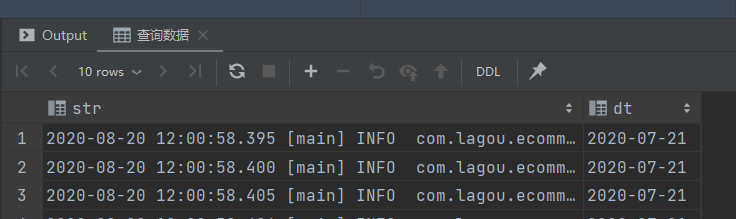
查询数据
-- 查询数据
select str,
       dt
from ods_log_event
where dt = '${do_date}'
limit 10;
脚本
vim /data/cpucode/script/advertisement/ods_load_event_log.sh
#!/bin/bash
source /etc/profile

if [ -n "$1" ]
then
    do_date=$1
else
    do_date=`date -d "-1 day" +%F`
fi

sql="
alter table ods.ods_log_event add partition (dt='$do_date');
"
hive -e "$sql"
DWD层
ODS:分区;事件的主要信息在 json 串中( json 数组),公共信息在另外一个 json 串中
ODS 解析 :
- 从 json 串中,提取 jsonArray 数据
- 将公共信息从 json 串中解析出来 => 所有事件的明细
所有事件的明细:
- 分区
- 事件 ( json 串)
- 公共信息字段
所有事件的明细 => 广告 json 串解析 => 广告事件的明细
广告事件的明细:
- 分区
- 广告信息字段
- 公共信息字段
DWD层建表
所有事件明细
-- 所有事件明细
drop table if exists dwd_event_log;

create external table dwd_event_log
(
    `device_id`   string comment '设备id',
    `uid`         string comment '用户id',
    `app_v`       string comment 'app版本',
    `os_type`     string comment '系统版本',
    `event_type`  string comment '事件类型',
    `language`    string comment '语言',
    `channel`     string comment '渠道',
    `area`        string comment '地区',
    `brand`       string comment '型号',
    `name`        string comment '数据',
    `event_json`  string comment '事件数据',
    `report_time` string comment '事件时间'
) comment '事件明细'
    partitioned by (`dt` string)
    stored as parquet;
广告点击明细
-- 广告点击明细
drop table if exists dwd_ad;

create external table dwd_ad
(
    `device_id`   string comment '设备id',
    `uid`         string comment '用户id',
    `app_v`       string comment 'app版本',
    `os_type`     string comment '系统版本',
    `event_type`  string comment '事件类型',
    `language`    string comment '语言',
    `channel`     string comment '渠道',
    `area`        string comment '地位',
    `brand`       string comment '品牌',
    `report_time` string comment '事件时间',
    `duration`    int comment '停留时长',
    `ad_action`   int comment '用户行为: 0 曝光 1 曝光后点击 2 购买',
    `shop_id`     int comment '商家id',
    `ad_type`     int comment '格式类型: 1 JPG 2 PNG 3 GIF 4 SWF',
    `show_style`  smallint comment '显示风格: 0 静态图 1 动态图',
    `product_id`  int comment '产品id',
    `place`       string comment '广告位置: 首页 1 左侧 2 右侧 3 列表页 4',
    `sort`        int comment '排序位置',
    `hour`        string comment '小时'
) comment '广告点击明细'
    partitioned by (`dt` string)
    stored as parquet;
装载数据
事件 json 串解析
UDF :
package com.cpucode.dw.hive.udf;

import com.alibaba.fastjson.JSON;
import com.alibaba.fastjson.JSONArray;
import com.alibaba.fastjson.JSONException;
import com.alibaba.fastjson.JSONObject;
import com.google.common.base.Strings;
import org.apache.hadoop.hive.ql.exec.UDF;
//import org.junit.Test;
import java.util.ArrayList;

/**
 * @author : cpucode
 * @date : 2022/7/2 12:04
 * @github : https://github.com/CPU-Code
 * @csdn : https://cpucode.blog.csdn.net
 */
public class ParseJsonArray extends UDF{

    public ArrayList<String> evaluate(String jsonStr) {
        // 传入空字符串,返回null
        if (Strings.isNullOrEmpty(jsonStr)){
            return null;
        }

        try{
            // 获取jsonArray
            JSONArray jsonArray = JSON.parseArray(jsonStr);
            ArrayList<String> lst = new ArrayList<>();
            for(Object o: jsonArray) {
                lst.add(o.toString());
            }

            return lst;
        }catch (JSONException e){
            return null;
        }
    }

    //@Test
    public void JunitParseJsonArray() {
        String jsonStr = " [{\"name\":\"goods_detail_loading\",\"json\": {\"entry\":\"1\",\"goodsid\":\"0\",\"loading_time\":\"93\",\"action\":\"3\",\"staytime\":\"56\",\"showtype\":\"2\"},\"time\":1596343881690},{\"name\":\"loading\",\"json\": {\"loading_time\":\"15\",\"action\":\"3\",\"loading_type\":\"3\",\"type\":\"1\"},\"time\":1596356988428}, {\"name\":\"notification\",\"json\": {\"action\":\"1\",\"type\":\"2\"},\"time\":1596374167278}, {\"name\":\"favorites\",\"json\": {\"course_id\":1,\"id\":0,\"userid\":0},\"time\":1596350933962 }]";
        ArrayList<String> result = evaluate(jsonStr);

        System.out.println(result.size());
        System.out.println(JSON.toJSONString(result));
    }
}
Maven :
<dependency>
    <groupId>org.apache.hive</groupId>
    <artifactId>hive-exec</artifactId>
    <version>2.3.7</version>
    <scope>provided</scope>
</dependency>

<dependency>
    <groupId>com.alibaba</groupId>
    <artifactId>fastjson</artifactId>
    <version>1.2.62</version>
</dependency>
Maven 打包 , 并上传 HDFS
hdfs dfs -put /opt/software/Hive-3.1.0-jar-with-dependencies.jar /origin_data/cpucode

所有事件明细
-- 筛选 json
set hive.execution.engine = spark;
set hivevar:do_date= 2020-07-21;
select split(str, ' ')[7] as line
from ods_log_event
where dt = '${do_date}'
limit 10;

-- 解析 json 各项
set hivevar:do_date= 2020-07-21;
with tmp_start as (
    select split(str, ' ')[7] as line
    from ods_log_event
    where dt = '${do_date}'
)
select get_json_object(line, '$.attr.device_id')  as device_id,
       get_json_object(line, '$.attr.uid')        as uid,
       get_json_object(line, '$.attr.app_v')      as app_v,
       get_json_object(line, '$.attr.os_type')    as os_type,
       get_json_object(line, '$.attr.event_type') as event_type,
       get_json_object(line, '$.attr.language')   as language,
       get_json_object(line, '$.attr.channel')    as channel,
       get_json_object(line, '$.attr.area')       as area,
       get_json_object(line, '$.attr.brand')      as brand,
       get_json_object(line, '$.lagou_event')     as lagou_event
from tmp_start
limit 10;

-- 装载数据

add jar hdfs://powercluster/origin_data/cpucode/Hive-3.1.0-jar-with-dependencies.jar;
create temporary function json_array as 'com.cpucode.dw.hive.udf.ParseJsonArray';
set hive.execution.engine = spark;
set hivevar:do_date= 2020-07-21;
with tmp_start as (
    select split(str, ' ')[7] as line
    from ods_log_event
    where dt = '${do_date}'
)
insert
overwrite
table
dwd_event_log
partition
(
dt = '${do_date}'
)
select device_id,
       uid,
       app_v,
       os_type,
       event_type,
       language,
       channel,
       area,
       brand,
       get_json_object(k, '$.name') as name,
       get_json_object(k, '$.json') as event_json,
       get_json_object(k, '$.time') as report_time
from (
         select get_json_object(line, '$.attr.device_id')  as device_id,
                get_json_object(line, '$.attr.uid')        as uid,
                get_json_object(line, '$.attr.app_v')      as app_v,
                get_json_object(line, '$.attr.os_type')    as os_type,
                get_json_object(line, '$.attr.event_type') as event_type,
                get_json_object(line, '$.attr.language')   as language,
                get_json_object(line, '$.attr.channel')    as channel,
                get_json_object(line, '$.attr.area')       as area,
                get_json_object(line, '$.attr.brand')      as brand,
                get_json_object(line, '$.lagou_event')     as lagou_event
         from tmp_start
     ) A lateral view explode(json_array(lagou_event)) B as k;
-- 查询数据
set hivevar:do_date= 2020-07-21;
select device_id,
       uid,
       app_v,
       os_type,
       event_type,
       language,
       channel,
       area,
       brand,
       name,
       event_json,
       report_time,
       dt
from dwd_event_log
where dt = '${do_date}'
limit 10;

广告点击明细
-- 装载数据
set hive.execution.engine = spark;
set hivevar:do_date = 2020-07-21;
insert overwrite table dwd_ad
    partition (dt = '${do_date}')
select device_id,
       uid,
       app_v,
       os_type,
       event_type,
       language,
       channel,
       area,
       brand,
       report_time,
       get_json_object(event_json, '$.duration'),
       get_json_object(event_json, '$.ad_action'),
       get_json_object(event_json, '$.shop_id'),
       get_json_object(event_json, '$.ad_type'),
       get_json_object(event_json, '$.show_style'),
       get_json_object(event_json, '$.product_id'),
       get_json_object(event_json, '$.place'),
       get_json_object(event_json, '$.sort'),
       from_unixtime(ceil(report_time / 1000), 'HH')
from dwd_event_log
where dt = '${do_date}'
  and name = 'ad';
-- 查询数据
set hivevar:do_date = 2020-07-21;
select device_id,
       uid,
       app_v,
       os_type,
       event_type,
       language,
       channel,
       area,
       brand,
       report_time,
       duration,
       ad_action,
       shop_id,
       ad_type,
       show_style,
       product_id,
       place,
       sort,
       hour,
       dt
from dwd_ad
where dt = '${do_date}'
limit 10;

加载脚本
解析json串;得到全部的事件日志
vim /data/cpucode/script/advertisement/dwd_load_event_log.sh
#!/bin/bash
source /etc/profile

if [ -n "$1" ] ;then
    do_date=$1
else
    do_date=`date -d "-1 day" +%F`
fi

sql="
use dwd;

add jar hdfs://powercluster/origin_data/cpucode/Hive-3.1.0-jar-with-dependencies.jar;
create temporary function json_array as 'com.cpucode.dw.hive.udf.ParseJsonArray';


with tmp_start as (
    select split(str, ' ')[7] as line
    from ods_log_event
    where dt = '$do_date'
)
insert
overwrite
table
dwd_event_log
partition
(
dt = '$do_date'
)
select device_id,
       uid,
       app_v,
       os_type,
       event_type,
       language,
       channel,
       area,
       brand,
       get_json_object(k, '$.name') as name,
       get_json_object(k, '$.json') as event_json,
       get_json_object(k, '$.time') as report_time
from (
         select get_json_object(line, '$.attr.device_id')  as device_id,
                get_json_object(line, '$.attr.uid')        as uid,
                get_json_object(line, '$.attr.app_v')      as app_v,
                get_json_object(line, '$.attr.os_type')    as os_type,
                get_json_object(line, '$.attr.event_type') as event_type,
                get_json_object(line, '$.attr.language')   as language,
                get_json_object(line, '$.attr.channel')    as channel,
                get_json_object(line, '$.attr.area')       as area,
                get_json_object(line, '$.attr.brand')      as brand,
                get_json_object(line, '$.lagou_event')     as lagou_event
         from tmp_start
     ) A lateral view explode(json_array(lagou_event)) B as k;
"

hive -e "$sql"
从全部的事件日志中获取广告点击事件:
vim /data/cpucode/script/advertisement/dwd_load_ad_log.sh
#!/bin/bash
source /etc/profile

if [ -n "$1" ] ;then
    do_date=$1
else
    do_date=`date -d "-1 day" +%F`
fi

sql="
insert overwrite table dwd.dwd_ad
partition (dt='$do_date')
select
    device_id,
    uid,
    app_v,
    os_type,
    event_type,
    language,
    channel,
    area,
    brand,
    report_time,
    get_json_object(event_json,'$.duration') ,
    get_json_object(event_json,'$.ad_action') ,
    get_json_object(event_json,'$.shop_id') ,
    get_json_object(event_json,'$.ad_type'),
    get_json_object(event_json,'$.show_style'),
    get_json_object(event_json,'$.product_id'),
    get_json_object(event_json,'$.place'),
    get_json_object(event_json,'$.sort'),
from_unixtime(ceil(report_time/1000), 'HH')
from dwd.dwd_event_log
where dt='$do_date' and name='ad';
"

hive -e "$sql"
日志 => Flume => ODS => 清洗、转换 => 广告事件详细信息
广告点击次数分析
需求分析
广告:ad
- action : 用户行为 : 0 曝光;1 曝光后点击;2 购买
- duration : 停留时长
- shop_id : 商家id
- event_type : “ad”
- ad_type : 格式类型 : 1 JPG;2 PNG;3 GIF;4 SWF
- show_style : 显示风格 : 0 静态图;1 动态图
- product_id : 产品id
- place : 广告位置 : 1 首页,2 左侧 ,3 右侧,4 列表页
- sort : 排序位置
分时统计:
- 曝光次数、不同用户id数( 公共信息中的uid )、不同用户数 ( 公共信息中的 device_id )
- 点击次数、不同用户id数、不同用户数 ( device_id )
- 购买次数、不同用户id数、不同用户数 ( device_id )
DWD => DWS(不需要) => ADS
创建 ADS 层
-- 广告点击次数分析
drop table if exists ads_ad_show;

create table ads_ad_show
(
    cnt        bigint comment '用户行为次数',
    u_cnt      bigint comment '用户id 数',
    device_cnt bigint comment '设备id 数',
    ad_action  tinyint comment '用户行为类型',
    hour       string comment '小时'
) comment '广告点击次数分析'
    partitioned by (`dt` string)
    row format delimited fields terminated by ',';
装载数据
-- 装载数据
set hive.execution.engine = spark;
set hivevar:do_date = 2020-07-21;
insert overwrite table ads_ad_show
    partition (dt = '${do_date}')
select count(*),
       count(distinct uid),
       count(distinct device_id),
       ad_action,
       hour
from dwd_ad
where dt = '${do_date}'
group by ad_action, hour;
-- 查询数据
set hivevar:do_date = 2020-07-21;
select cnt,
       u_cnt,
       device_cnt,
       ad_action,
       hour,
       dt
from ads_ad_show
where dt = '${do_date}'
limit 10;
加载脚本
vim /data/cpucode/script/advertisement/ads_load_ad_show.sh
#!/bin/bash
source /etc/profile

if [ -n "$1" ] ;then
    do_date=$1
else
    do_date=`date -d "-1 day" +%F`
fi

sql="
insert overwrite table ads_ad_show
    partition (dt = '$do_date')
select count(*),
       count(distinct uid),
       count(distinct device_id),
       ad_action,
       hour
from dwd_ad
where dt = '${do_date}'
group by ad_action, hour
"

hive -e "$sql"
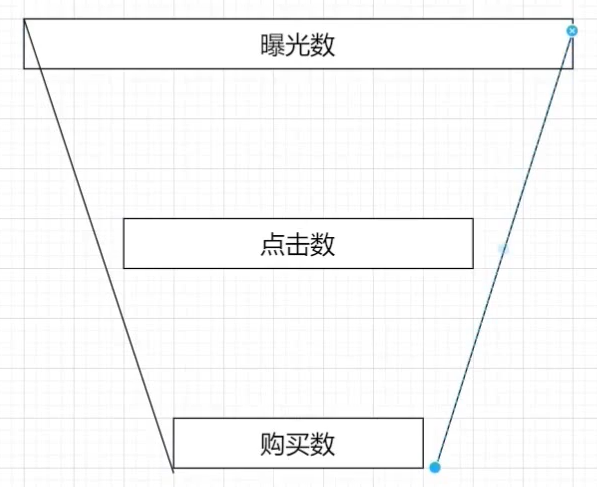
漏斗分析(点击率购买率)
需求分析
分时统计:
- 点击率 = 点击次数 / 曝光次数
- 购买率 = 购买次数 / 点击次数
创建 ADS 层
-- 点击率购买率
drop table if exists ads_ad_show_rate;

create table ads_ad_show_rate
(
    hour       string comment '小时',
    click_rate double comment '点击率',
    buy_rate   double comment '购买率'
) comment '点击率购买率'
    partitioned by (`dt` string)
    row format delimited fields terminated by ',';
装载数据
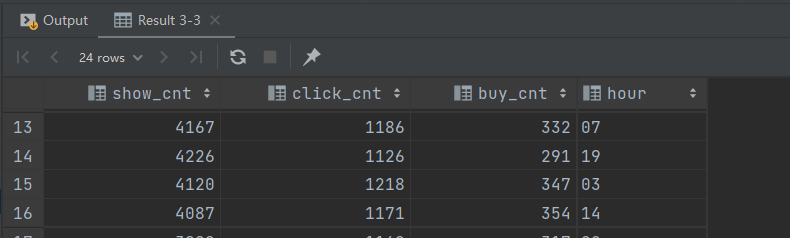
行转列 :
set hive.execution.engine = spark;
set hivevar:do_date = 2020-07-21;
select max(case when ad_action = '0' then cnt end) show_cnt,
       max(case when ad_action = '1' then cnt end) click_cnt,
       max(case when ad_action = '2' then cnt end) buy_cnt,
       hour
from ads_ad_show
where dt = '${do_date}'
group by hour
limit 10;
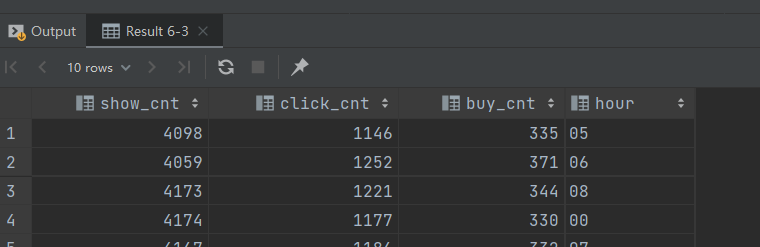
-- 行转列 二
set hive.execution.engine = spark;
set hivevar:do_date = 2020-07-21;
select sum(case when ad_action = '0' then cnt end) show_cnt,
       sum(case when ad_action = '1' then cnt end) click_cnt,
       sum(case when ad_action = '2' then cnt end) buy_cnt,
       hour
from ads_ad_show
where dt = '${do_date}'
group by hour
limit 10;
装载数据 :
set hive.execution.engine = spark;
set hivevar:do_date = 2020-07-21;
with tmp as (
    select max(case when ad_action = '0' then cnt end) show_cnt,
           max(case when ad_action = '1' then cnt end) click_cnt,
           max(case when ad_action = '2' then cnt end) buy_cnt,
           hour
    from ads_ad_show
    where dt = '${do_date}'
    group by hour
)
insert
overwrite
table
ads_ad_show_rate
partition
(
dt = '${do_date}'
)
select hour,
       click_cnt / show_cnt as click_rate,
       buy_cnt / click_cnt  as buy_rate
from tmp;
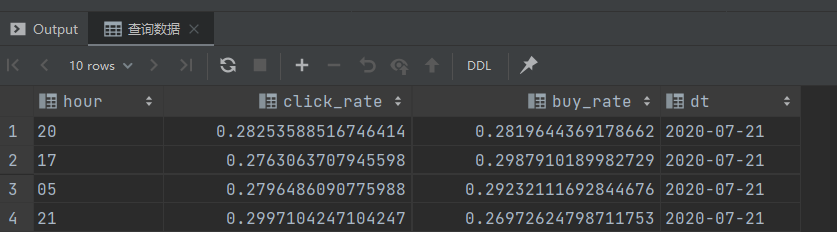
-- 查询数据
select hour,
       click_rate,
       buy_rate,
       dt
from ads_ad_show_rate
where dt = '${do_date}'
limit 10;
加载脚本
vim /data/cpucode/script/advertisement/ads_load_ad_show_rate.sh
#!/bin/bash
source /etc/profile

if [ -n "$1" ] ;then
    do_date=$1
else
    do_date=`date -d "-1 day" +%F`
fi

sql="
with tmp as(
select max(case when ad_action='0' then cnt end) show_cnt,
    max(case when ad_action='1' then cnt end) click_cnt,
    max(case when ad_action='2' then cnt end) buy_cnt,
    hour
from ads.ads_ad_show
where dt='$do_date'
group by hour
)
insert overwrite table ads.ads_ad_show_rate
    partition (dt='$do_date')
select hour,
    click_cnt / show_cnt as click_rate,
    buy_cnt / click_cnt as buy_rate
from tmp;
"

hive -e "$sql"
广告效果分析
需求分析
活动曝光效果评估:
- 行为(曝光、点击、购买)、时间段、广告位、商品,统计对应的次数
- 时间段、广告位、商品,曝光次数最多的前 100 个
创建ADS层
-- 活动曝光详细
drop table if exists ads_ad_show_place;

create table ads_ad_show_place
(
    ad_action  tinyint comment '行为',
    hour       string comment '小时',
    place      string comment '位置',
    product_id int comment '商品id',
    cnt        bigint comment '统计数'
) comment '活动曝光详细'
    partitioned by (`dt` string)
    row format delimited fields terminated by ',';
-- 活动曝光前 100
drop table if exists ads_ad_show_place_window;

create table ads_ad_show_place_window
(
    hour       string comment '小时',
    place      string comment '位置',
    product_id int comment '商品 id',
    cnt        bigint comment '统计数',
    rank       int comment '排名'
) comment '活动曝光前 100'
    partitioned by (`dt` string)
    row format delimited fields terminated by ',';
装载数据
活动曝光详细
-- 装载数据
set hive.execution.engine = spark;
set hivever:do_date = 2020-07-21;
insert overwrite table ads_ad_show_place
    partition (dt = '${do_date}')
select ad_action,
       hour,
       place,
       product_id,
       count(*)
from dwd_ad
where dt = '${do_date}'
group by ad_action, hour, place, product_id;
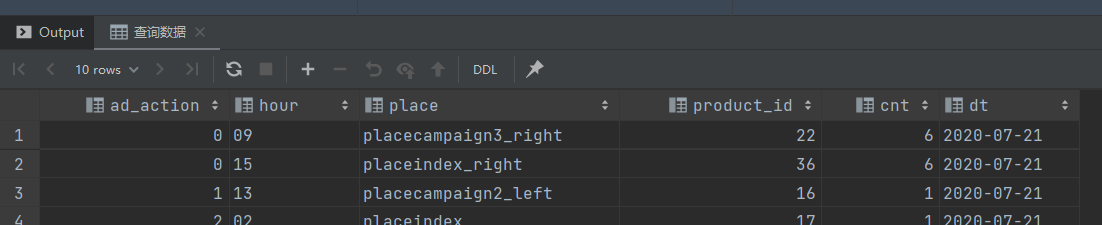
-- 查询数据
select ad_action,
       hour,
       place,
       product_id,
       cnt,
       dt
from ads_ad_show_place
where dt = '${do_date}'
limit 10;
活动曝光前 100
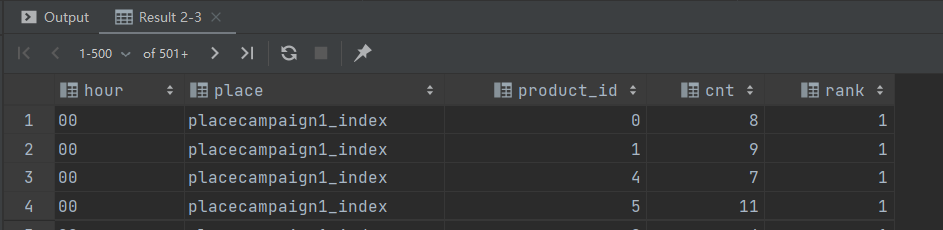
-- 活动曝光数排名
set hive.execution.engine = spark;
set hivever:do_date = 2020-07-21;
select hour,
       place,
       product_id,
       cnt,
       row_number() over (partition by hour, place, product_id order by cnt desc) rank
from ads_ad_show_place
where dt = '${do_date}'
  and ad_action = '0';
装载数据
set hivever:do_date = 2020-07-21;
insert overwrite table ads_ad_show_place_window
    partition (dt = '${do_date}')
select *
from (
         select hour,
                place,
                product_id,
                cnt,
                row_number() over (partition by hour, place, product_id order by cnt desc) rank
         from ads_ad_show_place
         where dt = '${do_date}'
           and ad_action = '0'
     ) t
where rank <= 100;
查询数据
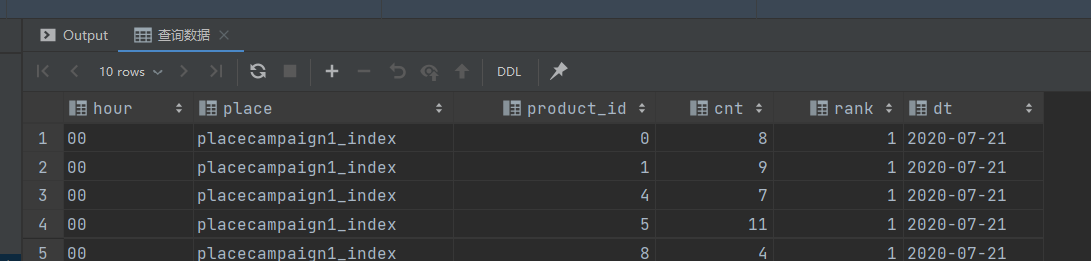
-- 查询数据
select hour,
       place,
       product_id,
       cnt,
       rank,
       dt
from ads_ad_show_place_window
where dt = '${do_date}'
limit 10;
加载脚本
vim /data/cpucode/script/advertisement/ads_load_ad_show_page.sh
#!/bin/bash
source /etc/profile

if [ -n "$1" ] ;then
    do_date=$1
else
    do_date=`date -d "-1 day" +%F`
fi

sql="
insert overwrite table ads.ads_ad_show_place
    partition (dt='$do_date')
select ad_action,
    hour,
    place,
    product_id,
    count(1)
from dwd.dwd_ad
where dt='$do_date'
group by ad_action, hour, place, product_id;
"

hive -e "$sql"
vim /data/cpucode/script/advertisement/ads_load_ad_show_page_window.sh
#!/bin/bash
source /etc/profile

if [ -n "$1" ] ;then
    do_date=$1
else
    do_date=`date -d "-1 day" +%F`
fi

sql="
insert overwrite table ads.ads_ad_show_place_window
    partition (dt='$do_date')
select *
from (
select hour,
    place,
    product_id,
    cnt,
    row_number() over (partition by hour, place,
    product_id order by cnt desc) rank
from ads.ads_ad_show_place
where dt='$do_date' and ad_action='0'
) t
where rank <= 100
"

hive -e "$sql"
小结
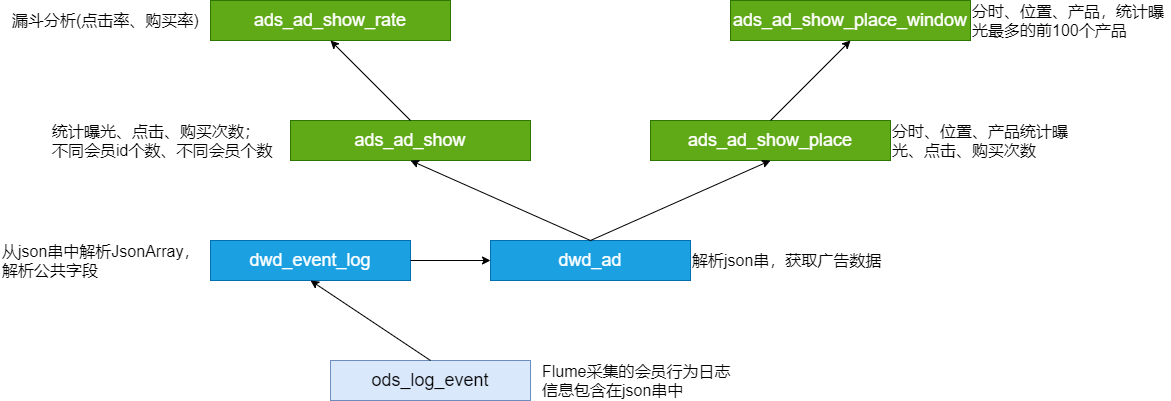
脚本调用次序:
ods_load_event_log.sh

dwd_load_event_log.sh
dwd_load_ad_log.sh

ads_load_ad_show.sh
ads_load_ad_show_rate.sh
ads_load_ad_show_page.sh
ads_load_ad_show_page_window.sh
ADS层数据导出(DataX)
步骤 :
- 在MySQL创建对应的表
- 创建配置文件(json)
- 执行命令,使用json配置文件;测试
- 编写执行脚本(shell)
- shell脚本的测试
MySQL 建表
drop table if exists dwads.ads_ad_show_place;

create table dwads.ads_ad_show_place(
    ad_action tinyint,
    hour varchar(2),
    place varchar(20),
    product_id int,
    cnt int,
    dt varchar(10)
);
创建配置文件
vim /data/cpucode/script/advertisement/ads_ad_show_place.json
{
    "job": {
        "setting": {
            "speed": {
                "channel": 1
            }
        },
        "content": [
            {
                "reader": {
                    "name": "hdfsreader",
                    "parameter": {
                        "path": "/lagou/hive/warehouse/ads.db/ads_ad_show_place/dt=$do _date/*",
                        "defaultFS": "hdfs://hadoop1:9000",
                        "column": [
                            {
                                "index": 0,
                                "type": "string"
                            },
                            {
                                "index": 1,
                                "type": "string"
                            },
                            {
                                "index": 2,
                                "type": "string"
                            },
                            {
                                "index": 3,
                                "type": "string"
                            },
                            {
                                "index": 4,
                                "type": "string"
                            },
                            {
                                "type": "string",
                                "value": "$do_date"
                            }
                        ],
                        "fileType": "text",
                        "encoding": "UTF-8",
                        "fieldDelimiter": ","
                    }
                },
                "writer": {
                    "name": "mysqlwriter",
                    "parameter": {
                        "writeMode": "insert",
                        "username": "hive",
                        "password": "12345678",
                        "column": [
                            "ad_action",
                            "hour",
                            "place",
                            "product_id",
                            "cnt",
                            "dt"
                        ],
                        "preSql": [
                            "delete from ads_ad_show_place where dt='$do_date'"
                        ],
                        "connection": [
                            {
                                "jdbcUrl": "jdbc:mysql://hadoop2:3306/dwads?useUnicode=true&characterEncoding=utf-8",
                                "table": [
                                    "ads_ad_show_place"
                                ]
                            }
                        ]
                    }
                }
            }
        ]
    }
}
执行命令(测试)
python /data/modules/datax/bin/datax.py -p "-Ddo_date=2020-08-02" /data/cpucode/script/advertisement/ads_ad_show_place.json
编写脚本
#!/bin/bash
source /etc/profile

JSON=/data/cpucode/script
if [ -n "$1" ] ;then
    do_date=$1
else
    do_date=`date -d "-1 day" +%F`
fi

python $DATAX_HOME/bin/datax.py -p "-Ddo_date=$do_date" $JSON/advertisement/ads_ad_show_place.json
执行脚本
sh /data/cpucode/script/advertisement/ads_ad_show_place.sh 2020-08-02
高仿日志数据测试
数据采集
- 1000W左右日活用户
- 按 30 条日志 / 人天,合计3亿条事件日志
- 每条日志 650 字节 左右
- 总数据量大概在180G
- 采集数据时间约2.5小时
启动Flume
nohup flume-ng agent --conf /opt/apps/flume-1.9/conf --conffile /data/cpucode/conf/flume-log2hdfs4.conf -name a1 -Dflume.root.logger=INFO,console &
日志文件很大,可以将 HDFS 文件滚动设置为10G甚至更大
写日志
cp eventlog0803.log /data/cpucode/logs/event/
执行脚本
sh ods_load_event_log.sh 2020-08-03

sh dwd_load_event_log.sh 2020-08-03
sh dwd_load_ad_log.sh 2020-08-03

sh ads_load_ad_show.sh 2020-08-03
sh ads_load_ad_show_rate.sh 2020-08-03

sh ads_load_ad_show_page.sh 2020-08-03
sh ads_load_ad_show_page_window.sh 2020-08-03

若有收获,就点个赞吧
0 人点赞


