规划

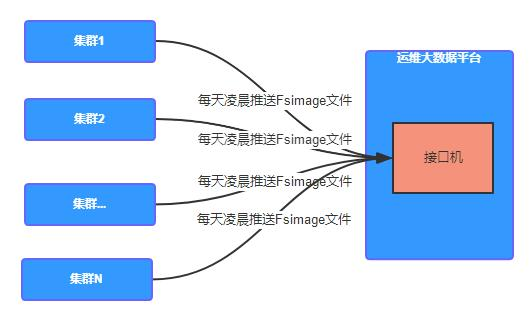
文件画像
分析 fsimage
使用 HDFS 命令解析 NameNode 序列化文件 fsimage 文件,得到 NameNode 第一关系相关信息
解析后的 Image 文件一般是原文件的三倍大小
hdfs oiv -p Delimited -i fsimage_xxxx -o fsimage_xxx.txt
Path Replication ModificationTime AccessTime PreferredBlockSize BlocksCount FileSize NSQUOTA DSQUOTA Permission UserName GroupName/ 0 2022-05-19 14:47 1970-01-01 08:00 0 0 0 9223372036854775807 -1 drwxr-xr-x hdfs supergroup/tmp 0 2022-05-19 09:10 1970-01-01 08:00 0 0 0 -1 -1 drwxrwxrwx hdfs supergroup/tmp/hadoop-yarn 0 2022-05-06 10:14 1970-01-01 08:00 0 0 0 -1 -1 drwxrwxrwx hdfs supergroup
- Path : 目录路径
- Replication : 副本数
- ModificationTime : 修改时间
- AccessTime : 访问时间
- PreferredBlockSize : 首选块大小 , 单位:byte
- BlocksCount : 块的数量
- FileSize : 文件大小,单位:byte
- NSQUOTA : 名称配额 , 限制指定目录下允许的文件和目录的数量
- DSQUOTA : 空间配额 , 限制该目录下允许的字节数
- Permission : 权限
- UserName : 用户
- GroupName : 用户组
HDFS 原始表
-- HDFS 原始解析表CREATE EXTERNAL TABLE `ods_fsimage_org`(`path` string COMMENT '目录路径',`replication` bigint COMMENT '副本数',`modification_time` string COMMENT '修改时间',`access_time` string COMMENT '访问时间',`preferred_block_size` bigint COMMENT '首选块大小 , byte',`blocks_count` bigint COMMENT '块的数量',`file_size` bigint COMMENT '文件大小 , byte',`nsquota` string COMMENT '名称配额',`dsquota` string COMMENT '空间配额',`permission` string COMMENT '权限',`user_name` string COMMENT '用户',`group_name` string COMMENT '用户组') COMMENT 'HDFS 原始解析表'PARTITIONED BY (`dt` string)row format delimited fields terminated by '\t';
hdfs dfs -put fsimage_0000000000001277281.txt /origin_data/cpucode/test

-- 转载数据
load data inpath '/origin_data/cpucode/test'
    overwrite into table ods_fsimage_org
    partition (dt = '2022-06-27');
脚本
#!/bash/bin
分析指标
小文件
精准定位小文件绝对路径,找到小文件所属用户和组
冷数据
精准定位冷数据绝对路径,找到冷数据所属的用户和组以及冷数据大小
小文件分布比例
- 10M 以下小文件占比
- 50M 以下小文件占比
- 100M 以下小文件占比
- 1G 以下小文件占比
目录画像
代码
fsimage-oiv
vim start-fsimage-oiv.sh
#!/bin/bash

home=$(cd `dirname $0`; cd ..; pwd)
. ${home}/bin/coomon.sh

export HADOOP_HEAPSIZE=20000

fsimage_binary_name=`ls ${fsimage_binary_path} | grep ${cluster} | grep ${day}`

fsimage_binary_file=${fsimage_binary_name}/${fsimage_binary_name}

fsimage_txt_name=${fsimage_binary_name}.txt
fsimage_txt_file=${fsimage_txt_path}/${fsimage_txt_name}

hdfs oiv -p Delimited -i ${fsimage_binary_file} -o ${fsimage_txt_file}

hdfs dfs -mkdir -p ${fsimage_org_hdfs_path}
hdfs dfs -rm ${fsimage_org_hdfs_path}/${fsimage_txt_name}
hdfs dfs -put ${fsimage_txt_file} ${fsimage_org_hdfs_path}

echo -e "*************** load to hive start *************************"

hive -e "ALTER TABLE cpu_table.dwd_fsimage_org DROP IF EXISTS PARITION(day=${day}, cluster='${cluster}');"
hive -e "ALTER TABLE cpu_table.dwd_fsiamge_org ADD PARTITION(day = ${day}, cluster = '${cluster}') LOCATION %{fsimage_org_hdfs_path};"

echo -e "*********** load to hive end ***********"
common
#!/bin/sh

. ~/.bashrc

home = $(cd `dirname $0`; cd ..; pwd)
bin_home = $home/bin

config_home = $home/conf
logs_home = $home/logs
lib_home = $home/lib
data_home = $home/data

cluster = $1
day = $2

if [ "${cluster}" = "" || "$day" = "" ]; then
    echo "请指定集群和日期 如 : cpu 2022060600"
    exit 0
if

day_timestamp = `date -d "${day}" +%s`
day_timestamp_1 = `date -d "${day} + 1 day" +%s`
day_str0 = `date -d @${day_timestamp} "+%Y-%m-%d"`
day_str1 = `date -d @${day_timestamp} "+%Y/%m/%d"`
day_str2 = `date -d @${day_timestamp_1} "+%Y-%m-%d"`

conf = ${config_home}/${cluster}.conf

flink_home = `cat ${conf} | grep ^flink_home | awk -F "=" '{print $2}'`

fsimage_binary_path = `cat ${conf} | grep ^fsimage_binary_path | awk -F "=" '{print $2}'`
fsimage_txt_path = `cat ${conf} | grep ^fsimage_txt_path | awk -F "=" '{print $2}'`
fsimage_org_hdfs_path = `cat ${conf} | grep ^fsimage_org_hdfs_path | awk -F "=" '{print $2}'`
fsimage_detail_hdfs_path = `cat ${conf} | grep ^fsimage_detail_hdfs_path | awk -F "=" '{print $2}'`


fsimage_org_hdfs_path = ${fsimage_org_hdfs_path}/day = ${day}/cluster = ${cluster}
fsimage_detail_hdfs_path = ${fsimage_detail_hdfs_path}/day = ${day}/cluster = ${cluster}

yarn_queue_offline = `cat ${conf} | grep ^yarn_queue_offline | awk -F "=" '{print $2}'`

# 作业解析参数
job_parse_input_path = `cat ${conf} | grep ^job_parse_input_path | awk -F "=" '{print $2}'`
job_parse_output_path = `cat ${conf} | grep ^job_parse_output_path | awk -F "=" '{print $2}'`
conf
flink_yarn_home=/opt/ops/flink

fsimage_binary_path=/opt/ops/fsimage
fsimage_txt_path=/opt/ops/fsiamge

fsimage_org_hdfs_path=hdfs://ops-bigdata/cpu_test/cpu_test.db/dwd_fsimage_org
fsimage_detail_hdfs_path=hdfs://ops-bigdata/cpu_test/cpu_test.db/dwd_fsimage_detail

fsimage_grep_pattern=fsimage_${day_str0}$

yarn_queue_offline=root.offline

# 作业解析配置
job_parse_input_path=hdfs://ops-bigdata/cpu_test/logs/ods_d_job_mr
job_parse_output_path=hdfs://ops-bigdata/cpu_test/cpu_test.db/dwd_job_mr
detail
SQL
select *
from dwd_fsimage_org
where
    day = 20220603 and cluster = 'cpu'
    and filesize > 0 and filesize < 10 * 1024 * 1024
limit 10;

select *
from
where
order by

select

from
where
order by
limit 10;

目录画像
目录画像指标 :
- 目录
- 目录层级
- 目录大小
- 目录文件数
- 目录 block 数
- 最小文件大小
- 最大文件大小
- 平均文件大小
- 平均 block 大小
- 用户
- 用户组
- 修改时间
- 访问时间
产线环境中账户、库、表、分区在 HDFS 角度看都是目录,就可以得到每个账户、每个库、每个表、每个分区的冷数据和小文件状态,临时目录、其他组件目录的状态,如 : HBase
Hive 建表
-- HDFS 目录精细画像表
CREATE EXTERNAL TABLE `dwd_fsimage_detail`(
    `dateid` bigint,
    `hdfsdir` string,
    `dirlevel` bigint,
    `dirsize` bigint,
    `filecount` bigint,
    `blockcount` bigint,
    `minfilesize` bigint,
    `maxfilesize` bigint,
    `avgfilesize` bigint,
    `avgblocksize` bigint,
    `username` string,
    `groupname` string,
    `modifytime` string,
    `modifyday` bigint,
    `modifyhour` bigint,
    `accesstime` string,
    `accessday` bigint,
    `accesshour` bigint,
    `reserved1` string,
    `reserved2` string,
    `bz1filecount` bigint,
    `bz2filecount` bigint,
    `bz3filecount` bigint,
    `bz4filecount` bigint,
    `bz5filecount` bigint,
    `bz6filecount` bigint,
    bz7filecount` bigint,
    `bz8filecount` bigint,
    `bz9filecount` bigint,
    `bz10filecount` bigint,
    `bz10plusfilecount` bigint,
    `file_size_0to50` bigint,
    `file_size_50to100` bigint,
    `file_size_100to150` bigint,
    `file_size_150to200` bigint,
    `file_size_200to250` bigint,
    `file_size_250to300` bigint,
    `file_size_300to350` bigint,
    `file_size_350to400` bigint,
    `file_size_400to450` bigint,
    `file_size_450to500` bigint,
    `file_size_500to550` bigint,
    `file_size_550to600` bigint,
    `file_size_600to650` bigint,
    `file_size_650to700` bigint,
    `file_size_700to750` bigint,
    `file_size_750to800` bigint,
    `file_size_800to850` bigint,
    `file_size_850to900` bigint,
    `file_size_900to950` bigint,
    `file_size_950to1024` bigint,
    `file_size_1gbto2gb` bigint,
    `file_size_2gbto3gb` bigint,
    `file_size_3gbto4gb` bigint,
    `file_size_4gbto5gb` bigint,
    `file_size_5gbto6gb` bigint,
    `file_size_6gbto7gb` bigint,
    `file_size_7gbto8gb` bigint,
    `file_size_8gbto9gb` bigint,
    `file_size_9gbto10gb` bigint,
    `file_size_gteq10gb` bigint,
    `file_size_0to10` bigint
) COMMENT 'HDFS 原始解析表'
PARTITIONED BY (`day` bigint, `cluster` string)
    row format delimited fields terminated by '\t';

若有收获,就点个赞吧
0 人点赞


