一、整体概述
1.1 生态
- Lambda 表达式
- 函数式接口
- 方法引用 / 构造器引用
- Stream API
- 接口中的默认方法 / 静态方法
- 新时间
- 日期 API
-
1.2 新特性
速度更快
- 代码更少
- 强大的 Stream API
- 便于并行
- 最大化减少空指针异常 Optional (Kotlin ?)

二、Lambda
2.1 Lambda概念
Lambda是一个匿名函数,可以理解为一段可以传递的代码(将代码像数据一样传递);可以写出更简洁、更灵活的代码;作为一种更紧凑的代码风格,是Java语言表达能力得到提升。
2.2 从匿名方法到Lambda的转换
@Test/*** 原来的使用匿名内部类方式*/public void test() {Comparator<Integer> comparator = new Comparator<Integer>() {@Overridepublic int compare(Integer o1, Integer o2) {return Integer.compare(o1, o2);}};TreeSet<Integer> set = new TreeSet<Integer>(comparator);}/*** 使用lambda表达式*/@Testpublic void testLambda() {Comparator<Integer> comparator = (x, y) -> Integer.compare(x, y);TreeSet<Integer> set = new TreeSet<Integer>(comparator);}
2.3 Lambda 表达式语法
2.3.1 基础语法
Lambda 表达式的基础语法:
Java8种引入了一个新的操作符“->” ,改操作符称为箭头操作符或者 Lambda 操作符号箭头操作符将 Lambda 拆分成两部分
左侧:Lambda 的参数列表
右侧:Lambda 表达式中的需要执行的功能 ,即 Lambda 体
2.3.2 语法格式
(1) 语法格式一: 无参数,无返回值
() -> System.out.println(“hello Lambda!”)
    @Test
    public void test1(){
        int num = 0;//jdk 1.7 之前必须是final jdk1.8他底层给你加了final 其实还是有的 但是可以不写
        Runnable runnable = new Runnable() {
            @Override
            public void run() {
                System.out.println("hello world!"+num);
            }
        };
        runnable.run();
        System.out.println("------------------------");
        Runnable runnable1 = () -> System.out.println("hello Lambda!"+num);
        runnable1.run();
    }
(2) 语法格式二: 一个参数,无返回值
Consumer
    @Test
    public void test2(){
        Consumer<String> consumer = (x) -> System.out.println(x);
        consumer.accept("我是你爸爸!!");
        System.out.println("-------------------------------");
        Consumer<String> consumer1 = x -> System.out.println(x);
        consumer1.accept("参数1,小括号可以省略不写");
    }
(3) 语法格式三:若只有一个参数,小括号可以省略不写
Consumer
(4) 语法格式四:有两个以上的参数,有返回值,并且 Lambda 体中有多条语句
Comparator
System.out.println(“x: “+x);
System.out.println(“y: “+y);
return Integer.compare(x,y);
};
    @Test
    public void test3(){
        Comparator<Integer> comparator = (x,y) -> {
            System.out.println("x: "+x);
            System.out.println("y: "+y);
            return Integer.compare(x,y);
        };
        int compare = comparator.compare(1, 2);
        System.out.println(compare);
    }
(5) 语法格式五: 有两个以上的参数,有返回值,但是 Lambda 中有一条语句 return 和 {} 都可以省略不写
Comparator
 @Test
    public void test4(){
        Comparator<Integer> comparator = (x,y) -> Integer.compare(x,y);
        int compare = comparator.compare(1, 2);
        System.out.println(compare);
    }
2.3.3 总结
2.3.4 简单练习
 //需求:对一个数进行运算
    @Test
    public void test5(){
        System.out.println("Lambda 直接实现函数接口,然后手动调用方法:");
        MyFunction myFunction = (x) -> {
            System.out.println(x);
            return x;
        };
        myFunction.getValue(12);
        System.out.println("-----------------------------");
        System.out.println("封装operation方法,完成直接调用和Lambda函数接口的实现:");
        Integer operation1 = operation(100, x -> x * x);
        System.out.println("1.值平方:"+operation1);
        Integer operation = operation(100, (x) -> x);
        System.out.println("2.值打印:"+operation);
        System.out.println("3.加法:"+operation(100,z -> z+200));

    }

    public Integer operation(Integer num,MyFunction myFunction){
        return myFunction.getValue(num);
    }
2.4 Lambda 表达式需要“函数式接口”的支持
函数式接口:接口中有一个抽象方法的接口,称为函数式接口。可以使用@FunctionalInterface修饰可以检查是否是函数式接口
2.5 类型推断
上述 Lambda 表达式中的参数类型都是由编译器推断得出的。Lambda 表达式中无需指定类型类型,程序依然可以编译,这是一位内 javac 根据程序的上下文,在后台推断出了参数的类型。Lambda 表达式的类型依赖与上下文环境,是由编译器推断出来的。这就是所谓的“类型推断”
三、函数式接口
- 函数式接口:只包含一个抽象方法的接口
- 你可以通过 Lambda 表达式来创建该接口的对象。(若 Lambda 表达式抛出就一个受检异常,那么该异常需要在目标接口的抽象方法上进行声明)。
- 我们可以在任意函数式接口上使用 @FunctionalInterface 注解,这样做可以检查它是否是一个函数式接口,同时 javadoc 也会包含一条声明,说明这个接口是一个函数式接口
3.1 自定义函数式接口
```java @FuntionalInterface public interface MyNumber{ public double getValue(); }
函数式接口中使用泛型:
@FuntionalInterface
public interface MyFunc
3.2 作为参数传递 Lambda 表达式
```java
public String toUpperString(Myfunc<String> fun,String str){
    return fun.getValue(str);
}
作为参数传递 Lambda 表达式:
String newStr = toUpperString(
    (str) -> str.toUpperCase(),"abcdef"
    );
System.out.println(newStr);
注意:作为参数传递 Lambda 表达式:为了将 Lambda 表达式作为参数传递,接收 Lambda 表达式的参数类型必须与该 Lambda 表达式兼容的函数式接口的类型。
3.2 Java 内置四大核心函数式接口
| ** | 参数类型 | 返回类型 | 用途 |
|---|---|---|---|
| 核心接口 | |||
| Consumer |
T | void | 对类型为T的对象应用操作,包含方法:void accept(T t); |
| Supplier |
无 | T | 返回类型为T的对象,包含方法:T get(); |
| Function |
T | R | 对类型为T的对象应用操作,并返回R类型的结果的对象。包含方法:R apply(T t); |
| Predicate |
T | boolean | 确定类型为T的对象是否满足某约束,并返回 boolean 值。包含方法 boolean test(T t); |
| 其他接口 | |||
| BiConsumer |
T, U | void | 对类型为T,U参数应用操作。包含方法为:R accept(T t,U u); |
| BiFuncation |
T,U | R | 对类型为 T, U 参数应用操作,返回 T 类型的结果。包含方法为: R apply(T t, U u); |
| UnaryOperator |
T | T | 对类型为 T 的对象进行一元运行。并返回 T 类型的结果。包含方法为:T apply(T t); |
| BinaryOperator |
T, T | T | 对类型为 T 的对象进行二元运算,并返回T类型的接口。包含方法为:T apply(T t1,T t2); |
| ToIntFunction ToLongFunction ToDoubleFunction |
T | int long double |
分别计算int 、long、double 值的函数 |
| IntFunction LongFunction DoubleFunction |
int long double |
R | 参数分别为int、long、double 类型的函数 |
3.3 练习
package lambda;

/**
 * @author : [Zara-cat]
 * @version : [v1.0]
 * @className : Lambda03
 * @description : [java8 内置的四大函数式接口]
 * @createTime : [2021/10/31 23:30]
 * @updateUser : [Zara-cat]
 * @updateTime : [2021/10/31 23:30]
 * @updateRemark : [描述说明本次修改内容]
 */

import org.junit.Test;

import java.util.ArrayList;
import java.util.Arrays;
import java.util.List;
import java.util.function.Consumer;
import java.util.function.Function;
import java.util.function.Predicate;
import java.util.function.Supplier;

/**
 * Consumer<T>:消费型接口
 *          void accept(T t);
 * Supplier<T>:供给型接口
 *          T get();
 * Function<T,R>:函数型接口
 *          R apply(T t);
 * Predicate: 断言型接口
 *          boolean test(T t);
 */
public class Lambda03 {
    // Consumer<T>:消费型接口
    @Test
    public void test1(){
        happy(10000,(x) -> System.out.println("大保健消费了"+x+"元"));
    }
    public void happy(double money, Consumer<Double> consumer){
        consumer.accept(money);
    }

    //Supplier<T>:供给型接口
    @Test
    public void test2(){
        List<Integer> numList = getNumList(10, () -> (int) (Math.random() * 100));
        numList.stream().forEach(System.out::println);
    }
    public List<Integer> getNumList(int sum, Supplier<Integer> supplier){
        List<Integer> integers = new ArrayList<>();
        for (int i = 0; i < sum; i++) {
            Integer integer = supplier.get();
            integers.add(integer);
        }
        return integers;
    }

    //Function<T,R>:函数型接口
    @Test
    public void test3(){
        String s1 = strHandler("\t\t\t\t\t 我爱王小明", (s) -> s.trim());
        System.out.println(s1);
        String s2 = strHandler("我爱王小明", (s -> s.substring(2, s.length())));
        System.out.println(s2);

    }
    public String strHandler(String str, Function<String,String> function){
        return function.apply(str);
    }

    //Predicate: 断言型接口
    @Test
    public void test4(){
        List<String> list = Arrays.asList("hello","Zara","ok","Lambda","www");
        List<String> strings = filterStr(list, (s) -> s.length() > 3);
        strings.stream().forEach(System.out::println);
    }
    public List<String> filterStr(List<String> strings , Predicate<String> pre){
        List<String> list = new ArrayList<>();
        for (String str : strings){
            if (pre.test(str)){
                list.add(str);
            }
        }
        return list;
    }

}
四、方法引用与构造器引用
4.1 方法引用
当要传递给Lambda体的操作,已经有实现的方法了,可以使用方法引用!(实现抽象方法的参数列表,必须与方法引用方法的参数列表保持一致!)
方法引用:使用操作符“::”将方法名与对象或类的名字分隔开来。
主要有 3 种语法格式:
对象 :: 实例方法名
类 :: 静态方法名
类 :: 实例方法名
注意:
(1). Lambda 体中调用方法的参数列表和返回值类型,要与函数式接口中的抽象方法的参数列表和返回值类型保持一致
(2). 若 Lambda 参数列表中的第一个参数列表是实例方法的调用者,而第二个参数是实例方法的参数时,可是使用ClassName :: methodName
 //对象 :: 实例方法名
    @Test
    public void test1(){
        Consumer<String> consumer = (x) -> System.out.println(x);

        PrintStream ps = System.out;
        Consumer<String> consumer1 = ps ::println;

        Consumer<String> consumer2 = ps ::println;
        consumer2.accept("aa");
    }

    @Test
    public void test2(){
        Employee employee = new Employee();
        employee.setName("哈哈哈");
        Supplier<String> sup = () -> employee.getName();
        String str = sup.get();
        System.out.println(str);

        Supplier<Integer> sup2 = employee::getAge;
        Integer integer = sup2.get();
        System.out.println(integer);
    }
    //类 :: 静态方法名
    @Test
    public void test3(){
        Comparator<Integer> comparator = (x,y) -> Integer.compare(x,y);

        Comparator<Integer> comparator1 = Integer::compare;
        int compare = comparator1.compare(5, 4);
        System.out.println(compare);
    }
    //类 :: 实例方法名
    @Test
    public void test4(){
        BiPredicate<String,String> biPredicate = (x,y) -> x.equals(y);
        BiPredicate<String,String> biPredicate1 = String :: equals;
    }
4.2 构造器引用
格式:ClassName :: new
与函数式接口相结合,自动与函数式接口中方法兼容。可以把构造器引用赋值给定义的方法,与构造器参数列表要与接口中抽象方法的参数列表一致!
    //构造器引用
    @Test
    public void test5(){
        Supplier<Employee> sup = () -> new Employee();
        Employee employee = sup.get();

        //构造器引用方式
        Supplier<Employee> sup2 = Employee:: new;
        Employee employee1 = sup2.get();
        System.out.println(employee1);
    }
    @Test
    public void test6(){
        Function<String,Employee> function = (x) -> new Employee(x);

        Function<String,Employee> function1 = Employee::new;
        Employee em = function1.apply("某某");
        System.out.println(em);

        BiFunction<String,Double,Employee> function2 = Employee::new;

    }
4.3 数组引用
格式:type[] :: new
  //数组引用
    @Test
    public void test7(){
        Function<Integer,String[]> fun = (x) ->new String[x];
        String[] apply = fun.apply(10);
        System.out.println(apply.length);

        Function<Integer,String[]> fun2 = String[]::new;
        System.out.println(fun2.apply(20).length);
    }
五、Stream API
Java8中有两大最为重要的改变。第一个是 Lambda 表达式;另一个则是 Stream API(java.util.stream.*)。
5.1 了解Stream
Stream 是 Java8 中处理集合的关键抽象概念,它可以指定你希望对集合进行的操作,可以执行非常复杂的查找、过滤和映射数据等操作,使用 Stream API 对集合数据进行操作,就类似于使用 SQL 执行的数据库查询。也可以使用 Stream API 来并行执行操作。简而言之,Stream API 提供了一种高效且易于使用的处理数据的方式
5.2 什么是 Stream
流(Stream)到底是什么呢?
是数据渠道,用于操作数据源(集合、数组等)所生成的元素序列。
“集合讲的是数据,流讲的是计算!”
注意:
(1) Stream 自己不会存储元素
(2) Stream 不会改变源对象。相反,他们会返回一个持有结果的新 Stream。
(3) Stream 操作是延迟执行的。这意味着他们会等到需要结果的时候才执行。
5.3 Stream的操作三个步骤
- 创建 Stream
一个数据源(如:集合、数组),获取一个流
- 中间操作
一个中间操作链,对数据源的数据进行处理
- 终止操作(终端操作)
一个终止操作,执行中间操作链,并产生结果

5.3.1 创建 Stream
Java8 中的 collection 接口被扩展,提供了两个获取流的方法:
- default Stream
stream() : 返回一个顺序流 - default Stream
parallelStream() : 返回一个并行流
Java8 中的 Arrays 的静态方法 stream() 可以获取数组流:
- static
Stream stream(T[] array) : 返回一个流 - 重载形式,能够处理对应基本类型的数组:
- public static IntStream stream(int[] array);
- public static LongStream stream(long[] array);
- public static DoubleStream stream(double[] array);
由值创建流,可以使用静态方法 Stream.of() ,通过显示值创建一个流。它可以接受任意数量的参数:
- public static
Stream of(T… values) : 返回一个流
创建无限流:
可以使用静态方法 Stream.iterate() 和 Stream.generate() , 创建无限流。
- 迭代
public static
- 生成
pubicl static
 @Test
    public void test1(){
        //1.可以通过Collection 系列集合提供的stream()方法 或 parallelStream()
        List<String> list = new ArrayList<>();
        Stream<String> stream = list.stream();

        //2.可以通过 Arrays 中的静态方法 stream() 获取数组流
        Employee[] employees = new Employee[10];
        Stream<Employee> stream1 = Arrays.stream(employees);

        //3.通过 Steam 类中静态方法 of()
        Stream<String> stream2 = Stream.of("aa", "bb", "cc");

        //4.创建无限流
        //迭代
        Stream<Integer> stream3 = Stream.iterate(0, (x) -> x + 2);
        //stream3.limit(10).forEach(System.out::println);
        //生成
        Stream.generate(() ->(int)(Math.random()*100))
                .limit(5)
                .forEach(System.out::println);
    }
5.3.2 Stream的中间操作
多个中间操作可以连接起来形成一个流水线,除非流水线上触发终止操作,否则中间操作不会执行任何的处理!而在终止操作时一次性全部处理,称为“惰性求值”。
a. 筛选与切片
| 方法 | 描述 |
|---|---|
| filter(Predicate p) | 接收 Lambda ,从流中排除某些约束 |
| distinct() | 筛选,通过流所生成元素的 hashCode() 和 equals() 去除重复元素 |
| limit(long maxSize) | 截断流,使其元素不超过给定数量。 |
| skip(long n) | 跳过元素,返回一个扔掉了前 n 个元素的流。若流中元素不足 n 个 ,则返回一个空流。与 limit(n) 互补。 |
 List<Employee> list = Arrays.asList(
            new Employee("张山", 18, 9999.99),
            new Employee("李四", 38, 9955.99),
            new Employee("王五", 50, 669.99),
            new Employee("赵六", 16, 339.99),
            new Employee("田七", 8, 9977.99),
            new Employee("田七", 8, 9977.99),
            new Employee("田七", 8, 9977.99)
    );
    /*
        筛选与切片
        filter:接收Lambda,从流中排除某些元素;
        limit:截断流,使其元素不超过给定数量
        skip(n):跳过元素,返回一个扔掉了前n个元素的流,若流中的元素不够 n 个,则返回一个空流,与limit(n) 互补
        distinct:筛选,通过流所生成的hashCode() 和 equals() 去除重复元素
     */
    @Test
    public void test1(){、
        //filter()
        Stream<Employee> s = list.stream()
                                 .filter(x -> x.getAge() > 30);//内置迭代操作
        s.forEach(System.out::println);
    }
    @Test
    public void test2(){
        //limit会形成短路,满足条件后不再迭代遍历,提高效率
        Stream<Employee> stream = list.stream().filter((e) -> e.getSalary() > 1000).limit(2);
        stream.forEach(System.out::println);
    }
    @Test
    public void test3(){
        //skip()
        list.stream().filter((e) ->e.getSalary()>1000)
                .skip(2)
                .forEach(System.out::println);
    }
    @Test
    public void test4(){
        //distinct()
        list.stream().filter((e) ->e.getSalary()>1000)
                .skip(2)
                .distinct()
                .forEach(System.out::println);
    }
b. 映射
| 方法 | 描述 |
|---|---|
| map(Function f) | 接收一个函数作为参数,该函数会被应用到每个元素上,并将其映射成一个新的元素。 |
| mapToDouble(ToDoubleFunction f) | 接收一个函数作为参数,该函数会被应用到每个元素上,产生一个新的 DoubleStream。 |
| mapToInt(ToIntFunction f) | 接收一个函数作为参数,该函数会被应用到每个元素上,产生一个新的 IntStream。 |
| mapToLong(ToLongFunction f) | 接收一个函数作为参数,该函数会被应用到每个元素上,产生一个新的 LongStream。 |
| flatMap(Function f) | 接收一个函数作为参数,将流中的每个值都换成另一个流,然后把所有流连接成一个流 |
    /**
     * 映射
     * map:接收 Lambda ,将元素转换成其他形式或提取信息。接受一个函数作为参数,该函数会被应用到每一个元素上,并将其映射成一个新的元素
     * flatMap:接收一个函数作为参数,将流中的每一个值都换成另一个流,然后把所有的流链接成一个流
     */
    @Test
    public void test5(){
        List<String> list = Arrays.asList("aaa","bbb","ccc","ddd","eee");
        list.stream()
                .map((str) -> str.toUpperCase())
                .forEach(System.out::println);
        System.out.println("-----------------------------");
        this.list.stream()
                .distinct()
                .map(Employee::getName)
                .forEach(System.out::println);
        System.out.println("-----------------------------");
        Stream<Stream<Character>> streamStream = list.stream()
                .map(StreamAPI02::filterStr);
        streamStream.forEach((stream) ->stream.forEach(System.out::println));
        System.out.println("-----------------------------");
        Stream<Character> characterStream = list.stream()
                .flatMap(StreamAPI02::filterStr);
        characterStream.forEach(System.out::println);
        System.out.println("++++++++++++++++++++++++++++++++++");
        List list1 = new ArrayList();
        list1.add(1);
        list1.add("你好");
        list1.addAll(list);
        list1.add(list);
        System.out.println(list1);
        Iterator iterator = list1.iterator();
        while (iterator.hasNext()){
            System.out.println(iterator.next());
        }
    }

    //将一个字符串转换成一个字符流
    public static Stream<Character> filterStr(String str){
        List<Character> list = new ArrayList<>();
        for(Character character : str.toCharArray()){
            list.add(character);
        }
        return list.stream();
    }
c. 排序
| 方法 | 描述 |
|---|---|
| sorted() | 产生一个新流,其中按自然顺序排序 |
| sorted(Comparator comp) | 产生一个新流,其中按比较器顺序排序 |
    /**
     * 排序:
     *  sorted() :自然排序(Comparable)
     *  sorted(Comparator com) : 定制排序(Comparator)
     */
    @Test
    public void test6(){
        List<String> list = Arrays.asList("ccc","eee","bbb","aaa","ddd");
        list.stream()
                .sorted()
                .forEach(System.out::println);
        System.out.println("---------------------");
        this.list.stream()
                .sorted((e1,e2) ->{
                    if (e1.getAge() == e2.getAge()){
                        return e1.getName().compareTo(e2.getName());
                    }else {
                        Integer age = e1.getAge();
                        return age.compareTo((Integer) e2.getAge());
                    }
                })
                .forEach(System.out::println);
    }
5.3.3 Stream的终止操作
终端操作会从流的流水线生成结果。其结果可以是任何不是流的值,例如:List、Integer,甚至 是 void。
a. 查找与匹配
| 方法 | 描述 |
|---|---|
| allMatch(Predicate p) 参数:断言函数式接口 |
检查是否匹配所有元素 |
| anyMatch(Predicate p) | 检查是否至少匹配一个元素 |
| noneMatch(Predicate p) | 检查是否没有匹配所有元素 |
| findFirst() | 返回第一个元素 |
| findAny() | 返回当前流中的任意元素 |
| count() | 返回流中元素得总数 |
| max(Comparator c) Comparator :比较器 |
返回流中最大值 |
| min(Comparator c) | 返回流中最小值 |
| forEach(Consumer c) Consumer :消费型函数式接口 |
内部迭代(使用Collection 接口需要用户去做迭代,称为外部迭代。相反,Stream API 使用内部迭代——它帮你把迭代做了) |
    List<Employee> list = Arrays.asList(
            new Employee("张山", 18, 9999.99, Employee.Status.FREE),
            new Employee("李四", 38, 9955.99, Employee.Status.BUSY),
            new Employee("王五", 50, 669.99, Employee.Status.VOCATION),
            new Employee("赵六", 16, 339.99, Employee.Status.FREE),
            new Employee("田七", 8, 9977.99, Employee.Status.BUSY)
    );
    /**
     * 查找与匹配:
     *      allMatch: 检查是否匹配所有元素
     *      anyMatch: 检查是否至少匹配一个元素
     *      noneMatch: 检查是否没有匹配所有元素  流里是不是没有元素能够匹配指定的规则
     *      findFirst: 返回第一个元素
     *      findAny: 返回当前流中的任意元素
     *      count: 返回流中元素的个数
     *      max: 返回流中最大值
     *      min: 返回流中最小值
     */
    @Test
    public void test1(){
        boolean b = list.stream()
                .allMatch((e) -> e.getStatus().equals(Employee.Status.BUSY));
        System.out.println(b);// fase

        boolean b1 = list.stream()
                .anyMatch((e) -> e.getStatus().equals(Employee.Status.BUSY));
        System.out.println(b1); //true

        boolean b2 = list.stream()
                .noneMatch((e) -> e.getStatus().equals(Employee.Status.BUSY));
        System.out.println(b2);//false

        Optional<Employee> first = list.stream()
                .sorted((e1, e2) -> Double.compare(e1.getSalary(), e2.getSalary()))
                .findFirst();
        Employee employee = first.get();
        System.out.println(employee);//Employee{name='赵六', age=16, salary=339.99, status=FREE}

        Optional<Employee> any = list.stream()
                .filter(employee1 -> employee1.getStatus().equals(Employee.Status.FREE))
                .findAny();
        System.out.println(any.get());//Employee{name='张山', age=18, salary=9999.99, status=FREE}
    }
    @Test
    public void test2(){
        long count = list.stream()
                .count();
        System.out.println(count);//5

        Optional<Employee> max = list.stream()
                .max((e1, e2) -> Double.compare(e1.getSalary(), e2.getSalary()));
        System.out.println(max.get());//Employee{name='张山', age=18, salary=9999.99, status=FREE}

        Optional<Double> min = list.stream()
                .map(Employee::getSalary)
                .min(Double::compare);
                //.min((e1, e2) -> Double.compare(e1, e2));
        System.out.println(min.get());//339.99
    }
b. 归约
| 方法 | 描述 |
|---|---|
| reduce(T iden, BinaryOperator b) | 可以将流中元素反复结合起来,得到一个值。返回 T |
| reduce(BinaryOperator b) | 可以将流中元素反复结合起来,得到一个值。返回 Optional |
备注:map和reduce的连接通常称为 map-reduce 模式,因 Google 用它来进行网络搜索而出名。
    /**
     * 规约
     * reduce(T identity,BinaryOperator) / reduce(BinaryOperator) :可以将流中元素反复结合起来,得到一个值
     */
    @Test
    public void test3(){
        List<Integer> list = Arrays.asList(1,2,3,4,5,6,7,8,9,10);
        Integer reduce = list.stream()
                .reduce(0, (x, y) -> x + y);
        System.out.println(reduce);
        System.out.println("-----------------------------------");
        Optional<Double> reduce1 = this.list.stream()
                .map(Employee::getSalary)
                .reduce(Double::sum);
        System.out.println(reduce1.get());
    }
c. 收集
| 方法 | 描述 |
|---|---|
| collect(Collector c) | 将流转换为其他形式。接收一个 Collector 接口的实现,用于给Stream中元素做汇总的方法 |
Collector 接口中方法的实现决定了如何对流执行收集操作(如收集到 List 、Set、Map)。 Collectors 实用类提供了很多静态方法,可以方便地创建常用收集器实例,具体方法与实例如下表:
| 方法 | 返回类型 | 作用 |
|---|---|---|
| toList | List |
把流中元素收集到List |
| toSet | Set |
把流中元素收集到Set |
| toCollection | Collection |
把流中元素收集到创建的集合 |
| counting | Long | 计算流中元素的个数 |
| summingInt | Integer | 对流中元素的整数属性求和 |
| averagingInt | Double | 对流中元素Integer属性的平均值 |
| summarizingInt | IntSummaryStatistics | 收集流中Integer属性的统计值。如:平均值 |
| joining | String | 连接流中每个字符串 |
| maxBy | Optional |
根据比较器选择最大值 |
| minBy | Optional |
根据比较器选择最小值 |
| reducing | 规约产生的类型 | 从一个作为累加器的初始值开始,利用BinaryOperator 与流中元素逐个结合,从而归约成单个值 |
| collectingAndThen | 转换函数返回的类型 | 包裹另一个收集器,对其结果转换函数 |
| groupingBy | Map |
根据某个属性值对流分组,属性为 K,结果为V |
| partitioningBy | Map |
根据 true 或 false 进行分区 |
    /**
     * 收集
     * collect:将流转换为其他形式,接收一个Collector接口的实现,用于给Stream中的元素做汇总的方法
     */
    @Test
    public void test4(){
        List<String> collect = this.list.stream()
                .map(Employee::getName)
                .collect(Collectors.toList());
        collect.stream()
                .forEach(System.out::println);
        //collect.forEach(System.out::println);
        System.out.println("-----------------------------------");
        Set<String> collect1 = this.list.stream()
                .map((x) -> x.getName())
                .collect(Collectors.toSet());
        collect1.forEach(System.out::println);
        System.out.println("------------------------------------");
        HashSet<String> collect2 = this.list.stream()
                .map(Employee::getName)
                .collect(Collectors.toCollection(HashSet::new));
        collect2.forEach(System.out::println);
        System.out.println("-----------------------------------");
        LinkedList<String> collect3 = this.list.stream()
                .map(Employee::getName)
                .collect(Collectors.toCollection(LinkedList::new));
        collect3.forEach(System.out::println);
    }
    @Test
    public void test5(){
        //总数
        Long collect = this.list.stream()
                .collect(Collectors.counting());
        long count = this.list.stream()
                .count();
        System.out.println(count +" "+count +"  ");
        System.out.println(count == collect);
        System.out.println("--------------------------");
        //平均值
        Double avg = this.list.stream()
                .collect(Collectors.averagingDouble(Employee::getSalary));
        System.out.println(avg);
        System.out.println("--------------------------");
        //总和
        Double SUM = this.list.stream()
                .collect(Collectors.summingDouble(Employee::getSalary));
        System.out.println(SUM);
        System.out.println("---------------------------");
        //工资最大的员工信息
        Optional<Employee> collect1 = this.list.stream()
                .collect(Collectors.maxBy((e1, e2) -> Double.compare(e1.getSalary(), e2.getSalary())));
        System.out.println(collect1.get());
        //最大的工资
        Optional<Double> collect2 = this.list.stream()
                .map(Employee::getSalary)
                .collect(Collectors.maxBy(Double::compare));
        System.out.println(collect2.get());
        //最小工资
        Optional<Double> collect3 = this.list.stream()
                .map(Employee::getSalary)
                .collect(Collectors.minBy(Double::compare));
        System.out.println(collect3.get());
        System.out.println("----------------------------");
    }
 @Test
    public void test6(){
        //分组
        Map<Employee.Status, List<Employee>> map = this.list.stream()
                .collect(Collectors.groupingBy(Employee::getStatus));
        System.out.println(map);
        System.out.println("-----------------------------");
        //多级分组
        Map<Employee.Status, Map<String, List<Employee>>> mapMap = this.list.stream()
                .collect(Collectors.groupingBy(Employee::getStatus, Collectors.groupingBy(e -> {
                    if (e.getAge() <= 35) {
                        return "青年";
                    } else if (e.getAge() <= 50) {
                        return "中年";
                    } else {
                        return "老年";
                    }
                })));
        System.out.println(mapMap);
    }
    @Test
    public void test7(){
        //分区(分为满足条件的和不满足条件的)
        Map<Boolean, List<Employee>> map = this.list.stream()
                .collect(Collectors.partitioningBy((e) -> e.getSalary() > 8000));
        System.out.println(map);
    }

    @Test
    public void test8(){
        DoubleSummaryStatistics dss = this.list.stream()
                .collect(Collectors.summarizingDouble(Employee::getSalary));
        System.out.println(dss.getMax());
        System.out.println(dss.getMin());
        System.out.println(dss.getSum());
        System.out.println(dss.getAverage());
        System.out.println(dss.getCount());
    }
    @Test
    public void test9(){
        String nameJoin= this.list.stream()
                .map(Employee::getName)
                //.collect(Collectors.joining());
                //.collect(Collectors.joining(","));
                .collect(Collectors.joining(",","===","==="));
        System.out.println(nameJoin);
    }
5.4 Stream练习
Trader交易员类
//交易员类
public class Trader {

    private String name;
    private String city;

    public Trader() {
    }

    public Trader(String name, String city) {
        this.name = name;
        this.city = city;
    }

    public String getName() {
        return name;
    }

    public void setName(String name) {
        this.name = name;
    }

    public String getCity() {
        return city;
    }

    public void setCity(String city) {
        this.city = city;
    }

    @Override
    public String toString() {
        return "Trader [name=" + name + ", city=" + city + "]";
    }

}
Transaction交易类
//交易类
public class Transaction {

    private Trader trader;
    private int year;
    private int value;

    public Transaction() {
    }

    public Transaction(Trader trader, int year, int value) {
        this.trader = trader;
        this.year = year;
        this.value = value;
    }

    public Trader getTrader() {
        return trader;
    }

    public void setTrader(Trader trader) {
        this.trader = trader;
    }

    public int getYear() {
        return year;
    }

    public void setYear(int year) {
        this.year = year;
    }

    public int getValue() {
        return value;
    }

    public void setValue(int value) {
        this.value = value;
    }

    @Override
    public String toString() {
        return "Transaction [trader=" + trader + ", year=" + year + ", value="
                + value + "]";
    }

}
test类
package stream.eq;

import java.util.ArrayList;
import java.util.Arrays;
import java.util.List;
import java.util.Optional;
import java.util.stream.Collectors;
import java.util.stream.Stream;

import org.junit.Before;
import org.junit.Test;

import javax.crypto.spec.PSource;

public class TestTransaction {

    List<Transaction> transactions = null;

    @Before
    public void before(){
        Trader raoul = new Trader("Raoul", "Cambridge");
        Trader mario = new Trader("Mario", "Milan");
        Trader alan = new Trader("Alan", "Cambridge");
        Trader brian = new Trader("Brian", "Cambridge");

        transactions = Arrays.asList(
                new Transaction(brian, 2011, 300),
                new Transaction(raoul, 2012, 1000),
                new Transaction(raoul, 2011, 400),
                new Transaction(mario, 2012, 710),
                new Transaction(mario, 2012, 700),
                new Transaction(alan, 2012, 950)
        );
    }

    //1. 找出2011年发生的所有交易, 并按交易额排序(从低到高)
    @Test
    public void test1(){
        transactions.stream()
                .filter((t) -> t.getYear() == 2011)
                .sorted((t1,t2) -> Integer.compare(t1.getValue(),t2.getValue()))
                .forEach(System.out::println);
    }

    //2. 交易员都在哪些不同的城市工作过?
    @Test
    public void test2(){
        transactions.stream()
                .map((t) -> t.getTrader().getCity())
                .distinct()//去重
                .forEach(System.out::println);
    }

    //3. 查找所有来自剑桥的交易员,并按姓名排序
    @Test
    public void test3(){
        transactions.stream()
                .filter((t) -> t.getTrader().getCity().equals("Cambridge"))
                .map(Transaction::getTrader)
                .sorted((t1,t2) -> t1.getName().compareTo(t2.getName()))
                .distinct()
                .forEach(System.out::println);
    }

    //4. 返回所有交易员的姓名字符串,按字母顺序排序
    @Test
    public void test4() {
        transactions.stream()
                .map((e) -> e.getTrader().getName())
                .distinct()
                .sorted((t1,t2) -> t1.compareTo(t2))
                .forEach(System.out::println);
        System.out.println("---------------------------------------");
        String str = transactions.stream()
                .map((e) -> e.getTrader().getName())
                .sorted()
                .distinct()
                .reduce("", String::concat);
        System.out.println(str);
        System.out.println("-----------------------------");
        transactions.stream()
                .map((e) -> e.getTrader().getName())
                .distinct()
                .flatMap(TestTransaction::filterCharacter)
                .sorted()
                .forEach(System.out::print);
    }
    public static Stream<Character> filterCharacter(String str){
        List<Character> list = new ArrayList<>();
        for(Character character : str.toCharArray()){
            list.add(character);
        }
        return list.stream();
    }

    //5. 有没有交易员是在米兰工作的?
    @Test
    public void test5(){
        boolean bl = transactions.stream()
                .anyMatch((t) -> t.getTrader().getCity().equals("Milan"));
        System.out.println(bl);
    }


    //6. 打印生活在剑桥的交易员的所有交易额
    @Test
    public void test6(){
        Optional<Integer> valueSum = transactions.stream()
                .filter((e) -> e.getTrader().getCity().equals("Cambridge"))
                .map(Transaction::getValue)
                .reduce(Integer::sum);
        System.out.println(valueSum.get());
    }


    //7. 所有交易中,最高的交易额是多少
    @Test
    public void test7(){
        Optional<Integer> max = transactions.stream()
                .map(Transaction::getValue)
                .collect(Collectors.maxBy(Integer::compare));
        System.out.println(max.get());
        System.out.println("-----------------------");
        Optional<Integer> max2 = transactions.stream()
                .map(Transaction::getValue)
                .sorted((t1,t2) -> -Integer.compare(t1,t2))
                .findFirst();
        System.out.println(max2.get());
        System.out.println("-----------------------");
        Optional<Integer> max1 = transactions.stream()
                .map(Transaction::getValue)
                .max(Integer::compare);
        System.out.println(max1.get());
    }

    //8. 找到交易额最小的交易
    @Test
    public void test8(){
        Optional<Transaction> min = transactions.stream()
                .min((e1, e2) -> Integer.compare(e1.getValue(), e2.getValue()));
        System.out.println(min.get());
        System.out.println("-----------------------------------");
        Optional<Transaction> min2 = transactions.stream()
                .collect(Collectors.minBy((e1, e2) -> Integer.compare(e1.getValue(), e2.getValue())));
        System.out.println(min2.get());

    }

}
六、新时间日期API
6.1 使用LocalDate、LocalTime、LocalDateTime
LocalDate、LocalTime、LocalDateTime类的实例是不可变对象,分别表示使用ISO-8601日历系统的时期、时间、日期和时间。他们提供了简单的日期或时间,并包括当前的时间信息。也不包括与时区相关的信息。
注:ISO-8601 日历系统是国际标准化组织制定的现代公民的日期和时间的表示法
    //1.LocalDate、LocalTime、LocalDateTime 类的实例是 不可变的对象 ,分别表示使用ISO-8601 日历系统的日期、时间、日期和时间。
    //  他们提供了简单的日期或时间,并不包括当前的时间信息,也不包括与时区相关的信息(我们人读的时间和日期)
    @Test
    public void test1(){
        LocalDateTime localTime = LocalDateTime.now();
        System.out.println(localTime);//2021-11-05T13:45:53.216 获取当前时间
        System.out.println("---------------------------------------------------");
        LocalDateTime localDateTime = LocalDateTime.of(2099, 9, 9, 9, 9, 9);
        System.out.println(localDateTime);//2099-09-09T09:09:09
        System.out.println("---------------------------------------------------");
        LocalDateTime newTime = localTime.plusYears(2);
        System.out.println(newTime);//2099-09-09T09:09:09 加两年
        System.out.println("---------------------------------------------------");
        LocalDateTime newTime2 = localTime.minusDays(5);
        System.out.println(newTime2);//2021-10-31T13:50:46.337 减5天
        System.out.println("---------------------------------------------------");
        System.out.println(localTime.getYear());//年
        System.out.println(localTime.getMonthValue());//月
        System.out.println(localTime.getDayOfMonth());//日
        System.out.println(localTime.getHour());//小时
        System.out.println(localTime.getMinute());//分钟
        System.out.println(localTime.getSecond());//秒
    }
运行结果: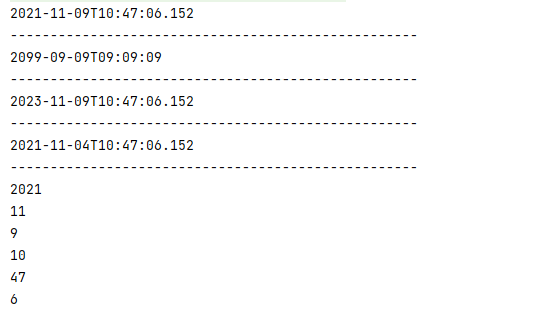
6.2 Instant 时间戳
用于“时间戳”的运算。他是以Unix元年(传统的设定为UTC时区 1970 年 1 月 1 日 午夜时分)开始所经历的描述进行运算
 //2.Instant:时间戳(以 Unix 元年:1970年1月1日 00:00:00 到某个时间之间到毫秒值)
    @Test
    public void test2(){
        Instant instant = Instant.now();//默认获取 UTC 时区             UTC:世界协调时间 和中国相差8个时差
        System.out.println("UTC:"+instant);
        OffsetDateTime offsetDateTime = instant.atOffset(ZoneOffset.ofHours(8));
        System.out.println("中国:"+offsetDateTime);

        System.out.println(instant.toEpochMilli());

        System.out.println(Instant.ofEpochSecond(6)); //1970-01-01T00:00:06Z  1970年1月1日 00:00:00后的6秒钟
    }

6.3 Duration 和 Period
- Duration: 计算两个“时间” 之间的间隔
- Period: 计算两个“日期”之间的间隔
    @Test
    public void test3(){
        Instant ins1 = Instant.now();
        try {
            Thread.sleep(1000);
        } catch (InterruptedException e) {
            e.printStackTrace();
        }
        Instant ins2 = Instant.now();
        Duration d = Duration.between(ins1, ins2);
        System.out.println(d.getSeconds());//秒
        System.out.println("---------------------------------------------------");
        LocalTime lt1 = LocalTime.now();
        try {
            Thread.sleep(1000);
        } catch (InterruptedException e) {
            e.printStackTrace();
        }
        LocalTime lt2 = LocalTime.now();
        System.out.println(Duration.between(lt1,lt2).toMillis());//毫秒
    }
    @Test
    public void test4(){
        LocalDate ld1 = LocalDate.of(2021,1,1);
        LocalDate ld2 = LocalDate.now();
        System.out.println(Period.between(ld1,ld2).getMonths());
        System.out.println(Period.between(ld1,ld2).getDays());
    }


6.4 TemporalAdjuster日期的操控
- TemporalAdjuster : 时间矫正器。有时我们可能需要获取列如:将日期调整到“下一个周日” 等操作
TemporalAdjusters: 该类通过静态方法提供了大量的常用 TemporalAdjuster 的实现
//TemporalAdjuster : 时间矫正器。有时我们可能需要获取列如:将日期调整到“下一个周日” 等操作 //TemporalAdjusters: 该类通过静态方法提供了大量的常用 TemporalAdjuster 的实现 @Test public void test1(){ LocalDateTime localDateTime = LocalDateTime.now(); System.out.println(localDateTime); LocalDateTime newLdt = localDateTime.withDayOfMonth(10);//指定当前时间为本月的10号 System.out.println(newLdt); //2021-11-05T15:19:23.534 //2021-11-10T15:19:23.534 LocalDateTime nextSUNDAY = localDateTime.with(TemporalAdjusters.next(DayOfWeek.SUNDAY)); System.out.println("下一个周日:"+nextSUNDAY); //自定义: 下一个工作日是什么时候 LocalDateTime nextWorkTime = localDateTime.with((e) -> { //public LocalDateTime with(TemporalAdjuster adjuster) {} //TemporalAdjuster是一个函数式接口,我们可以使用Lambda表达式进行实现 //这里把参数强转成我们想要的类型 /** * public LocalDateTime with(TemporalAdjuster adjuster) { * // optimizations * if (adjuster instanceof LocalDate) { * return with((LocalDate) adjuster, time); * } else if (adjuster instanceof LocalTime) { * return with(date, (LocalTime) adjuster); * } else if (adjuster instanceof LocalDateTime) { * return (LocalDateTime) adjuster; * } * return (LocalDateTime) adjuster.adjustInto(this); * } */ LocalDateTime ldt = (LocalDateTime) e; //我们就是用LocalDateTime DayOfWeek dayOfWeek = ldt.getDayOfWeek();//获取当前日期是周几 if (dayOfWeek.equals(DayOfWeek.FRIDAY)) { //如果当前是星期5 return ldt.plusDays(3);//加3天 } else if (dayOfWeek.equals(DayOfWeek.SATURDAY)) { return ldt.plusDays(2);//加2天 } else if (dayOfWeek.equals(DayOfWeek.SUNDAY)) { return ldt.plusDays(1);//加1天 } else { return ldt.plusDays(1); } }); System.out.println("下一个工作日是:"+nextWorkTime); }6.5 解析与格式化
java.time.format.DateTimeFormatter类:该类提供了三种
格式化方法:
预定义的标准格式
语言环境相关的格式
自定义的格式//DateTimeFormatter: 格式化时间/日期 @Test public void test2(){ DateTimeFormatter dtf = DateTimeFormatter.ISO_DATE_TIME; LocalDateTime localDateTime = LocalDateTime.now(); String strDate = localDateTime.format(dtf); System.out.println(strDate); System.out.println("------------------------------"); DateTimeFormatter dtf1 = DateTimeFormatter.ISO_DATE; LocalDateTime localDateTime1 = LocalDateTime.now(); String strDate1 = localDateTime1.format(dtf1); System.out.println(strDate1); System.out.println("------------------------------"); //DateTimeFormatter.ofPattern(); DateTimeFormatter dtf3 = DateTimeFormatter.ofPattern("yyyy年-MM月dd日 HH:mm:ss"); String strDate3 = dtf3.format(localDateTime); System.out.println(strDate3); //localDateTime.parse(param1,param2); LocalDateTime parse = localDateTime.parse(strDate3,dtf3); //解析回来str -=》date 参数1:str 参数2: System.out.println(parse); }6.6 时区的处理
Java8 中加入了对时区的支持,带时区的时间为分别为:
ZonedDate、ZonedTime、ZonedDateTime
其中每个时区都对应着 ID,地区ID都为 “{区域}/{城市}”的格式 。例如 :Asia/Shanghai 等
ZoneId:该类中包含了所有的时区信息
getAvailableZoneIds() : 可以获取所有时区时区信息
of(id) : 用指定的时区信息获取ZoneId 对象

    //ZonedDate ZonedTime ZonedDateTime
    @Test
    public void test3(){
        //支持多少个时区
        Set<String> set = ZoneId.getAvailableZoneIds();
        set.forEach(System.out::println);
    }
    @Test
    public void test4(){
        LocalDateTime now = LocalDateTime.now(ZoneId.of("Europe/London"));
        System.out.println(now);
        LocalDateTime now2 = LocalDateTime.now(ZoneId.of("Asia/Shanghai"));
        ZonedDateTime zonedDateTime = now2.atZone(ZoneId.of("Asia/Shanghai"));
        System.out.println(zonedDateTime);
    }
6.6 与传统日期处理的转换

七、接口中的默认方法与静态方法
7.1 接口中的默认方法
Java 8 中允许接口中包含具有实现的方法,该方法称为”默认方法”,默认方法使用 default 关键字修饰
例如:
interface MyInterface<T>{
    T func(int a);

    default String getName(){
        return "hello Java 8!"
    }
}
我们都知道Java 是一个单继承,多实现的。
若一个接口中定义了一个默认方法,而另一个父类或接口中又定义了一个同名的方法时。
我们使用代码进行实验一下:
//接口1
public interface MyInterface {
    default String getName(){
        return "林志玲";
    }
    public static void show(){
        System.out.println("接口中的静态方法");
    }
}
//接口2
public interface MyInterface2 {
    default String getName(){
        return "王振宇";
    }
}
//父类
public class MyClass {
    public String getName(){
        return "黄勃";
    }
}
//实现类1----》多实现
public class SubClass implements MyInterface,MyInterface2{
    @Override
    public String getName() {
        return MyInterface2.super.getName();
    }
}
//实现类1---》继承 实现
public class SubClass1 implements MyInterface extends MyClass{

}
//测试类---》SubClass
public class TestDefaultInterface {
    public static void main(String[] args) {
        SubClass subClass = new SubClass();
        System.out.println(subClass.getName()); //王振宇
        MyInterface.show();
    }
}
//测试类2---》SubClass1
public class TestDefaultInterface2 {
    public static void main(String[] args) {
        SubClass1 subClass = new SubClass1();
        System.out.println(subClass.getName()); //黄渤
        MyInterface.show();
    }
}
接口默认方法的“类优先”原则:
若一个接口中定义了一个默认方法,而另外一个父类或接口中又定义了一个同名的方法时:
1.选择父类中的方法。如果一个父类提供了具体的实现,那么接口中具有相同名称和参数的默认方法会被忽略
2.接口冲突。如果一个父接口提供了一个默认方法,而另一个接口也提供了一个具有相同名称的参数列表的方法(不管方法是否是默认方法,那么必须覆盖该方法来解决冲突)
7.2 接口中的静态方法
public interface MyInterface {
    default String getName(){
        return "林志玲";
    }
    //接口中的静态方法
    public static void show(){
        System.out.println("接口中的静态方法");
    }
}
八、Optional类
Optional
常用方法:
Optional.of(T t) : 创建一个 Optional 实例
Optional.empty() : 创建一个空的 Optional 实例
Optional.ofNullable(T t):若 t 不为 null,创建 Optional 实例,否则创建空实例
isPresent() : 判断是否包含值
orElse(T t) : 如果调用对象包含值,返回该值,否则返回t
orElseGet(Supplier s) :如果调用对象包含值,返回该值,否则返回 s 获取的值
map(Function f): 如果有值对其处理,并返回处理后的Optional,否则返回 Optional.empty()
flatMap(Function mapper):与 map 类似,要求返回值必须是Optional
/**
 * @author : [Zara-cat]
 * @version : [v1.0]
 * @className : TestOptional
 * @description : [optional对null针对介绍]
 * @createTime : [2021/11/4 13:37]
 * @updateUser : [Zara-cat]
 * @updateTime : [2021/11/4 13:37]
 * @updateRemark : [描述说明本次修改内容]
 */
public class TestOptional {
    /**
     * Optional 容器类的常用方法:
     * Optional.of(T t) : 创建一个Optional 实例
     * Optional.empty() : 创建一个空的 Optional 实例
     * Optional.ofNullable(T t) : 若 t 不为 null,创建 Optional 实例,否者创建空的实例
     * isPresent() : 判断是否包含值
     * orElse(T t) : 如果调用对象包含值,返回该值,否者返回 t
     * orElseGet(Supplier s) : 如果调用对象包含值,返回该值,否者返回 s 获取的值
     * map(Function f) : 如果有值对其处理,并返回处理后的 Optional ,否者返回 Optional。empty()
     * flatMap(Function mapper) : 与 map 类似,要求返回值必须是 Optional
     */
    @Test
    public void test1(){
        //Optional.of(T t) : 创建一个Optional 实例
        Optional<Employee> opEmployee = Optional.of(new Employee());
        Employee employee = opEmployee.get();
        System.out.println(employee);
    }
    @Test
    public void test2(){
        //Optional.empty() : 创建一个空的 Optional 实例
        Optional<Employee> opEmployee = Optional.empty();
        System.out.println(opEmployee.get());
    }
    @Test
    public void test3(){
        // Optional.ofNullable(T t) : 若 t 不为 null,创建 Optional 实例,否者创建空的实例
        Optional<Employee> opEmployee = Optional.ofNullable(new Employee());
        System.out.println(opEmployee.get());
        Optional<Employee> opEmployee2 = Optional.ofNullable(null);
        System.out.println(opEmployee2.get());
    }
    @Test
    public void test4(){
        //isPresent() : 判断是否包含值
        Optional<Employee> opEmployee = Optional.ofNullable(new Employee());
        if (opEmployee.isPresent()){
            System.out.println(opEmployee.get());
        }
        Optional<Employee> opEmployee2 = Optional.ofNullable(null);
        if (opEmployee2.isPresent()){
            System.out.println(opEmployee.get());
        }else {
            System.out.println("2=Optional中没有值");
        }
    }
    @Test
    public void test5(){
        //orElse(T t) : 如果调用对象包含值,返回该值,否者返回 t
        Optional<Employee> opEmployee = Optional.ofNullable(new Employee());
        Employee employee = opEmployee.orElse(new Employee("张山", 18, 8888.88, Employee.Status.BUSY));
        System.out.println(employee);


        Optional<Employee> opEmployee2 = Optional.ofNullable(null);
        Employee employee2 = opEmployee2.orElse(new Employee("张山", 18, 8888.88, Employee.Status.BUSY));
        System.out.println(employee2);
    }
    @Test
    public void test6(){
        //orElseGet(Supplier s) : 如果调用对象包含值,返回该值,否者返回 s 获取的值
        Optional<Employee> opEmployee = Optional.ofNullable(new Employee());
        Employee employee = opEmployee.orElseGet(() -> {
            //这里可以写自己的处理逻辑
            return new Employee();
        });
        System.out.println(employee);
    }
    @Test
    public void test7(){
        //map(Function f) : 如果有值对其处理,并返回处理后的 Optional ,否者返回 Optional。empty()
        Optional<Employee> opEmployee = Optional.ofNullable(new Employee("张山", 18, 8888.88, Employee.Status.BUSY));
        Optional<String> opName = opEmployee.map((e) -> e.getName());
        System.out.println(opName.get());
    }
    @Test
    public void test8(){
        //flatMap(Function mapper) : 与 map 类似,要求返回值必须是 Optional
        Optional<Employee> opEmployee = Optional.ofNullable(new Employee("张山", 18, 8888.88, Employee.Status.BUSY));
        Optional<String> name = opEmployee.flatMap(e -> Optional.of(e.getName()));
        System.out.println(name.get());
    }
九、附件1
/**
 * @author : [Zara-cat]
 * @version : [v1.0]
 * @className : Employee
 * @description : [描述说明该类的功能]
 * @createTime : [2021/10/27 23:26]
 * @updateUser : [Zara-cat]
 * @updateTime : [2021/10/27 23:26]
 * @updateRemark : [描述说明本次修改内容]
 */
public class Employee {
    private String name;
    private int age;
    private double salary;
    private Status status;

    public Employee() {
    }
    public Employee(String name){
        this.name = name;
    }
    public Employee(String name,double money){
        this.name = name;
        this.salary = money;
    }

    public Employee(String name, int age, double salary) {
        this.name = name;
        this.age = age;
        this.salary = salary;
    }

    public Employee(String name, int age, double salary, Status status) {
        this.name = name;
        this.age = age;
        this.salary = salary;
        this.status = status;
    }

    @Override
    public boolean equals(Object o) {
        if (this == o) return true;
        if (o == null || getClass() != o.getClass()) return false;
        Employee employee = (Employee) o;
        return age == employee.age && Double.compare(employee.salary, salary) == 0 && Objects.equals(name, employee.name);
    }

    @Override
    public int hashCode() {
        return Objects.hash(name, age, salary);
    }

    public String getName() {
        return name;
    }

    public void setName(String name) {
        this.name = name;
    }

    public int getAge() {
        return age;
    }

    public void setAge(int age) {
        this.age = age;
    }

    public double getSalary() {
        return salary;
    }

    public void setSalary(double salary) {
        this.salary = salary;
    }

    public Status getStatus() {
        return status;
    }

    public void setStatus(Status status) {
        this.status = status;
    }

    @Override
    public String toString() {
        return "Employee{" +
                "name='" + name + '\'' +
                ", age=" + age +
                ", salary=" + salary +
                ", status=" + status +
                '}';
    }

    public enum Status{
            FREE,
            BUSY,
            VOCATION;
    }
}

若有收获,就点个赞吧
0 人点赞


