一、Java NIO Channel 基本介绍
NIO的通道类似于流,但有些区别如下:- 通道可以同时进行读写,而流只能读或者只能写
- 通道可以实现异步读写数据
- 通道可以从缓冲读数据,也可以写数据到缓冲:
BIO中的Stream是单向的,例如FileInputStream对象只能进行读取数据的操作,而NIO中的通道(Channel)是双向的,可以读操作,也可以写操作。Channel在NIO中是一个接口public interface Channel extends Closeable{}

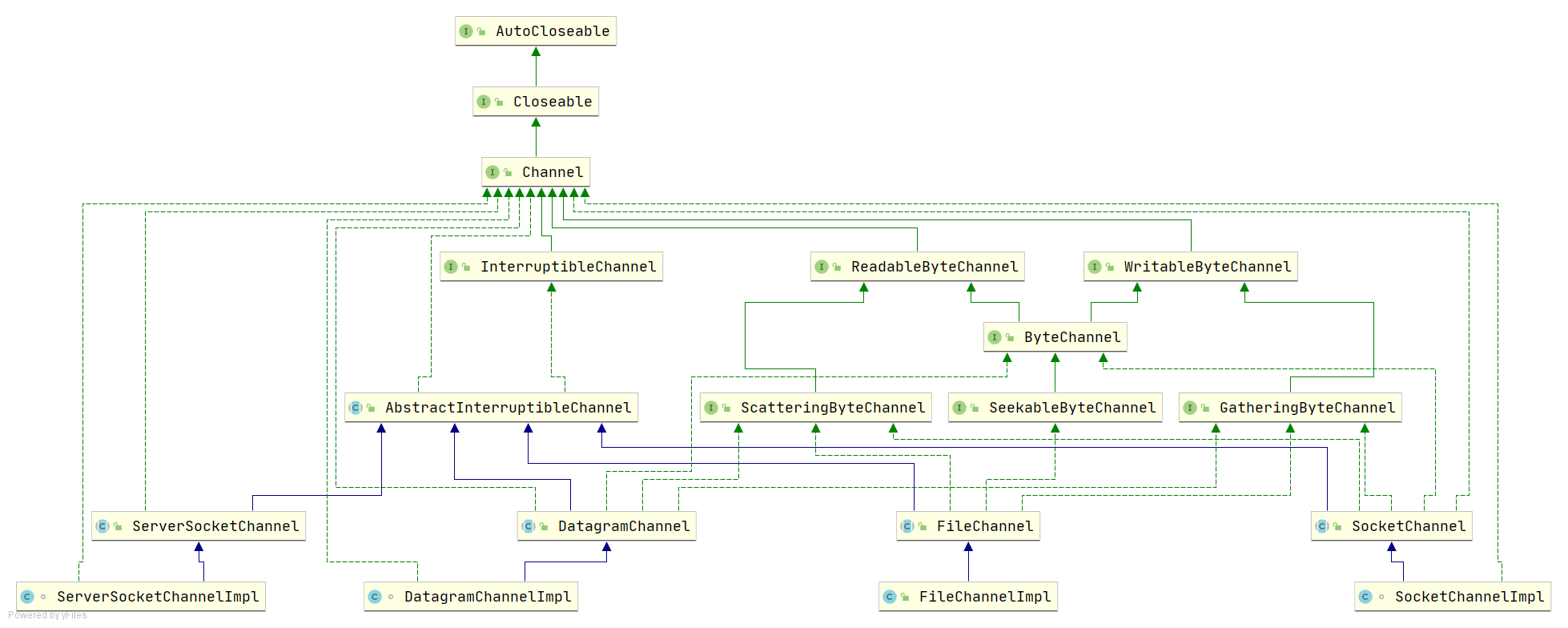
二、Java NIO Channel 主要实现类
**java.nio.channels.Channel** 包下:
- FileChannel :用于文件的数据读写
- SocketChannel :SocketChannel类似于Socket
- ServerSocketChannel :ServerSocketChannel类似于ServerSocket
- DatagramChannel :用于对UDP数据读写
图示如下:
三、Java NIO 获取通道Channel
- Java针对支持通道的类提供了getChannel()方法
本地IO:
  - FileInputStream/FileOutputStream
  - RandomAccessFile
网络IO:
  - Socket
  - ServerSocket
  - DatagramSocket
以上几个类都可以通过调用getChannel()方法获取通道
经过我们前后学的NIO 简介 ,NIO Buffer,NIO Channel 写几个案例来熟悉Buffer和Channel
应用实例1-本地文件写数据
实例要求:
- 将“你好,世界”写入 hello.txt 文件中
- 文件不存在就创建
代码:
/**
  *@Description     <h1>把数据写入到文件中</h1>
  *@author          王振宇
  *@create          2021-08-01 15:05
  */
public class NIOFileChannel01  {
    //使用的是FileChannel通道对象 + ByteBuffer字节缓冲区
    public static void main(String[] args)  throws  Exception{
        //1.创建一个字符串
        String str = "你好,世界";
        //2.创建一个输出流
        FileOutputStream fileOutputStream = new FileOutputStream("D:\\object\\IO\\NIO\\src\\main\\resources\\hello.txt");
        //3.根据输出流获取FileChannel通道对象
        //其实 FileChannel真正的为它的实现类FileChannelImpl
        FileChannel channel = fileOutputStream.getChannel();
        //4.创建一个缓冲区 ByteBuffer ,初始容量为1024字节
        ByteBuffer byteBuffer = ByteBuffer.allocate(1024);
        //5.把字符串放在缓冲区中
        byteBuffer.put(str.getBytes());
        //6.对ByteBuffer进行反转 ,因为在put进去的时候position属性已经为不再是0了,需要反转
        byteBuffer.flip();
        //7.把缓冲区的数据写入到通道channel中
        channel.write(byteBuffer);
        //8.关闭资源
        fileOutputStream.close();

    }
}
/**
 * str ====> Buffer ===>[FileOutStream(FileChannel)]===>文件
 */

其中:
    使用了FileChannel通道,ByteBuffer缓存区来完成此项应用实例
    获取通道方法为本文第三块获取方式的第一条,FileOutStream.getChannel()获取
    其中每一步骤的细节,代码注释中都已经解释清楚
应用实例2-本地文件读数据
实例要求:
- 将 hello.txt 文件中的内容读取到控制台
- 文件假定已经存在
代码:
/**
 * @author 王振宇
 * @Description <h1>文件读到控制台</h1>
 * @create 2021-08-02 1:04
 */
public class NIOFileChannel02 {
    public static void main(String[] args) throws Exception {
        File file = new File("D:\\object\\IO\\NIO\\src\\main\\resources\\hello.txt");
        //1.创建一个文件输入流
        FileInputStream fileInputStream = new FileInputStream(file);
        //2.通过文件输入流获取FileChannel管道===>其实实际为FileChannelImpl
        FileChannel channel = fileInputStream.getChannel();
        //3.创建缓冲区
        ByteBuffer byteBuffer =ByteBuffer.allocate((int) file.length());
        //4.从通道把数据读到缓冲区
        channel.read(byteBuffer);
        //5.把缓冲区的数据数组全部拿出来转换成string,(因为不是一个个读所以不需要管position的当前位置,不需要反转)
        System.out.println(new String(byteBuffer.array()));
        fileInputStream.close();
    }
}
/**
 *  文件===>[FileInputStream(FileChannel)]====>ByteBuffer==>控制台
 */
其中:
    使用了FileChannel通道,ByteBuffer缓存区来完成此项应用实例
    获取通道方法为本文第三块获取方式的第一条,FileInputStream.getChannel()获取
    其中每一步骤的细节,代码注释中都已经解释清楚
应用实例3-完成文件读取、写入
实例要求:
- 使用一个Buffer完成文件的读取、写入
- 图文说明

代码:
/**
 * @author : [王振宇]
 * @version : [v1.0]
 * @className : NIOFileChannel03
 * @description : [文件拷贝]
 * @createTime : [2021/8/2 10:32]
 * @updateUser : [王振宇]
 * @updateTime : [2021/8/2 10:32]
 * @updateRemark : [初始化代码]
 */
public class NIOFileChannel03 {
    public static void main(String[] args) throws Exception{
        //1.获取输入流,获取通道Channel
        FileInputStream fileInputStream = new FileInputStream("D:\\object\\IO\\NIO\\src\\main\\resources\\1.txt");
        FileChannel inputStreamChannel = fileInputStream.getChannel();
        //2.获取输出流, 获取通道Channel
        FileOutputStream fileOutputStream = new FileOutputStream("D:\\object\\IO\\NIO\\src\\main\\resources\\2.txt");
        FileChannel outputStreamChannel = fileOutputStream.getChannel();
        //3.创建字节缓存区
        ByteBuffer buffer = ByteBuffer.allocate(512);
        //4. 通道到缓存
        while (true){
            //如果文件大,缓存容量小,一次while肯定处理不完,所以每次进来缓存读完以后,清空buffer,也就是标识复位
            buffer.clear();
            int read = inputStreamChannel.read(buffer);
            if (read==-1){
                break;
            }
            //注意写之前先反转buffer
            buffer.flip();
            //5.把缓存到通道(文件)
            outputStreamChannel.write(buffer);
        }
        fileInputStream.close();
        fileOutputStream.close();
    }
}

其中:
    使用了FileChannel通道,ByteBuffer缓存区来完成此项应用实例
    获取通道方法为本文第三块获取方式的第一条,FileInputStream.getChannel()和FileOutputStream.getChannel()获取
    其中每一步骤的细节,代码注释中都已经解释清楚
五、关于 Buffer 和 Channel 的注意事项和细节
**ByteBuffer**支持类型化的**put**和**get**,**put**放入的是什么数据类型,**get**就应该使用相应的数据类型来取出,否则可能有**BufferUnderflowException**异常。/** * @author : [王振宇] * @version : [v1.0] * @className : NIOBufferGetPut * @description : [ByteBuffer 支持类型化的 put 和 get,put 放入的是什么数据类型,get 就应该使用相应的数据类型来取出,否则可能有 BufferUnderflowException 异常。] * @createTime : [2021/8/2 11:34] * @updateUser : [王振宇] * @updateTime : [2021/8/2 11:34] * @updateRemark : [描述说明本次修改内容] */ public class NIOBufferGetPut { public static void main(String[] args) { //创建一个 Buffer ByteBuffer buffer = ByteBuffer.allocate(64); //类型化方式放入数据 buffer.putInt(100); buffer.putLong(9); buffer.putChar('尚'); buffer.putShort((short) 4); //取出 buffer.flip(); System.out.println(buffer.getInt()); System.out.println(buffer.getLong()); System.out.println(buffer.getChar()); System.out.println(buffer.getShort()); } }
翻译:
用于读取int值的相对get方法。在这个缓冲区的当前位置读取接下来的四个字节,根据当前字节顺序将它们组合成一个int值,然后将该位置加4。返回:缓冲区当前位置的int值抛出:BufferUnderfLowException - 如果缓冲区中剩余的字节少于4个可以将一个普通
**Buffer**转成只读 `Buffer``**
`
import java.nio.ByteBuffer;

/**
 * @author : [王振宇]
 * @version : [v1.0]
 * @className : ReadOnlyBuffer
 * @description : [可以将一个普通 Buffer 转成只读 Buffer]
 * @createTime : [2021/8/2 11:36]
 * @updateUser : [王振宇]
 * @updateTime : [2021/8/2 11:36]
 * @updateRemark : [描述说明本次修改内容]
 */
public class ReadOnlyBuffer {
    public static void main(String[] args) {

        //创建一个 buffer
        ByteBuffer buffer = ByteBuffer.allocate(64);

        for (int i = 0; i < 64; i++) {
            buffer.put((byte) i);
        }

        //读取
        buffer.flip();

        //得到一个只读的 Buffer
        ByteBuffer readOnlyBuffer = buffer.asReadOnlyBuffer();
        System.out.println(readOnlyBuffer.getClass());

        //读取
        while (readOnlyBuffer.hasRemaining()) {
            System.out.println(readOnlyBuffer.get());
        }
        //如果在一个只读的 Buffer中put就会报异常
        readOnlyBuffer.put((byte) 100); //ReadOnlyBufferException
    }
}
方法:
如果put异常:
- 前面我们讲的读写操作,都是通过一个
**Buffer**完成的,**NIO**还支持通过多个**Buffer**(即**Buffer**数组)完成读写操作,即**Scattering**和**Gathering**```java /**- @author : [王振宇]
- @version : [v1.0]
- @className : ScatteringAndGathering
- @description : [Buffer的分散和聚集]
- @createTime : [2021/8/2 12:04]
- @updateUser : [王振宇]
- @updateTime : [2021/8/2 12:04]
- @updateRemark : [描述说明本次修改内容] */
import java.net.InetSocketAddress; import java.nio.Buffer; import java.nio.ByteBuffer; import java.nio.channels.ServerSocketChannel; import java.nio.channels.SocketChannel;
/**
- Scattering:将数据写入到 buffer 时,可以采用 buffer 数组,依次写入 [分散] ,也就是第一个buffer满了以后进入第二个buffer中
Gathering:从 buffer 读取数据时,可以采用 buffer 数组,依次读 */ public class ScatteringAndGathering { public static void main(String[] args) throws Exception {
 //使用serverSocketChannel 和  SocketChannel
 ServerSocketChannel open = ServerSocketChannel.open();
 InetSocketAddress inetSocketAddress = new InetSocketAddress(7000);
 //绑定端口并启动
 open.socket().bind(inetSocketAddress);
 //创建Buffer数组
 ByteBuffer[] buffers = new ByteBuffer[2]; //创建一个长度为2的buffer数组
 buffers[0] = ByteBuffer.allocate(5);  //初始化第一个buffer 容量为5个字节
 buffers[1] = ByteBuffer.allocate(3); //初始化第二个buffer,容量为3个字节
 //等待服务器链接
 SocketChannel socketChannel = open.accept();//当有客户端链接的时候就会返回一个socketChannel对象
 int messageLength = 8; //假定从客户端接收 8 个字节
 while (true){
     int byteRead = 0;
 }
} }
```

若有收获,就点个赞吧
0 人点赞


