一、稀疏sparsearray数组
1、先看一个实际的需求
问题编写的五子棋程序中,有存盘退出和续上盘的功能
我们以前使用的就是使用一个二维数组,把棋盘上的存在和不存在的点都用不同的标志保存起来如下图: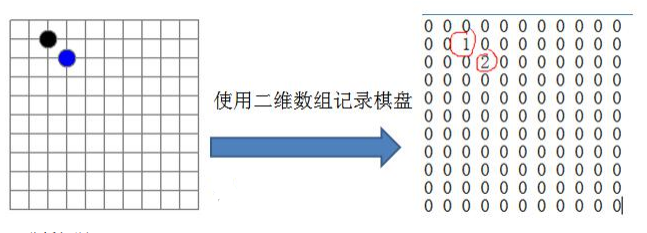
问题分析:
因为这个棋盘上很多都是空的,但是我们二维数组空的也得有值对应,导致很多值是默认值0,因此记录了很多没有意义的数据。这时候我们要是使用稀疏数组。
2、基本介绍
当一个数组中大部分元素为0,或者为同一个值的数组时,可以使用稀疏数组来保存该数组。
2.1稀疏数组的处理方法
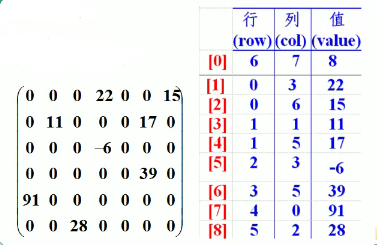
(1)、记录数组一共有几行几列,有多少个不同的值
(2)、把具有不同值的元素的行列及值记录再一个小规模的数组中,从而缩小程序的规模
2.2稀疏数组举例说明
3、应用实例
- 使用稀疏数组,来保留类似前面的二维数组(棋盘、地图等等)
- 吧稀疏数组存盘,并且可以重新恢复原来的二维数组
- 整体思路分析
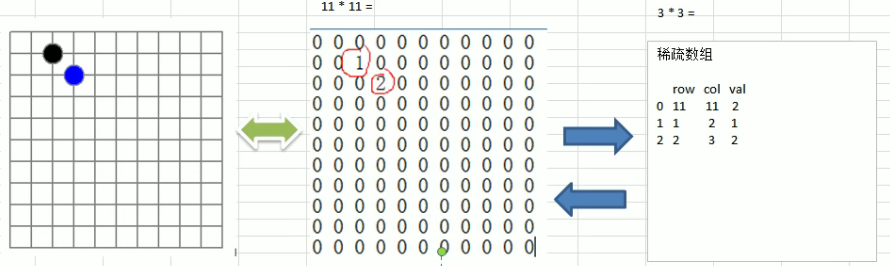
二维数组转稀疏数组的思路
- 便利 原始的二维数组,得到有效数据的个数 sum
- 根据sum就可以创建稀疏数组 sparseArr 行int[sum+1] 列[3]
- 将二维数组中的有效数据存储到稀疏数组中
稀疏数组转原始的二维数组的思路
- 先读取稀疏数组的第一行,根据第一行的数据,创建原始的二维数组,比如 上面的chessArr2=int[11][11]
- 再读取稀疏数组后几行的数据,并赋值给原始的二维数组即可。
3.1代码
```java package datastructures.sparsearray;
/**
- @author : [Zara-cat]
- @version : [v1.0]
- @className : SparseArray
- @description : [稀疏数组]
- @createTime : [2021/10/9 13:22]
- @updateUser : [Zara-cat]
- @updateTime : [2021/10/9 13:22]
@updateRemark : [描述说明本次修改内容] */ public class SparseArray { public static void main(String[] args) {
//创建一个原始的二维数组 11*11//0:表示没有棋子 1:表示黑子 2:表示蓝子int chessArr[][] = new int[11][11];chessArr[1][2] = 1;chessArr[2][3] = 2;chessArr[4][5] = 2;//打印一下原始数组//取出二维数组每一行System.out.println("原始的二维数组");for (int[] row : chessArr){//遍历每一行for (int data : row){System.out.printf("%d\t",data);}System.out.println();}//将二维数组 转 稀疏数组//1.先遍历二维数组,得到非0数据的个数int sum = 0;for (int i = 0 ;i<11;i++){for (int j = 0; j < 11; j++) {if (chessArr[i][j]!=0)sum++;}}System.out.println("sum = "+sum);//2.创建对应的稀疏数组int sparseArr[][] = new int[sum + 1][3];//3、给稀疏数组赋值sparseArr[0][0] = 11;sparseArr[0][1] = 11;sparseArr[0][2] = sum;//遍历二维数组,将非0的值赋值到稀疏数组中//count 用于记录是第几个非0的数据int count = 0;for (int i = 0 ;i<11;i++){for (int j = 0; j < 11; j++) {if (chessArr[i][j]!=0){count++;sparseArr[count][0] = i;sparseArr[count][1] = j;sparseArr[count][2] = chessArr[i][j];}}}//输出稀疏数组的形式System.out.println();System.out.println("得到的稀疏数组为:");for (int[] row :sparseArr){for (int data : row){System.out.printf("%d\t",data);}System.out.println();}//将稀疏数组===>恢复到原来的二维数组//1.先读取稀疏数据第一行,根据第一行数据,创建原始二维数组int chessArrOld[][] = new int[sparseArr[0][0]][sparseArr[0][1]];//2.再读取稀疏数组后几行的数据,并赋给原来的二维数组即可//第二行开始遍历for (int i = 1;i<sparseArr.length;i++){chessArrOld[sparseArr[i][0]][sparseArr[i][1]] = sparseArr[i][2];}System.out.println();System.out.println("恢复后的二维数组:");for (int[] row : chessArrOld){for (int data : row){System.out.printf("%d\t",data);}System.out.println();}
}
}
**运行结果:**<br />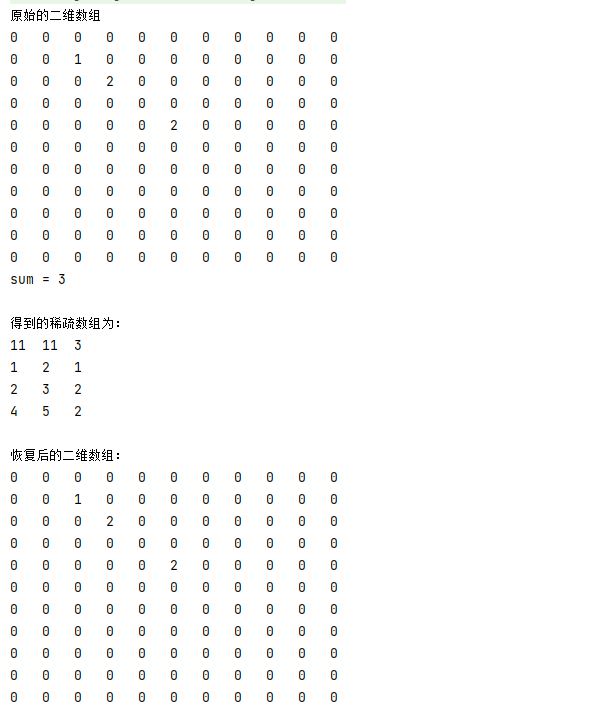
<a name="Jo5FH"></a>
# 二、队列
<a name="ijLRL"></a>
## 1、队列的一个使用场景
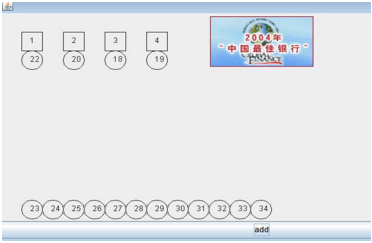
银行排队的案例
<a name="XaXjT"></a>
## 
<a name="SG4S9"></a>
## 2、队列介绍
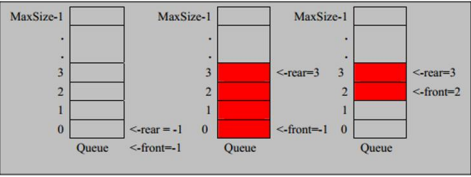
1. **队列是一个有序列表,可以用数组或者是链表实现。**
1. **遵循先入先出的原则**。即:先存入列表的数据,要先取出。后存入的数据,要后取出。
1. 示意图:(使用数组模拟队列示意图)
<a name="HEtEv"></a>
## 3、数组模拟队列思路
1. 队列本身就是有有序列表,若使用数组的结构来存储队列的数据,则队列数组的声明如上图,其中maxSize是该队列的最大容量
1. 因为队列的输出、输入是分别从前后端来处理,因此需要两个变量front和rear分别记录队列前后端的下标,front会随着数据输出而改变,而rear则是随着数据输入而改变。
1. 当我们将数据存入队列时称为“addQueue”,addQueue的处理需要有两个步骤:思路分析
- 将尾指针往后移:rear+1,当front==rear【空】
- 若尾指针rear小于队列的最大下标maxSize-1,则将数据存入rear所指的数组元素中,否者无法存入数据。rear == maxSize -1【队列满】
<a name="cy4u6"></a>
### 3.1 代码实现
```java
package datastructures.queue;
import java.util.Scanner;
/**
* @author : [Zara-cat]
* @version : [v1.0]
* @className : ArrayQueue
* @description : [使用数组模拟队列]
* @createTime : [2021/10/9 18:11]
* @updateUser : [Zara-cat]
* @updateTime : [2021/10/9 18:11]
* @updateRemark : [描述说明本次修改内容]
*/
public class ArrayQueue {
//表示数组的最大容量
private int maxSize;
//队列头
private int front;
//队列尾
private int rear;
//该数组用于存放数据,模拟队列
private int[] arr;
//创建队列的构造器
public ArrayQueue(int arrMaxSize){
this.maxSize = arrMaxSize;
this.arr = new int[maxSize];
//指向队列头部,分析出front是指向队列头的前一个位置
this.front = -1;
//指向队列尾部,指向队列尾的数据(即就是队列最后一个数据)
this.rear = -1;
}
/**
* 判断队列是否满
* @return
*/
public boolean isFull(){
return rear == maxSize-1;
}
/**
* 判断队列是否为空
* @return
*/
public boolean isEmpty(){
return rear == front;
}
/**
*
* 添加数据到队列
* @param n
*/
public void addQueue(int n){
//判断队列是否满
if (isFull()){
System.out.println("队列满,不能加入数据");
return;
}
//rear++; //让rear后移 ,与下方++rear一样效果
arr[++rear] = n;
}
/**
* 获取队列的数据 ,出队列
* @return
*/
public int getQueue(){
//判断队列是否空
if (isEmpty()){
throw new RuntimeException("队列为空,不能取数据");
}
return arr[++front];
}
/**
* 显示队列的所有数据
*/
public void showQueue(){
//遍历
if (isEmpty()){
System.out.println("队列空,无法遍历");
return;
}
for (int i=0;i< arr.length;i++){
System.out.printf("arr[%d]=%d\n",i,arr[i]);
}
}
/**
* 显示队列头数据,注意不是取出数据
* @return
*/
public int headQueue(){
//判断
if (isEmpty()){
throw new RuntimeException("队列空的,没有数据");
}
return arr[front+1];
}
public static void main(String[] args) {
//创建一个队列
ArrayQueue arrayQueue = new ArrayQueue(3);
char key =' ';
Scanner scanner = new Scanner(System.in);
boolean loop = true;
//输出一个菜单
while (loop){
System.out.println("s(show):显示队列");
System.out.println("e(exit):退出程序");
System.out.println("a(add):添加数据到队列");
System.out.println("g(get):从队列取出数据");
System.out.println("h(head):查看队列头的数据");
key = scanner.next().charAt(0);
switch (key){
case 's':
arrayQueue.showQueue();
break;
case 'a':
System.out.println("请输入一个数");
int value = scanner.nextInt();
arrayQueue.addQueue(value);
break;
case 'g':
try {
int queue = arrayQueue.getQueue();
System.out.println("取出的数据是:"+queue);
} catch (Exception e) {
System.out.println(e.getMessage());
}
break;
case 'h':
try {
int i = arrayQueue.headQueue();
System.out.println("队列头的数据是:"+i);
} catch (Exception e) {
System.out.println(e.getMessage());
}
break;
case 'e':
scanner.close();
System.out.println("程序退出");
loop = false;
break;
}
}
}
}
3.2 运行演示
3.3 问题分析并优化
- 目前数组使用一次就不能用,也就是,当存储数组满了以后,同时也全部取出后,由于fron已经 == maxSize-1,已经不能再进行存储,但是其实我们队列已经是逻辑为空了。没有达到复用的效果。
-
4、数组模拟环形队列
对前面的数组模拟队列的优化,充分利用数组。因此将数组看作是一个环形的。(通过取模的方式来实现即可)
思路如下: front变量的含义做一个调整:front就指向队列的第一个元素,也就是说arr[front]就是队列的第一个元素。front的初始化值为0;
- rear变量的含义做一个调整:rear指向队列的最后一个元素的后一个位置。因为希望空出一个空间作为约定。rear的初始值为0
- 当队列满的时候,条件是(rear+1)%maxSize = front
- 当队列为空的时候,条件是 rear == front
- 队列中有效的数据的个数(rear+maxSize-front)% maxSize
- 这个队列总有一个格子为预留位,并且预留位位子是不断改变的,预留位不能存储有效数据
4.1 代码实现
```java package datastructures.queue;
import java.util.Scanner;
/**
- @author : [王振宇]
- @version : [v1.0]
- @className : CircleArrayQueue
- @description : [数组模拟环形队列]
- @createTime : [2021/10/11 10:31]
- @updateUser : [王振宇]
- @updateTime : [2021/10/11 10:31]
@updateRemark : [描述说明本次修改内容] */ public class CircleArrayQueue { //表示数组的最大容量 private int maxSize; //队列头 private int front; //队列尾 private int rear; //该数组用于存放数据,模拟队列 private int[] arr;
//创建队列的构造器 public CircleArrayQueue(int arrMaxSize){
 this.maxSize = arrMaxSize;
 this.arr = new int[maxSize];
 //front就指向队列的第一个元素,也就是说arr[front]就是队列的第一个元素。front的初始化值为0;
 this.front = 0;
 //rear指向队列的最后一个元素的后一个位置。因为希望空出一个空间作为约定。rear的初始值为0
 this.rear = 0;
}
/**
- 判断队列是否满
@return */ public boolean isFull(){ return (rear + 1) % maxSize == front; }
/**
- 判断队列是否为空
@return */ public boolean isEmpty(){ return rear == front; }
/*
- 添加数据到队列
@param n */ public void addQueue(int n){ //判断队列是否满 if (isFull()){
 System.out.println("队列满,不能加入数据");
 return;
} //将数据加入 arr[rear] = n; //rear 后移 rear = (rear + 1) % maxSize; }
/**
- 获取队列的数据 ,出队列
- @return
*/
public int getQueue(){
//判断队列是否空
if (isEmpty()){
} //这里需要分析出front是指向队列的第一个元素 //1.先将front对应的值保留到一个临时变量 int value = arr[front]; //2.将front后移 front = (front + 1) % maxSize; return value; } /**throw new RuntimeException("队列为空,不能取数据"); 显示队列的所有数据 */ public void showQueue(){ //遍历 if (isEmpty()){
 System.out.println("队列空,无法遍历");
 return;
} //思路:从front开始遍历,遍历size个有效元素 for (int i=front;i< front+size();i++){
System.out.printf("arr[%d]=%d\n",i%maxSize,arr[i%maxSize]);} }
/**
- 显示队列头数据,注意不是取出数据
@return */ public int headQueue(){ //判断 if (isEmpty()){
throw new RuntimeException("队列空的,没有数据");} return arr[front]; }
/**
- 求出当前队列有效数据的个数
- @return
*/
public int size(){
return (rear + maxSize - front) % maxSize;
}
public static void main(String[] args) {
//创建一个队列
CircleArrayQueue arrayQueue = new CircleArrayQueue(3);
char key =’ ‘;
Scanner scanner = new Scanner(System.in);
boolean loop = true;
//输出一个菜单
while (loop){
} } }System.out.println("s(show):显示队列"); System.out.println("e(exit):退出程序"); System.out.println("a(add):添加数据到队列"); System.out.println("g(get):从队列取出数据"); System.out.println("h(head):查看队列头的数据"); key = scanner.next().charAt(0); switch (key){ case 's': arrayQueue.showQueue(); break; case 'a': System.out.println("请输入一个数"); int value = scanner.nextInt(); arrayQueue.addQueue(value); break; case 'g': try { int queue = arrayQueue.getQueue(); System.out.println("取出的数据是:"+queue); } catch (Exception e) { System.out.println(e.getMessage()); } break; case 'h': try { int i = arrayQueue.headQueue(); System.out.println("队列头的数据是:"+i); } catch (Exception e) { System.out.println(e.getMessage()); } break; case 'e': scanner.close(); System.out.println("程序退出"); loop = false; break; }
3.2 运行演示
自行运行

若有收获,就点个赞吧
0 人点赞


