框架主要采用 python+unittest+requests+HTMLTestRunner ,工具用的是 pycharm
一、框架结构
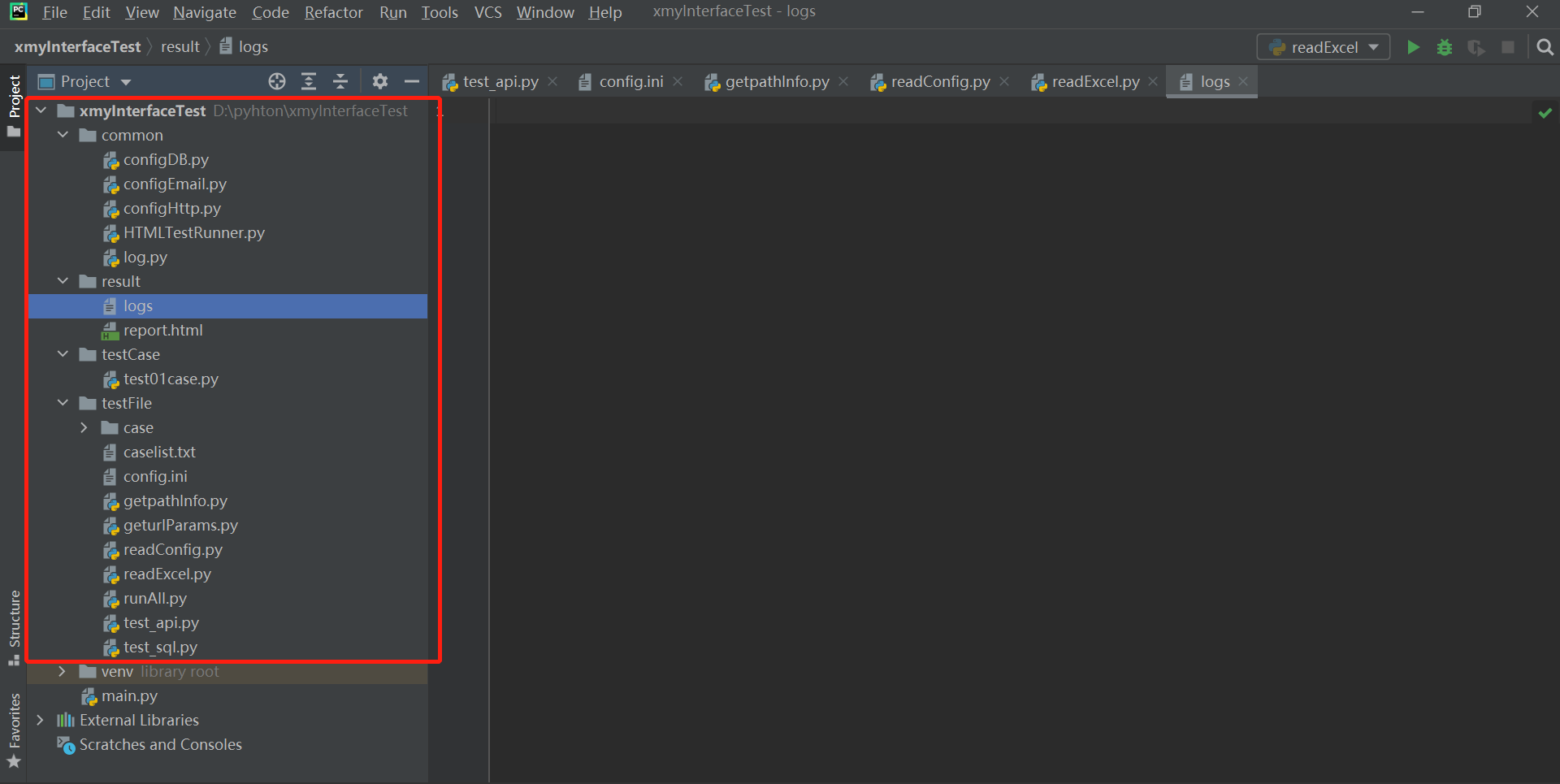
在 pycharm 中创建项目,并在项目中创建上图那样的目录。目录结构介绍如下,详细的作用见在后续的文件中有注解和介绍
common 文件夹
- configDb.py:这个文件主要编写数据库连接池的相关内容
- configEmail.py:这个文件主要是配置发送邮件的主题、正文等,将测试报告发送并抄送到相关人邮箱的逻辑
- configHttp.py:这个文件主要来通过 get、post、put、delete 等方法来进行 http请 求,并拿到请求响应
- HTMLTestRunner.py:主要是生成测试报告相关
-
result 文件夹
logs:生成的日志文件
-
testCase 文件夹
test01case.py:读取 userCase.xlsx 中的用例,使用 unittest 来进行断言校验
testFile 文件夹
userCase.xlsx:对下面 test_api.py 接口服务里的接口,设计了三条简单的测试用例,如参数为 null,参数不正确等
- caselist.txt:配置将要执行 testCase 目录下的哪些用例文件,前加#代表不进行执行。当项目过于庞大,用例足够多的时候,我们可以通过这个开关,来确定本次执行哪些接口的哪些用例。
- config.ini:数据库、邮箱、接口等的配置项,用于方便的调用读取。
- getpathInfo.py:获取项目绝对路径
- geturlParams.py:获取接口的 URL、参数、method 等
- readConfig.py:读取配置文件的方法,并返回文件中内容
- readExcel.py:读取 Excel 的方法
- runAll.py:开始执行接口自动化,项目工程部署完毕后直接运行该文件即可
- test_api.py:自己写的提供本地测试的接口服务
- test_sql.py:测试数据库连接池的文件
二、搭建测试接口服务
自己写一个简单的接口服务,用来对这个框架的测试。打开 test_api.py,写入如下代码 ```python自己写的提供本地测试的接口服务
import flask import json from flask import request
‘’’ flask: web框架,通过flask提供的装饰器@server.route()将普通函数转换为服 ‘’’
创建一个服务,把当前这个pyhton文件当成一个服务
server = flask.Flask(name)
@Serve.route() 可以将普通函数转变为服务,登录接口的路径、请求方式
@server.route(‘/login’, methods=[‘get’, ‘post’]) def login():
# 获取通过url请求参数的数据username = request.values.get('name')# 获取url请求传的密码,明文pwd = request.values.get('pwd')# 判断用户名、密码都不为空if username and pwd:if username == 'xiaoming' and pwd == '111':resu = {'code': 200, 'message': '登录成功'}return json.dumps(resu, ensure_ascii=False) # 将字段转换为字符串else:resu = {'code': -1, 'message': '账号或密码错误'}return json.dumps(resu, ensure_ascii=False)else:resu = {'code': 10001, 'message': '参数不能为空'}return json.dumps(resu, ensure_ascii=False)
if name == ‘main‘: server.run(debug=True, port=8888, host=’127.0.0.1’)
执行 test_api.py,在浏览器中输入 http://127.0.0.1:8888/login?name=xiaoming&pwd=1111 回车,验证我们的接口服务是否正常。如果能返回接口信息,则证明接口服务OK<a name="JV6Ro"></a>## 三、配置文件读取前面我们已经通过 flask 这个 web 框架创建好了我们用于测试的接口服务,因此我们可以把这个接口抽出来一些参数放到配置文件,然后通过一个读取配置文件的方法,方便后续的使用。同样还有邮件的相关配置。<br />在 config.ini 文件中写入内容:```python# -*- coding: utf-8 -*-[HTTP]scheme = httpbaseurl = 127.0.0.1port = 888timeout = 10.0[EMAIL]on_off = on;subject = 接口自动化测试报告app = Outlookaddressee = 785714@qq.comcc = zhxxxa@mxxxd.com
在HTTP中,配置协议、baseURL,端口 和 超时时间
在邮件中,on_off 是设置的一个开关,on 打开,发送邮件,其他不发送邮件。subject 是邮件主题,addressee 是收件人,cc 是抄送人
在编写 readConfig.py 文件前,先写一个获取项目某路径下某文件绝对路径的一个方法。在 getpathInfo.py 中写入:
# 获取项目绝对路径import osdef get_Path():path = os.path.split(os.path.realpath(__file__))[0]return pathif __name__ == '__main__':print("测试路径是否OK,路径为: ", get_Path())
写完后可以测试一下是否打印出了该项目的绝对路径。
打开 readConfig.py 文件,写入如下内容:
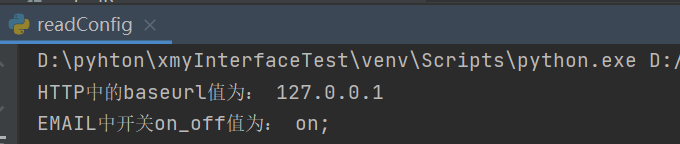
# 读取配置文件的方法,并返回文件中内容import osimport configparser# 引入自己写的获取路径的类import getpathInfo# 调用实例化,这个类返回的路径为 D:\pyhton\xmyInterfaceTest\testFilepath = getpathInfo.get_Path()# 在path路径下再加一级,最后变成D:\pyhton\xmyInterfaceTest\testFile\config.iniconfig_path = os.path.join(path, 'config.ini')# 调用外部的读取配置文件的方法config = configparser.ConfigParser()config.read(config_path, encoding='utf-8')class ReadConfig:def get_http(self, name):value = config.get('HTTP', name)return valuedef get_email(self, name):value = config.get('EMAIL', name)return valuedef get_mysql(self, name):value = config.get('DATABASE', name)return valueif __name__ == '__main__':print('HTTP中的baseurl值为:', ReadConfig().get_http('baseurl'))print('EMAIL中开关on_off值为:', ReadConfig().get_email('on_off'))
四、读取 Excel 中的 case
配置文件写好了,接口我们也有了。因此根据我们的接口设计我们简单的几条用例
在 case 文件中,创建一个 userCase.xlsx,在 excel 中写一下信息: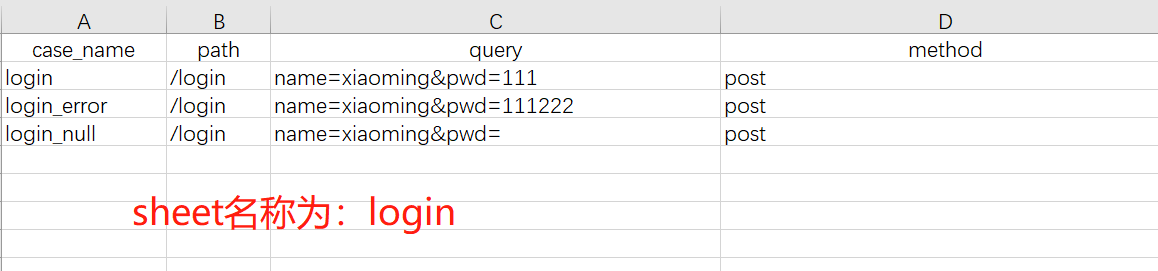
接下来,我们要对这个 Excel 进行数据的读取操作。打开 readExcel.py 文件,写入以下信息:
# 读取Excel的方法import os# 己定义的内部类,该类返回项目的绝对路径import getpathInfo# 调用读Excel的第三方库xlrdfrom xlrd import open_workbook# 拿到该项目所在的绝对路径path = getpathInfo.get_Path()class readExcel:# xls_name填写用例的Excel名称 sheet_name该Excel的sheet名称def get_xls(self, xls_name, sheet_name):cls = []# 获取用例文件路径xlsPath = os.path.join(path, 'case', xls_name)# 打开用例的excelfile = open_workbook(xlsPath)# 打开sheet文件sheet = file.sheet_by_name(sheet_name)# 获取这个sheet文件的行数nrows = sheet.nrowsfor i in range(nrows):# 如果这个sheet的第i行的第一列不等于case_name那么我们把这行的数据添加到cls[]if sheet.row_values(i)[0] != u'case_name':cls.append(sheet.row_values(i))return clsif __name__ == '__main__':print(readExcel().get_xls('userCase.xlsx', 'Login'))print(readExcel().get_xls('userCase.xlsx', 'Login')[0][1])print(readExcel().get_xls('userCase.xlsx', 'Login')[1][2])
写完后,验证是否能正常读取 excel 数据 :::info
这里有一个坑,因为是用 xlrd 来打开 excel 文件的,但最近 xlrd 更新到了2.0.1版本,只支持 .xls 文件,不支持 .xlsx 文件。因此要安装旧版 xlrd
:::
安装方法:在命令行中,运行 pip install xlrd==1.2.0 这样就可以了
:::info
这里有一个坑,因为是用 xlrd 来打开 excel 文件的,但最近 xlrd 更新到了2.0.1版本,只支持 .xls 文件,不支持 .xlsx 文件。因此要安装旧版 xlrd
:::
安装方法:在命令行中,运行 pip install xlrd==1.2.0 这样就可以了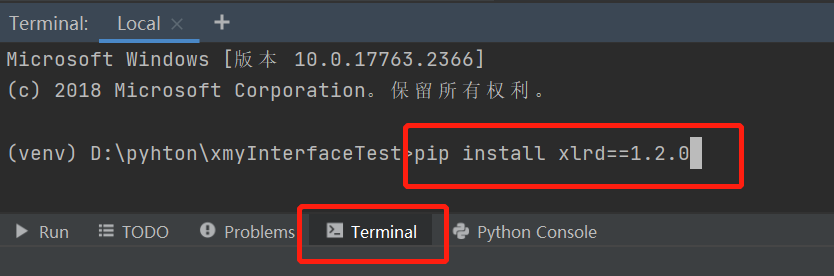
五、requests 请求
配置文件、读取配置文件、用例、读取用例、接口服务的文件都写好了,接下来该写对某个接口进行 http 请求。
首先要用 pip install requests 来安装第三方库
在 common 下的 configHttp.py 文件中,写入如下内容:
# 通过get、post、put、delete等方法来进行http请求,并拿到请求响应import requestsimport jsonclass RunMain:# 定义一个方法,传入需要的参数url 和 datadef send_post(self, url, data):# 因为要封装post方法,所以这里的url和data不能写死# 参数必须要按照url、data顺序写入result = requests.post(url=url, data=data).json()res = json.dumps(result, ensure_ascii=False, sort_keys=True, indent=2)return resdef send_get(self, url, data):result = requests.get(url=url, params=data).json()res = json.dumps(result, ensure_ascii=False, sort_keys=True, indent=2)return res# 定义一个run_main方法,通过传过来的method来进行不同的get或post请求def run_main(self, method, url=None, data=None):result = Noneif method == 'post':result = self.send_post(url, data)elif method == 'get':result = self.send_get(url, data)else:print("method值有误")return result# 验证一下自己写的请求是否正确if __name__ == '__main__':result1 = RunMain().run_main('post', 'http://127.0.0.1:8888/login', {'name': 'xiaoming', 'pwd': '111'})result2 = RunMain().run_main('get', 'http://127.0.0.1:8888/login', 'name=xiaoming&pwd=111')print(result1)print(result2)
执行该文件,验证结果,如果 get 和 post 请求都返回登录成功,则表示OK
六、参数动态化
前面的内容都是通过写死的参数来进行 requests 请求的,因此要写一个类,用来分别获取那些写死的参数。在 geturlParams.py 文件中写入内容如下:
# 获取接口的URL、参数、method等import readConfig as readConfigreadconfig = readConfig.ReadConfig()# 定义一个类,将从配置文件中读取数据,并进行拼接class geturlParams:def get_url(self):new_url = readconfig.get_http('scheme') + '://' + readconfig.get_http('baseurl') + ':8888' + '/login' + '?'# logger.info('new_url' + new_url)return new_urlif __name__ == '__main__':print(geturlParams().get_url())
执行后将会发现,拼接后的结果为:http://127.0.0.1:8888/login? 这个和我们的请求是一致的
七、unittest 断言
前面基础内容准备好后,开始写 unittest 断言测试 case 了,在 test01case.py 文件中,写入如下内容:
# 读取userCase.xlsx中的用例,使用unittest来进行断言校验import jsonimport unittestfrom common.configHttp import RunMainimport paramunittestfrom geturlParams import geturlParamsimport urllib.parseimport readExcel# import pythoncom# pythoncom.CoInitialize()# 调用我们的geturlParams 获取我们拼接的URLurl = geturlParams().get_url()login_xls = readExcel.readExcel().get_xls('userCase.xlsx', 'login')@paramunittest.parametrized(*login_xls)class testUserLogin(unittest.TestCase):def setParameters(self, case_name, path, query, method):self.case_name = str(case_name)self.path = str(path)self.query = str(query)self.method = str(method)def description(self):self.case_namedef setUp(self):print(self.case_name + "测试开始前准备")def test01case(self):self.checkResult()def tearDown(self):print("测试结束,输出log完结\n\n")def checkResult(self):# 拼接完整的请求urlnew_url = url + self.query# 将一个完整的URL中的name=&pwd=转换成{'name':'xxx','pwd':'bbb'}data1 = dict(urllib.parse.parse_qsl(urllib.parse.urlsplit(new_url).query))# 根据Excel中的method调用run_main来进行requests请求,并拿到响应info = RunMain().run_main(self.method, url, data1)# 将响应转换成字典格式ss = json.loads(info)# 如果case_name是login,说明合法,返回code的值应该是200if self.case_name == 'login':self.assertEqual(ss['code'], 200)if self.case_name == 'login_error':self.assertEqual(ss['code'], -1)if self.case_name == 'login_null':self.assertEqual(ss['code'], 10001)
八、测试报告 HTMLTestRunner
在 HTMLTestRunner.py 文件中,写入:
# -*- coding: utf-8 -*-"""A TestRunner for use with the Python unit testing framework. Itgenerates a HTML report to show the result at a glance.The simplest way to use this is to invoke its main method. E.g.import unittestimport HTMLTestRunner... define your tests ...if __name__ == '__main__':HTMLTestRunner.main()For more customization options, instantiates a HTMLTestRunner object.HTMLTestRunner is a counterpart to unittest's TextTestRunner. E.g.# output to a filefp = file('my_report.html', 'wb')runner = HTMLTestRunner.HTMLTestRunner(stream=fp,title='My unit test',description='This demonstrates the report output by HTMLTestRunner.')# Use an external stylesheet.# See the Template_mixin class for more customizable optionsrunner.STYLESHEET_TMPL = '<link rel="stylesheet" href="my_stylesheet.css" type="text/css">'# run the testrunner.run(my_test_suite)------------------------------------------------------------------------Copyright (c) 2004-2007, Wai Yip TungAll rights reserved.Redistribution and use in source and binary forms, with or withoutmodification, are permitted provided that the following conditions aremet:* Redistributions of source code must retain the above copyright notice,this list of conditions and the following disclaimer.* Redistributions in binary form must reproduce the above copyrightnotice, this list of conditions and the following disclaimer in thedocumentation and/or other materials provided with the distribution.* Neither the name Wai Yip Tung nor the names of its contributors may beused to endorse or promote products derived from this software withoutspecific prior written permission.THIS SOFTWARE IS PROVIDED BY THE COPYRIGHT HOLDERS AND CONTRIBUTORS "ASIS" AND ANY EXPRESS OR IMPLIED WARRANTIES, INCLUDING, BUT NOT LIMITEDTO, THE IMPLIED WARRANTIES OF MERCHANTABILITY AND FITNESS FOR APARTICULAR PURPOSE ARE DISCLAIMED. IN NO EVENT SHALL THE COPYRIGHT OWNEROR CONTRIBUTORS BE LIABLE FOR ANY DIRECT, INDIRECT, INCIDENTAL, SPECIAL,EXEMPLARY, OR CONSEQUENTIAL DAMAGES (INCLUDING, BUT NOT LIMITED TO,PROCUREMENT OF SUBSTITUTE GOODS OR SERVICES; LOSS OF USE, DATA, ORPROFITS; OR BUSINESS INTERRUPTION) HOWEVER CAUSED AND ON ANY THEORY OFLIABILITY, WHETHER IN CONTRACT, STRICT LIABILITY, OR TORT (INCLUDINGNEGLIGENCE OR OTHERWISE) ARISING IN ANY WAY OUT OF THE USE OF THISSOFTWARE, EVEN IF ADVISED OF THE POSSIBILITY OF SUCH DAMAGE."""# URL: http://tungwaiyip.info/software/HTMLTestRunner.html__author__ = "Wai Yip Tung"__version__ = "0.9.1""""Change HistoryVersion 0.9.1* 用Echarts添加执行情况统计图 (灰蓝)Version 0.9.0* 改成Python 3.x (灰蓝)Version 0.8.3* 使用 Bootstrap稍加美化 (灰蓝)* 改为中文 (灰蓝)Version 0.8.2* Show output inline instead of popup window (Viorel Lupu).Version in 0.8.1* Validated XHTML (Wolfgang Borgert).* Added description of test classes and test cases.Version in 0.8.0* Define Template_mixin class for customization.* Workaround a IE 6 bug that it does not treat <script> block as CDATA.Version in 0.7.1* Back port to Python 2.3 (Frank Horowitz).* Fix missing scroll bars in detail log (Podi)."""# TODO: color stderr# TODO: simplify javascript using ,ore than 1 class in the class attribute?import datetimeimport sysimport ioimport timeimport unittestfrom xml.sax import saxutils# ------------------------------------------------------------------------# The redirectors below are used to capture output during testing. Output# sent to sys.stdout and sys.stderr are automatically captured. However# in some cases sys.stdout is already cached before HTMLTestRunner is# invoked (e.g. calling logging.basicConfig). In order to capture those# output, use the redirectors for the cached stream.## e.g.# >>> logging.basicConfig(stream=HTMLTestRunner.stdout_redirector)# >>>class OutputRedirector(object):""" Wrapper to redirect stdout or stderr """def __init__(self, fp):self.fp = fpdef write(self, s):self.fp.write(s)def writelines(self, lines):self.fp.writelines(lines)def flush(self):self.fp.flush()stdout_redirector = OutputRedirector(sys.stdout)stderr_redirector = OutputRedirector(sys.stderr)# ----------------------------------------------------------------------# Templateclass Template_mixin(object):"""Define a HTML template for report customerization and generation.Overall structure of an HTML reportHTML+------------------------+|<html> || <head> || || STYLESHEET || +----------------+ || | | || +----------------+ || || </head> || || <body> || || HEADING || +----------------+ || | | || +----------------+ || || REPORT || +----------------+ || | | || +----------------+ || || ENDING || +----------------+ || | | || +----------------+ || || </body> ||</html> |+------------------------+"""STATUS = {0: u'通过',1: u'失败',2: u'错误',}DEFAULT_TITLE = 'Unit Test Report'DEFAULT_DESCRIPTION = ''# ------------------------------------------------------------------------# HTML TemplateHTML_TMPL = r"""<?xml version="1.0" encoding="UTF-8"?><!DOCTYPE html PUBLIC "-//W3C//DTD XHTML 1.0 Strict//EN" "http://www.w3.org/TR/xhtml1/DTD/xhtml1-strict.dtd"><html xmlns="http://www.w3.org/1999/xhtml"><head><title>%(title)s</title><meta name="generator" content="%(generator)s"/><meta http-equiv="Content-Type" content="text/html; charset=UTF-8"/><link href="http://cdn.bootcss.com/bootstrap/3.3.0/css/bootstrap.min.css" rel="stylesheet"><script src="https://cdn.bootcss.com/echarts/3.8.5/echarts.common.min.js"></script><!-- <script type="text/javascript" src="js/echarts.common.min.js"></script> -->%(stylesheet)s</head><body><script language="javascript" type="text/javascript"><!--output_list = Array();/* level - 0:Summary; 1:Failed; 2:All */function showCase(level) {trs = document.getElementsByTagName("tr");for (var i = 0; i < trs.length; i++) {tr = trs[i];id = tr.id;if (id.substr(0,2) == 'ft') {if (level < 1) {tr.className = 'hiddenRow';}else {tr.className = '';}}if (id.substr(0,2) == 'pt') {if (level > 1) {tr.className = '';}else {tr.className = 'hiddenRow';}}}}function showClassDetail(cid, count) {var id_list = Array(count);var toHide = 1;for (var i = 0; i < count; i++) {tid0 = 't' + cid.substr(1) + '.' + (i+1);tid = 'f' + tid0;tr = document.getElementById(tid);if (!tr) {tid = 'p' + tid0;tr = document.getElementById(tid);}id_list[i] = tid;if (tr.className) {toHide = 0;}}for (var i = 0; i < count; i++) {tid = id_list[i];if (toHide) {document.getElementById('div_'+tid).style.display = 'none'document.getElementById(tid).className = 'hiddenRow';}else {document.getElementById(tid).className = '';}}}function showTestDetail(div_id){var details_div = document.getElementById(div_id)var displayState = details_div.style.display// alert(displayState)if (displayState != 'block' ) {displayState = 'block'details_div.style.display = 'block'}else {details_div.style.display = 'none'}}function html_escape(s) {s = s.replace(/&/g,'&');s = s.replace(/</g,'<');s = s.replace(/>/g,'>');return s;}/* obsoleted by detail in <div>function showOutput(id, name) {var w = window.open("", //urlname,"resizable,scrollbars,status,width=800,height=450");d = w.document;d.write("<pre>");d.write(html_escape(output_list[id]));d.write("\n");d.write("<a href='javascript:window.close()'>close</a>\n");d.write("</pre>\n");d.close();}*/--></script><div id="div_base">%(heading)s%(report)s%(ending)s%(chart_script)s</div></body></html>""" # variables: (title, generator, stylesheet, heading, report, ending, chart_script)ECHARTS_SCRIPT = """<script type="text/javascript">// 基于准备好的dom,初始化echarts实例var myChart = echarts.init(document.getElementById('chart'));// 指定图表的配置项和数据var option = {title : {text: '测试执行情况',x:'center'},tooltip : {trigger: 'item',formatter: "{a} <br/>{b} : {c} ({d}%%)"},color: ['#95b75d', 'grey', '#b64645'],legend: {orient: 'vertical',left: 'left',data: ['通过','失败','错误']},series : [{name: '测试执行情况',type: 'pie',radius : '60%%',center: ['50%%', '60%%'],data:[{value:%(Pass)s, name:'通过'},{value:%(fail)s, name:'失败'},{value:%(error)s, name:'错误'}],itemStyle: {emphasis: {shadowBlur: 10,shadowOffsetX: 0,shadowColor: 'rgba(0, 0, 0, 0.5)'}}}]};// 使用刚指定的配置项和数据显示图表。myChart.setOption(option);</script>""" # variables: (Pass, fail, error)# ------------------------------------------------------------------------# Stylesheet## alternatively use a <link> for external style sheet, e.g.# <link rel="stylesheet" href="$url" type="text/css">STYLESHEET_TMPL = """<style type="text/css" media="screen">body { font-family: Microsoft YaHei,Consolas,arial,sans-serif; font-size: 80%; }table { font-size: 100%; }pre { white-space: pre-wrap;word-wrap: break-word; }/* -- heading ---------------------------------------------------------------------- */h1 {font-size: 16pt;color: gray;}.heading {margin-top: 0ex;margin-bottom: 1ex;}.heading .attribute {margin-top: 1ex;margin-bottom: 0;}.heading .description {margin-top: 2ex;margin-bottom: 3ex;}/* -- css div popup ------------------------------------------------------------------------ */a.popup_link {}a.popup_link:hover {color: red;}.popup_window {display: none;position: relative;left: 0px;top: 0px;/*border: solid #627173 1px; */padding: 10px;/*background-color: #E6E6D6; */font-family: "Lucida Console", "Courier New", Courier, monospace;text-align: left;font-size: 8pt;/* width: 500px;*/}}/* -- report ------------------------------------------------------------------------ */#show_detail_line {margin-top: 3ex;margin-bottom: 1ex;}#result_table {width: 99%;}#header_row {font-weight: bold;color: #303641;background-color: #ebebeb;}#total_row { font-weight: bold; }.passClass { background-color: #bdedbc; }.failClass { background-color: #ffefa4; }.errorClass { background-color: #ffc9c9; }.passCase { color: #6c6; }.failCase { color: #FF6600; font-weight: bold; }.errorCase { color: #c00; font-weight: bold; }.hiddenRow { display: none; }.testcase { margin-left: 2em; }/* -- ending ---------------------------------------------------------------------- */#ending {}#div_base {position:absolute;top:0%;left:5%;right:5%;width: auto;height: auto;margin: -15px 0 0 0;}</style>"""# ------------------------------------------------------------------------# Heading#HEADING_TMPL = """<div class='page-header'><h1>%(title)s</h1>%(parameters)s</div><div style="float: left;width:50%%;"><p class='description'>%(description)s</p></div><div id="chart" style="width:50%%;height:400px;float:left;"></div>""" # variables: (title, parameters, description)HEADING_ATTRIBUTE_TMPL = """<p class='attribute'><strong>%(name)s:</strong> %(value)s</p>""" # variables: (name, value)# ------------------------------------------------------------------------# Report#REPORT_TMPL = u"""<div class="btn-group btn-group-sm"><button class="btn btn-default" onclick='javascript:showCase(0)'>总结</button><button class="btn btn-default" onclick='javascript:showCase(1)'>失败</button><button class="btn btn-default" onclick='javascript:showCase(2)'>全部</button></div><p></p><table id='result_table' class="table table-bordered"><colgroup><col align='left' /><col align='right' /><col align='right' /><col align='right' /><col align='right' /><col align='right' /></colgroup><tr id='header_row'><td>测试套件/测试用例</td><td>总数</td><td>通过</td><td>失败</td><td>错误</td><td>查看</td></tr>%(test_list)s<tr id='total_row'><td>总计</td><td>%(count)s</td><td>%(Pass)s</td><td>%(fail)s</td><td>%(error)s</td><td> </td></tr></table>""" # variables: (test_list, count, Pass, fail, error)REPORT_CLASS_TMPL = u"""<tr class='%(style)s'><td>%(desc)s</td><td>%(count)s</td><td>%(Pass)s</td><td>%(fail)s</td><td>%(error)s</td><td><a href="javascript:showClassDetail('%(cid)s',%(count)s)">详情</a></td></tr>""" # variables: (style, desc, count, Pass, fail, error, cid)REPORT_TEST_WITH_OUTPUT_TMPL = r"""<tr id='%(tid)s' class='%(Class)s'><td class='%(style)s'><div class='testcase'>%(desc)s</div></td><td colspan='5' align='center'><!--css div popup start--><a class="popup_link" onfocus='this.blur();' href="javascript:showTestDetail('div_%(tid)s')" >%(status)s</a><div id='div_%(tid)s' class="popup_window"><pre>%(script)s</pre></div><!--css div popup end--></td></tr>""" # variables: (tid, Class, style, desc, status)REPORT_TEST_NO_OUTPUT_TMPL = r"""<tr id='%(tid)s' class='%(Class)s'><td class='%(style)s'><div class='testcase'>%(desc)s</div></td><td colspan='5' align='center'>%(status)s</td></tr>""" # variables: (tid, Class, style, desc, status)REPORT_TEST_OUTPUT_TMPL = r"""%(id)s: %(output)s""" # variables: (id, output)# ------------------------------------------------------------------------# ENDING#ENDING_TMPL = """<div id='ending'> </div>"""# -------------------- The end of the Template class -------------------TestResult = unittest.TestResultclass _TestResult(TestResult):# note: _TestResult is a pure representation of results.# It lacks the output and reporting ability compares to unittest._TextTestResult.def __init__(self, verbosity=1):TestResult.__init__(self)self.stdout0 = Noneself.stderr0 = Noneself.success_count = 0self.failure_count = 0self.error_count = 0self.verbosity = verbosity# result is a list of result in 4 tuple# (# result code (0: success; 1: fail; 2: error),# TestCase object,# Test output (byte string),# stack trace,# )self.result = []self.subtestlist = []def startTest(self, test):TestResult.startTest(self, test)# just one buffer for both stdout and stderrself.outputBuffer = io.StringIO()stdout_redirector.fp = self.outputBufferstderr_redirector.fp = self.outputBufferself.stdout0 = sys.stdoutself.stderr0 = sys.stderrsys.stdout = stdout_redirectorsys.stderr = stderr_redirectordef complete_output(self):"""Disconnect output redirection and return buffer.Safe to call multiple times."""if self.stdout0:sys.stdout = self.stdout0sys.stderr = self.stderr0self.stdout0 = Noneself.stderr0 = Nonereturn self.outputBuffer.getvalue()def stopTest(self, test):# Usually one of addSuccess, addError or addFailure would have been called.# But there are some path in unittest that would bypass this.# We must disconnect stdout in stopTest(), which is guaranteed to be called.self.complete_output()def addSuccess(self, test):if test not in self.subtestlist:self.success_count += 1TestResult.addSuccess(self, test)output = self.complete_output()self.result.append((0, test, output, ''))if self.verbosity > 1:sys.stderr.write('ok ')sys.stderr.write(str(test))sys.stderr.write('\n')else:sys.stderr.write('.')def addError(self, test, err):self.error_count += 1TestResult.addError(self, test, err)_, _exc_str = self.errors[-1]output = self.complete_output()self.result.append((2, test, output, _exc_str))if self.verbosity > 1:sys.stderr.write('E ')sys.stderr.write(str(test))sys.stderr.write('\n')else:sys.stderr.write('E')def addFailure(self, test, err):self.failure_count += 1TestResult.addFailure(self, test, err)_, _exc_str = self.failures[-1]output = self.complete_output()self.result.append((1, test, output, _exc_str))if self.verbosity > 1:sys.stderr.write('F ')sys.stderr.write(str(test))sys.stderr.write('\n')else:sys.stderr.write('F')def addSubTest(self, test, subtest, err):if err is not None:if getattr(self, 'failfast', False):self.stop()if issubclass(err[0], test.failureException):self.failure_count += 1errors = self.failureserrors.append((subtest, self._exc_info_to_string(err, subtest)))output = self.complete_output()self.result.append((1, test, output + '\nSubTestCase Failed:\n' + str(subtest),self._exc_info_to_string(err, subtest)))if self.verbosity > 1:sys.stderr.write('F ')sys.stderr.write(str(subtest))sys.stderr.write('\n')else:sys.stderr.write('F')else:self.error_count += 1errors = self.errorserrors.append((subtest, self._exc_info_to_string(err, subtest)))output = self.complete_output()self.result.append((2, test, output + '\nSubTestCase Error:\n' + str(subtest), self._exc_info_to_string(err, subtest)))if self.verbosity > 1:sys.stderr.write('E ')sys.stderr.write(str(subtest))sys.stderr.write('\n')else:sys.stderr.write('E')self._mirrorOutput = Trueelse:self.subtestlist.append(subtest)self.subtestlist.append(test)self.success_count += 1output = self.complete_output()self.result.append((0, test, output + '\nSubTestCase Pass:\n' + str(subtest), ''))if self.verbosity > 1:sys.stderr.write('ok ')sys.stderr.write(str(subtest))sys.stderr.write('\n')else:sys.stderr.write('.')class HTMLTestRunner(Template_mixin):def __init__(self, stream=sys.stdout, verbosity=1, title=None, description=None):self.stream = streamself.verbosity = verbosityif title is None:self.title = self.DEFAULT_TITLEelse:self.title = titleif description is None:self.description = self.DEFAULT_DESCRIPTIONelse:self.description = descriptionself.startTime = datetime.datetime.now()def run(self, test):"Run the given test case or test suite."result = _TestResult(self.verbosity)test(result)self.stopTime = datetime.datetime.now()self.generateReport(test, result)print('\nTime Elapsed: %s' % (self.stopTime - self.startTime), file=sys.stderr)return resultdef sortResult(self, result_list):# unittest does not seems to run in any particular order.# Here at least we want to group them together by class.rmap = {}classes = []for n, t, o, e in result_list:cls = t.__class__if cls not in rmap:rmap[cls] = []classes.append(cls)rmap[cls].append((n, t, o, e))r = [(cls, rmap[cls]) for cls in classes]return rdef getReportAttributes(self, result):"""Return report attributes as a list of (name, value).Override this to add custom attributes."""startTime = str(self.startTime)[:19]duration = str(self.stopTime - self.startTime)status = []if result.success_count: status.append(u'通过 %s' % result.success_count)if result.failure_count: status.append(u'失败 %s' % result.failure_count)if result.error_count: status.append(u'错误 %s' % result.error_count)if status:status = ' '.join(status)else:status = 'none'return [(u'开始时间', startTime),(u'运行时长', duration),(u'状态', status),]def generateReport(self, test, result):report_attrs = self.getReportAttributes(result)generator = 'HTMLTestRunner %s' % __version__stylesheet = self._generate_stylesheet()heading = self._generate_heading(report_attrs)report = self._generate_report(result)ending = self._generate_ending()chart = self._generate_chart(result)output = self.HTML_TMPL % dict(title=saxutils.escape(self.title),generator=generator,stylesheet=stylesheet,heading=heading,report=report,ending=ending,chart_script=chart)self.stream.write(output.encode('utf8'))# self.stream.write(output)def _generate_stylesheet(self):return self.STYLESHEET_TMPLdef _generate_heading(self, report_attrs):a_lines = []for name, value in report_attrs:line = self.HEADING_ATTRIBUTE_TMPL % dict(name=saxutils.escape(name),value=saxutils.escape(value),)a_lines.append(line)heading = self.HEADING_TMPL % dict(title=saxutils.escape(self.title),parameters=''.join(a_lines),description=saxutils.escape(self.description),)return headingdef _generate_report(self, result):rows = []sortedResult = self.sortResult(result.result)for cid, (cls, cls_results) in enumerate(sortedResult):# subtotal for a classnp = nf = ne = 0for n, t, o, e in cls_results:if n == 0:np += 1elif n == 1:nf += 1else:ne += 1# format class descriptionif cls.__module__ == "__main__":name = cls.__name__else:name = "%s.%s" % (cls.__module__, cls.__name__)doc = cls.__doc__ and cls.__doc__.split("\n")[0] or ""desc = doc and '%s: %s' % (name, doc) or namerow = self.REPORT_CLASS_TMPL % dict(style=ne > 0 and 'errorClass' or nf > 0 and 'failClass' or 'passClass',desc=desc,count=np + nf + ne,Pass=np,fail=nf,error=ne,cid='c%s' % (cid + 1),)rows.append(row)for tid, (n, t, o, e) in enumerate(cls_results):self._generate_report_test(rows, cid, tid, n, t, o, e)report = self.REPORT_TMPL % dict(test_list=''.join(rows),count=str(result.success_count + result.failure_count + result.error_count),Pass=str(result.success_count),fail=str(result.failure_count),error=str(result.error_count),)return reportdef _generate_chart(self, result):chart = self.ECHARTS_SCRIPT % dict(Pass=str(result.success_count),fail=str(result.failure_count),error=str(result.error_count),)return chartdef _generate_report_test(self, rows, cid, tid, n, t, o, e):# e.g. 'pt1.1', 'ft1.1', etchas_output = bool(o or e)tid = (n == 0 and 'p' or 'f') + 't%s.%s' % (cid + 1, tid + 1)name = t.id().split('.')[-1]doc = t.shortDescription() or ""desc = doc and ('%s: %s' % (name, doc)) or nametmpl = has_output and self.REPORT_TEST_WITH_OUTPUT_TMPL or self.REPORT_TEST_NO_OUTPUT_TMPLscript = self.REPORT_TEST_OUTPUT_TMPL % dict(id=tid,output=saxutils.escape(o + e),)row = tmpl % dict(tid=tid,Class=(n == 0 and 'hiddenRow' or 'none'),style=(n == 2 and 'errorCase' or (n == 1 and 'failCase' or 'none')),desc=desc,script=script,status=self.STATUS[n],)rows.append(row)if not has_output:returndef _generate_ending(self):return self.ENDING_TMPL############################################################################### Facilities for running tests from the command line############################################################################### Note: Reuse unittest.TestProgram to launch test. In the future we may# build our own launcher to support more specific command line# parameters like test title, CSS, etc.class TestProgram(unittest.TestProgram):"""A variation of the unittest.TestProgram. Please refer to the baseclass for command line parameters."""def runTests(self):# Pick HTMLTestRunner as the default test runner.# base class's testRunner parameter is not useful because it means# we have to instantiate HTMLTestRunner before we know self.verbosity.if self.testRunner is None:self.testRunner = HTMLTestRunner(verbosity=self.verbosity)unittest.TestProgram.runTests(self)main = TestProgram############################################################################### Executing this module from the command line##############################################################################if __name__ == "__main__":main(module=None)
九、调用生成测试报告
用例控制 unittest
先别急着创建 runAll.py 文件,在创建此文件前,还缺少点东东。先打开 caselist.txt 文件,写入内容如下:
user/test01case#user/test02case#user/test03case#user/test04case#user/test05case#shop/test_shop_list#shop/test_my_shop#shop/test_new_shop
通过这个文件来控制执行哪些模块下的哪些 unittest 用例文件。如在实际的项目中:use 模块下的 test01case.py,店铺 shop 模块下的我的店铺 my_shop
发送邮件 configEmail.py
但目前还缺少一个发送邮件的文件。打开 configEmail.py 文件,写入内容如下:
# 主要是配置发送邮件的主题、正文
import os
import smtplib
import base64
from email.mime.text import MIMEText
from email.mime.multipart import MIMEMultipart


class SendEmail(object):
    # email_host 是本地邮件发送邮件的服务器地址(SMTP),要自己去检查
    # ssl_port 是本地邮件发送的服务器的ssl端口
    def __init__(self, username, passwd, recv, title, content,
                 file=None, ssl=False,
                 email_host='mail.xxa.com', port=25, ssl_port=994):
        # 用户名
        self.username = username
        # 密码
        self.passwd = passwd
        # 收件人,多个要穿List['aa@qq.com','bb@qq.com']
        self.recv = recv
        # 邮件标题
        self.title = title
        # 邮件正文
        self.content = content
        # 邮件路径,如果不在当前目录下,要写绝对路径
        self.file = file
        # smtp服务器地址
        self.email_host = email_host
        # 普通端口
        self.port = port
        # 是否安全链接
        self.ssl = ssl
        # 安全链接端口
        self.ssl_port = ssl_port

    def send_email(self):
        # 发送内容对象
        msg = MIMEMultipart()
        # 处理附件
        if self.file:
            # 只读文件名,不取路径
            file_name = os.path.split(self.file)[-1]
            try:
                f = open(self.file, 'rb').read()
            except Exception as e:
                raise Exception('附件打不开!!!')
            else:
                att = MIMEText(f, "base64", "utf-8")
                att["Content-Type"] = 'application/octet-stream'
                # base64.b64encode(file_name.encode()).decode()
                new_file_name = '=?utf-8?b?' + base64.b64encode(file_name.encode()).decode() + '?='
                # 这里是处理文件名为中文的,必须这么写
                att["Content-Disposition"] = 'attachment; filename="%s"' % (new_file_name)
                msg.attach(att)
        # 邮件正文内容
        msg.attach(MIMEText(self.content))
        # 邮件主题
        msg['Subject'] = self.title
        # 发送者账号
        msg['From'] = self.username
        # 接收者账号列表
        msg['To'] = ','.join(self.recv)
        if self.ssl:
            self.smtp = smtplib.SMTP_SSL(self.email_host, port=self.ssl_port)
        else:
            self.smtp = smtplib.SMTP(self.email_host, port=self.port)
        # 发送邮件服务器的对象
        self.smtp.login(self.username, self.passwd)
        try:
            self.smtp.sendmail(self.username, self.recv, msg.as_string())
            pass
        except Exception as e:
            print("出错了。。。", e)
        else:
            print("邮件发送成功")
        self.smtp.quit()


if __name__ == '__main__':
    m = SendEmail(
        # 邮箱账号
        username='zhxxxwx8@mxxxxud.com',
        # 邮箱密码
        passwd='',
        # 收件人邮箱
        recv=[''],
        title='测试自动发送邮件',
        content='测试发送邮件',
        file=r'E:\blog\image1.jpg',
        ssl=True,
    )
    m.send_email()
这里要再次说明,email_host 和 ssl_port 和本地使用的邮箱有关系,我这里用的是 outlook,因此在 outlook 的客户端中查看了发送邮件的服务器地址和端口
运行 configEmail.py 验证邮件发送是否正确
执行所有文件 runAll.py
# 开始执行接口自动化,项目工程部署完毕后直接运行该文件即可
import os
import unittest
import common.HTMLTestRunner as HTMLTestRunner
import getpathInfo
import readConfig
from common.configEmail import SendEmail
# import common.Log

send_mail = SendEmail(
    username='zxxxx8@mxxxxd.com',
    passwd='',
    recv=[''],
    title='测试报告',
    content='测试报告',
    file=r'D:\pyhton\xmyInterfaceTest\result\report.html',
    ssl=True,
)
path = getpathInfo.get_Path()
report_path = os.path.join(path, 'result')
on_off = readConfig.ReadConfig().get_email('on_off')
# log = common.Log.logger


class AllTest:
    # 初始化一些参数和数据
    def __init__(self):
        global resultPath
        # result/report.html
        resultPath = os.path.join(report_path, "report.html")
        # 配置执行哪些测试文件的配置文件路径
        self.caseListFile = os.path.join(path, "caselist.txt")
        # 真正的测试断言文件路径
        self.caseFile = os.path.join(path, "testCase")
        self.caseList = []

        # 将resultPath的值输出到日志中,方便定位问题
        # log.info('resultPath: ' + resultPath)
        # log.info('caseListFile: ' + self.caseListFile)
        # log.info('caseList: %s', self.caseList)

    def set_case_list(self):
        """
        取caselist.txt文件中的用例名称,并添加到caselist元素组
        :return:
        """
        fb = open(self.caseListFile)
        for value in fb.readlines():
            data = str(value)
            # 如果data非空且不以#号开头
            if data != '' and not data.startswith("#"):
                # 读取每行数据会将换行转换为\n,去掉每行数据中的\n
                self.caseList.append(data.replace("\n", ""))
        fb.close()

    def set_case_suite(self):
        # 通过set_case_list()拿到caselist元素组
        self.set_case_list()
        test_suite = unittest.TestSuite()
        suite_module = []
        # 从caseList元素组中循环取出case
        for case in self.caseList:
            # 通过split函数来将aaa/bbb分割字符串,-1取后面,0取前面
            case_name = case.split("/")[-1]
            print(case_name + ".py")
            # 批量加载用例,第一个参数为用例存放路径,第二个参数为路径文件名
            discover = unittest.defaultTestLoader.discover(start_dir=self.caseFile, pattern='test*.py',
                                                           top_level_dir=None)
            # 将discover存入suite_module元素组
            suite_module.append(discover)
            print('suite_module:' + str(suite_module))
        # 判断suite_module元素组是否存在元素
        if len(suite_module) > 0:
            # 如果存在,循环取出元素组内容,命名为suite
            for suite in suite_module:
                # 从discover中取出test_name,使用addTest添加到测试集
                for test_name in suite:
                    test_suite.addTest(test_name)
        else:
            print("else:")
            return None
        return test_suite

    def run(self):
        try:
            suit = self.set_case_suite()
            print("try")
            print(str(suit))
            if suit is not None:
                print("if-suit")
                fp = open(resultPath, 'wb')
                # 调用HTMLTestRunner
                runner = HTMLTestRunner.HTMLTestRunner(stream=fp, title='Test Report',
                                                       description='Test Description')
                runner.run(suit)
            else:
                print("Have no case to test.")
        except Exception as ex:
            print(str(ex))
            # log.info(str(ex))
        finally:
            print("*********TEST END*********")
            # log.info("*********TEST END*********")
            fp.close()
        # 判断邮件发送的开关
        if on_off == 'on':
            send_mail.send_email()
        else:
            print("邮件发送开关配置关闭,请打开开关后可正常自动发送测试报告")


if __name__ == '__main__':
    AllTest().run()
执行 runAll.py,进到邮箱中查看发送的测试结果报告,打开查看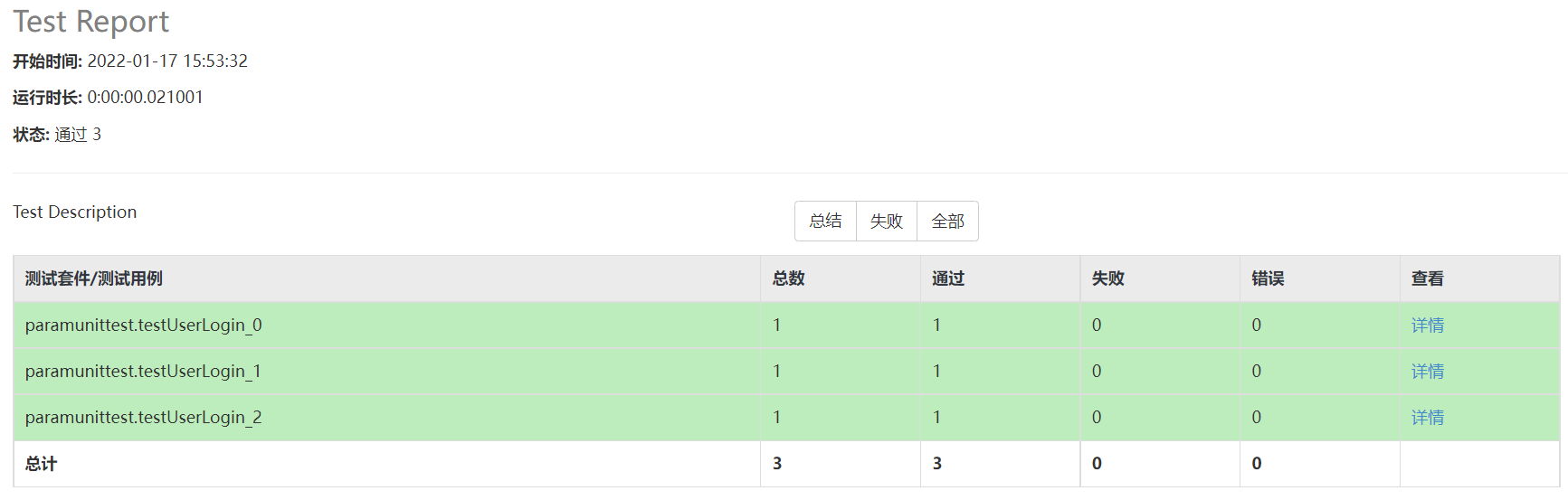
到这一步框架到基本搭建好了
日志记录
缺少日志的输出,在一些关键的参数调用的地方我们来输出一些日志。从而更方便的来维护和查找问题
在 common 下创建 Log.py,并写入:
import os
import logging
from logging.handlers import TimedRotatingFileHandler
import getpathInfo


path = getpathInfo.get_Path()
# 存放log文件的路径
log_path = os.path.join(path, 'result')


class Logger(object):
    def __init__(self, logger_name='logs…'):
        self.logger = logging.getLogger(logger_name)
        logging.root.setLevel(logging.NOTSET)
        # 日志文件的名称
        self.log_file_name = 'logs'
        # 最多存放日志的数量
        self.backup_count = 5
        # 日志输出级别
        self.console_output_level = 'WARNING'
        self.file_output_level = 'DEBUG'
        # 日志输出格式
        self.formatter = logging.Formatter('%(asctime)s - %(name)s - %(levelname)s - %(message)s')

    def get_logger(self):
        """在logger中添加日志句柄并返回,如果logger已有句柄,则直接返回"""
        if not self.logger.handlers:  # 避免重复日志
            console_handler = logging.StreamHandler()
            console_handler.setFormatter(self.formatter)
            console_handler.setLevel(self.console_output_level)
            self.logger.addHandler(console_handler)
            # 每天重新创建一个日志文件,最多保留backup_count份
            file_handler = TimedRotatingFileHandler(filename=os.path.join(log_path, self.log_file_name), when='D',
                                                    interval=1, backupCount=self.backup_count, delay=True,
                                                    encoding='utf-8')
            file_handler.setFormatter(self.formatter)
            file_handler.setLevel(self.file_output_level)
            self.logger.addHandler(file_handler)
        return self.logger


logger = Logger().get_logger()
然后我们在需要我们输出日志的地方添加日志。修改 runAll.py 文件,在顶部增加 import common.Log,然后增加标红框的代码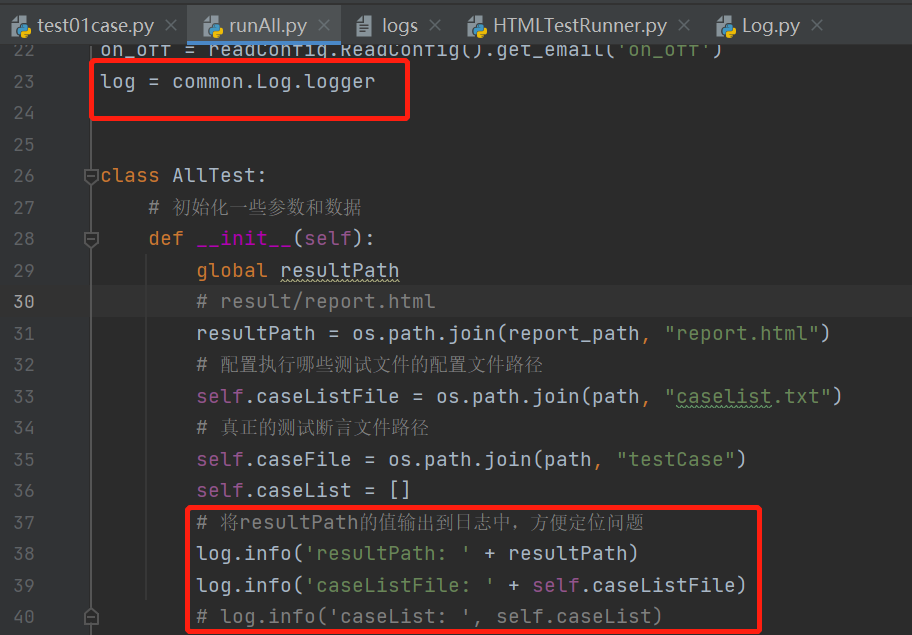
再来运行一下 runAll.py 文件,发现在 result 下多了一个 logs 文件
至此,我们的框架就搭建完成啦!
源码下载

若有收获,就点个赞吧
0 人点赞


