git地址: https://github.com/leezhang0525/boot
branch:1.1.1dynamicDataSource
本文档持续更新,目标为多组件系统,常用组件集成完毕后,后续会添加分布式内容。
1、说明
这里使用主从数据源,主从备份没有做,具体实现自行百度,这里简单使用两个数据库实现主从数据源
2、yml文件添加数据源
server:port: 8081spring:datasource:master:url: jdbc:mysql://localhost:3306/pay?characterEncoding=UTF-8&zeroDateTimeBehavior=convertToNull&allowMultiQueries=true&useLocalSessionState=trueusername: rootpassword: 123456driver-class-name: com.mysql.jdbc.Drivertype: com.alibaba.druid.pool.DruidDataSourceslave:url: jdbc:mysql://localhost:3306/payslave?characterEncoding=UTF-8&zeroDateTimeBehavior=convertToNull&allowMultiQueries=true&useLocalSessionState=trueusername: rootpassword: 123456driver-class-name: com.mysql.jdbc.Drivertype: com.alibaba.druid.pool.DruidDataSource
3、自定义主从数据源枚举
package com.zhangsan.boot.enums.core;/*** 数据源枚举*/public enum DataSourceType {MASTER("master"),SLAVE("slave");private String value;DataSourceType(String value) {this.value = value;}public String getValue() {return value;}}
4、新建动态数据源
1、数据源key值处理器
package com.zhangsan.boot.config;import com.zhangsan.boot.enums.core.DataSourceType;/*** 数据源处理器*/public class DataSourceContextHolder {private DataSourceContextHolder(){}private static final ThreadLocal<String> holder = new ThreadLocal<>();public static void putDataSource(DataSourceType dataSourceType) {holder.set(dataSourceType.getValue());}public static String getDataSource() {return holder.get();}public static void clearDataSource() {holder.remove();}}
2、编写DynamicDataSource类
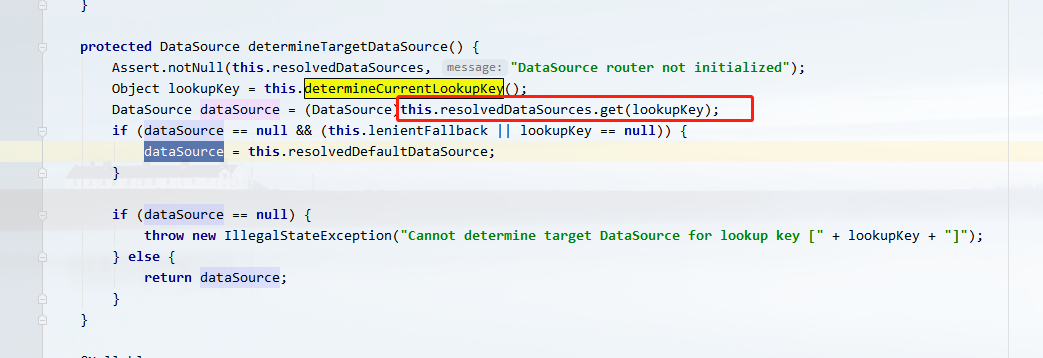
继承 AbstractRoutingDataSource类,重写determineCurrentLookupKey方法
package com.zhangsan.boot.config;import com.zhangsan.boot.enums.core.DataSourceType;import org.apache.commons.lang3.StringUtils;import org.springframework.jdbc.datasource.lookup.AbstractRoutingDataSource;/*** 自定义动态数据源路由*/public class DynamicDataSource extends AbstractRoutingDataSource {/**** @return Map<Object, DataSource> resolvedDataSources key值*/@Overrideprotected Object determineCurrentLookupKey() {if(StringUtils.isNotBlank(DataSourceContextHolder.getDataSource())){return DataSourceContextHolder.getDataSource();}// 默认主库return DataSourceType.MASTER.getValue();}}

3、注入动态数据源
重写DruidConfig.java类
package com.zhangsan.boot.config;import com.alibaba.druid.pool.DruidDataSource;import com.zhangsan.boot.enums.core.DataSourceType;import org.apache.ibatis.session.SqlSessionFactory;import org.mybatis.spring.SqlSessionFactoryBean;import org.mybatis.spring.mapper.MapperScannerConfigurer;import org.springframework.beans.factory.annotation.Qualifier;import org.springframework.boot.context.properties.ConfigurationProperties;import org.springframework.context.annotation.Bean;import org.springframework.context.annotation.Configuration;import org.springframework.context.annotation.DependsOn;import org.springframework.context.annotation.Primary;import org.springframework.core.io.support.PathMatchingResourcePatternResolver;import org.springframework.core.io.support.ResourcePatternResolver;import org.springframework.jdbc.datasource.DataSourceTransactionManager;import javax.sql.DataSource;import java.util.HashMap;import java.util.Map;@Configurationpublic class DruidConfig {public static final String MAPPER_BASE_PACKAGE = "com.zhangsan.boot.dao";public static final String ENTITY_BASE_PACKAGE = "com.zhangsan.boot.entity";/*** 主数据源* @return*/@Bean@ConfigurationProperties(prefix = "spring.datasource.master")public DataSource masterDataSource(){return new DruidDataSource();}/*** 从数据源* @return*/@Bean@ConfigurationProperties(prefix = "spring.datasource.slave")public DataSource slaveDataSource(){return new DruidDataSource();}/*** 动态数据源* @return*/@Bean@DependsOn({ "masterDataSource", "slaveDataSource"})@Primarypublic DataSource dynamicDataSource() {DynamicDataSource dataSource = new DynamicDataSource();Map<Object, Object> targetDataSources = new HashMap<>();targetDataSources.put(DataSourceType.MASTER.getValue(), masterDataSource());targetDataSources.put(DataSourceType.SLAVE.getValue(), slaveDataSource());dataSource.setTargetDataSources(targetDataSources);// 这里不需要重复添加默认数据源,DynamicDataSource类中已经制定默认主数据源keyreturn dataSource;}@Beanpublic SqlSessionFactory sqlSessionFactory (@Qualifier("dynamicDataSource") DataSource dataSource) throws Exception {SqlSessionFactoryBean sqlSessionFactoryBean = new SqlSessionFactoryBean();sqlSessionFactoryBean.setDataSource(dataSource);sqlSessionFactoryBean.setTypeAliasesPackage(ENTITY_BASE_PACKAGE);ResourcePatternResolver resolver = new PathMatchingResourcePatternResolver();sqlSessionFactoryBean.setMapperLocations(resolver.getResources("classpath*:mappers/*.xml"));return sqlSessionFactoryBean.getObject();}/*** mapperScannerConfigurer* @return*/@Beanpublic static MapperScannerConfigurer mapperScannerConfigurer() {MapperScannerConfigurer mapperScannerConfigurer = new MapperScannerConfigurer();mapperScannerConfigurer.setBasePackage(MAPPER_BASE_PACKAGE);mapperScannerConfigurer.setSqlSessionFactoryBeanName("sqlSessionFactory");return mapperScannerConfigurer;}@Beanpublic DataSourceTransactionManager transactionManager(@Qualifier("dynamicDataSource") DataSource dataSource) {return new DataSourceTransactionManager(dataSource);}}
5、自定义注解实现动态数据源
1、添加自定义注解
package com.zhangsan.boot.annotation;import com.zhangsan.boot.enums.core.DataSourceType;import java.lang.annotation.*;/*** 主从库注解*/@Target({ElementType.METHOD})@Retention(RetentionPolicy.RUNTIME)@Inheritedpublic @interface DataSource {DataSourceType value() default DataSourceType.MASTER;}
2、编写切面管理注解
给自定义注解加上切面,通过注解管理和制定数据源
package com.zhangsan.boot.aspect;import com.zhangsan.boot.annotation.DataSource;import com.zhangsan.boot.config.DataSourceContextHolder;import lombok.extern.slf4j.Slf4j;import org.aspectj.lang.ProceedingJoinPoint;import org.aspectj.lang.annotation.Around;import org.aspectj.lang.annotation.Aspect;import org.springframework.core.Ordered;import org.springframework.core.annotation.Order;import org.springframework.stereotype.Component;@Aspect@Component@Order(Ordered.HIGHEST_PRECEDENCE + 1)@Slf4jpublic class DataSourceAspect {@Around("execution(public * com.zhangsan.boot.service..*.*(..)) && @annotation(com.zhangsan.boot.annotation.DataSource) && @annotation(dataSource)")public Object setDataSource(ProceedingJoinPoint joinPoint, DataSource dataSource) throws Throwable {try {log.info("执行了数据路由切面,当前为:{}",dataSource.value());DataSourceContextHolder.putDataSource(dataSource.value());return joinPoint.proceed();} finally {DataSourceContextHolder.clearDataSource();log.info("清理了数据路由切面,threadLocal中dataSource为:{}",DataSourceContextHolder.getDataSource());}}}
6、编写测试类测试
/*** 默认主库* @param id* @return*/@Override@DataSource(DataSourceType.MASTER)public TPadDevice masterGetById(Long id) {return tPadDeviceMapper.selectByPrimaryKey(id);}/*** 从库* @param id* @return*/@Override@DataSource(DataSourceType.SLAVE)public TPadDevice salverGetById(Long id) {return tPadDeviceMapper.selectByPrimaryKey(id);}
TestController.java
@GetMapping("/masterDataSource")public TPadDevice dynamicDataSourceTest(Long id){log.info("这是测试");TPadDevice padDevice = padDeviceService.masterGetById(id);return padDevice;}@GetMapping("/slaveDataSource")public TPadDevice slaveDataSource(Long id){log.info("这是测试");TPadDevice padDevice = padDeviceService.salverGetById(id);return padDevice;}
测试成功(不同库中,表名相同的表记录不同)


若有收获,就点个赞吧
0 人点赞


