1、配置简单反向代理
1.1、配置本地域名解析
配置一个本地测试用的域名,指向linux服务器,我本机的linux ip为192.168.1.104,修改hosts文件
#添加域名解析192.168.1.104 www.zhangsan.com

说明:我本地的http://www.zhangsan.com:8081/login/test 接口是上传了spring-boot应用,应用中的接口。8081是我web服务的端口号,根据实际情况自行修改对应端口。
1.2 在Nginx中配置请求转发(反向代理)
cd /usr/local/nginx/conf/vi nginx.conf
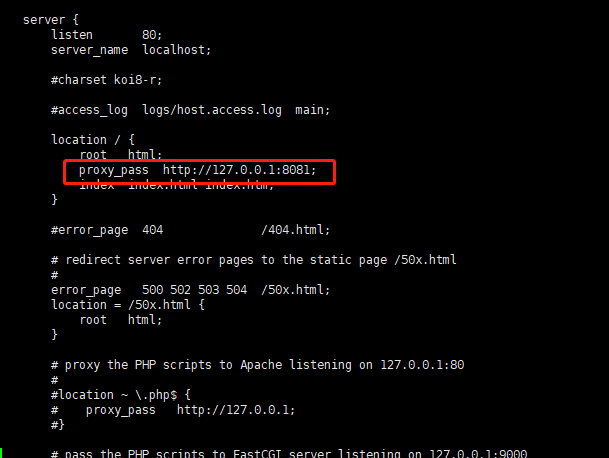
说明:本机是nginx和web服务在一台机器上的配置,如不在一台机器上需要指定对应的ip和端口号
添加代理路径:
proxy_pass http://127.0.0.1:8081;
启动nginx
cd /usr/local/nginx/sbin/./nginx
启动成功后访问成功 http://www.zhangsan.com/login/test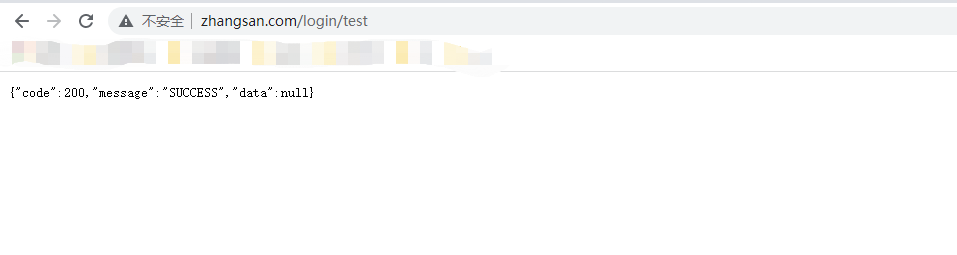
2、添加nginx监听端口8000并根据路径转发不同端口号
server {#监听8000端口listen 8000;server_name localhost;#路径中含有test1时 转发到http://127.0.0.1:8082location ~ /test1/ {proxy_pass http://127.0.0.1:8082;}#路径中含有test2时 转发到http://127.0.0.1:8083location ~ /test2/ {proxy_pass http://127.0.0.1:8083;}}

若有收获,就点个赞吧
0 人点赞


