原文链接:https://betterprogramming.pub/typescript-generics-90be93d8c292
Let’s demystify that weird 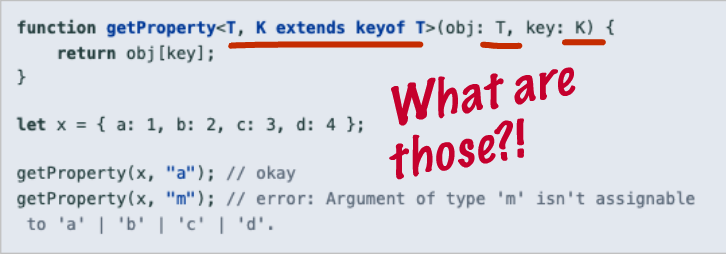
Annotated Image of the TypeScript Generics Documentation
Unless you are a seasoned veteran of a strongly typed language such as Java, I am sure you had the same “WTF?” moment that I did the first time you saw a generic type in TypeScript. The syntax is a far cry from anything else we have seen in JavaScript and it can be difficult to immediately intuit what it is doing.
I am here to tell you that Generics are not as scary as they seem. If you can write a function with arguments in JavaScript, then you will be able to write and use TypeScript Generics like a pro in no time. Let’s get started!
What is a Generic in TypeScript?
The TypeScript documentation explains Generics as “being able to create a component that can work over a variety of types rather than a single one.”
Great! That gives us a basic idea. We are going to use Generics to create some kind of reusable component that can work for a variety of types. But how does it do? Here is how I like to think of it:
Generics are to types what values are to function arguments — they are a way to tell our components (functions, classes, or interfaces) what type we want to use when we call it, just like how we tell a function what values to use as arguments when we call it.
The best way to understand what this statement means is to write a generic identity function. The identity function is a function that simply returns whatever argument is passed into it. In plain JavaScript, that would be:
function identity (value) {return value;}console.log(identity(1)) // 1
Now, let’s adapt this to work for a number in TypeScript:
function identity (value: Number) : Number {return value;}console.log(identity(1)) // 1
It’s nice that we now have a type in there, but the function is not very flexible. The identity function should work for any value passed in, not just numbers. This is where Generics come in. Generics allow us to write a function that can take in any type and will transform our function based on that type.
function identity <T>(value: T) : T {return value;}console.log(identity<Number>(1)) // 1
There is that unfamiliar 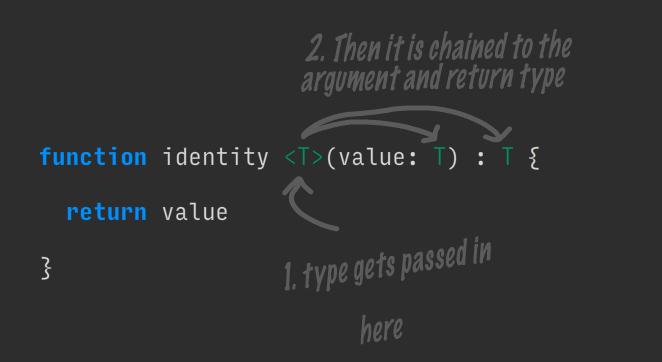
Referring to the above image, when we call identity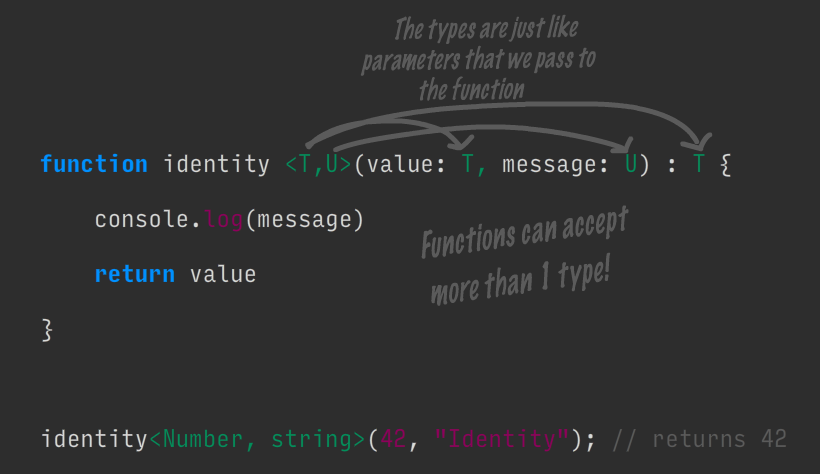
Take note of how we are calling the function. The syntax should start to make sense to you now! There is nothing special about T or U, they are just variable names that we choose. We populate them with type values when we call the function and it uses those types.
Another way to think of generics is that they transform a function based on the type of data you pass into it. The animation below shows how the identity function changes with different data types.

As you can see, the function takes on whatever type is passed into it, allowing us to create reusable components for different types, just like the documentation promised us.
Definitely take notice of the second console log statement in the animation. We do not provide a type. In that case, TypeScript will attempt to infer the type based on the data. Be careful — type inference only works for simple data. If you pass in something more complex like an object or multi-type array, it will infer that the type is any, which breaks down our type safety checks.
Generics for Classes and Interfaces Work Exactly the Same as Functions
We now know that generics are just a way to pass in types to a component. We just saw how this works for functions and the good news is: interfaces and classes work exactly the same way! In their case we place the types right after the name of our interface or class name.
See if the following code block makes sense to you. I hope that it will!
interface GenericInterface<U> {value: UgetIdentity: () => U}class IdentityClass<T> implements GenericInterface<T> {value: Tconstructor(value: T) {this.value = value}getIdentity () : T {return this.value}}const myNumberClass = new IdentityClass<Number>(1)console.log(myNumberClass.getIdentity()) // 1const myStringClass = new IdentityClass<string>("Hello!")console.log(myStringClass.getIdentity()) // Hello!
If it does not immediately make sense to you, try to trace the type values up the chain of function calls. It works like this:
- We instantiate a new instance of IdentityClass, passing in Number and 1.
- In the identity class, T becomes Number.
- IdentityClass implements GenericInterface
and we know that T is Number, so it is as if we are implementing GenericInterface - In GenericInterface, U becomes Number. I purposefully used different variable names here to show that type value propagates up the chain and the variable name does not matter.
Practical use case: moving beyond primitive types
All of the examples provided above use primitive types such as Number and string. These are nice to use as examples, but speaking practically, you are not likely going to be using generics for primitive types. The real power of generics comes in when we have custom types or classes that form an inheritance tree.
Consider the classic inheritance example of a car. We have a base class Car which is used as the base for Truck and Vespa. We then write a utility function washCar which takes in a generic instance of Car and then returns it.
class Car {label: string = 'Generic Car'numWheels: Number = 4horn() {return "beep beep!"}}class Truck extends Car {label = 'Truck'numWheels = 18}class Vespa extends Car {label = 'Vespa'numWheels = 2}function washCar <T extends Car> (car: T) : T {console.log(`Received a ${car.label} in the car wash.`)console.log(`Cleaning all ${car.numWheels} tires.`)console.log('Beeping horn -', car.horn())console.log('Returning your car now')return car}const myVespa = new Vespa()washCar<Vespa>(myVespa)const myTruck = new Truck()washCar<Truck>(myTruck)
By telling our car wash function that T must extend Car, we know which functions and properties we are able to call within the function. Using the generic also enables us to return the specific type we pass in, instead of just a non-specific Car.
The output for this code is:
Received a Vespa in the car wash.Cleaning all 2 tires.Beeping horn - beep beep!Returning your car nowReceived a Truck in the car wash.Cleaning all 18 tires.Beeping horn - beep beep!Returning your car now
Wrapping up
I hope that this post made generics more clear to you! Remember, all you are doing is passing in a type value to the function and nothing more. :)
If you want to learn more about generics, check out the links below.
Further Reading:
- TypeScript Generics Documentation
- TypeScript Generics Explained — a much more in-depth look at generics than my quick primer here provides.

若有收获,就点个赞吧
0 人点赞


