一个富文本 Text,可以显示多种样式的 text。
RichText 要传入 TextSpan 数组,每个 TextSpan 是一个独立的文本,可以定义自己的 Style:
RichText
RichText({Key key,@required this.text, //显示的文字,必须传一般都是 TextSpan 格式的this.textAlign = TextAlign.start, //text对齐方式 left,right,center,justify,start,endthis.textDirection, //文字方向 TextDirection.rtl TextDirection.ltrthis.softWrap = true, //是否允许换行显示this.overflow = TextOverflow.clip, //文本的截断方式this.textScaleFactor = 1.0, //文字大小倍率系数this.maxLines, //最大显示行数this.locale,this.strutStyle, //使用的支撑风格this.textWidthBasis = TextWidthBasis.parent, //设置一段文字宽度的显示基础})
TextSpan
const TextSpan({this.text, //文字this.children, //子 TextSpanTextStyle style, //风格设定this.recognizer, //手势识别器this.semanticsLabel, //给文本加上一个语义标签 没有实际用}) : super(style: style,);
实例
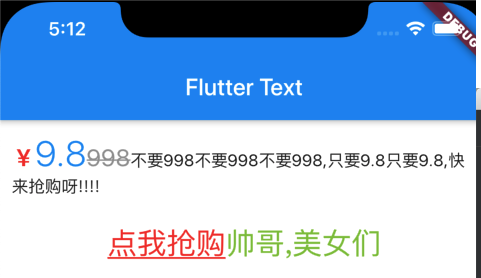
Padding(padding: EdgeInsets.fromLTRB(10, 10, 10, 5),child: Text.rich(TextSpan(children: <TextSpan>[TextSpan(text: "¥",style: TextStyle(color: Colors.red,fontSize: 20,fontWeight: FontWeight.w600,),),TextSpan(text: "9.8",style: TextStyle(color: Colors.blue,fontSize: 30,fontWeight: FontWeight.w300,)),TextSpan(text: "998",style: TextStyle(color: Colors.grey,fontSize: 20,decoration: TextDecoration.lineThrough,)),TextSpan(text: "不要998不要998不要998,只要9.8只要9.8,快来抢购呀!!!!"),],),),),Padding(padding: EdgeInsets.fromLTRB(15, 15, 15, 15),child: RichText(text: TextSpan(children: <TextSpan>[TextSpan(text: "点我抢购",style: TextStyle(fontSize: 25,color: Colors.red,decoration: TextDecoration.underline,),recognizer: TapGestureRecognizer()//添加点击事件,只有当前段文字有效..onTap = () {print("onTap");AlertDialog(title: Text("onTap"),content: Text("你点击了抢购哦!"),);}..onTapCancel = () {print("onTapCancel");}..onTapDown = (TapDownDetails detail) {print("onTapDown");}..onTapUp = (TapUpDetails detail) {print("onTapUp");},),TextSpan(text: "帅哥,美女们",style: TextStyle(fontSize: 25,color: Colors.lightGreen,),),],),),),

若有收获,就点个赞吧
0 人点赞


