
- 当使用Row 时,宽度超过屏幕宽时,超过部分无法显示。
- 使用Wrap时,超过屏幕宽度时,自动换行。
- 可以水平使用,也可以垂直使用
ap({Key key,this.direction = Axis.horizontal, // 水平或垂直this.alignment = WrapAlignment.start, // 对齐方式this.spacing = 0.0, // 子widget之间的间距,水平间距或垂直间距this.runAlignment = WrapAlignment.start, // 纵轴方向的对齐方式this.runSpacing = 0.0, // 纵轴方向的间距this.crossAxisAlignment = WrapCrossAlignment.start,this.textDirection,this.verticalDirection = VerticalDirection.down,List<Widget> children = const <Widget>[],})
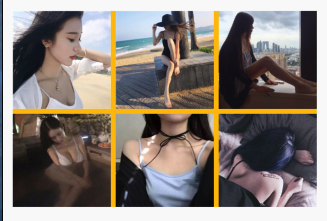
属性大部分都喝Row是一样的.就不记录了. 写个demo:
Container(color: Colors.amber,height: 200,child: Wrap(spacing: 5, //水平间距runSpacing: 5, //垂直间距children: <Widget>[Image.network("https://ss1.bdstatic.com/70cFvXSh_Q1YnxGkpoWK1HF6hhy/it/u=4032780575,3204528048&fm=26&gp=0.jpg",width: 100,height: 100,),Image.network("https://ss1.bdstatic.com/70cFuXSh_Q1YnxGkpoWK1HF6hhy/it/u=1063547563,2289391090&fm=26&gp=0.jpg",width: 100,height: 100,),Image.network("https://timgsa.baidu.com/timg?image&quality=80&size=b9999_10000&sec=1586237355792&di=4f65876fc2cb9e572c5b67e5494528c6&imgtype=0&src=http%3A%2F%2Fimg3.duitang.com%2Fuploads%2Fitem%2F201605%2F13%2F20160513184344_LviPQ.jpeg",width: 100,height: 100,),Image.network("https://ss0.bdstatic.com/70cFuHSh_Q1YnxGkpoWK1HF6hhy/it/u=1249774586,3389422086&fm=26&gp=0.jpg",width: 100,height: 100,),Image.network("https://timgsa.baidu.com/timg?image&quality=80&size=b9999_10000&sec=1586237371895&di=adf6082c8fcc78289cce9624d7bff576&imgtype=0&src=http%3A%2F%2Fwww.17qq.com%2Fimg_qqtouxiang%2F87354522.jpeg",width: 100,height: 100,),Image.network("https://timgsa.baidu.com/timg?image&quality=80&size=b9999_10000&sec=1586237371898&di=1b7029b71f3a9c3caa7e9e4bace0c7e0&imgtype=0&src=http%3A%2F%2Fb-ssl.duitang.com%2Fuploads%2Fitem%2F201509%2F29%2F20150929012659_QmNZh.jpeg",width: 100,height: 100,),],),),
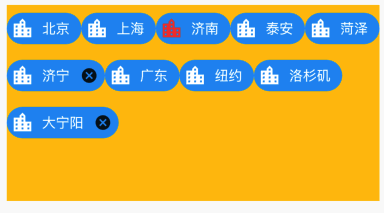
Container(color: Colors.amber,height: 200,child: Wrap(children: <Widget>[Chip(backgroundColor: Colors.blue,label: Text("北京",style: TextStyle(color: Colors.white),),avatar: Icon(Icons.location_city,color: Colors.white,),),Chip(backgroundColor: Colors.blue,label: Text("上海",style: TextStyle(color: Colors.white),),avatar: Icon(Icons.location_city,color: Colors.white,),),Chip(backgroundColor: Colors.blue,label: Text("济南",style: TextStyle(color: Colors.white),),avatar: Icon(Icons.location_city,color: Colors.red,),),Chip(backgroundColor: Colors.blue,label: Text("泰安",style: TextStyle(color: Colors.white),),avatar: Icon(Icons.location_city,color: Colors.white,),),Chip(backgroundColor: Colors.blue,label: Text("菏泽",style: TextStyle(color: Colors.white),),avatar: Icon(Icons.location_city,color: Colors.white,),),Chip(backgroundColor: Colors.blue,label: Text("济宁",style: TextStyle(color: Colors.white),),avatar: Icon(Icons.location_city,color: Colors.white,),onDeleted: () {print(123333);},),Chip(backgroundColor: Colors.blue,label: Text("广东",style: TextStyle(color: Colors.white),),avatar: Icon(Icons.location_city,color: Colors.white,),),Chip(backgroundColor: Colors.blue,label: Text("纽约",style: TextStyle(color: Colors.white),),avatar: Icon(Icons.location_city,color: Colors.white,),),Chip(backgroundColor: Colors.blue,label: Text("洛杉矶",style: TextStyle(color: Colors.white),),avatar: Icon(Icons.location_city,color: Colors.white,),),Chip(backgroundColor: Colors.blue,label: Text("大宁阳",style: TextStyle(color: Colors.white),),avatar: Icon(Icons.location_city,color: Colors.white,),onDeleted: () {print(123333);},),],),),

若有收获,就点个赞吧
0 人点赞


