- 简介
- 1. controller 控制 TextField 的编辑
- 2. 控制焦点 focusNode 用于控制TextField是否占有当前键盘的输入焦点
- 3. decoration 外观显示
- 1. icon 显示在输入框前面的图标,在文字和下划线前面
- 2. labelText、helperText、hintText
- 3. hasFloatingPlaceholder labelText是否上浮,true上浮,false表示获取焦点后labelText消失
- 4. prefix、prefixText、prefixStyle
- 5. suffix、suffixIcon、suffixText、suffixStyle
- 6. counter、counterText、counterStyle
- 7. filled、fillColor
- 8. errorBorder、focusedErrorBorder
- ">
- 9. border 级别最低的border,没有设置其他border时显示的border
- 3. 键盘类型 keyboardType
- 4. 设置键盘上enter键的显示内容 textInputAction
- 5. 指定输入格式 inputFormatters
- 6. 监听文本变化 this.onChanged、this.onEditingComplete、 this.onSubmitted

简介
文本输入框
const TextField({Key key,this.controller, //控制 TextField 的编辑,如果没有设置,会有默认值this.focusNode, //用于控制TextField是否占有当前键盘的输入焦点.它是我们和键盘交互的一个handlethis.decoration = const InputDecoration(), //用于控制TextField的外观显示,如提示文本、背景颜色、边框等TextInputType keyboardType, //用于设置该输入框默认的键盘输入类型this.textInputAction, //设置键盘上enter键的显示内容this.textCapitalization = TextCapitalization.none, //定义文本的大写格式this.style, //文本样式this.strutStyle, //支撑样式this.textAlign = TextAlign.start, //对齐方式this.textAlignVertical, //输入框文字的垂直对齐方式 top.center.bottomthis.textDirection, //文字方向this.readOnly = false, //是否自读,true后不可编辑ToolbarOptions toolbarOptions, //点击、长按弹出的窗口,里面有复制、粘贴、剪切、全选功能this.autofocus = false, //是否自动获取焦点 跳转到该页面后 光标自动显示到该输入框 键盘弹起this.obscureText = false, //是否是密码 非密码以明文显示,密码以点显示this.autocorrect = true, //是否自动更正this.enableSuggestions = true, //启用建议this.maxLines = 1, //不是允许输入的最大行数,指的是输入框内可显示的高度是几行,超过设定行数后,scroll滚动显示this.minLines, //最小行数this.expands = false, //扩展this.maxLength, //输入框中允许的最大字符数.设置此项会让TextField右下角有一个输入数量的统计字符串this.maxLengthEnforced = true,//是否强制限制最大字符数,默认为true.true:强制限制最大字符数.false:不限制最大字符数,即使设置了maxLength也不生效this.onChanged, //监听输入框内容变化this.onEditingComplete, //输入框输入完成时触发,但是onEditingComplete没有参数,不会返回内容this.onSubmitted, //输入框输入完成时触发,但是onSubmitted有参数,会返回内容this.inputFormatters, //用于指定输入格式;当用户输入内容改变时,会根据指定的格式来校验。this.enabled, //输入框是否禁用如果为false,则输入框会被禁用,禁用状态不接收输入和事件,同时显示禁用态样式(在其decoration中定义)。this.showCursor, //是否显示光标this.cursorWidth = 2.0, //自定义输入框光标宽度this.cursorRadius, //自定义输入框光标圆角this.cursorColor, //自定义输入框光标颜色this.keyboardAppearance, //设置键盘的亮度模式只能在iOS上使用,有两种:Brightness.dart和Brightness.lightthis.scrollPadding = const EdgeInsets.all(20.0), //文本框滑动时的间距this.dragStartBehavior = DragStartBehavior.start, //设置确定当用户启动拖动时拖动正式开始的时间this.enableInteractiveSelection = true, //是否启用交互式选择 true:长按将会选中文字,并且弹出 cut/copy/paste 的菜单this.onTap, //TextField的点击事件this.buildCounter, //生成自定义 InputDecorator.counter 小部件的回调.当设置了maxLength后,右下角会出现如图红圈内的字数。buildCounter属性,可以自定义右下角的字数显示。this.scrollController,this.scrollPhysics,})
1. controller 控制 TextField 的编辑
TextEditingController 是 TextField 的控制类,可以控制 TextField 的编辑,是 TextField 的 controller 属性,我们可以为 TextField 赋值自己创建的 TextEditingController 对象来控制 TextField。 使用代码如下:
class TextFieldWidget extends StatelessWidget {final TextEditingController _controller = TextEditingController();@overrideWidget build(BuildContext context) {return...TextField(controller: _controller,),...);}}
然后使用 _controller.text 来访问 TextField 里的内容。 点击按钮的时候直接读取 controller.text的值
2. 控制焦点 focusNode 用于控制TextField是否占有当前键盘的输入焦点
3. decoration 外观显示
const InputDecoration({this.icon, //显示在输入框前面的图标,在文字和下划线前面this.labelText, //显示在输入框内的提示语this.labelStyle, //提示语的样式this.helperText, //显示在输入框下面的提示语this.helperStyle, //输入框下面提示用的样式this.helperMaxLines,//输入框下面提示语的最大行数,默认 1 超过显示..this.hintText, //焦点在输入框内的提示文字this.hintStyle, //焦点在输入框内的提示文字风格this.hintMaxLines, //焦点在输入框内的提示文字最大行数, 默认 1 超过显示..this.errorText, //输入框下面的错误提示文字. 比如手机号、密码输入错误时候的提示。同事输入框下边线变红色this.errorStyle, //输入框下面的错误提示风格this.errorMaxLines, //输入框下面的错误提示最大行数, 默认 1 超过显示..this.hasFloatingPlaceholder = true, labelText是否上浮,true上浮,false表示获取焦点后labelText消失this.isDense, //改变输入框是否为密集型,默认为false,修改为true时,图标及间距会变小 行间距减小this.contentPadding, //输入框的padding 对内部的文字有效this.prefixIcon, //显示在输入框内,光标前面的图标,注意icon是在输入框外this.prefix, //输入框之前的组件,(我试了好几次都失败..😂...)this.prefixText, //显示在输入框内,光标前面的文本this.prefixStyle, //显示在输入框内,光标前面的文本风格this.suffixIcon, //显示在输入框内,光标后面的图标,显示在最后this.suffix,this.suffixText, //显示在输入框内,光标后面的文字,显示在最后this.suffixStyle, //显示在输入框内,光标后面的文字风格this.counter, //显示在输入的下划线外右下角的文字提示,会覆盖maxLength的右下角显示的字数限制。counterText与counter只能存在一个this.counterText, //显示在输入的下划线外右下角的文字提示 同上this.counterStyle, //显示在输入的下划线外右下角的文字提示风格this.filled, //输入框内部是否允许填充 默认 falsethis.fillColor, //输入框内部填充颜色.filled设置为turethis.focusColor,this.hoverColor,this.errorBorder, //失去焦点时,error时下划线显示的边框样式,不设置则使用默认的的下划线this.focusedBorder, //获得焦点后的下划线显示的边框样式this.focusedErrorBorder, //获得焦点时,error时下划线显示的边框样式,不设置则使用默认的的下划线this.disabledBorder, //输入框禁用时,下划线显示的边框样式this.enabledBorder, //启用时的,下划线显示的边框样式this.border, //级别最低的border,没有设置其他border时显示的borderthis.enabled = true, //是否启用输入 如果是false 就无法输入了,且errorText失效this.semanticCounterText,this.alignLabelWithHint,})
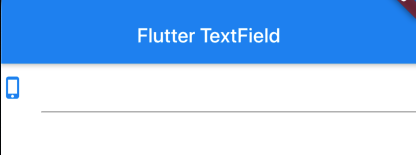
1. icon 显示在输入框前面的图标,在文字和下划线前面
TextField(decoration: InputDecoration(icon: Icon(Icons.phone_iphone,color: Colors.blue,),),
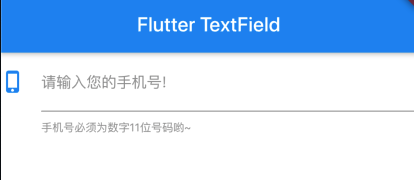
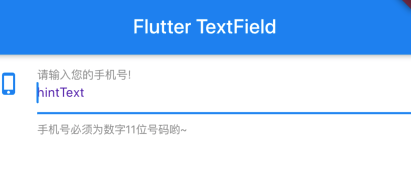
2. labelText、helperText、hintText
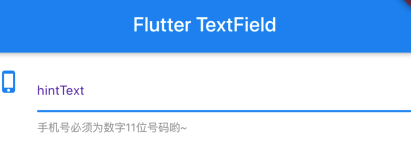
TextField(controller: _controller,decoration: InputDecoration(icon: Icon(Icons.phone_iphone,color: Colors.blue,),//显示默认提示语labelText: "请输入您的手机号!",//默认提示语的样式修改labelStyle: TextStyle(fontSize: 15,color: Colors.grey),//输入框下面的提示语helperText: "手机号必须为数字11位号码哟~",//输入框下面提示语的样式helperStyle: TextStyle(fontSize: 11,color: Colors.red),//输入框下面提示语的最大行数,默认 1helperMaxLines: 1,//焦点在输入框内的提示文字hintText: "hintText",//焦点在输入框内的提示文字风格hintStyle: TextStyle(fontSize: 13,color: Colors.deepPurple,),//焦点在输入框内的提示文字醉倒行数, 默认 1hintMaxLines: 1,),),
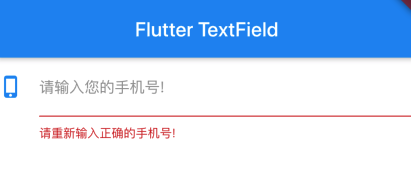
3. hasFloatingPlaceholder labelText是否上浮,true上浮,false表示获取焦点后labelText消失
hasFloatingPlaceholder: false,
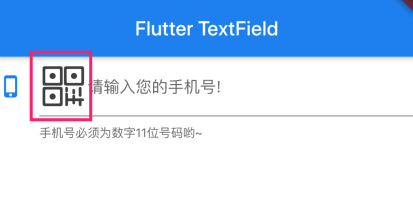
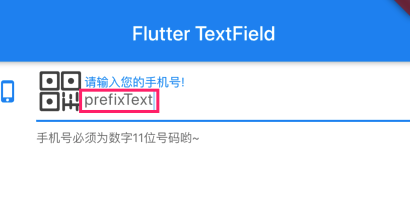
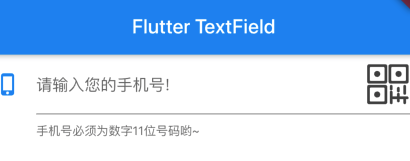
4. prefix、prefixText、prefixStyle
TextField(controller: _controller,decoration: InputDecoration(icon: Icon(Icons.phone_iphone,color: Colors.blue,),//显示默认提示语labelText: "请输入您的手机号!",//输入框下面的提示语helperText: "手机号必须为数字11位号码哟~",prefixIcon: Image.asset("image/flutter1.png",width: 20,height: 20,),prefixText: "prefixText",),),
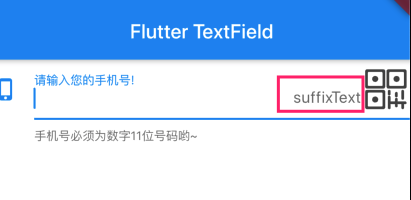
5. suffix、suffixIcon、suffixText、suffixStyle
TextField(controller: _controller,decoration: InputDecoration(icon: Icon(Icons.phone_iphone,color: Colors.blue,),//显示默认提示语labelText: "请输入您的手机号!",//输入框下面的提示语helperText: "手机号必须为数字11位号码哟~",suffixIcon: Image.asset("image/flutter1.png",width: 20,height: 20,),suffixText: "suffixText",),),
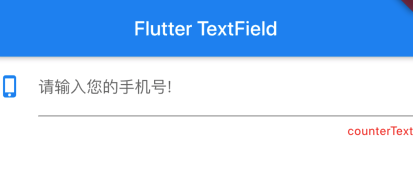
6. counter、counterText、counterStyle
TextField(controller: _controller,decoration: InputDecoration(icon: Icon(Icons.phone_iphone,color: Colors.blue,),//显示默认提示语labelText: "请输入您的手机号!",counterText: "counterText",counterStyle: TextStyle(color: Colors.red),),),
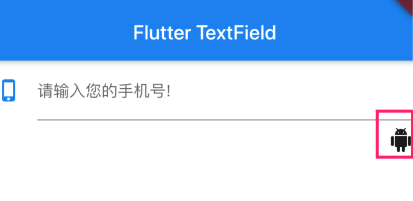
TextField(controller: _controller,decoration: InputDecoration(icon: Icon(Icons.phone_iphone,color: Colors.blue,),//显示默认提示语labelText: "请输入您的手机号!",counter: Icon(Icons.android),),),
7. filled、fillColor
TextField(controller: _controller,decoration: InputDecoration(icon: Icon(Icons.phone_iphone,color: Colors.blue,),labelText: "请输入您的手机号!",filled: true,fillColor: Colors.deepPurple),),
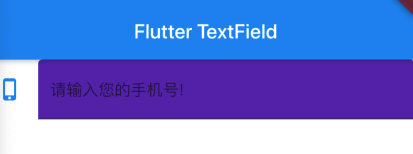
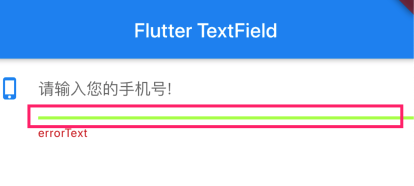
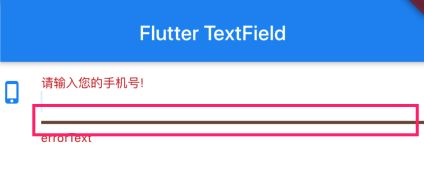
8. errorBorder、focusedErrorBorder
TextField(controller: _controller,decoration: InputDecoration(icon: Icon(Icons.phone_iphone,color: Colors.blue,),labelText: "请输入您的手机号!",errorText: "errorText",errorBorder: UnderlineInputBorder(borderSide: BorderSide(width: 3,color: Colors.lightGreenAccent,style: BorderStyle.solid),)),),
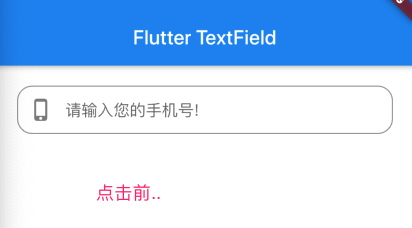
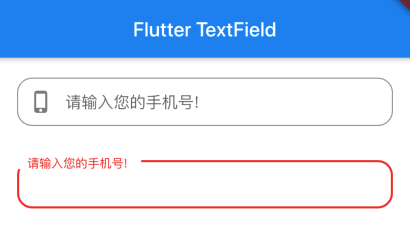
9. border 级别最低的border,没有设置其他border时显示的border
TextField(decoration: InputDecoration(contentPadding: EdgeInsets.all(10.0),prefixIcon: Icon(Icons.phone_iphone),labelText: "请输入您的手机号!",border: OutlineInputBorder(borderRadius: BorderRadius.circular(15.0),),),),
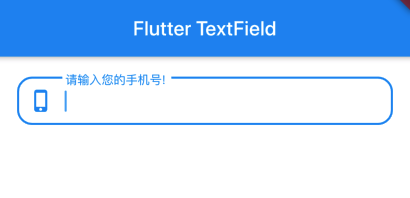
改变border的颜色:
Theme(data: new ThemeData(primaryColor: Colors.red, hintColor: Colors.grey),child: TextField(decoration: InputDecoration(contentPadding: EdgeInsets.all(10.0),labelText: "请输入您的手机号!",border: OutlineInputBorder(borderRadius: BorderRadius.circular(15.0),),),),),
3. 键盘类型 keyboardType
| TextInputType.text | 文本输入键盘 |
|---|---|
| TextInputType.multiline | 多行文本,需和maxLines配合使用(设为null或大于1) |
| TextInputType.number | 数字;会弹出数字键盘 |
| TextInputType.phone | 优化后的电话号码输入键盘;会弹出数字键盘并显示”* #” |
| TextInputType.datetime | 优化后的日期输入键盘;Android上会显示“: -” |
| TextInputType.emailAddress | 优化后的电子邮件地址;会显示“@ .” |
| TextInputType.url | 优化后的url输入键盘; 会显示“/ .” |
4. 设置键盘上enter键的显示内容 textInputAction
| TextInputAction.none | 默认回车符号 |
|---|---|
| TextInputAction.search | 搜索 |
| TextInputAction.done | 安卓显示 回车符号,苹果完成 |
| TextInputAction.go | 开始 |
| TextInputAction.next | 下一步 |
| TextInputAction.send | 发送 |
| TextInputAction.continueAction | 继续,安卓不支持 |
| TextInputAction.emergencyCall | 紧急电话,安卓不支持 |
| TextInputAction.newline | 安卓显示 回车符号 |
| TextInputAction.route | 路线,安卓不支持 |
| TextInputAction.join | 加入,安卓不支持 |
| TextInputAction.previous | 上一步,安卓 回车符号 |
| extInputAction.unspecified | 安卓显示回车符 |
5. 指定输入格式 inputFormatters
TextField(//只允许输入数字 digitsOnly表示只允许数字。inputFormatters: [WhitelistingTextInputFormatter.digitsOnly],//只允许输入a-z小写字母//inputFormatters: [WhitelistingTextInputFormatter(RegExp("[a-z]"))],//允许输入的最大长度,一个字母一个符号一个汉字都算1 不会显示右下角的字数//如果设置了maxLength 那么长度限制以这里的限制为准,但是会显示右下角的字数//inputFormatters: [LengthLimitingTextInputFormatter(15)],//黑名单校验,只允许输入给定规则以外的文本//不允许输入a-z小写字母//inputFormatters: [BlacklistingTextInputFormatter(RegExp("[a-z]"))],//不允许输入a-z小写字母 如果输入了 用“-”替代//inputFormatters: [BlacklistingTextInputFormatter(RegExp("[a-z]"),replacementString: "-")],maxLength: 20,decoration: InputDecoration(contentPadding: EdgeInsets.all(10.0),prefixIcon: Icon(Icons.phone_iphone),labelText: "请输入您的手机号!",border: OutlineInputBorder(borderRadius: BorderRadius.circular(15.0),),),),
6. 监听文本变化 this.onChanged、this.onEditingComplete、 this.onSubmitted
1. 通过 onChange回调
TextField(autofocus: true,controller: _controller,maxLength: 40,onChanged: (text) {print(text);},),
2. 通过controller监听
class _MyHomePageState extends State<MyHomePage> {//定义textEditingControllerfinal TextEditingController _controller = TextEditingController();@overridevoid initState() {// TODO: implement initStatesuper.initState();_controller.text = "你好flutter";//第三个字符开始选中后面的字符_controller.selection = TextSelection(baseOffset: 2,extentOffset: _controller.text.length);// 监听输入变化_controller.addListener((){print(_controller.text);});}@overrideWidget build(BuildContext context) {return Scaffold(appBar: AppBar(title: Text(widget.title),backgroundColor: Colors.blue,),backgroundColor: Colors.white,body: Container(padding: EdgeInsets.all(20),child: Column(children: <Widget>[TextField(controller: _controller,),],),),);}}

若有收获,就点个赞吧
0 人点赞


