
Container 是一个拥有绘制、定位、调整大小的 Widget.
Container
Container({Key key,this.alignment, //容器内 child 的对齐方式 (9个位置)this.padding, //容器内边距Color color,Decoration decoration, //容器的背景装饰this.foregroundDecoration, //容器的前景装饰double width,double height,BoxConstraints constraints,//容器的大小限制this.margin, //容器外边距this.transform, //容器的变化this.child, //容器里显示的 Widget})
1. 绘制过程
Container的绘制的过程如下:
3. padding、margin 内容边距
padding: 内边距
margin: 外边距
4. decoration 容器的背景装饰
const BoxDecoration({this.color, //颜色this.image, //图片this.border, //边框this.borderRadius, //边框圆角this.boxShadow, //阴影this.gradient, //渐变,如果指定了渐变色,color属性就无效this.backgroundBlendMode, //混合模式应用于框的[颜色]或[渐变]背景,如果没有颜色或者渐变色,这个属性就没有效果this.shape = BoxShape.rectangle, // 这个有两个值,一个是方形,一个是圆形(circle),BoxShape.rectangle和RoundedRectangleBorder是一样的,CircleBorder和BoxShape.circle是一样的效果但是Container的shape只能用BoxShape.rectangle、BoxShape.circle是这两种,而RoundedRectangleBorder、CircleBorder目前是用在Material上的,因为Container的shape是继承自 BoxBorder的,而Material的shape是继承自ShapeBorder,虽然BoxBorder也是继承ShapeBorder的})
body: Container(alignment: Alignment.center,color: Colors.white,child: Column(children: <Widget>[Container(//对齐方式alignment: Alignment.center,//容器内间距margin: EdgeInsets.only(top: 20 , left: 20),//卡片大小constraints: BoxConstraints.tightFor(width: 200, height: 150),//背景装饰decoration: BoxDecoration(gradient: RadialGradient(//这里设置渐变设外面就不能设置背景色,不然会报错误colors: [Colors.green, Colors.blue],center: Alignment.topLeft,radius: .98),//加阴影boxShadow: [BoxShadow(color: Colors.black54,offset: Offset(2.0, 2.0),blurRadius: 4.0)]),transform: Matrix4.rotationZ(.2), //卡片倾斜变换child: Text("Hello Flutter",style: TextStyle(fontSize: 30,color: Colors.red),),),],),),
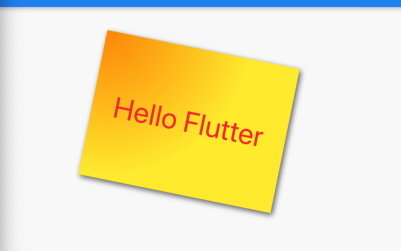
5. borderRadius 边框半径
new BorderRadius.all(Radius.circular(4)) // 四个圆角都是半径为4new BorderRadius.circular(4), // 四个圆角都是半径为4,和上面的效果是一样的new BorderRadius.horizontal( left: Radius.circular(10)), //左边的两个角的半径为10new BorderRadius.horizontal(left: Radius.circular(10), right: Radius.circular(4)),//左边的两个角半径为10,右侧两个角半径为4new BorderRadius.vertical( top: Radius.circular(6)), //上边两个角半径为6new BorderRadius.only(topLeft: Radius.circular(10),topRight: Radius.circular(4),bottomLeft: Radius.circular(6),bottomRight: Radius.circular(20)), //坐上角半径为10,右上角4,左下角为6,右下角为20

若有收获,就点个赞吧
0 人点赞


