
class Text extends StatelessWidget { //静态的 widgetconst Text(this.data, {Key key,this.style, //字体样式 字体大小、字体颜色.....this.strutStyle, //使用的支撑风格this.textAlign, //对齐方式this.textDirection, //文本方向this.locale, //国际化this.softWrap, //是否允许换行显示 默认true false时不换行this.overflow, //文本的截断方式this.textScaleFactor, //代表文本相对于当前字体大小的缩放因子 默认值为1.0this.maxLines, //文字显示的最大行数this.semanticsLabel,//给文本加上一个语义标签 没有实际用处this.textWidthBasis,//设置一段文字宽度的显示基础})
1. Text 的必选参数:data
Text 的内容 data 是必选参数。其他都为可选参数
Text('Text Demo'),
2. this.style 字体样式、字体大小、字体颜色
TextStyle 的构造参数:
class TextStyle extends Diagnosticable {const TextStyle({this.inherit = true, //是否继承父 Text 的样式,默认为 true如果为false,且样式没有设置具体的值,则采用默认值:白色、字体大小 10px、sans-serif 字体this.color, //字体颜色this.backgroundColor, //字体背景色this.fontSize, //字体大小this.fontWeight, //字体粗细this.fontStyle, //是否在字体中倾斜字形this.letterSpacing, //字母之间的间距this.wordSpacing, //单词之间的间隔this.textBaseline, //用于对齐文本的水平线this.height, //文本的高度.但它并不是一个绝对值,而是一个因子,具体的行高等于fontSize*height。this.locale, //用于选择用户语言和格式设置首选项的标识符this.foreground, //文本的前景色this.background, //文本的背景色this.shadows, //在文本下方绘制阴影this.fontFeatures, //字体特征.是个数组this.decoration, //文本的线条this.decorationColor, //线条的颜色this.decorationStyle, //线条的样式this.decorationThickness, //线条的密度,值越大线条越粗this.debugLabel, //文本样式的描述,无实际用处String fontFamily, //用于设置使用哪种自定义字体List<String> fontFamilyFallback, //字体列表,当前面的字体找不到时,会在这个列表里依次查找String package, //用于设置使用哪种自定义字体}) : fontFamily = package == null ? fontFamily : 'packages/$package/$fontFamily',_fontFamilyFallback = fontFamilyFallback,_package = package,assert(inherit != null),assert(color == null || foreground == null, _kColorForegroundWarning),assert(backgroundColor == null || background == null, _kColorBackgroundWarning);...}
color 、 fontSize 颜色,字体大小
Text('想都是问题,做才有答案!',style: TextStyle(fontSize: 20,color: Colors.blue),),

fontWeight 字体粗细
Text('想都是问题,做才有答案! ',style: TextStyle(fontSize: 20,color: Colors.blue,fontWeight: FontWeight.w100),),Text('想都是问题,做才有答案!',style: TextStyle(fontSize: 20,color: Colors.blue,fontWeight: FontWeight.w200,),),Text('想都是问题,做才有答案!',style: TextStyle(fontSize: 20,color: Colors.blue,fontWeight: FontWeight.w300,),),Text('想都是问题,做才有答案!',style: TextStyle(fontSize: 20,color: Colors.blue,fontWeight: FontWeight.w400,),),Text('想都是问题,做才有答案!',style: TextStyle(fontSize: 20,color: Colors.blue,fontWeight: FontWeight.w500,),),Text('想都是问题,做才有答案!',style: TextStyle(fontSize: 20,color: Colors.blue,fontWeight: FontWeight.w600,),),Text('想都是问题,做才有答案!',style: TextStyle(fontSize: 20,color: Colors.blue,fontWeight: FontWeight.w700,),),Text('想都是问题,做才有答案!',style: TextStyle(fontSize: 20,color: Colors.blue,fontWeight: FontWeight.w800,),),Text('想都是问题,做才有答案!',style: TextStyle(fontSize: 20,color: Colors.blue,fontWeight: FontWeight.w900,),),

fontStyle 是否在字体中倾斜字形
Text('想都是问题,做才有答案!',style: TextStyle(fontSize: 20,color: Colors.blue,fontStyle: FontStyle.italic, //默认不倾斜normal),),

letterSpacing 字母之间的间隔
Text('I love you jinan',style: TextStyle(color: Colors.blue, letterSpacing: 0.0,),),Text('I love you jinan',style: TextStyle(color: Colors.blue, letterSpacing: 1.0,),),Text('I love you jinan',style: TextStyle(color: Colors.blue, letterSpacing: 2.0,),),Text('I love you jinan',style: TextStyle(color: Colors.blue, letterSpacing: 3.0,),),Text('I love you jinan',style: TextStyle(color: Colors.blue, letterSpacing: 4.0,),),Text('I love you jinan',style: TextStyle(color: Colors.blue, letterSpacing: 5.0,),),Text('I love you jinan',style: TextStyle(color: Colors.blue, letterSpacing: 6.0,),),Text('I love you jinan',style: TextStyle(color: Colors.blue, letterSpacing: 7.0,),),Text('I love you jinan',style: TextStyle(color: Colors.blue, letterSpacing: 8.0,),),Text('I love you jinan',style: TextStyle(color: Colors.blue, letterSpacing: 9.0,),),Text('I love you jinan',style: TextStyle(color: Colors.blue, letterSpacing: 10.0,),),

wordSpacing 单词之间的间隔
Text('I love you jinan',style: TextStyle(color: Colors.blue, wordSpacing: 0.0,),),Text('I love you jinan',style: TextStyle(color: Colors.blue, wordSpacing: 1.0,),),Text('I love you jinan',style: TextStyle(color: Colors.blue, wordSpacing: 2.0,),),Text('I love you jinan',style: TextStyle(color: Colors.blue, wordSpacing: 3.0,),),Text('I love you jinan',style: TextStyle(color: Colors.blue, wordSpacing: 4.0,),),Text('I love you jinan',style: TextStyle(color: Colors.blue, wordSpacing: 5.0,),),Text('I love you jinan',style: TextStyle(color: Colors.blue, wordSpacing: 6.0,),),Text('I love you jinan',style: TextStyle(color: Colors.blue, wordSpacing: 7.0,),),Text('I love you jinan',style: TextStyle(color: Colors.blue, wordSpacing: 8.0,),),Text('I love you jinan',style: TextStyle(color: Colors.blue, wordSpacing: 9.0,),),Text('I love you jinan',style: TextStyle(color: Colors.blue, wordSpacing: 10.0,),),

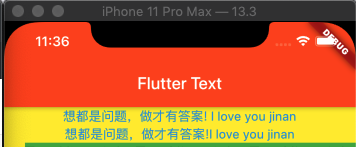
textBaseline 用于对齐文本的水平线
alphabetic: 用于对齐字母字符底部的水平线
ideographic:用于对齐表意字符的水平线
Text('想都是问题,做才有答案! I love you jinan',style: TextStyle(color: Colors.blue, textBaseline: TextBaseline.alphabetic,fontSize: 15),),Text('想都是问题,做才有答案!I love you jinan',style: TextStyle(color: Colors.blue, textBaseline: TextBaseline.ideographic,fontSize: 15),),
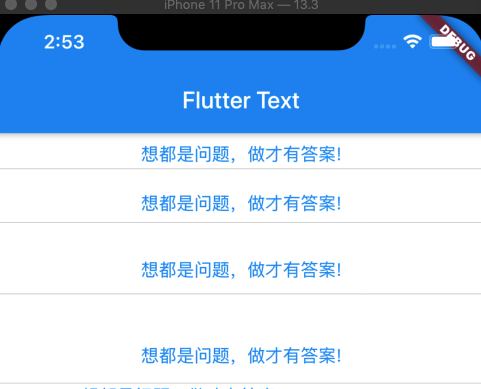
height 文本的高度
行高系数,实际行高 = height * fontSize
Text('想都是问题,做才有答案!',style: TextStyle(color: Colors.blue,fontSize: 15,height: 2),),Divider(color: Colors.grey, height: 0.5,),Text('想都是问题,做才有答案!',style: TextStyle(color: Colors.blue,fontSize: 15,height: 3),),Divider(color: Colors.grey, height: 0.5,),Text('想都是问题,做才有答案!',style: TextStyle(color: Colors.blue,fontSize: 15,height: 4),),Divider(color: Colors.grey, height: 0.5,),Text('想都是问题,做才有答案!',style: TextStyle(color: Colors.blue,fontSize: 15,height: 5),),Divider(color: Colors.grey, height: 0.5,),
foreground 文本的前景色
background 文本的背景色
因为对 Paint 不熟悉,暂不做笔记…
shadows 阴影
Text('想都是问题,做才有答案!',style: TextStyle(color: Colors.blue,fontSize: 30,shadows: <Shadow>[Shadow(//颜色color: Colors.deepOrange,//偏移量 默认 0,0 (x轴 和 y轴)x 正数偏右,负数偏左. y 正数向下偏移,负数向上偏移offset: Offset(1,2),//模糊半径,默认0blurRadius: 5,)]),),

x轴偏移
Text('想都是问题,做才有答案!',style: TextStyle(color: Colors.blue,fontSize: 30,shadows: <Shadow>[Shadow(color: Colors.deepOrange,offset: Offset(5,0),//y轴不变 x轴正数, 向右偏移blurRadius: 3,)]),),

Text('想都是问题,做才有答案!',style: TextStyle(color: Colors.blue,fontSize: 30,shadows: <Shadow>[Shadow(color: Colors.deepOrange,offset: Offset(-5,0),//y轴不变 x轴负数, 向左偏移blurRadius: 3,)]),),

Text(
  '想都是问题,做才有答案!',
  style: TextStyle(
      color: Colors.blue,
      fontSize: 30,
      shadows: <Shadow>[
        Shadow(
            color: Colors.deepOrange,
            offset: Offset(0,5), //x轴不变。 y轴为正数,向下偏移
            blurRadius: 3,
        )]
  ),
),

Text(
  '想都是问题,做才有答案!',
  style: TextStyle(
      color: Colors.blue,
      fontSize: 30,
      shadows: <Shadow>[
        Shadow(
            color: Colors.deepOrange,
            offset: Offset(0,-5), //x轴不变。 y轴为负数数,向上偏移
            blurRadius: 3,
        )]
  ),
),

Text(
  '想都是问题,做才有答案!',
  style: TextStyle(
      color: Colors.blue,
      fontSize: 30,
      shadows: <Shadow>[
        Shadow(
            color: Colors.deepOrange,
            offset: Offset(5,5), //都为正数  , 向右下角偏移
            blurRadius: 3,
        )]
  ),
),

Text(
  '想都是问题,做才有答案!',
  style: TextStyle(
      color: Colors.blue,
      fontSize: 30,
      shadows: <Shadow>[
        Shadow(
            color: Colors.deepOrange,
            offset: Offset(-5,-5), //都是负数 左上角偏移
            blurRadius: 3,
        )]
  ),
),

fontFeatures 字体特征.是个数组
decoration, 文本的线条
给文字添加删除线、上划线、下划线等,可同时添加多个
- TextDecoration.overline 上划线
- TextDecoration.lineThrough 删除线
- TextDecoration.underline 下划线
Text(
  '想都是问题,做才有答案!',
  style: TextStyle(
      color: Colors.blue,
      fontSize: 20,
      decoration: TextDecoration.lineThrough, //删除线
  ),
),

Text(
  '想都是问题,做才有答案!',
  style: TextStyle(
    color: Colors.red,
    fontSize: 20,
    decoration: TextDecoration.overline, //上划线
  ),
),

Text(
  '想都是问题,做才有答案!',
  style: TextStyle(
    color: Colors.teal,
    fontSize: 20,
    decoration: TextDecoration.underline, //下划线
  ),
),

decorationColor 线条的颜色
给删除下增加颜色
 Text(
  '想都是问题,做才有答案!',
  style: TextStyle(
      color: Colors.blue,
      fontSize: 20,
      decoration: TextDecoration.lineThrough,
    decorationColor: Colors.deepOrange
  ),
),

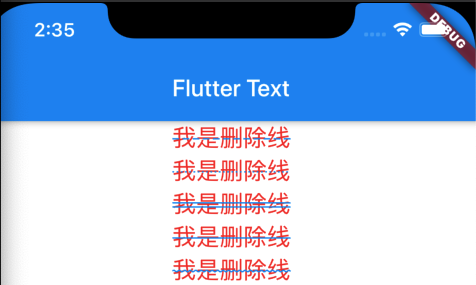
decorationStyle 线条的样式
- TextDecorationStyle.dashed 短横线
- TextDecorationStyle.dotted 点线
- TextDecorationStyle.double 双线
- TextDecorationStyle.solid 实线
- TextDecorationStyle.wavy 波浪线
  Text(
    '我是删除线',
    style: TextStyle(
      color: Colors.red,
      fontSize: 20,
      decoration: TextDecoration.lineThrough,
      decorationColor: Colors.blue,
      decorationStyle: TextDecorationStyle.dashed
    ),
  ),

  Text(
    '我是删除线',
    style: TextStyle(
        color: Colors.red,
        fontSize: 20,
        decoration: TextDecoration.lineThrough,
        decorationColor: Colors.blue,
  //                decorationStyle: TextDecorationStyle.dashed
        decorationStyle: TextDecorationStyle.dotted
    ),
  ),
  Text(
    '我是删除线',
    style: TextStyle(
        color: Colors.red,
        fontSize: 20,
        decoration: TextDecoration.lineThrough,
        decorationColor: Colors.blue,
        decorationStyle: TextDecorationStyle.double
    ),
  ),
  Text(
    '我是删除线',
    style: TextStyle(
        color: Colors.red,
        fontSize: 20,
        decoration: TextDecoration.lineThrough,
        decorationColor: Colors.blue,
        decorationStyle: TextDecorationStyle.solid
    ),
  ),
  Text(
    '我是删除线',
    style: TextStyle(
        color: Colors.red,
        fontSize: 20,
        decoration: TextDecoration.lineThrough,
        decorationColor: Colors.blue,
        decorationStyle: TextDecorationStyle.wavy
    ),
  ),
decorationThickness
 Text(
    '我是删除线',
    style: TextStyle(
      color: Colors.red,
      fontSize: 20,
      decoration: TextDecoration.lineThrough,
      decorationColor: Colors.blue,
      decorationThickness: 1.00
    ),
  ),

  Text(
    '我是删除线',
    style: TextStyle(
        color: Colors.red,
        fontSize: 20,
        decoration: TextDecoration.lineThrough,
        decorationColor: Colors.blue,
        decorationThickness: 2.00
    ),
  ),
  Text(
    '我是删除线',
    style: TextStyle(
        color: Colors.red,
        fontSize: 20,
        decoration: TextDecoration.lineThrough,
        decorationColor: Colors.blue,
        decorationThickness: 3.00
    ),
  ),
  Text(
    '我是删除线',
    style: TextStyle(
        color: Colors.red,
        fontSize: 20,
        decoration: TextDecoration.lineThrough,
        decorationColor: Colors.blue,
        decorationThickness: 4.00
    ),
  ),
  Text(
    '我是删除线',
    style: TextStyle(
        color: Colors.red,
        fontSize: 20,
        decoration: TextDecoration.lineThrough,
        decorationColor: Colors.blue,
        decorationThickness: 5.00
    ),
  ),

3. strutStyle 使用的支撑风格
const StrutStyle({
    String fontFamily,     //用于设置使用哪种自定义字体
    List<String> fontFamilyFallback,  //字体列表,当前面的字体找不到时,会在这个列表里依次查找
    this.fontSize, //字体的像素大小 默认14像素
    this.height,   //行高系数,实际行高 = height * fontSize
    this.leading,  //行与行直接的头部额外间距  = leading * fontSize
    this.fontWeight, //字体粗细,(设置没效果...)
    this.fontStyle,
    this.forceStrutHeight,
    this.debugLabel,
    String package,
  ....
}
4. this.textAlign 对齐方式
- TextAlign.left 左对齐
- TextAlign.right 右对齐
- TextAlign.center 居中
- TextAlign.justify 自适应 两端对齐
- TextAlign.start 如果textDirection 是ltr ,start表示左对齐 ,如果textDirection是rtl,start表示右对齐。
- TextAlign.end 如果textDirection 是ltr,end表示右对齐,如果textDirection是rtl ,end表示左对齐
Text(
  'TextAlign.right TextAlign.right  TextAlign.right  TextAlign.right',
  style: TextStyle(backgroundColor: Colors.green, fontSize: 20),
  textAlign: TextAlign.right,
),
Divider(height: 0.5, color: Colors.grey),
Text(
  'TextAlign.left TextAlign.left TextAlign.left TextAlign.left',
  textAlign: TextAlign.left,
  style: TextStyle(fontSize: 20, backgroundColor: Colors.cyan),
),
Divider(height: 0.5, color: Colors.grey),
Text(
  'TextAlign.center TextAlign.center TextAlign.center TextAlign.center',
  textAlign: TextAlign.center,
  style: TextStyle(fontSize: 20, backgroundColor: Colors.brown),
),
Divider(height: 0.5, color: Colors.grey),
Text(
  'TextAlign.justify TextAlign.justify TextAlign.justify TextAlign.justify',
  textAlign: TextAlign.justify,
  style: TextStyle(fontSize: 20, backgroundColor: Colors.tealAccent),
),
Divider(height: 0.5, color: Colors.grey),
Text(
  'TextAlign.start TextAlign.start TextAlign.start TextAlign.start',
  textAlign: TextAlign.start,
  style: TextStyle(fontSize: 20, backgroundColor: Colors.blueGrey),
),
Divider(height: 0.5, color: Colors.grey),
Text(
  'TextAlign.end TextAlign.end TextAlign.end TextAlign.end',
  textAlign: TextAlign.end,
  style: TextStyle(fontSize: 20, backgroundColor: Colors.white70),
),
Divider(height: 0.5, color: Colors.grey),

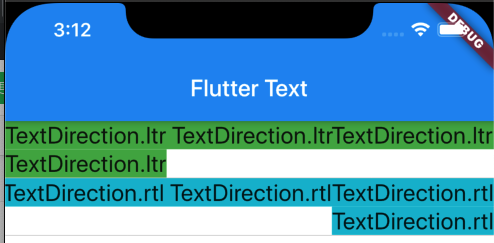
5. this.textDirection 文本方向
- TextDirection.ltr:文字方向从左到右
- TextDirection.ltr:文字方向从右到左
Text(
  'TextDirection.ltr TextDirection.ltrTextDirection.ltr  TextDirection.ltr',
  style: TextStyle(
      backgroundColor: Colors.green,
      fontSize: 20
  ),
  textDirection: TextDirection.ltr,
),
Divider(height: 0.5, color: Colors.grey),
Text(
  'TextDirection.rtl TextDirection.rtlTextDirection.rtl TextDirection.rtl',
  textDirection: TextDirection.rtl,
  style: TextStyle(
      fontSize: 20,
      backgroundColor:
      Colors.cyan
  ),
),
Divider(height: 0.5, color: Colors.grey),
6. locale 国际化
7. softWrap 是否允许换行显示 默认true false时不换行
8. overflow 文本的截断方式
- TextOverflow.ellipsis:多余文本截断后以省略符“…”表示
- TextOverflow.clip:剪切多余文本,多余文本不显示
- TextOverflow.fade:将多余的文本设为透明
- TextOverflow.visible: 多余的文本显示在容器之外
Text(
  'TextOverflow.clipTextOverflow.clipTextOverflow.clipTextOverflow.clipTextOverflow.clip',
  style: TextStyle(
      backgroundColor: Colors.green,
      fontSize: 20
  ),
  softWrap: false,
  overflow: TextOverflow.clip,
),
Divider(height: 0.5, color: Colors.grey),
Text(
  'TextOverflow.clipTextOverflow.clipTextOverflow.clipTextOverflow.clipTextOverflow.clip',
  style: TextStyle(
      backgroundColor: Colors.tealAccent,
      fontSize: 20
  ),
  softWrap: false,
  overflow: TextOverflow.fade,
),
Divider(height: 0.5, color: Colors.grey), Text(
  'TextOverflow.clipTextOverflow.clipTextOverflow.clipTextOverflow.clipTextOverflow.clip',
  style: TextStyle(
      backgroundColor: Colors.yellow,
      fontSize: 20
  ),
  softWrap: false,
  overflow: TextOverflow.ellipsis,
),
Divider(height: 0.5, color: Colors.grey), Text(
  'TextOverflow.clipTextOverflow.clipTextOverflow.clipTextOverflow.clipTextOverflow.clip',
  style: TextStyle(
      backgroundColor: Colors.orange,
      fontSize: 20
  ),
  softWrap: false,
  overflow: TextOverflow.visible,
),
Divider(height: 0.5, color: Colors.grey),

最后一个应该是显示在容器之外的,因为我是全屏幕的所以效果不是很明显.
9. textScaleFactor 文字大小倍率系数
Text(
  'Flutter',
  style: TextStyle(
      backgroundColor: Colors.green,
  ),
  textScaleFactor: 1,
),
Divider(height: 0.5, color: Colors.grey),
Text(
  'Flutter',
  style: TextStyle(
    backgroundColor: Colors.green,
  ),
  textScaleFactor: 2,
),
Divider(height: 0.5, color: Colors.grey),
Text(
  'Flutter',
  style: TextStyle(
    backgroundColor: Colors.green,
  ),
  textScaleFactor: 3,
),
Divider(height: 0.5, color: Colors.grey),
Text(
  'Flutter',
  style: TextStyle(
    backgroundColor: Colors.green,
  ),
  textScaleFactor: 4,
),
Divider(height: 0.5, color: Colors.grey),

10. maxLines 文字显示的最大行数
11. textWidthBasis
/// {@macro flutter.painting.textPainter.textWidthBasis}
  final TextWidthBasis textWidthBasis;
/// The different ways of measuring the width of one or more lines of text.
///
/// See [Text.textWidthBasis], for example.
enum TextWidthBasis {
  /// multiline text will take up the full width given by the parent. For single
  /// line text, only the minimum amount of width needed to contain the text
  /// will be used. A common use case for this is a standard series of
  /// paragraphs. //段落
  parent,

  /// The width will be exactly enough to contain the longest line and no
  /// longer. A common use case for this is chat bubbles. //聊天气泡
  longestLine,
}
Text(
  'FlutterFlutterFlutterFlutterFlutterFlutterFlutterFlutterFlutterFlutterFlutterFlutterFlutterFlutterFlutterFlutterFlutterFlutterFlutterFlutterFlutterFlutterFlutterFlutterFlutterFlutterFlutterFlutterFlutterFlutterFlutterFlutter',
  style: TextStyle(
      backgroundColor: Colors.green,
  ),
  textWidthBasis: TextWidthBasis.parent,
),
Divider(height: 0.5, color: Colors.grey),
Text(
  'FlutterFlutterFlutterFlutterFlutterFlutterFlutterFlutterFlutterFlutterFlutterFlutterFlutterFlutterFlutterFlutterFlutterFlutterFlutterFlutterFlutterFlutterFlutterFlutterFlutterFlutterFlutterFlutterFlutterFlutterFlutterFlutterFlutterFlutterFlutterFlutterFlutterFlutterFlutterFlutterFlutterFlutterFlutterFlutterFlutterFlutterFlutterFlutter',
  style: TextStyle(
    backgroundColor: Colors.green,
  ),
  textWidthBasis: TextWidthBasis.longestLine,
),
Divider(height: 0.5, color: Colors.grey),

若有收获,就点个赞吧
0 人点赞


