# Kubernetes CNI Calico GuideLine# 时间:20210806-[20:00-22:00]# 主题:Calico基础架构# 文档:https://www.yuque.com/docs/share/dd390d06-d256-454f-b9f9-9c030b4db4d4?# 《20210806-Calico基础架构》# 作业:Calico设计理念
# FAQ:
Wath is Calico
What is Calico? # From: https://docs.projectcalico.org/archive/v3.20/about/about-calico [Calico 官网]Calico is an open source networking and network security solution for containers, virtual machines, and native host-based workloads. Calico supports a broad range of platforms including Kubernetes, OpenShift, Mirantis Kubernetes Engine (MKE), OpenStack, and bare metal services.Whether you opt to use Calico's eBPF data plane or Linux’s standard networking pipeline, Calico delivers blazing fast performance with true cloud-native scalability. Calico provides developers and cluster operators with a consistent experience and set of capabilities whether running in public cloud or on-prem, on a single node, or across a multi-thousand node cluster.Calico 是一个 CNI 插件,为 Kubernetes 集群提供容器网络。它使用 Linux 原生工具来促进流量路由和执行网络策略。它还托管一个 BGP 守护进程,用于将路由分发到其他节点。Calico 的工具作为 DaemonSet 在 Kubernetes 集群上运行。这使管理员能够安装 Calico, kubectl apply -f ${CALICO_MANIFESTS}.yaml而无需设置额外的服务或基础设施。每个部分都涵盖架构建议,有时还包括 Calico 部署中每个问题的配置。在高层次上,主要建议是:1.使用 Kubernetes 数据存储。2.安装 Typha 以确保数据存储可扩展性。3.对单个子网集群不使用封装。4.对于多子网集群,在 CrossSubnet 模式下使用 IP-in-IP。5.根据网络 MTU 和选择的路由模式配置 Calico MTU。6.为能够增长到 50 个以上节点的集群添加全局路由反射器。7.将 GlobalNetworkPolicy 用于集群范围的入口和出口规则。通过添加 namespace-scoped 来修改策略NetworkPolicy。# 多网卡环境:https://ethantang.top/posts/calico-multicard/
Calico Components
[root@k8s-1 ~]# kubectl get pods -o wide -A| grep calicokube-system calico-kube-typha-69496dddsde 1/1 Running 1 123d 10.244.231.129 k8s-1 <none> <none>kube-system calico-kube-controllers-69496d8b75-tvgzw 1/1 Running 1 123d 10.244.231.199 k8s-1 <none> <none>kube-system calico-node-ktrhr 1/1 Running 1 123d 172.12.1.11 k8s-1 <none> <none>kube-system calico-node-m8n5d 1/1 Running 1 123d 172.12.1.12 k8s-2 <none> <none>[root@k8s-1 ~]#
Components 之 calico-kube-typha
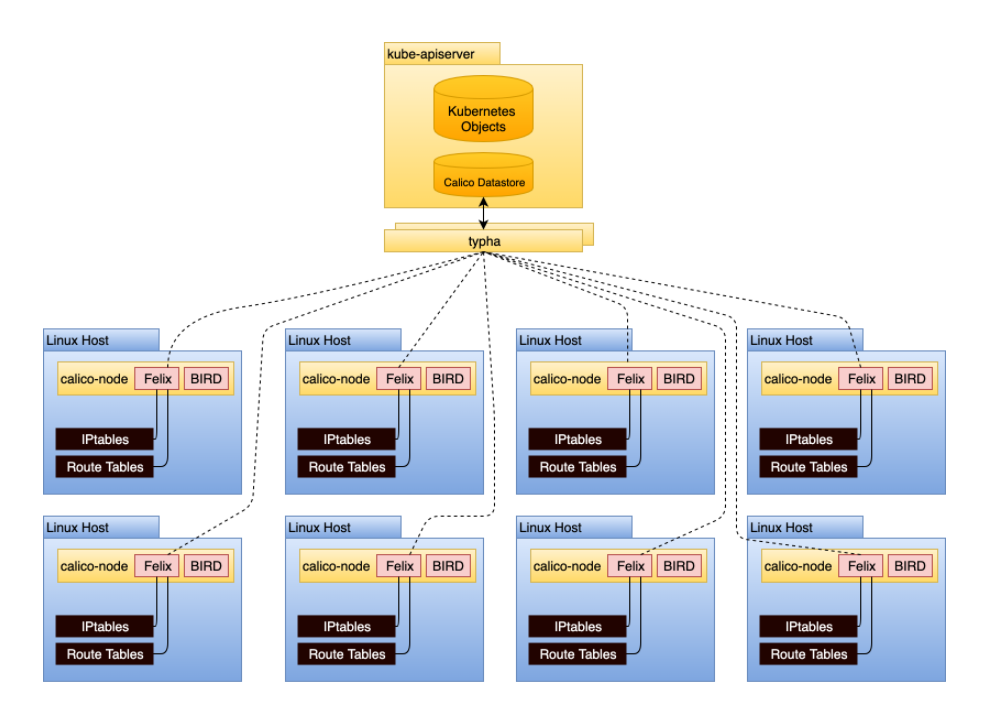
Components 之 calico-kube-controllers
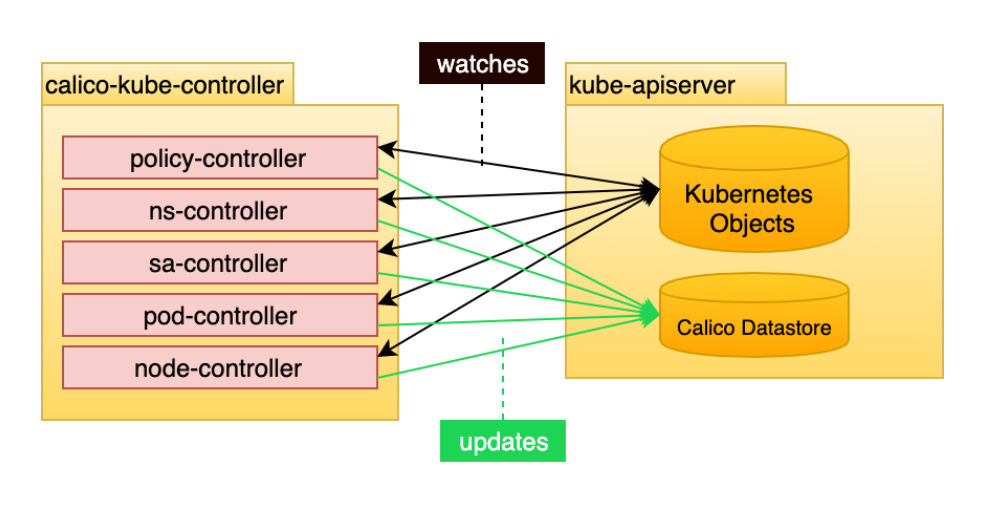
kube-system calico-kube-controllers-69496d8b75-tvgzw 1/1 Running 1 123d 10.244.231.199 k8s-1 <none> <none>The calico-kube-controller is responsible for recognizing changes in Kubernetes objects that impact routing. The controller contains multiple controllers inside of it, watching changes in the following: # 识别影响路由变化。且包含多个控制器1.Network Policies (used to program IPtables for network access enforcement) # 网络策略,被用作编写iptables来执行网络访问的能力2.Pods (e.g. labels) # 观察Pod的变化,比如标签的变化3.Namespaces (used to determine if enforcement is needed for the new namespace) # 名称空间的变化4.Service Accounts (used for setting up Calico profiles) # SA 设置Calico的配置文件5.Nodes (used to determine the associated subnet and inform the routing topology) # 通知节点路由变化# multiple controllers:包含:1.policy-controller2.ns-controller2.sa-controller3.pod-controller4.node-controller# topo Like below:
Components 之 calico-node
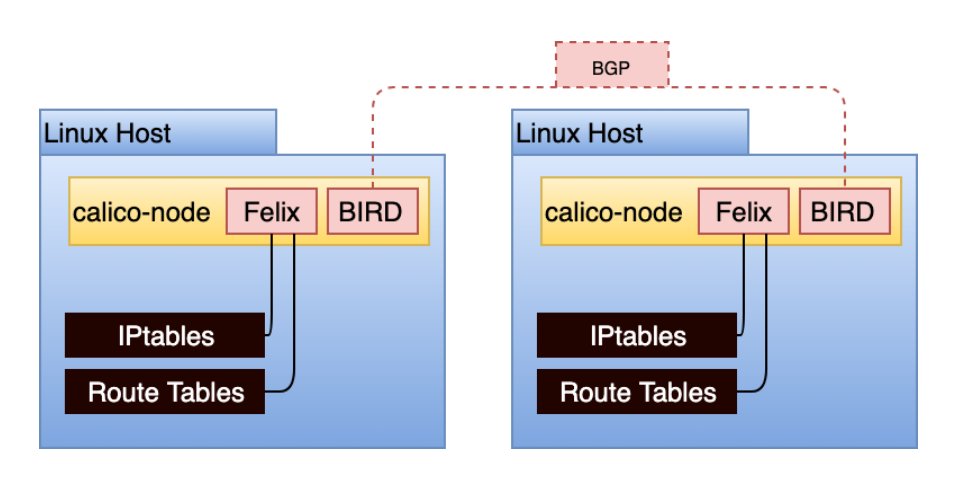
kube-system calico-node-ktrhr 1/1 Running 1 123d 172.12.1.11 k8s-1 <none> <none>kube-system calico-node-m8n5d 1/1 Running 1 123d 172.12.1.12 k8s-2 <none> <none>The calico-node pod runs on every host. It is responsible for 2 pieces of functionality:1.Route programming: Based on known routes to pods in the Kubernetes cluster, configure the Linux host to facilitate routing accordingly. # 路由配置2.Route sharing: Based on pods running on this host, provide a mechanism to share known routes with other hosts. Typically accomplished with Border Gateway Protocol (BGP). # 路由共享为了实现以上的两个功能,calico-node运行了两个进程:1.Felix:Felix负责对主机进行编程以满足 pod 路由和网络策略。为此,它与 Linux 内核的路由表和 Linux IPtables(用于网络策略)交互。Felix 将静态配置路由表,将学到的内容转换为主机路由表中的静态路由。Calico 使用 IPtables 会引起对可扩展性的担忧,但是使用 IPtables 的时间复杂度为 O(1). Calico 依赖 kube-proxy 来促进服务,这(在 IPtables 模式下)可能具有更接近于 O(n). 对于具有数千个服务的集群,应该考虑这一点。2.BIRD :BIRD采用 Felix 编写的路由规则,并与默认情况下在所有主机上运行的其他 BIRD 实例对等。这些 BGP 对等体不断共享有关其已知路由的路由信息。BIRD 是一个功能强大的守护进程,它支持多种拓扑。# topo like below:
Components 之 All in One
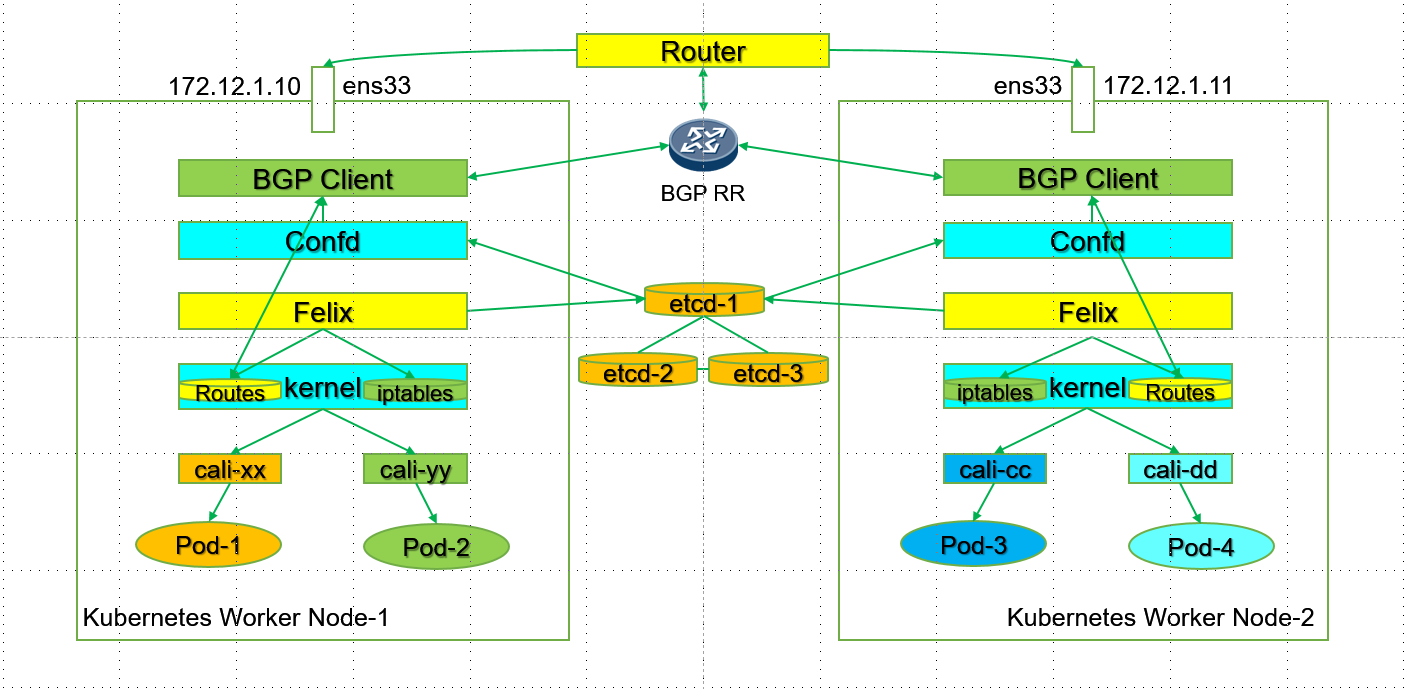
Calico Kubernetes Datastore Mode
#1. 使用Kubernetes作为存储# In almost all cases, it’s preferable to use the Kubernetes datastore instead of etcd. In this model, all persisted data used by Calico is stored through the Kubernetes API server as custom resource definitions (CRDs).// 在这里我们推荐使用Kubernetes来作为数据存储而非使用etcd。主要有一下原因:Support for a Kubernetes backend was introduced after the etcd backend. For some time after its release, it did not offer the same features as the etcd backend. In current Calico (3.9+), feature parity has been achieved. Another issue with the Kubernetes backend was its inability to scale. With hundreds of Felix instances trying to interact with the kube-apiserver to get the latest updates and changes, it had a negative impact on the system. This has been remedied with the introduction of Typha. With the feature parity and scalability solved, the etcd mode incurs an unnecessary cost of administering a second etcd cluster. It also requires the implementation of authentication and authorization controls to prevent unauthorized modification of the Calico datastore. In the Kubernetes backend mode, it uses the administrator’s kubeconfig, which means access to Calico resources can be controlled by Kubernetes RBAC.# 解释:1.直接使用etcd使得集群需要维护另外一套etcd环境。2.SA和RBAC问题。# 2. 使用ectcd直接作为存储:For the reasons stated in the previous section, this approach is not recommended as it introduces unnecessary complexity and security risk. If this model is used, do not use the Kubernetes etcd cluster as the datastore for Calico. No process outside of core Kubernetes should have access to the cluster’s etcd for security and performance reasons.
Calico calicoctl CLI
# 1.安装calicoctl:0.0:Installing calicoctlhttps://docs.projectcalico.org/v3.11/getting-started/calicoctl/installInstalling calicoctl as a binary on a single host1.Log into the host, open a terminal prompt, and navigate to the location where you want to install the binary.Tip: Consider navigating to a location that’s in your PATH. For example, /usr/local/bin/.2.Use the following command to download the calicoctl binary.curl -O -L https://github.com/projectcalico/calicoctl/releases/download/v3.11.1/calicoctl3.chmod +x calicoctl0.1:Configuring calicoctl to connect to the Kubernetes API datastorehttps://docs.projectcalico.org/v3.11/getting-started/calicoctl/configure/kdd#Example using environment variablesexport DATASTORE_TYPE=kubernetesexport KUBECONFIG=~/.kube/configLike:[root@k8s-1 ~]# calicoctl node statusCalico process is running.IPv4 BGP status+--------------+-------------------+-------+----------+-------------+| PEER ADDRESS | PEER TYPE | STATE | SINCE | INFO |+--------------+-------------------+-------+----------+-------------+| 172.12.1.12 | node-to-node mesh | up | 07:38:53 | Established |+--------------+-------------------+-------+----------+-------------+IPv6 BGP statusNo IPv6 peers found.[root@k8s-1 ~]#[root@k8s-1 ~]# calicoctl get wep -o wideNAME WORKLOAD NODE NETWORKS INTERFACE PROFILES NATSk8s--1-k8s-cni--j7klb-eth0 cni-j7klb k8s-1 10.244.231.200/32 cali0949f5d22ad kns.default,ksa.default.defaultk8s--2-k8s-cni--mm9pd-eth0 cni-mm9pd k8s-2 10.244.200.194/32 calif83b17275a0 kns.default,ksa.default.default[root@k8s-1 ~]# calicoctl get ippool -o wideNAME CIDR NAT IPIPMODE VXLANMODE DISABLED SELECTORdefault-ipv4-ippool 10.244.0.0/16 true Always Never false all()[root@k8s-1 ~]#
Routing Configuration
calico supports multiple routing modes each with unique trade-offs. This section details the differences in those routing modes, our recommendations based on topology, and an overview of alternative configurations.# 1.Routing MethodsCalico supports 3 routing modes:# 2.Native: Packets routed as-is, no encapsulation.# 3.IP-in-IP: Minimal encapsulation; outer header includes host source/destination IPs and inner header includes pod source/destination.# 4.VXLAN: Robust encapsulation using UDP over IP; outer header includes host source/destination IP addresses and inner header includes pod source/destination IP addresses as well as Ethernet headers.
Native
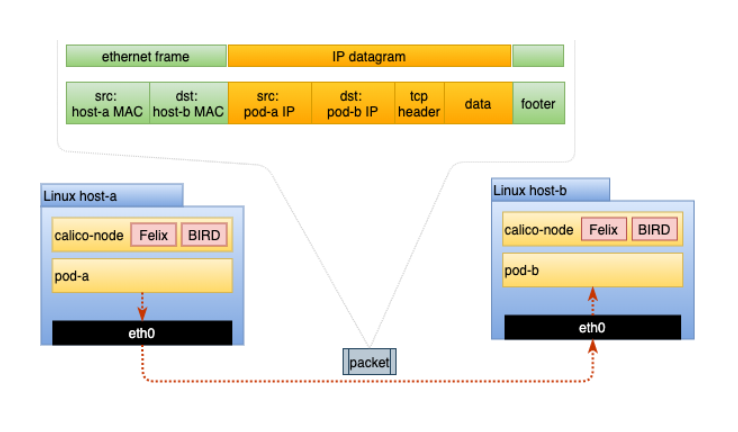
Native routing does not encapsulate packets to and from pods. As such, it’s a highly performant routing method as you’re not incurring the overhead of encapsulation, decapsulation, and larger header sizes. It also makes troubleshooting simpler as analyzing network traffic does not involve looking inside a packet for another packet. When running in this mode, the packet structure looks as shown in the diagram below:
IP-in-IP
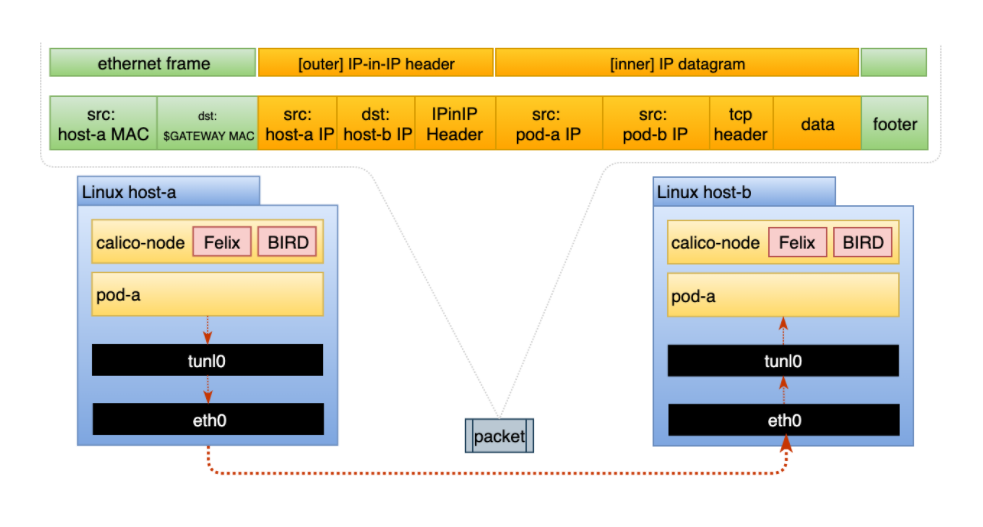
IP-in-IP is a simple form of encapsulation that wraps the packet with an outer IP header that appears as if the source and destination are hosts rather than pods. Therefore, when a host receives an IP-in-IP packet, it examines the internal IP header to determine the target pod. This is Calico’s default routing method. While this routing method incurs more overhead than native routing, it does work in most environments without modification, especially in environments that cross multiple subnets. When running in this mode, the packet structure looks as shown in the diagram below:
VXLAN
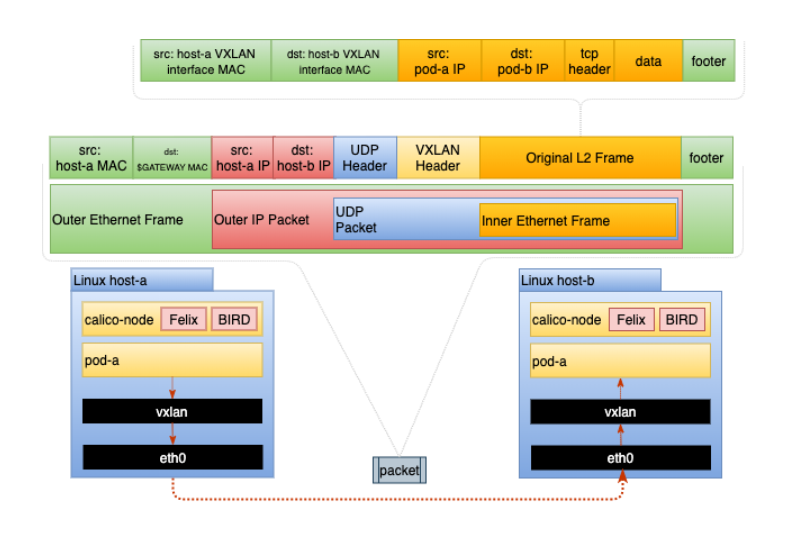
VXLAN is a feature-rich form of encapsulation that enables the creation of virtualized layer 2 networks. This is achieved by completely encapsulating the pod’s ethernet frame and adding some header information specific to VXLAN. The VXLAN mode does not require BGP, which is ideal for environments where BGP peering is blocked. When running in this mode, the packet structure looks as shown in the diagram below:
Single Subnet Configuration
For clusters deployed in a single subnet, use the Native routing mode. This will provide the best performance and simplest network model as there will be no encapsulation. Packets traversing the network will contain the source and destination IPs of pods in their IP headers. If for any reason, networks or hosts cannot allow this type of configuration, you’ll need to look into a full IP-in-IP configuration instead.
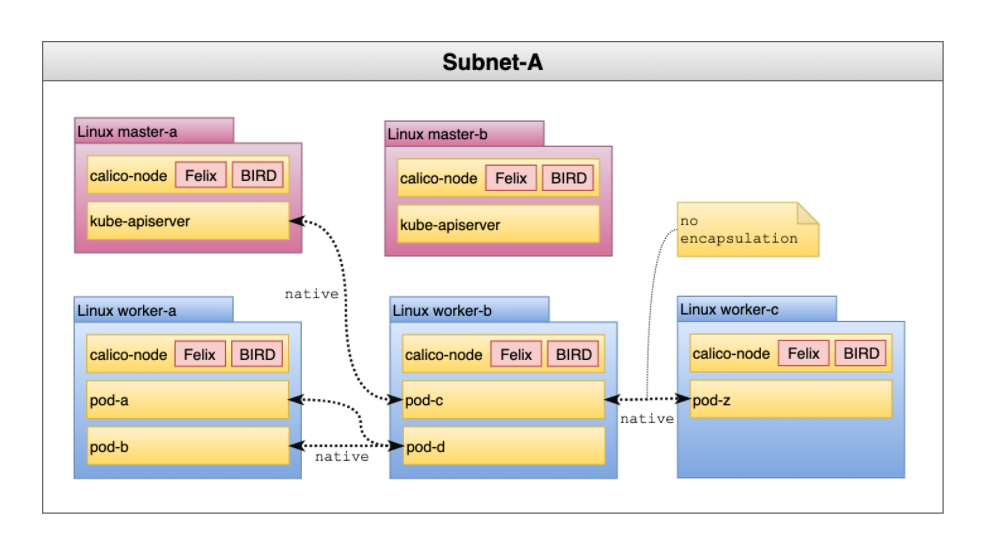
To enable this mode, the IPPools in the cluster must have ipipMode and vxlanMode set to Never. This should be done during deployment of Calico, but it can be changed after.To ensure native routing is setup during the deployment, verify that the following is set in the calico-node container manifest:env:# other variables removed for brevity# Enable IPIP- name: CALICO_IPV4POOL_IPIPvalue: "Never"Using calicoctl, you can verify (or modify) the IPPool setting. The default pool is exposed as follows:calicoctl get ippool default-ipv4-ippoolThe output should show the current setting for ipipMode and vxlanMode. Both of these must be set to Never as shown below:apiVersion: projectcalico.org/v3kind: IPPoolmetadata:name: default-ipv4-ippoolspec:blockSize: 26cidr: 192.168.0.0/16ipipMode: NevernatOutgoing: truenodeSelector: all()vxlanMode: Never
Multi-Subnet Configuration
For clusters that are deployed across subnets, it’s likely native routing will work for intra-subnet traffic. However, when pods are communicating across the subnet boundary, they are often met with a router that relies on the destination IP to determine what host to route to. IP-in-IP solves this, however, you’re taking an unnecessary hit to performance and complexity for intra-subnet traffic.For these cases, the recommended option is to run ipipMode in CrossSubnet. With this setting enabled, native routing is used for all intra-subnet communication and IP-in-IP (encapsulation) is used when crossing the subnet boundary as illustrated in the diagram below:
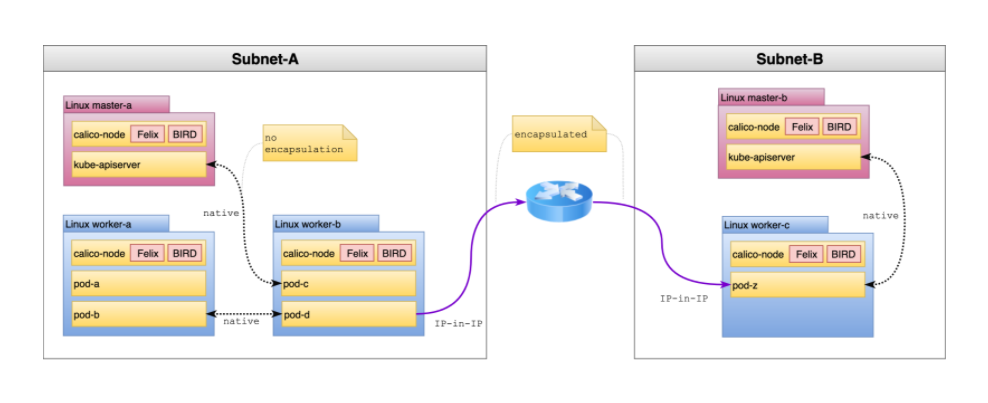
In our experience, the majority of clusters span subnets. Thus, this is the most common recommended topology.To ensure native cross-subnet IP-in-IP is setup during the deployment, verify that the following is set in the calico-node container manifest.env:# other variables removed for brevity# Enable IPIP- name: CALICO_IPV4POOL_IPIPvalue: "CrossSubnet"Using calicoctl, you can verify (or modify) the IPPool setting. The default pool is exposed as follows:calicoctl get ippool default-ipv4-ippoolThe output should show the current setting for ipipMode as CrossSubnet and vxlanMode as Never:apiVersion: projectcalico.org/v3kind: IPPoolmetadata:name: default-ipv4-ippoolspec:blockSize: 26cidr: 192.168.0.0/16ipipMode: CrossSubnetnatOutgoing: truenodeSelector: all()vxlanMode: NeverFull IP-in-IP ConfigurationIf native routing for intra-subnet traffic is not possible in your environment, e.g. the network performs source/destination checks against the IP datagram, you can use full IP-in-IP configuration. This is the default for most Calico deployments. To verify that, you can check the following in the calico-node manifest:env:# other variables removed for brevity# Enable IPIP- name: CALICO_IPV4POOL_IPIPvalue: "Always"Using calicoctl, you can verify (or modify) the IPPool setting. The default pool is exposed as follows:calicoctl get ippool default-ipv4-ippoolThe output should show the current setting for ipipMode as Always and vxlanMode as Never:apiVersion: projectcalico.org/v3kind: IPPoolmetadata:name: default-ipv4-ippoolspec:blockSize: 26cidr: 192.168.0.0/16ipipMode: AlwaysnatOutgoing: truenodeSelector: all()vxlanMode: NeverIP-in-IP and Native both require BGP to distribute routes amongst nodes. In some environments, BGP peering might not be possible. In these cases it’s best to consider VXLAN, where BGP is optional.VXLAN ConfigurationFor environments where VXLAN is preferred or BGP is not possible, Calico can be configured to operate in this mode. Due to the changes in routing and route sharing between Native/IP-in-IP and VXLAN, do not change this setting in a running cluster. Instead, follow the steps below to ensure a cluster has VXLAN enabled. Unless you plan to peer IPPools with existing network hardware, you should disable BGP peering to reduce overhead:The calico-config configmap has backend set to vxlan as shown below:kind: ConfigMapapiVersion: v1metadata:name: calico-confignamespace: kube-systemdata:# other settings removed for brevity# value changed from bird to vxlancalico_backend: “vxlan”The calico-node manifest has CALICO_IPVPOOL_VXLAN set to Always as shown below:env:# other variables removed for brevity# Enable VXLAN- name: CALICO_IPV4POOL_VXLANvalue: "Always"The calico-node manifest is not setting CALICO_IPVPOOL_IPIP.The calico-node manifest has all BIRD-related liveness and readiness checks disabled as shown below:livenessProbe:exec:command:- /bin/calico-node- -felix-live# disable bird liveness test# - -bird-liveperiodSeconds: 10initialDelaySeconds: 10failureThreshold: 6readinessProbe:exec:command:- /bin/calico-node- -felix-ready# disable bird readiness test#- -bird-readyperiodSeconds: 10If the above is true, Calico will operate in VXLAN mode for all traffic.
Route Distribution
Unless running in VXLAN mode, Calico requires the Border Gateway Protocol (BGP) to share routes amongst hosts. BGP is a common protocol that many routers are able to peer with. By default, Calico requires no BGP-capable routers to be deployed. Instead it runs a routing daemon (BIRD) in each node, creating a BGP mesh.
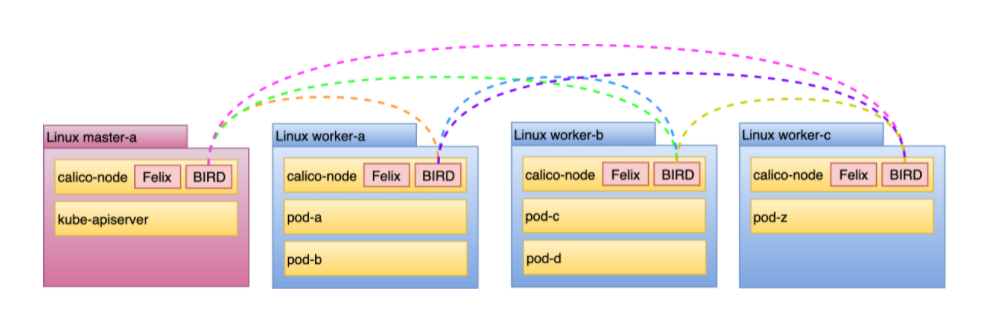
Each colored line represents a peering relationship. This model is referred to as a node-to-node mesh, as it does not centralize route distribution. Using calicoctl on 1 of the 4 hosts reveals the peering relationship.sudo calicoctl node statusCalico process is running.IPv4 BGP status+--------------+-------------------+-------+----------+--------------------------------+| PEER ADDRESS | PEER TYPE | STATE | SINCE | INFO |+--------------+-------------------+-------+----------+--------------------------------+| 10.30.0.17 | node-to-node mesh | up | 01:17:08 | Established || 10.30.0.16 | node-to-node mesh | up | 01:17:07 | Established || 10.30.0.14 | node-to-node mesh | up | 01:29:06 | Established |+--------------+-------------------+-------+----------+--------------------------------+Running the above on 1 out of 4 hosts reveals the host is peered with 3 others. For small clusters (under 50 nodes), this model is adequate and should not change. However, when a cluster is running 50 to thousands of nodes, this peering relationship between every node becomes a bottle neck. For clusters that plan to scale into hundreds of nodes, route reflectors should be leveraged.There are two types of targets Calico may be configured to peer routes with:calico-node configured reflector:In this model, nodes run dedicated calico-node instances responsible for acting as reflectors. The configuration of this model is demonstrated in the Global Route Reflection section below.Top of rack (ToR) switch or router:In this model, Calico is configured to peer with existing network gear that supports BGP. This is a valid approach for making pod IPPools routable to the network fabric. The configuration of this model is demonstrated in the Node-Specific Route Reflection section below.
BGP Full Mesh
BGP route reflectors provide centralized, highly-available route sharing hubs that nodes can peer with. In the default node-to-node mesh topology, the quantity of node peers are N-1, where N is the total number of hosts in the cluster. In the route reflector model, the number of peers become the quantity of reflectors deployed. For clusters exceeding 50 nodes and potentially growing far beyond that, this topology is recommended. Once applied, the route sharing model looks as shown in the diagram below:
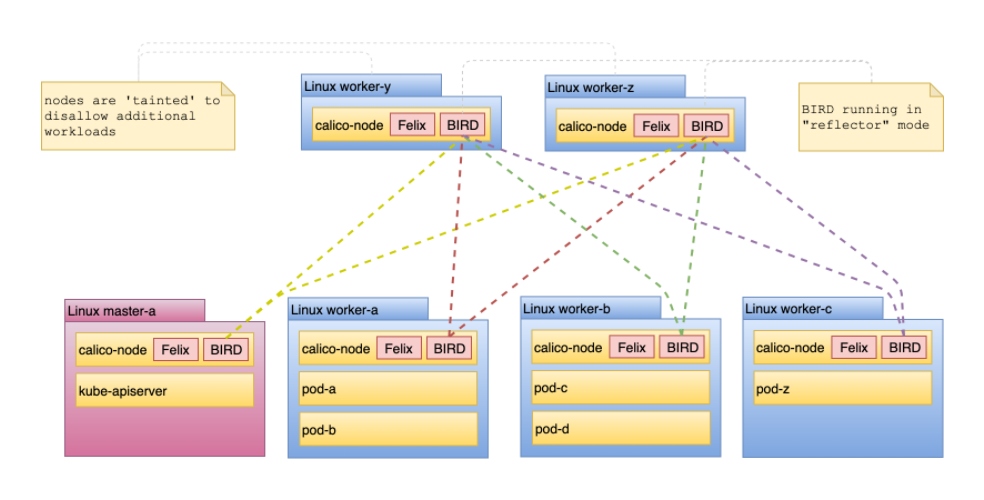
This model is referred to as global reflection because nodes peer to all route reflectors made available to the cluster. This is an ideal model for most deployments as it is simple and scalable. However, it does assume a single layer 2 network that calico-node instances can peer to reflectors. For more complex or massive-scale deployments, nodes may need to peer with specific routers in their segment. This model is covered in the Node-Specific Route Reflection section.Clusters wishing to achieve the global reflection model without additional routers can leverage the calico-node container. To configure this, add two nodes to the Kubernetes cluster running calico-node containers. These nodes are tainted to ensure only the reflector will run on them. For each node, the Calico Node CRD is altered to include a label representing the instance of calico-node as a reflector as show below:apiVersion: projectcalico.org/v3kind: Nodemetadata:name: k8s-node-z# Set to represent this node is a reflectorlabels:route-reflector: truespec:bgp:ipv4Address: 10.30.0.13/22ipv4IPIPTunnelAddr: 192.168.0.1routeReflectorClusterID: 1.0.0.1With nodes labeled via the Node CRD, BGPPeer CRDs are added for peering configuration. These BGPPeers instruct the nodes to peer with the reflectors and the reflectors to peer with each other.Worker-to-reflector BGPPeer configuration:kind: BGPPeerapiVersion: projectcalico.org/v3metadata:name: node-peer-to-rrspec:nodeSelector: !has(route-reflector)peerSelector: has(route-reflector)Reflector-to-reflector BGPPeer configuration:kind: BGPPeerapiVersion: projectcalico.org/v3metadata:name: rr-to-rr-peerspec:nodeSelector: has(route-reflector)peerSelector: has(route-reflector)With peering for the route reflectors setup, the cluster has the node-to-node BGP mesh disabled by modifying the BGPConfiguration CRD.apiVersion: projectcalico.org/v3kind: BGPConfigurationmetadata:name: defaultspec:logSeverityScreen: Info# Set to disable node mesh and leverage route reflectorsnodeToNodeMeshEnabled: falseasNumber: 63400The cluster’s new peer table looks as follows from the perspective of any node:sudo calicoctl node statusCalico process is running.IPv4 BGP status+--------------+-----------+-------+----------+-------------+| PEER ADDRESS | PEER TYPE | STATE | SINCE | INFO |+--------------+-----------+-------+----------+-------------+| 10.30.0.45 | global | up | 03:52:51 | Established || 10.30.0.46 | global | up | 03:54:11 | Established |+--------------+-----------+-------+----------+-------------+Clusters that run in this mode introduce a (highly-available) centralized point of failure. For this reason, you should ensure that at least 2 route reflectors are running per cluster. Furthermore, in multi-subnet environments, ensure that at least 1 route reflector is running per subnet.
BGP RR
Peering can be configured for BGP-capable hardware in a datacenter’s network. Most commonly setup with top of rack (ToR) switches. Each grouping of reflected routes typically represent a separate network AS as illustrated in the diagram below:
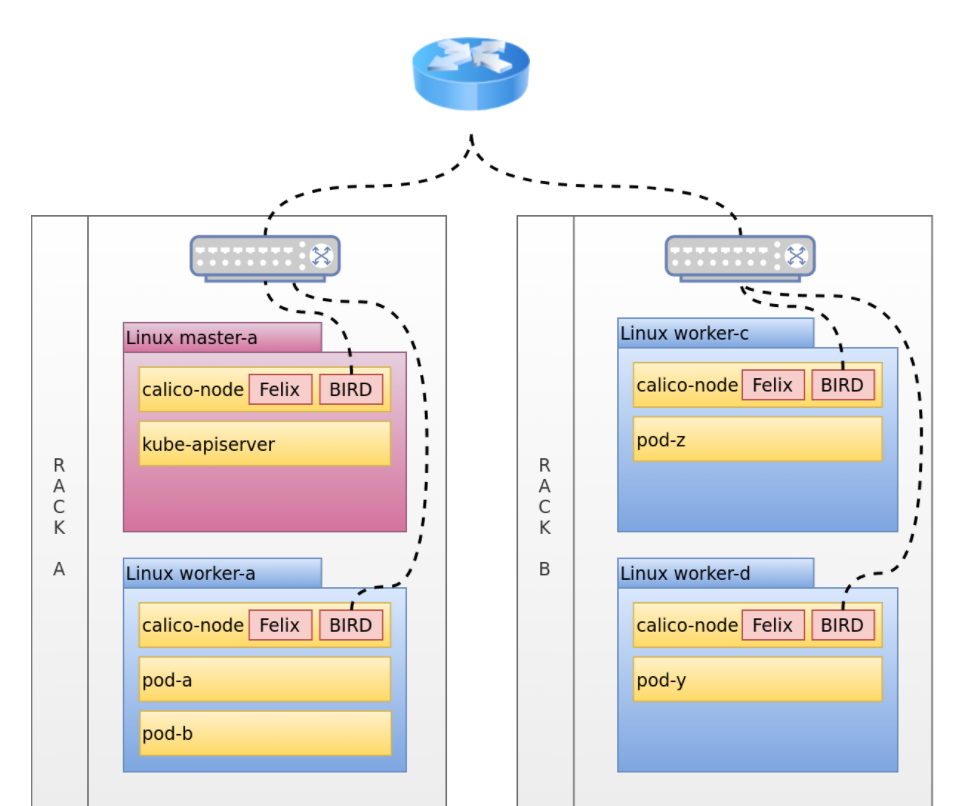
To configure the above model, each node should be labeled with an identifier representing the part of the network it runs in.apiVersion: projectcalico.org/v3kind: Nodemetadata:name: k8s-node-z# Add rack label; used for BGPPeerlabels:rack: aspec:bgp:ipv4Address: 10.30.0.13/22ipv4IPIPTunnelAddr: 192.168.0.1routeReflectorClusterID: 1.0.0.1With nodes labeled via the Node CRD, BGPPeer CRDs are added for each target switch / router to be peered with. These BGPPeers instruct the nodes to peer with the ToR.Here is a Worker-to-ToR BGPPeer configuration:kind: BGPPeerapiVersion: projectcalico.org/v3metadata:name: node-peer-rack-aspec:# peer all nodes with label rack: a with peerIPnodeSelector: rack == 'a'peerIP: 192.168.1.1# remote AS number of the peerasNumber: 64400With peering for the switch or router setup, the cluster’s node-to-node BGP mesh is disabled by modifying the BGPConfiguration CRD as follows:apiVersion: projectcalico.org/v3kind: BGPConfigurationmetadata:name: defaultspec:logSeverityScreen: Info# Set to disable node mesh and leverage route reflectorsnodeToNodeMeshEnabled: falseasNumber: 63400
BGP RR TOPO: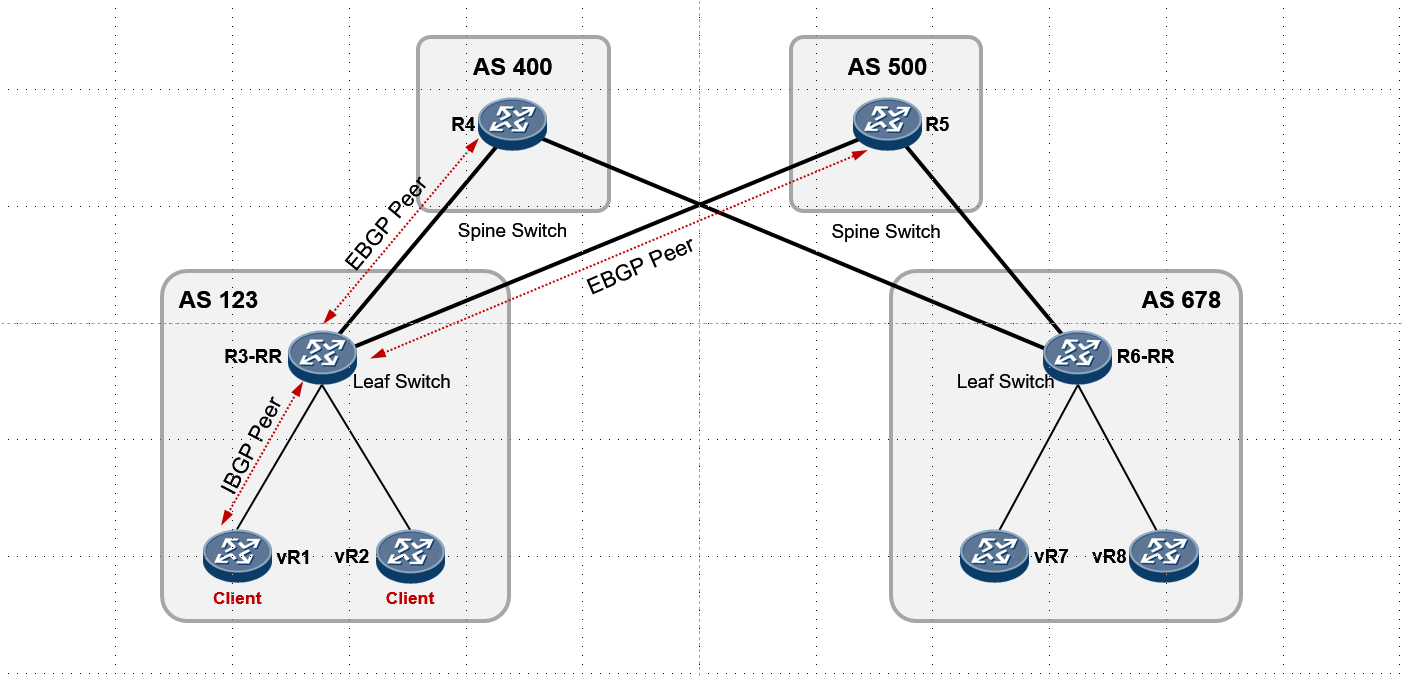
(BGP RR)
# BGP RR:使用eNSP 模拟 BGP RR

若有收获,就点个赞吧
0 人点赞


