# Kubernetes CNI Flannel GuideLine# 时间:20210728-[20:00-22:00]# 主题:eNSP实现VxLAN# 文档:https://www.yuque.com/docs/share/2e8618a3-fefc-408c-b00a-852786a69d06?# 《20210728-Flannel VxLAN Mode(四)》# 作业:eNSP实现VxLAN
# FAQ:
1.eNSP 实现VxLAN
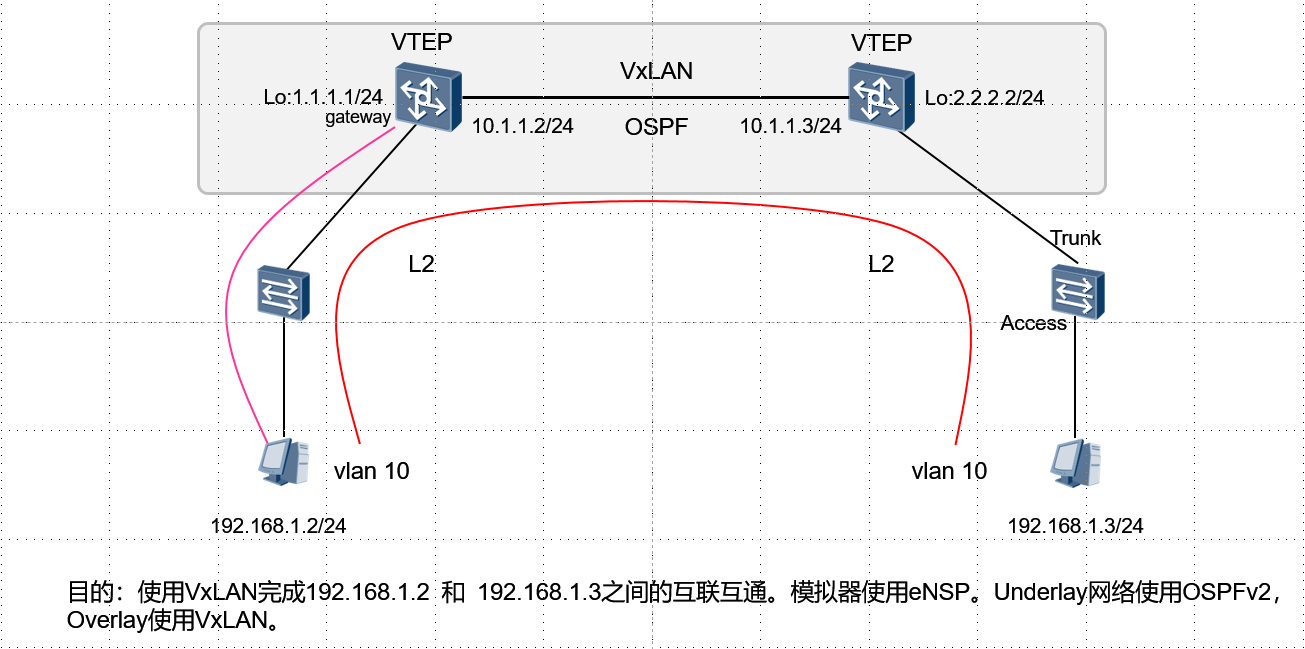
1.VxLAN配置说明
12800-CloudEngine配置指南-VXLAN.pdf
2.环境说明
# ENV 说明:eNSP:1.3.00.100 V100R003C00 SPC100CE: CE12800VirtualBox: VirtualBox Graphical User InterfaceVersion 5.2.44 r139111 (Qt5.6.2)Wireshark: Version 2.6.0 (v2.6.0-0-gc7239f02)
3.配置原理介绍
topo:# 地址信息10.1.1.1/24 10.1.1.2/24G1/0/0 G1/0/01.1.1.1/32 CE1------------------------CE2 2.2.2.2/32G1/0/1 | OSPF |G1/0/1| || G0/0/1 G0/0/1 |LSW1 LSW2G0/0/2 | | G0/0/2| || |PC1 PC2192.168.1.1 192.168.1.2vlan 10 vlan 10# 配置思路介绍:# 统一原则:由于该类型设备为超核心设备,所以每一个步骤都需要commit。包括修改名字。1.PC1和LSW1之间为普通二层接入,并被划分到相应的VLAN中。配置为Access接口类型。2.LSW1和CE1之间靠近LSW1侧配置为普通Trunk类型。为了接入更多的VLAN,这里只有VLAN10,但可以配置多VLAN。3.LSW1和CE1之间靠近CE1侧配置为使用dot1q 来封装VxLAN的数据报文。由于涉及到子接口配置,所以这里需要父接口和子接口都需要undo shutdown.4.underlay网络使用OSPF网络。配置说明:############################################################### 左边Leg配置###############################################################1. PC1配置:PC>ipconfigLink local IPv6 address...........: fe80::5689:98ff:fe1f:7471IPv6 address......................: :: / 128IPv6 gateway......................: ::IPv4 address......................: 192.168.1.1 # 地址Subnet mask.......................: 255.255.255.0 # 掩码Gateway...........................: 0.0.0.0Physical address..................: 54-89-98-1F-74-71 # MACDNS server........................:#2. LSW1配置:<LSW1>dis current-configuration#sysname LSW1 # 修改交换机名字为:LSW1#vlan batch 10 # 创建VLAN 10#cluster enablentdp enablendp enable#drop illegal-mac alarm#diffserv domain default#drop-profile default#aaaauthentication-scheme defaultauthorization-scheme defaultaccounting-scheme defaultdomain defaultdomain default_adminlocal-user admin password simple adminlocal-user admin service-type http#interface Vlanif1#interface MEth0/0/1#interface GigabitEthernet0/0/1port link-type trunk # 配置LSW1和CE1之间靠近LSW1之间的接口为Trunkport trunk allow-pass vlan 2 to 4094 # 配置该Trunk允许相应的VLAN通过。这里是全放通#interface GigabitEthernet0/0/2port link-type accessport default vlan 10#interface GigabitEthernet0/0/3#interface GigabitEthernet0/0/4#interface GigabitEthernet0/0/5#interface GigabitEthernet0/0/6#interface GigabitEthernet0/0/7#interface GigabitEthernet0/0/8#interface GigabitEthernet0/0/9#interface GigabitEthernet0/0/10#interface GigabitEthernet0/0/11#interface GigabitEthernet0/0/12#interface GigabitEthernet0/0/13#interface GigabitEthernet0/0/14#interface GigabitEthernet0/0/15#interface GigabitEthernet0/0/16#interface GigabitEthernet0/0/17#interface GigabitEthernet0/0/18#interface GigabitEthernet0/0/19#interface GigabitEthernet0/0/20#interface GigabitEthernet0/0/21#interface GigabitEthernet0/0/22#interface GigabitEthernet0/0/23#interface GigabitEthernet0/0/24#interface NULL0#user-interface con 0user-interface vty 0 4#return<LSW1>#3.CE1配置:[~CE1]dis cu[~CE1]dis current-configuration!Software Version V200R005C10SPC607B607!Last configuration was updated at 2021-07-26 21:16:32+00:00 by SYSTEM automatically!Last configuration was saved at 2020-11-08 14:25:28+00:00#sysname CE1#device board 17 board-type CE-MPUBdevice board 1 board-type CE-LPUE#bridge-domain 10 # 配置BD域,由于这里BD域中实际上为了配置VNI,所以如果哪里需要该VNI的VxLAN封装的话,就引用即可vxlan vni 10 # 配置VxLAN的VNI ID#aaa#authentication-scheme default#authorization-scheme default#accounting-scheme default#domain default#domain default_admin#interface MEth0/0/0undo shutdown#interface GE1/0/0 # 配置接口undo portswitch # 关闭portswitch,打开三层功能undo shutdown # 开启该接口ip address 10.1.1.1 255.255.255.0 # 配置underlay接口地址#interface GE1/0/1 # 配置父接口开启undo shutdown#interface GE1/0/1.10 mode l2 # 配置子接口,并设置为L2模式encapsulation dot1q vid 10 # 配置封装类型为dot1q,且VLAN ID为10bridge-domain 10 # 引用BD域,来打对应的VxLAN的VNI#interface GE1/0/2shutdown#interface GE1/0/3shutdown#interface GE1/0/4shutdown#interface GE1/0/5shutdown#interface GE1/0/6shutdown#interface GE1/0/7shutdown#interface GE1/0/8shutdown#interface GE1/0/9shutdown#interface LoopBack0ip address 1.1.1.1 255.255.255.255 # 配置VTEP的地址#interface Nve1 # 配置VTEPsource 1.1.1.1 # 配置VTEP使用的源接口地址vni 10 head-end peer-list 2.2.2.2 # 配置VTEP 针对于VNI 10 的使用头端复制来转发,且peer为另一个VTEP地址为:2.2.2.2#interface NULL0#ospf 1 router-id 1.1.1.1 # 配置OSPF underlay网络互联互通area 0.0.0.0network 0.0.0.0 255.255.255.255 # 这里配置全放通,生产中切记需要精确放通#ssh authorization-type default aaa#ssh server cipher aes256_gcm aes128_gcm aes256_ctr aes192_ctr aes128_ctr aes256_cbc aes128_cbc 3des_cbc#ssh server dh-exchange min-len 1024#ssh client cipher aes256_gcm aes128_gcm aes256_ctr aes192_ctr aes128_ctr aes256_cbc aes128_cbc 3des_cbc#user-interface con 0#vm-manager#return[~CE1]############################################################### 右边边Leg配置############################################################### PC2配置:PC>ipconfigLink local IPv6 address...........: fe80::5689:98ff:fe46:4117IPv6 address......................: :: / 128IPv6 gateway......................: ::IPv4 address......................: 192.168.1.2Subnet mask.......................: 255.255.255.0Gateway...........................: 0.0.0.0Physical address..................: 54-89-98-46-41-17DNS server........................:# LSW2配置:<LSW2>dis current-configuration#sysname LSW2#vlan batch 10#stp disable#cluster enablentdp enablendp enable#drop illegal-mac alarm#diffserv domain default#drop-profile default#aaaauthentication-scheme defaultauthorization-scheme defaultaccounting-scheme defaultdomain defaultdomain default_adminlocal-user admin password simple adminlocal-user admin service-type http#interface Vlanif1#interface MEth0/0/1#interface GigabitEthernet0/0/1port link-type trunkport trunk allow-pass vlan 2 to 4094#interface GigabitEthernet0/0/2port link-type accessport default vlan 10#interface GigabitEthernet0/0/3#interface GigabitEthernet0/0/4#interface GigabitEthernet0/0/5#interface GigabitEthernet0/0/6#interface GigabitEthernet0/0/7#interface GigabitEthernet0/0/8#interface GigabitEthernet0/0/9#interface GigabitEthernet0/0/10#interface GigabitEthernet0/0/11#interface GigabitEthernet0/0/12#interface GigabitEthernet0/0/13#interface GigabitEthernet0/0/14#interface GigabitEthernet0/0/15#interface GigabitEthernet0/0/16#interface GigabitEthernet0/0/17#interface GigabitEthernet0/0/18#interface GigabitEthernet0/0/19#interface GigabitEthernet0/0/20#interface GigabitEthernet0/0/21#interface GigabitEthernet0/0/22#interface GigabitEthernet0/0/23#interface GigabitEthernet0/0/24#interface NULL0#user-interface con 0user-interface vty 0 4#return<LSW2># CE2配置:<CE2>dis current-configuration!Software Version V200R005C10SPC607B607!Last configuration was updated at 2021-07-26 21:16:32+00:00 by SYSTEM automatically!Last configuration was saved at 2020-11-08 14:25:33+00:00#sysname CE2#device board 17 board-type CE-MPUBdevice board 1 board-type CE-LPUE#bridge-domain 10vxlan vni 10#aaa#authentication-scheme default#authorization-scheme default#accounting-scheme default#domain default#domain default_admin#interface MEth0/0/0undo shutdown#interface GE1/0/0undo portswitchundo shutdownip address 10.1.1.2 255.255.255.0#interface GE1/0/1undo shutdown#interface GE1/0/1.10 mode l2encapsulation dot1q vid 10bridge-domain 10#interface GE1/0/2shutdown#interface GE1/0/3shutdown#interface GE1/0/4shutdown#interface GE1/0/5shutdown#interface GE1/0/6shutdown#interface GE1/0/7shutdown#interface GE1/0/8shutdown#interface GE1/0/9shutdown#interface LoopBack0ip address 2.2.2.2 255.255.255.255#interface Nve1source 2.2.2.2vni 10 head-end peer-list 1.1.1.1#interface NULL0#ospf 1 router-id 2.2.2.2area 0.0.0.0network 0.0.0.0 255.255.255.255#ssh authorization-type default aaa#ssh server cipher aes256_gcm aes128_gcm aes256_ctr aes192_ctr aes128_ctr aes256_cbc aes128_cbc 3des_cbc#ssh server dh-exchange min-len 1024#ssh client cipher aes256_gcm aes128_gcm aes256_ctr aes192_ctr aes128_ctr aes256_cbc aes128_cbc 3des_cbc#user-interface con 0#vm-manager#return
4.报文解析
# LSW1 G0/0/02抓包:
No.     Time           Source                Destination           Protocol Length Info
     19 39.594000      HuaweiTe_1f:74:71     Broadcast             ARP      60     Who has 192.168.1.2? Tell 192.168.1.1

Frame 19: 60 bytes on wire (480 bits), 60 bytes captured (480 bits) on interface 0
Ethernet II, Src: HuaweiTe_1f:74:71 (54:89:98:1f:74:71), Dst: Broadcast (ff:ff:ff:ff:ff:ff)
Address Resolution Protocol (request)

No.     Time           Source                Destination           Protocol Length Info
     20 39.703000      HuaweiTe_46:41:17     HuaweiTe_1f:74:71     ARP      60     192.168.1.2 is at 54:89:98:46:41:17

Frame 20: 60 bytes on wire (480 bits), 60 bytes captured (480 bits) on interface 0
Ethernet II, Src: HuaweiTe_46:41:17 (54:89:98:46:41:17), Dst: HuaweiTe_1f:74:71 (54:89:98:1f:74:71)
Address Resolution Protocol (reply)

No.     Time           Source                Destination           Protocol Length Info
     21 39.719000      192.168.1.1           192.168.1.2           ICMP     74     Echo (ping) request  id=0x1204, seq=1/256, ttl=128 (reply in 22)

Frame 21: 74 bytes on wire (592 bits), 74 bytes captured (592 bits) on interface 0
Ethernet II, Src: HuaweiTe_1f:74:71 (54:89:98:1f:74:71), Dst: HuaweiTe_46:41:17 (54:89:98:46:41:17)
Internet Protocol Version 4, Src: 192.168.1.1, Dst: 192.168.1.2
Internet Control Message Protocol

No.     Time           Source                Destination           Protocol Length Info
     22 39.766000      192.168.1.2           192.168.1.1           ICMP     74     Echo (ping) reply    id=0x1204, seq=1/256, ttl=128 (request in 21)

Frame 22: 74 bytes on wire (592 bits), 74 bytes captured (592 bits) on interface 0
Ethernet II, Src: HuaweiTe_46:41:17 (54:89:98:46:41:17), Dst: HuaweiTe_1f:74:71 (54:89:98:1f:74:71)
Internet Protocol Version 4, Src: 192.168.1.2, Dst: 192.168.1.1
Internet Control Message Protocol

# CE1 G1/0/1:
No.     Time           Source                Destination           Protocol Length Info
     15 30.953000      HuaweiTe_1f:74:71     Broadcast             ARP      64     Who has 192.168.1.2? Tell 192.168.1.1

Frame 15: 64 bytes on wire (512 bits), 64 bytes captured (512 bits) on interface 0
Ethernet II, Src: HuaweiTe_1f:74:71 (54:89:98:1f:74:71), Dst: Broadcast (ff:ff:ff:ff:ff:ff)
802.1Q Virtual LAN, PRI: 0, DEI: 0, ID: 10
Address Resolution Protocol (request)

No.     Time           Source                Destination           Protocol Length Info
     16 31.000000      HuaweiTe_46:41:17     HuaweiTe_1f:74:71     ARP      64     192.168.1.2 is at 54:89:98:46:41:17

Frame 16: 64 bytes on wire (512 bits), 64 bytes captured (512 bits) on interface 0
Ethernet II, Src: HuaweiTe_46:41:17 (54:89:98:46:41:17), Dst: HuaweiTe_1f:74:71 (54:89:98:1f:74:71)
802.1Q Virtual LAN, PRI: 0, DEI: 0, ID: 10
Address Resolution Protocol (reply)

No.     Time           Source                Destination           Protocol Length Info
     17 31.047000      192.168.1.1           192.168.1.2           ICMP     78     Echo (ping) request  id=0x1204, seq=1/256, ttl=128 (reply in 19)

Frame 17: 78 bytes on wire (624 bits), 78 bytes captured (624 bits) on interface 0
Ethernet II, Src: HuaweiTe_1f:74:71 (54:89:98:1f:74:71), Dst: HuaweiTe_46:41:17 (54:89:98:46:41:17)
802.1Q Virtual LAN, PRI: 0, DEI: 0, ID: 10
Internet Protocol Version 4, Src: 192.168.1.1, Dst: 192.168.1.2
Internet Control Message Protocol

No.     Time           Source                Destination           Protocol Length Info
     19 31.078000      192.168.1.2           192.168.1.1           ICMP     78     Echo (ping) reply    id=0x1204, seq=1/256, ttl=128 (request in 17)

Frame 19: 78 bytes on wire (624 bits), 78 bytes captured (624 bits) on interface 0
Ethernet II, Src: HuaweiTe_46:41:17 (54:89:98:46:41:17), Dst: HuaweiTe_1f:74:71 (54:89:98:1f:74:71)
802.1Q Virtual LAN, PRI: 0, DEI: 0, ID: 10
Internet Protocol Version 4, Src: 192.168.1.2, Dst: 192.168.1.1
Internet Control Message Protocol


# CE1 G1/0/0:
No.     Time           Source                Destination           Protocol Length Info
      3 4.906000       HuaweiTe_1f:74:71     Broadcast             ARP      110    Who has 192.168.1.2? Tell 192.168.1.1

Frame 3: 110 bytes on wire (880 bits), 110 bytes captured (880 bits) on interface 0
Ethernet II, Src: 38:36:0a:01:01:00 (38:36:0a:01:01:00), Dst: 38:36:0a:02:01:00 (38:36:0a:02:01:00)
Internet Protocol Version 4, Src: 1.1.1.1, Dst: 2.2.2.2
User Datagram Protocol, Src Port: 4789, Dst Port: 4789
Virtual eXtensible Local Area Network
Ethernet II, Src: HuaweiTe_1f:74:71 (54:89:98:1f:74:71), Dst: Broadcast (ff:ff:ff:ff:ff:ff)
Address Resolution Protocol (request)

No.     Time           Source                Destination           Protocol Length Info
      4 4.938000       HuaweiTe_46:41:17     HuaweiTe_1f:74:71     ARP      110    192.168.1.2 is at 54:89:98:46:41:17

Frame 4: 110 bytes on wire (880 bits), 110 bytes captured (880 bits) on interface 0
Ethernet II, Src: 38:36:0a:02:01:00 (38:36:0a:02:01:00), Dst: 38:36:0a:01:01:00 (38:36:0a:01:01:00)
Internet Protocol Version 4, Src: 2.2.2.2, Dst: 1.1.1.1
User Datagram Protocol, Src Port: 4789, Dst Port: 4789
Virtual eXtensible Local Area Network
Ethernet II, Src: HuaweiTe_46:41:17 (54:89:98:46:41:17), Dst: HuaweiTe_1f:74:71 (54:89:98:1f:74:71)
Address Resolution Protocol (reply)

No.     Time           Source                Destination           Protocol Length Info
      5 4.985000       192.168.1.1           192.168.1.2           ICMP     124    Echo (ping) request  id=0x1204, seq=1/256, ttl=128 (reply in 6)

Frame 5: 124 bytes on wire (992 bits), 124 bytes captured (992 bits) on interface 0
Ethernet II, Src: 38:36:0a:01:01:00 (38:36:0a:01:01:00), Dst: 38:36:0a:02:01:00 (38:36:0a:02:01:00)
Internet Protocol Version 4, Src: 1.1.1.1, Dst: 2.2.2.2
User Datagram Protocol, Src Port: 4789, Dst Port: 4789
Virtual eXtensible Local Area Network
Ethernet II, Src: HuaweiTe_1f:74:71 (54:89:98:1f:74:71), Dst: HuaweiTe_46:41:17 (54:89:98:46:41:17)
Internet Protocol Version 4, Src: 192.168.1.1, Dst: 192.168.1.2
Internet Control Message Protocol

No.     Time           Source                Destination           Protocol Length Info
      6 5.016000       192.168.1.2           192.168.1.1           ICMP     124    Echo (ping) reply    id=0x1204, seq=1/256, ttl=128 (request in 5)

Frame 6: 124 bytes on wire (992 bits), 124 bytes captured (992 bits) on interface 0
Ethernet II, Src: 38:36:0a:02:01:00 (38:36:0a:02:01:00), Dst: 38:36:0a:01:01:00 (38:36:0a:01:01:00)
Internet Protocol Version 4, Src: 2.2.2.2, Dst: 1.1.1.1
User Datagram Protocol, Src Port: 4789, Dst Port: 4789
Virtual eXtensible Local Area Network
Ethernet II, Src: HuaweiTe_46:41:17 (54:89:98:46:41:17), Dst: HuaweiTe_1f:74:71 (54:89:98:1f:74:71)
Internet Protocol Version 4, Src: 192.168.1.2, Dst: 192.168.1.1
Internet Control Message Protocol
5.抓包报文
# 抓包可从这里获取:
# https://github.com/BurlyLuo/cni/tree/master/weiluo/ensp-vxlan

若有收获,就点个赞吧
0 人点赞


