# Kubernetes CNI Calico GuideLine# 时间:20210811-[20:00-22:00]# 主题:Calico BGP Full Mesh# 文档:https://www.yuque.com/docs/share/66ba0e70-384d-4b1e-99a7-847d3b5c9f9c?# 《20210811-Calico BGP Full Mesh》# 作业:Calico BGP
# FAQ:# BGP Full Mesh Mode 在https://docs.projectcalico.org/manifests/calico.yaml 中修改如下:# kubectl apply -f https://docs.projectcalico.org/manifests/calico-bgp-full-mesh.yamlcontainers:# Runs calico-node container on each Kubernetes node. This# container programs network policy and routes on each# host.- name: calico-nodeimage: docker.io/calico/node:v3.18.1envFrom:- configMapRef:# Allow KUBERNETES_SERVICE_HOST and KUBERNETES_SERVICE_PORT to be overridden for eBPF mode.name: kubernetes-services-endpointoptional: trueenv:# Use Kubernetes API as the backing datastore.- name: DATASTORE_TYPEvalue: "kubernetes"# Wait for the datastore.- name: WAIT_FOR_DATASTOREvalue: "true"# Set based on the k8s node name.- name: NODENAMEvalueFrom:fieldRef:fieldPath: spec.nodeName# Choose the backend to use.- name: CALICO_NETWORKING_BACKENDvalueFrom:configMapKeyRef:name: calico-configkey: calico_backend# Cluster type to identify the deployment type- name: CLUSTER_TYPEvalue: "k8s,bgp"# Auto-detect the BGP IP address.- name: IPvalue: "autodetect"# Enable IPIP- name: CALICO_IPV4POOL_IPIP # IPIP模式设置 - 设置为Nevervalue: "Alway" # IPIP模式设置的类型:Always,Never,CrossSubnet# Enable or Disable VXLAN on the default IP pool.- name: CALICO_IPV4POOL_VXLAN # VxLAN模式设置 - 设置为Nevervalue: "Never" # VxLAN模式设置的类型:Always,Never,CrossSubnet# Set MTU for tunnel device used if ipip is enabled- name: FELIX_IPINIPMTUvalueFrom:configMapKeyRef:name: calico-configkey: veth_mtu# Set MTU for the VXLAN tunnel device.- name: FELIX_VXLANMTUvalueFrom:configMapKeyRef:name: calico-configkey: veth_mtu# Set MTU for the Wireguard tunnel device.- name: FELIX_WIREGUARDMTUvalueFrom:configMapKeyRef:name: calico-configkey: veth_mtu# The default IPv4 pool to create on startup if none exists. Pod IPs will be# chosen from this range. Changing this value after installation will have# no effect. This should fall within `--cluster-cidr`.# - name: CALICO_IPV4POOL_CIDR# value: "192.168.0.0/16"# Disable file logging so `kubectl logs` works.- name: CALICO_DISABLE_FILE_LOGGINGvalue: "true"# Set Felix endpoint to host default action to ACCEPT.- name: FELIX_DEFAULTENDPOINTTOHOSTACTIONvalue: "ACCEPT"# Disable IPv6 on Kubernetes.- name: FELIX_IPV6SUPPORTvalue: "false"# Set Felix logging to "info"- name: FELIX_LOGSEVERITYSCREENvalue: "info"- name: FELIX_HEALTHENABLEDvalue: "true"securityContext:privileged: true
BGP基础概念
定义:边界网关协议BGP(Border Gateway Protocol)是一种实现自治系统AS(Autonomous System)之间的路由可达,并选择最佳路由的距离矢量路由协议。早期发布的三个版本分别是BGP-1、BGP-2和BGP-3,1994年开始使用BGP-4,2006年之后单播IPv4网络使用的版本是BGP-4,其他网络(如IPv6等)使用的版本是MP-BGP。MP-BGP是对BGP-4进行了扩展,来达到在不同网络中应用的目的,BGP-4原有的消息机制和路由机制并没有改变。MP-BGP在IPv6单播网络上的应用称为BGP4+,在IPv4组播网络上的应用称为MBGP(Multicast BGP)。目的为方便管理规模不断扩大的网络,网络被分成了不同的自治系统。1982年,外部网关协议EGP(Exterior Gateway Protocol)被用于实现在AS之间动态交换路由信息。但是EGP设计得比较简单,只发布网络可达的路由信息,而不对路由信息进行优选,同时也没有考虑环路避免等问题,很快就无法满足网络管理的要求。BGP是为取代最初的EGP而设计的另一种外部网关协议。不同于最初的EGP,BGP能够进行路由优选、避免路由环路、更高效率的传递路由和维护大量的路由信息。虽然BGP用在AS之间传递路由信息,但并非所有AS之间传递路由信息都要运行BGP。如数据中心上行到Internet的出口上,为了避免Internet海量路由对数据中心内部网络影响,设备采用静态路由代替BGP与外部网络通信。受益BGP从多方面保证了网络的安全性、灵活性、稳定性、可靠性和高效性:BGP采用认证和GTSM的方式,保证了网络的安全性。BGP提供了丰富的路由策略,能够灵活的进行路由选路,并且能指导邻居按策略发布路由。BGP提供了路由聚合和路由衰减功能用于防止路由振荡,有效提高了网络的稳定性。BGP使用TCP作为其传输层协议(端口号为179),并支持BGP与BFD联动、BGP Tracking和BGP GR和NSR,提高了网络的可靠性。在邻居数目多、路由量大且大多邻居有相同出口策略场景下,BGP用按组打包技术极大提高了BGP打包发包性能。
| 名词 | 说明 |
|---|---|
| BGP | 边界网关协议(Border Gateway Protocol)是互联网上一个核心的去中心化自治路由协议,它通过维护IP路由表或前缀表来实现自治系统(AS)之间的可达性 |
| 大多数ISP使用BGP来与其他ISP创建路由连接,特大型的私有IP网络也可以使用BGP | |
| BGP的通信对端(对等实体,Peer)通过TCP(端口179)会话交换数据,BGP路由器会周期地发送19字节的保活消息来维护连接。在路由协议中,只有BGP使用TCP作为传输层协议 | |
| IBGP | 内部边界网关协议。同一个AS内部的两个或多个对等实体之间运行的BGP被称为IBGP |
| IGP | 内部网关协议。同一AS内部的对等实体(路由器)之间使用的协议,它存在可扩容性问题: |
| 1. 一个IGP内部应该仅有数十(最多小几百)个对等实体 | |
| 2. 对于端点数,也存在限制,一般在数百(最多上千)个Endpoint级别 | |
| IBGP和IGP都是处理AS内部路由的,仍然需要IGP的原因是: | |
| 1. IBGP之间是TCP连接,也就意味着IBGP邻居采用的是逻辑连接的方式,两个IBGP连接不一定存在实际的物理链路。所以需要有IGP来提供路由,以完成BGP路由的递归查找 | |
| 2. BGP协议本身实际上并不发现路由,BGP将路由发现的工作全部移交给了IGP协议,它本身着重于路由的控制 | |
| EBGP | 外部边界网关协议。归属不同的AS的对等实体之间运行的BGP称为EBGP |
| Border Router | 边界路由器,在AS边界上与其他AS交换信息的路由器 |
| AS | 自治系统(Autonomous system),一个组织(例如ISP)管辖下的所有IP网络和路由器的整体 |
| 参与BGP路由的每个AS都被分配一个唯一的自治系统编号(ASN)。对BGP来说ASN是区别整个相互连接的网络中的各个网络的唯一标识。64512到65535之间的ASN编号保留给专用网络使用 | |
| Route Reflector | 同一AS内如果有多个路由器参与BGP路由,则它们之间必须配置成全连通的网状结构——任意两个路由器之间都必须配置成对等实体。由于所需要TCP连接数是路由器数量的平方,这就导致了巨大的TCP连接数 |
| 为了缓解这种问题,BGP支持两种方案:Route Reflector、Confederations | |
| 路由反射器(Route Reflector)是AS内的一台路由器,其它所有路由器都和RR直接连接,作为RR的客户机。RR和客户机之间建立BGP连接,而客户机之间则不需要相互通信 | |
| RR的工作步骤如下: | |
| 1. 从非客户机IBGP对等实体学到的路由,发布给此RR的所有客户机 | |
| 2. 从客户机学到的路由,发布给此RR的所有非客户机和客户机 | |
| 3. 从EBGP对等实体学到的路由,发布给所有的非客户机和客户机 | |
| RR的一个优势是配置方便,因为只需要在反射器上配置 | |
| 工作负载 | Workload,即运行在Calico节点上的虚机或容器 |
| 全互联 | 全互联网络(Full node-to-node Mesh)是指任何两个Calico节点都进行配对的L3连接模式 |
OSPF介绍
开放式最短路径优先OSPF(Open Shortest Path First)是IETF组织开发的一个基于链路状态的内部网关协议。目前针对IPv4协议使用的是OSPF Version 2(RFC2328);针对IPv6协议使用OSPF Version 3(RFC2740)。如无特殊说明,本文中所指的OSPF均为OSPF Version 2。目的:在OSPF出现前,网络上广泛使用RIP(Routing Information Protocol)作为内部网关协议。由于RIP是基于距离矢量算法的路由协议,存在着收敛慢、路由环路、可扩展性差等问题,所以逐渐被OSPF取代。OSPF作为基于链路状态的协议,能够解决RIP所面临的诸多问题。此外,OSPF还有以下优点:OSPF采用组播形式收发报文,这样可以减少对其它不运行OSPF路由器的影响。OSPF支持无类型域间选路(CIDR)。OSPF支持对等价路由进行负载分担。OSPF支持报文加密。由于OSPF具有以上优势,使得OSPF作为优秀的内部网关协议被快速接收并广泛使用。OSPF协议具有以下特点:OSPF把自治系统AS(Autonomous System)划分成逻辑意义上的一个或多个区域;OSPF通过LSA(Link State Advertisement)的形式发布路由;OSPF依靠在OSPF区域内各设备间交互OSPF报文来达到路由信息的统一;OSPF报文封装在IP报文内,可以采用单播或组播的形式发送。邻居状态机:在OSPF网络中,为了交换路由信息,邻居设备之间首先要建立邻接关系,邻居(Neighbors)关系和邻接(Adjacencies)关系是两个不同的概念。邻居关系:OSPF设备启动后,会通过OSPF接口向外发送Hello报文,收到Hello报文的OSPF设备会检查报文中所定义的参数,如果双方一致就会形成邻居关系,两端设备互为邻居。邻接关系:形成邻居关系后,如果两端设备成功交换DD报文和LSA,才建立邻接关系。OSPF共有8种状态机,分别是:Down、Attempt、Init、2-way、Exstart、Exchange、Loading、Full。Down:邻居会话的初始阶段,表明没有在邻居失效时间间隔内收到来自邻居路由器的Hello数据包。Attempt:该状态仅发生在NBMA网络中,表明对端在邻居失效时间间隔(dead interval)超时前仍然没有回复Hello报文。此时路由器依然每发送轮询Hello报文的时间间隔(poll interval)向对端发送Hello报文。Init:收到Hello报文后状态为Init。2-way:收到的Hello报文中包含有自己的Router ID,则状态为2-way;如果不需要形成邻接关系则邻居状态机就停留在此状态,否则进入Exstart状态。Exstart:开始协商主从关系,并确定DD的序列号,此时状态为Exstart。Exchange:主从关系协商完毕后开始交换DD报文,此时状态为Exchange。Loading:DD报文交换完成即Exchange done,此时状态为Loading。Full:LSR重传列表为空,此时状态为Full。
OSPF配置Demo

[R1] ospf 1 router-id 2.2.2.2[R1-ospf-1] area 0[R1-ospf-1-area-0.0.0.0] network 10.1.1.0 0.0.0.255[R1-ospf-1-area-0.0.0.0] network 2.2.2.2 255.255.255.255[R2] ospf 1 router-id 1.1.1.1[R2-ospf-1] area 0[R2-ospf-1-area-0.0.0.0] network 10.1.1.0 0.0.0.255[R2-ospf-1-area-0.0.0.0] network 1.1.1.1 255.255.255.255[R2-ospf-1] area 1[R2-ospf-1] network 10.1.2.0 0.0.0.255[R3] ospf 1 router-id 3.3.3.3[R3-ospf-1] area 1[R3-ospf-1-area-0.0.0.1] network 10.1.2.0 0.0.0.255[R3-ospf-1-area-0.0.0.1] network 3.3.3.3 255.255.255.255# OSPF:# R1配置:<R1>dis current-configuration#sysname R1#aaaauthentication-scheme defaultauthorization-scheme defaultaccounting-scheme defaultdomain defaultdomain default_adminlocal-user admin password cipher &3G<#`Q\@5bL^B&WSBiQPo[#local-user admin service-type http#firewall zone Localpriority 16#interface Ethernet0/0/0ip address 10.1.1.1 255.255.255.0#interface Ethernet0/0/1#interface Serial0/0/0link-protocol ppp#interface Serial0/0/1link-protocol ppp#interface Serial0/0/2link-protocol ppp#interface Serial0/0/3link-protocol ppp#interface GigabitEthernet0/0/0#interface GigabitEthernet0/0/1#interface GigabitEthernet0/0/2#interface GigabitEthernet0/0/3#wlan#interface NULL0#interface LoopBack0ip address 2.2.2.2 255.255.255.255#ospf 1 router-id 2.2.2.2area 0.0.0.0network 10.1.1.0 0.0.0.255network 2.2.2.2 0.0.0.0#user-interface con 0user-interface vty 0 4user-interface vty 16 20#return<R1># R2配置:<R2>dis current-configuration#sysname R2#aaaauthentication-scheme defaultauthorization-scheme defaultaccounting-scheme defaultdomain defaultdomain default_adminlocal-user admin password cipher 8{<hFro3c7:z9:%F`[a=0oY#local-user admin service-type http#firewall zone Localpriority 16#interface Ethernet0/0/0ip address 10.1.1.2 255.255.255.0#interface Ethernet0/0/1ip address 10.1.2.1 255.255.255.0#interface Serial0/0/0link-protocol ppp#interface Serial0/0/1link-protocol ppp#interface Serial0/0/2link-protocol ppp#interface Serial0/0/3link-protocol ppp#interface GigabitEthernet0/0/0#interface GigabitEthernet0/0/1#interface GigabitEthernet0/0/2#interface GigabitEthernet0/0/3#wlan#interface NULL0#interface LoopBack0ip address 1.1.1.1 255.255.255.255#ospf 1 router-id 1.1.1.1area 0.0.0.0network 10.1.1.0 0.0.0.255network 1.1.1.1 0.0.0.0area 0.0.0.1network 10.1.2.0 0.0.0.255#user-interface con 0user-interface vty 0 4user-interface vty 16 20#return<R2># R3配置:<R3>dis cu<R3>dis current-configuration#sysname R3#aaaauthentication-scheme defaultauthorization-scheme defaultaccounting-scheme defaultdomain defaultdomain default_adminlocal-user admin password cipher 8{<hFro3c7bL^B&WSBiQ`o[#local-user admin service-type http#firewall zone Localpriority 16#interface Ethernet0/0/0ip address 10.1.2.2 255.255.255.0#interface Ethernet0/0/1#interface Serial0/0/0link-protocol ppp#interface Serial0/0/1link-protocol ppp#interface Serial0/0/2link-protocol ppp#interface Serial0/0/3link-protocol ppp#interface GigabitEthernet0/0/0#interface GigabitEthernet0/0/1#interface GigabitEthernet0/0/2#interface GigabitEthernet0/0/3#wlan#interface NULL0#interface LoopBack0ip address 3.3.3.3 255.255.255.255#ospf 1 router-id 3.3.3.3area 0.0.0.1network 10.1.2.0 0.0.0.255network 3.3.3.3 0.0.0.0#user-interface con 0user-interface vty 0 4user-interface vty 16 20#return<R3>
IBGP And EBGP
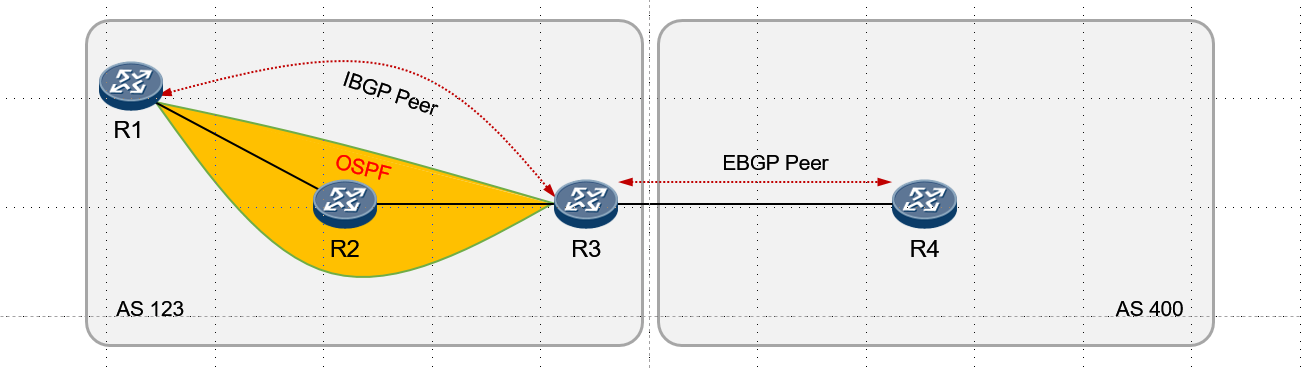
IBGP(Internal BGP):位于相同自治系统的BGP路由器之间的BGP邻接关系。两台路由器之间要建立IBGP对等体关系,必须满足两个条件:两个路由器所属AS需相同(也即AS号相同)。在配置BGP时,Peer命令所指定的对等体IP地址要求路由可达,并且TCP连接能够正确建立EBGP(External BGP):位于不同自治系统的BGP路由器之间的BGP邻接关系。两台路由器之间要建立EBGP对等体关系,必须满足两个条件:两个路由器所属AS不同(也即AS号不同)。在配置BGP时,Peer命令所指定的对等体IP地址要求路由可达,并且TCP连接能够正确建立.
BGP Configuration[IBGP & EBGP]
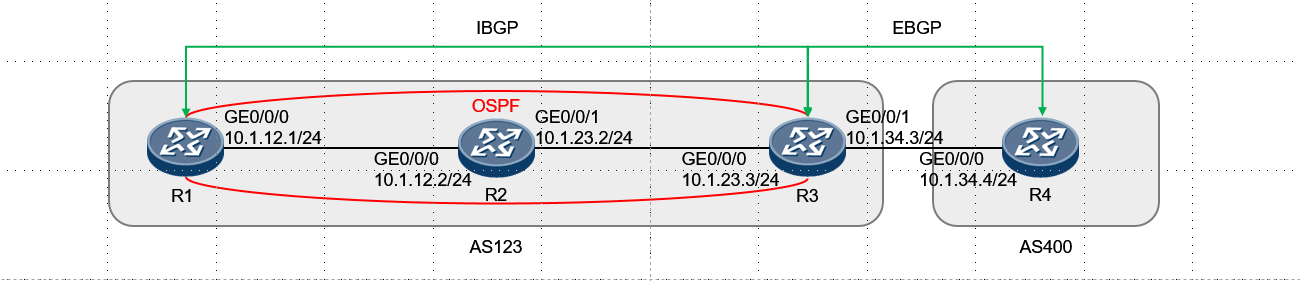
1. R1、R2及R3属于AS123,R4属于AS 400;2. AS123内的R1、R2及R3运行OSPF,通告各自直连接口(包括三台设备的Loopback0接口),注意OSPF域的工作范围;所有设备的Loopback0接口地址为x.x.x.x/32,其中x为设备编号(如R1的接口地址为1.1.1.1/32)。3. R3与R4之间建立EBGP对等体关系,R2暂时不运行BGP,R1与R3之间建立IBGP对等体关系,所有的BGP对等体关系基于直连接口建立;R4将直连路由4.4.4.4/32通告到BGP,要求R1能学习到BGP路由4.4.4.4/32;4. 修改BGP配置,使得R1与R3基于Loopback0接口建立IBGP对等体关系# 配置过程:[V200R003C00]#sysname AR1#snmp-agent local-engineid 800007DB03000000000000snmp-agent#clock timezone China-Standard-Time minus 08:00:00#portal local-server load portalpage.zip#drop illegal-mac alarm#set cpu-usage threshold 80 restore 75#aaaauthentication-scheme defaultauthorization-scheme defaultaccounting-scheme defaultdomain defaultdomain default_adminlocal-user admin password cipher %$%$K8m.Nt84DZ}e#<0`8bmE3Uw}%$%$local-user admin service-type http#firewall zone Localpriority 15#interface GigabitEthernet0/0/0ip address 10.1.12.1 255.255.255.0#interface GigabitEthernet0/0/1#interface GigabitEthernet0/0/2#interface NULL0#interface LoopBack0ip address 1.1.1.1 255.255.255.255#bgp 123router-id 1.1.1.1peer 2.2.2.2 as-number 123#ipv4-family unicastundo synchronizationpeer 2.2.2.2 enable#ospf 1 router-id 1.1.1.1area 0.0.0.0network 0.0.0.0 255.255.255.255#user-interface con 0authentication-mode passworduser-interface vty 0 4user-interface vty 16 20#wlan ac#return[V200R003C00]#sysname AR2#snmp-agent local-engineid 800007DB03000000000000snmp-agent#clock timezone China-Standard-Time minus 08:00:00#portal local-server load portalpage.zip#drop illegal-mac alarm#set cpu-usage threshold 80 restore 75#aaaauthentication-scheme defaultauthorization-scheme defaultaccounting-scheme defaultdomain defaultdomain default_adminlocal-user admin password cipher %$%$K8m.Nt84DZ}e#<0`8bmE3Uw}%$%$local-user admin service-type http#firewall zone Localpriority 15#interface GigabitEthernet0/0/0ip address 10.1.12.2 255.255.255.0#interface GigabitEthernet0/0/1ip address 10.1.23.1 255.255.255.0#interface GigabitEthernet0/0/2#interface NULL0#interface LoopBack0ip address 2.2.2.2 255.255.255.255#bgp 123router-id 2.2.2.2peer 1.1.1.1 as-number 123peer 1.1.1.1 connect-interface LoopBack0peer 3.3.3.3 as-number 123peer 3.3.3.3 connect-interface LoopBack0#ipv4-family unicastundo synchronizationpeer 1.1.1.1 enablepeer 3.3.3.3 enable#ospf 1 router-id 2.2.2.2area 0.0.0.0network 0.0.0.0 255.255.255.255#user-interface con 0authentication-mode passworduser-interface vty 0 4user-interface vty 16 20#wlan ac#return[V200R003C00]#sysname AR3#snmp-agent local-engineid 800007DB03000000000000snmp-agent#clock timezone China-Standard-Time minus 08:00:00#portal local-server load portalpage.zip#drop illegal-mac alarm#set cpu-usage threshold 80 restore 75#aaaauthentication-scheme defaultauthorization-scheme defaultaccounting-scheme defaultdomain defaultdomain default_adminlocal-user admin password cipher %$%$K8m.Nt84DZ}e#<0`8bmE3Uw}%$%$local-user admin service-type http#firewall zone Localpriority 15#interface GigabitEthernet0/0/0ip address 10.1.23.2 255.255.255.0#interface GigabitEthernet0/0/1ip address 10.1.34.1 255.255.255.0#interface GigabitEthernet0/0/2#interface NULL0#interface LoopBack0ip address 3.3.3.3 255.255.255.255#bgp 123router-id 3.3.3.3peer 2.2.2.2 as-number 123peer 2.2.2.2 connect-interface LoopBack0peer 10.1.34.2 as-number 400#ipv4-family unicastundo synchronizationpeer 2.2.2.2 enablepeer 10.1.34.2 enable#ospf 1 router-id 3.3.3.3area 0.0.0.0network 0.0.0.0 255.255.255.255#user-interface con 0authentication-mode passworduser-interface vty 0 4user-interface vty 16 20#wlan ac#return[V200R003C00]#sysname AR4#snmp-agent local-engineid 800007DB03000000000000snmp-agent#clock timezone China-Standard-Time minus 08:00:00#portal local-server load portalpage.zip#drop illegal-mac alarm#set cpu-usage threshold 80 restore 75#aaaauthentication-scheme defaultauthorization-scheme defaultaccounting-scheme defaultdomain defaultdomain default_adminlocal-user admin password cipher %$%$K8m.Nt84DZ}e#<0`8bmE3Uw}%$%$local-user admin service-type http#firewall zone Localpriority 15#interface GigabitEthernet0/0/0ip address 10.1.34.2 255.255.255.0#interface GigabitEthernet0/0/1#interface GigabitEthernet0/0/2#interface NULL0#interface LoopBack0ip address 4.4.4.4 255.255.255.255#bgp 400peer 10.1.34.1 as-number 123#ipv4-family unicastundo synchronizationpeer 10.1.34.1 enable#user-interface con 0authentication-mode passworduser-interface vty 0 4user-interface vty 16 20#wlan ac#return

若有收获,就点个赞吧
0 人点赞


