# Kubernetes CNI Flannel GuideLine# 时间:20210728-[20:00-22:00]# 主题:DIY Flannel VxLAN Mode# 文档:https://www.yuque.com/docs/share/91261581-b309-4053-9e25-60dcc7801917?# 《20210728-Flannel VxLAN Mode(三)》# 作业:DIY VxLAN
# FAQ:每一个技术出来都有它要解决的问题,VXLAN 也不例外,那么我们先看看 VXLAN 到底要解决哪些问题。虚拟化(虚拟机和容器)的兴起使得一个数据中心会有成千上万的机器需要通信,而传统的 VLAN 技术只能支持 4096 个网络上限,已经满足不了不断扩展的数据中心规模越来越多的数据中心(尤其是公有云服务)需要提供多租户的功能,不同用户之间需要独立地分配 ip 和 MAC 地址,如何保证这个功能的扩展性和正确性也是一个待解决的问题云计算业务对业务灵活性要求很高,虚拟机可能会大规模迁移,并保证网络一直可用,也就是大二层的概念。解决这个问题同时保证二层的广播域不会过分扩大,也是云计算网络的要求传统二层+三层的网络在应对这些要求时变得力不从心,虽然很多改进型的技术比如堆叠、SVF、TRILL 等能够增加二层的范围,努力改进经典网络,但是要做到对网络改动小同时保证灵活性高却非常困难。为了解决这些问题,有很多方案被提出来,vxlan 就是其中之一。vxlan 是 VMware、Cisco 等一众大型企业共同推出的,目前标准文档在 RFC7348。
1.DIY Flannel VxLAN Mode
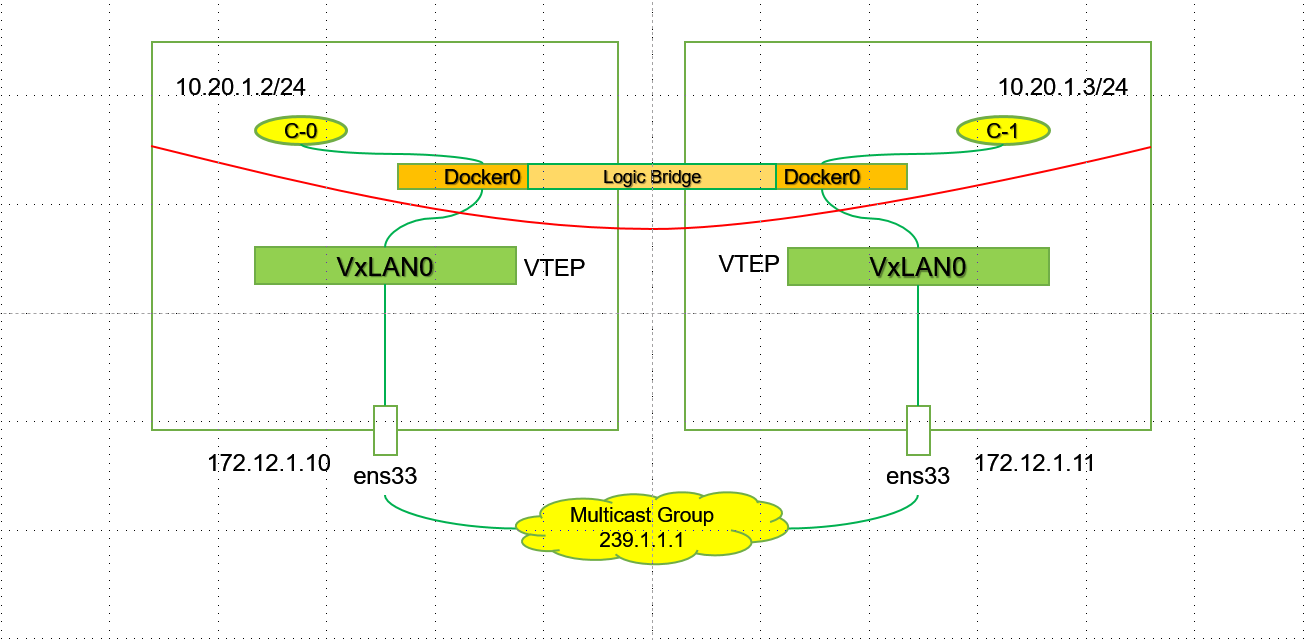
DIY VxLAN ENV
# 1.环境配置VxLAN Tunnel:[root@k8s-1 ~]# yum -y install bridge-utils#1.k8s-1节点的配置:ip link add vxlan_docker type vxlan id 20 remote 172.12.1.12 dstport 4789 dev ens33ip link set vxlan_docker upbrctl addif docker0 vxlan_docker#2.k8s-2节点的配置:ip link add vxlan_docker type vxlan id 20 remote 172.12.1.11 dstport 4789 dev ens33ip link set vxlan_docker upbrctl addif docker0 vxlan_docker#配置说明第一步:创建接口vxlan0 type为vxlan,vni为20.第二部:创建的vxlan0 up起来.第三步:使用brctl 添加interface vxlan0 到bridge docker0上,连接docker0和vxlan的接口,这样数据包从docker0上来以后,就可以被vxlan封装了。# 2.启动相关容器:# 在k8s-1上创建容器:docker run --name vxlan-c01 -td burlyluo/nettoolbox //该容器的地址为:172.17.0.2。# 在k8s-2上创建容器:docker run --name vxlan-c01 -td burlyluo/nettoolbox //该容器的地址为:172.17.0.2。docker run --name vxlan-c02 -td burlyluo/nettoolbox //该容器的地址为:172.17.0.3。# 3.ping测:[root@k8s-1 ~]# docker exec -it vxlan-c01 bashbash-5.0# ping 172.17.0.3PING 172.17.0.3 (172.17.0.3): 56 data bytes64 bytes from 172.17.0.3: seq=0 ttl=64 time=1.446 ms64 bytes from 172.17.0.3: seq=1 ttl=64 time=0.643 ms^C--- 172.17.0.3 ping statistics ---2 packets transmitted, 2 packets received, 0% packet lossround-trip min/avg/max = 0.643/1.044/1.446 msbash-5.0######################地址信息:k8s-1节点:[root@k8s-1 ~]# ifconfig[root@k8s-1 ~]# docker exec -it vxlan-c01 ifconfigeth0 Link encap:Ethernet HWaddr 02:42:AC:11:00:02inet addr:172.17.0.2 Bcast:172.17.255.255 Mask:255.255.0.0UP BROADCAST RUNNING MULTICAST MTU:1500 Metric:1RX packets:19 errors:0 dropped:0 overruns:0 frame:0TX packets:3 errors:0 dropped:0 overruns:0 carrier:0collisions:0 txqueuelen:0RX bytes:1398 (1.3 KiB) TX bytes:182 (182.0 B)---#docker0: flags=4163<UP,BROADCAST,RUNNING,MULTICAST> mtu 1450inet 172.17.0.1 netmask 255.255.0.0 broadcast 172.17.255.255inet6 fe80::42:c9ff:feeb:2769 prefixlen 64 scopeid 0x20<link>ether 02:42:c9:eb:27:69 txqueuelen 0 (Ethernet)RX packets 18 bytes 1252 (1.2 KiB)RX errors 0 dropped 0 overruns 0 frame 0TX packets 5 bytes 526 (526.0 B)TX errors 0 dropped 0 overruns 0 carrier 0 collisions 0ens33: flags=4163<UP,BROADCAST,RUNNING,MULTICAST> mtu 1500inet 172.12.1.11 netmask 255.255.255.0 broadcast 172.12.1.255inet6 fe80::e222:32bb:f400:f0c3 prefixlen 64 scopeid 0x20<link>ether 00:0c:29:bd:fb:4a txqueuelen 1000 (Ethernet)RX packets 2833 bytes 356496 (348.1 KiB)RX errors 0 dropped 0 overruns 0 frame 0TX packets 3103 bytes 1317158 (1.2 MiB)TX errors 0 dropped 0 overruns 0 carrier 0 collisions 0vxlan_docker: flags=4163<UP,BROADCAST,RUNNING,MULTICAST> mtu 1450inet6 fe80::4431:deff:fe40:88d1 prefixlen 64 scopeid 0x20<link>ether 46:31:de:40:88:d1 txqueuelen 1000 (Ethernet)RX packets 20 bytes 1364 (1.3 KiB)RX errors 0 dropped 0 overruns 0 frame 0TX packets 20 bytes 1364 (1.3 KiB)TX errors 0 dropped 0 overruns 0 carrier 0 collisions 0# k8s-2 节点:[root@k8s-2 ~]# docker exec -it vxlan-c02 ifconfigeth0 Link encap:Ethernet HWaddr 02:42:AC:11:00:03inet addr:172.17.0.3 Bcast:172.17.255.255 Mask:255.255.0.0UP BROADCAST RUNNING MULTICAST MTU:1500 Metric:1RX packets:18 errors:0 dropped:0 overruns:0 frame:0TX packets:3 errors:0 dropped:0 overruns:0 carrier:0collisions:0 txqueuelen:0RX bytes:1328 (1.2 KiB) TX bytes:182 (182.0 B)---#docker0: flags=4163<UP,BROADCAST,RUNNING,MULTICAST> mtu 1450inet 172.17.0.1 netmask 255.255.0.0 broadcast 172.17.255.255inet6 fe80::42:dcff:fea0:192e prefixlen 64 scopeid 0x20<link>ether 02:42:dc:a0:19:2e txqueuelen 0 (Ethernet)RX packets 6 bytes 308 (308.0 B)RX errors 0 dropped 0 overruns 0 frame 0TX packets 5 bytes 526 (526.0 B)TX errors 0 dropped 0 overruns 0 carrier 0 collisions 0ens33: flags=4163<UP,BROADCAST,RUNNING,MULTICAST> mtu 1500inet 172.12.1.12 netmask 255.255.255.0 broadcast 172.12.1.255inet6 fe80::a9cd:74a4:47fc:9fec prefixlen 64 scopeid 0x20<link>ether 00:0c:29:e2:bf:86 txqueuelen 1000 (Ethernet)RX packets 2620 bytes 1116242 (1.0 MiB)RX errors 0 dropped 0 overruns 0 frame 0TX packets 2065 bytes 282698 (276.0 KiB)TX errors 0 dropped 0 overruns 0 carrier 0 collisions 0vxlan_docker: flags=4163<UP,BROADCAST,RUNNING,MULTICAST> mtu 1450inet6 fe80::d463:d8ff:fee1:8b73 prefixlen 64 scopeid 0x20<link>ether d6:63:d8:e1:8b:73 txqueuelen 1000 (Ethernet)RX packets 8 bytes 420 (420.0 B)RX errors 0 dropped 0 overruns 0 frame 0TX packets 20 bytes 1364 (1.3 KiB)TX errors 0 dropped 0 overruns 0 carrier 0 collisions 0######################4.抓包:#4.1:从容器到docker0网桥:eth0接口抓包No. Time Source Destination Protocol Length Info1 2021-07-26 20:54:03.857948 02:42:ac:11:00:02 Broadcast ARP 42 Who has 172.17.0.3? Tell 172.17.0.2Frame 1: 42 bytes on wire (336 bits), 42 bytes captured (336 bits)Ethernet II, Src: 02:42:ac:11:00:02 (02:42:ac:11:00:02), Dst: Broadcast (ff:ff:ff:ff:ff:ff)Address Resolution Protocol (request)No. Time Source Destination Protocol Length Info2 2021-07-26 20:54:03.858531 02:42:ac:11:00:03 02:42:ac:11:00:02 ARP 42 172.17.0.3 is at 02:42:ac:11:00:03Frame 2: 42 bytes on wire (336 bits), 42 bytes captured (336 bits)Ethernet II, Src: 02:42:ac:11:00:03 (02:42:ac:11:00:03), Dst: 02:42:ac:11:00:02 (02:42:ac:11:00:02)Address Resolution Protocol (reply)No. Time Source Destination Protocol Length Info3 2021-07-26 20:54:03.858537 172.17.0.2 172.17.0.3 ICMP 98 Echo (ping) request id=0x1d00, seq=0/0, ttl=64 (reply in 4)Frame 3: 98 bytes on wire (784 bits), 98 bytes captured (784 bits)Ethernet II, Src: 02:42:ac:11:00:02 (02:42:ac:11:00:02), Dst: 02:42:ac:11:00:03 (02:42:ac:11:00:03)Internet Protocol Version 4, Src: 172.17.0.2, Dst: 172.17.0.3Internet Control Message ProtocolNo. Time Source Destination Protocol Length Info4 2021-07-26 20:54:03.858948 172.17.0.3 172.17.0.2 ICMP 98 Echo (ping) reply id=0x1d00, seq=0/0, ttl=64 (request in 3)Frame 4: 98 bytes on wire (784 bits), 98 bytes captured (784 bits)Ethernet II, Src: 02:42:ac:11:00:03 (02:42:ac:11:00:03), Dst: 02:42:ac:11:00:02 (02:42:ac:11:00:02)Internet Protocol Version 4, Src: 172.17.0.3, Dst: 172.17.0.2Internet Control Message Protocol#4.2:学习对端VTEP的MAC地址:vxlan_docker上抓包No. Time Source Destination Protocol Length Info3 2021-07-26 20:54:03.857965 02:42:ac:11:00:02 Broadcast ARP 42 Who has 172.17.0.3? Tell 172.17.0.2Frame 3: 42 bytes on wire (336 bits), 42 bytes captured (336 bits)Ethernet II, Src: 02:42:ac:11:00:02 (02:42:ac:11:00:02), Dst: Broadcast (ff:ff:ff:ff:ff:ff)Address Resolution Protocol (request)No. Time Source Destination Protocol Length Info4 2021-07-26 20:54:03.858469 02:42:ac:11:00:03 02:42:ac:11:00:02 ARP 42 172.17.0.3 is at 02:42:ac:11:00:03Frame 4: 42 bytes on wire (336 bits), 42 bytes captured (336 bits)Ethernet II, Src: 02:42:ac:11:00:03 (02:42:ac:11:00:03), Dst: 02:42:ac:11:00:02 (02:42:ac:11:00:02)Address Resolution Protocol (reply)No. Time Source Destination Protocol Length Info5 2021-07-26 20:54:03.858549 172.17.0.2 172.17.0.3 ICMP 98 Echo (ping) request id=0x1d00, seq=0/0, ttl=64 (reply in 6)Frame 5: 98 bytes on wire (784 bits), 98 bytes captured (784 bits)Ethernet II, Src: 02:42:ac:11:00:02 (02:42:ac:11:00:02), Dst: 02:42:ac:11:00:03 (02:42:ac:11:00:03)Internet Protocol Version 4, Src: 172.17.0.2, Dst: 172.17.0.3Internet Control Message ProtocolNo. Time Source Destination Protocol Length Info6 2021-07-26 20:54:03.858915 172.17.0.3 172.17.0.2 ICMP 98 Echo (ping) reply id=0x1d00, seq=0/0, ttl=64 (request in 5)Frame 6: 98 bytes on wire (784 bits), 98 bytes captured (784 bits)Ethernet II, Src: 02:42:ac:11:00:03 (02:42:ac:11:00:03), Dst: 02:42:ac:11:00:02 (02:42:ac:11:00:02)Internet Protocol Version 4, Src: 172.17.0.3, Dst: 172.17.0.2Internet Control Message Protocol#4.3:构造VxLAN数据报文:No. Time Source Destination Protocol Length Info683 2021-07-26 20:54:03.857992 02:42:ac:11:00:02 Broadcast ARP 92 Who has 172.17.0.3? Tell 172.17.0.2Frame 683: 92 bytes on wire (736 bits), 92 bytes captured (736 bits)Ethernet II, Src: Vmware_bd:fb:4a (00:0c:29:bd:fb:4a), Dst: Vmware_e2:bf:86 (00:0c:29:e2:bf:86)Internet Protocol Version 4, Src: 172.12.1.11, Dst: 172.12.1.12User Datagram Protocol, Src Port: 51305, Dst Port: 4789Virtual eXtensible Local Area NetworkEthernet II, Src: 02:42:ac:11:00:02 (02:42:ac:11:00:02), Dst: Broadcast (ff:ff:ff:ff:ff:ff)Address Resolution Protocol (request)No. Time Source Destination Protocol Length Info684 2021-07-26 20:54:03.858469 02:42:ac:11:00:03 02:42:ac:11:00:02 ARP 92 172.17.0.3 is at 02:42:ac:11:00:03Frame 684: 92 bytes on wire (736 bits), 92 bytes captured (736 bits)Ethernet II, Src: Vmware_e2:bf:86 (00:0c:29:e2:bf:86), Dst: Vmware_bd:fb:4a (00:0c:29:bd:fb:4a)Internet Protocol Version 4, Src: 172.12.1.12, Dst: 172.12.1.11User Datagram Protocol, Src Port: 51881, Dst Port: 4789Virtual eXtensible Local Area NetworkEthernet II, Src: 02:42:ac:11:00:03 (02:42:ac:11:00:03), Dst: 02:42:ac:11:00:02 (02:42:ac:11:00:02)Address Resolution Protocol (reply)No. Time Source Destination Protocol Length Info685 2021-07-26 20:54:03.858562 172.17.0.2 172.17.0.3 ICMP 148 Echo (ping) request id=0x1d00, seq=0/0, ttl=64 (reply in 688)Frame 685: 148 bytes on wire (1184 bits), 148 bytes captured (1184 bits)Ethernet II, Src: Vmware_bd:fb:4a (00:0c:29:bd:fb:4a), Dst: Vmware_e2:bf:86 (00:0c:29:e2:bf:86)Internet Protocol Version 4, Src: 172.12.1.11, Dst: 172.12.1.12User Datagram Protocol, Src Port: 45497, Dst Port: 4789Virtual eXtensible Local Area NetworkEthernet II, Src: 02:42:ac:11:00:02 (02:42:ac:11:00:02), Dst: 02:42:ac:11:00:03 (02:42:ac:11:00:03)Internet Protocol Version 4, Src: 172.17.0.2, Dst: 172.17.0.3Internet Control Message ProtocolNo. Time Source Destination Protocol Length Info688 2021-07-26 20:54:03.858915 172.17.0.3 172.17.0.2 ICMP 148 Echo (ping) reply id=0x1d00, seq=0/0, ttl=64 (request in 685)Frame 688: 148 bytes on wire (1184 bits), 148 bytes captured (1184 bits)Ethernet II, Src: Vmware_e2:bf:86 (00:0c:29:e2:bf:86), Dst: Vmware_bd:fb:4a (00:0c:29:bd:fb:4a)Internet Protocol Version 4, Src: 172.12.1.12, Dst: 172.12.1.11User Datagram Protocol, Src Port: 59330, Dst Port: 4789Virtual eXtensible Local Area NetworkEthernet II, Src: 02:42:ac:11:00:03 (02:42:ac:11:00:03), Dst: 02:42:ac:11:00:02 (02:42:ac:11:00:02)Internet Protocol Version 4, Src: 172.17.0.3, Dst: 172.17.0.2Internet Control Message Protocol# 抓包可从这里获取:# https://github.com/BurlyLuo/cni/tree/master/weiluo/diy-vxlan

若有收获,就点个赞吧
0 人点赞


