# Kubernetes CNI Flannel GuideLine# 时间:20210801-[20:00-22:00]# 主题:Flannel IPIP Mode# 文档:https://www.yuque.com/docs/share/7cd392c0-ff31-4a75-ab9d-add5750b42a9?# 《20210804-Flannel IPIP Mode(一)》# 作业:IPIP Mode和VxLAN Mode对比思考
# FAQ:
1.同节点,同Pod,不同容器之间通信
采用container 模式这个模式指定新创建的容器和已经存在的一个容器共享一个 Network Namespace,而不是和宿主机共享。新创建的容器不会创建自己的网卡,配置自己的 IP,而是和一个指定的容器共享 IP、端口范围等。同样,两个容器除了网络方面,其他的如文件系统、进程列表等还是隔离的。# [两个容器的进程可以通过 lo 网卡设备通信。]
2.同节点,不同Pod之间通信
# 同节点不同Pod之间的通信:/#/ 有一个前提,我们在iconfig中看到的网卡都是在内核级别的,或是说在内核这个层面。Pod - Pod[Same Node]:通常情况下,在Flannel上解决同节点Pod之间的通信依赖的是Linux Bridge,和我们在Docker中不同的是,在Kubernetes Flannel的环境中使用的Linux Bridge为cni0,而不是原来的docker0。可通过:brctl show查看对应的Linux Bridge的bridge name和interfaces。[root@k8s-1 ~]# brctl showbridge name bridge id STP enabled interfacescni0 8000.1edb12e1c079 no veth54a9e98a # cni0 为Linux下的一个虚拟Bridge。docker0 8000.0242da0ca579 no[root@k8s-1 ~]#此时我们看到一端在ROOT NS中的一个接口,而Pod中的eth0中的接口在Pod所在的namespace中。此时两者之间有通信的需求,何种方案比较合适呢?--- #[veth pair]其中veth device(pair)的定义为:# The veth devices are virtual Ethernet devices. They can act as tunnels between network namespaces。topo like below:APP APP| || |kernel ------------------------------ kernel| |network stack network stack| ||______________________________|veth-m veth-n#对于此种模式我们普通Linux中是怎么实现呢?#5.2.1:创建 namespaceip netns a ns1ip netns a ns2#5.2.2:创建一对 veth-pair veth0 veth1ip l a veth0 type veth peer name veth1#5.2.3:将 veth0 veth1 分别加入两个 nsip l s veth0 netns ns1ip l s veth1 netns ns2#5.2.4:给两个 veth0 veth1 配上 IP 并启用ip netns exec ns1 ip a a 10.1.1.2/24 dev veth0ip netns exec ns1 ip l s veth0 upip netns exec ns2 ip a a 10.1.1.3/24 dev veth1ip netns exec ns2 ip l s veth1 up# veth0 ping veth1[root@k8s-1 ~]# ip netns exec ns1 ping 10.1.1.3PING 10.1.1.3 (10.1.1.3) 56(84) bytes of data.64 bytes from 10.1.1.3: icmp_seq=1 ttl=64 time=0.060 ms/此时需要弄清楚两个问题:1.此时如何知道Pod中的eth0的pair是谁?2.此时由Pod-1进入内核,如果想要把数据包转发给另外一个Pod-2?#1.使用ethtool -S eth0[root@k8s-1 ~]# kubectl exec -it cni-59h6g bashkubectl exec [POD] [COMMAND] is DEPRECATED and will be removed in a future version. Use kubectl exec [POD] -- [COMMAND] instead.bash-5.1# ethtool -S eth0NIC statistics:peer_ifindex: 6 ##此时在Pod中查看peer的index为6.我们可以在ROOT NS中查看,ifindex为6的网卡。rx_queue_0_xdp_packets: 0rx_queue_0_xdp_bytes: 0rx_queue_0_drops: 0rx_queue_0_xdp_redirect: 0rx_queue_0_xdp_drops: 0rx_queue_0_xdp_tx: 0rx_queue_0_xdp_tx_errors: 0tx_queue_0_xdp_xmit: 0tx_queue_0_xdp_xmit_errors: 0bash-5.1# exitexit[root@k8s-1 ~]# ip a1: lo: <LOOPBACK,UP,LOWER_UP> mtu 65536 qdisc noqueue state UNKNOWN group default qlen 1000link/loopback 00:00:00:00:00:00 brd 00:00:00:00:00:00inet 127.0.0.1/8 scope host lovalid_lft forever preferred_lft foreverinet6 ::1/128 scope hostvalid_lft forever preferred_lft forever2: ens33: <BROADCAST,MULTICAST,UP,LOWER_UP> mtu 1500 qdisc pfifo_fast state UP group default qlen 1000link/ether 00:0c:29:bd:fb:4a brd ff:ff:ff:ff:ff:ffinet 172.12.1.11/24 brd 172.12.1.255 scope global noprefixroute ens33valid_lft forever preferred_lft foreverinet6 fe80::e222:32bb:f400:f0c3/64 scope link noprefixroutevalid_lft forever preferred_lft forever3: docker0: <NO-CARRIER,BROADCAST,MULTICAST,UP> mtu 1500 qdisc noqueue state DOWN group defaultlink/ether 02:42:da:0c:a5:79 brd ff:ff:ff:ff:ff:ffinet 172.17.0.1/16 brd 172.17.255.255 scope global docker0valid_lft forever preferred_lft forever4.flannel.ipip: flags=193<UP,RUNNING,NOARP> mtu 1480inet 10.244.0.0 netmask 255.255.255.255inet6 fe80::200:5efe:ac0c:10b prefixlen 64 scopeid 0x20<link>tunnel txqueuelen 0 (IPIP Tunnel)RX packets 0 bytes 0 (0.0 B)RX errors 0 dropped 0 overruns 0 frame 0TX packets 0 bytes 0 (0.0 B)TX errors 1 dropped 0 overruns 0 carrier 0 collisions 05: cni0: <BROADCAST,MULTICAST,UP,LOWER_UP> mtu 1472 qdisc noqueue state UP group default qlen 1000link/ether 1e:db:12:e1:c0:79 brd ff:ff:ff:ff:ff:ffinet 10.244.0.1/24 brd 10.244.0.255 scope global cni0valid_lft forever preferred_lft foreverinet6 fe80::1cdb:12ff:fee1:c079/64 scope linkvalid_lft forever preferred_lft forever6: veth54a9e98a@if3: <BROADCAST,MULTICAST,UP,LOWER_UP> mtu 1472 qdisc noqueue master cni0 state UP group default # 这里的ifindex为6.link/ether 66:c5:ab:c8:03:4e brd ff:ff:ff:ff:ff:ff link-netnsid 0inet6 fe80::64c5:abff:fec8:34e/64 scope linkvalid_lft forever preferred_lft forever[root@k8s-1 ~]#[root@k8s-1 ~]# brctl showbridge name bridge id STP enabled interfacescni0 8000.1edb12e1c079 no veth54a9e98a # 此时该接口是在cni0这个bridge上。docker0 8000.0242da0ca579 no[root@k8s-1 ~]#下边以两个在同一个节点上的两个Pod的情况分析:# network topo:10.244.1.10 10.244.1.7[ns1] [ns2]| |-- [cni0] --#[root@k8s-1 ~]# kubectl get pods -o wide | grep k8s-2cc 1/1 Running 0 32h 10.244.1.10 k8s-2 <none> <none>cni-svtwf 1/1 Running 1 109d 10.244.1.7 k8s-2 <none> <none>[root@k8s-1 ~]#在pod cni-svtwf中去ping cc这个pod。抓包显示为:[root@k8s-1 ~]# kubectl exec -it cni-svtwf bashkubectl exec [POD] [COMMAND] is DEPRECATED and will be removed in a future version. Use kubectl exec [POD] -- [COMMAND] instead.bash-5.1# tcpdump -n -e -i eth0tcpdump: verbose output suppressed, use -v[v]... for full protocol decodelistening on eth0, link-type EN10MB (Ethernet), snapshot length 262144 bytes14:31:06.751041 9a:16:45:30:3a:c6 > ee:6f:75:01:ed:bb, ethertype IPv4 (0x0800), length 98: 10.244.1.7 > 10.244.1.10: ICMP echo request, id 17920, seq 0, length 6414:31:06.751096 ee:6f:75:01:ed:bb > 9a:16:45:30:3a:c6, ethertype IPv4 (0x0800), length 98: 10.244.1.10 > 10.244.1.7: ICMP echo reply, id 17920, seq 0, length 64^C#从抓包可以看出,cni-svtwf 的eth0的网卡的MAC地址为:9a:16:45:30:3a:c6cc 的eth0的网卡的MAC地址为:ee:6f:75:01:ed:bb此时我们在cni0 bridge中查看MAC地址表:[root@k8s-2 ~]# brctl showmacs cni0port no mac addr is local? ageing timer1 1e:89:b9:2c:44:b1 yes 0.001 1e:89:b9:2c:44:b1 yes 0.003 32:2e:01:1d:a1:53 yes 0.003 32:2e:01:1d:a1:53 yes 0.002 4a:bc:c1:08:30:04 no 1.702 5e:14:4c:e2:2b:22 yes 0.002 5e:14:4c:e2:2b:22 yes 0.003 9a:16:45:30:3a:c6 no 32.42 # 此地址对应 cni-svtwf的eht0 MAC地址,对应bridge上的端口3.4 b2:8e:21:90:45:39 yes 0.004 b2:8e:21:90:45:39 yes 0.001 ce:22:d7:ee:59:7d no 1.704 ee:6f:75:01:ed:bb no 32.42 # 此地址对应cc 的eth0 的MAC地址,对应bridge上的端口4.[root@k8s-2 ~]##此种Bridge模式把相应的peer建立在pod和bridge之间。此时Linux中又是如何实现呢:# network topo:10.1.1.2 10.1.1.3[ns1] [ns2]| |-- [br0] --##创建nsip netns a ns1ip netns a ns2#首先创建 bridge br0ip l a br0 type bridgeip l s br0 up#然后创建两对 veth-pairip l a veth0 type veth peer name br-veth0ip l a veth1 type veth peer name br-veth1#分别将两对 veth-pair 加入两个 ns 和 br0ip l s veth0 netns ns1ip l s br-veth0 master br0ip l s br-veth0 upip l s veth1 netns ns2ip l s br-veth1 master br0ip l s br-veth1 up#给两个 ns 中的 veth 配置 IP 并启用ip netns exec ns1 ip a a 10.1.1.2/24 dev veth0ip netns exec ns1 ip l s veth0 upip netns exec ns2 ip a a 10.1.1.3/24 dev veth1ip netns exec ns2 ip l s veth1 up# ping 测:[root@k8s-2 ~]# ip netns exec ns1 ping 10.1.1.3PING 10.1.1.3 (10.1.1.3) 56(84) bytes of data.64 bytes from 10.1.1.3: icmp_seq=1 ttl=64 time=0.173 ms64 bytes from 10.1.1.3: icmp_seq=2 ttl=64 time=0.068 ms^C--- 10.1.1.3 ping statistics ---2 packets transmitted, 2 received, 0% packet loss, time 1020msrtt min/avg/max/mdev = 0.068/0.120/0.173/0.053 ms# 查看bridge br0上的端口:[root@k8s-2 ~]# brctl showbridge name bridge id STP enabled interfacesbr0 8000.8e495ef498dd no br-veth0br-veth1# 查看对应的MAC地址和不同ns中的MAC。[root@k8s-2 ~]# brctl showmacs br0port no mac addr is local? ageing timer2 06:b5:78:d9:7b:75 no 16.28 # ns21 1a:7e:30:46:72:11 no 12.18 # ns11 8e:49:5e:f4:98:dd yes 0.001 8e:49:5e:f4:98:dd yes 0.002 ca:b6:7e:6:c2:bf yes 0.002 ca:b6:7e:06:c2:bf yes 0.00[root@k8s-2 ~]#
3.Linux 内核转发
"IP forwarding" is a synonym for "routing." It is called "kernel IP forwarding" because it is a feature of the Linux kernel.A router has multiple network interfaces. If traffic comes in on one interface that matches a subnet of another network interface, a router then forwards that traffic to the other network interface.# 重点看这里:# So, let's say you have two NICs, one (NIC 1) is at address 192.168.2.1/24, and the other (NIC 2) is 192.168.3.1/24. If forwarding is enabled, and a packet comes in on NIC 1 with a "destination address" of 192.168.3.8, the router will resend that packet out of the NIC 2.It's common for routers functioning as gateways to the Internet to have a default route whereby any traffic that doesn't match any NICs will go through the default route's NIC. So in the above example, if you have an internet connection on NIC 2, you'd set NIC 2 as your default route and then any traffic coming in from NIC 1 that isn't destined for something on 192.168.2.0/24 will go through NIC 2. Hopefully there's other routers past NIC 2 that can further route it (in the case of the Internet, the next hop would be your ISP's router, and then their providers upstream router, etc.)Enabling ip_forward tells your Linux system to do this. For it to be meaningful, you need two network interfaces (any 2 or more of wired NIC cards, Wifi cards or chipsets, PPP links over a 56k modem or serial, etc.).When doing routing, security is important and that's where Linux's packet filter, iptables, gets involved. So you will need an iptables configuration consistent with your needs.Note that enabling forwarding with iptables disabled and/or without taking firewalling and security into account could leave you open to vulnerabilites if one of the NICs is facing the Internet or a subnet you don't have control over.
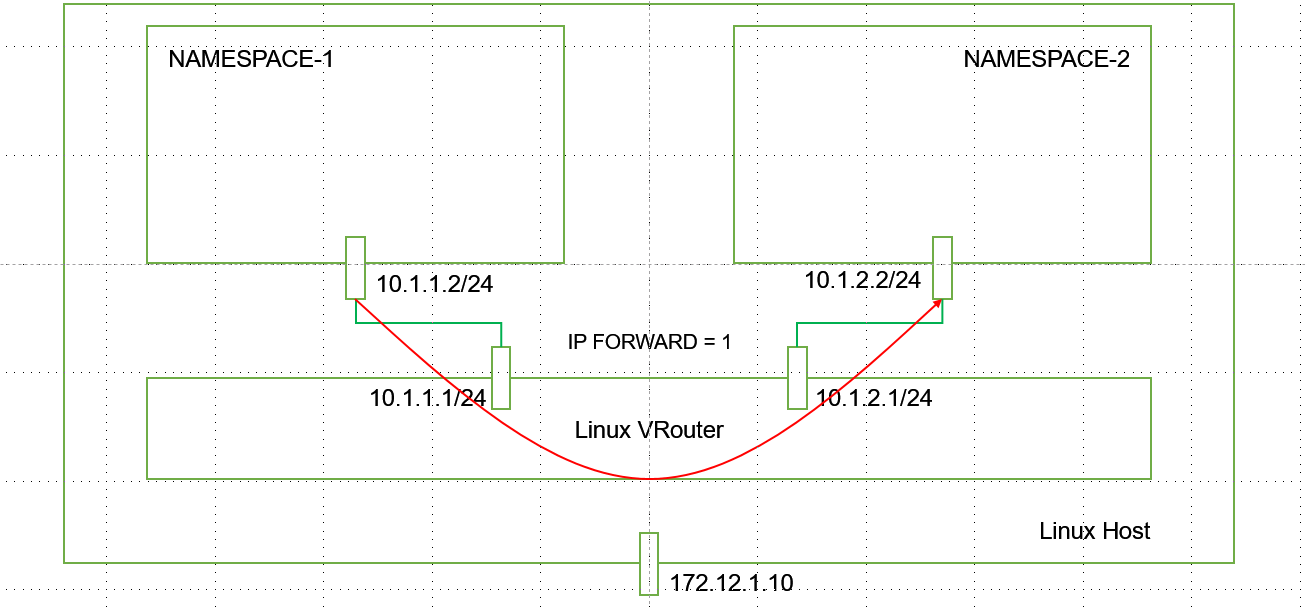
IP Forward 转发配置逻辑:# topo:v1 v210.1.1.2 10.1.2.2[ns1] [ns2]| |- [kernel] - # echo 1 > /proc/sys/net/ipv4/ip_forward # 开启内核转发v1_r| |v2_r10.1.1.1 10.1.2.1#1.创建两个 namespace:ip netns add ns1ip netns add ns22.创建两对 veth-pair,一端分别挂在两个 namespace 中:ip link add v1 type veth peer name v1_rip link add v2 type veth peer name v2_rip link set v1 netns ns1ip link set v2 netns ns23.分别给两对 veth-pair 端点配上 IP 并启用:ip a a 10.1.1.1/24 dev v1_rip l s v1_r upip a a 10.1.2.1/24 dev v2_rip l s v2_r upip netns exec ns1 ip a a 10.1.1.2/24 dev v1ip netns exec ns1 ip l s v1 upip netns exec ns2 ip a a 10.1.2.2/24 dev v2ip netns exec ns2 ip l s v2 up4.添加路由:ip netns exec ns1 route add -net 10.1.2.0 netmask 255.255.255.0 gw 10.1.1.1 # 注意和Docker逻辑中添加默认路由方式思考对比.(Docker 环境会自动添加默认路由)ip netns exec ns2 route add -net 10.1.1.0 netmask 255.255.255.0 gw 10.1.2.1 # 注意和Docker逻辑中添加默认路由方式思考对比5.修改内核转发:echo 1 > /proc/sys/net/ipv4/ip_forward#路由表:[root@k8s-1 ~]# ip netns exec ns1 route -nKernel IP routing tableDestination Gateway Genmask Flags Metric Ref Use Iface10.1.1.0 0.0.0.0 255.255.255.0 U 0 0 0 v110.1.2.0 10.1.1.1 255.255.255.0 UG 0 0 0 v1 # 匹配该路由[root@k8s-1 ~]## 抓包:[root@k8s-1 ~]# ip netns exec ns1 ping 10.1.2.2PING 10.1.2.2 (10.1.2.2) 56(84) bytes of data.64 bytes from 10.1.2.2: icmp_seq=1 ttl=63 time=0.087 ms^C--- 10.1.2.2 ping statistics ---1 packets transmitted, 1 received, 0% packet loss, time 0msrtt min/avg/max/mdev = 0.087/0.087/0.087/0.000 ms[root@k8s-1 ~]## 抓包详情:ip netns exec ns1 arp -d 10.1.1.1 # 清空对应gateway的arp缓存[root@k8s-1 ~]# ip netns exec ns1 tcpdump -ne -i v1tcpdump: verbose output suppressed, use -v or -vv for full protocol decodelistening on v1, link-type EN10MB (Ethernet), capture size 262144 bytes14:13:03.636646 26:e9:e2:4b:ff:e9 > Broadcast, ethertype ARP (0x0806), length 42: Request who-has 10.1.1.1 tell 10.1.1.2, length 2814:13:03.636673 42:58:a1:ed:f4:d3 > 26:e9:e2:4b:ff:e9, ethertype ARP (0x0806), length 42: Reply 10.1.1.1 is-at 42:58:a1:ed:f4:d3, length 2814:13:03.636676 26:e9:e2:4b:ff:e9 > 42:58:a1:ed:f4:d3, ethertype IPv4 (0x0800), length 98: 10.1.1.2 > 10.1.2.2: ICMP echo request, id 42491, seq 1, length 6414:13:03.636717 42:58:a1:ed:f4:d3 > 26:e9:e2:4b:ff:e9, ethertype IPv4 (0x0800), length 98: 10.1.2.2 > 10.1.1.2: ICMP echo reply, id 42491, seq 1, length 6414:13:08.935762 42:58:a1:ed:f4:d3 > 26:e9:e2:4b:ff:e9, ethertype ARP (0x0806), length 42: Request who-has 10.1.1.2 tell 10.1.1.1, length 2814:13:08.935820 26:e9:e2:4b:ff:e9 > 42:58:a1:ed:f4:d3, ethertype ARP (0x0806), length 42: Reply 10.1.1.2 is-at 26:e9:e2:4b:ff:e9, length 28
4.DIY IPIP Tunnel
Tunneling is a way to transform data frames to allow them pass networks with incompatible address spaces or even incompatible protocols. There are different kinds of tunnels: some process only IPv4 packets and some can carry any type of frame. Linux kernel supports 3 tunnel types: IPIP (IPv4 in IPv4), GRE (IPv4/IPv6 over IPv4) and SIT (IPv6 over IPv4). Tunnels are managed with ip program, part of Iproute2:$ /sbin/ip tunnel helpUsage: ip tunnel { add | change | del | show } [ NAME ][ mode { ipip | gre | sit } ] [ remote ADDR ] [ local ADDR ][ [i|o]seq ] [ [i|o]key KEY ] [ [i|o]csum ][ ttl TTL ] [ tos TOS ] [ [no]pmtudisc ] [ dev PHYS_DEV ]Where: NAME := STRINGADDR := { IP_ADDRESS | any }TOS := { NUMBER | inherit }TTL := { 1..255 | inherit }KEY := { DOTTED_QUAD | NUMBER }# iproute2 is usually shipped with documentation, of which you need the file ip-tunnels.ps to learn about tunnel management. In Fedora Core 4 it is /usr/share/doc/iproute-2.6.11/ip-tunnels.ps.#IPIP tunnelsIPIP kind of tunnels is the simplest one. It has the lowest overhead, but can incapsulate only IPv4 unicast traffic, so you will not be able to setup OSPF, RIP or any other multicast-based protocol. You can setup only one tunnel for unique tunnel endpoints pair. It can work with FreeBSD and cisco IOS. Kernel module is 'ipip'. The following example demonstrates configuration of IPIP tunnel with four IPv4 routes, manually or via /etc/net.# IPIP 包格式:No. Time Source Destination Protocol Length Info1 0.000000 10.10.100.10 10.10.200.10 ICMP 118 Echo (ping) request id=0x8578, seq=1/256, ttl=64 (reply in 2)Frame 1: 118 bytes on wire (944 bits), 118 bytes captured (944 bits)Ethernet II, Src: 2a:32:a4:68:2d:fb (2a:32:a4:68:2d:fb), Dst: 52:0c:6d:7a:80:12 (52:0c:6d:7a:80:12) # Outer_MACInternet Protocol Version 4, Src: 10.10.10.2, Dst: 10.10.20.2 # Outer_IPInternet Protocol Version 4, Src: 10.10.100.10, Dst: 10.10.200.10 # Inner_IPInternet Control Message Protocol # No Inner MAC
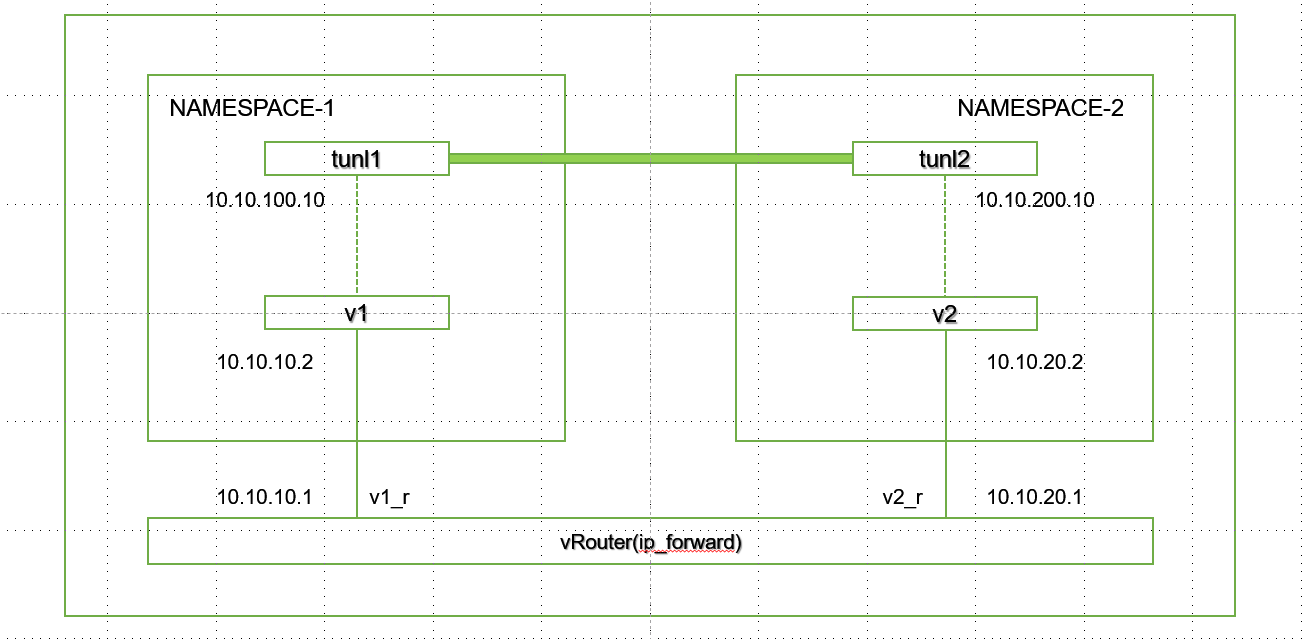
# IPIP Tunnel 配置思路:# topo:v1 v2v10.10.10.2 10.10.20.2[ns1] [ns2]| |10.10.100.10 10.20.200.10tun1 ---[kernel]---tun2 # echo 1 > /proc/sys/net/ipv4/ip_forward # 开启内核转发v1_r| |v2_r10.10.10.1 10.10.20.1/\|| # 上边topo转化一下到下边的topo\/tun1 tun210.10.100.10 10.10.200.10| |10.10.10.2[ens33] 10.10.20.2[ens33]| |10.10.10.1[gw]------10.10.20.1[gw]# 这里主要是需要使用隔离的方式实现,所以需要创建不同的NS,通过不同的NS来模式不同的HOST。实际环境也可以使用真正的不同的HOST来实现该实例。# 配置思路:1.创建nsip netns add ns1ip netns add ns22.添加虚拟网卡对ip link add v1 type veth peer name v1_rip link add v2 type veth peer name v2_rip link set v1 netns ns1ip link set v2 netns ns23.添加地址ip a a 10.10.10.1/24 dev v1_rip l s v1_r upip a a 10.10.20.1/24 dev v2_rip l s v2_r upip netns exec ns1 ip a a 10.10.10.2/24 dev v1ip netns exec ns1 ip l s v1 upip netns exec ns2 ip a a 10.10.20.2/24 dev v2ip netns exec ns2 ip l s v2 up4.添加路由ip netns exec ns1 route add -net 10.10.20.0 netmask 255.255.255.0 gw 10.10.10.1ip netns exec ns2 route add -net 10.10.10.0 netmask 255.255.255.0 gw 10.10.20.15.添加ip转发echo 1 > /proc/sys/net/ipv4/ip_forward6.在 ns1 上创建 tunl1 和 IPIP tunnelip netns exec ns1 ip tunnel add tunl1 mode ipip remote 10.10.20.2 local 10.10.10.2ip netns exec ns1 ip l s tunl1 upip netns exec ns1 ip a a 10.10.100.10 peer 10.10.200.10 dev tunl17.在 ns2 上创建 tunl1 和 IPIP tunnelip netns exec ns2 ip tunnel add tunl2 mode ipip remote 10.10.10.2 local 10.10.20.2ip netns exec ns2 ip l s tunl2 upip netns exec ns2 ip a a 10.10.200.10 peer 10.10.100.10 dev tunl2# 数据包转发逻辑:[10.10.100.10 ping 10.10.200.10][root@k8s-2 ~]# ip netns exec ns1 ping 10.10.200.10PING 10.10.200.10 (10.10.200.10) 56(84) bytes of data.64 bytes from 10.10.200.10: icmp_seq=1 ttl=64 time=0.065 ms^C--- 10.10.200.10 ping statistics ---1 packets transmitted, 1 received, 0% packet loss, time 0msrtt min/avg/max/mdev = 0.065/0.065/0.065/0.000 ms[root@k8s-2 ~]## 转发逻辑:# 1.在ns1中查看:[root@k8s-2 ~]# ip netns exec ns1 ifconfigtunl1: flags=209<UP,POINTOPOINT,RUNNING,NOARP> mtu 1480 # tunl1的信息,ip,macinet 10.10.100.10 netmask 255.255.255.255 destination 10.10.200.10inet6 fe80::5efe:a0a:a02 prefixlen 64 scopeid 0x20<link>tunnel txqueuelen 1000 (IPIP Tunnel)RX packets 3 bytes 252 (252.0 B)RX errors 0 dropped 0 overruns 0 frame 0TX packets 3 bytes 252 (252.0 B)TX errors 8 dropped 0 overruns 0 carrier 0 collisions 0v1: flags=4163<UP,BROADCAST,RUNNING,MULTICAST> mtu 1500 # v1的信息,ip,macinet 10.10.10.2 netmask 255.255.255.0 broadcast 0.0.0.0inet6 fe80::2832:a4ff:fe68:2dfb prefixlen 64 scopeid 0x20<link>ether 2a:32:a4:68:2d:fb txqueuelen 1000 (Ethernet)RX packets 19 bytes 1458 (1.4 KiB)RX errors 0 dropped 0 overruns 0 frame 0TX packets 19 bytes 1458 (1.4 KiB)TX errors 0 dropped 0 overruns 0 carrier 0 collisions 0[root@k8s-2 ~]# ip netns exec ns1 route -n # 查询当前ns1的路由表Kernel IP routing tableDestination Gateway Genmask Flags Metric Ref Use Iface10.10.10.0 0.0.0.0 255.255.255.0 U 0 0 0 v110.10.20.0 10.10.10.1 255.255.255.0 UG 0 0 0 v110.10.200.10 0.0.0.0 255.255.255.255 UH 0 0 0 tunl1[root@k8s-2 ~]## 此时由于目的地址10.10.200.10 的地址和10.10.100.10的地址并不在同一个网段,所以需要查询路由表:所以匹配到:10.10.200.10 0.0.0.0 255.255.255.255 UH 0 0 0 tunl1 # 发往10.10.200.10的网络需要走出接口地址为tunl1[root@k8s-2 ~]# ip netns exec ns1 tcpdump -ne -i tunl1tcpdump: verbose output suppressed, use -v or -vv for full protocol decodelistening on tunl1, link-type RAW (Raw IP), capture size 262144 bytes # 通过抓包我们看到这里,是RAW IP Data。也就意味着,我们此时不需要解析D_MAC,这点重要。15:35:10.629336 ip: 10.10.100.10 > 10.10.200.10: ICMP echo request, id 13981, seq 1, length 6415:35:10.629439 ip: 10.10.200.10 > 10.10.100.10: ICMP echo reply, id 13981, seq 1, length 64# 加之tunl1是一个Tunnel设备,所以会对当前数据包再进程IPIP模式封装。所以封装的报文格式为:[因为外层的数据包S_IP和D_IP不在同网段,所以需要走三层网关,路由查询]# Outer_S_IP:10.10.10.2 Outer_D_IP:10.10.20.2 Outer_S_MAC:$(10.10.10.2) Outer_D_MAC:$(10.10.10.1)# Inner_S_IP:10.10.100.10 Inner_D_IP: 10.10.200.10 Inner_S_MAC: // Inner_D_MAC: //查询路由表:[root@k8s-2 ~]# ip netns exec ns1 route -nKernel IP routing tableDestination Gateway Genmask Flags Metric Ref Use Iface10.10.10.0 0.0.0.0 255.255.255.0 U 0 0 0 v110.10.20.0 10.10.10.1 255.255.255.0 UG 0 0 0 v1 # 匹配到这条路由信息,此时送到10.10.20.2对应的gw10.10.10.1。出接口是v1,对应S_MAC的接口10.10.200.10 0.0.0.0 255.255.255.255 UH 0 0 0 tunl1[root@k8s-2 ~]#各接口的IP和MAC信息:[root@k8s-2 ~]# ip netns exec ns1 ifconfigtunl1: flags=209<UP,POINTOPOINT,RUNNING,NOARP> mtu 1480inet 10.10.100.10 netmask 255.255.255.255 destination 10.10.200.10inet6 fe80::5efe:a0a:a02 prefixlen 64 scopeid 0x20<link>tunnel txqueuelen 1000 (IPIP Tunnel)RX packets 5 bytes 420 (420.0 B) # 无 MAC地址RX errors 0 dropped 0 overruns 0 frame 0TX packets 5 bytes 420 (420.0 B)TX errors 10 dropped 0 overruns 0 carrier 0 collisions 0v1: flags=4163<UP,BROADCAST,RUNNING,MULTICAST> mtu 1500inet 10.10.10.2 netmask 255.255.255.0 broadcast 0.0.0.0inet6 fe80::2832:a4ff:fe68:2dfb prefixlen 64 scopeid 0x20<link>ether 2a:32:a4:68:2d:fb txqueuelen 1000 (Ethernet)RX packets 26 bytes 1988 (1.9 KiB)RX errors 0 dropped 0 overruns 0 frame 0TX packets 25 bytes 1918 (1.8 KiB)TX errors 0 dropped 0 overruns 0 carrier 0 collisions 0[root@k8s-2 ~]# ifconfigv1_r: flags=4163<UP,BROADCAST,RUNNING,MULTICAST> mtu 1500inet 10.10.10.1 netmask 255.255.255.0 broadcast 0.0.0.0inet6 fe80::500c:6dff:fe7a:8012 prefixlen 64 scopeid 0x20<link>ether 52:0c:6d:7a:80:12 txqueuelen 1000 (Ethernet)RX packets 25 bytes 1918 (1.8 KiB)RX errors 0 dropped 0 overruns 0 frame 0TX packets 26 bytes 1988 (1.9 KiB)TX errors 0 dropped 0 overruns 0 carrier 0 collisions 0# 转包信息:[root@k8s-2 ~]# ip netns exec ns1 tcpdump -ne -i v1tcpdump: verbose output suppressed, use -v or -vv for full protocol decodelistening on v1, link-type EN10MB (Ethernet), capture size 262144 bytes15:54:19.032974 2a:32:a4:68:2d:fb > 52:0c:6d:7a:80:12, ethertype IPv4 (0x0800), length 118: 10.10.10.2 > 10.10.20.2: 10.10.100.10 > 10.10.200.10: ICMP echo request, id 21857, seq 1, length 64 (ipip-proto-4)15:54:19.033105 52:0c:6d:7a:80:12 > 2a:32:a4:68:2d:fb, ethertype IPv4 (0x0800), length 118: 10.10.20.2 > 10.10.10.2: 10.10.200.10 > 10.10.100.10: ICMP echo reply, id 21857, seq 1, length 64 (ipip-proto-4)# Outer_S_IP:10.10.10.2 Outer_D_IP:10.10.20.2 Outer_S_MAC:2a:32:a4:68:2d:fb Outer_D_MAC:52:0c:6d:7a:80:12# Inner_S_IP:10.10.100.10 Inner_D_IP: 10.10.200.10 Inner_S_MAC: // Inner_D_MAC: //# 抓包可从这里获取:
5.Flannel之IPIP Backend
#---kind: ConfigMapapiVersion: v1metadata:name: kube-flannel-cfgnamespace: kube-systemlabels:tier: nodeapp: flanneldata:cni-conf.json: |{"name": "cbr0","cniVersion": "0.3.1","plugins": [{"type": "flannel","delegate": {"hairpinMode": true,"isDefaultGateway": true}},{"type": "portmap","capabilities": {"portMappings": true}}]}net-conf.json: |{"Network": "10.244.0.0/16","Backend": {"Type": "ipip"}}---## 同Pod和同节点的和Flannel以前UDP和VxLAN模式中相同,这里不再赘述。# 有了上边的经验,我们来看看Flannel中又是如何去调用IPIP模块去实现Overlay网络的呢?这里主要介绍跨节点通信的原理:env:[root@k8s-1 ~]# kubectl get pods -o wideNAME READY STATUS RESTARTS AGE IP NODE NOMINATED NODE READINESS GATEScni-8v2vj 1/1 Running 1 120d 10.244.0.3 k8s-1 <none> <none>cni-w8b7p 1/1 Running 1 120d 10.244.1.7 k8s-2 <none> <none>[root@k8s-1 ~]#[root@k8s-1 ~]# kubectl exec -it cni-8v2vj -- ifconfig # k8s-1 的Pod信息eth0 Link encap:Ethernet HWaddr 26:32:89:A6:66:6Einet addr:10.244.0.3 Bcast:10.244.0.255 Mask:255.255.255.0UP BROADCAST RUNNING MULTICAST MTU:1480 Metric:1RX packets:13 errors:0 dropped:0 overruns:0 frame:0TX packets:1 errors:0 dropped:0 overruns:0 carrier:0collisions:0 txqueuelen:0RX bytes:1178 (1.1 KiB) TX bytes:42 (42.0 B)lo Link encap:Local Loopbackinet addr:127.0.0.1 Mask:255.0.0.0UP LOOPBACK RUNNING MTU:65536 Metric:1RX packets:0 errors:0 dropped:0 overruns:0 frame:0TX packets:0 errors:0 dropped:0 overruns:0 carrier:0collisions:0 txqueuelen:1000RX bytes:0 (0.0 B) TX bytes:0 (0.0 B)[root@k8s-1 ~]#[root@k8s-1 ~]# ifconfig # k8s-1节点信息cni0: flags=4163<UP,BROADCAST,RUNNING,MULTICAST> mtu 1480inet 10.244.0.1 netmask 255.255.255.0 broadcast 10.244.0.255inet6 fe80::45:21ff:fe42:c49d prefixlen 64 scopeid 0x20<link>ether 02:45:21:42:c4:9d txqueuelen 1000 (Ethernet)RX packets 1 bytes 28 (28.0 B)RX errors 0 dropped 0 overruns 0 frame 0TX packets 9 bytes 854 (854.0 B)TX errors 0 dropped 0 overruns 0 carrier 0 collisions 0docker0: flags=4099<UP,BROADCAST,MULTICAST> mtu 1500inet 172.17.0.1 netmask 255.255.0.0 broadcast 172.17.255.255ether 02:42:4c:45:1b:a0 txqueuelen 0 (Ethernet)RX packets 0 bytes 0 (0.0 B)RX errors 0 dropped 0 overruns 0 frame 0TX packets 0 bytes 0 (0.0 B)TX errors 0 dropped 0 overruns 0 carrier 0 collisions 0ens33: flags=4163<UP,BROADCAST,RUNNING,MULTICAST> mtu 1500inet 172.12.1.11 netmask 255.255.255.0 broadcast 172.12.1.255inet6 fe80::e222:32bb:f400:f0c3 prefixlen 64 scopeid 0x20<link>ether 00:0c:29:bd:fb:4a txqueuelen 1000 (Ethernet)RX packets 2293 bytes 293007 (286.1 KiB)RX errors 0 dropped 0 overruns 0 frame 0TX packets 2687 bytes 1106994 (1.0 MiB)TX errors 0 dropped 0 overruns 0 carrier 0 collisions 0flannel.ipip: flags=193<UP,RUNNING,NOARP> mtu 1480inet 10.244.0.0 netmask 255.255.255.255inet6 fe80::200:5efe:ac0c:10b prefixlen 64 scopeid 0x20<link>tunnel txqueuelen 0 (IPIP Tunnel)RX packets 0 bytes 0 (0.0 B)RX errors 0 dropped 0 overruns 0 frame 0TX packets 0 bytes 0 (0.0 B)TX errors 8 dropped 0 overruns 0 carrier 0 collisions 0lo: flags=73<UP,LOOPBACK,RUNNING> mtu 65536inet 127.0.0.1 netmask 255.0.0.0inet6 ::1 prefixlen 128 scopeid 0x10<host>loop txqueuelen 1000 (Local Loopback)RX packets 120749 bytes 22923848 (21.8 MiB)RX errors 0 dropped 0 overruns 0 frame 0TX packets 120749 bytes 22923848 (21.8 MiB)TX errors 0 dropped 0 overruns 0 carrier 0 collisions 0veth5b471bd4: flags=4163<UP,BROADCAST,RUNNING,MULTICAST> mtu 1480inet6 fe80::5877:c0ff:fe36:b2f3 prefixlen 64 scopeid 0x20<link>ether 5a:77:c0:36:b2:f3 txqueuelen 0 (Ethernet)RX packets 1 bytes 42 (42.0 B)RX errors 0 dropped 0 overruns 0 frame 0TX packets 13 bytes 1178 (1.1 KiB)TX errors 0 dropped 0 overruns 0 carrier 0 collisions 0[root@k8s-1 ~]############################################################[root@k8s-1 ~]# kubectl exec -it cni-w8b7p -- ifconfigeth0 Link encap:Ethernet HWaddr F2:22:7C:58:D4:DBinet addr:10.244.1.7 Bcast:10.244.1.255 Mask:255.255.255.0UP BROADCAST RUNNING MULTICAST MTU:1480 Metric:1RX packets:16 errors:0 dropped:0 overruns:0 frame:0TX packets:1 errors:0 dropped:0 overruns:0 carrier:0collisions:0 txqueuelen:0RX bytes:1304 (1.2 KiB) TX bytes:42 (42.0 B)lo Link encap:Local Loopbackinet addr:127.0.0.1 Mask:255.0.0.0UP LOOPBACK RUNNING MTU:65536 Metric:1RX packets:0 errors:0 dropped:0 overruns:0 frame:0TX packets:0 errors:0 dropped:0 overruns:0 carrier:0collisions:0 txqueuelen:1000RX bytes:0 (0.0 B) TX bytes:0 (0.0 B)[root@k8s-1 ~]#[root@k8s-2 ~]# ifconfigcni0: flags=4163<UP,BROADCAST,RUNNING,MULTICAST> mtu 1480inet 10.244.1.1 netmask 255.255.255.0 broadcast 10.244.1.255inet6 fe80::2842:51ff:fec2:2085 prefixlen 64 scopeid 0x20<link>ether 2a:42:51:c2:20:85 txqueuelen 1000 (Ethernet)RX packets 1734 bytes 141204 (137.8 KiB)RX errors 0 dropped 0 overruns 0 frame 0TX packets 1766 bytes 170858 (166.8 KiB)TX errors 0 dropped 0 overruns 0 carrier 0 collisions 0docker0: flags=4099<UP,BROADCAST,MULTICAST> mtu 1500inet 172.17.0.1 netmask 255.255.0.0 broadcast 172.17.255.255ether 02:42:09:5d:0c:7c txqueuelen 0 (Ethernet)RX packets 0 bytes 0 (0.0 B)RX errors 0 dropped 0 overruns 0 frame 0TX packets 0 bytes 0 (0.0 B)TX errors 0 dropped 0 overruns 0 carrier 0 collisions 0ens33: flags=4163<UP,BROADCAST,RUNNING,MULTICAST> mtu 1500inet 172.12.1.12 netmask 255.255.255.0 broadcast 172.12.1.255inet6 fe80::a9cd:74a4:47fc:9fec prefixlen 64 scopeid 0x20<link>ether 00:0c:29:e2:bf:86 txqueuelen 1000 (Ethernet)RX packets 2642 bytes 1132782 (1.0 MiB)RX errors 0 dropped 0 overruns 0 frame 0TX packets 2132 bytes 281910 (275.3 KiB)TX errors 0 dropped 0 overruns 0 carrier 0 collisions 0flannel.ipip: flags=193<UP,RUNNING,NOARP> mtu 1480inet 10.244.1.0 netmask 255.255.255.255inet6 fe80::200:5efe:ac0c:10c prefixlen 64 scopeid 0x20<link>tunnel txqueuelen 0 (IPIP Tunnel)RX packets 0 bytes 0 (0.0 B)RX errors 0 dropped 0 overruns 0 frame 0TX packets 0 bytes 0 (0.0 B)TX errors 8 dropped 0 overruns 0 carrier 0 collisions 0lo: flags=73<UP,LOOPBACK,RUNNING> mtu 65536inet 127.0.0.1 netmask 255.0.0.0inet6 ::1 prefixlen 128 scopeid 0x10<host>loop txqueuelen 1000 (Local Loopback)RX packets 165 bytes 11936 (11.6 KiB)RX errors 0 dropped 0 overruns 0 frame 0TX packets 165 bytes 11936 (11.6 KiB)TX errors 0 dropped 0 overruns 0 carrier 0 collisions 0veth22c373b4: flags=4163<UP,BROADCAST,RUNNING,MULTICAST> mtu 1480inet6 fe80::40bc:fff:fe62:dec6 prefixlen 64 scopeid 0x20<link>ether 42:bc:0f:62:de:c6 txqueuelen 0 (Ethernet)RX packets 870 bytes 82962 (81.0 KiB)RX errors 0 dropped 0 overruns 0 frame 0TX packets 893 bytes 86195 (84.1 KiB)TX errors 0 dropped 0 overruns 0 carrier 0 collisions 0veth419fa604: flags=4163<UP,BROADCAST,RUNNING,MULTICAST> mtu 1480inet6 fe80::182f:58ff:fed3:4b1d prefixlen 64 scopeid 0x20<link>ether 1a:2f:58:d3:4b:1d txqueuelen 0 (Ethernet)RX packets 863 bytes 82476 (80.5 KiB)RX errors 0 dropped 0 overruns 0 frame 0TX packets 897 bytes 86459 (84.4 KiB)TX errors 0 dropped 0 overruns 0 carrier 0 collisions 0vethea5a8f1b: flags=4163<UP,BROADCAST,RUNNING,MULTICAST> mtu 1480inet6 fe80::7086:95ff:fe37:ab9b prefixlen 64 scopeid 0x20<link>ether 72:86:95:37:ab:9b txqueuelen 0 (Ethernet)RX packets 1 bytes 42 (42.0 B)RX errors 0 dropped 0 overruns 0 frame 0TX packets 16 bytes 1304 (1.2 KiB)TX errors 0 dropped 0 overruns 0 carrier 0 collisions 0[root@k8s-2 ~]#1.首先是数据包从Pod中出来到ROOT NS中:使用10.244.0.3 ping 10.244.1.7由于10.244.1.7和自己10.244.0.3并不在同一个网段:所以需要进程三层路由表查询:[root@k8s-1 ~]# kubectl exec -it cni-8v2vj -- ifconfigeth0 Link encap:Ethernet HWaddr 26:32:89:A6:66:6Einet addr:10.244.0.3 Bcast:10.244.0.255 Mask:255.255.255.0UP BROADCAST RUNNING MULTICAST MTU:1480 Metric:1RX packets:13 errors:0 dropped:0 overruns:0 frame:0TX packets:1 errors:0 dropped:0 overruns:0 carrier:0collisions:0 txqueuelen:0RX bytes:1178 (1.1 KiB) TX bytes:42 (42.0 B)lo Link encap:Local Loopbackinet addr:127.0.0.1 Mask:255.0.0.0UP LOOPBACK RUNNING MTU:65536 Metric:1RX packets:0 errors:0 dropped:0 overruns:0 frame:0TX packets:0 errors:0 dropped:0 overruns:0 carrier:0collisions:0 txqueuelen:1000RX bytes:0 (0.0 B) TX bytes:0 (0.0 B)[root@k8s-1 ~]#[root@k8s-1 ~]# kubectl exec -it cni-8v2vj -- route -nKernel IP routing tableDestination Gateway Genmask Flags Metric Ref Use Iface0.0.0.0 10.244.0.1 0.0.0.0 UG 0 0 0 eth010.244.0.0 0.0.0.0 255.255.255.0 U 0 0 0 eth010.244.0.0 10.244.0.1 255.255.0.0 UG 0 0 0 eth0[root@k8s-1 ~]#S_IP:10.244.0.3 S_MAC:$(10.244.0.3)D_IP: 10.244.1.7 D_MAC:$(10.244.0.1)抓包如下:# 此时在pod中的eth0转包结果:No. Time Source Destination Protocol Length Info1 2021-04-01 20:31:08.004680 de:12:83:ae:98:64 Broadcast ARP 42 Who has 10.244.1.4? Tell 10.244.1.1Frame 1: 42 bytes on wire (336 bits), 42 bytes captured (336 bits)Ethernet II, Src: de:12:83:ae:98:64 (de:12:83:ae:98:64), Dst: Broadcast (ff:ff:ff:ff:ff:ff)Address Resolution Protocol (request)No. Time Source Destination Protocol Length Info2 2021-04-01 20:31:08.004712 a2:fe:41:22:15:94 de:12:83:ae:98:64 ARP 42 10.244.1.4 is at a2:fe:41:22:15:94Frame 2: 42 bytes on wire (336 bits), 42 bytes captured (336 bits)Ethernet II, Src: a2:fe:41:22:15:94 (a2:fe:41:22:15:94), Dst: de:12:83:ae:98:64 (de:12:83:ae:98:64)Address Resolution Protocol (reply)No. Time Source Destination Protocol Length Info3 2021-04-01 20:31:08.004730 10.244.0.2 10.244.1.4 ICMP 98 Echo (ping) request id=0x1000, seq=0/0, ttl=62 (reply in 4)Frame 3: 98 bytes on wire (784 bits), 98 bytes captured (784 bits)Ethernet II, Src: de:12:83:ae:98:64 (de:12:83:ae:98:64), Dst: a2:fe:41:22:15:94 (a2:fe:41:22:15:94)Internet Protocol Version 4, Src: 10.244.0.2, Dst: 10.244.1.4Internet Control Message ProtocolNo. Time Source Destination Protocol Length Info4 2021-04-01 20:31:08.004751 10.244.1.4 10.244.0.2 ICMP 98 Echo (ping) reply id=0x1000, seq=0/0, ttl=64 (request in 3)Frame 4: 98 bytes on wire (784 bits), 98 bytes captured (784 bits)Ethernet II, Src: a2:fe:41:22:15:94 (a2:fe:41:22:15:94), Dst: de:12:83:ae:98:64 (de:12:83:ae:98:64)Internet Protocol Version 4, Src: 10.244.1.4, Dst: 10.244.0.2Internet Control Message Protocol# IP 和 MAC地址对应上边的env即可。# 2.次数数据包到达ROOT NS:此时我们查看路由表信息:[root@k8s-1 ~]# route -nKernel IP routing tableDestination Gateway Genmask Flags Metric Ref Use Iface0.0.0.0 172.12.1.2 0.0.0.0 UG 100 0 0 ens3310.244.0.0 0.0.0.0 255.255.255.0 U 0 0 0 cni010.244.1.0 172.12.1.12 255.255.255.0 UG 0 0 0 flannel.ipip # 由于D_IP为10.244.1.7,所以匹配到此路由条目,从flannel.ipip发出172.12.1.0 0.0.0.0 255.255.255.0 U 100 0 0 ens33172.17.0.0 0.0.0.0 255.255.0.0 U 0 0 0 docker0此时由上边的经验我们知道,此时数据包是一个RAW IP Data:所以此时仅仅是做RAW格式数据包转化,并且指导内核做IPIP封装。先看第一个转换数据包为RAW IP Data:# 此时在flannel.ipip接口抓包的结果:No. Time Source Destination Protocol Length Info1 2021-07-31 17:10:56.190468 10.244.0.3 10.244.1.7 ICMP 84 Echo (ping) request id=0x4a00, seq=0/0, ttl=63 (reply in 2)Frame 1: 84 bytes on wire (672 bits), 84 bytes captured (672 bits)Raw packet data # this oneInternet Protocol Version 4, Src: 10.244.0.3, Dst: 10.244.1.7Internet Control Message ProtocolNo. Time Source Destination Protocol Length Info2 2021-07-31 17:10:56.190828 10.244.1.7 10.244.0.3 ICMP 84 Echo (ping) reply id=0x4a00, seq=0/0, ttl=63 (request in 1)Frame 2: 84 bytes on wire (672 bits), 84 bytes captured (672 bits)Raw packet data # this oneInternet Protocol Version 4, Src: 10.244.1.7, Dst: 10.244.0.3Internet Control Message Protocol# 此为步骤一:我们还能看到它需要指导内核进行IPIP封装:所以我们再次观察刚才的路由表信息:[root@k8s-1 ~]# route -nKernel IP routing tableDestination Gateway Genmask Flags Metric Ref Use Iface0.0.0.0 172.12.1.2 0.0.0.0 UG 100 0 0 ens3310.244.0.0 0.0.0.0 255.255.255.0 U 0 0 0 cni010.244.1.0 172.12.1.12 255.255.255.0 UG 0 0 0 flannel.ipip # 出接口是flannel.ipip,网关是172.12.1.12(是另外一台主机k8s-2)172.12.1.0 0.0.0.0 255.255.255.0 U 100 0 0 ens33172.17.0.0 0.0.0.0 255.255.0.0 U 0 0 0 docker0[root@k8s-1 ~]# ip -d link show flannel.ipip ## 使用此命令我们可以查询到ipip tunnel的信息:5: flannel.ipip@NONE: <NOARP,UP,LOWER_UP> mtu 1480 qdisc noqueue state UNKNOWN mode DEFAULT group defaultlink/ipip 172.12.1.11 brd 0.0.0.0 promiscuity 0ipip remote any local 172.12.1.11 ttl inherit nopmtudisc addrgenmode eui64 numtxqueues 1 numrxqueues 1 gso_max_size 65536 gso_max_segs 65535可以看到loacl是172.12.1.11,而上边的路由表表明它的下一跳(网关)是172.12.1.12,所以此时使用的IPIP Tunnel是local:172.12.1.11 remote:172.12.1.12所以此时数据包格式为:Outer_S_IP:172.12.1.11 Outer_D_IP:172.12.1.12 Outer_S_MAC:$(172.12.1.11) Outer_D_MAC:$(172.12.1.12)Inner_S_IP:10.244.0.3 Inner_D_IP:10.244.1.7 Inner_S_MAC: // Inner_D_MAC: //抓包show的结果为:#此时在ens33上抓包的结果:No. Time Source Destination Protocol Length Info675 2021-07-31 17:10:56.190480 10.244.0.3 10.244.1.7 ICMP 118 Echo (ping) request id=0x4a00, seq=0/0, ttl=63 (reply in 676)Frame 675: 118 bytes on wire (944 bits), 118 bytes captured (944 bits)Ethernet II, Src: Vmware_bd:fb:4a (00:0c:29:bd:fb:4a), Dst: Vmware_e2:bf:86 (00:0c:29:e2:bf:86) # 地址信息Internet Protocol Version 4, Src: 172.12.1.11, Dst: 172.12.1.12Internet Protocol Version 4, Src: 10.244.0.3, Dst: 10.244.1.7Internet Control Message ProtocolNo. Time Source Destination Protocol Length Info676 2021-07-31 17:10:56.190828 10.244.1.7 10.244.0.3 ICMP 118 Echo (ping) reply id=0x4a00, seq=0/0, ttl=63 (request in 675)Frame 676: 118 bytes on wire (944 bits), 118 bytes captured (944 bits)Ethernet II, Src: Vmware_e2:bf:86 (00:0c:29:e2:bf:86), Dst: Vmware_bd:fb:4a (00:0c:29:bd:fb:4a)Internet Protocol Version 4, Src: 172.12.1.12, Dst: 172.12.1.11Internet Protocol Version 4, Src: 10.244.1.7, Dst: 10.244.0.3 # 地址信息Internet Control Message Protocol# 抓包可以在这里获得:

若有收获,就点个赞吧
0 人点赞


