1.import os
将图导出保存在文件夹里定义保存图片函数
import numpy as npimport pandas as pdimport os #保存文件包import matplotlib.pyplot as plt
2.定义保存图片函数:
# 根文件夹root_dir="."# 创建目录二级目录多层model_id="linear_model"def save_fig(file_name):# 组装文件目录path=os.path.join(root_dir,"images",model_id)# 判断路径是否存在if not os.path.exists(path):# 不存在就创建path路径os.makedirs(path)# 保存文件创建图片文件名# 文件地址path=os.path.join(path,file_name)print("Saving figure",file_name)plt.savefig(path,format="png",dpi=300)print(path)
3.生成线性数据: θ+θ1x
特征数据和标签数据用随机数生成.
# 随机种子# np.random.seed(2)# 生成训练数据(特征部分)x=2*np.random.rand(100,1)# 生成训练数据(特标签部分)y=4+3*x+np.random.randn(100,1)
4.画出模型数据散点图:
参数rotation=0 坐标轴文字翻转
plt.axis([0,2,0,15]) 设置坐标轴范围
保存图片:save_fig(“linera_scatter.png”)
# rotation 翻转文字plt.scatter(x,y,color="#fff345")#画图plt.xlabel("$x_1$",fontsize=16)plt.ylabel("$y$",fontsize=16,rotation=0)plt.axis([0,2,0,15])plt.show()save_fig("linera_scatter.png")

5.建立模型:#从sklearn包里导入线性回归模型
创建线性回归对象: LinearRegression()
拟合训练数据: linreg.fit(x, y)
做预测 :lin_reg.predict(x_new)
输出截距lin_reg.intercept,,斜率 linreg.coef
from sklearn.linear_model import LinearRegression
模型数据测验:
# 创建线性回归对象lin_reg = LinearRegression() # 调用构造函数 pd.DataFrame()# 拟合训练数据lin_reg.fit(x, y)# 输出截距,斜率lin_reg.intercept_, lin_reg.coef#预测测试数据x_new = np.array([[0], [2]]) # 两行一列的数组#对测试集进行预测lin_reg.predict(x_new)
数据80条为训练数据20条为测试数据:
导入分割模块:
from sklearn.model_selection import train_test_split
分割数据块为4部分:
x_train,x_test,y_train,y_test=train_test_split(x,y,test_size=20,random_state=0)
预测三步走:
lin_reg=LinearRegression()lin_reg.fit(x_train,y_train)lin_reg.predict(x_test)对比test集标签y_test
对模型评分:score
lin_reg.score(x,y)
一.批量梯度下降:
生成俩列特征数据前面填充一列:
x_b = np.hstack((np.ones((100, 1)), x))x_b
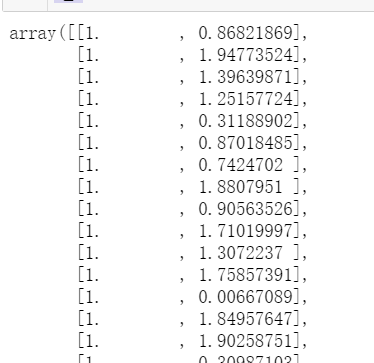
# 步长 stepeta = 0.1# 迭代次数n_iterations = 1000# 数据量m = len(x_b)#数据形状#初始化参数theta = np.random.randn(2,1)# 梯度下降公式及参数更新公式for _ in range(n_iterations):# 限定迭代次数gradients = (1/m) * x_b.T.dot(x_b.dot(theta) - y) #梯度求解公式theta = theta - eta * gradients #更新theta
# 提供画图的横坐标画图# 测试集数据x_new=np.array([[0],[2]])# 做测试的数据np.c_yu\\与stack一样x_new_b=np.c_[np.ones((2,1)),x_new]print(x_new)print(x_new_b)
函数版:
theta_path_bgd = []
列表收集迭代更新的theta,最后画迭代图
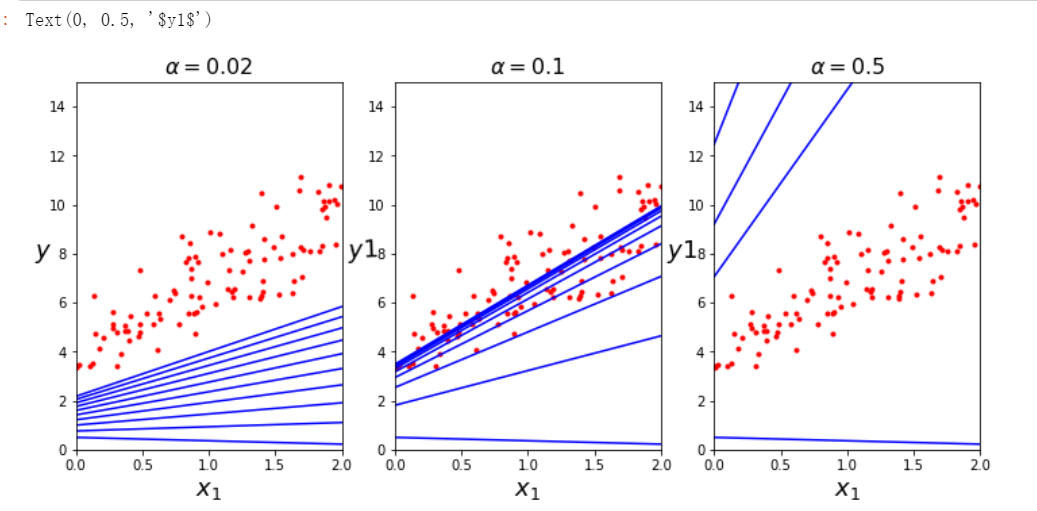
# 为了保存每次更新的thetatheta_path_bgd = []# [1,2] [2,4]收集θ,最后画三个图def plot_gradient_descent(theta, eta, theta_path=None,):m = len(x_b)#数据形状plt.plot(x, y, "r.")#散点图源数据n_iterations = 1000 #迭代次数for i in range(n_iterations):if i < 10:#取前10次# 测试集预测的结果y_predict = x_new_b.dot(theta) ## 测试集确定的直线plt.plot(x_new, y_predict, "b-")# 使用训练集计算梯度gradients = 2/m * x_b.T.dot(x_b.dot(theta) - y)# 参数更新公式theta = theta - eta * gradientsif theta_path is not None: #把每个theta添加起来theta_path.append(theta)plt.xlabel("$x_1$", fontsize=18)plt.axis([0, 2, 0, 15])# eta 专业步长符号# plt.title(r"$\eta = {}$".format(eta), fontsize=16)plt.title(r"$\alpha = {}$".format(eta), fontsize=16)
画图:
np.random.seed(42)theta=np.random.randn(2,1)fig,ax=plt.subplots(1,3,figsize=(12,5))plt.subplot(131)plot_gradient_descent(theta, eta=0.02)plt.ylabel("$y$",rotation=0,fontsize=18)plt.subplot(132)plot_gradient_descent(theta, eta=0.1,theta_path=theta_path_bgd)plt.ylabel("$y1$",rotation=2,fontsize=18)plt.subplot(133)plot_gradient_descent(theta, eta=0.5)plt.ylabel("$y1$",rotation=0,fontsize=18)
随机梯度下降
theta_path_sgd=[]m=len(x_b)np.random.seed(42)
n_epochs参数控制外层循环遍历次数
内层循环取每个数据
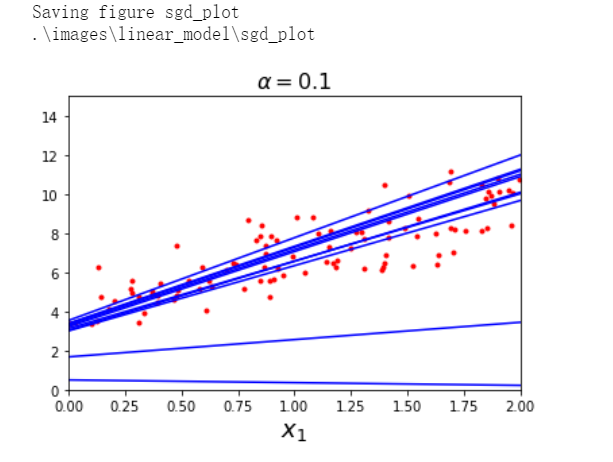
n_epochs=2eta=0.1theta=np.random.randn(2,1)plt.plot(x, y, "r.")#散点图源数据for epoch in range(n_epochs):for j in range(m):if j<10 and epoch==0:# 测试集预测yy_predict=x_new_b.dot(theta)# 测试集确定的直线plt.plot(x_new, y_predict, "b-")x1=x_b[j:j+1]y1=y[j:j+1]gradients = 2 * x1.T.dot(x1.dot(theta) - y1)theta = theta - eta * gradientstheta_path_sgd.append(theta)plt.xlabel("$x_1$", fontsize=18)plt.axis([0, 2, 0, 15])# eta 专业步长符号plt.title(r"$\alpha = {}$".format(eta), fontsize=16)# boacsave_fig('sgd_plot')
小批量梯度下降
注意时间
theta_path_mgd = []n_iterations = 5minibatch_size = 20#np.random.seed(42)theta = np.random.randn(2,1) # random initializationfor epoch in range(n_iterations):# # 数据洗牌,产生一个新的随机顺序# shuffled_indices = np.random.permutation(m)# x_b_shuffled = x_b[shuffled_indices]# y_shuffled = y[shuffled_indices]for i in range(0, m, minibatch_size):xi = x_b[i:i+minibatch_size]yi = y[i:i+minibatch_size]gradients = 2/minibatch_size * xi.T.dot(xi.dot(theta) - yi)eta = 0.1theta = theta - eta * gradientstheta_path_mgd.append(theta)
将列表数据转化为array
theta_path_bgd = np.array(theta_path_bgd)theta_path_sgd = np.array(theta_path_sgd)theta_path_mgd = np.array(theta_path_mgd)
画图:
plt.figure(figsize=(7,4))plt.plot(theta_path_sgd[:, 0], theta_path_sgd[:, 1], "r-s", linewidth=1, label="Stochastic")plt.plot(theta_path_mgd[:, 0], theta_path_mgd[:, 1], "g-+", linewidth=2, label="Mini-batch")plt.plot(theta_path_bgd[:, 0], theta_path_bgd[:, 1], "b-o", linewidth=3, label="Batch")plt.legend(loc="upper left", fontsize=16)plt.xlabel(r"$\theta_0$", fontsize=20)plt.ylabel(r"$\theta_1$ ", fontsize=20, rotation=0)plt.axis([2.5, 4.5, 2.3, 3.9])save_fig("gradient_descent_paths_plot")plt.show()


若有收获,就点个赞吧
0 人点赞


