一、lnmp项目简介
Nginx:是由俄罗斯人开发的一款开源的高性能的HTTP和反向代理的Web服务器同时也提供了IMAP(交互邮件访问协议)/POP3(邮局协议版本3)/SMTP(电子邮件传输协议)服务。它的特点是占有内存少,并发能力强,在同类型的网页服务器中表现得尤其出色,目前中国大陆使用Nginx网站的用户有:百度、新浪、京东等企业。C语言编写。
MySQL是一个关系型数据库管理系统,由瑞典MySQL AB公司开发,属于Oracle旗下产品。MySQL 是最流行的关系型数据库管理系统之一,MySQL所使用的 SQL 语言是用于访问数据库的最常用标准化语言。其特点是体积小、速度快、总体拥有成本低,尤其是开放源码这一特点,一般中小型网站的开发都选择MySQL 作为网站数据库。MariaDB数据库管理系统是MySQL的一个分支,主要由开源社区在维护,采用GPL授权许可 MariaDB的目的是完全兼容MySQL,包括API和命令行,使之能轻松成为MySQL的代替品。
PHP—“超文本预处理器”,是在服务器端执行的脚本语言,尤其适用于Web开发并可嵌入HTML中。PHP语法学习了C语言,吸纳Java和Perl多个语言的特色发展出自己的特色语法。
这4种软件均为免费开源软件,组合到一起,成为一个免费、高效、扩展性强的网站服务系统。
二、wordpress简介
WordPress是使用PHP语言开发的博客平台,用户可以在支持PHP和MySQL数据库的服务器上架设属于自己的网站。全球约34%的网站都在用WordPress、小到兴趣博客、大到新闻网站,国外的学校里甚至都有WordPress相关的课程。
三、构建lnmp+wordpress
上传lnmp+wordpress包到根目录下
hostnamectl set-hostname lnmp //修改主机名bash[root@lnmp html]# hostnamectl //查看主机名Static hostname: lnmpIcon name: computer-vmChassis: vmMachine ID: 8e678fb0617d400a991be932f99bace0Boot ID: 7fce301a22cb488291cabbd35d426c32Virtualization: vmwareOperating System: CentOS Linux 7 (Core)CPE OS Name: cpe:/o:centos:centos:7Kernel: Linux 3.10.0-862.el7.x86_64Architecture: x86-64
配置yum 源
[root@lnmp html]# cat /etc/yum.repos.d/local.repo[centos]name=centosbaseurl=file:///opt/centosgpgcheck=0enabled=1[lnmp]name=lnmpbaseurl=file:///root/lnmpgpgcheck=0enabled=1[root@lnmp html]#[root@lnmp html]# yum clean allLoaded plugins: fastestmirrorCleaning repos: centos lnmpCleaning up everythingMaybe you want: rm -rf /var/cache/yum, to also free up space taken by orphaned data from disabled or removed reposCleaning up list of fastest mirrors[root@lnmp html]# yum repolistLoaded plugins: fastestmirrorDetermining fastest mirrorscentos | 3.6 kB 00:00lnmp | 3.0 kB 00:00(1/3): centos/primary_db | 3.1 MB 00:00(2/3): centos/group_gz | 166 kB 00:00(3/3): lnmp/primary_db | 153 kB 00:00repo id repo name statuscentos centos 3,971lnmp lnmp 178repolist: 4,149[root@lnmp html]#
安装工具
[root@lnmp html]# yum -y install nginx mariadb-server mariadb php-fpm php-mysql
nginx
[root@lnmp ~]# systemctl start nginx && systemctl enable nginx //启动服务[root@lnmp ~]# vi /etc/nginx/conf.d/default.confserver {listen 80;server_name localhost;#charset koi8-r;#access_log /var/log/nginx/host.access.log main;location / {root /usr/share/nginx/html;index index.html index.htm;}location ~ \.php$ {root /usr/share/nginx/html;server {listen 80;server_name localhost;#charset koi8-r;#access_log /var/log/nginx/host.access.log main;location / {root /usr/share/nginx/html;index index.php index.html index.htm;}location ~ \.php$ {root /usr/share/nginx/html;fastcgi_pass 127.0.0.1:9000;fastcgi_index index.php;fastcgi_param SCRIPT_FILENAME $document_root$fastcgi_script_name;include fastcgi_params;}#error_page 404 /404.html;# redirect server error pages to the static page /50x.html#error_page 500 502 503 504 /50x.html;location = /50x.html {root /usr/share/nginx/html;}# proxy the PHP scripts to Apache listening on 127.0.0.1:80##location ~ \.php$ {# proxy_pass http://127.0.0.1;#}# pass the PHP scripts to FastCGI server listening on 127.0.0.1:9000##location ~ \.php$ {# root html;# fastcgi_pass 127.0.0.1:9000;[root@lnmp ~]# systemctl restart nginx //重启服务
mysql
[root@lnmp ~]# systemctl start mariadb && systemctl enable mariadb //启动服务[root@lnmp ~]# mysql_secure_installation //初始化数据库yynyy[root@lnmp ~]# mysql -uroot -p123456 //登录数据库Welcome to the MariaDB monitor. Commands end with ; or \g.Your MariaDB connection id is 35Server version: 5.5.56-MariaDB MariaDB ServerCopyright (c) 2000, 2017, Oracle, MariaDB Corporation Ab and others.Type 'help;' or '\h' for help. Type '\c' to clear the current input statement.MariaDB [(none)]>MariaDB [(none)]> create database wordpress; //创建数据库服务MariaDB [(none)]> grant all privileges on *.* to root@localhost identified by '123456' with grant option; //授权所有用户拥有本地数据库的所有权限。MariaDB [(none)]> grant all privileges on *.* to root@"%" identified by '123456' with grant option; //授权用户可进行远程登录MariaDB [(none)]> exitBye[root@lnmp ~]#
php
[root@lnmp ~]# vi /etc/php-fpm.d/www.conf输入set nu 显示行号39 user = nginx40 ; RPM: Keep a group allowed to write in log dir.41 group = nginx修改39行和41行[root@lnmp ~]# systemctl start php-fpm && systemctl enable php-fpm //重启服务并设置开机自启
wordpress
[root@lnmp ~]# unzip wordpress-4.7.3-zh_CN.zip[root@lnmp ~]# cd /usr/share/nginx/html[root@lnmp html]#[root@lnmp html]# rm -rf *[root@lnmp html]# cp -rvf /root/wordpress/* ./[root@lnmp html]# cp wp-config-sample.php wp-config.php[root@lnmp html]# chmod 777 *[root@lnmp html]# vi wp-config.php// ** MySQL 设置 - 具体信息来自您正在使用的主机 ** ///** WordPress数据库的名称 */define('DB_NAME', 'wordpress');/** MySQL数据库用户名 */define('DB_USER', 'root');/** MySQL数据库密码 */define('DB_PASSWORD', '123456');/** MySQL主机 */define('DB_HOST', '127.0.0.1');/** 创建数据表时默认的文字编码 */define('DB_CHARSET', 'utf8');/** 数据库整理类型。如不确定请勿更改 */define('DB_COLLATE', '');/**#@+* 身份认证密钥与盐。** 修改为任意独一无二的字串!* 或者直接访问{@link https://api.wordpress.org/secret-key/1.1/salt/* WordPress.org密钥生成服务}* 任何修改都会导致所有cookies失效,所有用户将必须重新登录。*
至此完成,在网页输入IP地址即可
192.168.100.11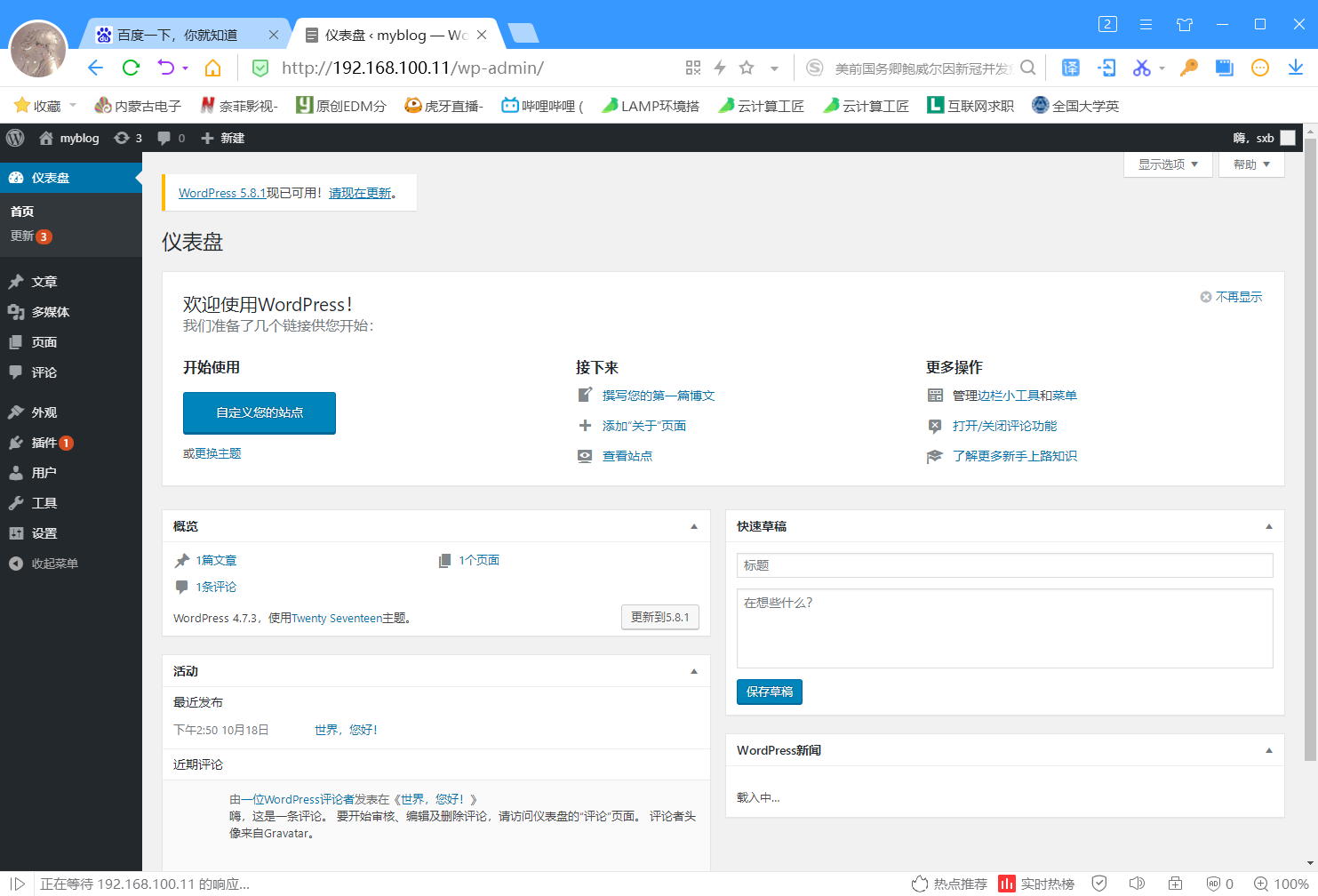

若有收获,就点个赞吧
0 人点赞


