静态路由配置
Pro 中默认会读取 config/config.tsx 中的 routes 配置作为 ProLayout 的菜单数据来生成菜单,并且配合 plugin-access 还可以很方便的进行菜单的权限管理。
位置:/config/routers.ts
export default [{path: '/',component: '../layouts/BlankLayout',routes: [{path: '/user',component: '../layouts/UserLayout',routes: [{name: 'login',path: '/user/login',component: './User/login',},],},{path: '/',component: '../layouts/SecurityLayout',routes: [{path: '/',component: '../layouts/BasicLayout',authority: ['admin', 'user'],routes: [{path: '/',redirect: '/welcome',},{path: '/welcome',name: 'welcome',icon: 'smile',component: './Welcome',},{path: '/admin',name: 'admin',icon: 'crown',component: './Admin',authority: ['admin'],routes: [{path: '/admin/sub-page',name: 'sub-page',icon: 'smile',component: './Welcome',authority: ['admin'],},],},{name: 'list.table-list',icon: 'table',path: '/list',component: './TableList',},{path: '/system',name: '系统管理',icon: 'crown',authority: ['admin'],routes: [{path: '/system/user',name: '用户管理',icon: 'smile',component: './system/user',authority: ['admin'],},{path: '/system/organize',name: '组织管理',icon: 'smile',component: './system/organize',authority: ['admin'],},{path: '/system/role',name: '角色管理',icon: 'smile',component: './system/role',authority: ['admin'],},{path: '/system/dictionary',name: '字典管理',icon: 'smile',component: './system/dictionary',authority: ['admin'],},{path: '/system/menu',name: '菜单管理',icon: 'smile',component: './system/menu',authority: ['admin'],},{path: '/system/area',name: '地区管理',icon: 'smile',component: './system/area',authority: ['admin'],},{path: '/system/group',name: '用户组管理',icon: 'smile',component: './system/group',authority: ['admin'],},{path: '/system/Gencode',name: '代码生成器',icon: 'crown',component: './system/Gencode',authority: ['admin']},],},{path: '/quartz',name: 'quartz定时器',routes: [{path: '/quartz/Cron',name: 'cron表达式',component: './quartz/Cron',},{path: '/quartz/CronSelect',name: 'cron表达式',component: './quartz/CronSelect',},{path: '/quartz/TimTask',name: 'quartz任务管理',component: './quartz/TimTask',},{path: '/quartz/busTask',name: '业务任务案例',component: './quartz/busTask',}],},{path: '/monitor',name: '监控管理',routes: [{path: '/monitor/server',name: '服务监控',component: './monitor/server',}],},{path: '/example',name: '案例管理',icon: 'crown',authority: ['admin'],routes: [{path: '/example/userOrganize',name: '选择用户组织',icon: 'smile',component: './example/userOrganize',authority: ['admin']},{path: '/example/openHref',name: '外链跳转',icon: 'smile',component: './example/openHref',authority: ['admin']},{path: '/example/iframe',name: 'iframe嵌套',icon: 'smile',component: './example/iframe',authority: ['admin']},{path: '/example/richText',name: 'iframe嵌套',icon: 'smile',component: './example/richText',authority: ['admin']},{path: '/gencode/mycontent',name: '测试单表',icon: 'smile',component: './gencode/mycontent',authority: ['admin']},],},{path: '/gencode',name: '代码生成',icon: 'crown',authority: ['admin'],routes: [{path: '/gencode/mycontent',name: '测试单表',icon: 'smile',component: './gencode/mycontent',authority: ['admin']},{path: '/gencode/mytree',name: '测试树表',icon: 'smile',component: './gencode/mytree',authority: ['admin']},],},{component: './404',},],},{component: './404',},],},],},{component: './404',},];
动态路由配置
在某些情况下,写死的菜单数据可能满足不了我们的需求,Pro 也提供了相应的解决方案来进行远程的菜单数据请求。我们这里需要用到两个 API, menu.request 和 menu.params,request 需要传入一个 promise,它会自动托管 loading,params 修改会触发 request 方便重新请求菜单。
进入src/layouts/Basilayout.js在官网中直接复制该代码,将原文件替换。
现在正式进入正题。
查询菜单
//查询菜单getTreeList({types: '0,1,3,4'}).then((res:any) =>{// console.log('--------------我进来查询菜单了。。。。')// console.log(res);const treeData = fommat(res.data,"parent_id");const menu = menuAuthorized(treeData);setMenuData(menu);})
菜单数据格式化
const fommat = (arrayList:any,pidStr = "parent_id",idStr = "id",childrenStr = "children") => {let listOjb = {}; // 用来储存{key: obj}格式的对象let treeList = []; // 用来储存最终树形结构数据的数组// 将数据变换成{key: obj}格式,方便下面处理数据// const responseDataLength = response?.data?.data?.length || 0;for (let i = 0; i < arrayList?.length || 0; i++) {var data = arrayList[i];data.key = data.id;data.icon = "";//处理菜单格式信息// if (data.type == '0') {//目录// } else if (data.type == '1') {// } else if (data.type == '4') {// }const authority = data.role_ids?.split(',')if (data.child_num > 0) {if (authority == undefined) {authority = ['system']} else {authority.push('system');}}data.authority = authority;if (data.type == '3') {data.target = '_black';}// console.log(data.meta)listOjb[arrayList[i][idStr]] = data;}// 根据pid来将数据进行格式化for (let j = 0; j < arrayList?.length || 0; j++) {// 判断父级是否存在let haveParent = listOjb[arrayList[j][pidStr]];if (haveParent) {// 如果有没有父级children字段,就创建一个children字段!haveParent[childrenStr] && (haveParent[childrenStr] = []);// 在父级里插入子项haveParent[childrenStr].push(arrayList[j]);} else {// 如果没有父级直接插入到最外层treeList.push(arrayList[j]);}}return treeList;}
注意:需要在router.config.js里面把你的菜单全集写出来。你动态拉取的必须是你router.config.js里面有的路由才能有效。
菜单权限控制
权限菜单的配置
在路由配置中,通过配置authority: [‘admin’, ‘user’],来控制权限,权限标识可以理解成通过角色进行控制,比如admin角色和user角色。
赋权控制
1、鉴权角色设置

2、鉴权角色管理
通过设置【authority】可以对权限角色进行控制,角色存储在本地:antd-pro-authority。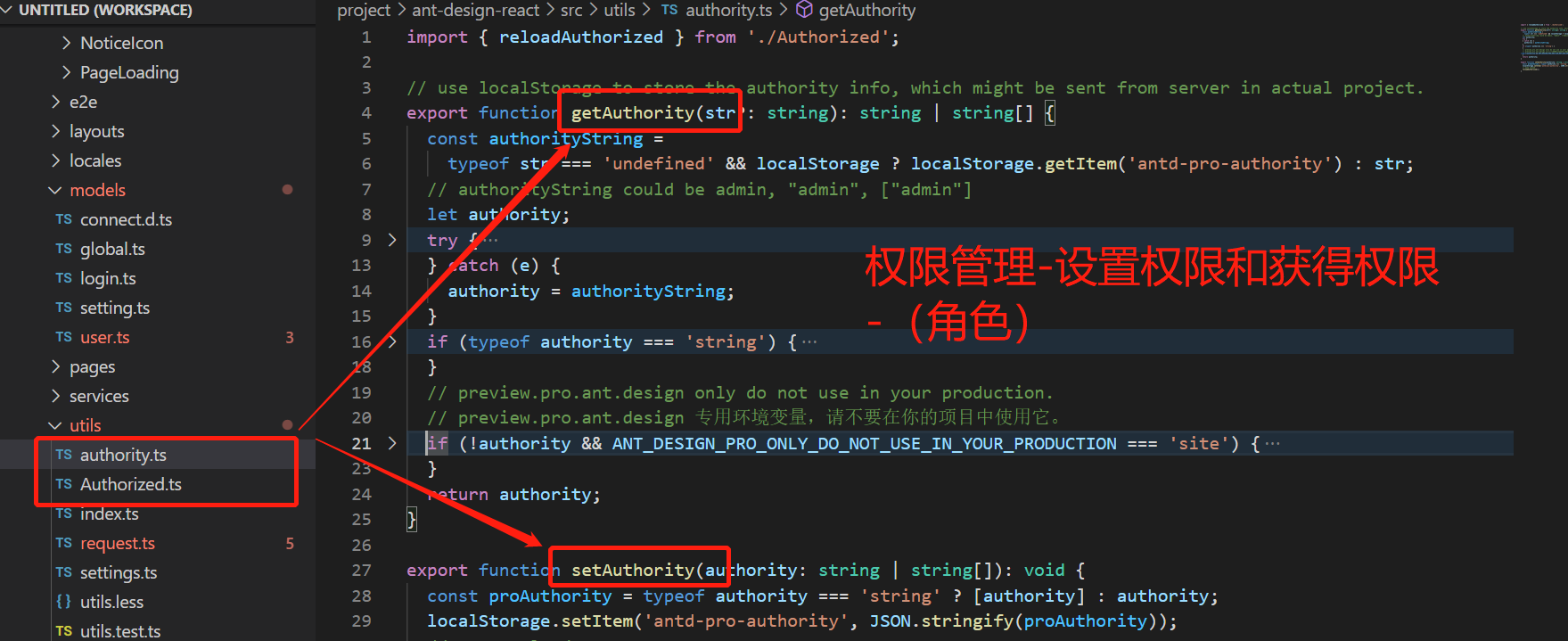
3、菜单权限鉴权

/*** 通用权限检查方法 Common check permissions method** @param { 权限判定 | Permission judgment } authority* @param { 你的权限 | Your permission description } currentAuthority* @param { 通过的组件 | Passing components } target* @param { 未通过的组件 | no pass components } Exception*/const checkPermissions = <T, K>(authority: IAuthorityType,currentAuthority: string | string[],target: T,Exception: K,): T | K | React.ReactNode => {// 没有判定权限.默认查看所有// Retirement authority, return target;if (!authority) {return target;}// 数组处理if (Array.isArray(authority)) {if (Array.isArray(currentAuthority)) {if (currentAuthority.some((item) => authority.includes(item))) {return target;}} else if (authority.includes(currentAuthority)) {return target;}return Exception;}// string 处理if (typeof authority === 'string') {if (Array.isArray(currentAuthority)) {if (currentAuthority.some((item) => authority === item)) {return target;}} else if (authority === currentAuthority) {return target;}return Exception;}// Promise 处理if (authority instanceof Promise) {return <PromiseRender<T, K> ok={target} error={Exception} promise={authority} />;}// Function 处理if (typeof authority === 'function') {const bool = authority(currentAuthority);// 函数执行后返回值是 Promiseif (bool instanceof Promise) {return <PromiseRender<T, K> ok={target} error={Exception} promise={bool} />;}if (bool) {return target;}return Exception;}throw new Error('unsupported parameters');};

若有收获,就点个赞吧
0 人点赞


