实验目的
1、了解 python 中的可视化库
2、掌握 python 中 matplotlib 中图像大小的设置
3、掌握 python 中 matplotlib 中辅助显示功能和图像生成功能
实验环境
1、64 位电脑,8G 以上内存
2、win10 系统
3、matplotlib 和 pylab
实验步骤:
1. 二条折线图,注意观察分析各个程序段的功能
import matplotlib.pyplot as pltimport random# 解决中文显示为方块的问题from pylab import mplmpl.rcParams["font.sans-serif"] = ["SimHei"]mpl.rcParams["axes.unicode_minus"] = False# 准备数据x = range(60)y_sh = [random.uniform(26, 31) for i in x]y_bj = [random.uniform(27, 35) for i in x]# 创建画布plt.figure(figsize=(16, 8), dpi=60)# 同一坐标内--绘制多条折线图 (新增)plt.plot(x, y_sh, label="sh")plt.plot(x, y_bj, label="bj", linestyle="--", color="y") # 线条颜色,线条样式设置# 自定义 x, y 轴 刻度 & 刻度标签 (新增)x_ticks = range(0, 60, 5)y_ticks = range(20, 40, 5)x_ticks_label = ["11 点{}分".format(i) for i in x_ticks]plt.xticks(x_ticks, x_ticks_label)plt.yticks(y_ticks)# 添加辅助描述信息-- x,y 轴标签 & 图形标题plt.xlabel("时间")plt.ylabel("温度")plt.title("两地同一时间温度变化图")# 添加网格线 - alpha:透明度 (新增)plt.grid(True, linestyle="--", alpha=0.6)# 显示图例 -- loc:位置设置,详见下图 (新增)plt.legend(loc="best")# 显示图象plt.show()

2. 绘制多个坐标系
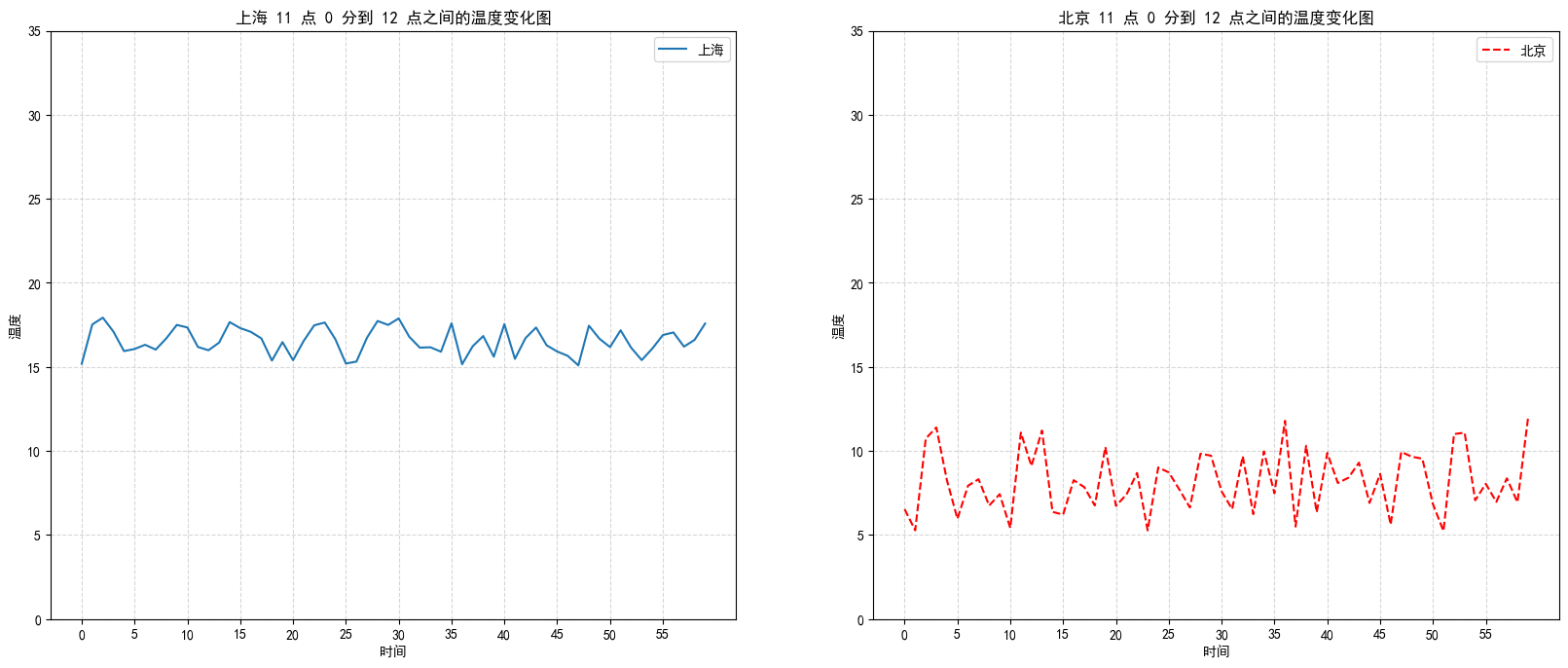
import matplotlib.pyplot as pltimport random# 中文显示问题from pylab import mplmpl.rcParams["font.sans-serif"] = ["SimHei"]mpl.rcParams["axes.unicode_minus"] = False# 准备 x,y 轴数据x = range(60)y_sh = [random.uniform(15, 18) for i in x]y_bj = [random.uniform(5, 12) for i in x]# 创建画布--多个坐标轴, 绘制折线图fig, axes = plt.subplots(nrows=1, ncols=2, figsize=(20, 8), dpi=100)# Returns: fig: 图对象 ax: 坐标轴对象列表axes[0].plot(x, y_sh, label='上海')axes[1].plot(x, y_bj, label='北京', color='r', linestyle='--')# 显示图例/坐标轴刻度/网格线axes[0].legend()axes[1].legend()x_ticks_label = ['11 点{}分'.format(i) for i in x]y_ticks = range(40)axes[0].set_xticks(x[::5])axes[0].set_yticks(y_ticks[::5])axes[1].set_xticks(x[::5])axes[1].set_yticks(y_ticks[::5])axes[0].grid(True, linestyle='--', alpha=0.5)axes[1].grid(True, linestyle='--', alpha=0.5)# 添加 标题/坐标轴描述信息axes[0].set_title('上海 11 点 0 分到 12 点之间的温度变化图')axes[0].set_xlabel("时间")axes[0].set_ylabel("温度")axes[1].set_title('北京 11 点 0 分到 12 点之间的温度变化图')axes[1].set_xlabel('时间')axes[1].set_ylabel('温度')plt.show()
- 绘制sin()函数
# 准备数据import matplotlib.pyplot as pltimport numpy as npx = np.linspace(-10, 10, 1000)y = np.sin(x)# 创建画布,绘制图像,显示图像plt.figure(figsize=(10, 1), dpi=100)plt.plot(x, y)plt.grid(linestyle='--', alpha=0.5)plt.show()

4. 散点图 — scatter-- 案例: 探究房屋面积和房屋价格的关系import matplotlib.pyplot as pltfrom pylab import mpl # 中文显示问题--下面手动修改配置mpl.rcParams["font.sans-serif"] = ["SimHei"]mpl.rcParams["axes.unicode_minus"] = False# 准备数据x = [225.98, 247.07, 253.14, 457.85, 241.58, 301.01, 20.67, 288.64, 163.56, 120.06, 207.83, 342.75, 147.9 , 53.06, 224.72, 29.51, 21.61, 483.21, 245.25, 399.25, 343.35]y = [196.63, 203.88, 210.75, 372.74, 202.41, 247.61, 24.9 , 239.34, 140.32, 104.15, 176.84, 288.23, 128.79, 49.64, 191.74, 33.1 , 30.74, 400.02, 205.35, 330.64, 283.45]# 创建画布 -- 绘制散点图 -- 显示图像plt.figure(figsize=(20,8), dpi=100)plt.scatter(x, y)plt.title('房屋面积和房屋价格的关系--案例测试')plt.xlabel('面积')plt.ylabel('价格')plt.show()

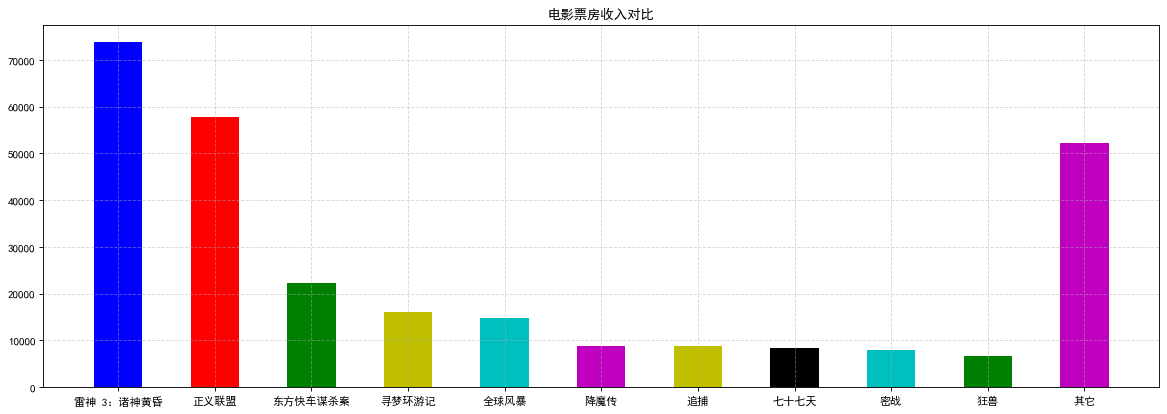
5. 柱状图— barimport matplotlib.pyplot as plt# 中文显示问题--下面手动修改配置from pylab import mplmpl.rcParams["font.sans-serif"] = ["SimHei"]mpl.rcParams["axes.unicode_minus"] = False# 准备数据movie_name = ['雷神 3:诸神黄昏', '正义联盟', '东方快车谋杀案', '寻梦环游记', '全球风暴', '降魔传', '追捕', '七十七天', '密战', '狂兽', '其它']y = [73853, 57767, 22354, 15969, 14839, 8725, 8716, 8318, 7916, 6764, 52222]x = range(len(movie_name))# 创建画布,绘制柱状图,添加标题和格线,显示图像plt.figure(figsize=(18, 6), dpi=80)plt.bar(x, y, width=0.5, color=['b', 'r', 'g', 'y', 'c', 'm', 'y', 'k', 'c', 'g', 'm'])plt.title("电影票房收入对比")plt.xticks(x, movie_name)plt.grid(linestyle='--', alpha=0.5)plt.show()
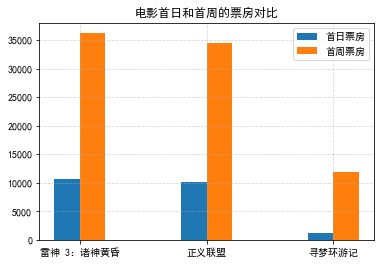
6. 柱状图— bar 多个指标对比(案例:不同电影首日和首周的票房)import matplotlib.pyplot as plt# 中文显示问题--下面手动修改配置from pylab import mplmpl.rcParams["font.sans-serif"] = ["SimHei"]mpl.rcParams["axes.unicode_minus"] = False# 准备数据movie_name = ['雷神 3:诸神黄昏', '正义联盟', '寻梦环游记']first_day = [10587.6, 10062.5, 1275.7]first_weekend = [36224.9, 34479.6, 11830]x = range(len(movie_name))# 创建画布,绘制柱状图,添加标题/坐标轴刻度标签/网格线/示例, 显示图像plt.figure(figsize=(10, 5), dpi=80)plt.bar(x, first_day, width=0.2, label="首日票房")plt.bar([i + 0.2 for i in x], first_weekend, width=0.2, label="首周票房")plt.title("电影首日和首周的票房对比")plt.xticks([i + 0.1 for i in x], movie_name) # 修改 x 轴刻度显示plt.grid(linestyle="--", alpha=0.5)plt.legend()plt.show()
7. 直方图 — hist
import matplotlib.pyplot as plt# 准备数据time = [131, 98, 125, 131, 124, 139, 131, 117, 128, 108, 135, 138, 131, 102, 107, 114, 119, 128, 121, 142, 127, 130, 124, 101, 110, 116, 117, 110, 128, 128, 115, 99, 136, 126, 134, 95, 138, 117, 111, 78, 132, 124, 113, 150, 110, 117, 86, 95, 144, 105, 126, 130, 126, 130, 126, 116, 123, 106, 112, 138, 123, 86, 101, 99, 136, 123, 117, 119, 105, 137, 123, 128, 125, 104, 109, 134, 125, 127, 105, 120, 107, 129, 116, 108, 132, 103, 136, 118, 102, 120, 114, 105, 115, 132, 145, 119, 121, 112, 139, 125, 138, 109, 132, 134, 156, 106, 117, 127, 144, 139, 139, 119, 140, 83, 110, 102, 123, 107, 143, 115, 136, 118, 139, 123, 112, 118, 125, 109, 119, 133, 112, 114, 122, 109, 106, 123, 116, 131, 127, 115, 118, 112, 135, 115, 146, 137, 116, 103, 144, 83, 123, 111, 110, 111, 100, 154, 136, 100, 118, 119, 133, 134, 106, 129, 126, 110, 111, 109, 141, 120, 117, 106, 149, 122, 122, 110, 118, 127, 121, 114, 125, 126, 114, 140, 103, 130, 141, 117, 106, 114, 121, 114, 133, 137, 92, 121, 112, 146, 97, 137, 105, 98, 117, 112, 81, 97, 139, 113, 134, 106, 144, 110, 137, 137, 111, 104, 117, 100, 111, 101, 110, 105, 129, 137, 112, 120, 113, 133, 112, 83, 94, 146, 133, 101, 131, 116, 111, 84, 137, 115, 122, 106, 144, 109, 123, 116, 111, 111, 133, 150]# 创建画布, 绘制直方图, 添加标题/坐标轴刻度标签/网格线plt.figure(figsize=(20, 8), dpi=80)distance = 2group_num = int((max(time) - min(time)) / distance)plt.hist(time, bins=group_num)plt.title("电影时长分布状况")plt.xticks(range(min(time), max(time))[::2])plt.xlabel("电影时长")plt.ylabel("数量")plt.grid(linestyle="--", alpha=0.5)plt.show()

8. 饼图 — pie
import matplotlib.pyplot as plt# 准备数据 -- 案例:电影的排片占比movie_name = ['雷神 3:诸神黄昏', '正义联盟', '东方快车谋杀案', '寻梦环游记', '全球风暴', '降魔传', '追捕', '七十七天', '密战', '狂兽', '其它']place_count = [60605, 54546, 45819, 28243, 13270, 9945, 7679, 6799, 6101, 4621, 20105]# 创建画布,绘制饼图,添加标题/坐标轴刻度标签plt.figure(figsize=(18, 6), dpi=80)plt.pie(place_count, labels=movie_name, autopct="%1.2f%%")plt.axis("equal") # 坐标轴长宽相等,保证饼图成圆形plt.title("电影的排片占比")plt.legend()plt.show()


若有收获,就点个赞吧
0 人点赞


