知识回顾:
1. 值过滤器(ValueFilter)
Filter filter= new ValueFilter (CompareFilter.CompareOp.EQUAL, new SubstringComparator(“wang”));
解释:用ValueFilter类实例化了一个filter对象,并将wang这个参数传入到了filter对象中
2. 单列值过滤器(SingleColumnValueFilter)
Filter filter= new SingleColumnValueFilter( Bytes.toBytes(“info”), Bytes.toBytes(“name”), CompareFilter.CompareOp.EQUAL, new SubstringComparator(“wang”));
解释:用SingleColumnValueFilter类实例化一个filter对象, 将info族name列字符串转换成了字节流并封装起来,将wang这个参数传入到filter对象中
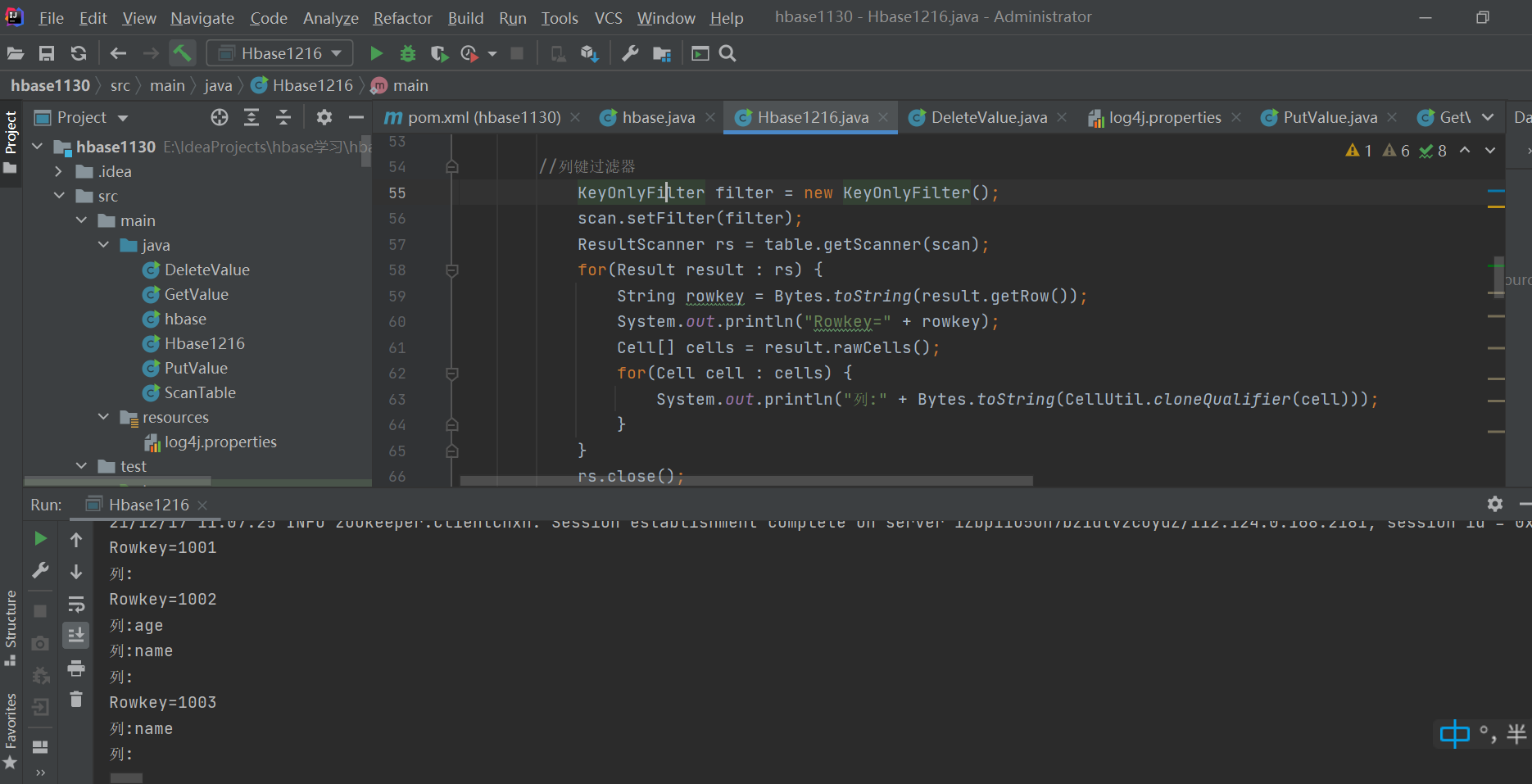
3. 列键过滤器(KeyOnlyFilter)
列键过滤器的作用就是在遍历过程中不获取值只获取列名。
KeyOnlyFilter filter = new KeyOnlyFilter();
解释:
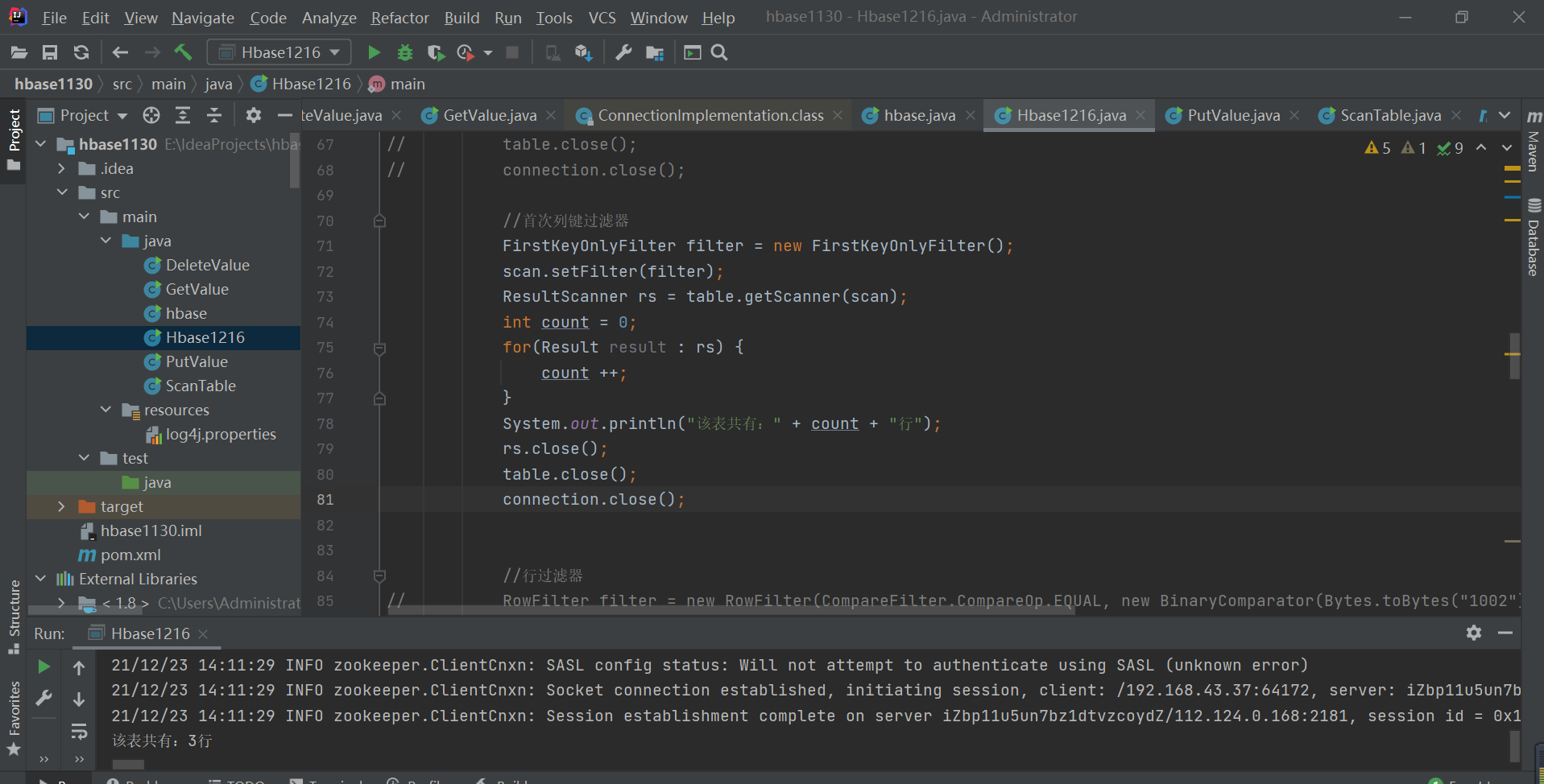
4. 首次列键过滤器(FirstKeyOnlyFilter)
解释:首次列键过滤器是在列键过滤器的基础上更进一步,他在遍历到行的第1个列的时候就立即放弃了往下遍历该行的其他列,转而便立下一个列,由于总是获取第1个列键,所以叫首次列键过滤器。使用这种过滤器时,如果扫描到列,那么证明该行必然存在,所以在做行数统计的时候速度非常快。
5. 行过滤器(ROWFilter)
行过滤器的作用是针对rowkey进行过滤。
RowFilter filter = new RowFilter(CompareFilter.CompareOp.GREATER,new SubstringComparator(“1001”));
解释:用RowFilter类实例化一个filter对象,并将1001这个参数传入到这个对象中
6. 前缀过滤器(PrefixFilter)
前缀过滤器是一种行健过滤器,可以根据行健的前缀,来匹配行健包含指定前缀的数据。
PrefixFilter filter= new PrefixFilter(Bytes.toBytes(“row”));
7. 随机行过滤器(RandomRowFilter)
当你想随机抽取系统的一部分数据的时候,可以使用随机行过滤器,这种过滤器适用于数据分析时,对系统数据进行采样的场景,通过随机行过滤器,让你可以随机的选择系统中的一部分数据
随机行过滤器的构造函数是: RandomRowFilter(float chance)chance是一个用来比较的数值,它的取值范围从0~1.0。当扫描器遍历数据的时候,每遍历到一行数据,Hbase就会调用Random来得出一个随机数,并用这个随机数跟你提供的chance值进行比较,如果比较的结果是随机数比chance小,该条记录就会被选择出来。
8. 列族过滤器(FamilyFilter)
针对列族来进行过滤。
FamilyFilter filter= new FamilyFilter(CompareFilter.CompareOp.EQUAL, new SubstringComparator(“info”));
上代码:
public class HBaseFilter {public static void main(String[] args) {// TODO Auto-generated method stub//获取配置文件Configuration config = HBaseConfiguration.create();config.set("hbase.zookeeper.quorum", "192.168.141.30");config.set("hbase.master","localhost:16010");config.set("hbase.zookeeper.property.clientPort", "2181");try {//创建链接Connection connection = ConnectionFactory.createConnection(config);Admin admin = connection.getAdmin();//链接Table接口Table table = connection.getTable(TableName.valueOf("test"));Scan scan = new Scan();//值过滤器ValueFilter filter = new ValueFilter(CompareFilter.CompareOp.EQUAL, new SubstringComparator("wang"));scan.setFilter(filter);ResultScanner rs = table.getScanner(scan);for(Result result : rs) {Cell[] cells = result.rawCells();for(Cell cell : cells) {System.out.println("Value=" + Bytes.toString(CellUtil.cloneValue(cell)));}}rs.close();table.close();connection.close();/* //单列值过滤器SingleColumnValueFilter filter = new SingleColumnValueFilter(Bytes.toBytes("info1"), Bytes.toBytes("name"), CompareFilter.CompareOp.EQUAL, new SubstringComparator("wang"));scan.setFilter(filter);ResultScanner rs = table.getScanner(scan);for(Result result : rs) {String name = Bytes.toString(result.getValue(Bytes.toBytes("info1"), Bytes.toBytes("name")));System.out.println("Value=" + name);}rs.close();table.close();connection.close();*//* //列键过滤器KeyOnlyFilter filter = new KeyOnlyFilter();scan.setFilter(filter);ResultScanner rs = table.getScanner(scan);for(Result result : rs) {String rowkey = Bytes.toString(result.getRow());System.out.println("Rowkey=" + rowkey);Cell[] cells = result.rawCells();for(Cell cell : cells) {System.out.println("列:" + Bytes.toString(CellUtil.cloneQualifier(cell)));}}rs.close();table.close();connection.close();*//* //首次列键过滤器FirstKeyOnlyFilter filter = new FirstKeyOnlyFilter();scan.setFilter(filter);ResultScanner rs = table.getScanner(scan);int count = 0;for(Result result : rs) {count ++;}System.out.println("该表共有:" + count + "行");rs.close();table.close();connection.close();*//* //行过滤器RowFilter filter = new RowFilter(CompareFilter.CompareOp.EQUAL, new BinaryComparator(Bytes.toBytes("1002")));scan.setFilter(filter);ResultScanner rs = table.getScanner(scan);for(Result result : rs) {Cell[] cells = result.rawCells();for(Cell cell : cells) {System.out.println("行键:" + Bytes.toString(CellUtil.cloneRow(cell)));System.out.println("列族:" + Bytes.toString(CellUtil.cloneFamily(cell)));System.out.println("列:" + Bytes.toString(CellUtil.cloneQualifier(cell)));System.out.println("值:" + Bytes.toString(CellUtil.cloneValue(cell)));}}rs.close();table.close();connection.close();*//* //前缀过滤器PrefixFilter filter = new PrefixFilter(Bytes.toBytes("100"));scan.setFilter(filter);ResultScanner rs = table.getScanner(scan);for(Result result : rs) {Cell[] cells = result.rawCells();for(Cell cell : cells) {System.out.println("行键:" + Bytes.toString(CellUtil.cloneRow(cell)));System.out.println("列族:" + Bytes.toString(CellUtil.cloneFamily(cell)));System.out.println("列:" + Bytes.toString(CellUtil.cloneQualifier(cell)));System.out.println("值:" + Bytes.toString(CellUtil.cloneValue(cell)));}}rs.close();table.close();connection.close();*//* //随机行过滤器RandomRowFilter filter = new RandomRowFilter(new Float(0.8));scan.setFilter(filter);ResultScanner rs = table.getScanner(scan);for(Result result : rs) {String rowkey = Bytes.toString(result.getRow());System.out.println("Rowkey=" + rowkey);}rs.close();table.close();connection.close();*//* //列族过滤器FamilyFilter filter = new FamilyFilter(CompareFilter.CompareOp.EQUAL, new BinaryComparator(Bytes.toBytes("info2")));scan.setFilter(filter);ResultScanner rs = table.getScanner(scan);for(Result result : rs) {Cell[] cells = result.rawCells();for(Cell cell : cells) {System.out.println("行键:" + Bytes.toString(CellUtil.cloneRow(cell)));System.out.println("列族:" + Bytes.toString(CellUtil.cloneFamily(cell)));System.out.println("列:" + Bytes.toString(CellUtil.cloneQualifier(cell)));System.out.println("值:" + Bytes.toString(CellUtil.cloneValue(cell)));}}rs.close();table.close();connection.close();*//* //列过滤器QualifierFilter filter = new QualifierFilter(CompareFilter.CompareOp.EQUAL, new BinaryComparator(Bytes.toBytes("tname")));scan.setFilter(filter);ResultScanner rs = table.getScanner(scan);for(Result result : rs) {Cell[] cells = result.rawCells();for(Cell cell : cells) {System.out.println("行键:" + Bytes.toString(CellUtil.cloneRow(cell)));System.out.println("列族:" + Bytes.toString(CellUtil.cloneFamily(cell)));System.out.println("列:" + Bytes.toString(CellUtil.cloneQualifier(cell)));System.out.println("值:" + Bytes.toString(CellUtil.cloneValue(cell)));}}rs.close();table.close();connection.close();*/}catch(IOException e) {e.printStackTrace();}}}
1. 值过滤器
代码:
该过滤器使用单元格的值来过滤数据,只有满足条件、指定值的单元格才会被返回
//值过滤器
ValueFilter filter = new ValueFilter(CompareFilter.CompareOp.EQUAL, new SubstringComparator("wang"));
scan.setFilter(filter);
ResultScanner rs = table.getScanner(scan);
for(Result result : rs) {
    Cell[] cells = result.rawCells();
    for(Cell cell : cells) {
        System.out.println("Value=" + Bytes.toString(CellUtil.cloneValue(cell)));
    }
}
![_%TFTUV[~NVCSNL_]WVMZIU.png](/uploads/projects/nannan-fqrop@zgabed/0fb7bac9e18b21963b12679d42e2ee3d.png)
2.单列值过滤器
该过滤器类似于关系型数据库where条件语句,通过判断数据行指定的列限定符对应的值是否匹配指定的条件(如:等于1000)来决定是否将改数据行返回
代码:
SingleColumnValueFilter filter = new SingleColumnValueFilter(Bytes.toBytes("info1"), Bytes.toBytes("name"), CompareFilter.CompareOp.EQUAL, new SubstringComparator("wang"));
scan.setFilter(filter);
ResultScanner rs = table.getScanner(scan);
for(Result result : rs) {
    String name = Bytes.toString(result.getValue(Bytes.toBytes("info1"), Bytes.toBytes("name")));
    System.out.println("Value=" + name);
}

3.列键过滤器
该过滤器使得查询结果只返回行键
KeyOnlyFilter filter = new KeyOnlyFilter();
scan.setFilter(filter);
ResultScanner rs = table.getScanner(scan);
for(Result result : rs) {
    String rowkey = Bytes.toString(result.getRow());
    System.out.println("Rowkey=" + rowkey);
    Cell[] cells = result.rawCells();
    for(Cell cell : cells) {
        System.out.println("列:" + Bytes.toString(CellUtil.cloneQualifier(cell)));
    }
}
rs.close();
table.close();
connection.close();



若有收获,就点个赞吧
0 人点赞