翻译:Chunk7、GepaoAX、KuenYo_
Hello @Dev-Build Tester! :ablobwave:
I have some really cool shit in this update (mostly in Blockbuster)! The main features, IMO, are in-game Snowstorm particle editor and new way to sync scenes with camera.
哈喽~ @Dev-Build 测试者们 :D
在这次更新中我整了一些好活(主要是 Blockbuster 的)!我认为的主要的功能是游戏中的暴风雪粒子编辑器和新的场景与镜头的同步方式。
Metamorph 1.2-dev9 :
— Added debugging logging to morph category code to investigate lost morph categories
— 为伪装分类相关的代码加入了调试日志,用以调查丢失伪装分类的原因
— Changed scrolling to be faster in the creative and survival morph menus
— 修改了创造模式伪装菜单和生存模式伪装菜单的滚动速度,使其滚动得更快
Blockbuster 2.0-dev17 :
— Added barrier block to Blockbuster creative tabs when Utility blocks option is enabled in BB’s mod options
— 当 Blockbuster 的 mod 选项中的 实用方块 选项被启用时,在 Blockbuster 创造选项卡中会加入屏障方块
— Added default keybind for BB gun (End key) (suggested by @Mr Wolf)
— 加入了 BB枪 的默认快捷键 (End 键) (由@Mr Wolf建议)
— Added a new way to attach a scene to camera (for more info read below)
— 加入了新的将场景绑定至相机的方式(详见下文)
— Added interact_entity action to BB’s recording system (suggested by @Lucatim)
— 在 BB 的回放系统中加入了 interact_entity (实体交互) 动作(由@Lucatim建议)
— Added “Vanish delay” option to BB gun
— BB枪 加入了「延迟消失」的选项
— Added Snowstorm GUI particle editor into the game (for more info read below)
— 将暴风雪 GUI 粒子编辑器加入到了游戏中(详见下文)
— Added particle morph reloading when particle was edited
— 加入了粒子伪装重载动作,在编辑粒子伪装后触发
— Changed the particle’s location from config/blockbuster/particles/ to config/blockbuster/models/parti``cles/
— 将暴风雪粒子的文件位置由 config/blockbuster/particles/ 改为 config/blockbuster/models/particles/
— Fixed elytra pose’s head (reported by @ImJingLan)
— 修复了鞘翅的姿势的头部问题(由 @ImJingLan 报告)
关于新的场景/相机同步
So now, along side with the traditional playback button way, you can attach a scene to camera editor using the new “Edit camera” button in director block/scenes panel of the dashboard. It will open up automatically the camera editor with already binded scene. Make sure you don’t hold the playback button in the hand, because otherwise the scene from the playback button will take the precedence. So, if you’ll need to detach the attached scene with button from the panel, you can use the “Detach scene” button in camera editor’s ⚙️. The playback button approach doesn’t go anywhere, yet, maybe in 1.8 or another major update when I’ll be rewriting a lot of stuff (so next year?).
现在,除了传统的播放按钮方式外,你还可以使用仪表盘的「导演方块/场景」面板中新的「编辑相机」按钮,将一个场景绑定到相机编辑器。它将自动打开已绑定场景的相机编辑器。注意不要把播放按钮拿在手里,否则播放按钮的场景会被优先使用。所以,如果你想将绑定过的场景解绑,可以在相机编辑器的 ⚙️ 界面中点击「解绑场景」按钮。播放按钮的功能也还是老样子,现在是这样,或许在 1.8 或者其他重大更新的时候,我会重写很多东西(所以等明年?)
关于内置暴风雪粒子配置界面
So you can find in the dashboard GUI, it should be the last icon after texture manager panel. It works exactly the same as the web version, but for exception that it’s unfinished (the buttons in the modal don’t work, there are a couple of missing tooltips, and curves and gradient editing sections are missing). So yeah, I also moved the default particles folder to config/blockbuster/models/particles. Make sure to move your old particles from config/blockbuster/particles into the new folder.
你可以在仪表板 GUI 中找到它,它应该是材质管理器面板之后的最后一个图标(就是左侧菜单的最底部)。它的工作原理和网页版完全一样,但有一个问题就是它还没有完成(modal 中的按钮用不了,有几个工具提示缺失,曲线和渐变编辑部分也不可用)。我还把默认的粒子文件夹移到了 config/blockbuster/models/particles。一定要把你的旧粒子从 config/blockbuster/particles 中移动到新文件夹中。
丢失伪装分类
So, it’ve been going around for a while, but people have been losing their morph categories. Please switch to this current dev-build as I added some debugging printing which should help me find out why they disappear, hopefully. If you ever notice that you lost your categories, immediately turn off your game, and send the logs/latest.log file to me in #dev-issues. This should help me fix this dreadful issue.
问题已经存在了一段时间了,但大家的伪装分类还是一直在木大。请替换到当前的这个开发版,因为我加入了一些调试信息输出代码,希望可以帮助我找到它们丢失的原因。如果你发现你的分类全部木大了,请立即关闭你的游戏,并将 logs/latest.log 文件发到 #dev-issues 频道里给我(发到中文用户交流群也行,操作方式见 FAQ)。这应该能帮我解决这个谔谔的问题。
I hope you’ll have fun with new particle editor. For now, just get crazy with it, and you’ll have questions about how different sections work, feel free to ask in #dev-discussion. Thank you guys very much for testing! :ablobsurpriseblush:
我希望你能享受这个新的粒子编辑器。现在,往死里玩它吧,如果你有关于不同部分的工作原理的问题,可以在 McHorse 的 Discord 服务器的 #dev-discussion 频道和 McHorse 中文用户交流群中询问与沟通。感谢你们能参与测试! :D
Edit: Now give me my reactions!
Edit: 给点反应秋梨膏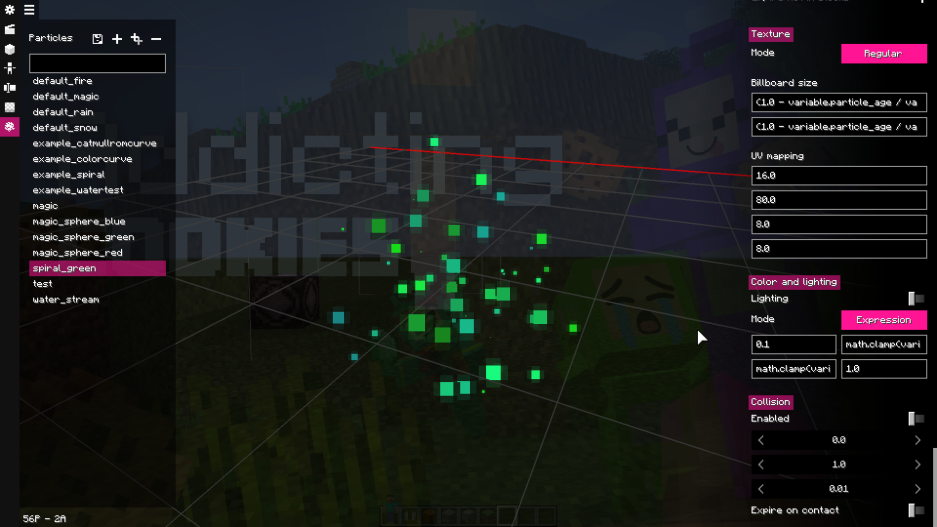
下载
如果你没有使用过上一次开发版,请务必要阅读前一篇更新日志再使用 » McHorse’s Mods 开发版模组更新日志
将前一个开发版的 MOD 替换为此次修复版本,再启动游戏

若有收获,就点个赞吧
0 人点赞


