翻译:Chunk7 / GepaoAX / KuenYo
注:目前的开发版模组尚未支持除英语外的语言,会在未来跟进
Hello there @everyone (apparently the first time I posted this didn’t go through, so sorry for double ping, but this is so exciting)! Behold the new dev-builds of Blockbuster 1.7 , Aperture 1.4 , Metamorph 1.2 , McLib 2.0 and Minema 3.5 !
大家好 @全体用户 (显然我第一次很明显发布此消息并没有通过,抱歉@大家两次,但这太让人兴奋啦!)来看看Blockbuster 1.7 、Aperture 1.4 、 Metamorph 1.2 、 McLib 2.0 和 Minema 3.5 吧!
This update was more than a month in making, and I’m glad to present to you an update experience to my mods. There were so many things changed in this update, so let’s better get started!
这次更新做了一个多月,很高兴给大家介绍一下我的mod的更新经历。这次更新有太多的改动,所以我们还是赶紧开始吧!
⚠ IMPORTANT: back-up your worlds, models, etc. or test these dev-builds in a fresh instance of Minecraft. I’m not responsible for any data losses if you didn’t back up your work. ⚠
⚠ 重要:备份您的世界、模型等,或在一个新的 Minecraft 客户端中测试这些开发版构建。如果您没有备份您的工程,我不对任何的数据丢失情况负责。⚠
Also, make sure to uninstall my other mods like Emoticons (or S&B), Extended Reach and Commander should be fine though. That being said, the first thing I’m going to review is McLib changes.
还有,请一定要卸载诸如 Emoticons(或 S&B)、Extended Reach 以及 Commander 之类的 mods。话虽如此,我首先要回顾的是 McLib 的变化。
— McLib 2.0 —
So the whole GUI code was heavily rewritten (but not from scratch). Many familiar elements were changed. It also now provides a dashboard GUI (which was transferred from Blockbuster), and added lots of cool features which I can utilize for making GUIs.
整个 GUI 代码被大规模重写(但不是重构)。 许多熟悉的控件也改了。 它现在还提供了一个仪表板 GUI(这是从 Blockbuster 移植过来的),并且增加了许多很酷的功能,我可以利用这些功能制作 GUI。
Configuration system 配置系统
All the config options from Mod Options area were removed and transferred into McLib’s new configuration system, which allows me to add config options relatively much easier without any problems.
所有来自 Mod 选项的配置选项都被移除,并转移到 McLib 的新配置系统中,这让可以我相对容易地添加配置选项并避免很多麻烦。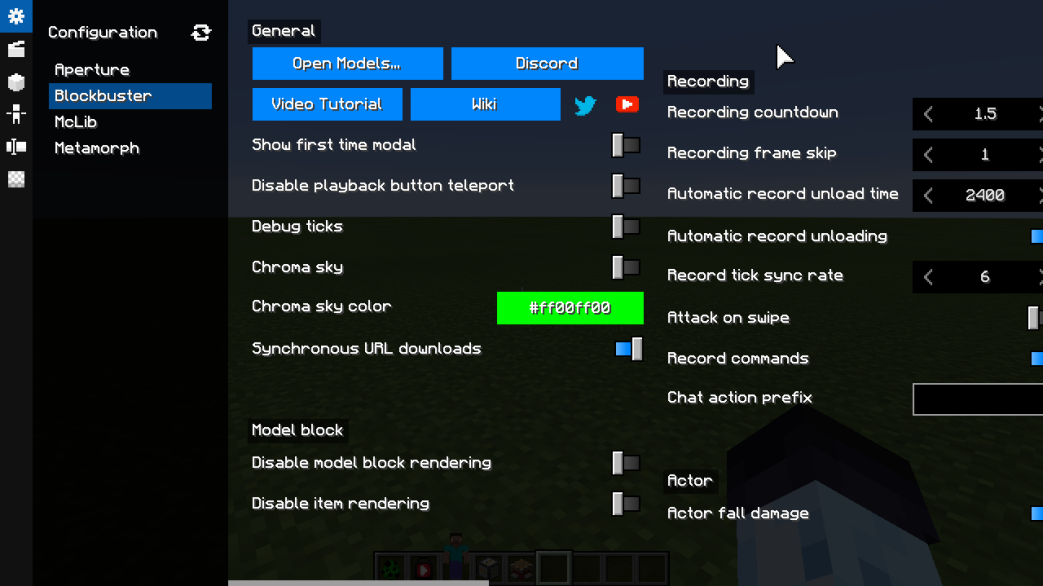
Changed existing elements 改变现有控件
There are a couple of input elements which were drastically changed.
对几个输入控件进行了重写。
Trackpad element 触摸板控件
This is the element that is used to modify numerical numbers with ease, instead of inputting numbers directly, you can drag its corners and change the value this way.
这个控件可以用于轻松地修改数字,而不是直接输入数字,你可以拖动它的边角,以这种方式改变数值。
Instead of vertical distance calculation, now it uses horizontal change, so instead of dragging up and down, now you’ll have to drag left and right. Beside that, I also added little buttons to left and right, which allow to change the value by specific ammount like +1/-1.
现在值的改变使用水平距离计算,而不是垂直距离计算,所以现在不需要上下拖动,而是需要左右拖动。 除此之外,我还在左侧和右侧添加了按钮,这些按钮允许以加减特定的数值来更改值,例如+1或者-1。
Toggle element 开关控件
Instead of check boxes, now there is toggle element. It’s basically the same thing, but a bit different. I probably should’ve not mentioned it.
现在改成了开关控件,而不是复选框控件。 两者大同小异,但仍有些许的不同。瞧我这嘴欠的
In-GUI keybinds GUI 内按键映射
Now every GUI element can have keybinds of their own. My mods currently don’t use this system fully, but you can always look up which keybinds are available by pressing F9. This keybind toggles this menu, so you can hide it again by pressing F9.
现在,每个 GUI 控件都可以拥有自己的热键。我的模组目前尚未完全使用该系统,但是你始终可以通过按 F9 键来查询可用的热键。这个热键可以用于切换此菜单,也就是说你可以按 F9 来再次将其隐藏。
Some elements could have keybinds when mouse is hovering the element, but for now, none of the elements uses it.
当鼠标悬停在某些控件上时,某些控件可能会显示它所绑定的热键,但是目前暂时没有控件会显示。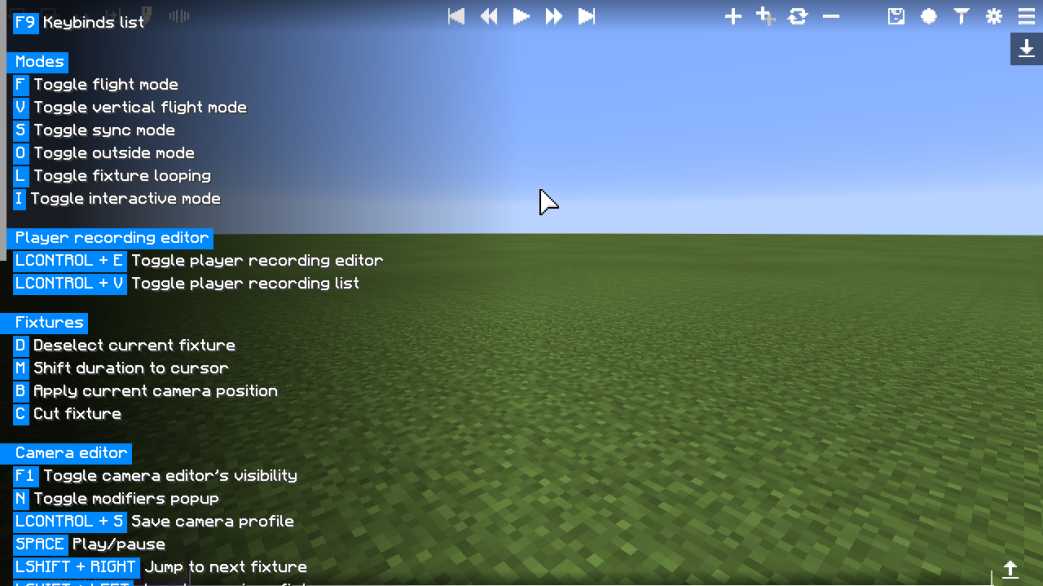
Tooltips 工具提示
In older versions, only button elements supported tooltips, now, literally any element can have a tooltip. Beside that, inventory and slots elements got vanilla item tooltips, which could be useful.
在旧版本中,只有按钮控件支持工具提示,现在,基本上所有控件都会有工具提示。 除此之外,背包和物品栏中的控件还会包含原版物品工具提示,可能会派上用场。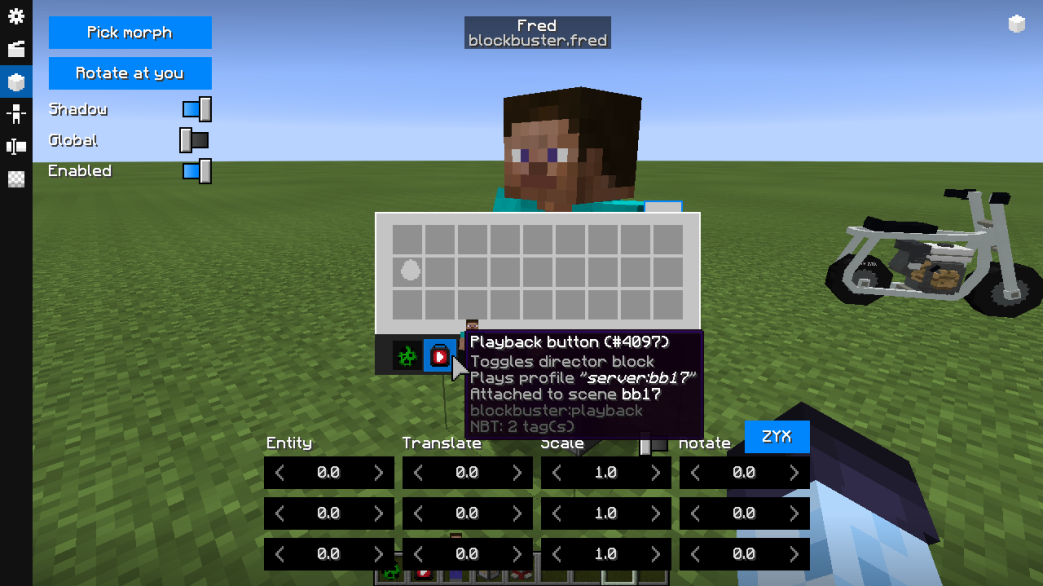
Context menus 下拉菜单
All the GUI elements also can have context menus, for now, only Metamorph fully uses those. Just right click on the element, and if a thing like this pops up, well, it means it works haha.
所有 GUI 控件也都能够拥有下拉菜单,目前暂时只有 Metamorph 完全使用下拉菜单。只需右键单击该控件,然后弹出一个像这样的东西,就表示成功了,我草太好了我们走!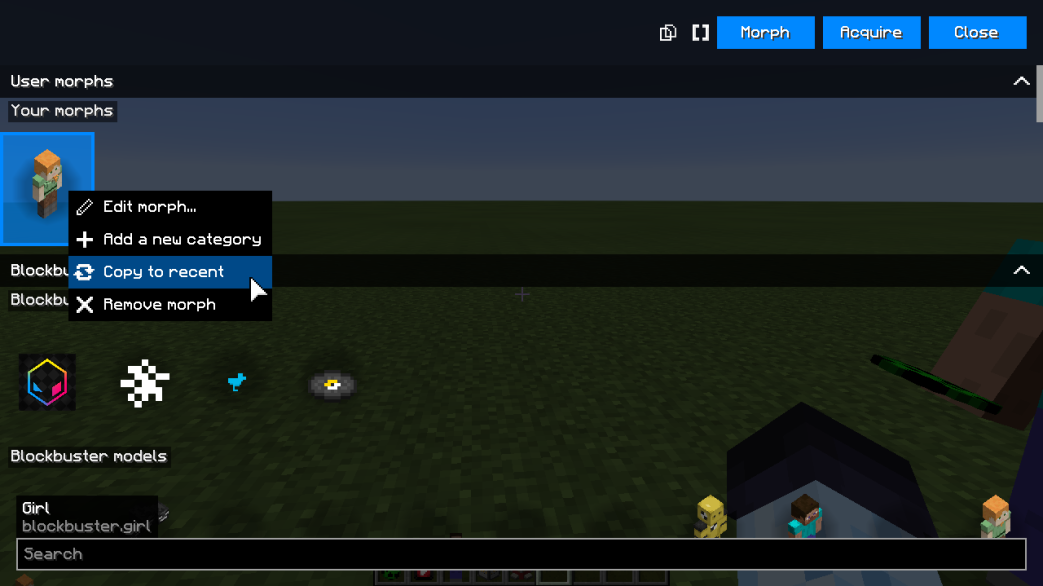
List multi selection and sorting 列表的多选及排序功能
List elements were also greatly improved in this update. Now users can select multiple elements by holding left click (not all list elements enable it though) or change the position of the element by dragging.
列表中的控件在此更新中也得到了极大的改进。 现在,用户可以通过按住鼠标左键来选择多个控件(尽管并非所有列表中的控件都可以适用),也可以拖动更改控件的位置。
At the moment, these two features weren’t used yet, however, sequencer morph GUI uses the sorting feature, so you could rearrange sequences (:wink: @Frtc @Chunk7w)
目前,这两个功能尚未完全启用,但是序列发生器伪装的 GUI 已经能用排序功能了,也就是说你可以调整序列的顺序了(建议自 @Frtc @Chunk7w)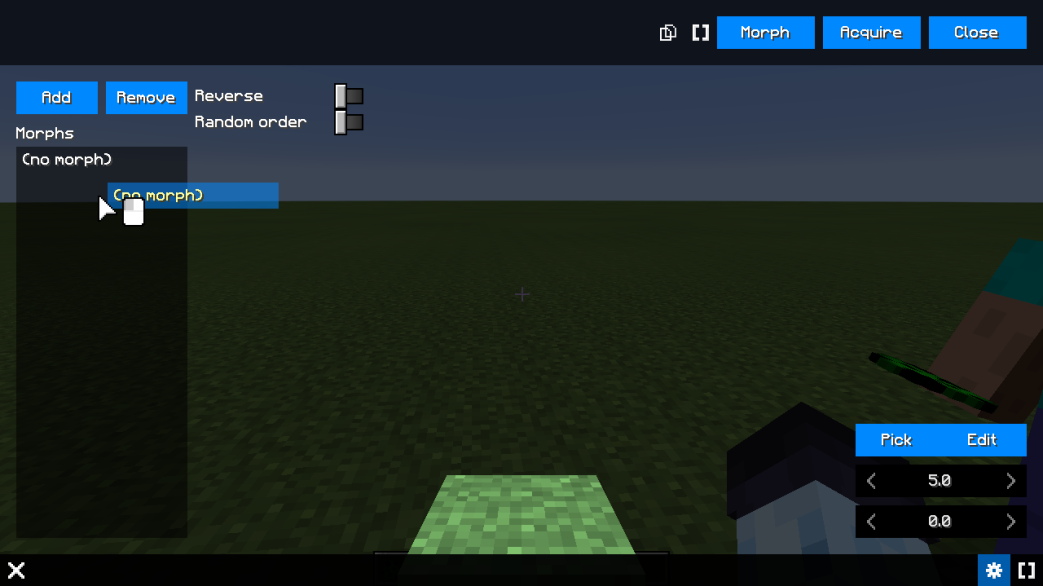
Model renderer 模型渲染器
Model renderer is the element that allows you to preview model. It is used in Blockbuster’s model editor and morph editor. In this update, it was rewritten to use orbit controls, so now it should be much easier to use and navigate.
模型渲染器是使你能够预览模型的控件,用于 Blockbuster 的模型编辑器和伪装编辑器。在此次更新中,它被重写为使用环绕控制,因此现在它会更易于使用和拖动。
Beside that, now it’s used as a default morph preview element in Metamorph.
除此之外,现在它还应用于 Metamorph 的默认伪装预览控件。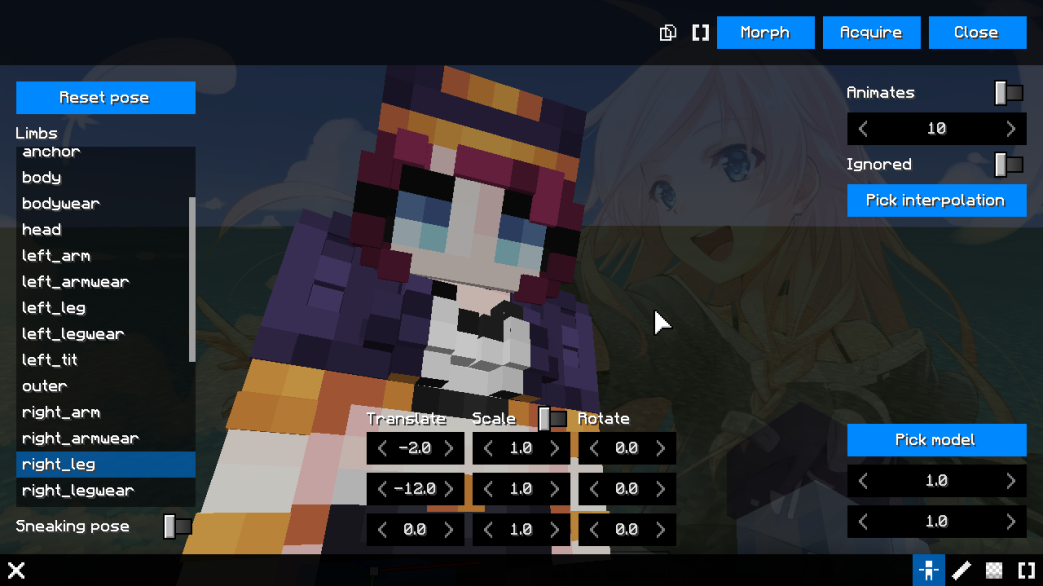
Personal customizations 个性化
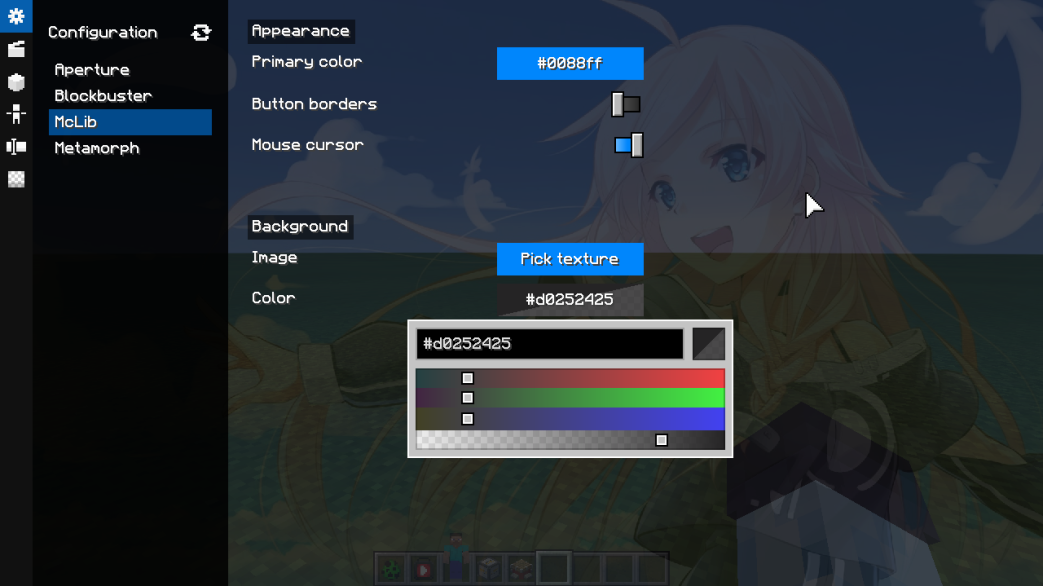
And last but not least, you can customize your own color for buttons by changing the Primary color in McLib’s settings. Beside that, you can also change the background color (with opacity) and a background picture.
最后值得一提的是,您可以通过更改 McLib 设置中的「前景色」来自定义按钮的颜色。 除此之外,您还可以更改背景颜色(包含透明度)和背景图片。
— Metamorph 1.2 —
Just go watch the video: https://www.youtube.com/watch?v=oTuxTZDmR0o
可以去看看这个视频:https://www.bilibili.com/video/BV1t64y1M7qa
— Aperture 1.4 —
I’m going to make the sneak peek later today too, but for now, here are some features.
今天晚些时候也将发布一个前瞻视频,但是现在,这里有一些功能。
Modifier envelopes 调整器包络
This is a new option tab for modifiers, what it allows to do is to setup an envelope. In audio field, envelopes are graphs that allow to setup a behavior for different options, including setup behavior for volume how long it takes to play at full volume, for how long it plays at full volume and how long it takes to fade out after releaseing a key.
这是调整器的新选项卡,用于设置包络。在音频文件中,包络是一种可以为不同的选项设置行为的图形,包括设置需要播放多久才会达到全音量,在全音量下播放需要多长时间,以及松开按键后需要多长时间才能淡出需要。
This feature allows you set when you want the modifiers to play instead of being always enabled. The top fields set the offset from beginning and the end, and the bottom one allows you to set the durations of fade in and fade out. The gear icon allows to change interpolation.
这一功能可以让你设置何时播放调整器,而不是始终保持启用。顶部的输入框设置了开始和结束的偏移量,下面的输入框可以让你设置淡入和淡出的持续时间。齿轮图标可用于更改插值。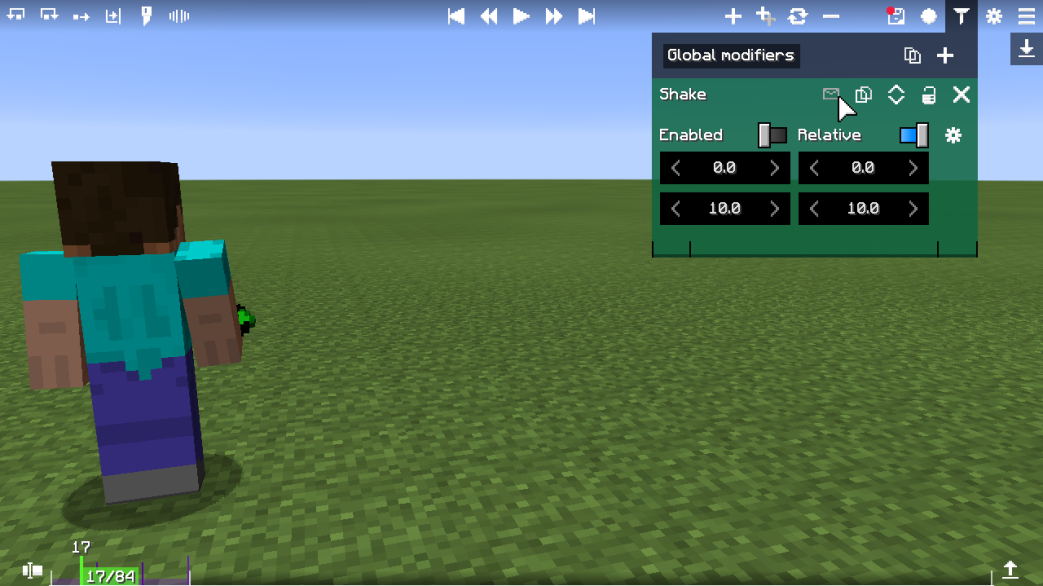
Improved flight mode 改进飞行模式
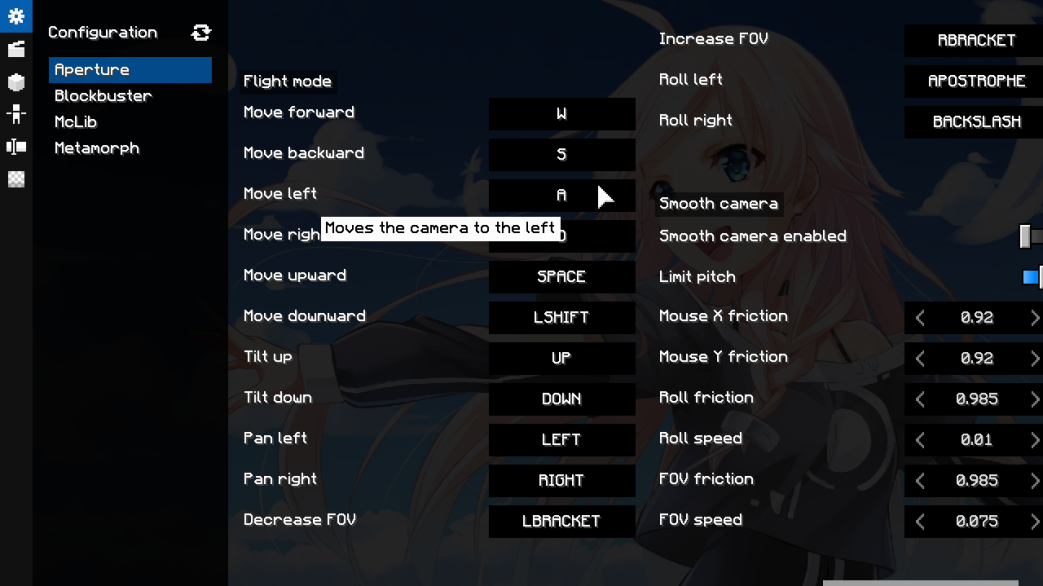
Flight mode was slightly improved. Now you can drag the mouse with left click to orient the camera instead of arrows (arrows weren’t removed), middle click dragging to zoom in/out FOV (instead of ' and \ ) and right click dragging for roll instead of [ and ] .
飞行模式略有改进。你可以用左键拖动鼠标来调整相机的方向,而不必使用键盘的方向键(方向键控制并未被删除),鼠标中键拖动来放大 / 缩小 FOV(而不是 ' 和 \ ),鼠标右键拖动进行翻滚(而不是 [ 和 ] )。
Beside that, I also added configuration of flight mode keybinds for users with different than Qwerty layout (thanks to French users).
除此之外,我还为 QWERTY 键盘布局的用户加入了不同的飞行模式热键配置(感谢法国的用户们)。
Manual fixture 手动关键点
Manual fixture allows to record the manual movement and then use it as a camera fixture. This should be a very nice addition for people who record the old school way of using Optifine’s zoom and shaking the camera a bit.
手动关键点可以记录下手动动作,然后作为相机关键点使用。这是对那些使用 OptiFine 的缩放和甩狙拍片的人来说是个不错的功能。
I haven’t fully test it, but there might be issues with very long durations, as it records a lot of data, kind of like Blockbuster. Thanks to @Dyl_Art and @Lucatim for suggestion!
我还没完整测试过,但在录制时间很长的情况下可能会出些问题,因为它记录了很多的数据,类似于 Blockbuster。感谢 @Dyl_Art 和 @Lucatim 提供的建议!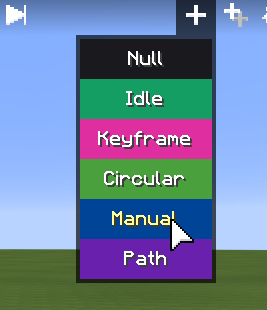
Minema recording panel Minema 录制调整面板
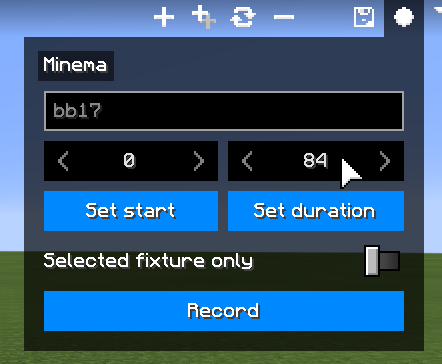
And the most convenient feature of these all is Minema recording panel. What it does is allows to record footage right out of camera editor, no need to come out and press F4 and other silly stuff.
这其中最方便的功能还要数 Minema 录制调整面板。它的作用是能够在相机编辑器中直接录制镜头,不需要退出再按 F4 之类的📢操作。
Just select the start and end points, and click record, and it should record the footage. This means you can use letter box option to be recorded with (which was a requested feature). Also, at the moment, Minema doesn’t overwrite the files, so if you get an error after second recording, please remove the file, or give a different name.
只需选择开始点和结束点,然后点击录制,就能将镜头录下来了。这意味着你可以在启用画面黑边的情况下进行录制(之前就有人提过这个功能了)。另外,目前 Minema 不会覆盖文件,所以如果你在第二次录制后出现错误,请删除文件,或者换个名字。
Crosshair option 十字准心选项
And last but not least, is a crosshair feature which just renders default Minecraft’s crosshair which should let you position stuff in the middle of the screen easier. Thanks @terbin for suggestion.
最后一个也是值得期待的,就是十字准心功能,只是用于渲染默认的 Minecraft 的十字准心,可以让你更容易地定位到屏幕的中间的东西。感谢 @terbin 的建议。
— Blockbuster 1.7-dev7 —
Well, there were already a couple of dev builds, but this dev build makes it work with all the changes made in previously mentioned dev builds, but there were a bunch of bug fixes from this ToDo list:
https://github.com/mchorse/blockbuster/issues/125
啊这,已经有很多开发版了,但这次的开发版兼容了上述更新的所有开发版,然而在待办事项上还有很多需要修复的 BUG:
https://github.com/mchorse/blockbuster/issues/125
And beside that, I changed layouts of many panels within Blockbuster and fixed lots of bugs with GUIs. There isn’t a lot to say, just try it out.
除此之外,我改变了 Blockbuster 中很多面板的布局并且修复了 GUI 中的很多 BUG。没啥可说的,造他就完了。
— Minema 3.5 —
Minema 3.5 doesn’t have a lot of new stuff, it was mostly modified to work with Aperture’s recording panel, however, in this update I fixed the fast forwarding when starting recording, and added depth buffer distance factor which allows to avoid using CrushedPixel’s depth buffer shader since now you can just set the distance in blocks (thanks to @Lucatim for suggestion).
Minema 3.5 并没有太多新功能,它主要是为了配合 Aperture 的录制面板而修改的。但是,在这次更新中,我修复了开始录制时会快进的 BUG,并加入了深度缓冲区距离系数,从而避免了使用 CrushedPixel 的深度缓冲着色器,因为现在你可以以方块为单位设置距离(感谢 @Lucatim 的建议)。
That should be it. Before you could start playing around with all these features I documented above, giving feedback in #dev-feedback and reporting all the cool crashes and bugs you find into #dev-issues, I would like to thank you all for the hype you had.
以上就是本次更新的内容,在开始尝试我上述的特性之前,记得要在 McHorse 的 Discord 频道中的 #dev-feedback 版块提交反馈,并在 #dev-issues 版块反馈你发现的崩溃和漏洞,我要感谢大家的大力宣传。
I’m really glad that people were excited to see and use all these cool features. That was definitely a step up of the game, and I hope to nail these updates before grand release to the public.
我很高兴看到大家知道、使用这些酷炫功能时的兴奋,这是一次质的飞跃,我希望在正式公布之前让这些更新变得更加稳定。
It took me almost 6 weeks to make this dev-build release, so it would be appreciated if you could spread the word or something. If you can afford, and haven’t pledged yet, I also have a Patreon: https://www.patreon.com/McHorse
完成这次开发版的更新花了我将近6周的时间,所以如果你能帮我宣传的话,我会十分感激。如果手头有富裕,而且没欠什么债的话,我还有一个 Patreon,欢迎赞助:https://www.patreon.com/McHorse
Anyways, that’s enough of shameless plug. I’ll probably be fixing any critical bugs once they arise today, but I’ll take a small break once these are sorted out.
打广告到此结束,今天公布这些之后我应该会修复一些关键漏洞,但当解决这些问题后我会小小地休息一下。
Have fun with new features, and make sure to leave as much reactions as possible, because I worked hard on it! :thinking_gun: :heart_eyes:
撒开欢试试这些新特性吧,请一定要尽可能多地留言下你的感受,因为我肝都快爆了!:D :D
下载
请务必同时下载修复版本 ,并将 ultimite-dev-build 中相对应的 MOD 替换为修复版本,再启动游戏
修复版本(持续更新)
📦 blockbuster-1.7-dev8-1.12.2.jar
📦 aperture-1.4-dev2-1.12.2.jar

若有收获,就点个赞吧
0 人点赞


