 |
|---|
| © Karobben |
由於語法渲染問題而影響閱讀體驗, 請移步博客閱讀~
本文GitPage地址
Conky
Another post for Conky: Conky
CODE: Karobben, GitHub
video: 史上最不正經的生物狗, BiliBili
Assign variables
############################ - Graphics settings - ###########################draw_shades nodefault_color cccccccolor0 whitecolor1 1E90FFcolor2 whitecolor3 0084C8
CPU Model
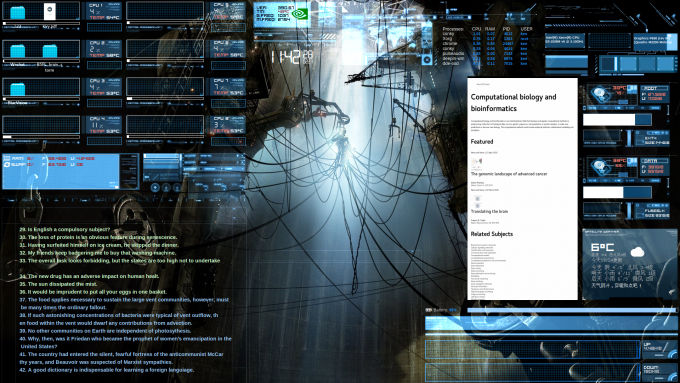
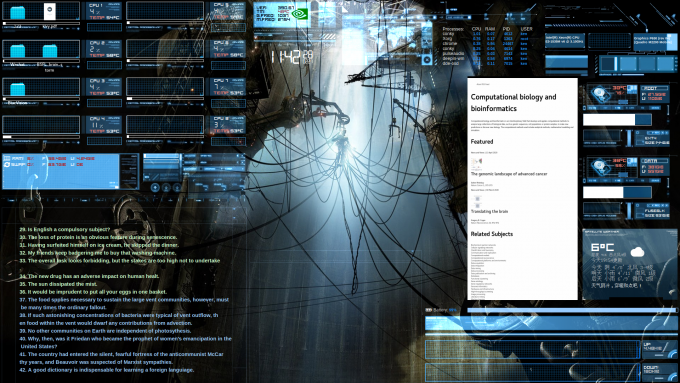
## |--CPU1## Assign the path of the image## -p position${image /home/ken/Desktop/BlueVision/Blue_conky/Resorse/CPU_INTERFACE.png -p 0,0 }${image /home/ken/Desktop/BlueVision/Blue_conky/Resorse/CPU_INFO_PANEL.png -p 225,0 }${image /home/ken/Desktop/BlueVision/Blue_conky/Resorse/CPU_TEMPERATURE_GRAPH.png -p 241,60 }## CPU tag${voffset 1}${voffset -48}${goto 8}${cpugraph cpu1 50,216 1E90FF 0084C8}${color}## CPU usage${voffset -56}${goto 250} ${font HOOGE 05_53:style=Bold:size=9}${color0 white}CPU 1${goto 250} ${font Digital Readout Thick Upright:style=Bold:size=16}${color0}${cpu cpu1} ${font HOOGE 05_53:style=Bold:size=9}%## CPU Tem${voffset 2}${goto 248} ${font HOOGE 05_53:style=Bold:size=10}${color salmon}TEMP ${color white}${execi 30 sensors | grep 'Core 0' | awk '{print $3}' | sed 's/+//'| sed 's/.0.*//' }°C## CPU bar${voffset 2}${goto 8}${cpubar cpu1 7,216}
RAM
##RAM Tag,Usage${voffset -129}${color0}${font ConkyColors:size=15}g${font}${color white}${goto 32}${voffset -6} ${font HOOGE 05_53:style=Bold:size=9}RAM:${goto 78}${color firebrick}$memperc%${color0} ${goto 120}F: ${color firebrick}${memeasyfree} ${goto 200}${color0}U: ${color firebrick}${mem}${color}# |--SWAP${goto 10}${color0}${font ConkyColors:size=15}z${font}${voffset -6}${goto 32}${font HOOGE 05_53:style=Bold:size=9}SWAP:${goto 78}${color firebrick}${swapperc}%${color0} ${goto 120}F: ${color firebrick}$swapmax ${goto 200}${color0}U: ${color firebrick}$swap${color}${font}##RAM bar${voffset -55}${goto 406}${color white}${membar 10,97}${voffset 1}${goto 406}${color white}${swapbar 10,97}
InforBoard
It’ll be rolling-present lines in File1.txt file.
## |--infor board1${voffset 130}${execpi 5 cat /home/ken/Desktop/BlueVision/Blue_conky/File1.txt | fold -w 83 | sed 's/\[ \]/\[ \]/' | sed 's/\[X\]/\[ X \]/' | sed 's/\] /\] ${color white}/' | sed 's/$/${color }/' | sed 's/^/${voffset 4}${goto 55}${color CCFFCC}${font Liberation Sans:style=Bold:size=11}/'| head -n $(echo $(date "+%M")+9|bc)| tail -n 9}${execpi 5 cat /home/ken/Desktop/BlueVision/Blue_conky/File1.txt | fold -w 83 | sed 's/\[ \]/\[ \]/' | sed 's/\[X\]/\[ X \]/' | sed 's/\] /\] ${color white}/' | sed 's/$/${color }/' | sed 's/^/${voffset 4}${goto 55}${color 99CCFF}${font Liberation Sans:style=Bold:size=11}/'| head -n $(echo $(date "+%M")+19|bc)| tail -n 10}${image /home/ken/Desktop/BlueVision/Blue_conky/Resorse/GRID.png -p 0,580 -s 692x500 }${image /home/ken/Desktop/BlueVision/Blue_conky/Resorse/GRID.png # -p 700,700 -s 485x380 }
GPU Module
## |--GPU${voffset -1148}${image /home/ken/Desktop/BlueVision/Blue_conky/Resorse/GPU.png -p 710,0 }${goto 725}${font HOOGE 05_53:style=Bold:size=9}${color black}Ver: ${goto 785}${exec nvidia-settings -q [gpu:0]/NvidiaDriverVersion -t}${goto 725}${font HOOGE 05_53:style=Bold:size=9}${color black}Tm: ${goto 785}${color 993333}${nvidia temp}°C${color}${goto 725}${font HOOGE 05_53:style=Bold:size=9}${color black}G.freq: ${goto 785}${nvidia gpufreq}${goto 725}${font HOOGE 05_53:style=Bold:size=9}${color black}M.freq: ${goto 785}${nvidia memfreq}${voffset -60}${goto 820}${color 008800}${font ConkyColorsLogos:size=40}n${font}${color}
Time & Processes
## |-- Time & Processes${voffset 10}${font Digital Readout Thick Upright:size=40}${goto 750}${color2}${time %k}${voffset -9}:${voffset 9}${time %M}${color2}${voffset -14}${font Digital Readout Thick Upright:size=24}${goto 855}${color2}${time %d}${font Digital Readout Thick Upright:size=12}${voffset 14}${goto 855}${color2}${time %m}${goto 869}${color2}${time %y}${font}${voffset -97}${goto 1250}${voffset -10}Processes: ${color2}${goto 1330} CPU${goto 1370 }RAM${goto 1420 }PID${goto 1470 }USER${color}${voffset -1}${goto 1250}${color2}${top name 1}${color}${font Liberation Sans:style=Bold:size=8}${color1} ${goto 1330}${top cpu 1}${goto 1370 }${top mem 1}${goto 1420 }${top pid 1}${goto 1470 }${top user 1}${color}${font}${voffset -1}${goto 1250}${color2}${top name 2}${color}${font Liberation Sans:style=Bold:size=8}${color1} ${goto 1330}${top cpu 2}${goto 1370 }${top mem 2}${goto 1420 }${top pid 2}${goto 1470 }${top user 2}${color}${font}${voffset -1}${goto 1250}${color2}${top name 3}${color}${font Liberation Sans:style=Bold:size=8}${color1} ${goto 1330}${top cpu 3}${goto 1370 }${top mem 3}${goto 1420 }${top pid 3}${goto 1470 }${top user 3}${color}${font}${voffset -1}${goto 1250}${color2}${top name 4}${color}${font Liberation Sans:style=Bold:size=8}${color1} ${goto 1330}${top cpu 4}${goto 1370 }${top mem 4}${goto 1420 }${top pid 4}${goto 1470 }${top user 4}${color}${font}${voffset -1}${goto 1250}${color2}${top name 5}${color}${font Liberation Sans:style=Bold:size=8}${color1} ${goto 1330}${top cpu 5}${goto 1370 }${top mem 5}${goto 1420 }${top pid 5}${goto 1470 }${top user 5}${color}${font}${voffset -1}${goto 1250}${color2}${top name 6}${color}${font Liberation Sans:style=Bold:size=8}${color1} ${goto 1330}${top cpu 6}${goto 1370 }${top mem 6}${goto 1420 }${top pid 6}${goto 1470 }${top user 6}${color}${font}${voffset -1}${goto 1250}${color2}${top name 7}${color}${font Liberation Sans:style=Bold:size=8}${color1} ${goto 1330}${top cpu 7}${goto 1370 }${top mem 7}${goto 1420 }${top pid 7}${goto 1470 }${top user 7}${color}${font}${image /home/ken/Desktop/BlueVision/Blue_conky/Resorse/ZONES.png -p 960,0 }
CPU and GPU information | Test in Deepin 15.1
## |--C&G infor${voffset -145}${goto 1541}${color white}${font Liberation Sans:style=Bold:size=7}${exec lscpu| grep "Model name:"| awk -F" " '{print $2}'|sed "s/ E3/\nE3/"|head -n 1}${goto 1540}${color white}${exec lscpu| grep "Model name:"| awk -F" " '{print $2}'|sed "s/ E3/\nE3/"|tail -n 1}${voffset -31}${goto 1790}${color white}${exec lspci | grep -i vga| awk -F"HD " '{print $2}'}${goto 1791}${color white}${exec lspci | grep --colour=never -i nvidia| awk -F"M " '{print $2}'| awk -F"(" '{print $1}'}${image /home/ken/Desktop/BlueVision/Blue_conky/Resorse/OVERALL_INTERFACE.png -p 1530,0 }
Battery
## |--BATTERY${voffset 845}${goto 1201}${if_existing /sys/class/power_supply/BAT0}${color0}${font ConkyColors:size=15}6${font}${color} ${voffset -6}Battery: ${font Liberation Sans:style=Bold:size=8}${color1}${battery_percent BAT0}%${color}${font}${voffset -14}${goto 1320}${color 99CCFF}${battery_bar 12,594}
Network
## |--NetWork${voffset 32}${goto 1201}${color #0077ff}${upspeedgraph wlp4s0 48,605 104E8B 0077ff}${voffset 3 }${goto 1201}${color #0077ff}${downspeedgraph wlp4s0 48,605 104E8B 0077ff}${voffset -119 }${goto 1818}${color0}${font HOOGE 05_53:style=Bold:size=9}Up:${goto 1818}$color${font HOOGE 05_53:style=Bold:size=9}${upspeed wlp4s0}${voffset 32 }${goto 1818}${color0}${font HOOGE 05_53:style=Bold:size=9}Down:$color${goto 1818}${font HOOGE 05_53:style=Bold:size=9}${downspeed wlp4s0}${image /home/ken/Desktop/BlueVision/Blue_conky/Resorse/NETWORK_INFO.png -p 1195,885 }${image /home/ken/Desktop/BlueVision/Blue_conky/Resorse/NETWORK2.png -p 1195,955 }${image /home/ken/Desktop/BlueVision/Blue_conky/Resorse/NETWORK2.png -p 1195,1020 }
Enjoy~
由於語法渲染問題而影響閱讀體驗, 請移步博客閱讀~
本文GitPage地址
GitHub: Karobben
Blog:Karobben
BiliBili:史上最不正經的生物狗

若有收获,就点个赞吧
0 人点赞


