由於語法渲染問題而影響閱讀體驗, 請移步博客閱讀~
本文GitPage地址
Conky - the best plug for desktop
reference:aikunzhe
sudo apt-get install conkyconky
sudo apt-get install hddtemp curl lm-sensors conky-allsudo chmod u+s /usr/sbin/hddtempsudo sensors-detectsudo reboot
cp /etc/conky/conky.conf /home/$USER/.conkyrc
You can editing /home/$USER/.conkyrc to personize it.
conky.config
gap_x # initial placegap_y # initial place
Theme from github
git clone https://github.com/aikunzhe/conky_colors.gitcd conky_colorsmakesudo make install## testconky-colors --theme=custom --default-color=black --color0=cyan --color1=green --color2=orange --color3=red --ubuntu --cpu=2--updates --proc=3--clock=default --calendar --nvidia --hd=default --hdtemp1=sda --photo --photord --network --unit=C --side=right --bbcweather=1586--weather=CHXX0100 --rhythmbox=cdconky -c /home/$USER/.conkycolors/conkyrc
效果:
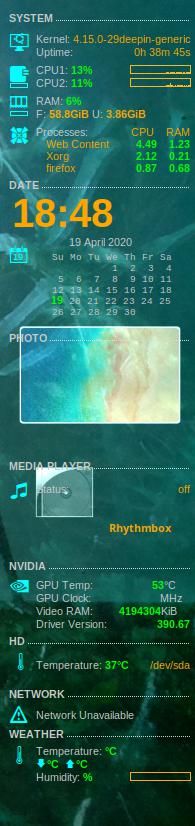
具體配置:
from: aikunzhe
快捷键 Ctrl Alt T 打开一个终端运行以下命令查看帮助,代码:conky-colors --help部份conky-colors命令参数选项介绍:--lang 语言,5.1.2 版没有cn 中文选项,只能用默认的en 英语。--theme 面板主题,brave|carbonite|dust|human|noble|tribute|wine|wise|ambiance|radiance|elementary|cyan|blue|orange|red|green|purple|black|white|custom--side 面板在桌面的位置 left 左, right 右(默认)--ubuntu 显示LOGO,有9个LOGO可选,还可以在配置文件里自定义更多的LOGO--Fedora,--openSUSE,--debian,--arch,--gentoo,--pardus,--xfce,--gnome--cpu 显示CPU信息,双核CPU用2,四核用4,单核用1--cputemp 显示CPU温度--swap 显示swap缓存分区的信息--updates 显示系统需要升级的软件包信息--proc 显示资源占用情况排在前列的进程,3 显示3个进程(最多为10)--clock 显示时钟和日期,有7种形式可选default,classic,slim,modern,lucky,digital,off--calendar 显示月历--nvidia 显示Nidia显卡信息,抱歉没有ATI 的选项--hd 显示硬盘信息,有4中形式可选default,meerkat,mix,simple--hdtemp1 显示第一个硬盘的温度,第2个sata硬盘为 --hdtemp2=sdb--photord 随机显示幻灯片相册,默认使用的是系统桌面背景图片文件夹,可以在脚本 ~/.conkycolors/bin/conkyPhotoRandom 中把 source="/usr/share/backgrounds/" 修改为自定义的图片目录--photo 仅固定显示一张图片,放在 /usr/share/backgrounds/ 内--network 显示网络信息,可以指定使用 --eth 网卡设备,--wlan 无线设备,--ppp 拨号设备 (默认都是0)--battery 显示电池信息--unit 温度单位 C 摄氏 或 F 华氏--rhythmbox 在多媒体栏显示Ubuntu自带的rhythmbox播放器的曲目信息。有7中形式可选:default,cd,case,glassy,vinyl,oldvinyl,simple还支持其他播放器:--covergloobus,--banshee,--exaile--pidgin 可显示pidgin在线的聊天好友按自己需要实现的功能选择相应参数,然后运行conky-colors生成.conkycolors目录和相关文件,你至少需要运行一次这个命令!否则没有.conkycolors这个目录,或者缺少某些程序文件。例如:代码:conky-colors --theme=custom --default-color=black --color0=cyan --color1=green --color2=orange --color3=red --ubuntu --cpu=2--updates --proc=3--clock=default --calendar --nvidia --hd=default --hdtemp1=sda --photo --photord --network --unit=C --side=right --bbcweather=1586--weather=CHXX0100 --rhythmbox=cd然后生成conkyrc配置文件,存放在 /home/用户名/.conkycolors 目录下,如果没有.conkycolors这个目录,可以自己创建。提示:在Linux中,凡是名称以点号开头的文件或文件夹,默认都是隐藏不见的。在窗口中,按下 Ctrl H 键即可显示隐藏文件。在终端下,可以用 ls -a 命令查看隐藏文件。
./conky-colors <options>options:-------------- LANGUAGES ----------------lang=<language> - Set default languageLanguages: bg|de|el|en*|et|fr|it|pl|pt|ru|es|uk-------------- THEMES ----------------theme=<theme> - Set default theme colorThemes: brave|carbonite|dust|human*|noble|tribute|wine|wise|ambiance|radiance|elementary|cyan|blue|orange|red|green|purple|black|white|customWork only with --theme=custom--default-color=<value>--color0=<value>--color1=<value>--color2=<value>--color3=<value>--dark - Set Dark Brightness-------------- DEFAULT MODE ----------------<logo> - Replace computer icon for distro LogoLogos: ubuntu|fedora|opensuse|debian|arch|gentoo|pardus|xfce|gnome--cpu=<number> - Set number of cpu cores--cputemp - Enable CPU temperature--swap - Enable SWAP--battery - Enable battery--battery-value=<number> - Change battery device number </proc/acpi/battery>--updates - Show updates for Debian/Ubuntu--proc=<number> - Enable processes [Max = 10]--clock=<default|modern|digital|off>--nodata - disable Data--calendar - Enable calendar--calendarm - Enable calendar with monday as first day--calendarzim - Enable calendar with Zim support--nvidia - Enable nvidia gpu--task - Enable Task [type "ct help" in terminal for info]--hd=<default|meerkat|mix|simple> - Enable HD--hdtemp1=<device> - Enable HD temperature [Ex: --hdtemp1=sda]--hdtemp2=<device> - Enable HD temperature [Ex: --hdtemp2=sdb]--hdtemp3=<device> - Enable HD temperature [Ex: --hdtemp3=sdc]--hdtemp4=<device> - Enable HD temperature [Ex: --hdtemp4=sdd]--photo - Enable Photo--photord - Enable Photo in random mode--mpd - Enable MPD--banshee=<default|cd|case|glassy|vinyl|oldvinyl|simple>--clementine=<default|cd|case|glassy|vinyl|oldvinyl|simple>--rhythmbox=<default|cd|case|glassy|vinyl|oldvinyl|simple>--covergloobus - Enable CoverGloobus--gmail - Enable gmail notify--user=<username> - Type your username--passwd=<password> - Type your password--network - Enable network--eth=<number> - Change ethernet device [Default=0]--wlan=<number> - Change wireless device [Default=0]--ppp=<number> - Change 3g modem device [Default=0]--unit=<C|F>- Force output temperature either in Celius or Fahrenheit--weather=<AreaID> - Enable weather[Ex: --weather=BRXX0043]--bbcweather=<AreaID> - Enable weather[Ex: --bbcweather=3849]--side=<left|right*> - Set the side of conky in your screem-------------- CAIRO/RING MODE ----------------cairo - Enable cairo-conky mode.--ring - Enable ring-conky mode.--cpu=<number> - Set number of cpu cores--swap - Enable SWAP [cairo-mode only]--clock=<cairo|bigcairo> - Enable/disable clock [cairo-mode only]--banshee=<cairo|cairo-case|cairo-cd|cairo-glassy|lua> [cairo-mode only]--clementine=<cairo|cairo-case|cairo-cd|cairo-glassy|lua> [cairo-mode only]--rhythmbox=<cairo|cairo-case|cairo-cd|cairo-glassy|lua> [cairo-mode only]--banshee=<ring|ring-case|ring-cd|ring-glassy> [ring-mode only]--clementine=<ring|ring-case|ring-cd|ring-glassy> [ring-mode only]--rhythmbox=<ring|ring-case|ring-cd|ring-glassy> [ring-mode only]--network - Enable network--unit=<C|F>- Force output temperature either in Celius or Fahrenheit-------------- BOARD/SLIM MODE ----------------board - Enable board-conky mode.--slim - Enable slim-conky mode.--w=<width> - Set your screen width--h=<height> - Set your screen height--nobg - Remove background--posfix=<number> - fix ring position--weather=<AreaID> - Enable weather[Ex: --weather=BRXX0043]--unit=<C|F>- Force output temperature either in Celius or Fahrenheit-------------- SLS MODE ----------------sls - Enable SLS-conky mode.--nobg - Remove background--weather=<AreaID> - Enable weather[Ex: --weather=BRXX0043]--user=<username> - Type your gmail username--passwd=<password> - Type your gmail password-------------- EXTRA OPTIONS ----------------datadir=/path/to/datadir - it overrides default datadir--createlocalcopy - it copies the content of system datadir to /home/ken/.conkycolors--nofilecheck - disables checking the presence of files--default_datadir - prints the order of default datadirs in which files are searched by default.--finddir=FILE - this option makes this program find and print out a directory where FILE is located.--argb-value=0-255 - Set the value of own_window_argb_value, the default is 200--install=local(*), system, or custom - install generated configuration files to a chosen datadir.--systemdir - displays the system directory for conkycolors.--localdir - displays the local directory for conkycolors.(*)default values
task 文件在 /home/$USER/.conkycolors/tasks
conky-colors --theme=blue  --default-color=black --color0=cyan --color1=green  \
--color2=orange --color3=red \ # basic thmeme
--debian --updates    \   # system $ update information
--cpu=8 --cputemp    \   # cpu and cmp tmp
--nvidia            \    # gpu infor
--swap               \   # Ram
--battery            \    # Battery inf
--proc=10           \    #task
--clock=digital  --calendarm  \    # Date
--task              \    # personal task, stort at /home/$USER/.conkycolors/tasks
--hd=default --hdtemp1=sda  --hdtemp2=sda2  \   #hard drive Tm
--banshee=simple --clementine=default --rhythmbox=default  \    #Media player
##--network          \    # fail to show on my computer
## --board/--slim    \    # fail to show on my computer
## --weather=BRXX0043\    # fail to request the Tm
conky-colors --theme=blue  --default-color=black --color0=cyan --color1=green  \
--color2=orange --color3=red \
--debian --updates    \
--cpu=8 --cputemp    \
--nvidia            \
--swap               \
--battery            \
--proc=10           \
--clock=digital  --calendarm  \
--task              \
--hd=default --hdtemp1=sda  --hdtemp2=sda2  \
--banshee=simple --clementine=default --rhythmbox=default
开机启动
reference:Micr067
创建启动文件并加入以下配置
locate autostart 查找系统启动文件目录
我的栗子:
sudo vim /etc/xdg/autostart/conky.desktop
输入一下文本
[Desktop Entry]
Name=conky
Type=Application
Exec=/usr/bin/conky
保存(:wq!)并退出 reboot
conky主题网站
reference:潘哒mate
https://www.deviantart.com/customization/skins/linuxutil/applications/conky/newest/
tutorial:https://www.cnblogs.com/MineLSG/p/10413608.html
Enjoy~
由於語法渲染問題而影響閱讀體驗, 請移步博客閱讀~
本文GitPage地址
GitHub: Karobben
Blog:Karobben
BiliBili:史上最不正經的生物狗

若有收获,就点个赞吧
0 人点赞


