1.什么是 Stream
流( Stream)到底是什么呢?
是数据渠道,用于操作数据源(集合、数组等)所生成的元素序列
“集合讲的是数据,流讲的是计算!”
Stream的操作三个步骤
- 创建操作
一个数据源(如: 集合, 数组), 获取一个流
- 中间操作
一个中间操作链, 对数据源的数据进行处理
- 终止操作(终端操作)
一个终止操作, 执行中间操作链, 并产生结果
注意:
① Stream自己不会存储元素。
② Stream不会改变源对象。相反,他们会返回一个持有结果的面stam
③ Stream操作是延迟执行的。这意味着他们会等到需要结果的时候才执行。
2.创建流
public class TestStreamAPI1 {public void test1(){//1.可以通过Collection 系列集合提供的stream() 或parallelStream()ArrayList<String> list = new ArrayList<>();Stream<String> stream1 = list.stream();//2.通过 Arrays中的静态方法 stream()获取数组流Employee[] employees = new Employee[10];List<Employee[]> stream2 = Arrays.stream(employees);//3. 通过Stream 类中的静态方法of()Stream<String> stream3 = Stream.of("aa", "bb", "cc");//4.创建无限流//迭代Stream<Integer> stream4 = Stream.iterate(0, (x) -> x + 2);stream4.forEach(System.out::println);//生成Stream.generate(() -> Math.random()).limit(5).forEach(System.out::println);}}
2.1 通过Collection 系列集合提供的stream() 或parallelStream()
首先,java.util.Collection接口中加入了default方法stream用来获取流,所以其所有实现类均可获取流
default Stream<E> stream() {return StreamSupport.stream(spliterator(), false);}
java.util.Collection<E>新添加了两个默认方法
- default Stream stream() : 返回串行流
- default Stream parallelStream() : 返回并行流
可以发现,stream()和parallelStream()方法返回的都是java.util.stream.Stream<E>类型的对象,说明它们在功能的使用上是没差别的。唯一的差别就是单线程和多线程的执行
并行流的问题
发现一个查询返回一会是3,一会是4
for (int i = 0; i < 100; i++) {List<String> list1 = new ArrayList<>();List<String> list2 = new ArrayList<>();list1.add("a");list1.add("b");list1.add("c");list1.add("d");list1.parallelStream().forEach(list -> list2.add(list));System.out.println(list2.size());}
循环100次,会出现3,分析原因:ArrayList是线程不安全的,在并行流时,会出现并发问题。
所以项目中不要动不动就用ArrayList,在高并发的情况下可能会有问题
Arraylist本身底层是一个数组,多线程并发下线程并不安全,操作出现的原因无非就是多个线程赋值可能同时操作同一个地址,后赋值的把先赋值的给覆盖掉了,才会出现这种问题**
2.2. 通过 Arrays中的静态方法 stream()获取数组流
//2.通过 Arrays中的静态方法 stream()获取数组流Employee[] employees = new Employee[10];List<Employee[]> stream2 = Arrays.stream(employees);
2.3. 通过Stream 类中的静态方法of()
//3. 通过Stream 类中的静态方法of()Stream<String> stream3 = Stream.of("aa", "bb", "cc");
2.4. 创建无限流
//4.创建无限流//迭代Stream<Integer> stream4 = Stream.iterate(0, (x) -> x + 2);stream4.forEach(System.out::println);//生成Stream.generate(() -> Math.random()).limit(5).forEach(System.out::println);
2.5 组合concat
两个流合并为一个流,与java.lang.String中的concat方法不同
public static <T> Stream<T> concat(Stream<? extends T> a, Stream<? extends T> b)
3.操作流
多个中间操作可以连接起来形成一个流水线, 除非流水线上触发终止操作, 否则中间操作不会执行任何的处理!
而在终止操作时一次性全部处理, 称为”惰性求值”
a.筛选与切片**
filter
—接收Lambda,从流中排除某些操作;
limit
—截断流,使其元素不超过给定对象
skip
—跳过元素,返回一个扔掉了前n个元素的流,若流中元素不足n个,则返回一个空流,与limit(n)互补
distinct
—筛选,通过流所生成元素的hashCode()和equals()去除重复元素。
举个简单的例子:
假设有一个Person类和一个Person列表,现在有个需求:
1)找到年龄大于18岁的人并输出;
@Dataclass Person {private String name;private Integer age;private String country;private char sex;public Person(String name, Integer age, String country, char sex) {this.name = name;this.age = age;this.country = country;this.sex = sex;}}
List<Person> personList = new ArrayList<>();personList.add(new Person("欧阳雪",18,"中国",'F'));personList.add(new Person("Tom",24,"美国",'M'));personList.add(new Person("Harley",22,"英国",'F'));personList.add(new Person("向天笑",20,"中国",'M'));personList.add(new Person("李康",22,"中国",'M'));personList.add(new Person("小梅",20,"中国",'F'));personList.add(new Person("何雪",21,"中国",'F'));personList.add(new Person("李康",22,"中国",'M'));
public static void main(String[] args) {//1.filter,找到年龄大于18岁的人并输出;personList.stream().filter((p) -> p.getAge() > 18).forEach(System.out::println);//2.limit,只取前两个personList.stream().filter((p) -> p.getSex() == 'F').limit(2).forEach(System.out::println);//3.skip跳过第一个,从第2个女性开始,取出所有女性personList.stream().filter((p) -> p.getSex() == 'F').skip(1).forEach(System.out::println);//4.distinct, 取出所有男性,并取出重复的人personList.stream().filter((p) -> p.getSex() == 'M').distinct().forEach(System.out::println);}
b.映射
map
—接收Lambda,将元素转换成其他形式或提取信息。 接收一个函数作为参数,该函数会被应用到每个元素上,并将其映射成一个新的元素。
例1:比如,我们用一个PersonCountry类来接收所有的国家信息:
@Dataclass PersonCountry {private String country;}personList.stream().map((p) -> {PersonCountry personName = new PersonCountry();personName.setCountry(p.getCountry());return personName;}).distinct().forEach(System.out::println);//---------//输出结果为://PersonName(country=中国)//PersonName(country=美国)//PersonName(country=英国)
例2:假如有一个字符列表,需要提出每一个字符
//根据字符串获取字符方法:
public static Stream<Character> getCharacterByString(String str) {

    List<Character> characterList = new ArrayList<>();

    for (Character character : str.toCharArray()) {
        characterList.add(character);
    }

    return characterList.stream();
}


List<String> list = Arrays.asList("aaa","bbb","ccc","ddd","ddd");

final Stream<Stream<Character>> streamStream = list.stream()
    .map(TestStreamAPI::getCharacterByString);
streamStream.forEach(System.out::println);

//运行结果:
//java.util.stream.ReferencePipeline$Head@3f91beef
//java.util.stream.ReferencePipeline$Head@1a6c5a9e
//java.util.stream.ReferencePipeline$Head@37bba400
//java.util.stream.ReferencePipeline$Head@179d3b25
//java.util.stream.ReferencePipeline$Head@254989ff
从输出结果及返回结果类型(Stream
要想打印出我们想要的结果,需要对流中的每个流进行打印:
streamStream.forEach(sm -> sm.forEach(System.out::print));

运行结果为:
aaabbbcccdddddd
但我们希望的是返回的是一个流,而不是一个包含了多个流的流,而flatMap可以帮助我们做到这一点。
flatMap
—接收一个函数作为参数,将流中的每个值都换成另一个流,然后把所有流连接成一个流
改写上面的方法,将map改成flatMap:
final Stream<Character> characterStream = list.stream()
    .flatMap(TestStreamAPI::getCharacterByString);

characterStream.forEach(System.out::print);

//运行结果为:
//aaabbbcccdddddd
使用flatMap方法的效果是,各个数组并不是分别映射成一个流,而是映射成流的内容。
所有使用map(Arrays::stream)时生成的单个流都被合并起来,即扁平化为一个流
一言以蔽之,flatmap方法让你把一个流中的每个值都换成另一个流,然后把所有的流连接 起来成为一个流。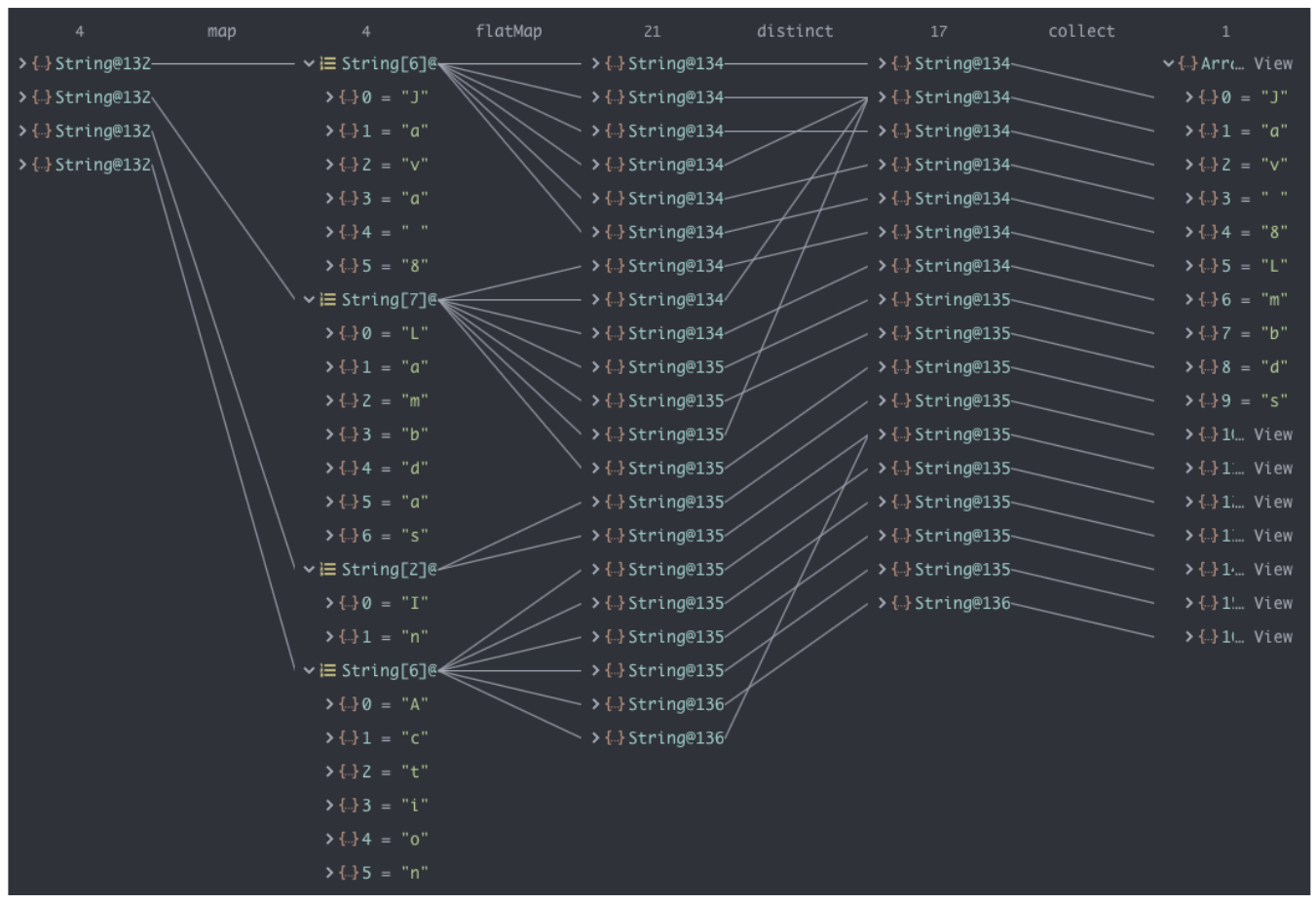
c.排序
sorted()
—自然排序(Comparable)
sorted(Comparator com)
—定制排序(Comparator)
**
自然排序比较好理解,这里只讲一下定制排序,
对前面的personList按年龄从小到大排序,年龄相同,则再按姓名排序:
final Stream<Person> sorted = personList.stream().sorted((p1, p2) -> {

    if (p1.getAge().equals(p2.getAge())) {
        return p1.getName().compareTo(p2.getName());
    } else {
        return p1.getAge().compareTo(p2.getAge());
    }
});
sorted.forEach(System.out::println);
4.终止流
a.查找&匹配
allMatch
—检查是否匹配所有元素
final Stream<Person> stream = personList.stream();
        final boolean adult = stream.allMatch(p -> p.getAge() >= 18);
        System.out.println("是否都是成年人:" + adult);

final boolean chinaese = personList.stream()
            .allMatch(p -> p.getCountry().equals("中国"));
        System.out.println("是否都是中国人:" + chinaese);
anyMatch
—检查是否有匹配至少一个元素
final boolean chinaese = personList.stream()
            .anyMatch(p -> p.getCountry().equals("中国"));
        System.out.println("是否有中国人:" + chinaese);
noneMatch
—检查是否没有匹配的元素
final boolean chinaese = personList.stream()
            .noneMatch(p -> p.getCountry().equals("中国"));
        System.out.println("没有中国人?:" + chinaese);
findFirst
—返回第一个元素
Optional<Person> first = personList.stream().findFirst();
findAny
—返回当前流中的任意一元素
Optional<Person> first = personList.stream().findAny();
count
—返回流中元素的总数
List<Integer> list = Arrays.asList(1,3,2,6,8,3,9);
long count = list.stream().count();
System.out.println(count);

-----------------输出----------------
7
max/min
—返回流中最大值
final Optional<Person> maxAge = personList.stream()
    .max((p1, p2) -> p1.getAge().compareTo(p2.getAge()));
        System.out.println("年龄最大的人信息:" + maxAge.get());

final Optional<Person> minAge = personList.stream()
    .min((p1, p2) -> p1.getAge().compareTo(p2.getAge()));
        System.out.println("年龄最小的人信息:" + minAge.get());
forEach
—遍历流中的元素
 List<Integer> list = Arrays.asList(1,3,2,6,8,3,9);
 list.stream().forEach(System.out::println);
b.归约
reduce(BinaryOpreator)
—-可以将流中元素反复结合起来,返回Optional< T >
第一次执行时,accumulator函数的第一个参数为流中的第一个元素,第二个参数为流中元素的第二个元素;
第二次执行时,第一个参数为第一次函数执行的结果,第二个参数为流中的第三个元素;依次类推
 List<Integer> list = Arrays.asList(1,3,2,6,8,3,9);
 Optional<Integer> reduce = list.stream().reduce((x, y) -> x + y);
 System.out.println(reduce.get());
  -----------------输出----------------
 32
reduce(T identity,BinaryOperator)
—可以将流中元素反复结合起来得到一个值,返回T
流程跟上面一样,只是第一次执行时,accumulator函数的第一个参数为identity,
而第二个参数为流中的第一个元素
 List<Integer> list = Arrays.asList(1,3,2,6,8,3,9);
 Integer reduce = list.stream().reduce(0, (x, y) -> x + y);
 System.out.println(reduce);
 -----------------输出----------------
 32
c.收集
collect
—将流转换为其他形式,接收一个Collector接口的实现,用于给Stream中元素做汇总的方法
Colloector 接口中方法的实现决定了如何对流执行收集操作(如收集到List、Set、Map中)
但是Collectots实用类提供了很多静态方法,可以方便的创建常见收集器实例
接下来进行详细介绍
首先创建一个实体类
public class User {
    private String name;
    private Integer age;
    private double salary;

    public User(String name, Integer age, double salary) {
        this.name = name;
        this.age = age;
        this.salary = salary;
    }

    public String getName() {
        return name;
    }

    public void setName(String name) {
        this.name = name;
    }

    public Integer getAge() {
        return age;
    }

    public void setAge(Integer age) {
        this.age = age;
    }

    public double getSalary() {
        return salary;
    }

    public void setSalary(double salary) {
        this.salary = salary;
    }

    @Override
    public String toString() {
        return "User{" +
                "name='" + name + '\'' +
                ", age=" + age +
                ", salary=" + salary +
                '}';
    }

    @Override
    public boolean equals(Object o) {
        if (this == o) return true;
        if (o == null || getClass() != o.getClass()) return false;
        User user = (User) o;
        return Double.compare(user.salary, salary) == 0 &&
                Objects.equals(name, user.name) &&
                Objects.equals(age, user.age);
    }

    @Override
    public int hashCode() {
        return Objects.hash(name, age, salary);
    }
}
在测试类中准备好数据
public class StreamTest {
     List<User> user = Arrays.asList(new User("张三",12,1000.00),
                                    new User ("李四",32,4000),
                                    new User ("王五",40,4000),
                                    new User ("王五",40,4000));
}
- 根据名称生成一个新的List
List<String> list = user.stream().map(User::getName).collect(Collectors.toList());
list.forEach(System.out::println);
-----------------输出--------------
张三
李四
王五
王五
2.根据名称生成一个新的Set
 Set<String> set = user.stream().map(User::getName).collect(Collectors.toSet());
 set.forEach(System.out::println);
 -----------------输出--------------
 张三
 李四
 王五
根据名称生成一个新的HashSet
HashSet<String> hashSet = user.stream()
  .map(User::getName)
  .collect(Collectors.toCollection(HashSet::new));

hashSet.forEach(System.out::println);
-----------------输出--------------
李四
张三
王五
4.获取流中的元素总数
Long count = user.stream().collect(Collectors.counting());
System.out.println(count);
-----------------输出--------------
4
5.根据工资获取平均值
Double avg = user.stream()
    .collect(Collectors.averagingDouble(User::getSalary));
System.out.println(avg);
-----------------输出--------------
3250.0
6.根据工资获取总和
Double sum = user.stream().collect(Collectors.summingDouble(User::getSalary));
System.out.println(sum);
-----------------输出--------------
13000.0
根据工资获取组函数
DoubleSummaryStatistics sum = user.stream()
 .collect(Collectors.summarizingDouble(User::getSalary));
System.out.println(sum);
-----------------输出--------------
DoubleSummaryStatistics{count=4, sum=13000.000000, min=1000.000000, average=3250.000000, max=4000.000000}
根据工资获取最大值
Optional<User> max = user.stream()
  .collect(Collectors.maxBy(Comparator.comparingDouble(User::getSalary)));
System.out.println(max.get());
-----------------输出--------------
User{name='李四', age=32, salary=4000.0}
9.根据工资获取最小值
 Optional<User> min = user.stream()
     .collect(Collectors.minBy(Comparator.comparingDouble(User::getSalary)));
 System.out.println(min.get());
 -----------------输出--------------
 User{name='张三', age=12, salary=1000.0}
10.分组
//按薪水分组
Map<Double, List<User>> map = user.stream()
    .collect(Collectors.groupingBy(User::getSalary));
System.out.println(map);
-----------------输出--------------
{4000.0=[User{name='李四', age=32, salary=4000.0},
         User{name='王五', age=40, salary=4000.0},
         User{name='王五', age=40, salary=4000.0}],
 1000.0=[User{name='张三', age=12, salary=1000.0}]}
11.多级分组
//按薪水和年龄多级分组
Map<Double, Map<String, List<User>>> collect = user.stream()
    .collect(Collectors.groupingBy(User::getSalary, Collectors.groupingBy(
                u -> {
                    if ( u.getAge() <= 12) {
                        return "青年";
                    } else if ( u.getAge() <= 32) {
                        return "中年";
                    } else {
                        return "老年";
                    }
                }
        )));
System.out.println(collect);
-----------------输出--------------
{4000.0={老年=[User{name='王五', age=40, salary=4000.0},
             User{name='王五', age=40, salary=4000.0}],
         中年=[User{name='李四', age=32, salary=4000.0}]},
 1000.0={青年=[User{name='张三', age=12, salary=1000.0}]}}
12.分区
//按薪水分区
Map<Boolean, List<User>> collect1 = user.stream()
    .collect(Collectors.partitioningBy(e -> e.getSalary() > 3000));
System.out.println(collect1);
-----------------输出--------------
{false=[User{name='张三', age=12, salary=1000.0}],
 true=[User{name='李四', age=32, salary=4000.0},
       User{name='王五', age=40, salary=4000.0},
       User{name='王五', age=40, salary=4000.0}]}
13.连接
//返回所有人的名字并中间加上"--"来连接
String s = user.stream().map(User::getName).collect(Collectors.joining("--"));
System.out.println(s);
-----------------输出--------------
张三--李四--王五--王五

若有收获,就点个赞吧
0 人点赞


