1 换取抠图API
到RemoveBg官网注册账号免费获得API,每月可用50次。
RemoveBg官网:https://www.remove.bg/r/a9Dy3RhvgnKDphmsMbarJYrG
2 安装现需要的库
pip install removebgpip install pillow(python2安装:pip install PILpip install shutil
3 编写代码
#!/usr/bin/env python# _*_ coding: utf-8 _*_# @Time : 2021/10/12 15:07# @Author : cfxin# @File : photo-background-color-change.py# @Software: PyCharm# -*- 功能说明 -*-# 图片抠图和更换背景颜色# -*- 功能说明 -*-import osimport shutilfrom PIL import Imagefrom removebg import RemoveBg# 证件照背景色Background_Color = {'Red': (255, 0, 0, 255),'Blue': (67, 142, 219, 255),'White': (255, 255, 255, 255)}pic = input("Tip:请将图片移至当前所在目录下!\n请输入图片文件名(含文件后缀):") # 图片文件名print("当前所在目录:" + os.getcwd())if os.path.exists('img'):print("\n当前目录已存在img文件夹!!!")else:print("\n正在新建输出目录img ...")new_folder = '%s' % os.mkdir(os.getcwd() + '\\img') # 新建文件夹print("输出目录img创建成功!!!\n")os.chdir('./img') # 切换至img目录下if not os.path.exists(pic):print("\n正在复制图片至img文件夹......")shutil.copy('../' + pic, pic)print("目标图片已复制到img文件夹!\n")path = '%s' % os.getcwd() # 当前所在路径print("当前目标图片路径:\t" + '%s\%s' % (path, pic)) # 输出图片所在路径# Api每月可用50次,降低同一张图片重复抠图频率if os.path.exists(pic + '_no_bg.png'):print("\n当前目录已存在透明背景图片" + pic + '_no_bg.png\n')else:print("\n正在生成错误日志(可不用理会)......")rmbg = RemoveBg("Your-RemoveBg-Api-Key", "error.log") # 密钥,错误日志print("正在进行抠图......")rmbg.remove_background_from_img_file('%s\%s' % (path, pic)) # 抠图print("已生成透明背景图片:" + pic + "_no_bg.png\n")select_bgColor = input("Tip:更换红色背景按 r,更换蓝色背景按 b,更换白色背景按 w \n请选择需要更换的证件照底色:") # 选择所需更换的底色while True:if select_bgColor == 'r':color = 'Red'breakelif select_bgColor == 'b':color = 'Blue'breakelif select_bgColor == 'w':color = 'White'breakelse:select_bgColor = input("\n输入有误!请重新输入:")foreground = Image.open(pic + '_no_bg.png') # 前景图background = Image.new('RGBA', foreground.size, Background_Color[color]) # 背景图,大小同前景图background.paste(foreground, mask=foreground)print("\n正在展示图片......")background.show() # 显示图片print("正在保存图片......\n")new_pic = pic + '_' + color + '.png' # 输出文件名background.save(os.getcwd() + '\\' + new_pic) # 保存图片print("输出路径为:" + os.getcwd())os.chdir('../') # 切换回原工作目录print("\n保存成功!输出文件为:" + new_pic + "\n\n按任意键退出\n") # 显示保存图片名os.system('pause') # 按任意键继续
到此处已经可以实现抠图并更换背景颜色的功能。为了方便使用可以按下面的步骤打包成可执行程序。
4 打包成exe可执行文件
- 安装PyInstaller包:pip install PyInstaller
- 切换至该刚才编写的 .py 文件所在目录下,命令行窗口输入pyinstaller -F Your_File_Name.py
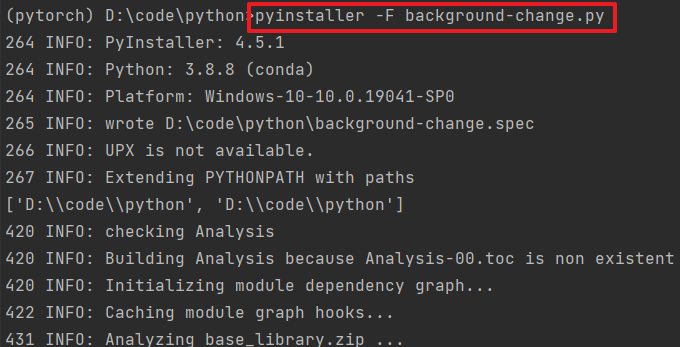
- 打包成功后会出现3个文件夹和一个文件,打包成功的.exe 文件在 dist 目录下


若有收获,就点个赞吧
0 人点赞


