- 引言
- 安装本课程所需的Python第三方模块
- 四行Python代码上手词云制作
- 导入词云制作第三方库wordcloud
- 创建词云对象,赋值给w,现在w就表示了一个词云对象
- 调用词云对象的generate方法,将文本传入
- 将生成的词云保存为output1.png图片文件,保存出到当前文件夹中
- 中文分词
- 高级词云:绘制指定形状的词云
- wujiaoxing.png">6号词云:乡村振兴战略中央文件(五角星形状)wujiaoxing.png
- chinamap.png">7号词云:新时代中国特色社会主义(中国地图形状)chinamap.png
- 三国演义.txt">8号词云:《三国演义》词云(stopwords参数去除词)三国演义.txt
- hamlet.txt alice.png">9号词云:《哈姆雷特》(勾勒轮廓线)hamlet.txt alice.png
- alice_color.png">10号词云:《爱丽丝漫游仙境》词云(按模板填色)alice_color.png
- 进阶词云:尽享数据驱动与开源社区
- 文字情感分析与文本挖掘
- 课后闲话
 ">
">
引言
从四行代码开始,一步步教你做出高大上的词云图片,可视化生动直观展示出枯燥文字背后的核心概念。进一步实现修改字体、字号、背景颜色、词云形状、勾勒边框、颜色渐变、分类填色、情感分析等高级玩法。
学完本课之后,你可以将四大名著、古典诗词、时事新闻、法律法规、政府报告、小说诗歌等大段文本做成高大上的可视化词云,还可以将你的微信好友个性签名导出,看看你微信好友的“画风”是怎样的。
词云的应用场景
- 会议记录
- 海报制作
- PPT制作
- 生日表白
- 数据挖掘
- 情感分析
- 用户画像
- 微信聊天记录分析
- 微博情感分析
- Bilibili弹幕情感分析
- 年终总结
安装本课程所需的Python第三方模块
打开命令行,输入下面这行命令,回车执行即可。pip install numpy matplotlib pillow wordcloud imageio jieba snownlp itchat -i https://pypi.tuna.tsinghua.edu.cn/simple
四行Python代码上手词云制作
1号词云:《葛底斯堡演说》黑色背景词云(4行代码上手)
```python导入词云制作第三方库wordcloud
import wordcloud
创建词云对象,赋值给w,现在w就表示了一个词云对象
w = wordcloud.WordCloud()
调用词云对象的generate方法,将文本传入
w.generate(‘and that government of the people, by the people, for the people, shall not perish from the earth.’)
将生成的词云保存为output1.png图片文件,保存出到当前文件夹中
w.to_file(‘output1.png’)
运行完成之后,在代码所在的文件夹,就会出现`output.png`图片文件。可以看出,wordcloud自动将`and that by the not from`等废话词组过滤掉,并且把出现次数最多的`people`大号显示。<br />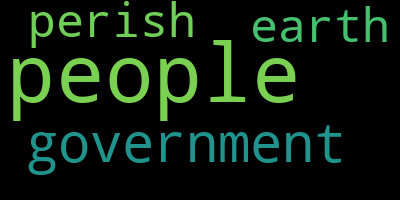<br />`wordcloud`库为每一个词云生成一个WordCloud对象(注意,此处的W和C是大写),也就是说,`wordcloud.WordCloud()`代表一个词云对象,我们将它赋值给`w`。现在,这个`w`就是词云对象啦!我们可以调用这个对象。我们可以在`WordCloud()`括号里填入各种参数,控制词云的字体、字号、字的颜色、背景颜色等等。wordcloud库会非常智能地按空格进行分词及词频统计,出现次数多的词就大。<a name="MPi8l"></a>## 美化词云<a name="7kQXs"></a>#### 2号词云:面朝大海,春暖花开(配置词云参数)增加宽、高、字体、背景颜色等参数。<br />这里使用的HarmonyOS_Sans鸿蒙开源字体,[下载连接](https://communityfile-drcn.op.hicloud.com/FileServer/getFile/cmtyPub/011/111/111/0000000000011111111.20210608111628.62420999153403221248286695242932:50520607053655:2800:27F307A9789BAC4269AD95AC3BB2C8F68B4857BA697D207904B1937733A2C648.zip?needInitFileName=true)。```pythonimport wordcloud# 构建词云对象w,设置词云图片宽、高、字体、背景颜色等参数# HarmonyOS_Sans_SC_Regular.ttf 是鸿蒙简体中文开源字体w = wordcloud.WordCloud(width=1000,height=700,background_color='white',font_path='HarmonyOS_Sans_SC_Regular.ttf')# 调用词云对象的generate方法,将文本传入w.generate('从明天起,做一个幸福的人。喂马、劈柴,周游世界。从明天起,关心粮食和蔬菜。我有一所房子,面朝大海,春暖花开')# 将生成的词云保存为output2-poem.png图片文件,保存到当前文件夹中w.to_file('output2-poem.png')

常用参数
- width 词云图片宽度,默认400像素
- height 词云图片高度 默认200像素
- background_color 词云图片的背景颜色,默认为黑色
background_color='white' - font_step 字号增大的步进间隔 默认1号
font_path 指定字体路径 默认None,对于中文可用font_path='msyh.ttc'
- mini_font_size 最小字号 默认4号
- max_font_size 最大字号 根据高度自动调节
- max_words 最大词数 默认200
- stop_words 不显示的单词
stop_words={"python","java"} - Scale 默认值1。值越大,图像密度越大越清晰
- prefer_horizontal:默认值0.90,浮点数类型。表示在水平如果不合适,就旋转为垂直方向,水平放置的词数占0.9?
- relative_scaling:默认值0.5,浮点型。设定按词频倒序排列,上一个词相对下一位词的大小倍数。有如下取值:“0”表示大小标准只参考频率排名,“1”如果词频是2倍,大小也是2倍
- mask 指定词云形状图片,默认为矩形
通过以下代码读入外部词云形状图片(需要先pip install imageio安装imageio)
import imageiomk = imageio.imread("picture.png")w = wordcloud.WordCloud(mask=mk)
也就是说,我们可以这样来构建词云对象w,其中的参数均为常用参数的默认值,供我们自定义:
w = wordcloud.WordCloud(width=400,height=200,background_color='black',font_path=None,font_step=1,min_font_size=4,max_font_size=None,max_words=200,stopwords={},scale=1,prefer_horizontal=0.9,relative_scaling=0.5,mask=None)
从外部文件读入文本
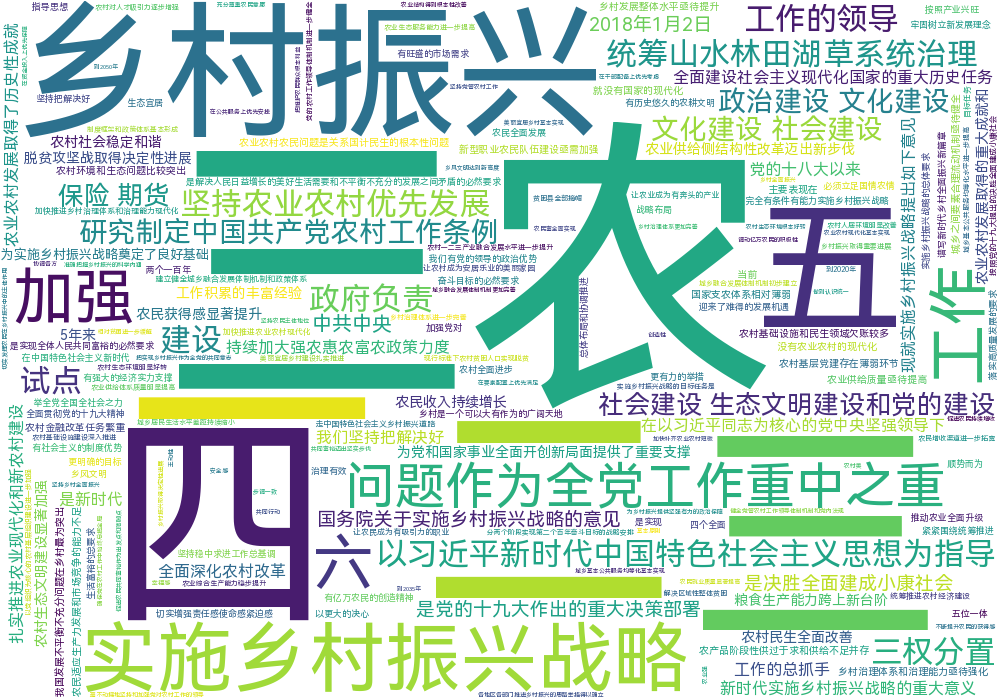
3号词云:乡村振兴战略中央文件(句子云)
import wordcloud# 从外部.txt文件中读取大段文本,存入变量txt中with open('关于实施乡村振兴战略的意见.txt', encoding='utf-8') as file:txt = file.read()# 构建词云对象w,设置词云图片宽、高、字体、背景颜色等参数w = wordcloud.WordCloud(width=1000,height=700,background_color='white',font_path='HarmonyOS_Sans_SC_Regular.ttf')# 将txt变量传入w的generate()方法,给词云输入文字w.generate(txt)# 将词云图片导出到当前文件夹w.to_file('output3-sentence.png')
中文分词
中文分词第三方模块jieba
安装中文分词库jieba:在命令行中输入pip install jieba
打开python的交互式shell界面,也就是有三个大于号>>>的这个界面,依次输入以下命令。
>>> import jieba>>> textlist = jieba.lcut('计算机科学与技术')>>> textlist['计算机科学', '与', '技术']>>> string = " ".join(textlist)>>> string'计算机科学 与 技术'
以上代码将一句完整的中文字符串转换成了以空格分隔的词组成的字符串,而后者是绘制词云时generate()方法要求传入的参数。
中文分词库jieba的常用方法
精确模式(最常用,只会这个就行):每个字只用一遍,不存在冗余词汇。jieba.lcut('计算机科学与技术')全模式:把每个字可能形成的词汇都提取出来,存在冗余。jieba.lcut('计算机科学与技术',cut_all=True)搜索引擎模式:将全模式分词的结果从短到长排列好。jieba.lcut_for_search('计算机科学与技术')
以下命令演示了三种分词模式及结果,精确模式是最常用的。
>>> import jieba>>> textlist1 = jieba.lcut('动力学和电磁学')>>> textlist1['计算机科学', '与', '技术']>>> textlist2 = jieba.lcut('动力学和电磁学',cut_all=True)>>> textlist2['计算', '计算机', '计算机科学', '算机', '科学', '与', '技术']>>> textlist3 = jieba.lcut_for_search('动力学和电磁学')>>> textlist3['计算', '算机', '科学', '计算机', '计算机科学', '与', '技术']
4号词云:西南民族大学介绍词云(中文分词)
import jiebaimport wordcloud# 构建并配置词云对象ww = wordcloud.WordCloud(width=1000,height=700,background_color='white',font_path='HarmonyOS_Sans_SC_Regular.ttf')# 调用jieba的lcut()方法对原始文本进行中文分词,得到stringtxt = '同济大学(Tongji University),简称“同济”,是中华人民共和国教育部直属,由教育部、国家海洋局和上海市共建的全国重点大学,历史悠久、声誉卓著,是国家“双一流”、“211工程”、“985工程”重点建设高校,也是收生标准最严格的中国大学之一'txtlist = jieba.lcut(txt)string = " ".join(txtlist)# 将string变量传入w的generate()方法,给词云输入文字w.generate(string)# 将词云图片导出到当前文件夹w.to_file('output4-tongji.png')
 **
**
5号词云:乡村振兴战略中央文件(词云)
import jiebaimport wordcloud# 构建并配置词云对象ww = wordcloud.WordCloud(width=1000,height=700,background_color='white',font_path='HarmonyOS_Sans_SC_Regular.ttf')# 对来自外部文件的文本进行中文分词,得到stringwith open('关于实施乡村振兴战略的意见.txt', encoding='utf-8') as file:txt = file.read()txtlist = jieba.lcut(txt)string = " ".join(txtlist)# 将string变量传入w的generate()方法,给词云输入文字w.generate(string)# 将词云图片导出到当前文件夹w.to_file('output5-village.png')

高级词云:绘制指定形状的词云
6号词云:乡村振兴战略中央文件(五角星形状)wujiaoxing.png
import jiebaimport wordcloud# 导入imageio库中的imread函数,并用这个函数读取本地图片,作为词云形状图片import imageiomk = imageio.imread("wujiaoxing.png")# 构建并配置词云对象w,注意要加scale参数,提高清晰度w = wordcloud.WordCloud(width=1000,height=700,background_color='white',font_path='HarmonyOS_Sans_SC_Regular.ttf',mask=mk,scale=15)# 对来自外部文件的文本进行中文分词,得到stringf = open('关于实施乡村振兴战略的意见.txt',encoding='utf-8')txt = f.read()txtlist = jieba.lcut(txt)string = " ".join(txtlist)# 将string变量传入w的generate()方法,给词云输入文字w.generate(string)# 将词云图片导出到当前文件夹w.to_file('output6-village.png')

7号词云:新时代中国特色社会主义(中国地图形状)chinamap.png
import jiebaimport wordcloudimport imageiomk = imageio.imread("chinamap.png")# 构建并配置词云对象w,注意要加scale参数,提高清晰度w = wordcloud.WordCloud(width=1000,height=700,background_color='white',font_path='HarmonyOS_Sans_SC_Regular.ttf',mask=mk,scale=15)f = open('新时代中国特色社会主义.txt',encoding='utf-8')txt = f.read()txtlist = jieba.lcut(txt)string = " ".join(txtlist)w.generate(string)w.to_file('output7-chinamap.png')

8号词云:《三国演义》词云(stopwords参数去除词)三国演义.txt
import jiebaimport wordcloudimport imageiomk = imageio.imread("chinamap.png")# 构建并配置词云对象w,注意要加stopwords集合参数,将不想展示在词云中的词放在stopwords集合里,这里去掉“曹操”和“孔明”两个词w = wordcloud.WordCloud(width=1000,height=700,background_color='white',font_path='HarmonyOS_Sans_SC_Regular.ttf',mask=mk,scale=15,stopwords={'曹操','孔明'})f = open('threekingdoms.txt',encoding='utf-8')txt = f.read()txtlist = jieba.lcut(txt)string = " ".join(txtlist)w.generate(string)w.to_file('output8-threekingdoms.png')

9号词云:《哈姆雷特》(勾勒轮廓线)hamlet.txt alice.png
import wordcloudimport imageio# 将外部文件包含的文本保存在string变量中string = open('hamlet.txt').read()mk = imageio.imread("alice.png")# 构建词云对象w,注意增加参数contour_width和contour_color设置轮廓宽度和颜色w = wordcloud.WordCloud(background_color="white",mask=mk,contour_width=1,contour_color='steelblue')w.generate(string)w.to_file('output9-contour.png')

10号词云:《爱丽丝漫游仙境》词云(按模板填色)alice_color.png
# 导入绘图库matplotlib和词云制作库wordcloudimport matplotlib.pyplot as pltfrom wordcloud import WordCloud,ImageColorGenerator# 将外部文件包含的文本保存在text变量中text = open('alice.txt').read()# 导入imageio库中的imread函数,并用这个函数读取本地图片queen2.jfif,作为词云形状图片import imageiomk = imageio.imread("alice_color.png")# 构建词云对象wwc = WordCloud(background_color="white",mask=mk,)# 将text字符串变量传入w的generate()方法,给词云输入文字wc.generate(text)# 调用wordcloud库中的ImageColorGenerator()函数,提取模板图片各部分的颜色image_colors = ImageColorGenerator(mk)# 显示原生词云图、按模板图片颜色的词云图和模板图片,按左、中、右显示fig, axes = plt.subplots(1, 3)# 最左边的图片显示原生词云图axes[0].imshow(wc)# 中间的图片显示按模板图片颜色生成的词云图,采用双线性插值的方法显示颜色axes[1].imshow(wc.recolor(color_func=image_colors), interpolation="bilinear")# 右边的图片显示模板图片axes[2].imshow(mk, cmap=plt.cm.gray)for ax in axes:ax.set_axis_off()plt.show()# 给词云对象按模板图片的颜色重新上色wc_color = wc.recolor(color_func=image_colors)# 将词云图片导出到当前文件夹wc_color.to_file('output10-alice.png')

进阶词云:尽享数据驱动与开源社区
11号词云:绘制你的微信好友个性签名词云(此案例已失效,腾讯关闭了微信网页版登陆接口)
# 微信库ichatimport wordcloudimport itchatimport jiebaimport imageioimport matplotlib.pyplot as pltitchat.login() # 先登录微信,跳出登陆二维码tList = []friends = itchat.get_friends(update=True) # 获取好友列表# 构建所有好友个性签名组成的大列表tListfor i in friends:signature = i["Signature"] # 获取个性签名if 'emoji' in signature:passelse:tList.append(signature)text = " ".join(tList)# 对个性签名进行中文分词wordlist_jieba = jieba.lcut(text, cut_all=True)wl_space_split = " ".join(wordlist_jieba)mk = imageio.imread("chinamap.png")# 构建并配置词云对象w,注意要加scale参数,提高清晰度my_wordcloud = wordcloud.WordCloud(background_color='white',width=1000,height=700,font_path='HarmonyOS_Sans_SC_Regular.ttf',max_words=2000,mask=mk,scale=20)my_wordcloud.generate(wl_space_split)nickname = friends[0]['NickName']filename = "output11-{}的微信好友个性签名词云图.png".format(nickname)my_wordcloud.to_file(filename)# 显示词云图片plt.imshow(my_wordcloud)plt.axis("off")plt.show()print('程序结束')
文字情感分析与文本挖掘
Python中文语言处理第三方库snownlp小试牛刀
安装中文文本分析库snownlp:在命令行中输入pip install snownlp。
打开python的交互式shell界面,也就是有三个大于号>>>的这个界面,依次输入以下命令。
>>> import snownlp>>> word = snownlp.SnowNLP("中华民族伟大复兴")>>> feeling = word.sentiments>>> feeling0.9935086411278989>>> word = snownlp.SnowNLP("快递慢到死,客服态度不好,退款!")>>> feeling = word.sentiments>>> feeling0.00012171645785852281
snownlp的语料库是淘宝等电商网站的评论,所以对购物类的文本情感分析准确度很高。
12号词云:《三国演义》情感分析词云
import jiebaimport wordcloudimport imageioimport snownlpmk = imageio.imread("chinamap.png")# 构建并配置两个词云对象w1和w2,分别存放积极词和消极词w1 = wordcloud.WordCloud(width=1000,height=700,background_color='white',font_path='HarmonyOS_Sans_SC_Regular.ttf',mask=mk,scale=15)w2 = wordcloud.WordCloud(width=1000,height=700,background_color='white',font_path='HarmonyOS_Sans_SC_Regular.ttf',mask=mk,scale=15)# 对来自外部文件的文本进行中文分词,得到积极词汇和消极词汇的两个列表f = open('三国演义.txt',encoding='utf-8')txt = f.read()txt_list = jieba.lcut(txt)positive_list = []negative_list = []# 下面对文本中的每个词进行情感分析,情感>0.96判为积极词,情感<0.06判为消极词print('开始进行情感分析,请稍等,三国演义全文那么长的文本需要三分钟左右')for each in txt_list:each_word = snownlp.SnowNLP(each)feeling = each_word.sentimentsif feeling > 0.96:positive_list.append(each)elif feeling < 0.06:negative_list.append(each)else:pass# 将积极和消极的两个列表各自合并成积极字符串和消极字符串,字符串中的词用空格分隔positive_string = " ".join(positivelist)negative_string = " ".join(negativelist)# 将string变量传入w的generate()方法,给词云输入文字w1.generate(positive_string)w2.generate(negative_string)# 将积极、消极的两个词云图片导出到当前文件夹w1.to_file('output12-positive.png')w2.to_file('output12-negative.png')print('词云生成完成')

13号词云:《三国演义》人物阵营分色词云
from wordcloud import WordCloud, get_single_color_funcimport imageioimport jiebaclass SimpleGroupedColorFunc(object):"""Create a color function object which assigns EXACT colorsto certain words based on the color to words mappingParameters----------color_to_words : dict(str -> list(str))A dictionary that maps a color to the list of words.default_color : strColor that will be assigned to a word that's not a memberof any value from color_to_words."""def __init__(self, color_to_words, default_color):self.word_to_color = {word: colorfor (color, words) in color_to_words.items()for word in words}self.default_color = default_colordef __call__(self, word, **kwargs):return self.word_to_color.get(word, self.default_color)class GroupedColorFunc(object):"""Create a color function object which assigns DIFFERENT SHADES ofspecified colors to certain words based on the color to words mapping.Uses wordcloud.get_single_color_funcParameters----------color_to_words : dict(str -> list(str))A dictionary that maps a color to the list of words.default_color : strColor that will be assigned to a word that's not a memberof any value from color_to_words."""def __init__(self, color_to_words, default_color):self.color_func_to_words = [(get_single_color_func(color), set(words))for (color, words) in color_to_words.items()]self.default_color_func = get_single_color_func(default_color)def get_color_func(self, word):"""Returns a single_color_func associated with the word"""try:color_func = next(color_func for (color_func, words) in self.color_func_to_wordsif word in words)except StopIteration:color_func = self.default_color_funcreturn color_funcdef __call__(self, word, **kwargs):return self.get_color_func(word)(word, **kwargs)mk = imageio.imread("chinamap.png")w = wordcloud.WordCloud(width=1000,height=700,background_color='white',font_path='res/HarmonyOS_Sans_SC_Regular.ttf',mask=mk,scale=15,max_font_size=60,max_words=20000,font_step=1)# 对来自外部文件的文本进行中文分词,得到stringf = open('三国演义.txt', encoding='utf-8')txt = f.read()txt_list = jieba.lcut(txt)sentence = " ".join(txt_list)# 将string变量传入w的generate()方法,给词云输入文字w.generate(string)# 创建字典,按人物所在的不同阵营安排不同颜色,绿色是蜀国,橙色是魏国,紫色是东吴,粉色是诸侯群雄color_to_words = {'green': ['刘备','刘玄德','孔明','诸葛孔明', '玄德', '关公', '玄德曰','孔明曰','张飞', '赵云','后主', '黄忠', '马超', '姜维', '魏延', '孟获','关兴','诸葛亮','云长','孟达','庞统','廖化','马岱'],'red': ['曹操', '司马懿', '夏侯', '荀彧', '郭嘉','邓艾','许褚','徐晃','许诸','曹仁','司马昭','庞德','于禁','夏侯渊','曹真','钟会'],'purple':['孙权','周瑜','东吴','孙策','吕蒙','陆逊','鲁肃','黄盖','太史慈'],'pink':['董卓','袁术','袁绍','吕布','刘璋','刘表','貂蝉']}# 其它词语的颜色default_color = 'gray'# 构建新的颜色规则grouped_color_func = GroupedColorFunc(color_to_words, default_color)# 按照新的颜色规则重新绘制词云颜色w.recolor(color_func=grouped_color_func)# 将词云图片导出到当前文件夹w.to_file('output13-threekingdoms.png')
课后闲话
wordcloud库
词云绘制的原理

若有收获,就点个赞吧
0 人点赞


