在本地仓库和远程仓库之间的一个仓库
maven私服就是公司局域网内的maven远程仓库
每个员工的电脑上安装maven软件并且连接maven私服,程序员可以将自己开发的项目打成jar并发布到私服,其它项目组成员就可以从私服下载所依赖的jar。私服还充当一个代理服务器的角色,当私服上没有jar包时会从maven中央仓库自动下载。
nexus可以充当maven私服
nexus下载https://help.sonatype.com/repomanager2/download/download-archives—-repository-manager-oss
解压
在bin目录下打开以管理员身份打开cmd 可先以管理员身份打开cmd在cd到bin目录
执行nexus.bat install命令 完成安装
services.msc在系统中启动nexus
成功启动后访问http://localhost:8081/nexus
使用默认用户名admin和密码admin123
点击左侧菜单Repositories可以看到nexus内置的仓库列表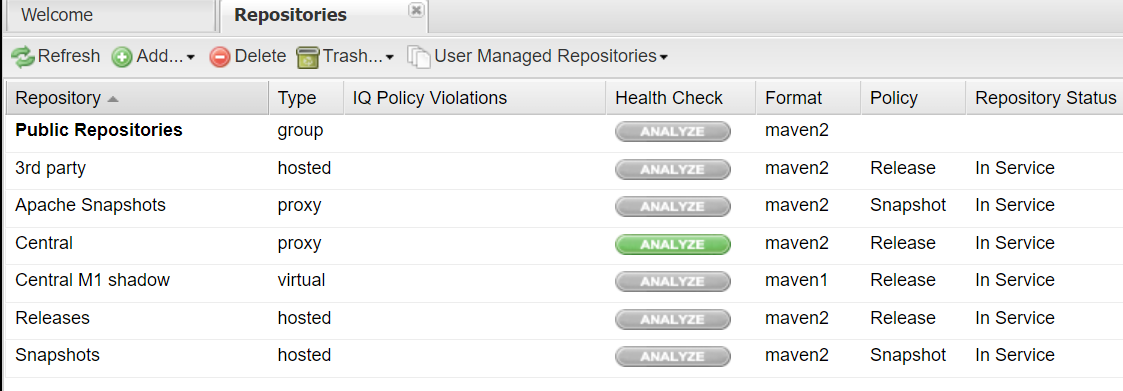
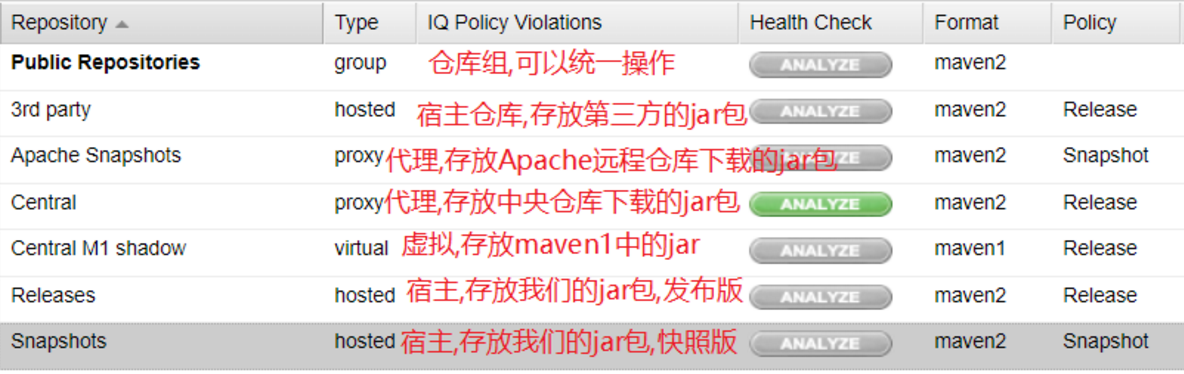
1. hosted (宿主)
1). 作用: 部署自己开发(上传)的jar到这个类型的仓库
2). 具体有三个
I. snapshots: ★快照版,内部使用的测试版发布仓库
只要我们项目的version后面是snapshot,部署的时候会到这个仓库中
II. releases: ★发布版,经过测试的代码
只要我们项目的version后面release,部署的时候会到这个仓库中
III. 3rd party : 第三方
有些jar包中央仓库中也没有,我们需要从jar包官网下载,我们再手动传到此仓库
比如:oracle的驱动包在mavne中央仓库中是没有的(闭源)
2. proxy (代理)
1). 作用: 用于代理远程的公共仓库,我们要用的jar包从远程仓库中下载之后存放到这
2). 具体有两个
I. Apache Snapshots: apache快照仓库
II. Central : ★ maven中央仓库
国内一般用私服代替(阿里云)
从私服仓库下载资源 只要从group下载 group包含了宿主仓库和中央代理Central仓库
配置:
1)在maven的xml文件中的
<server><id>releases</id><username>admin</username><password>admin123</password></server><server><id>snapshots</id><username>admin</username><password>admin123</password></server>
2)在maven的xml文件中的
    <!-- 配置私服模板 -->
    <profile>
        <!-- 模板id标记 -->
        <id>dev</id>
        <!-- 私服仓库 -->
        <repositories>
            <repository>
                <id>nexus</id>
                <!--仓库地址,即nexus仓库组的地址-->
                <url>http://localhost:8081/nexus/content/groups/public/</url>
                <!--是否下载releases构件-->
                <releases>
                    <enabled>true</enabled>
                </releases>
                <!--是否下载snapshots构件-->
                <snapshots>
                    <enabled>true</enabled>
                </snapshots>
            </repository>
        </repositories>
        <pluginRepositories>
            <!-- 插件仓库,maven的运行依赖插件,也需要从私服下载插件 -->
            <pluginRepository>
                <id>public</id>
                <name>Public Repositories</name>
                <url>http://localhost:8081/nexus/content/groups/public/</url>
            </pluginRepository>
        </pluginRepositories>
    </profile>


<!-- 激活模板 -->
    <activeProfiles>
        <activeProfile>dev</activeProfile>
    </activeProfiles>
3)在pom文件中设置上传路径 根据当前项目版本后缀上传到对应的私服仓库
<distributionManagement>
      <!--当前项目版本后缀为:RELEASES上传目录-->
    <repository>
       <id>releases</id>
       <url>http://localhost:8081/nexus/content/repositories/releases/</url>
    </repository>
      <!--当前项目版本后缀为:SNAPSHOT上传目录-->
    <snapshotRepository>
       <id>snapshots</id>
      <url>http://localhost:8081/nexus/content/repositories/snapshots/</url></snapshotRepository>
</distributionManagement>

若有收获,就点个赞吧
0 人点赞


