设置项目的场景依赖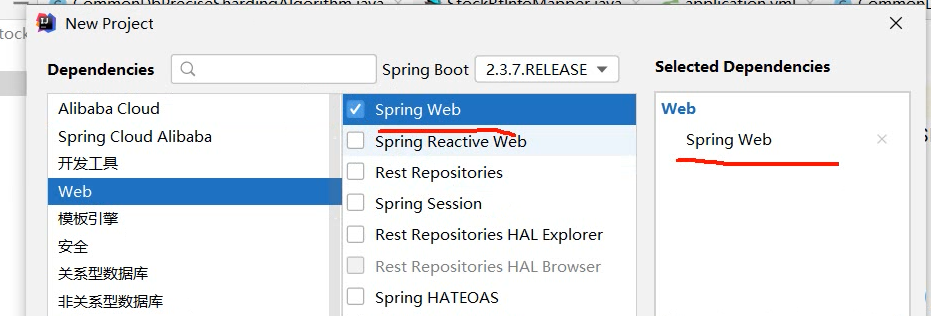
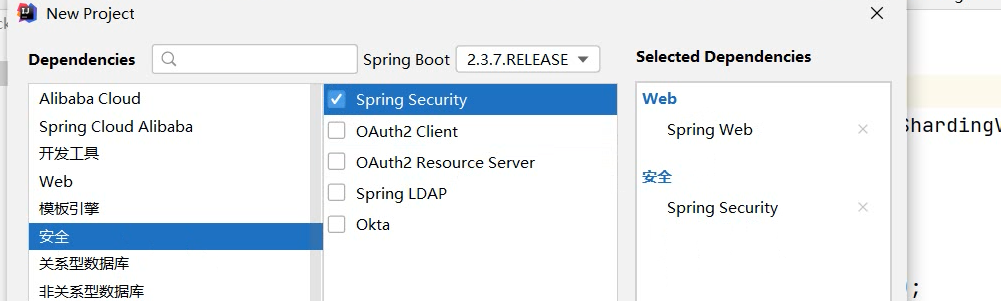
如果手动引入
<parent><groupId>org.springframework.boot</groupId><artifactId>spring-boot-starter-parent</artifactId><version>2.3.4.RELEASE</version><relativePath/></parent><dependencies><!-- web起步依赖 --><dependency><groupId>org.springframework.boot</groupId><artifactId>spring-boot-starter-web</artifactId></dependency><!-- springBoot整合Security --><dependency><groupId>org.springframework.boot</groupId><artifactId>spring-boot-starter-security</artifactId></dependency><!-- lombok --><dependency><groupId>org.projectlombok</groupId><artifactId>lombok</artifactId></dependency></dependencies>
引导app main方法
@SpringBootApplication
public class MySecurityApplication {
    public static void main(String[] args) {
        SpringApplication.run(MySecurityApplication.class,args);
    }
}
controller
@RestController
public class UserController {
    @GetMapping("/hello")
    public String hello(){
        return "hello security";
    }
    @GetMapping("/say")
    public String say(){
        return "say security";
    }
    @GetMapping("/register")
    public String register(){
        return "register security";
    }
}
配置完之后浏览器访问8080端口 就直接访问到登录页面 初始用户名为user 密码打印在控制台
如果想自定义用户名和密码 可以自定配置一个bean加入ioc容器
在设置用户的的时候 同时设置用户的权限信息
@Configuration
@EnableWebSecurity//开启web安全设置生效
public class SecurityConfig extends WebSecurityConfigurerAdapter {
    /**
     * 构建认证服务,并将对象注入spring IOC容器,用户登录时,会调用该服务进行用户合法信息认证
     * @return
     */
    @Bean
    public UserDetailsService userDetailsService(){
        //从内存获取用户认证信息的服务类(了解)
        InMemoryUserDetailsManager inMemoryUserDetailsManager = new InMemoryUserDetailsManager();
        //构建用户,真实开发中用户信息要从数据库加载构建
        UserDetails u1 = User//此User类是安全框架提供  实现了UserDetails接口
                .withUsername("itcast")
                .password("{noop}123456")//{noop}:no operration--》表示登录时对避免不做任何操作,说白了就是明文比对
                .authorities("P5", "ROLE_ADMIN")//用户的权限信息
                .build();
        UserDetails u2 = User
                .withUsername("itheima")
                .password("{noop}123456")
                .authorities("P7", "ROLE_SELLER","ROLE_ADMIN")//如果角色也作为一种权限资源,则角色名称的前缀必须加ROLE_
                .build();
        inMemoryUserDetailsManager.createUser(u1);
        inMemoryUserDetailsManager.createUser(u2);
        return inMemoryUserDetailsManager;
    }
}
创建了用户授权之后 为资源定义访问权限 在同一类下定义
能够对任何请求过滤 对指定请求设置访问权限 包括指定ip 指定用户
在用户授权的角色权限是要加ROLE_ 表明这是一个用户权限 在定义权限的角色权限时不用加ROLE
.anyRequest().authenticated()表示其他为未定义权限的资源必须登录之后才可访问与@PermitAll不用登录就可访问注解是冲突的 在使用@PermitAll注解时 一定要注释掉前置 因为当注解时 这个资源也是被定义的 不属于未定义的范畴
@Override
    protected void configure(HttpSecurity http) throws Exception {
        http.formLogin()//定义认证时使用form表单的方式提交数据
                .and()
                .logout()//登出用默认的路径登出 /logout
                .permitAll()//允许所有的用户访问登录或者登出的路径
                .and()
                .csrf().disable()//禁用跨站伪造
                .authorizeRequests()//对任何请求过滤处理
                //允许所有账户都可访问(不登录即可访问),同时可指定多个路径
                .antMatchers("/register").permitAll()
                //开发方式1:基于配置
//                .antMatchers("/a1","/a2").hasRole("seller")//拥有seller角色的用户可访问a1和a2资源
                //拥有指定的任意角色都可以访问对应资源
//                .antMatchers("/b1").hasAnyRole("manager1","manager2")
                //用户任意指定的aa bb都可以访问c1资源
//                .antMatchers("/c1").hasAnyAuthority("aa","bb")
//                .antMatchers("/d").denyAll()//拒绝任意用户访问
//                .antMatchers("/e").anonymous()//允许匿名访问
                //指定IP可以访问
//                .antMatchers("/f").hasIpAddress("localhost")
                .antMatchers("/hello").hasAuthority("P5") //具有P5权限才可以访问
                .antMatchers("/say").hasRole("ADMIN") //具有ROLE_ADMIN 角色才可以访问
                .anyRequest().authenticated(); //其他的资源登录之后就可以访问
    }

若有收获,就点个赞吧
0 人点赞


