常用的查询方法
对应简单的查询,MyBatis-Plus提供了一些简单的方法:selectById、selectBatchIds、selectByMap。而复杂的查询也需要借助条件构造器。
依次演示如下:
selectById(通过id查询一条数据)
@Testpublic void test() {User user = userMapper.selectById(1422397337881661442L);System.out.println(user);}

selectBatchIds(通过id批量查询)
 @Test
 public void test() {
     //参数需要一个Collection集合
     List<User> list = userMapper.selectBatchIds(Arrays.asList(1422391989980487681L, 1422397337881661442L));
     System.out.println(list);
 }

selectByMap(通过map查询一条数据)
@Test
public void test() {
    Map<String, Object> map = new HashMap<>();
    map.put("name", "小阿狸");
    map.put("pwd", "1236987");
    //参数需要一个Map<String, Object>集合
    List<User> list = userMapper.selectByMap(map);
    System.out.println(list);
}

分页查询
MyBtis-Plus内置了分页插件,可以快速帮我们完成分页功能,相比于以前手动完成分页,插件时十分便捷的,不再需要书写大量的计算代码了。
我们只需要在配置类注册分页插件就可以直接使用了:
@Configuration
public class MyBatisPlusConfig {
    /**
     * 注册分页插件
     * @return new PaginationInterceptor()
     */
    @Bean
    public PaginationInterceptor paginationInterceptor() {
        return new PaginationInterceptor();
    }

}
演示:
 @Test
 public void test() {
     // 参数一:当前页
     // 参数二:页面大小
     Page<User> page = new Page<>(1, 3);
     //这里暂时不用条件构造器,第一个参数
     IPage<User> userIPage = userMapper.selectPage(page, null);
     System.out.println(userIPage);
 }
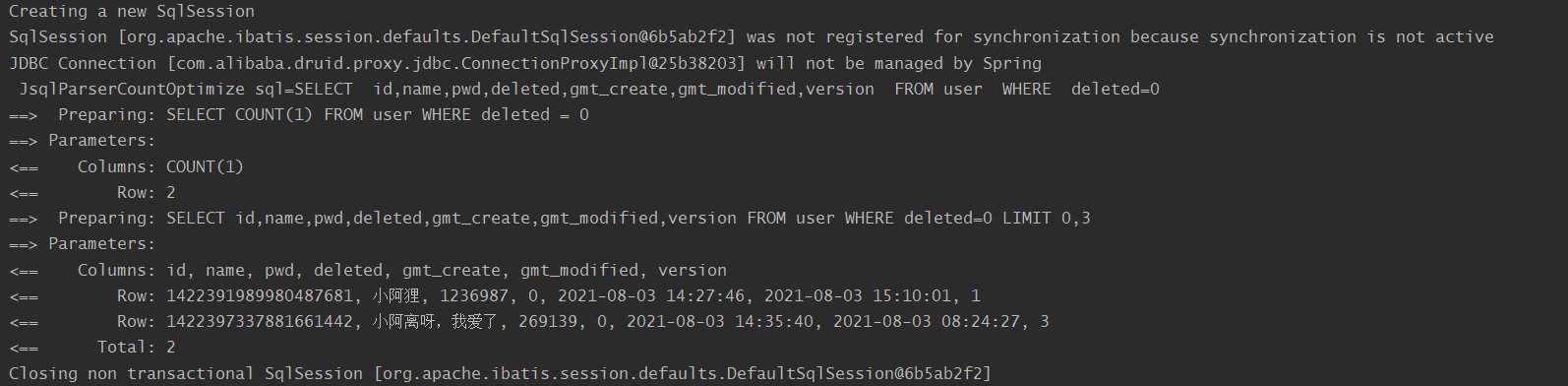
第二条数据查不到是因为被逻辑删除了。

若有收获,就点个赞吧
0 人点赞


