监听事件简介
在Swing中事件模型中由3个分离的对象完成对事件的处理,分别为事件源、事件以及监听器。事件源触发一个事件,他被一个或多个监听器接收,监听器负责处理事件。事件源(如按钮)会在用户做出相应动作(如按钮被按下)时产生事件对象,如动作事件对应ActionEvent类对象,同时要编写一个监听器的类必须实现相应的接口,如ActionEvent类对应的是ActionListener接口,需要获取某个事件对象就必须实现相应的接口,同时需要将接口中的方法一一实现。
动作事件监听器
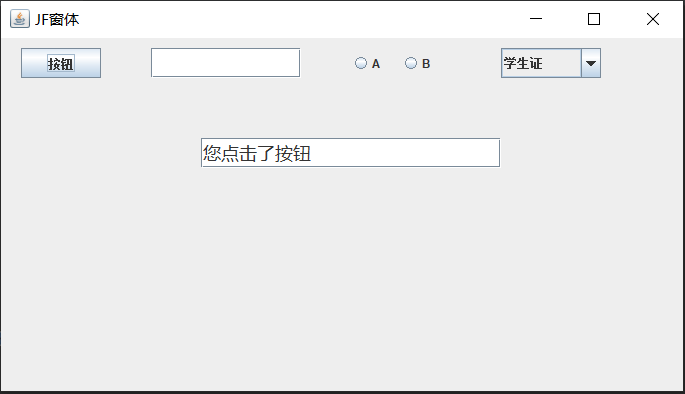
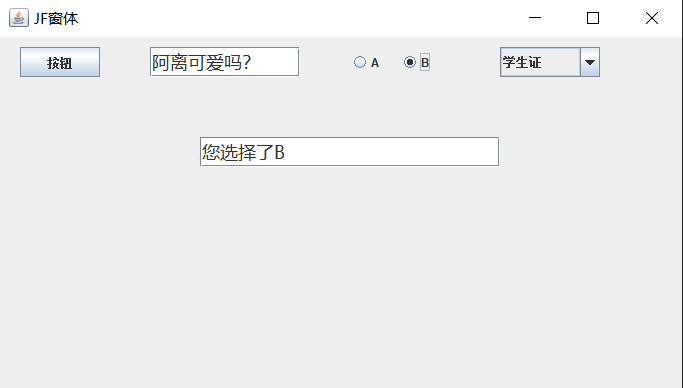
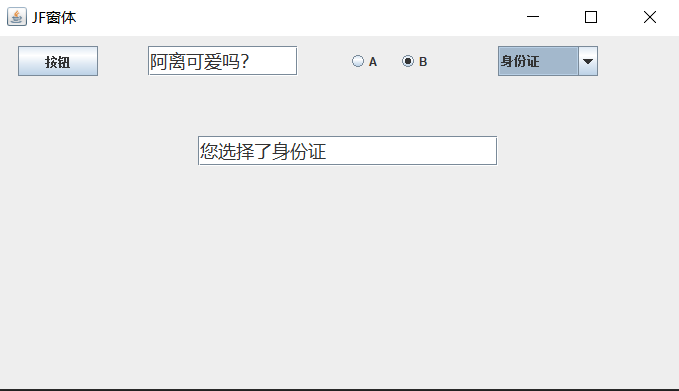
package MyPackage_2;import javax.swing.*;import java.awt.*;import java.awt.event.ActionEvent;import java.awt.event.ActionListener;public class TestClass extends JFrame{public TestClass(String str){super(str);super.setBounds(100,100,700,400);super.setDefaultCloseOperation(WindowConstants.EXIT_ON_CLOSE);Container c1=super.getContentPane();c1.setLayout(null);//设置为绝对布局JTextField j=new JTextField();j.setBounds(200,100,300,30);j.setFont(new Font("微软雅黑", Font.PLAIN,18));c1.add(j);JButton jb=new JButton("按钮");jb.setBounds(20,10,80,30);c1.add(jb);jb.addActionListener(new ActionListener() {@Overridepublic void actionPerformed(ActionEvent e) {j.setText("您点击了按钮");}});JTextField jt=new JTextField();jt.setFont(new Font("微软雅黑",Font.PLAIN,18));jt.setBounds(150,10,150,30);c1.add(jt);jt.addActionListener(new ActionListener() {@Overridepublic void actionPerformed(ActionEvent e) {j.setText("您在文本框输入了“"+jt.getText()+"”");}});JRadioButton jr1=new JRadioButton("A");JRadioButton jr2=new JRadioButton("B");jr1.setBounds(350,10,40,30);jr2.setBounds(400,10,40,30);c1.add(jr1);c1.add(jr2);ButtonGroup group=new ButtonGroup();group.add(jr1);group.add(jr2);jr1.addActionListener(new ActionListener() {@Overridepublic void actionPerformed(ActionEvent e) {j.setText("您选择了A");}});jr2.addActionListener(new ActionListener() {@Overridepublic void actionPerformed(ActionEvent e) {j.setText("您选择了B");}});String items[]={"学生证","身份证","工作证"};JComboBox<String> jc=new JComboBox<>(items);jc.setBounds(500,10,100,30);c1.add(jc);jc.addActionListener(new ActionListener() {@Overridepublic void actionPerformed(ActionEvent e) {j.setText("您选择了"+jc.getSelectedItem());}});super.setVisible(true);//设置JF窗体可见}public static void main(String[] args) {TestClass d1=new TestClass("JF窗体");}}

焦点事件监听
package MyPackage_2;import javax.swing.*;import java.awt.*;import java.awt.event.FocusEvent;import java.awt.event.FocusListener;public class TestClass extends JFrame{public TestClass(String str){super(str);super.setBounds(100,100,700,400);super.setDefaultCloseOperation(WindowConstants.EXIT_ON_CLOSE);Container c1=super.getContentPane();c1.setLayout(null);//设置为绝对布局JTextField j1=new JTextField();JTextField j2=new JTextField();JTextField j3=new JTextField();j1.setBounds(10,10,100,30);j2.setBounds(10,50,100,30);j3.setBounds(10,90,100,30);c1.add(j1);c1.add(j2);c1.add(j3);class MyFocusListener implements FocusListener{//自定义焦点事件监听实现类@Overridepublic void focusGained(FocusEvent e) {//获得焦点时执行的方法JTextField x=(JTextField) e.getSource();//获取被监听的组件,强制转化为文本框x.setBorder(BorderFactory.createLineBorder(Color.green));//获得焦点时边框变成绿色}@Overridepublic void focusLost(FocusEvent e) {//失去焦点时执行的方法JTextField x=(JTextField) e.getSource();//获取被监听的组件,强制转化为文本框x.setBorder(BorderFactory.createLineBorder(Color.red));//失去焦点时边框变成红色}}/*也可以使用API提供的焦点监听实现类,但这样的话3个文本框都要写,比较麻烦*/j1.addFocusListener(new MyFocusListener());//使用自定义焦点监听实现类j2.addFocusListener(new MyFocusListener());//使用自定义焦点监听实现类j3.addFocusListener(new MyFocusListener());//使用自定义焦点监听实现类super.setVisible(true);//设置JF窗体可见}public static void main(String[] args) {TestClass d1=new TestClass("JF窗体");}}
运行结果:

若有收获,就点个赞吧
0 人点赞


