创建子模块
1. 创建子模块 spring-hello_world
File -> New -> Module 创建 Maven 子模块 hello_world。
需要注意的是,这里使用 IDEA 创建子模块会在父模块 pom.xml 文件中自动生成子模块的引用:
<modules><module>spring-hello_world</module></modules>
2. 配置 pom.xml
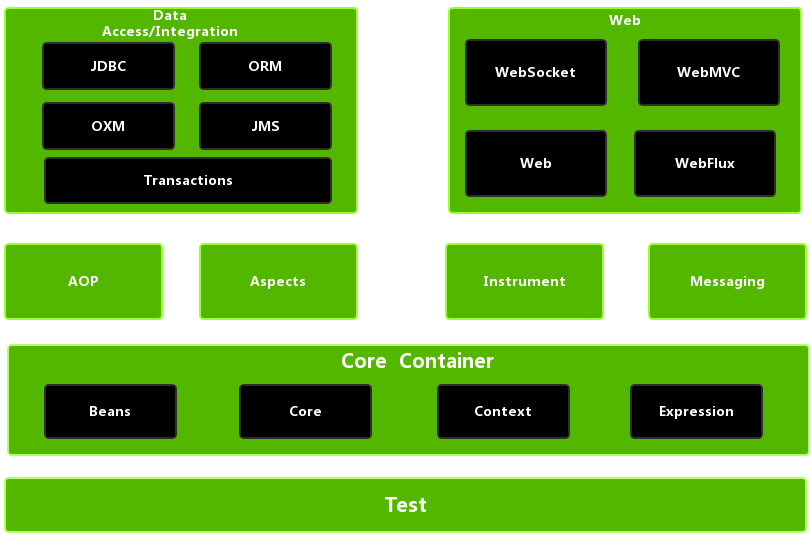
根据 Spring 模块图引入 4 个核心模块以供测试:
- Beans
- Core
- Context
Expression
<?xml version="1.0" encoding="UTF-8"?><project xmlns="http://maven.apache.org/POM/4.0.0"xmlns:xsi="http://www.w3.org/2001/XMLSchema-instance"xsi:schemaLocation="http://maven.apache.org/POM/4.0.0 http://maven.apache.org/xsd/maven-4.0.0.xsd"><parent><artifactId>spring-framework-parent</artifactId><groupId>io.zsy</groupId><version>1.0</version></parent><modelVersion>4.0.0</modelVersion><artifactId>spring-hello_world</artifactId><dependencies><dependency><groupId>org.springframework</groupId><artifactId>spring-beans</artifactId></dependency><dependency><groupId>org.springframework</groupId><artifactId>spring-core</artifactId></dependency><dependency><groupId>org.springframework</groupId><artifactId>spring-context</artifactId></dependency><dependency><groupId>org.springframework</groupId><artifactId>spring-expression</artifactId></dependency></dependencies></project>
3. 创建一个 java bean
```java package io.zsy.hello;
/**
- @author zhangshuaiyin
@date 2022/4/18 22:06 */ public class User {
public void born() {
System.out.println("我出生了");} }
<a name="etQHP"></a>
## 4. 注册到 Spring 容器
```xml
<?xml version="1.0" encoding="UTF-8"?>
<beans xmlns="http://www.springframework.org/schema/beans"
    xmlns:xsi="http://www.w3.org/2001/XMLSchema-instance"
    xsi:schemaLocation="http://www.springframework.org/schema/beans http://www.springframework.org/schema/beans/spring-beans.xsd">

 <bean id="id_user" class="io.zsy.hello.User"/>
</beans>
5. 测试
- 加载Spring配置文件
- 获取配置中注入的 bean 对象
- 创建对象成功,调用成员方法 ```java package io.zsy.hello;
import org.junit.Test; import org.springframework.context.support.ClassPathXmlApplicationContext;
/**
- @author zhangshuaiyin
@date 2022/4/18 22:09 */ public class HelloWorldTests {
@Test public void testBean() {
 // 1. 加载Spring配置文件
 ClassPathXmlApplicationContext context = new ClassPathXmlApplicationContext("bean.xml");

 // 2. 获取配置中注入的 bean 对象
 User user = context.getBean("id_user", User.class);

 // 3. 创建对象成功,调用成员方法
 user.born();
} }
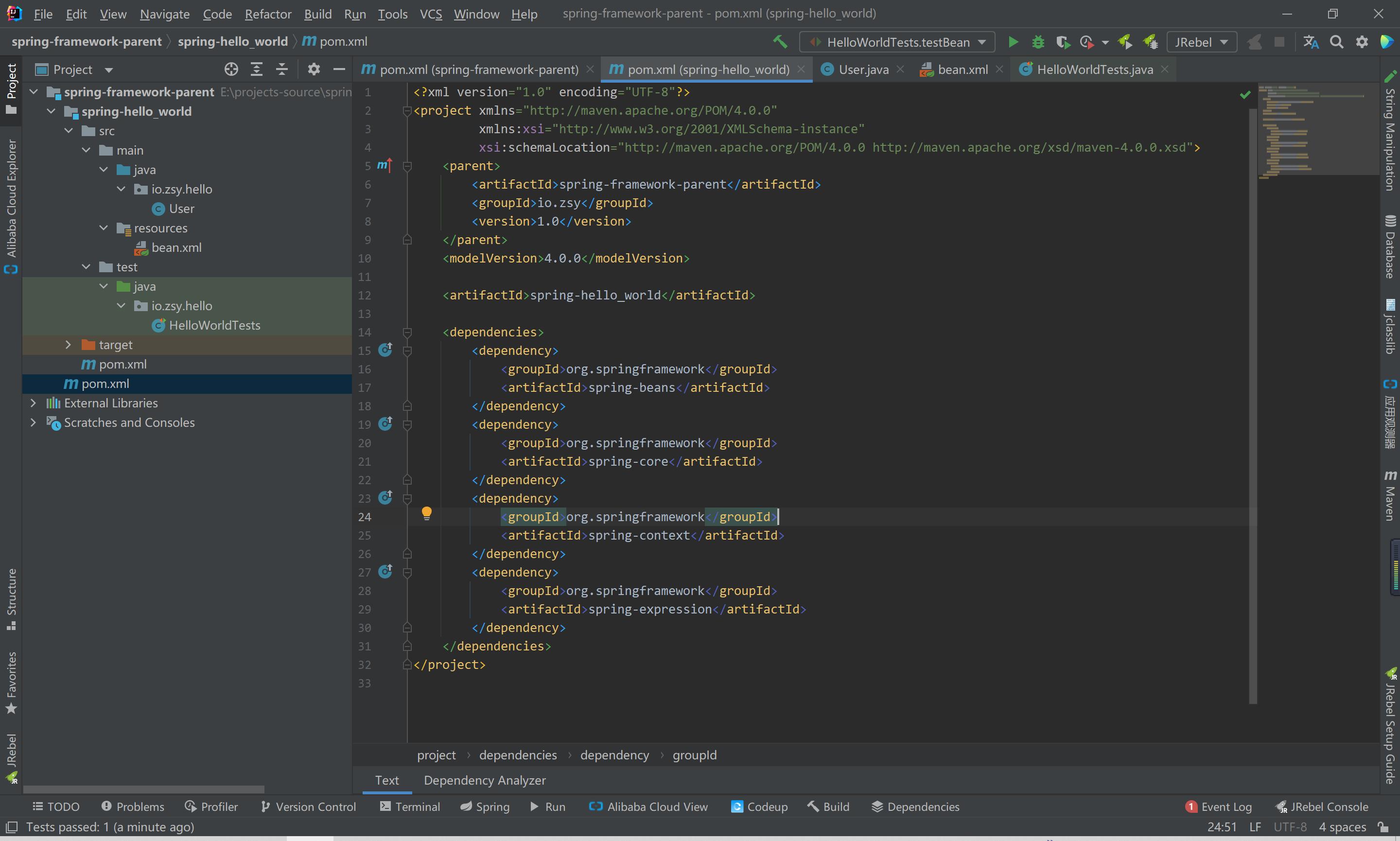
完整目录结构

若有收获,就点个赞吧
0 人点赞


