
Hive内置函数:https://cwiki.apache.org/confluence/display/Hive/LanguageMan ual+UDF#LanguageManualUDF-Built-inFunctions
第 1 节 系统内置函数
查看系统函数
-- 查看系统自带函数show functions;-- 显示自带函数的用法desc function upper;desc function extended upper;
日期函数【重要】
-- 当前日期
select current_date;
select unix_timestamp();

-- 建议使用current_timestamp,有没有括号都可以
select current_timestamp();

-- 时间戳转日期
select from_unixtime(1505456567);
select from_unixtime(1505456567, 'yyyyMMdd');
select from_unixtime(1505456567, 'yyyy-MM-dd HH:mm:ss');

-- 日期转时间戳
select unix_timestamp('2019-09-15 14:23:00');

-- 计算时间差
select datediff('2020-04-18','2019-11-21');
select datediff('2019-11-21', '2020-04-18');

-- 查询当月第几天
select dayofmonth(current_date);

-- 计算月末:
select last_day(current_date);

-- 当月第1天:
select date_sub(current_date, dayofmonth(current_date)-1)

-- 下个月第1天:
select add_months(date_sub(current_date, dayofmonth(current_date)-1), 1)

-- 字符串转时间(字符串必须为:yyyy-MM-dd格式)
select to_date('2020-01-01');
select to_date('2020-01-01 12:12:12');

-- 日期、时间戳、字符串类型格式化输出标准时间格式
select date_format(current_timestamp(), 'yyyy-MM-dd HH:mm:ss');
select date_format(current_date(), 'yyyyMMdd');
select date_format('2020-06-01', 'yyyy-MM-dd HH:mm:ss');

-- 计算emp表中,每个人的工龄
select *, round(datediff(current_date, hiredate)/365,1) workingyears from emp;
字符串函数
-- 转小写。lower
select lower("HELLO WORLD");

-- 转大写。upper
select lower(ename), ename from emp;

-- 求字符串长度。length
select length(ename), ename from emp;

-- 字符串拼接。 concat / ||
select empno || " " ||ename idname from emp;
select concat(empno, " " ,ename) idname from emp;

-- 指定分隔符。concat_ws(separator, [string | array(string)]+)
SELECT concat_ws('.', 'www', array('baidu', 'com'));
select concat_ws(" ", ename, job) from emp;

-- 求子串。substr
SELECT substr('www.baidu.com', 5);
SELECT substr('www.baidu.com', -5);
SELECT substr('www.baidu.com', 5, 5);

-- 字符串切分。split,注意 '.' 要转义
select split("www.baidu.com", "\\.");
数学函数
-- 四舍五入。round
select round(314.15926);
select round(314.15926, 2);
select round(314.15926, -2);
-- 向上取整。ceil
select ceil(3.1415926);
-- 向下取整。floor
select floor(3.1415926);
-- 其他数学函数包括:绝对值、平方、开方、对数运算、三角运算等
条件函数【重要】
-- if (boolean testCondition, T valueTrue, T valueFalseOrNull)
select sal, if (sal<1500, 1, if (sal < 3000, 2, 3)) from emp;
-- CASE WHEN a THEN b [WHEN c THEN d]* [ELSE e] END
-- 将emp表的员工工资等级分类:0-1500、1500-3000、3000以上
select sal, if (sal<=1500, 1, if (sal <= 3000, 2, 3)) from emp;

-- CASE WHEN a THEN b [WHEN c THEN d]* [ELSE e] END -- 复杂条件用 case when 更直观
select sal, case when sal<=1500 then 1
                 when sal<=3000 then 2
                 else 3 end sallevel
from emp;

-- 以下语句等价
select ename, deptno,
       case deptno when 10 then 'accounting'
                   when 20 then 'research'
                   when 30 then 'sales'
                   else 'unknown' end deptname
from emp;

select ename, deptno,
       case when deptno=10 then 'accounting'
            when deptno=20 then 'research'
            when deptno=30 then 'sales'
            else 'unknown' end deptname
from emp;

-- COALESCE(T v1, T v2, ...)。返回参数中的第一个非空值;如果所有值都为 NULL,那么返回NULL
select sal, coalesce(comm, 0) from emp;
-- isnull(a) isnotnull(a)
select * from emp where isnull(comm);
select * from emp where isnotnull(comm);
-- nvl(T value, T default_value)
select empno, ename, job, mgr, hiredate, deptno, sal + nvl(comm,0) sumsal from emp;
-- nullif(x, y) 相等为空,否则为a
SELECT nullif("b", "b"), nullif("b", "a");
UDTF函数【重要】
UDTF : User Defined Table-Generating Functions。
用户定义表生成函数,一行输入,多行输出。
-- explode,炸裂函数
-- 就是将一行中复杂的 array 或者 map 结构拆分成多行
select explode(array('A','B','C')) as col;
select explode(map('a', 8, 'b', 88, 'c', 888));
-- UDTF's are not supported outside the SELECT clause, nor nested in expressions
-- SELECT pageid, explode(adid_list) AS myCol... is not supported
-- SELECT explode(explode(adid_list)) AS myCol... is not supported
-- lateral view 常与 表生成函数explode结合使用

-- lateral view 语法:
lateralView: LATERAL VIEW udtf(expression) tableAlias AS columnAlias (',' columnAlias)*
fromClause: FROM baseTable (lateralView)*

-- lateral view 的基本使用
with t1 as (
  select 'OK' cola, split('www.lagou.com', '\\.') colb
)
select cola, colc from t1 lateral view explode(colb) t2 as colc;
UDTF案例1
-- 数据(uid tags):
1    1,2,3
2 2,3
3 1,2
--编写sql,实现如下结果:
1    1
1    2
1    3
2    2
2    3
3    1
3    2

-- 建表加载数据
create table market(
    id int,
    storage string,
    allocation string,
    outdt string
)
row format delimited fields terminated by '\t';
load data local inpath '/hivedata/market.txt' into table market;

-- SQL
select uid, tag from t1 lateral view explode(split(tags,",")) t2 as tag;
UDTF案例2
-- 数据准备
lisi|Chinese:90,Math:80,English:70
wangwu|Chinese:88,Math:90,English:96
maliu|Chinese:99,Math:65,English:60

-- 创建表
create table studscore(
   name string
  ,score map<String,string>)
row format delimited
fields terminated by '|'
collection items terminated by ','
map keys terminated by ':';

-- 加载数据
load data local inpath '/home/hadoop/data/score.dat' overwrite into table studscore;

-- 需求:找到每个学员的最好成绩
-- 第一步,使用 explode 函数将map结构拆分为多行
select explode(score) as (subject, socre) from studscore;

--但是这里缺少了学员姓名,加上学员姓名后出错。下面的语句有是错的
select name, explode(score) as (subject, socre) from studscore;

-- 第二步:explode常与 lateral view 函数联用,这两个函数结合在一起能关联其他字段
select name, subject, score1 as score from studscore
lateral view explode(score) t1 as subject, score1;

-- 第三步:找到每个学员的最好成绩
方法一:
select name, max(mark) maxscore
  from (select name, subject, mark
          from studscore lateral view explode(score) t1 as subject, mark) t1
group by name;

方法二:
with tmp as (
    select name, subject, mark
  from studscore lateral view explode(score) t1 as subject, mark
)
select name, max(mark) maxscore
  from tmp
group by name;
小结:
- 将一行数据转换成多行数据,可以用于array和map类型的数据;
- lateral view 与 explode 联用,解决 UDTF 不能添加额外列的问题
第 2 节 窗口函数【重要】
窗口函数又名开窗函数,属于分析函数的一种。用于解决复杂报表统计需求的功能强大的函数,很多场景都需要用到。窗口函数用于计算基于组的某种聚合值,它和聚合函数的不同之处是:对于每个组返回多行,而聚合函数对于每个组只返回一行。
窗口函数指定了分析函数工作的数据窗口大小,这个数据窗口大小可能会随着行的变化而变化。
over 关键字
使用窗口函数之前一般要通过over()进行开窗
-- 查询emp表工资总和
select sum(sal) from emp;

-- 不使用窗口函数,有语法错误
select ename, sal, sum(sal) salsum from emp;

-- 使用窗口函数,查询员工姓名、薪水、薪水总和、薪水占比
select ename, sal, sum(sal) over() salsum,
       concat(round(sal / sum(sal) over()*100, 1) || '%') ratiosal
from emp;
注意:窗口函数是针对每一行数据的;如果over中没有参数,默认的是全部结果集;
partition by子句
在over窗口中进行分区,对某一列进行分区统计,窗口的大小就是分区的大小
-- 查询员工姓名、薪水、部门薪水总和
select ename, sal, sum(sal) over(partition by deptno) salsum from emp;
order by 子句
order by 子句对输入的数据进行排序
-- 增加了order by子句;sum:从分组的第一行到当前行求和
select ename, sal, deptno, sum(sal) over(partition by deptno order by sal) salsum from emp;
Window子句
rows between ... and ...
如果要对窗口的结果做更细粒度的划分,使用window子句,有如下的几个选项:!clear
- unbounded preceding
- n preceding
- current row
- n following
- unbounded following
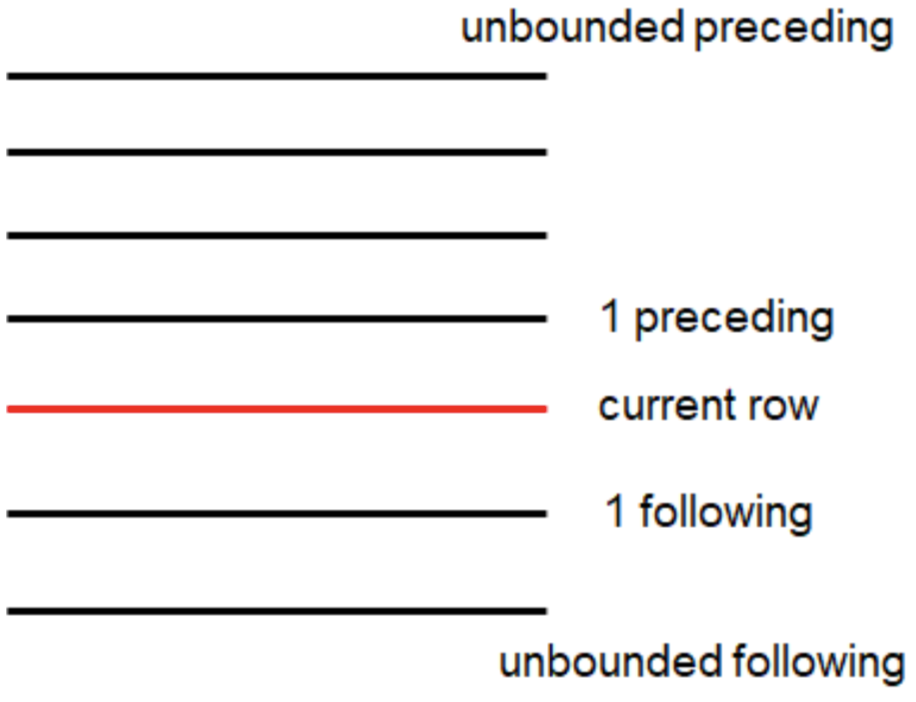
-- rows between ... and ... 子句
select ename, sal, deptno,
       sum(sal) over(partition by deptno order by sal) salsum1,
       sum(sal) over(partition by deptno order by sal rows
between unbounded preceding and unbounded following) salsum2,
       sum(sal) over(partition by deptno) salsum3
from emp;

-- rows between ... and ... 子句。前一行、当前行、后一行的和
select ename, sal, deptno,
       sum(sal) over(partition by deptno order by sal rows
between 1 preceding and 1 following) salsum
from emp;
排名函数
都是从1开始,生成数据项在分组中的排名。
- row_number()。排名顺序增加不会重复;如1、2、3、4、… …
- rank()。 排名相等会在名次中留下空位;如1、2、2、4、5、… …
- dense_rank()。 排名相等会在名次中不会留下空位 ;如1、2、2、3、4、… … ```sql — row_number / rank / dense_rank 100 1 1 1 100 2 1 1 100 3 1 1 99 4 4 2 98 5 5 3 98 6 5 3 97 7 7 4
— 数据准备 class1 s01 100 class1 s03 100 class1 s05 100 class1 s07 99 class1 s09 98 class1 s02 98 class1 s04 97 class2 s21 100 class2 s24 99 class2 s27 99 class2 s22 98 class2 s25 98 class2 s28 97 class2 s26 96
— 创建表加载数据 create table t2( cname string, sname string, score int ) row format delimited fields terminated by ‘\t’; load data local inpath ‘/home/hadoop/data/t2.dat’ into table t2;
— 按照班级,使用3种方式对成绩进行排名 select cname, sname, score, row_number() over (partition by cname order by score desc) rank1, rank() over (partition by cname order by score desc) rank2, dense_rank() over (partition by cname order by score desc) rank3 from t2;
— 求每个班级前3名的学员—前3名的定义是什么—假设使用dense_rank select cname, sname, score, rank from (select cname, sname, score, dense_rank() over (partition by cname order by score desc) rank from t2) tmp where rank <= 3;
<a name="VImnB"></a>
### 序列函数

- lag。返回当前数据行的上一行数据
- lead。返回当前数据行的下一行数据
- first_value。取分组内排序后,截止到当前行,第一个值
- last_value。分组内排序后,截止到当前行,最后一个值
- ntile。将分组的数据按照顺序切分成n片,返回当前切片值
```sql
-- 测试数据 userpv.dat。cid ctime pv
cookie1,2019-04-10,1
cookie1,2019-04-11,5
cookie1,2019-04-12,7
cookie1,2019-04-13,3
cookie1,2019-04-14,2
cookie1,2019-04-15,4
cookie1,2019-04-16,4
cookie2,2019-04-10,2
cookie2,2019-04-11,3
cookie2,2019-04-12,5
cookie2,2019-04-13,6
cookie2,2019-04-14,3
cookie2,2019-04-15,9
cookie2,2019-04-16,7

-- 建表语句
create table userpv(
    cid string,
    ctime date,
    pv int
)
row format delimited fields terminated by ",";

-- 加载数据
Load data local inpath '/home/hadoop/data/userpv.dat' into table userpv;

-- lag。返回当前数据行的上一行数据
-- lead。功能上与lag类似
select cid, ctime, pv,
       lag(pv) over(partition by cid order by ctime) lagpv,
       lead(pv) over(partition by cid order by ctime) leadpv
  from userpv;

-- first_value / last_value
select cid, ctime, pv,
       first_value(pv) over (partition by cid order by ctime rows
between unbounded preceding and unbounded following) as firstpv,
       last_value(pv) over (partition by cid order by ctime rows
between unbounded preceding and unbounded following) as lastpv
from userpv;

-- ntile。按照cid进行分组,每组数据分成2份
select cid, ctime, pv,
       ntile(2) over(partition by cid order by ctime) ntile
from userpv;
SQL面试题
1、连续7天登录的用户
-- 数据。uid dt status(1 正常登录,0 异常)
1 2019-07-11 1
1 2019-07-12 1
1 2019-07-13 1
1 2019-07-14 1
1 2019-07-15 1
1 2019-07-16 1
1 2019-07-17 1
1 2019-07-18 1
2 2019-07-11 1
2 2019-07-12 1
2 2019-07-13 0
2 2019-07-14 1
2 2019-07-15 1
2 2019-07-16 0
2 2019-07-17 1
2 2019-07-18 0
3 2019-07-11 1
3 2019-07-12 1
3 2019-07-13 1
3 2019-07-14 0
3 2019-07-15 1
3 2019-07-16 1
3 2019-07-17 1
3 2019-07-18 1

-- 建表语句
create table ulogin(
    uid int,
    dt date,
    status int
)
row format delimited fields terminated by ' ';

-- 加载数据
load data local inpath '/home/hadoop/data/ulogin.dat' into table ulogin;

-- 连续值的求解,面试中常见的问题。这也是同一类,基本都可按照以下思路进行
-- 1、使用 row_number 在组内给数据编号(rownum)
-- 2、某个值 - rownum = gid,得到结果可以作为后面分组计算的依据
-- 3、根据求得的gid,作为分组条件,求最终结果

select uid, dt,
       date_sub(dt, row_number() over (partition by uid order by dt)) gid
  from ulogin
where status=1;

select uid, count(*) logincount
  from (select uid, dt,
               date_sub(dt, row_number() over (partition by uid order by dt)) gid
          from ulogin
        where status=1) t1
group by uid, gid
having logincount>=7;
2、编写sql语句实现每班前三名,分数一样并列,同时求出前三名按名次排序的分差
-- 数据。
sid class score
1 1901 90
2 1901 90
3 1901 83
4 1901 60
5 1902 66
6 1902 23
7 1902 99
8 1902 67
9 1902 87

-- 待求结果数据如下:
class score rank lagscore
1901 90 1 0
1901 90 1 0
1901 83 2 -7
1901 60 3 -23
1902 99 1 0
1902 87 2 -12
1902 67 3 -20

-- 建表语句
create table stu(
    sno int,
    class string,
    score int
)row format delimited fields terminated by ' ';
-- 加载数据
load data local inpath '/home/hadoop/data/stu.dat' into table stu;

-- 求解思路:
-- 1、上排名函数,分数一样并列,所以用dense_rank
-- 2、将上一行数据下移,相减即得到分数差
-- 3、处理 NULL
with tmp as (
    select sno, class, score,
       dense_rank() over (partition by class order by score desc) as rank
from stu)
select class, score, rank,
       nvl(score - lag(score) over (partition by class order by score desc), 0) lagscore
  from tmp
 where rank<=3;
3、行 <=> 列
-- 数据:id course
1 java
1 hadoop
1 hive
1 hbase
2 java
2 hive
2 spark
2 flink
3 java
3 hadoop
3 hive
3 kafka

-- 建表加载数据
create table rowline1(
  id string,
  course string
)row format delimited fields terminated by ' ';

load data local inpath '/root/data/data1.dat' into table rowline1;

-- 编写sql,得到结果如下(1表示选修,0表示未选修)
id java hadoop hive hbase spark flink kafka
1        1            1            1            1            0            0            0
2        1            0            1            0            1            1            0
3        1            1            1            0            0            0            1

-- 使用case when;group by + sum
select id,
  sum(case when course="java" then 1 else 0 end) as java,
  sum(case when course="hadoop" then 1 else 0 end) as hadoop,
  sum(case when course="hive" then 1 else 0 end) as hive,
  sum(case when course="hbase" then 1 else 0 end) as hbase,
  sum(case when course="spark" then 1 else 0 end) as spark,
  sum(case when course="flink" then 1 else 0 end) as flink,
  sum(case when course="kafka" then 1 else 0 end) as kafka
from rowline1
group by id;
-- 数据。
id1 id2 flag
a    b    2
a    b    1
a    b    3
c    d    6
c    d    8
c    d    8

-- 编写sql实现如下结果
id1 id2 flag
a     b     2|1|3
c     d     6|8
-- 创建表 & 加载数据
create table rowline2(
    id1 string,
    id2 string,
    flag int
) row format delimited fields terminated by ' ';
load data local inpath '/root/data/data2.dat' into table rowline2;
-- 第一步 将元素聚拢
select id1, id2, collect_set(flag) flag from rowline2 group by id1, id2;
select id1, id2, collect_list(flag) flag from rowline2 group by id1, id2;
select id1, id2, sort_array(collect_set(flag)) flag from rowline2 group by id1, id2;
-- 第二步 将元素连接在一起
select id1, id2, concat_ws("|", collect_set(flag)) flag
  from rowline2
group by id1, id2;
-- 这里报错,CONCAT_WS must be "string or array<string>"。加一个类型 转换即可
select id1, id2, concat_ws("|", collect_set(cast (flag as string))) flag
  from rowline2
group by id1, id2;

-- 创建表 rowline3
create table rowline3 as
select id1, id2, concat_ws("|", collect_set(cast (flag as string))) flag
  from rowline2
group by id1, id2;
-- 第一步:将复杂的数据展开
select explode(split(flag, "\\|")) flat from rowline3;
-- 第二步:lateral view 后与其他字段关联
select id1, id2, newflag
  from rowline3 lateral view explode(split(flag, "\\|")) t1 as newflag;

lateralView: LATERAL VIEW udtf(expression) tableAlias AS
columnAlias (',' columnAlias)*
fromClause: FROM baseTable (lateralView)*
第 3 节 自定义函数
当 Hive 提供的内置函数无法满足实际的业务处理需要时,可以考虑使用用户自定义函数进行扩展。
用户自定义函数分为以下三类:
- UDF(User Defined Function)。用户自定义函数,一进一出
- UDAF(User Defined Aggregation Function)。用户自定义聚集函数,多进一出;类似于:count/max/min
- UDTF(User Defined Table-Generating Functions)。用户自定义表生成函数,一进多出;类似于:explode
UDF开发:
- 继承org.apache.hadoop.hive.ql.exec.UDF
- 需要实现evaluate函数;evaluate函数支持重载
- UDF必须要有返回类型,可以返回null,但是返回类型不能为void
UDF开发步骤
- 创建maven java 工程,添加依赖
- 开发java类继承UDF,实现evaluate方法
- 将项目打包上传服务器
- 添加开发的jar包
- 设置函数与自定义函数关联
- 使用自定义函数
需求:扩展系统 nvl 函数功能:
nvl(ename, "OK"): ename==null => 返回第二个参数
nvl(ename, "OK"): ename==null or ename=="" or ename==" " => 返回第二个参数
1、创建maven java 工程,添加依赖
<!-- pom.xml 文件 -->
<dependencies>
    <dependency>
        <groupId>org.apache.hive</groupId>
        <artifactId>hive-exec</artifactId>
        <version>2.3.7</version>
    </dependency>
</dependencies>
2、开发java类继承UDF,实现evaluate 方法
package cn.lagou.hive.udf;
import org.apache.hadoop.hive.ql.exec.UDF;
public class nvl extends UDF {
    public Text evaluate(final Text t, final Text x) {
        if (t == null || t.toString().trim().length()==0) {
            return x;
        }
        return t;
    }
}
3、将项目打包上传服务器
4、添加开发的jar包(在Hive命令行中)
add jar /home/hadoop/hiveudf.jar;
5、创建临时函数。指定类名一定要完整的路径,即包名加类名
create temporary function mynvl as "cn.lagou.hive.udf.nvl";
6、执行查询
-- 基本功能还有
select mynvl(comm, 0) from mydb.emp;
-- 测试扩充的功能
select mynvl("", "OK");
select mynvl(" ", "OK");
7、退出Hive命令行,再进入Hive命令行。执行步骤6的测试,发现函数失效。
备注:创建临时函数每次进入Hive命令行时,都必须执行以下语句,很不方便:
add jar /home/hadoop/hiveudf.jar;
create temporary function mynvl as "cn.lagou.hive.udf.nvl";
可创建永久函数
1、将jar上传HDFS
hdfs dfs -put hiveudf.jar jar/
2、在hive命令中创建永久函数
create function mynvl1 as 'cn.lagou.hive.udf.nvl' using jar 'hdfs:/user/hadoop/jar/hiveudf.jar';
-- 查询所有的函数,发现 mynvl1 在列表中 show functions;
3、退出hive,再进入,执行测试
-- 基本功能还有
select mynvl(comm, 0) from mydb.emp;
-- 测试扩充的功能
select mynvl("", "OK");
select mynvl(" ", "OK");
4、删除永久函数,并检查
drop function mynvl1;
show functions;

若有收获,就点个赞吧
0 人点赞


